-
dpdk结合sriov测试vpp ipsec性能
目的
测试vpp ipsec转发性能,想当作openstack VPNaas的一种driver,提高ipsec网关的转发能力。
环境
测试资源很有限,没有测试仪,物理机之外的交换机不受控制。
只有两台物理机,各有一张测试网卡,网卡有两个10G口,可能确定的是两台物理机一个10G口之间联到同一个TOR交换机可能互通,另一对10G口之间测试不通。
想法就是vpp两个口,一个口当作网关,另一个口用来做tunnel。
vpp版本是master commit 6e39ff03a6fa28a2655d767454394413252a269d,早期版本ipsec有bug.
vpp用到了dpdk,需要先创建hugepage和网卡绑定igb_uio,不再特殊强调。
第一种方法
创建一对veth pair,一个放在namespace中,一个放在vpp上当host interface。
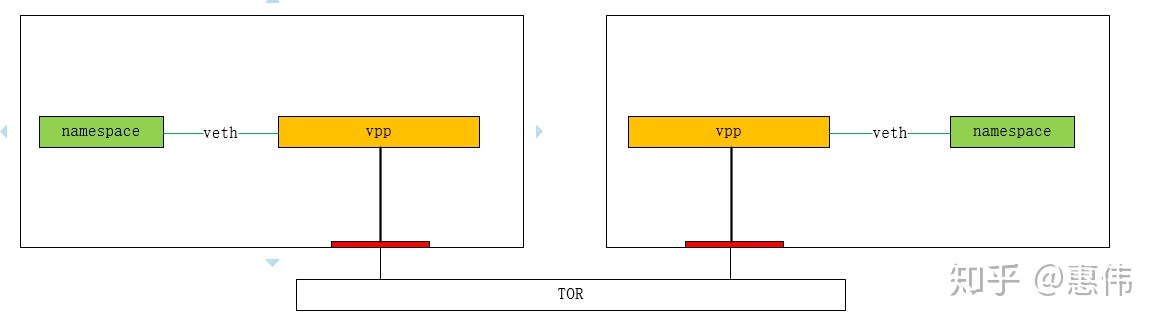
机器1上操作:
- #服务器1配置
- ip netns add ns0
- ip link add vpp0 type veth peer name host_vpp0
- ip link set vpp0 up
- ip link set host_vpp0 netns ns0
- ip netns exec ns0 ip link set lo up
- ip netns exec ns0 ip link set host_vpp0 up
- ip netns exec ns0 ip addr add 192.168.1.1/24 dev host_vpp0
- ip netns exec ns0 ip route add default via 192.168.1.2 dev host_vpp0
- #启动vpp
- /home/huiwei/vpp/build-root/build-vpp-native/vpp/bin/vpp -c /home/huiwei/vsap/configs/startup.conf
- #vpp1的配置
- set interface state TenGigabitEthernet3/0/1 up
- set interface ip address TenGigabitEthernet3/0/1 192.168.3.1/24
- set interface promiscuous on TenGigabitEthernet3/0/1
- create host-interface name vpp0 hw-addr fa:16:19:19:19:19
- set interface state host-vpp0 up
- set interface ip address host-vpp0 192.168.1.2/24
- create ipip tunnel src 192.168.3.1 dst 192.168.3.2
- ipsec sa add 10 spi 1000 esp crypto-key 4339314b55523947594d6d3547666b45 crypto-alg aes-cbc-128 integ-key 4339314b55523947594d6d3547666b45 integ-alg sha1-96
- ipsec tunnel protect ipip0 sa-in 10 sa-out 10 192.168.3.2
- ip route add 192.168.2.0/24 via 192.168.3.2 ipip0
- set interface unnumbered ipip0 use TenGigabitEthernet3/0/1
- set interface state ipip0 up
复制
机器2上操作:
- #服务器2配置
- ip netns add ns0
- ip link add vpp0 type veth peer name host_vpp0
- ip link set vpp0 up
- ip link set host_vpp0 netns ns0
- ip netns exec ns0 ip link set lo up
- ip netns exec ns0 ip link set host_vpp0 up
- ip netns exec ns0 ip addr add 192.168.2.1/24 dev host_vpp0
- ip netns exec ns0 ip route add default via 192.168.2.2 dev host_vpp0
- #启动vpp
- /home/huiwei/vpp/build-root/build-vpp-native/vpp/bin/vpp -c /home/huiwei/vsap/configs/startup.conf
- #vpp2的配置
- set interface state TenGigabitEthernet3/0/1 up
- set interface ip address TenGigabitEthernet3/0/1 192.168.3.2/24
- set interface promiscuous on TenGigabitEthernet3/0/1
- create host-interface name vpp0 hw-addr fa:16:29:29:29:29
- set interface state host-vpp0 up
- set interface ip address host-vpp0 192.168.2.2/24
- create ipip tunnel src 192.168.3.2 dst 192.168.3.1
- ipsec sa add 10 spi 1000 esp crypto-key 4339314b55523947594d6d3547666b45 crypto-alg aes-cbc-128 integ-key 4339314b55523947594d6d3547666b45 integ-alg sha1-96
- ipsec tunnel protect ipip0 sa-in 10 sa-out 10 192.168.3.1
- ip route add 192.168.1.0/24 via 192.168.3.1 ipip0
- set interface unnumbered ipip0 use TenGigabitEthernet3/0/1
- set interface state ipip0 up
复制
测试结果比较差,分析原因第一是vpp host interface收包时大量丢包,第二就是iperf3测试工具不好用。
- ip netns exec ns0 iperf3 -c 192.168.1.1 -u -l 64 -P 128 -t 5
- #no ipsec
- [SUM] 0.00-5.00 sec 64.5 MBytes 108 Mbits/sec 42.081 ms 554038/1056128 (52%)
- #aesni_mb
- [SUM] 0.00-5.00 sec 67.6 MBytes 113 Mbits/sec 26.476 ms 775537/1105258 (70%)
- #openssl
- [SUM] 0.00-5.00 sec 69.2 MBytes 116 Mbits/sec 11.179 ms 886194/1132434 (78%)
复制
第二种方法
既然veth pair不好用,那就用物理网卡,但卡又不够用,外面交换机又不受控制,突然想到了sriov,多虚出来几个物理网卡。iperf3用dpdk-ptkgen或者test-pmd替代。dpdk用一个vf作为host,vpp用另一个vf作为网关,这两个vf之间互通用网卡内嵌的switch。
PS:sriov有个问题就是网卡内嵌的switch只转发它自己的pf和vf的mac,不学习mac,所以openstack中sriov虚机和同host上virtio虚机或者dvr网关是通不了的。
vpp另一个网卡本来想直接用整个物理网卡,但是结果用着用着就莫名其妙NO-CARRIER了,提示没有接网线,原因不明,reboot物理机就好了,试着用vf就没再碰到这个问题

dpdk test-pmd只显示发包和收包个数,不能显示实时速率,采用low一点的手法,用手机秒表计时300s计算pps,不是非常精确。
- #纯IP转发vpp1
- set interface state VirtualFunctionEthernet3/10/1 up
- set interface state VirtualFunctionEthernet3/10/0 up
- set interface ip address VirtualFunctionEthernet3/10/1 192.168.3.1/24
- set interface ip address VirtualFunctionEthernet3/10/0 192.168.1.2/24
- ip route add 192.168.2.0/24 v
-
相关阅读:
超顺磁四氧化三铁@二氧化硅@硫化镉纳米核壳结构材料|表面接枝mPEG的Fe3O4磁性纳米颗粒(f-Fe3O4)|相关产品
JavaScript小技能: Ajax
数据结构线性表
OpenCV For Unity Mat容器的创建与矩阵操作基础
SaaSBase:Nintex Process Platform是什么?
linux 线程同步
win11系统影响玩游戏吗?适合玩游戏吗?
echarts根据x轴数据长度判断是否倾斜展示/柱状图上方显示数字
SpringBoot 学习(六)Shiro
python爬虫中json数据与python数据相互转换
- 原文地址:https://blog.csdn.net/lingshengxiyou/article/details/128025844

- 最新文章
-
沪漂五周年了:我越来越迷茫了
Agentic Skill Routing 实战:别再把所有 Skill 塞进 AI Agent 上下文
MySQL-Seconds_behind_master的精度误差
[MAF预定义ChatClient中间件-03]CachingChatClient——利用缓存省钱省时间
AI的至暗历史:从万众期待到被政府撤资,AI的两次死亡徘徊
Agent OS :五种驯服不确定性的范式
PortSwigger SQL注入LAB11
数据库即时编译JIT
[Begin]AI Learn Data Day 0
深度学习进阶(二十七)现代 LLM 的核心架构设计其二:SwiGLU