-
Java 后端 本地调试-获取微信公众号 openId
Java 后端 本地调试-获取微信公众号 openId
申请测试微信公众号
内网穿透工具
配置公众号
- 搜索网页账号选项

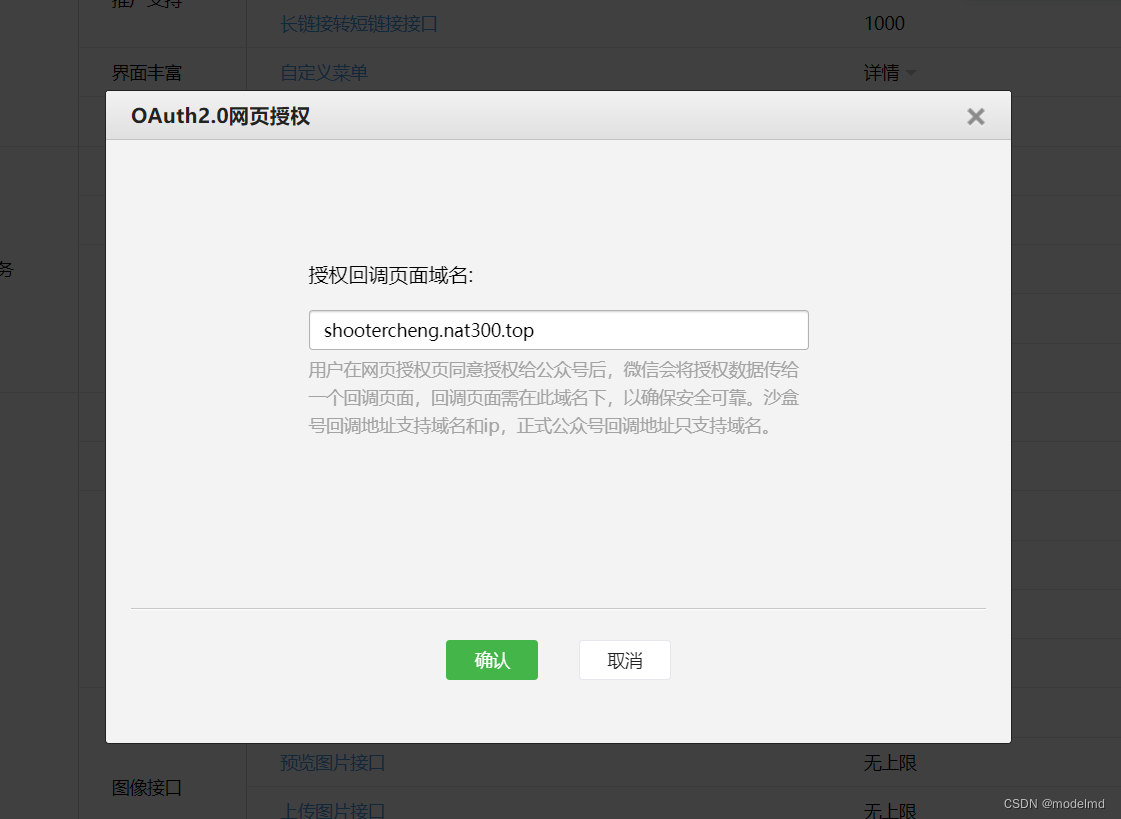
- 点击修改,填写内网穿透的域名
获取用户 openId
1 第一步:用户同意授权,获取code
2 第二步:通过 code 换取网页授权access_token
3 第三步:刷新access_token(如果需要)
4 第四步:拉取用户信息(需 scope 为 snsapi_userinfo)
5 附:检验授权凭证(access_token)是否有效
– 来源https://developers.weixin.qq.com/doc/offiaccount/OA_Web_Apps/Wechat_webpage_authorization.html第2步 就可以获取到 openId 了
代码如下package com.scd.serverless.controller; import com.fasterxml.jackson.core.JsonProcessingException; import com.fasterxml.jackson.databind.ObjectMapper; import org.slf4j.Logger; import org.slf4j.LoggerFactory; import org.springframework.beans.factory.annotation.Autowired; import org.springframework.web.bind.annotation.RequestMapping; import org.springframework.web.bind.annotation.RestController; import org.springframework.web.client.RestTemplate; import javax.servlet.http.HttpServletRequest; import java.io.UnsupportedEncodingException; import java.net.URLEncoder; import java.nio.charset.StandardCharsets; import java.util.UUID; /** * @author James */ @RestController @RequestMapping(value = "/wx") public class WxController { private static final Logger LOGGER = LoggerFactory.getLogger(WxController.class); public static final String MAP_URL = "http://shootercheng.nat300.top"; public static final String WE_CHAT_APP_ID = "wxfcfbe0c738b569a5"; public static final String WE_CHAT_APP_SECRET = "002b379cbe62689eab9d0a7cfc227dd8"; public static final String WE_CHAT_CLIENT_URL = "https://open.weixin.qq.com/connect/oauth2/authorize?appid=%s&redirect_uri=%s&response_type=code&scope=snsapi_userinfo&state=STATE#wechat_redirect"; public static final String WE_CHAT_ACCESS_TOKEN_URL = "https://api.weixin.qq.com/sns/oauth2/access_token?appid=%s&secret=%s&code=%s&grant_type=authorization_code"; @Autowired private RestTemplate restTemplate; @RequestMapping(value = "/config") public String testConfig(HttpServletRequest request) { String signature = request.getParameter("signature"); // 时间戳 String timestamp = request.getParameter("timestamp"); // 随机数 String nonce = request.getParameter("nonce"); // 随机字符串 String echostr = request.getParameter("echostr"); LOGGER.info("config return info {}", echostr); // TODO check return echostr; } @RequestMapping(value = "/client") public String genWxUrl() throws UnsupportedEncodingException { String redirectUrl = MAP_URL + "/wx/callback?token=" + UUID.randomUUID(); String encodeUrl = URLEncoder.encode(redirectUrl, StandardCharsets.UTF_8.name()); String clientUrl = String.format(WE_CHAT_CLIENT_URL, WE_CHAT_APP_ID, encodeUrl); LOGGER.info("client url {}", clientUrl); return clientUrl; } @RequestMapping(value = "/callback") public String wxCallBack(HttpServletRequest request) throws JsonProcessingException { String code = request.getParameter("code"); String token = request.getParameter("token"); LOGGER.info("current token {}", token); // 校验 token String tokenUrl = String.format(WE_CHAT_ACCESS_TOKEN_URL, WE_CHAT_APP_ID, WE_CHAT_APP_SECRET, code); String result = restTemplate.getForObject(tokenUrl, String.class); LOGGER.info("token result {}", result); return result; } }- 1
- 2
- 3
- 4
- 5
- 6
- 7
- 8
- 9
- 10
- 11
- 12
- 13
- 14
- 15
- 16
- 17
- 18
- 19
- 20
- 21
- 22
- 23
- 24
- 25
- 26
- 27
- 28
- 29
- 30
- 31
- 32
- 33
- 34
- 35
- 36
- 37
- 38
- 39
- 40
- 41
- 42
- 43
- 44
- 45
- 46
- 47
- 48
- 49
- 50
- 51
- 52
- 53
- 54
- 55
- 56
- 57
- 58
- 59
- 60
- 61
- 62
- 63
- 64
- 65
- 66
- 67
- 68
- 69
- 70
- 71
- 72
- 73
- 74
- 75
debug启动服务之后,执行以下步骤
- 获取微信客户端url
访问 http://shootercheng.nat300.top/wx/client


- 使用微信打开此地址

如图,已在本地调试获取到 openId
- 搜索网页账号选项
-
相关阅读:
Python:实现日历功能
图数据库 NebulaGraph 的内存管理实践之 Memory Tracker
素数筛法代码-总结(Python,C++)
信号(软中断)
UGUI交互组件InputField
Kotlin协程:生命周期原理
ASP.NET Core 中的 Razor Pages
APISpace 验证码短信API接口案例代码
【软考 系统架构设计师】软件架构设计⑦ 构件与中间件技术
OKR在项目管理中的应用:精准化目标管理
- 原文地址:https://blog.csdn.net/modelmd/article/details/127992348

- 最新文章
-
沪漂五周年了:我越来越迷茫了
Agentic Skill Routing 实战:别再把所有 Skill 塞进 AI Agent 上下文
MySQL-Seconds_behind_master的精度误差
[MAF预定义ChatClient中间件-03]CachingChatClient——利用缓存省钱省时间
AI的至暗历史:从万众期待到被政府撤资,AI的两次死亡徘徊
Agent OS :五种驯服不确定性的范式
PortSwigger SQL注入LAB11
数据库即时编译JIT
[Begin]AI Learn Data Day 0
深度学习进阶(二十七)现代 LLM 的核心架构设计其二:SwiGLU