-
在KubeSphere中部署微服务(阡陌)+ DevOps
一、微服务的一般部署顺序
第一步:部署中间件,如 mysql、redis、es、mq
第二步:部署注册中心,如 nacos
第三步:部署除了 getway 以外的后端服务
第四步:部署 getway 服务
第四步:部署前端服务,如 nginx + ui二、微服务的 Dockerfile 包结构
本地测试没有问题之后,就是对每一个微服务编写Dockerfile包
dockerfiles -- qianmo-auth -- Dockerfile -- target -- qianmo-auth.jar -- qianmo-crud -- Dockerfile -- target -- qianmo-crud.jar -- qianmo-dataapi -- Dockerfile -- target -- qianmo-dataapi.jar -- qianmo-develop -- Dockerfile -- target -- qianmo-develop.jar -- qianmo-getaway -- Dockerfile -- target -- qianmo-getaway.jar -- qianmo-system -- Dockerfile -- target -- qianmo-system.jar -- qianmo-ui -- Dockerfile -- target -- qianmo-ui.jar -- qianmo-user -- Dockerfile -- target -- qianmo-user.jar -- qianmo-workflow -- Dockerfile -- target -- qianmo-workflow.jar- 1
- 2
- 3
- 4
- 5
- 6
- 7
- 8
- 9
- 10
- 11
- 12
- 13
- 14
- 15
- 16
- 17
- 18
- 19
- 20
- 21
- 22
- 23
- 24
- 25
- 26
- 27
- 28
- 29
- 30
- 31
- 32
- 33
- 34
- 35
- 36
- 37
三、微服务的 Dockerfile 模板
你需要注意的是:
--server.port=8080:因为每个服务最终都会存在与一个 Pod 中,所以每个微服务都可以使用相同的端口号
--spring.profile.active=prod:表示使用生产环境
--spring.cloud.nacos.server-addr=qianmo-nacos.scheduling:8848:qianmo-nacos.scheduling 表示 nacos 在 K8S 中的 DNS 域名,当然你也可以使用 NodePort 暴露的外网访问地址:端口号;若 nacos 不是在 K8S 中,那么可以直接使用 ip:portFROM openjdk:8-jdk LABEL maintainer=studioustiger ENV PARAMS="--server.port=8080 --spring.profile.active=prod --spring.cloud.nacos.server-addr=qianmo-nacos.scheduling:8848 --spring.cloud.nacos.discovery.server-addr=qianmo-nacos.scheduling:8848 --spring.cloud.nacos.config.server-addr=qianmo-nacos.scheduling:8848 --spring.cloud.nacos.config.file-extension=yml" COPY target/*.jar /app.jar EXPOSE 8080 ENTRYPOINT ["/bin/sh","-c","java -Dfile.encoding=utf8 -Djava.security.egd=file:/dev/./urandom -jar app.jar ${PARAMS}"]- 1
- 2
- 3
- 4
- 5
- 6
- 7
- 8
- 9
后端服务一般都属于
无状态服务(不需要挂载数据卷以及配置文件),无状态应用部署过程一般如下:
第一步中,如果你没有 K8 s服务器的访问权限,那么可以是任意一台部署了 docker 的服务器
第三步中,在企业中一般都会将镜像推送到企业的私有仓库 harbor

四、后端服务的打包推送过程
前提条件
首先你需要有一个Harbor的账号,并在harbor中创建一个项目
第1步:安装docker
传送门:【Docker】Docker 快速入门(精讲)/ 二、Docker 安装
第2步:配置镜像源
$ vim /etc/docker/daemon.json # 追加,其中 harbor-addr:port 表示 harbor 的地址 > {"bip": "172.172.172.1/24","insecure-registries": ["harbor-addr:port"]}- 1
- 2
- 3

第3步:重新加载进程
$ systemctl daemon-reload- 1
第4步:启动/重启docker
$ systemctl restart docker- 1
第5步:登录harbor
$ docker login harbor地址 -u 用户名 > 密码- 1
- 2

第6步:tag镜像
$ docker tag 镜像名:TAG harbor地址/项目/镜像名:TAG- 1
第7步:推送镜像
$ docker push harbor地址/项目/镜像名:TAG- 1

结果:

补充:镜像构建+推送指令
docker build -t harbor地址:端口/工作目录/镜像名:TAG -f dockerfile .
docker push harbor地址:端口/工作目录/镜像名:TAG########################################## build&tag镜像 ################################### # docker build -t harbor地址:端口/production-scheduling/qianmo-register:1.0.0 -f Dockerfile . docker build -t harbor地址:端口/production-scheduling/qianmo-auth:1.0.0 -f Dockerfile . docker build -t harbor地址:端口/production-scheduling/qianmo-crud:1.0.0 -f Dockerfile . docker build -t harbor地址:端口/production-scheduling/qianmo-dataapi:1.0.0 -f Dockerfile . docker build -t harbor地址:端口/production-scheduling/qianmo-develop:1.0.0 -f Dockerfile . docker build -t harbor地址:端口/production-scheduling/qianmo-system:1.0.0 -f Dockerfile . docker build -t harbor地址:端口/production-scheduling/qianmo-user:1.0.0 -f Dockerfile . docker build -t harbor地址:端口/production-scheduling/qianmo-workflow:1.0.0 -f Dockerfile . docker build -t harbor地址:端口/production-scheduling/qianmo-gateway:1.0.0 -f Dockerfile . docker build -t harbor地址:端口/production-scheduling/qianmo-ui:1.0.0 -f Dockerfile . ########################################## push镜像 ######################################### # docker push harbor地址:端口/production-scheduling/qianmo-register:1.0.0 docker push harbor地址:端口/production-scheduling/qianmo-auth:1.0.0 docker push harbor地址:端口/production-scheduling/qianmo-crud:1.0.0 docker push harbor地址:端口/production-scheduling/qianmo-dataapi:1.0.0 docker push harbor地址:端口/production-scheduling/qianmo-develop:1.0.0 docker push harbor地址:端口/production-scheduling/qianmo-gateway:1.0.0 docker push harbor地址:端口/production-scheduling/qianmo-system:1.0.0 docker push harbor地址:端口/production-scheduling/qianmo-user:1.0.0 docker push harbor地址:端口/production-scheduling/qianmo-workflow:1.0.0 docker push harbor地址:端口/production-scheduling/qianmo-gateway:1.0.0 docker push harbor地址:端口/production-scheduling/qianmo-ui:1.0.0- 1
- 2
- 3
- 4
- 5
- 6
- 7
- 8
- 9
- 10
- 11
- 12
- 13
- 14
- 15
- 16
- 17
- 18
- 19
- 20
- 21
- 22
- 23
- 24
五、在 Kubsphere 中部署服务
1.部署nacos服务
配置字典
进入项目 / 配置 / 配置字典 / 创建 /

下一步 / 添加数据 /
配置文件内容如图下的文件

application.properties
# # Copyright 1999-2021 Alibaba Group Holding Ltd. # # Licensed under the Apache License, Version 2.0 (the "License"); # you may not use this file except in compliance with the License. # You may obtain a copy of the License at # # http://www.apache.org/licenses/LICENSE-2.0 # # Unless required by applicable law or agreed to in writing, software # distributed under the License is distributed on an "AS IS" BASIS, # WITHOUT WARRANTIES OR CONDITIONS OF ANY KIND, either express or implied. # See the License for the specific language governing permissions and # limitations under the License. # #*************** Spring Boot Related Configurations ***************# ### Default web context path: server.servlet.contextPath=/nacos ### Default web server port: server.port=8848 #*************** Network Related Configurations ***************# ### If prefer hostname over ip for Nacos server addresses in cluster.conf: # nacos.inetutils.prefer-hostname-over-ip=false ### Specify local server's IP: # nacos.inetutils.ip-address= #*************** Config Module Related Configurations ***************# ### If use MySQL as datasource: spring.datasource.platform=mysql ### Count of DB: db.num=1 ### Connect URL of DB: db.url.0=jdbc:mysql://172.31.52.129:3306/snjt_sys_db?characterEncoding=utf8&connectTimeout=1000&socketTimeout=3000&autoReconnect=true&useUnicode=true&useSSL=false&serverTimezone=UTC db.user.0=root db.password.0=Mysql@dhcc123.com ### Connection pool configuration: hikariCP db.pool.config.connectionTimeout=30000 db.pool.config.validationTimeout=10000 db.pool.config.maximumPoolSize=20 db.pool.config.minimumIdle=2 #*************** Naming Module Related Configurations ***************# ### Data dispatch task execution period in milliseconds: Will removed on v2.1.X, replace with nacos.core.protocol.distro.data.sync.delayMs # nacos.naming.distro.taskDispatchPeriod=200 ### Data count of batch sync task: Will removed on v2.1.X. Deprecated # nacos.naming.distro.batchSyncKeyCount=1000 ### Retry delay in milliseconds if sync task failed: Will removed on v2.1.X, replace with nacos.core.protocol.distro.data.sync.retryDelayMs # nacos.naming.distro.syncRetryDelay=5000 ### If enable data warmup. If set to false, the server would accept request without local data preparation: # nacos.naming.data.warmup=true ### If enable the instance auto expiration, kind like of health check of instance: # nacos.naming.expireInstance=true ### will be removed and replaced by `nacos.naming.clean` properties nacos.naming.empty-service.auto-clean=true nacos.naming.empty-service.clean.initial-delay-ms=50000 nacos.naming.empty-service.clean.period-time-ms=30000 ### Add in 2.0.0 ### The interval to clean empty service, unit: milliseconds. # nacos.naming.clean.empty-service.interval=60000 ### The expired time to clean empty service, unit: milliseconds. # nacos.naming.clean.empty-service.expired-time=60000 ### The interval to clean expired metadata, unit: milliseconds. # nacos.naming.clean.expired-metadata.interval=5000 ### The expired time to clean metadata, unit: milliseconds. # nacos.naming.clean.expired-metadata.expired-time=60000 ### The delay time before push task to execute from service changed, unit: milliseconds. # nacos.naming.push.pushTaskDelay=500 ### The timeout for push task execute, unit: milliseconds. # nacos.naming.push.pushTaskTimeout=5000 ### The delay time for retrying failed push task, unit: milliseconds. # nacos.naming.push.pushTaskRetryDelay=1000 ### Since 2.0.3 ### The expired time for inactive client, unit: milliseconds. # nacos.naming.client.expired.time=180000 #*************** CMDB Module Related Configurations ***************# ### The interval to dump external CMDB in seconds: # nacos.cmdb.dumpTaskInterval=3600 ### The interval of polling data change event in seconds: # nacos.cmdb.eventTaskInterval=10 ### The interval of loading labels in seconds: # nacos.cmdb.labelTaskInterval=300 ### If turn on data loading task: # nacos.cmdb.loadDataAtStart=false #*************** Metrics Related Configurations ***************# ### Metrics for prometheus #management.endpoints.web.exposure.include=* ### Metrics for elastic search management.metrics.export.elastic.enabled=false #management.metrics.export.elastic.host=http://localhost:9200 ### Metrics for influx management.metrics.export.influx.enabled=false #management.metrics.export.influx.db=springboot #management.metrics.export.influx.uri=http://localhost:8086 #management.metrics.export.influx.auto-create-db=true #management.metrics.export.influx.consistency=one #management.metrics.export.influx.compressed=true #*************** Access Log Related Configurations ***************# ### If turn on the access log: server.tomcat.accesslog.enabled=true ### The access log pattern: server.tomcat.accesslog.pattern=%h %l %u %t "%r" %s %b %D %{User-Agent}i %{Request-Source}i ### The directory of access log: server.tomcat.basedir= #*************** Access Control Related Configurations ***************# ### If enable spring security, this option is deprecated in 1.2.0: #spring.security.enabled=false ### The ignore urls of auth, is deprecated in 1.2.0: nacos.security.ignore.urls=/,/error,/**/*.css,/**/*.js,/**/*.html,/**/*.map,/**/*.svg,/**/*.png,/**/*.ico,/console-ui/public/**,/v1/auth/**,/v1/console/health/**,/actuator/**,/v1/console/server/** ### The auth system to use, currently only 'nacos' and 'ldap' is supported: nacos.core.auth.system.type=nacos ### If turn on auth system: nacos.core.auth.enabled=false ### worked when nacos.core.auth.system.type=ldap,{0} is Placeholder,replace login username # nacos.core.auth.ldap.url=ldap://localhost:389 # nacos.core.auth.ldap.userdn=cn={0},ou=user,dc=company,dc=com ### The token expiration in seconds: nacos.core.auth.default.token.expire.seconds=18000 ### The default token: nacos.core.auth.default.token.secret.key=SecretKey012345678901234567890123456789012345678901234567890123456789 ### Turn on/off caching of auth information. By turning on this switch, the update of auth information would have a 15 seconds delay. nacos.core.auth.caching.enabled=true ### Since 1.4.1, Turn on/off white auth for user-agent: nacos-server, only for upgrade from old version. nacos.core.auth.enable.userAgentAuthWhite=false ### Since 1.4.1, worked when nacos.core.auth.enabled=true and nacos.core.auth.enable.userAgentAuthWhite=false. ### The two properties is the white list for auth and used by identity the request from other server. nacos.core.auth.server.identity.key=serverIdentity nacos.core.auth.server.identity.value=security #*************** Istio Related Configurations ***************# ### If turn on the MCP server: nacos.istio.mcp.server.enabled=false #*************** Core Related Configurations ***************# ### set the WorkerID manually # nacos.core.snowflake.worker-id= ### Member-MetaData # nacos.core.member.meta.site= # nacos.core.member.meta.adweight= # nacos.core.member.meta.weight= ### MemberLookup ### Addressing pattern category, If set, the priority is highest # nacos.core.member.lookup.type=[file,address-server] ## Set the cluster list with a configuration file or command-line argument # nacos.member.list=192.168.16.101:8847?raft_port=8807,192.168.16.101?raft_port=8808,192.168.16.101:8849?raft_port=8809 ## for AddressServerMemberLookup # Maximum number of retries to query the address server upon initialization # nacos.core.address-server.retry=5 ## Server domain name address of [address-server] mode # address.server.domain=jmenv.tbsite.net ## Server port of [address-server] mode # address.server.port=8080 ## Request address of [address-server] mode # address.server.url=/nacos/serverlist #*************** JRaft Related Configurations ***************# ### Sets the Raft cluster election timeout, default value is 5 second # nacos.core.protocol.raft.data.election_timeout_ms=5000 ### Sets the amount of time the Raft snapshot will execute periodically, default is 30 minute # nacos.core.protocol.raft.data.snapshot_interval_secs=30 ### raft internal worker threads # nacos.core.protocol.raft.data.core_thread_num=8 ### Number of threads required for raft business request processing # nacos.core.protocol.raft.data.cli_service_thread_num=4 ### raft linear read strategy. Safe linear reads are used by default, that is, the Leader tenure is confirmed by heartbeat # nacos.core.protocol.raft.data.read_index_type=ReadOnlySafe ### rpc request timeout, default 5 seconds # nacos.core.protocol.raft.data.rpc_request_timeout_ms=5000 #*************** Distro Related Configurations ***************# ### Distro data sync delay time, when sync task delayed, task will be merged for same data key. Default 1 second. # nacos.core.protocol.distro.data.sync.delayMs=1000 ### Distro data sync timeout for one sync data, default 3 seconds. # nacos.core.protocol.distro.data.sync.timeoutMs=3000 ### Distro data sync retry delay time when sync data failed or timeout, same behavior with delayMs, default 3 seconds. # nacos.core.protocol.distro.data.sync.retryDelayMs=3000 ### Distro data verify interval time, verify synced data whether expired for a interval. Default 5 seconds. # nacos.core.protocol.distro.data.verify.intervalMs=5000 ### Distro data verify timeout for one verify, default 3 seconds. # nacos.core.protocol.distro.data.verify.timeoutMs=3000 ### Distro data load retry delay when load snapshot data failed, default 30 seconds. # nacos.core.protocol.distro.data.load.retryDelayMs=30000- 1
- 2
- 3
- 4
- 5
- 6
- 7
- 8
- 9
- 10
- 11
- 12
- 13
- 14
- 15
- 16
- 17
- 18
- 19
- 20
- 21
- 22
- 23
- 24
- 25
- 26
- 27
- 28
- 29
- 30
- 31
- 32
- 33
- 34
- 35
- 36
- 37
- 38
- 39
- 40
- 41
- 42
- 43
- 44
- 45
- 46
- 47
- 48
- 49
- 50
- 51
- 52
- 53
- 54
- 55
- 56
- 57
- 58
- 59
- 60
- 61
- 62
- 63
- 64
- 65
- 66
- 67
- 68
- 69
- 70
- 71
- 72
- 73
- 74
- 75
- 76
- 77
- 78
- 79
- 80
- 81
- 82
- 83
- 84
- 85
- 86
- 87
- 88
- 89
- 90
- 91
- 92
- 93
- 94
- 95
- 96
- 97
- 98
- 99
- 100
- 101
- 102
- 103
- 104
- 105
- 106
- 107
- 108
- 109
- 110
- 111
- 112
- 113
- 114
- 115
- 116
- 117
- 118
- 119
- 120
- 121
- 122
- 123
- 124
- 125
- 126
- 127
- 128
- 129
- 130
- 131
- 132
- 133
- 134
- 135
- 136
- 137
- 138
- 139
- 140
- 141
- 142
- 143
- 144
- 145
- 146
- 147
- 148
- 149
- 150
- 151
- 152
- 153
- 154
- 155
- 156
- 157
- 158
- 159
- 160
- 161
- 162
- 163
- 164
- 165
- 166
- 167
- 168
- 169
- 170
- 171
- 172
- 173
- 174
- 175
- 176
- 177
- 178
- 179
- 180
- 181
- 182
- 183
- 184
- 185
- 186
- 187
- 188
- 189
- 190
- 191
- 192
- 193
- 194
- 195
- 196
- 197
- 198
- 199
- 200
- 201
- 202
- 203
- 204
- 205
- 206
- 207
- 208
- 209
- 210
- 211
- 212
- 213
- 214
- 215
- 216
- 217
- 218
- 219
- 220
- 221
- 222
- 223
- 224
- 225
- 226
- 227
- 228
- 229
- 230
- 231
- 232

cluster.conf
服务名-v1-0.服务名.项目名.svc.cluster.local:8848
qianmo-nacos-v1-0.qianmo-nacos.scheduling.svc.cluster.local:8848qianmo-nacos-v1-0.qianmo-nacos.scheduling.svc.cluster.local:8848 qianmo-nacos-v1-1.qianmo-nacos.scheduling.svc.cluster.local:8848 qianmo-nacos-v1-2.qianmo-nacos.scheduling.svc.cluster.local:8848- 1
- 2
- 3
进入项目 / 应用负载 / 服务 / 创建 / 有状态服务 /

编辑 名称、别名、版本、描述

下一步 / 添加容器
添加nacos/nacos-server:v2.1.2,回车,

配置资源以及端口设置,

同步主机时区,确认并点击下一步

挂载配置字典或保密字典

选择字典配置:nacos-conf
挂载路径:/home/nacos/conf/application.properties
自定子路径:application.properties
选在特定键:键为: application.properties ;值为 :application.properties
点击确认
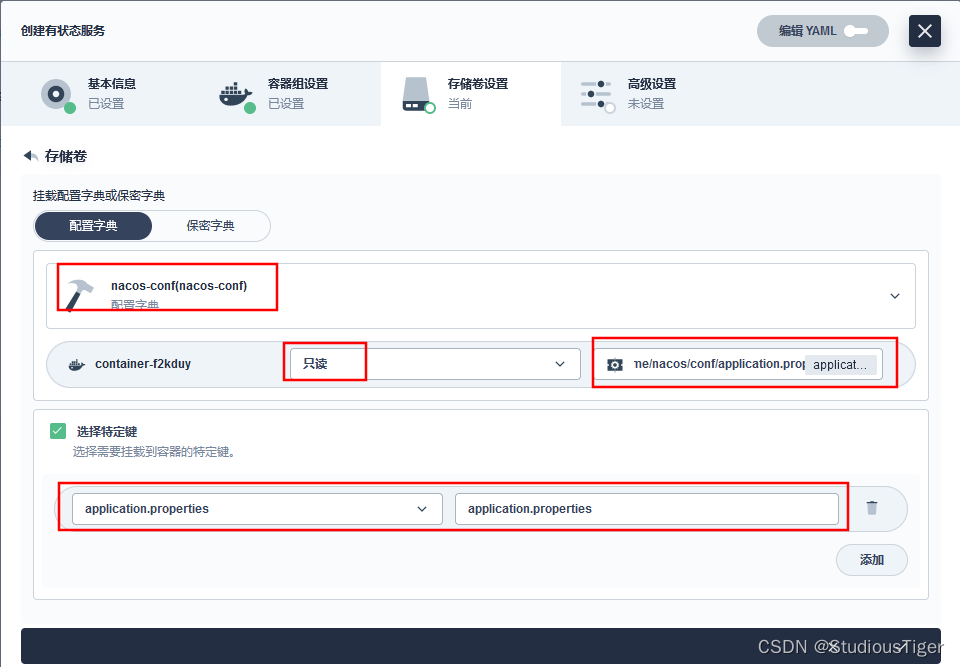
选择字典配置:nacos-conf
挂载路径:/home/nacos/conf/cluster.conf
自定子路径:cluster.conf
选在特定键:键为: cluster.conf ;值为 :cluster.conf
点击确认

下一步:点击确定来到
/应用负载/工作负载/有状态副本集/qianmo-nacos-v1
可以看到一个容器组接下来我们暴露一个 对外访问的工作负载
/ 应用负载/服务 / 创建/ 指定工作负载 /

指定工作负载,并配置端口

外网访问 / 访问模式-nodePort / 创建

如果想要集群以单点模式启动,那么只要配置环境变量MODE=standalone2.部署nacos服务
同上
六、后端上云
第1步:编写好 Helm Charts 压缩包

第2步:在 KubeSphere 上创建部署模板

第3步:根据部署模板部署应用

七、前端上云
前端Dockerfile包
dockerfiles -- qianmo-ui -- Dockerfile -- html -- dist -- config -- nginx.conf- 1
- 2
- 3
- 4
- 5
- 6
- 7
第1步:打包工程(dist)
npm run build

第2步:编写nginx.conf
worker_processes auto; events { worker_connections 1024; accept_mutex on; } http { include mime.types; default_type application/octet-stream; server { server_name _; listen 8080; location /api { rewrite "^/api/(.*)$" /$1 break; proxy_pass http://qianmo-gateway.scheduling:8080; proxy_set_header Host $host; proxy_set_header X-Real-IP $remote_addr; proxy_set_header X-Forwarded-For $proxy_add_x_forwarded_for; proxy_set_header X-Forwarded-Host $http_host; proxy_set_header X-Forwarded-Port $server_port; proxy_set_header X-Forwarded-Proto $scheme; } location / { root /home/nginx/html/system/; } location /system { root /home/nginx/html; } location /help { root /home/nginx/html; } location /webroot/decision { proxy_pass http://xx.xx.0.184:8080; proxy_set_header Host $host; proxy_set_header X-Real-IP $remote_addr; proxy_set_header X-Forwarded-For $proxy_add_x_forwarded_for; proxy_set_header X-Forwarded-Host $http_host; proxy_set_header X-Forwarded-Port $server_port; proxy_set_header X-Forwarded-Proto $scheme; } location /metadata { root /home/nginx/html/system; index index.html; } } }- 1
- 2
- 3
- 4
- 5
- 6
- 7
- 8
- 9
- 10
- 11
- 12
- 13
- 14
- 15
- 16
- 17
- 18
- 19
- 20
- 21
- 22
- 23
- 24
- 25
- 26
- 27
- 28
- 29
- 30
- 31
- 32
- 33
- 34
- 35
- 36
- 37
- 38
- 39
- 40
- 41
- 42
- 43
- 44
- 45
第3步:构建-打包-推送镜像
docker build -t harbor地址:端口/production-scheduling/qianmo-ui:1.0.0 -f Dockerfile . docker push harbor地址:端口/production-scheduling/qianmo-ui:1.0.0- 1
- 2
- 3
第4步:编写好 Helm Charts 压缩包
第5步:在 KubeSphere 上创建部署模板
第6步:根据部署模板部署应用
八、DevOps流水线(Jenkins)
Jenkins模板

pipeline { agent { node { label 'maven' } } stages { stage('拉取代码') { steps { container('maven') { git(url: 'http://xxx.xxx/xxx/xx/xx', credentialsId: 'key-id', branch: 'master', changelog: true, poll: false) sh 'ls -al' } } } stage('编译项目') { agent none steps { container('maven') { sh 'ls -al' sh 'mvn clean package -Dmaven.test.skip=true' } } } stage('构建镜像') { parallel { stage('构建a服务镜像') { agent none steps { container('maven') { sh 'docker build -t $APP_NAME_A:latest -f ./Dockerfile所在目录路径/Dockerfile ./Dockerfile所在目录路径/' } } } stage('构建b服务镜像') { agent none steps { container('maven') { sh 'docker build -t $APP_NAME_B:latest -f ./Dockerfile所在目录路径/Dockerfile ./Dockerfile所在目录路径/' } } } stage('构建c服务镜像') { agent none steps { container('maven') { sh 'docker build -t $APP_NAME_C:latest -f ./Dockerfile所在目录路径/Dockerfile ./Dockerfile所在目录路径/' } } } stage('构建d服务镜像') { agent none steps { container('maven') { sh 'docker build -t $APP_NAME_D:latest -f ./Dockerfile所在目录路径/Dockerfile ./Dockerfile所在目录路径/' } } } stage('构建e服务镜像') { agent none steps { container('maven') { sh 'docker build -t $APP_NAME_E:latest -f ./Dockerfile所在目录路径/Dockerfile ./Dockerfile所在目录路径/' } } } stage('构建f服务镜像') { agent none steps { container('maven') { sh 'docker build -t $APP_NAME_F:latest -f ./Dockerfile所在目录路径/Dockerfile ./Dockerfile所在目录路径/' } } } stage('构建g服务镜像') { agent none steps { container('maven') { sh 'docker build -t $APP_NAME_G:latest -f ./Dockerfile所在目录路径/Dockerfile ./Dockerfile所在目录路径/' } } } } } stage('推送镜像') { parallel { stage('推送a镜像') { agent none steps { container('maven') { withCredentials([usernamePassword(credentialsId : 'harbor-register' ,passwordVariable : 'HARBOR_PASSWOED' ,usernameVariable : 'HARBOR_USERNAME' ,)]) { sh 'echo "$HARBOR_PASSWOED" | docker login $REGISTRY -u "$HARBOR_PASSWOED" --password-stdin' sh 'docker tag $APP_NAME_A:latest $REGISTRY/$DOCKERHUB_NAMESPACE/$APP_NAME_A:SNAPSHOT-$BRANCH_NAME' sh 'docker push $REGISTRY/$DOCKERHUB_NAMESPACE/$APP_NAME_A:SNAPSHOT-$BRANCH_NAME' } } } } stage('推送b镜像') { agent none steps { container('maven') { withCredentials([usernamePassword(credentialsId : 'harbor-register' ,passwordVariable : 'HARBOR_PASSWOED' ,usernameVariable : 'HARBOR_USERNAME' ,)]) { sh 'echo "$HARBOR_PASSWOED" | docker login $REGISTRY -u "$HARBOR_PASSWOED" --password-stdin' sh 'docker tag $APP_NAME_B:latest $REGISTRY/$DOCKERHUB_NAMESPACE/$APP_NAME_B:SNAPSHOT-$BRANCH_NAME' sh 'docker push $REGISTRY/$DOCKERHUB_NAMESPACE/$APP_NAME_B:SNAPSHOT-$BRANCH_NAME' } } } } stage('推送c镜像') { agent none steps { container('maven') { withCredentials([usernamePassword(credentialsId : 'harbor-register' ,passwordVariable : 'HARBOR_PASSWOED' ,usernameVariable : 'HARBOR_USERNAME' ,)]) { sh 'echo "$HARBOR_PASSWOED" | docker login $REGISTRY -u "$HARBOR_PASSWOED" --password-stdin' sh 'docker tag $APP_NAME_C:latest $REGISTRY/$DOCKERHUB_NAMESPACE/$APP_NAME_C:SNAPSHOT-$BRANCH_NAME' sh 'docker push $REGISTRY/$DOCKERHUB_NAMESPACE/$APP_NAME_C:SNAPSHOT-$BRANCH_NAME' } } } } stage('推送d镜像') { agent none steps { container('maven') { withCredentials([usernamePassword(credentialsId : 'harbor-register' ,passwordVariable : 'HARBOR_PASSWOED' ,usernameVariable : 'HARBOR_USERNAME' ,)]) { sh 'echo "$HARBOR_PASSWOED" | docker login $REGISTRY -u "$HARBOR_PASSWOED" --password-stdin' sh 'docker tag $APP_NAME_D:latest $REGISTRY/$DOCKERHUB_NAMESPACE/$APP_NAME_D:SNAPSHOT-$BRANCH_NAME' sh 'docker push $REGISTRY/$DOCKERHUB_NAMESPACE/$APP_NAME_D:SNAPSHOT-$BRANCH_NAME' } } } } stage('推送e镜像') { agent none steps { container('maven') { withCredentials([usernamePassword(credentialsId : 'harbor-register' ,passwordVariable : 'HARBOR_PASSWOED' ,usernameVariable : 'HARBOR_USERNAME' ,)]) { sh 'echo "$HARBOR_PASSWOED" | docker login $REGISTRY -u "$HARBOR_PASSWOED" --password-stdin' sh 'docker tag $APP_NAME_E:latest $REGISTRY/$DOCKERHUB_NAMESPACE/$APP_NAME_E:SNAPSHOT-$BRANCH_NAME' sh 'docker push $REGISTRY/$DOCKERHUB_NAMESPACE/$APP_NAME_E:SNAPSHOT-$BRANCH_NAME' } } } } stage('推送f镜像') { agent none steps { container('maven') { withCredentials([usernamePassword(credentialsId : 'harbor-register' ,passwordVariable : 'HARBOR_PASSWOED' ,usernameVariable : 'HARBOR_USERNAME' ,)]) { sh 'echo "$HARBOR_PASSWOED" | docker login $REGISTRY -u "$HARBOR_PASSWOED" --password-stdin' sh 'docker tag $APP_NAME_F:latest $REGISTRY/$DOCKERHUB_NAMESPACE/$APP_NAME_F:SNAPSHOT-$BRANCH_NAME' sh 'docker push $REGISTRY/$DOCKERHUB_NAMESPACE/$APP_NAME_F:SNAPSHOT-$BRANCH_NAME' } } } } stage('推送g镜像') { agent none steps { container('maven') { withCredentials([usernamePassword(credentialsId : 'harbor-register' ,passwordVariable : 'HARBOR_PASSWOED' ,usernameVariable : 'HARBOR_USERNAME' ,)]) { sh 'echo "$HARBOR_PASSWOED" | docker login $REGISTRY -u "$HARBOR_PASSWOED" --password-stdin' sh 'docker tag $APP_NAME_G:latest $REGISTRY/$DOCKERHUB_NAMESPACE/$APP_NAME_G:SNAPSHOT-$BRANCH_NAME' sh 'docker push $REGISTRY/$DOCKERHUB_NAMESPACE/$APP_NAME_G:SNAPSHOT-$BRANCH_NAME' } } } } } } stage('部署服务') { parallel { stage('部署a服务') { steps { input(message: '''确定进行部署? 需要给每一个微服务下面建一个 deploy/deploy.yml 文件, deploy.yml文件为K8s的部署文件''', submitter: '') kubernetesDeploy(configs: 'a微服务根目录/deploy/**', enableConfigSubstitution: true, kubeconfigId: '"$KUBECONFIG_CREDENTIAL_ID"') } } stage('部署b服务') { steps { input(message: '''确定进行部署? 需要给每一个微服务下面建一个 deploy/deploy.yml 文件, deploy.yml文件为K8s的部署文件''', submitter: '') kubernetesDeploy(configs: 'b微服务根目录/deploy/**', enableConfigSubstitution: true, kubeconfigId: '"$KUBECONFIG_CREDENTIAL_ID"') } } stage('部署c服务') { steps { input(message: '''确定进行部署? 需要给每一个微服务下面建一个 deploy/deploy.yml 文件, deploy.yml文件为K8s的部署文件''', submitter: '') kubernetesDeploy(configs: 'c微服务根目录/deploy/**', enableConfigSubstitution: true, kubeconfigId: '"$KUBECONFIG_CREDENTIAL_ID"') } } stage('部署d服务') { steps { input(message: '''确定进行部署? 需要给每一个微服务下面建一个 deploy/deploy.yml 文件, deploy.yml文件为K8s的部署文件''', submitter: '') kubernetesDeploy(configs: 'd微服务根目录/deploy/**', enableConfigSubstitution: true, kubeconfigId: '"$KUBECONFIG_CREDENTIAL_ID"') } } stage('部署e服务') { steps { input(message: '''确定进行部署? 需要给每一个微服务下面建一个 deploy/deploy.yml 文件, deploy.yml文件为K8s的部署文件''', submitter: '') kubernetesDeploy(configs: 'e微服务根目录/deploy/**', enableConfigSubstitution: true, kubeconfigId: '"$KUBECONFIG_CREDENTIAL_ID"') } } stage('部署f服务') { steps { input(message: '''确定进行部署? 需要给每一个微服务下面建一个 deploy/deploy.yml 文件, deploy.yml文件为K8s的部署文件''', submitter: '') kubernetesDeploy(configs: 'f微服务根目录/deploy/**', enableConfigSubstitution: true, kubeconfigId: '"$KUBECONFIG_CREDENTIAL_ID"') } } stage('部署g服务') { steps { input(message: '''确定进行部署? 需要给每一个微服务下面建一个 deploy/deploy.yml 文件, deploy.yml文件为K8s的部署文件''', submitter: '') kubernetesDeploy(configs: 'g微服务根目录/deploy/**', enableConfigSubstitution: true, kubeconfigId: '"$KUBECONFIG_CREDENTIAL_ID"') } } } } } environment { DOCKER_CREDENTIAL_ID = 'dockerhub-id' GITHUB_CREDENTIAL_ID = 'github-id' KUBECONFIG_CREDENTIAL_ID = 'demo-kubeconfig' REGISTRY = '仓库IP:端口号' DOCKERHUB_NAMESPACE = '命名空间' GITHUB_ACCOUNT = 'kubesphere' APP_NAME_A = '微服务a名' APP_NAME_B = '微服务b名' APP_NAME_C = '微服务c名' APP_NAME_D = '微服务d名' APP_NAME_E = '微服务e名' APP_NAME_F = '微服务f名' APP_NAME_G = '微服务g名' } parameters { string(name: 'TAG_NAME', defaultValue: '', description: '') } }- 1
- 2
- 3
- 4
- 5
- 6
- 7
- 8
- 9
- 10
- 11
- 12
- 13
- 14
- 15
- 16
- 17
- 18
- 19
- 20
- 21
- 22
- 23
- 24
- 25
- 26
- 27
- 28
- 29
- 30
- 31
- 32
- 33
- 34
- 35
- 36
- 37
- 38
- 39
- 40
- 41
- 42
- 43
- 44
- 45
- 46
- 47
- 48
- 49
- 50
- 51
- 52
- 53
- 54
- 55
- 56
- 57
- 58
- 59
- 60
- 61
- 62
- 63
- 64
- 65
- 66
- 67
- 68
- 69
- 70
- 71
- 72
- 73
- 74
- 75
- 76
- 77
- 78
- 79
- 80
- 81
- 82
- 83
- 84
- 85
- 86
- 87
- 88
- 89
- 90
- 91
- 92
- 93
- 94
- 95
- 96
- 97
- 98
- 99
- 100
- 101
- 102
- 103
- 104
- 105
- 106
- 107
- 108
- 109
- 110
- 111
- 112
- 113
- 114
- 115
- 116
- 117
- 118
- 119
- 120
- 121
- 122
- 123
- 124
- 125
- 126
- 127
- 128
- 129
- 130
- 131
- 132
- 133
- 134
- 135
- 136
- 137
- 138
- 139
- 140
- 141
- 142
- 143
- 144
- 145
- 146
- 147
- 148
- 149
- 150
- 151
- 152
- 153
- 154
- 155
- 156
- 157
- 158
- 159
- 160
- 161
- 162
- 163
- 164
- 165
- 166
- 167
- 168
- 169
- 170
- 171
- 172
- 173
- 174
- 175
- 176
- 177
- 178
- 179
- 180
- 181
- 182
- 183
- 184
- 185
- 186
- 187
- 188
- 189
- 190
- 191
- 192
- 193
- 194
- 195
- 196
- 197
- 198
- 199
- 200
- 201
- 202
- 203
- 204
- 205
- 206
- 207
- 208
- 209
- 210
- 211
- 212
- 213
- 214
- 215
- 216
- 217
- 218
- 219
- 220
- 221
- 222
- 223
- 224
- 225
- 226
- 227
- 228
- 229
- 230
- 231
- 232
- 233
- 234
- 235
- 236
- 237
- 238
- 239
- 240
- 241
- 242
- 243
- 244
- 245
- 246
- 247
- 248
- 249
- 250
- 251
- 252
- 253
- 254
- 255
- 256
- 257
- 258
- 259
- 260
- 261
- 262
- 263
- 264
- 265
- 266
- 267
- 268
- 269
- 270
- 271
- 272
- 273
- 274
- 275
- 276
- 277
- 278
- 279
- 280
- 281
- 282
- 283
- 284
- 285
- 286
- 287
- 288
- 289
- 290
- 291
- 292
- 293
- 294
- 295
-
相关阅读:
Es的核心概念
java基础10题
TCP零窗口探测实战
群晖服务器Synology nas断电重启后 如何重新连接。重新设置静态IP
化工供应链如何向产业互联网转型,S2B2C供应链电商系统提升企业供应链效率
牛客网刷题训练(二)
重生奇迹通关恶魔广场攻略篇
TRex学习之旅二
k8s驱逐篇(5)-kube-controller-manager驱逐
netty学习 java-io
- 原文地址:https://blog.csdn.net/m0_45067620/article/details/127862930
