-
log4cpp初入门
下载与安装
https://sourceforge.net/projects/log4cpp/
tar xvf log4cpp-1.1.3.tar.gz cd log4cpp ./configure make make check make install ldconfig- 1
- 2
- 3
- 4
- 5
- 6
- 7
头文件位于/usr/local/include/log4cpp/
库文件位于/usr/local/lib/log4cpp框架
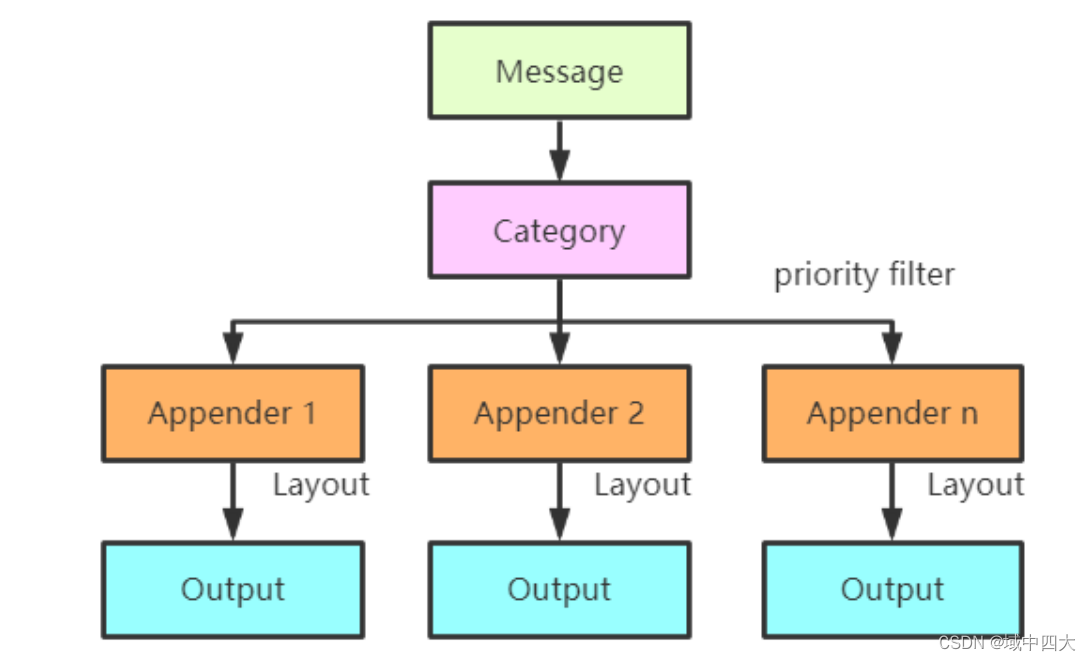
Category
Appender
- ⽇志输出到控制台
OstreamAppender(const std::string& name, std::ostream* stream);- 1
- ⽇志输出到本地⽂件
FileAppender(const std::string& name, const std::string& fileName, bool append = true, mode_t mode = 00644);- 1
- 2
- ⽇志通过⽹络输出到远程服务器
RemoteSyslogAppender(const std::string& name, const std::string& syslogName, const std::string& relayer, int facility = LOG_USER, int portNumber = 514);- 1
- 2
- 3
- 4
- 5
- 日志输出到系统日志
SyslogAppender(const std::string& name, const std::string& syslogName, int facility = LOG_USER);- 1
- 2
- 日志输出到String队列
StringQueueAppender(const std::string& name);- 1
- 日志输出到Buffer
BufferingAppender(const std::string name, unsigned long max_size, std::auto_ptr<Appender> sink, std::auto_ptr<TriggeringEventEvaluator> evaluator);- 1
- 2
- 日志在规定大小的文件中回滚输入
RollingFileAppender::RollingFileAppender(const std::string& name, const std::string& fileName, size_t maxFileSize, unsigned int maxBackupIndex, bool append, mode_t mode) :- 1
- 2
- 3
- 4
- 5
- 6
- ……(可定制)
Layout
日志格式模板
- Basic layout
/** * BasicLayout is a simple fixed format Layout implementation. **/ class LOG4CPP_EXPORT BasicLayout : public Layout { public: BasicLayout(); virtual ~BasicLayout(); /** * Formats the LoggingEvent in BasicLayout style:
* "timeStamp priority category ndc: message" **/ virtual std::string format(const LoggingEvent& event); };- 1
- 2
- 3
- 4
- 5
- 6
- 7
- 8
- 9
- 10
- 11
- 12
- 13
- 14
- simple layout
/** * BasicLayout is a simple fixed format Layout implementation. **/ class LOG4CPP_EXPORT SimpleLayout : public Layout { public: SimpleLayout(); virtual ~SimpleLayout(); /** * Formats the LoggingEvent in SimpleLayout style:
* "priority - message" **/ virtual std::string format(const LoggingEvent& event); };- 1
- 2
- 3
- 4
- 5
- 6
- 7
- 8
- 9
- 10
- 11
- 12
- 13
- 14
- Pattern layout
/** * PatternLayout is a simple fixed format Layout implementation. **/ class LOG4CPP_EXPORT PatternLayout : public Layout { public: /** The default conversion pattern **/ static const char* DEFAULT_CONVERSION_PATTERN; /** A conversion pattern equivalent to the SimpleLayout. **/ static const char* SIMPLE_CONVERSION_PATTERN; /** A conversion pattern equivalent to the BasicLayout. **/ static const char* BASIC_CONVERSION_PATTERN; /** A conversion pattern equivalent to the TTCCLayout. Note: TTCCLayout is in log4j but not log4cpp. **/ static const char* TTCC_CONVERSION_PATTERN; PatternLayout(); virtual ~PatternLayout(); // NOTE: All double percentage signs ('%%') followed by a character // in the following comments should actually be a single char. // The doubles are included so that doxygen will print them correctly. /** * Formats the LoggingEvent in the style set by * the setConversionPattern call. By default, set * to "%%m%%n" **/ virtual std::string format(const LoggingEvent& event); /** * Sets the format of log lines handled by this * PatternLayout. By default, set to "%%m%%n".
* Format characters are as follows:
*- %% - a single percent sign
*- %%c - the category
*- %%d - the date\n * Date format: The date format character may be followed by a date format * specifier enclosed between braces. For example, %%d{%%H:%%M:%%S,%%l} or %%d{%%d %%m %%Y %%H:%%M:%%S,%%l}. * If no date format specifier is given then the following format is used: * "Wed Jan 02 02:03:55 1980". The date format specifier admits the same syntax * as the ANSI C function strftime, with 1 addition. The addition is the specifier * %%l for milliseconds, padded with zeros to make 3 digits.
*- %%m - the message
*- %%n - the platform specific line separator
*- %%p - the priority
*- %%r - milliseconds since this layout was created.
*- %%R - seconds since Jan 1, 1970
*- %%u - clock ticks since process start
*- %%x - the NDC
* @param conversionPattern the conversion pattern * @exception ConfigureFailure if the pattern is invalid **/ virtual void setConversionPattern(const std::string& conversionPattern); virtual std::string getConversionPattern() const; virtual void clearConversionPattern(); class LOG4CPP_EXPORT PatternComponent { public: inline virtual ~PatternComponent() {}; virtual void append(std::ostringstream& out, const LoggingEvent& event) = 0; }; private: typedef std::vector<PatternComponent*> ComponentVector; ComponentVector _components; std::string _conversionPattern; };- 1
- 2
- 3
- 4
- 5
- 6
- 7
- 8
- 9
- 10
- 11
- 12
- 13
- 14
- 15
- 16
- 17
- 18
- 19
- 20
- 21
- 22
- 23
- 24
- 25
- 26
- 27
- 28
- 29
- 30
- 31
- 32
- 33
- 34
- 35
- 36
- 37
- 38
- 39
- 40
- 41
- 42
- 43
- 44
- 45
- 46
- 47
- 48
- 49
- 50
- 51
- 52
- 53
- 54
- 55
- 56
- 57
- 58
- 59
- 60
- 61
- 62
- 63
- 64
- 65
- 66
- 67
- 68
- 69
- 70
- 71
- 72
- 73
- 74
- 75
- 76
- 77
- 78
- 79
- 80
- PassThroughLayout
class PassThroughLayout : public Layout { public: virtual std::string format(const LoggingEvent& event) { return event.message; } };- 1
- 2
- 3
- 4
- 5
Priorty
Output
三种输出风格
warn_log.log(log4cpp::Priority::WARN, "This will be a logged warning, darren = %d", 100); warn_log.warnStream() << "This will be a logged warning, darren = " << 100; warn_log.alert("Alert info");- 1
- 2
- 3
功能
日志级别
日志等级值越小,打印等级越高
typedef enum { EMERG = 0, FATAL = 0, ALERT = 100, CRIT = 200, ERROR = 300, WARN = 400, NOTICE = 500, INFO = 600, DEBUG = 700, NOTSET = 800 } PriorityLevel;- 1
- 2
- 3
- 4
- 5
- 6
- 7
- 8
- 9
- 10
- 11
- 12
⽇志格式化
/********************************************************************* 格式化布局。它的使⽤⽅式类似C语⾔中的printf,使⽤格式化它符串来描述输出格式。⽬前⽀持的转义 定义如下: %% - 转义字符'%' %c - Category %d - ⽇期;⽇期可以进⼀步设置格式,⽤花括号包围,例如%d{%H:%M:%S,%l}。 ⽇期的格式符号与ANSI C函数strftime中的⼀致。但增加了⼀个格式符号%l,表示毫秒,占三个 ⼗进制位。 %m - 消息 %n - 换⾏符;会根据平台的不同⽽不同,但对⽤户透明。 %p - 优先级 %r - ⾃从layout被创建后的毫秒数 %R - 从1970年1⽉1⽇开始到⽬前为⽌的秒数 %u - 进程开始到⽬前为⽌的时钟周期数 %x - NDC %t - 线程id ***********************************************************************/- 1
- 2
- 3
- 4
- 5
- 6
- 7
- 8
- 9
- 10
- 11
- 12
- 13
- 14
- 15
- 16
- 17
⽇志输出
- ⽇志输出到控制台
- ⽇志输出到本地⽂件
- ⽇志通过⽹络输出到远程服务器
- ……(可定制)
日志回滚
- 本地⽇志⽀持最⼤⽂件限制
- 当本地⽇志到达最⼤⽂件限制的时候新建⼀个⽂件
- 每天⾄少⼀个⽂件
日志配置文件
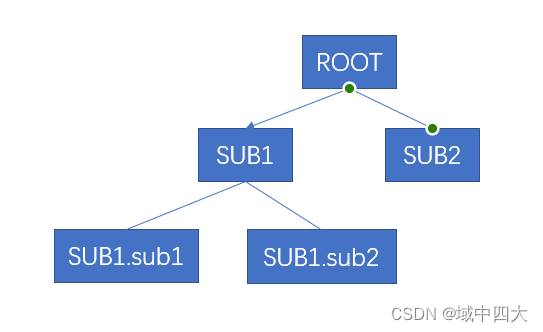
该功能可以将日志打印建立层级关系,如下图,他们能够同步从上级将日志输出,不同的权限(root、sub1、sub2、sub1.sub1……)可以定制不同的输出方式,比如输出到服务器,比如输出到文件等,是否需要将日志向上级汇报,可以通过配置文件进行设置
- 加载日志配置文件
log4cpp::PropertyConfigurator::configure("log4cpp_lsy_test.conf");- 1
- 获取输出层级
log4cpp::Category& root = log4cpp::Category::getRoot(); log4cpp::Category& sub1 = log4cpp::Category::getInstance(std::string("sub1")); log4cpp::Category& sub1 = log4cpp::Category::getInstance(std::string("sub1")); log4cpp::Category& sub1_sub2 = log4cpp::Category::getInstance(std::string("sub1.sub2"));- 1
- 2
- 3
- 4
- 5
- 6
- 7
- 配置是否向上级汇报
# 默认是true,即默认向上级汇报 log4cpp.additivity.sub1=false- 1
- 2
- 配置启用某个层级
启用层级的时候,可以配置两个参数
第一个参数:打印等级
第二个参数:配置对应的adaptor
log4cpp.rootCategory=DEBUG, rootAppender log4cpp.category.sub1=,A1 log4cpp.category.sub2=INFO log4cpp.category.sub1.sub2=, A2- 1
- 2
- 3
- 4
- 设置adaptor
# 配置为控制台输出 log4cpp.appender.rootAppender=org.apache.log4cpp.ConsoleAppender log4cpp.appender.rootAppender.layout=org.apache.log4cpp.BasicLayout # 配置为文件输出 log4cpp.appender.A1=org.apache.log4cpp.FileAppender log4cpp.appender.A1.fileName=A1.log log4cpp.appender.A1.layout=org.apache.log4cpp.SimpleLayout # 配置为控制台输出 log4cpp.appender.A2=org.apache.log4cpp.ConsoleAppender log4cpp.appender.A2.layout=org.apache.log4cpp.PatternLayout # 配置输出模板 log4cpp.appender.A2.layout.ConversionPattern=%d %p %x - %m%n- 1
- 2
- 3
- 4
- 5
- 6
- 7
- 8
- 9
- 10
- 11
- 12
-
相关阅读:
LC买卖股票的最佳时机Ⅱ(三种解法详解)
报错分析nest--嵌套
XAMPP、Apache搭建本地PHP服务器(全网最保姆级)
RK3568平台 内核定时器的使用
使用vscode实现远程开发,并通过内网穿透在公网环境下远程连接
codesys TCP客户端程序
ES6中的代理proxy
Spring注解中的@DependsOn是什么意思
时序(流式)图谱数据仓库AbutionGraph功能介绍-Streaming Graph OLAM Database
用jquery方法获取页面的值
- 原文地址:https://blog.csdn.net/qq_34954047/article/details/127950625
