-
数字信号处理及python实现(三)
这是参考知乎的数字信号处理及matlab实现的python实现版本,参考连接
项目文件结构
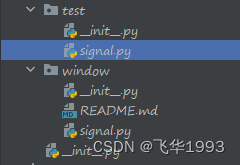
test为测试文件,window为项目文件抽样引起的混叠
def test_sample1(self): signal = Signal() f0 = 500 n = np.array(list(range(0, 23))) fs1 = 100 # 采样频率为100Hz x1 = np.sin(2 * np.pi * f0 * n / fs1 + np.pi / 3) X1, W1 = signal.dtft(x1, 1000) # 对x1进行DTFT变换 fs2 = 1000 # 采样频率为1kHz x2 = np.sin(2 * np.pi * f0 * n / fs2 + np.pi / 3) X2, W2 = signal.dtft(x2, 1000) # 对x2进行DTFT变换 fs3 = 10000 # 采样频率为10kHz x3 = np.sin(2 * np.pi * f0 * n / fs3 + np.pi / 3) X3, W3 = signal.dtft(x3, 1000) # 对x3进行DTFT变换 plt.subplot(3, 2, 1); plt.stem(n, x1) # 绘制fs = 100 # Hz时域采样结果 plt.title('fs=100Hz时域采样结果') plt.xlabel('n') plt.ylabel('x1(n)') plt.grid(visible=True) plt.subplot(3, 2, 2) plt.plot(W1, X1) plt.title('fs=100Hz时x1(n)的DTFT') plt.xlabel('FREQUENCY') plt.ylabel('$X1(e^{jw})$') plt.grid(visible=True) plt.subplot(3, 2, 3) plt.stem(n, x2) # 绘制fs = 1 # kHz时域采样结果 plt.title('fs=1kHz时域采样结果') plt.xlabel('n') plt.ylabel('$x2(n)$') plt.grid(visible=True) plt.subplot(3, 2, 4) plt.plot(W2, X2) plt.title('fs=1000Hz时x1(n)的DTFT') plt.xlabel('FREQUENCY') plt.ylabel('$X2(e^{jw})$') plt.grid(visible=True) plt.subplot(3, 2, 5); plt.stem(n, x3) # 绘制fs = 10 # kHz时域采样结果 plt.title('fs=10kHz时域采样结果') plt.xlabel('n') plt.ylabel('$x3(n)$') plt.grid(visible=True) plt.subplot(3, 2, 6) plt.plot(W3, X3) plt.title('fs=10kHz时x1(n)的DTFT') plt.xlabel('FREQUENCY') plt.ylabel('$X3(e^{jw})$') plt.grid(visible=True) plt.tight_layout() plt.savefig('data/images/sample1.png')- 1
- 2
- 3
- 4
- 5
- 6
- 7
- 8
- 9
- 10
- 11
- 12
- 13
- 14
- 15
- 16
- 17
- 18
- 19
- 20
- 21
- 22
- 23
- 24
- 25
- 26
- 27
- 28
- 29
- 30
- 31
- 32
- 33
- 34
- 35
- 36
- 37
- 38
- 39
- 40
- 41
- 42
- 43
- 44
- 45
- 46
- 47
- 48
- 49
- 50
- 51
- 52
- 53
- 54
- 55
- 56
- 57
- 58
- 59
- 60
- 61
- 62

抽样的频域视图
def test_sample_fourier(self): dt = 0.00001 # 给出一个无限小的间隔 t = np.arange(-0.005, 0.005 + dt, dt) # 给出t的取值范围 xa = np.exp(-1000 * abs(t)) # xa的时域表达式 Wmax = 2 * np.pi * 2000 # 给出频率的最大值 K = 600 k = np.array(list(range(0, K + 1))) W = k * Wmax / K # W的范围 Xa = np.array(np.matrix(xa) * np.exp(np.complex(0, -1) * np.matrix(t).T * np.matrix(W)) * dt) Xa = np.real(Xa) # 连续时间傅里叶变换 len_W = len(W) W.resize(1, len_W) W = np.concatenate([-np.fliplr(W)[0], W[0][1:]], axis=0) # 给出频率的范围 Xa = np.concatenate([np.fliplr(Xa)[0], Xa[0][1:]], axis=0) # 给出Xa的范围 plt.subplot(1, 2, 1) plt.plot(t * 1000, xa) # 绘出xa(t)的时域图形 plt.title('xa(t)的时域图形') plt.xlabel('t') plt.ylabel('xa(t)') plt.subplot(1, 2, 2) plt.plot(W / (2 * np.pi * 1000), Xa * 1000) # 绘出xa(t)的傅里叶变换的频谱 plt.title('xa(t)的傅里叶变换') plt.xlabel('FREQUENCY') plt.ylabel('$Xa(jw)$') plt.tight_layout() plt.savefig('data/images/sample_fourier.png')- 1
- 2
- 3
- 4
- 5
- 6
- 7
- 8
- 9
- 10
- 11
- 12
- 13
- 14
- 15
- 16
- 17
- 18
- 19
- 20
- 21
- 22
- 23
- 24
- 25
- 26
- 27
- 28
- 29
- 30
- 31

e.g. x a ( t ) = e − 1000 ∣ t ∣ x_a(t)=e^{-1000|t|} xa(t)=e−1000∣t∣,绘制其傅里叶变换 X a ( j Ω ) X_a(j\Omega) Xa(jΩ)def test_sample_fourier(self): dt = 0.00001 # 给出一个无限小的间隔 t = np.arange(-0.005, 0.005 + dt, dt) # 给出t的取值范围 xa = np.exp(-1000 * abs(t)) # xa的时域表达式 Wmax = 2 * np.pi * 2000 # 给出频率的最大值 K = 600 k = np.array(list(range(0, K + 1))) W = k * Wmax / K # W的范围 Xa = np.array(np.matrix(xa) * np.exp(np.complex(0, -1) * np.matrix(t).T * np.matrix(W)) * dt) Xa = np.real(Xa) # 连续时间傅里叶变换 len_W = len(W) W.resize(1, len_W) W = np.concatenate([-np.fliplr(W)[0], W[0][1:]], axis=0) # 给出频率的范围 Xa = np.concatenate([np.fliplr(Xa)[0], Xa[0][1:]], axis=0) # 给出Xa的范围 plt.subplot(1, 2, 1) plt.plot(t * 1000, xa) # 绘出xa(t)的时域图形 plt.title('xa(t)的时域图形') plt.xlabel('t') plt.ylabel('xa(t)') plt.subplot(1, 2, 2) plt.plot(W / (2 * np.pi * 1000), Xa * 1000) # 绘出xa(t)的傅里叶变换的频谱 plt.title('xa(t)的傅里叶变换') plt.xlabel('FREQUENCY') plt.ylabel('$Xa(jw)$') plt.tight_layout() plt.savefig('data/images/sample_fourier.png')- 1
- 2
- 3
- 4
- 5
- 6
- 7
- 8
- 9
- 10
- 11
- 12
- 13
- 14
- 15
- 16
- 17
- 18
- 19
- 20
- 21
- 22
- 23
- 24
- 25
- 26
- 27
- 28
- 29
- 30
- 31

当频率为 5000 H z 5000Hz 5000Hz和 1000 H z 1000Hz 1000Hz分别时,画出其DTFTdef test_sample_fourier_frequency(self): t1 = 0.0002 # 频率5000Hz进行采样 t2 = 0.001 # 频率1000Hz进行采样 n = np.array(list(range(-25, 26))) x1 = np.exp(-1000 * abs(n * t1)) # x1的时域表达式 x2 = np.exp(-1000 * abs(n * t2)) # x2的时域表达式 K = 500 k = np.array(list(range(0, K + 1))) w = k * np.pi / K # w的取值范围 X1 = np.array(np.matrix(x1) * np.exp(np.complex(0, -1) * np.matrix(n).T * np.matrix(w))) X1 = np.real(X1) # 做x1的DTFTX1 X2 = np.array(np.matrix(x2) * np.exp(np.complex(0, -1) * np.matrix(n).T * np.matrix(w))) X2 = np.real(X2) # 做x2的DTFTX2 len_w = len(w) w.resize(1, len_w) w = np.concatenate([-np.fliplr(w)[0], w[0][1:]], axis=0) # 给出频率的范围 X1 = np.concatenate([np.fliplr(X1)[0], X1[0][1:]], axis=0) # 给出X1的范围 X2 = np.concatenate([np.fliplr(X2)[0], X2[0][1:]], axis=0) # 给出X2的范围 plt.subplot(1, 2, 1) plt.plot(w / np.pi, X1) # 采样频率为5000Hz时x1(n)的DTFT plt.title('采样频率为5000Hz时x1(n)的DTFT') plt.xlabel('FREQUENCY') plt.ylabel('$X1(jw)$') plt.grid(visible=True) plt.subplot(1, 2, 2) plt.plot(w / np.pi, X2) # 采样频率为1000Hz时x2(n)的DTFT plt.title('采样频率为1000Hz时x2(n)的DTFT'); plt.xlabel('FREQUENCY') plt.ylabel('$X2(jw)$') plt.grid(visible=True) plt.tight_layout() plt.savefig('data/images/sample_fourier_frequency.png')- 1
- 2
- 3
- 4
- 5
- 6
- 7
- 8
- 9
- 10
- 11
- 12
- 13
- 14
- 15
- 16
- 17
- 18
- 19
- 20
- 21
- 22
- 23
- 24
- 25
- 26
- 27
- 28
- 29
- 30
- 31
- 32
- 33
- 34
- 35
- 36
- 37

样本重建信号
拟合正弦波
def test_reconstruction_fitting(self): t = np.arange(0, 2 * np.pi + 0.01, 0.01) x = 3 * np.cos(np.pi * t / 4) ax = plt.axes() plt.title('解出频率为w=pi/4的信号') plt.xlabel('t') plt.ylabel('x(t)') ax.set_xticks(t) # 在细密的网格上绘出产生的正弦信号 plt.plot(t, x) plt.grid(visible=True) plt.savefig('data/images/sample_reconstruction_fitting.png')- 1
- 2
- 3
- 4
- 5
- 6
- 7
- 8
- 9
- 10
- 11
- 12
- 13
- 14

线性与多项式内插
直线段连接样本
def test_interpolation1(self): x = [5, 3, -1] n = list(range(0, 3)) t = np.arange(0, 2, 0.01) ax = plt.axes() ax.set_xticks(t) plt.plot(n, x) plt.grid(visible=True) plt.savefig('data/images/sample_interpolation1.png')- 1
- 2
- 3
- 4
- 5
- 6
- 7
- 8
- 9
- 10
- 11

将三角形冲激响应与三个样本进行卷积def test_interpolation2(self): A = [0.2, 0.4, 0.6, 0.8, 1.0, 0.8, 0.6, 0.4, 0.2] B = [5, 0, 0, 0, 0, 3, 0, 0, 0, 0, -1] t = np.array(list(range(-4, 15))) Z = scipy.signal.convolve(A, B) vv = [0, 5, 3, -1, 0] xx = np.array(list(range(-1, 4))) xq = np.arange(-1, 3 + 0.1, 0.1) f = scipy.interpolate.interp1d(xx, vv, kind='linear') vq = f(xq) plt.subplot(2, 2, 1) plt.plot(t / 5, Z, 'rs', xq, vq, 'b^') # 绘出卷积的结果和线性插值的结果,分别用红色和蓝色表示 plt.xlabel('t') plt.ylabel('x(t)') plt.legend(['卷积的结果', '线性插值结果']) plt.subplot(2, 2, 2) plt.plot(t / 5, Z, 'rs') # 绘出卷积的结果 plt.title('卷积的结果') plt.xlabel('t') plt.ylabel('x(t)') plt.subplot(2, 2, 3) plt.plot(xq, vq, 'b^') # 线性插值的结果 plt.title('线性插值结果') plt.xlabel('t') plt.ylabel('x(t)') plt.grid(visible=True) plt.tight_layout() plt.savefig('data/images/sample_interpolation2.png')- 1
- 2
- 3
- 4
- 5
- 6
- 7
- 8
- 9
- 10
- 11
- 12
- 13
- 14
- 15
- 16
- 17
- 18
- 19
- 20
- 21
- 22
- 23
- 24
- 25
- 26
- 27
- 28
- 29
- 30
- 31
- 32

将这三个数据点拟合为二阶多项式def test_polynomial_interpolation(self): x = [5, 3, -1] n = np.array(list(range(0, 3))) p = np.polyfit(n, x, 2) nn = np.arange(-5, 5 + 0.5, 0.5) f = np.polyval(p, nn) t = np.arange(-5, 5 + 0.1, 0.1) ax = plt.axes() plt.legend(['样本点二阶多项式拟合结果']) plt.xlabel('t') ax.set_xticks(t) plt.plot(n, x, 'o', nn, f) plt.grid(visible=True) plt.savefig('data/images/polynomial_interpolation.png')- 1
- 2
- 3
- 4
- 5
- 6
- 7
- 8
- 9
- 10
- 11
- 12
- 13
- 14
- 15
- 16
- 17

理想低通滤波器
对t=0处的数值为1的单点样本进行插值,绘出大约从-5到5的结果。它应该和sinc函数形状相一致。
def test_low_pass_filter1(self): t = np.arange(-5, 5 + 0.01, 0.01) x1 = np.sinc(t) plt.subplot(2, 1, 1) plt.plot(t, x1) plt.title('单点样本插值结果') plt.xlabel('t') plt.ylabel('x1(t)') plt.grid(visible=True) plt.subplot(2, 1, 2) plt.plot(t, np.sinc(t)) plt.title('sinc(t)') plt.xlabel('t') plt.ylabel('sinc(t)') plt.grid(visible=True) plt.tight_layout() plt.savefig('data/images/low_pass_filter1.png')- 1
- 2
- 3
- 4
- 5
- 6
- 7
- 8
- 9
- 10
- 11
- 12
- 13
- 14
- 15
- 16
- 17
- 18
- 19
- 20

对 x a ( t ) Σ n = − ∞ ∞ x a ( n t ) sin ( π ( t − n T s ) / T s ) π ( t − n T s ) / T s x_a(t)\overset{\infty}{\underset{n=-\infty}{\Sigma}}x_a(nt)\frac{\sin(\pi(t-nT_s)/T_s)}{\pi(t-nT_s)/T_s} xa(t)n=−∞Σ∞xa(nt)π(t−nTs)/Tssin(π(t−nTs)/Ts)给定及实验内容中的三点情形进行插值。def test_low_pass_filter2(self): xn = np.array([5, 3, -1]) M = 0 N = 2 n = np.array(list(range(M, N + 1))) Ts = 1 t1 = np.arange(-1, 5 + 0.05, 0.05) xa = np.matrix(xn) * np.matrix(np.sinc(np.array( np.matrix(1 / Ts * (np.ones([len(n), 1])) * np.matrix(t1)) - np.array( np.matrix(n).T * np.matrix(Ts) * np.matrix(np.ones([1, len(t1)])))))) xa = np.array(xa)[0] # 基于(3.18)的内插表达式 x = [5, 3, -1] # 直线段的转折点 n = np.array(list(range(0, 3))) A = [0.2, 0.4, 0.6, 0.8, 1.0, 0.8, 0.6, 0.4, 0.2] # 冲激响应 B = [5, 0, 0, 0, 0, 1, 0, 0, 0, 0, -1] tt = np.array(list(range(-4, 15))) C = scipy.signal.convolve(A, B) # 计算线性插值 plt.xlabel('t') plt.ylabel('x(t)') # 拟合正弦波 plt.plot(t1, xa, n, x, 'o-m', tt / 5, C, '.-b') # 将直线段与正弦波进行拟合,其中直线拟合用洋红色曲线来表示,线性插值结果用蓝色曲线来表示 plt.stem(range(M, N + 1), xn, 'k') plt.legend(['sinc函数', '直线拟合', '线性插值结果']) plt.grid(visible=True) plt.savefig('data/images/low_pass_filter2.png')- 1
- 2
- 3
- 4
- 5
- 6
- 7
- 8
- 9
- 10
- 11
- 12
- 13
- 14
- 15
- 16
- 17
- 18
- 19
- 20
- 21
- 22
- 23
- 24
- 25
- 26
- 27
- 28

-
相关阅读:
第六节——Vue中的事件
Nacos原理简单介绍
ROS学习记录2018.7.10
中级职称评审业绩材料和技术总结应该如何撰写?甘建二告诉你
5 | Java Spark WordCount打成Jar 包测试
创建型模式-抽象工厂模式(三)
Qt源码阅读(四) 事件循环
springboot多模块下swaggar界面出现异常(Knife4j文档请求异常)或者界面不报错但是没有显示任何信息
测试/开发程序员槽点,这个功能要加钱......
【C++ STL】模拟实现 string
- 原文地址:https://blog.csdn.net/u011740601/article/details/127873189
