-
Vue(八)——Vuex
目录
理解vuex
概念:
在Vue中实现集中式状态(数据)管理的一个Vue插件,对vue应用中多个组件的共享状态(数据)进行集中式的管理(读/写),也是一种组件间通信的方式,且适用于任意组件间通信。
多组件共享数据——全局事件总线实现(让所有组件都可以读写x和y)

多组件共享数据——vuex实现

什么时候使用vuex?
1.多个组件依赖于同一状态(数据)
2.来自不同组件的行为需要变更同一状态(数据)工作原理图:
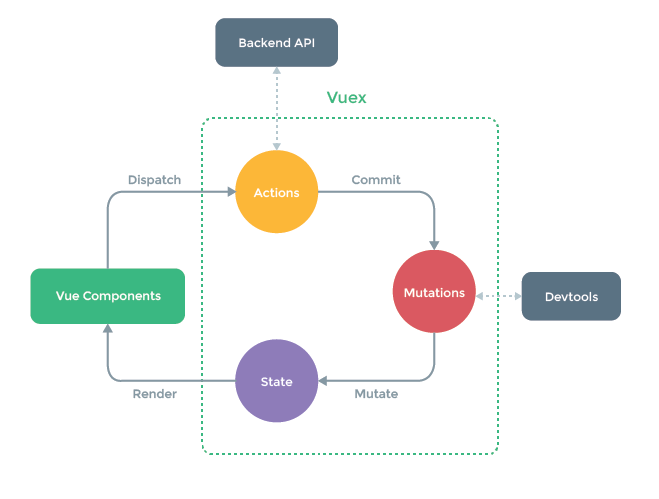
我们所说的将数据交给vuex去管理,就是交给State对象去管理。这个actions主要处理mounted,向服务器发异步请求,然后获取数据,修改,保存到state仓库中,然后通过mapState组件能拿到,然后进行遍历数组动态展示数据,这就是前台项目的大部分功能。

1.A M S 都是对象
2.A M S都要经过store的领导
3.需要在任何一个组件里调dispatch、commit,而dispatch、commit都在store身上。这就需要所有的组件实例对象vc都能看见store。
求和案例
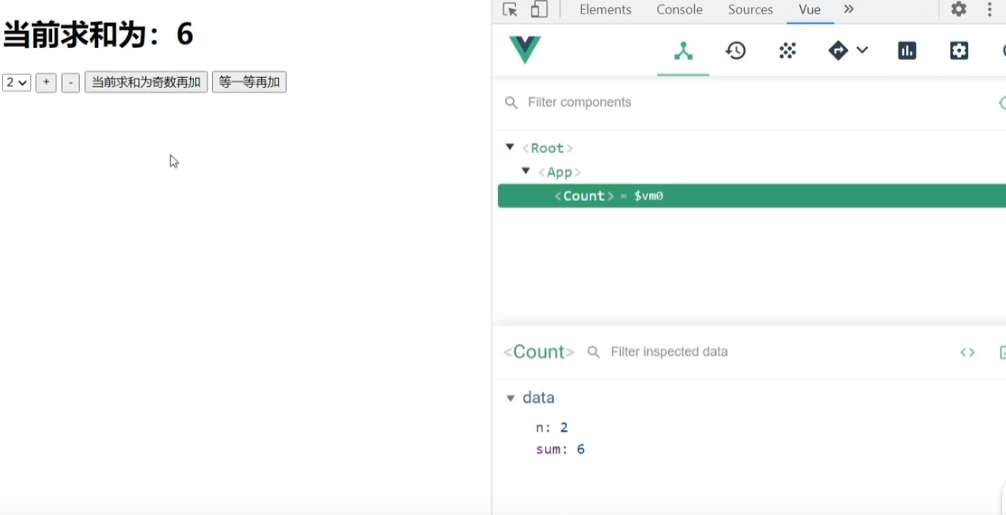
纯vue版
option里的值如果不处理会被当成字符串而无法进行运算


Count.vue
- <template>
- <div>
- <h1>当前求和为:{{sum}}h1>
- <select v-model.number="n">
- <option value="1">1option>
- <option value="2">2option>
- <option value="3">3option>
- select>
- <button @click="increment">+button>
- <button @click="decrement">-button>
- <button @click="incrementOdd">当前求和为奇数再加button>
- <button @click="incrementWait">等一等再加button>
- div>
- template>
- <script>
- export default {
- name:'Count',
- data() {
- return {
- n:1, //用户选择的数字
- sum:0 //当前的和
- }
- },
- methods: {
- increment(){
- this.sum += this.n
- },
- decrement(){
- this.sum -= this.n
- },
- incrementOdd(){
- if(this.sum % 2){
- this.sum += this.n
- }
- },
- incrementWait(){
- setTimeout(()=>{
- this.sum += this.n
- },500)
- },
- },
- }
- script>
- <style lang="css">
- button{
- margin-left: 5px;
- }
- style>
App.vue
- <template>
- <div>
- <Count/>
- div>
- template>
- <script>
- import Count from './components/Count'
- export default {
- name:'App',
- components:{Count},
- }
- script>
main.js
- //引入Vue
- import Vue from 'vue'
- //引入App
- import App from './App.vue'
- //引入插件
- import vueResource from 'vue-resource'
- //关闭Vue的生产提示
- Vue.config.productionTip = false
- //使用插件
- Vue.use(vueResource)
- //创建vm
- new Vue({
- el:'#app',
- render: h => h(App),
- beforeCreate() {
- Vue.prototype.$bus = this
- }
- })
搭建vuex环境
-
下载 Vuex:
npm i vuex(npm i vuex@3)

让所有的vc和vm都有一个store

没引入vuex之前,vue是不认识store的

引入vuex之后,vue就认识这个store了。


App的组件实例对象也有store


2.创建
src/store/index.js:该文件用于创建Vuex中最为核心的store(根据原理图,store需包含actions、mutations、state)
- //引入Vue核心库
- import Vue from 'vue'
- //引入Vuex
- import Vuex from 'vuex'
- //应用Vuex插件
- Vue.use(Vuex)
- //准备actions对象——响应组件中用户的动作、处理业务逻辑
- const actions = {}
- //准备mutations对象——修改state中的数据
- const mutations = {}
- //准备state对象——保存具体的数据
- const state = {}
- //创建并暴露store
- export default new Vuex.Store({
- //key和value重名了可以触发简写形式
- actions,
- mutations,
- state,
- })
3.在
src/main.js中创建 vm 时传入store配置项:- import Vue from 'vue'
- import App from './App.vue'
- import Vuex from 'vuex'
- //引入store
- import store from './store'
- Vue.config.productionTip = false
- Vue.use(Vuex)
- new Vue({
- el:"#app",
- render: h => h(App),
- store
- })

vuex版
./components/Count.vue
- <template>
- <div>
- <h1>当前求和为:{{$store.state.sum}}h1>
- <select v-model.number="n">
- <option value="1">1option>
- <option value="2">2option>
- <option value="3">3option>
- select>
- <button @click="increment">+button>
- <button @click="decrement">-button>
- <button @click="incrementOdd">当前求和为奇数再加button>
- <button @click="incrementWait">等一等再加button>
- div>
- template>
- <script>
- export default {
- name:'Count',
- data() {
- return {
- n:1, //用户选择的数字
- }
- },
- methods: {
- increment(){
- //可直接commit给mutations
- this.$store.commit('JIA',this.n)
- },
- decrement(){
- //可直接commit给mutations
- this.$store.commit('JIAN',this.n)
- },
- incrementOdd(){
- //dispatch到actions
- this.$store.dispatch('jiaOdd',this.n)
- },
- incrementWait(){
- this.$store.dispatch('jiaWait',this.n)
- },
- },
- mounted() {
- console.log('Count',this)
- },
- }
- script>
- <style lang="css">
- button{
- margin-left: 5px;
- }
- style>

./store/index.js
- //该文件用于创建Vuex中最为核心的store
- import Vue from 'vue'
- //引入Vuex
- import Vuex from 'vuex'
- //应用Vuex插件
- Vue.use(Vuex)
- //准备actions——用于响应组件中的动作
- const actions = {
- /* jia(context,value){
- //参数1是上下文对象,里面包含了可能用到的方法(例如commit),参数2是所传过来的参数值
- console.log('actions中的jia被调用了')
- context.commit('JIA',value)
- },
- jian(context,value){
- console.log('actions中的jian被调用了')
- context.commit('JIAN',value)
- }, */
- jiaOdd(context,value){
- console.log('actions中的jiaOdd被调用了')
- if(context.state.sum % 2){
- context.commit('JIA',value)
- }
- },
- jiaWait(context,value){
- console.log('actions中的jiaWait被调用了')
- setTimeout(()=>{
- context.commit('JIA',value)
- },500)
- }
- }
- //准备mutations——用于操作数据(state)
- const mutations = {
- JIA(state,value){
- console.log('mutations中的JIA被调用了')
- state.sum += value
- },
- JIAN(state,value){
- console.log('mutations中的JIAN被调用了')
- state.sum -= value
- }
- }
- //准备state——用于存储数据
- const state = {
- sum:0 //当前的和
- }
- //创建并暴露store
- export default new Vuex.Store({
- actions,
- mutations,
- state,
- })
参数中的state

App.vue
- <template>
- <div>
- <Count/>
- div>
- template>
- <script>
- import Count from './components/Count'
- export default {
- name:'App',
- components:{Count},
- mounted() {
- // console.log('App',this)
- },
- }
- script>
main.js
- //引入Vue
- import Vue from 'vue'
- //引入App
- import App from './App.vue'
- //引入插件
- import vueResource from 'vue-resource'
- //引入store
- import store from './store'
- //关闭Vue的生产提示
- Vue.config.productionTip = false
- //使用插件
- Vue.use(vueResource)
- //创建vm
- new Vue({
- el:'#app',
- render: h => h(App),
- store,
- beforeCreate() {
- Vue.prototype.$bus = this
- }
- })
使用步骤:
1.初始化数据、配置```actions```、配置```mutations```,操作文件```store.js```
- //引入Vue核心库
- import Vue from 'vue'
- //引入Vuex
- import Vuex from 'vuex'
- //引用Vuex
- Vue.use(Vuex)
- const actions = {
- //响应组件中加的动作
- jia(context,value){
- // console.log('actions中的jia被调用了',miniStore,value)
- context.commit('JIA',value)//大写为mutations中的方法
- },
- }
- const mutations = {
- //执行加
- JIA(state,value){
- // console.log('mutations中的JIA被调用了',state,value)
- state.sum += value
- }
- }
- //初始化数据
- const state = {
- sum:0
- }
- //创建并暴露store
- export default new Vuex.Store({
- actions,
- mutations,
- state,
- })
2.组件中读取vuex中的数据:```$store.state.sum```
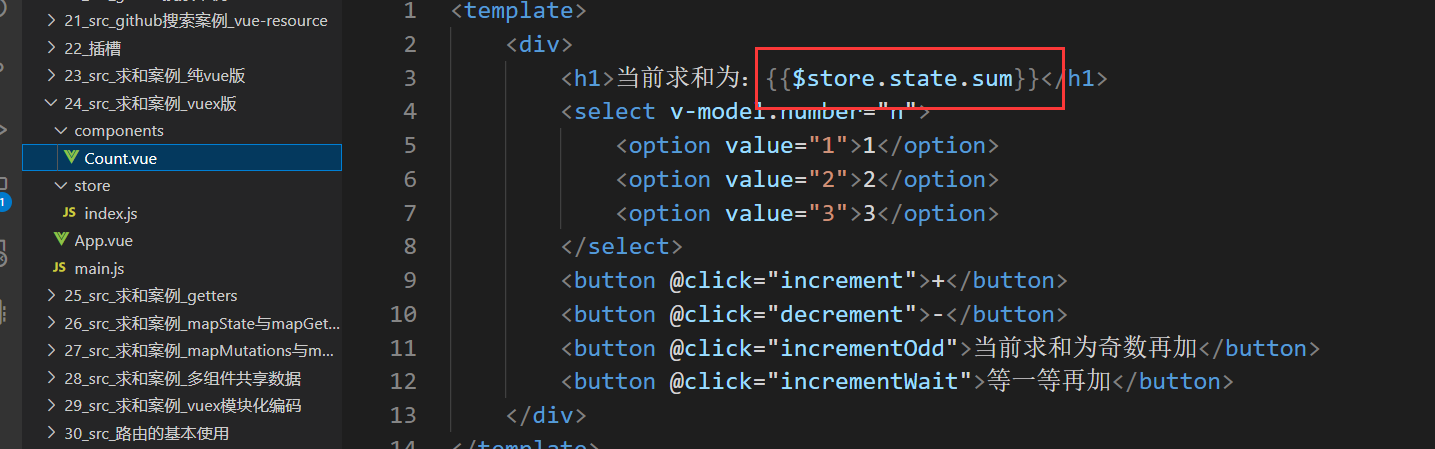
3.组件中修改vuex中的数据:
```$store.dispatch('action中的方法名',数据)``` 或 ```$store.commit('mutations中的方法名',数据)```

vuex开发者工具的使用

页面所呈现的数据一定是绿色条所在的数据

每一条后面三个按钮的作用


getters配置项
-
概念:当
state中的数据需要经过加工后再使用时,可以使用getters加工
求和案例
提出需求如下:

index.js中添加getters配置项,别忘了在store里配置进去getters

读取getters的返回值数据

1.概念:当
state中的数据需要经过加工后再使用时,可以使用getters加工2.在
store.js中追加getters配置- ...
- const getters = {
- bigSum(state){
- return state.sum * 10
- }
- }
- //创建并暴露store
- export default new Vuex.Store({
- ...
- getters
- })
$store.getters.bigSum四个Map方法的使用
往state中添加两个数据

在组件中引入

效果

问题:当使用vuex中很多数据时,就会重复使用这些

1.靠程序员自己亲自去写计算属性

mapState与mapGetters
看一下mapState干了什么活

 在数组写法当中一个sum干了两件事,1.作为计算属性 2.寻找state当中的值
如果要用数组写法,那么计算属性的名和读取出来的名要一致。

./components/Count.vue
- <template>
- <div>
- <h1>当前求和为:{{sum}}h1>
- <h3>当前求和放大10倍为:{{bigSum}}h3>
- <h3>我在{{school}},学习{{subject}}h3>
- <select v-model.number="n">
- <option value="1">1option>
- <option value="2">2option>
- <option value="3">3option>
- select>
- <button @click="increment">+button>
- <button @click="decrement">-button>
- <button @click="incrementOdd">当前求和为奇数再加button>
- <button @click="incrementWait">等一等再加button>
- div>
- template>
- <script>
- import {mapState,mapGetters} from 'vuex'
- export default {
- name:'Count',
- data() {
- return {
- n:1, //用户选择的数字
- }
- },
- computed:{
- //靠程序员自己亲自去写计算属性
- /* sum(){
- return this.$store.state.sum
- },
- school(){
- return this.$store.state.school
- },
- subject(){
- return this.$store.state.subject
- }, */
- //借助mapState生成计算属性,从state中读取数据。(对象写法)
- // ...mapState({he:'sum',xuexiao:'school',xueke:'subject'}),
- //借助mapState生成计算属性,从state中读取数据。(数组写法)
- ...mapState(['sum','school','subject']),
- /* ******************************************************************** */
- /* bigSum(){
- return this.$store.getters.bigSum
- }, */
- //借助mapGetters生成计算属性,从getters中读取数据。(对象写法)
- // ...mapGetters({bigSum:'bigSum'})
- //借助mapGetters生成计算属性,从getters中读取数据。(数组写法)
- ...mapGetters(['bigSum'])
- },
- methods: {
- increment(){
- this.$store.commit('JIA',this.n)
- },
- decrement(){
- this.$store.commit('JIAN',this.n)
- },
- incrementOdd(){
- this.$store.dispatch('jiaOdd',this.n)
- },
- incrementWait(){
- this.$store.dispatch('jiaWait',this.n)
- },
- },
- mounted() {
- const x = mapState({he:'sum',xuexiao:'school',xueke:'subject'})
- console.log(x)
- },
- }
- script>
- <style lang="css">
- button{
- margin-left: 5px;
- }
- style>
1.mapState方法:用于帮助我们映射
state中的数据- computed: {
- //借助mapState生成计算属性:sum、school、subject(对象写法)
- ...mapState({sum:'sum',school:'school',subject:'subject'}),
- //借助mapState生成计算属性:sum、school、subject(数组写法)
- ...mapState(['sum','school','subject']),
- },
2.mapGetters方法:用于帮助我们映射
getters中的数据- computed: {
- //借助mapGetters生成计算属性:bigSum(对象写法)
- ...mapGetters({bigSum:'bigSum'}),
- //借助mapGetters生成计算属性:bigSum(数组写法)
- ...mapGetters(['bigSum'])
- },
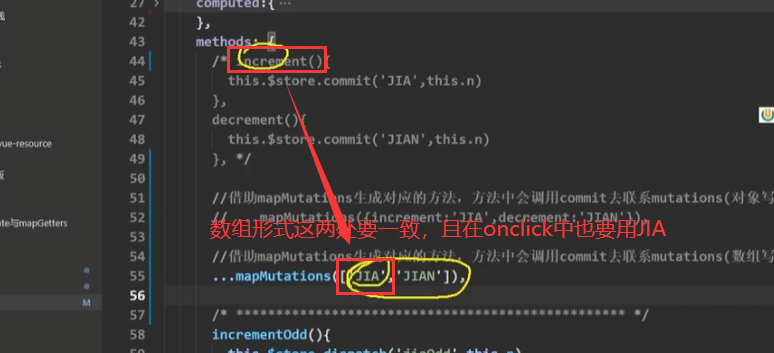
mapMutations与mapActions

./components/Count.vue
- <template>
- <div>
- <h1>当前求和为:{{sum}}h1>
- <h3>当前求和放大10倍为:{{bigSum}}h3>
- <h3>我在{{school}},学习{{subject}}h3>
- <select v-model.number="n">
- <option value="1">1option>
- <option value="2">2option>
- <option value="3">3option>
- select>
- <button @click="increment(n)">+button>
- <button @click="decrement(n)">-button>
- <button @click="incrementOdd(n)">当前求和为奇数再加button>
- <button @click="incrementWait(n)">等一等再加button>
- div>
- template>
- <script>
- import {mapState,mapGetters,mapMutations,mapActions} from 'vuex'
- export default {
- name:'Count',
- data() {
- return {
- n:1, //用户选择的数字
- }
- },
- computed:{
- //借助mapState生成计算属性,从state中读取数据。(对象写法)
- // ...mapState({he:'sum',xuexiao:'school',xueke:'subject'}),
- //借助mapState生成计算属性,从state中读取数据。(数组写法)
- ...mapState(['sum','school','subject']),
- /* ******************************************************************** */
- //借助mapGetters生成计算属性,从getters中读取数据。(对象写法)
- // ...mapGetters({bigSum:'bigSum'})
- //借助mapGetters生成计算属性,从getters中读取数据。(数组写法)
- ...mapGetters(['bigSum'])
- },
- methods: {
- //程序员亲自写方法
- /* increment(){
- this.$store.commit('JIA',this.n)
- },
- decrement(){
- this.$store.commit('JIAN',this.n)
- }, */
- //借助mapMutations生成对应的方法,方法中会调用commit去联系mutations(对象写法)
- ...mapMutations({increment:'JIA',decrement:'JIAN'}),
- //借助mapMutations生成对应的方法,方法中会调用commit去联系mutations(数组写法)
- // ...mapMutations(['JIA','JIAN']), //需要使用
- /* ************************************************* */
- //程序员亲自写方法
- /* incrementOdd(){
- this.$store.dispatch('jiaOdd',this.n)
- },
- incrementWait(){
- this.$store.dispatch('jiaWait',this.n)
- }, */
- //借助mapActions生成对应的方法,方法中会调用dispatch去联系actions(对象写法)
- ...mapActions({incrementOdd:'jiaOdd',incrementWait:'jiaWait'})
- //借助mapActions生成对应的方法,方法中会调用dispatch去联系actions(数组写法)
- // ...mapActions(['jiaOdd','jiaWait'])
- },
- mounted() {
- const x = mapState({he:'sum',xuexiao:'school',xueke:'subject'})
- console.log(x)
- },
- }
- script>
- <style lang="css">
- button{
- margin-left: 5px;
- }
- style>
1.mapActions方法:用于帮助我们生成与
actions对话的方法,即包含$store.dispatch(xxx)的函数。- methods:{
- //靠mapActions生成:incrementOdd、incrementWait(对象形式)
- ...mapActions({incrementOdd:'jiaOdd',incrementWait:'jiaWait'})
- //靠mapActions生成:incrementOdd、incrementWait(数组形式)
- ...mapActions(['jiaOdd','jiaWait'])
- }
2.mapMutations方法:用于帮助我们生成与
mutations对话的方法,即包含$store.commit(xxx)的函数。- methods:{
- //靠mapActions生成:increment、decrement(对象形式)
- ...mapMutations({increment:'JIA',decrement:'JIAN'}),
- //靠mapMutations生成:JIA、JIAN(对象形式)
- ...mapMutations(['JIA','JIAN']),
- }
备注:mapActions与mapMutations使用时,若需要传递参数需要:在模板中绑定事件时传递好参数,否则参数是事件对象(event)。
多组件共享数据
需求:一个数据,多个组件共享,在Count里读取personList人数,在Person里读取Count的和。

index.js里state添加personList属性和值,并在mutations中添加ADD_PERSON方法使之能够给personList添加人。

新建Person.vue并使用原始方法计算属性,其中可以使用state中的sum,并在template中展示。

Count.vue使用map,其中可以添加personList,并在template中展示personList.length

效果:

src/components/Count.vue:- <template>
- <div>
- <h1>当前求和为:{{sum}}h1>
- <h3>当前求和放大10倍为:{{bigSum}}h3>
- <h3>我在{{school}},学习{{subject}}h3>
- <h3 style="color:red">Person组件的总人数是:{{personList.length}}h3>
- <select v-model.number="n">
- <option value="1">1option>
- <option value="2">2option>
- <option value="3">3option>
- select>
- <button @click="increment(n)">+button>
- <button @click="decrement(n)">-button>
- <button @click="incrementOdd(n)">当前求和为奇数再加button>
- <button @click="incrementWait(n)">等一等再加button>
- div>
- template>
- <script>
- import {mapState,mapGetters,mapMutations,mapActions} from 'vuex'
- export default {
- name:'Count',
- data() {
- return {
- n:1, //用户选择的数字
- }
- },
- computed:{
- //借助mapState生成计算属性,从state中读取数据。(数组写法)
- ...mapState(['sum','school','subject','personList']),
- //借助mapGetters生成计算属性,从getters中读取数据。(数组写法)
- ...mapGetters(['bigSum'])
- },
- methods: {
- //借助mapMutations生成对应的方法,方法中会调用commit去联系mutations(对象写法)
- ...mapMutations({increment:'JIA',decrement:'JIAN'}),
- //借助mapActions生成对应的方法,方法中会调用dispatch去联系actions(对象写法)
- ...mapActions({incrementOdd:'jiaOdd',incrementWait:'jiaWait'})
- },
- mounted() {
- // const x = mapState({he:'sum',xuexiao:'school',xueke:'subject'})
- // console.log(x)
- },
- }
- script>
- <style lang="css">
- button{
- margin-left: 5px;
- }
- style>
src/components/Person.vue:- <template>
- <div>
- <h1>人员列表h1>
- <h3 style="color:red">Count组件求和为:{{sum}}h3>
- <input type="text" placeholder="请输入名字" v-model="name">
- <button @click="add">添加button>
- <ul>
- <li v-for="p in personList" :key="p.id">{{p.name}}li>
- ul>
- div>
- template>
- <script>
- import {nanoid} from 'nanoid'
- export default {
- name:'Person',
- data() {
- return {
- name:''
- }
- },
- computed:{
- personList(){
- return this.$store.state.personList
- },
- sum(){
- return this.$store.state.sum
- }
- },
- methods: {
- add(){
- const personObj = {id:nanoid(),name:this.name}
- this.$store.commit('ADD_PERSON',personObj)
- this.name = ''
- }
- },
- }
- script>
src/store/index.js:- //该文件用于创建Vuex中最为核心的store
- import Vue from 'vue'
- //引入Vuex
- import Vuex from 'vuex'
- //应用Vuex插件
- Vue.use(Vuex)
- //准备actions——用于响应组件中的动作
- const actions = {
- /* jia(context,value){
- console.log('actions中的jia被调用了')
- context.commit('JIA',value)
- },
- jian(context,value){
- console.log('actions中的jian被调用了')
- context.commit('JIAN',value)
- }, */
- jiaOdd(context,value){
- console.log('actions中的jiaOdd被调用了')
- if(context.state.sum % 2){
- context.commit('JIA',value)
- }
- },
- jiaWait(context,value){
- console.log('actions中的jiaWait被调用了')
- setTimeout(()=>{
- context.commit('JIA',value)
- },500)
- }
- }
- //准备mutations——用于操作数据(state)
- const mutations = {
- JIA(state,value){
- console.log('mutations中的JIA被调用了')
- state.sum += value
- },
- JIAN(state,value){
- console.log('mutations中的JIAN被调用了')
- state.sum -= value
- },
- ADD_PERSON(state,value){
- console.log('mutations中的ADD_PERSON被调用了')
- state.personList.unshift(value)
- }
- }
- //准备state——用于存储数据
- const state = {
- sum:0, //当前的和
- school:'尚硅谷',
- subject:'前端',
- personList:[
- {id:'001',name:'张三'}
- ]
- }
- //准备getters——用于将state中的数据进行加工
- const getters = {
- bigSum(state){
- return state.sum*10
- }
- }
- //创建并暴露store
- export default new Vuex.Store({
- actions,
- mutations,
- state,
- getters
- })
src/App.vue:- <template>
- <div class="container">
- <Count/>
- <hr/>
- <Person/>
- div>
- template>
- <script>
- import Count from './components/Count'
- import Person from './components/Person'
- export default {
- name:'App',
- components:{Count,Person}
- }
- script>
vuex模块化编码
目录结构:
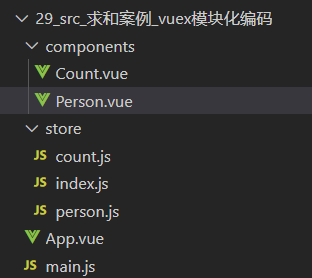
1. 目的:让代码更好维护,让多种数据分类更加明确。
2. 修改 store.js
- //count.js
- const countAbout = {
- namespaced:true,//开启命名空间
- state:{x:1},
- mutations: { ... },
- actions: { ... },
- getters: {
- bigSum(state){
- return state.sum * 10
- }
- }
- }
- export default countAbout
- //person.js
- const personAbout = {
- namespaced:true,//开启命名空间
- state:{ ... },
- mutations: { ... },
- actions: { ... }
- }
- export default personAbout
- //index.js
- //该文件用于创建Vuex中最为核心的store
- import Vue from 'vue'
- //引入Vuex
- import Vuex from 'vuex'
- import countOptions from './count'
- import personOptions from './person'
- //应用Vuex插件
- Vue.use(Vuex)
- const store = new Vuex.Store({
- modules: {
- //countAbout:countOptions,
- //personAbout:personOptions
- countAbout,
- personAbout
- }
- })
- export default store
3. 开启命名空间后,组件中读取state数据:
- //方式一:自己直接读取
- this.$store.state.personAbout.list
- //方式二:借助mapState读取:
- ...mapState('countAbout',['sum','school','subject']),
4. 开启命名空间后,组件中读取getters数据:
- //方式一:自己直接读取
- this.$store.getters['personAbout/firstPersonName']
- //方式二:借助mapGetters读取:
- ...mapGetters('countAbout',['bigSum'])
5. 开启命名空间后,组件中调用dispatch
- //方式一:自己直接dispatch
- this.$store.dispatch('personAbout/addPersonWang',person)
- //方式二:借助mapActions:
- ...mapActions('countAbout',{incrementOdd:'jiaOdd',incrementWait:'jiaWait'})
6. 开启命名空间后,组件中调用commit
- //方式一:自己直接commit
- this.$store.commit('personAbout/ADD_PERSON',person)
- //方式二:借助mapMutations:
- ...mapMutations('countAbout',{increment:'JIA',decrement:'JIAN'}),
-
相关阅读:
Django自定义manage.py命令实现hexo博客迁移
Node.js躬行记(18)——半吊子的可视化搭建系统
Java数组遍历深度解析
如何在3DMax中使用超过16个材质ID通道?
互联网行业数据安全建设实践方案
MFC中对编码文件的操作01
Numpy数组中的运算与拼接,看这篇就够了
致医生的一封信:感谢“医”路有你,天天好心情
计算机专业哀鸿遍野:低代码平台和程序员水火不容,马上被取代
LED台灯控制芯片 LED调光芯片 LED驱动芯片AH6730
- 原文地址:https://blog.csdn.net/m0_52601969/article/details/127877072

- 最新文章
-
OpenCode 对接实践:从独立进程到共享 Runtime 的架构演进
Redis--Redis分布式系统的原理与实操
V8引擎 精品漫游指南--Ignition篇(下 二) JavaScript 栈帧详解
【JVM】编译执行与解释执行的区别是什么?JVM 使用哪种方式?
用 Hashids 优雅解决 C 端自增 ID 暴露问题
V8引擎 精品漫游指南--Ignition篇(上) 指令 栈帧 槽位 调用约定 内存布局 基础内容
LLVM Pass快速入门(四):代码插桩
milkup:桌面端 markdown AI续写和即时渲染
基于项目工程构建SBOM(软件物料清单)的研究
鸿蒙应用开发UI基础第二节:鸿蒙应用程序框架核心解析与实操