-
C++ 输入输出流
1、输入输出机制
流:字节序列,数据间的传输操作。
1.1、流的类型
- 标准 IO:系统指定的标准设备,iostream: istream, ostream, iostream
- 文件 IO:磁盘文件,fstream: ifstream, ofstream, fstream
- 字符串 IO:内存空间,sstream: istringstream, ostringstream, stringstream
1.2、流的继承图
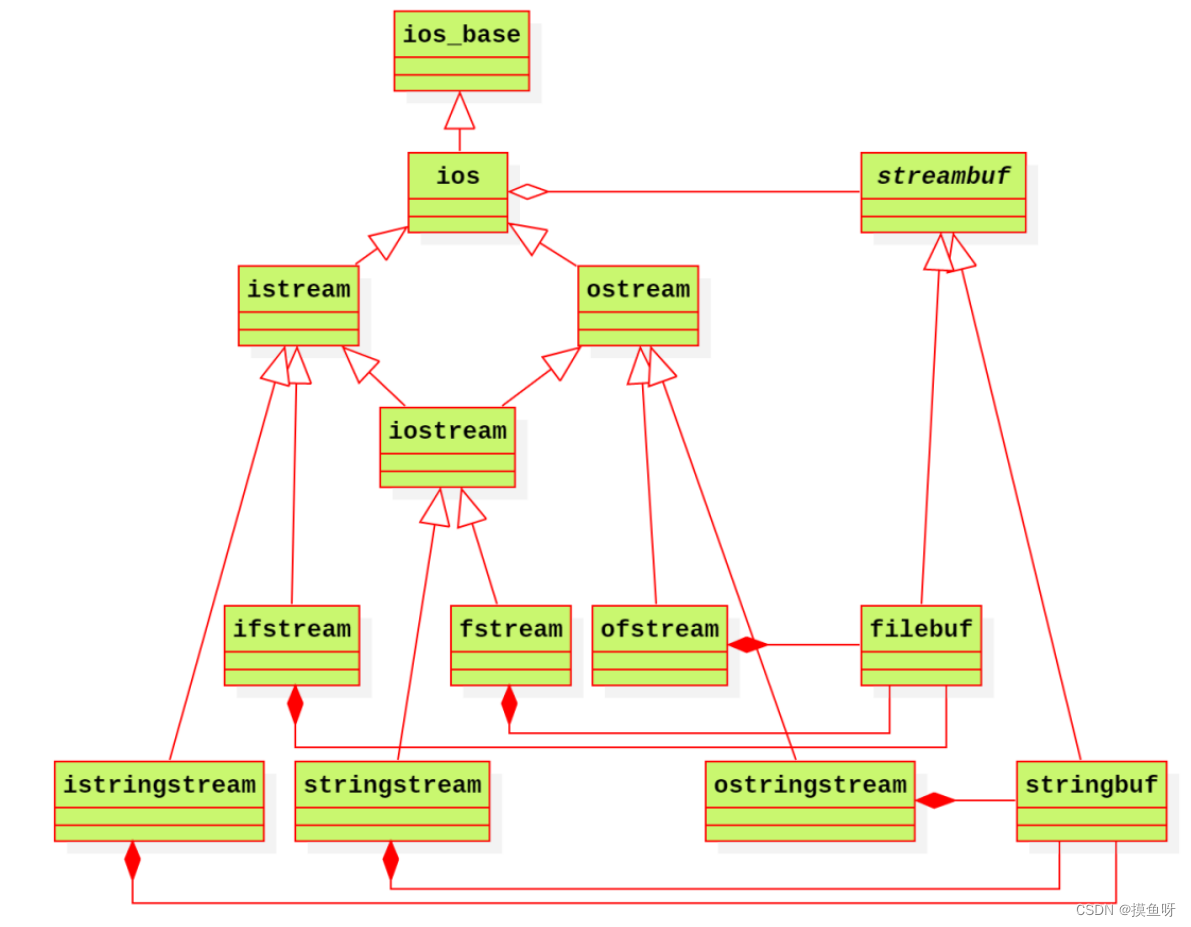
ios是抽象基类,由它派生出 istream 类和 ostream 类,iostream 类支持输入输出操作,iostream类是从 istream 类和 ostream 类通过多重继承而派生的类。类ifstream继承了类 istream,类ofstream 继承了类 ostream,类 fstream 继承了类 iostream.
1.3、流的状态
-
badbit:
bad(),系统级的错误,不可恢复。 -
failbit:
fail(),可恢复的错误。 -
eofbit:
eof(),到达文件的结束位置。 -
goodbit:
good(),流正常状态
管理流的状态
bool bad() const; //若流的badbit置位,则返回true;否则返回false bool fail() const; //若流的failbit或badbit置位,则返回true; bool eof() const; //若流的eofbit置位,则返回true; bool good() const; //若流处于有效状态,则返回true; iostate rdstate() const; //获取流的状态 void setstate(iostate state); //设置流的状态 //clear的无参版本会复位所有错误标志位*,重置流的状态 void clear(std::ios_base::iostate state = std::ios_base::goodbit);- 1
- 2
- 3
- 4
- 5
- 6
- 7
- 8
- 9
- 10
1.4、流的操作
/* ----输入流操作---- */ // 读取一个字符 int_type get(); istream & get(char_type & ch); // 读取一行数据 istream & getline(char_type * s, std::streamsize count, char_type delim ='\n'); // 读取 count 个字节的数据 istream & read(char_type * s, std::streamsize count); // 最多获取 count 个字节,返回值为实际获取的字节数 std::streamsize readsome(char_type * s, std::streamsize count); // 清空缓冲区:读取到前 count 个字符或在该过程中遇到 delim 字符就停止,并把读取数据 istream & ignore(std::streamsize count = 1, int_type delim = Traits::eof()); // 查看输入流中的下一个字符, 但是并不将该字符从输入流中取走,不会跳过输入流中的空格、回车符; 在输入流已经结束的情况下,返回 EOF。 int_type peek(); // 获取当前流中游标所在的位置 pos_type tellg(); // 偏移游标的位置 basic_istream & seekg(pos_type pos); basic_istream & seekg(off_type off, std::ios::seekdir dir); /* ----输出流操作---- */ // 往输出流中写入一个字符 ostream & put(char_type ch); // 往输出流中写入count个字符 ostream & write(const char_type * s, std::streamsize count); // 获取当前流中游标所在的位置 pos_type tellp(); // 刷新缓冲区 ostream & flush(); // 偏移游标的位置 ostream & seekp(pos_type pos); ostream & seekp(off_type off, std::ios_base::seekdir dir);- 1
- 2
- 3
- 4
- 5
- 6
- 7
- 8
- 9
- 10
- 11
- 12
- 13
- 14
- 15
- 16
- 17
- 18
- 19
- 20
- 21
- 22
- 23
- 24
- 25
- 26
- 27
- 28
- 29
- 30
- 31
- 32
1.5、缓冲区
缓冲区的类型
- 全缓冲:填满缓冲后,执行 IO 操作,文件读写
- 行缓冲:遇到换行符,执行 IO 操作,键盘输入
- 不缓冲:cerr/stderr,立即显示错误信息。
2、标准IO
cin, cout, cerr 分别用文件描述符 0,1,2 代表。
2.1、标准输入
标准输入 cin:流提取符>>,从输入流中提取数据跳过空白字符(空格、tab、换行等)。换行符将数据送入缓冲区,形成输入流。
例:cin 与流状态的使用
clear重置流的状态ignore清空缓冲区,ignore(std::numeric_limits
int n = 0; cin >> n; while (cin >> n, !cin.eof()) { // ctrl+D,流的状态:eofbit=1 // 不可恢复错误,流不能继续使用,流的状态: badbit=1 if (cin.bad()) { break; } // 可恢复错误,重置流的状态 + 清空缓冲区。流的状态: failbit=1 else if (cin.fail()) { // 1、重置流的状态,流恢复正常 cin.clear(); // 2、清空缓冲区 // 流虽然恢复正常,但是其中的杂质数据还在缓冲区,会影响之后的输出 cin.ignore(std::numeric_limits<std::streamsize>::max(), '\n'); } // 流正常。流的状态: goodbit=1 else { cout << n << endl; } }- 1
- 2
- 3
- 4
- 5
- 6
- 7
- 8
- 9
- 10
- 11
- 12
- 13
- 14
- 15
- 16
- 17
- 18
- 19
- 20
2.2、标准输出
标准输出流
- 标准输出 cout
- 标准错误 cerr(非缓冲)
- 标准错误 clog(带缓冲)
输出缓冲区被刷新的时机
- 程序正常结束
- 缓冲区满:默认1024字节
- 使用操作符显示刷新缓冲区
- endl: 完成换行,并刷新缓冲区
- flush: 直接刷新缓冲区
3、文件IO
3.1、文件的模式
输入模式
- in:输入,文件将允许做读操作;如果文件不存在,打开失败
- ate:末尾,读操作始终发生在文件的末尾
输出模式
- out:输出,文件将允许做写操作;如果文件不存在,则直接创建一个
- app:追加,写入将始终发生在文件的末尾
- trunc:截断,如果打开的文件存在,其内容将被丢弃,其大小被截断为零
- binary:二进制,读取或写入文件的数据为二进制形式
3.2、文件流
文件流的构造函数
// ifstream 文件输入流,默认in explicit ifstream(const char *filename, openmode mode = in); explicit ifstream(const string &filename, openmode mode = in); // ofstream 文件输出流,默认out explicit ofstream(const char *filename, openmode mode = out); explicit ofstream(const string &filename, openmode mode = out); // fstream 文件输入输出流,默认in|out explicit fstream(const char *filename, openmode mode = in|out); explicit fstream(const string &filename, openmode mode = in|out);- 1
- 2
- 3
- 4
- 5
- 6
- 7
- 8
- 9
- 10
- 11
例如:
std::ofstream ofs("text.txt"); // 默认 out 模 std::ofstream ofs("text.txt", std::ios::app); // 设置 app 模式- 1
- 2
3.3、文件指针
查找文件指针的位置:tellp/tellg,p = put, g = get
设置文件指针的位置:seekp/seekg,文件指针的位置有
- std::ios::beg
- std::ios::cur
- std::ios::end
4、字符串IO
字符串流的构造函数
// istringstream 字符串输入流 explicit istringstream(openmode mode = ios_base::in); explicit istringstream(const string& str, openmode mode = ios_base::in); // ostringstream 字符串输出流 explicit ostringstream(openmode mode = ios_base::out); explicit ostringstream(const string& str, openmode mode = ios_base::out); // stringstream 字符串输入输出流 explicit stringstream(openmode mode = ios_base::in|ios_base::out); explicit stringstream(const string& str, openmode mode = ios_base::in|ios_base::out);- 1
- 2
- 3
- 4
- 5
- 6
- 7
- 8
- 9
- 10
5、实例
例1:统计一篇英文 (The_Holy_Bible.txt) 文章中出现的单词和词频,
- 输入:某篇文章的绝对路径
- 输出:词典(词典中的内容为每一行都是一个"单词 词频")
#include#include #include #include #include #include #include using std::cout; using std::endl; using std::string; using std::vector; using std::ifstream; using std::ofstream; using std::cerr; using std::istringstream; using std::sort; // 记录词频,用 hash 替代 struct Record { Record(const string &word, int frequency) : _word(word) , _frequency(frequency) {} string _word; int _frequency; }; bool operator<(const Record &lhs, const Record &rhs) { return lhs._word < rhs._word; } class Dictionary { public: Dictionary(int capa) { _dict.reserve(capa); } // 读文件 void read(const std::string & filename) { ifstream ifs(filename); if(!ifs) { cerr << "the ifstream " << filename << " error" << endl; return; } string line; // 每次读取文件的一行,while(getline(ifs), line) while(getline(ifs, line)) { istringstream iss(line); string word; // 读取一行中的每一个单词 while(iss >> word, !iss.eof()) { string newWord = dealWord(word); //处理异常单词 insert(newWord); //将新的单词插入vector } } // 对单词排序 sort(_dict.begin(), _dict.end()); ifs.close(); } // 处理结果,写文件 void store(const std::string & filename) { ofstream ofs(filename); if(!ofs) { cerr << "ofstream is not good" << endl; return; } // 处理输出文件格式 for(size_t idx = 0; idx != _dict.size(); ++idx) { ofs << _dict[idx]._word << " : " << _dict[idx]._frequency << endl; } ofs.close(); } // 处理异常单词,不统计非单词的词频,例如123abc string dealWord(const string &word) { for(size_t idx = 0; idx != word.size(); ++idx) { if(!isalpha(word[idx])) { return string(); } } return word; } void insert(const string &word) { if(word == string()) { return; } // 查找该单词是否出现,出现则增加词频 size_t idx = 0; for(idx = 0; idx != _dict.size(); ++idx) { if(word == _dict[idx]._word) { ++_dict[idx]._frequency; break; } } // 单词第一次出现,加入词典 if(idx == _dict.size()) { _dict.push_back(std::move(Record(word, 1))); } } private: vector<Record> _dict; }; int main(int argc, char **argv) { Dictionary dictionary(13000); cout << "start reading..." << endl; time_t beg = time(NULL); dictionary.read("The_Holy_Bible.txt"); time_t end = time(NULL); cout << "cost time: " << (end - beg) << "s" << endl; cout << "finish reading..." << endl; dictionary.store("data.txt"); return 0; } - 1
- 2
- 3
- 4
- 5
- 6
- 7
- 8
- 9
- 10
- 11
- 12
- 13
- 14
- 15
- 16
- 17
- 18
- 19
- 20
- 21
- 22
- 23
- 24
- 25
- 26
- 27
- 28
- 29
- 30
- 31
- 32
- 33
- 34
- 35
- 36
- 37
- 38
- 39
- 40
- 41
- 42
- 43
- 44
- 45
- 46
- 47
- 48
- 49
- 50
- 51
- 52
- 53
- 54
- 55
- 56
- 57
- 58
- 59
- 60
- 61
- 62
- 63
- 64
- 65
- 66
- 67
- 68
- 69
- 70
- 71
- 72
- 73
- 74
- 75
- 76
- 77
- 78
- 79
- 80
- 81
- 82
- 83
- 84
- 85
- 86
- 87
- 88
- 89
- 90
- 91
- 92
- 93
- 94
- 95
- 96
- 97
- 98
- 99
- 100
- 101
- 102
- 103
- 104
- 105
- 106
- 107
- 108
- 109
- 110
- 111
- 112
- 113
- 114
- 115
- 116
- 117
- 118
- 119
- 120
- 121
例2:查询某一单词在一篇英文 (The_Holy_Bible.txt) 文章出现的行号和行信息
#include#include #include #include #include #include #include #include using std::cout; using std::cin; using std::endl; using std::shared_ptr; using std::string; using std::map; using std::set; using std::vector; using std::ifstream; using std::istringstream; using line_no = vector<string>::size_type; // 类的前向声明,作为函数query的返回类型 class QueryResult; // 文本查询类 class TextQuery { public: TextQuery(ifstream &ifs); QueryResult query(const string &sought) const; private: shared_ptr<vector<string>> file; // 输入文件 map<string, shared_ptr<set<line_no>>> wm; // 单词-行号集合 }; // 查询结果类 class QueryResult { public: QueryResult(string s, shared_ptr<set<line_no>> p, shared_ptr<vector<string>> f) : sought(s) , lines(p) , file(f) {} /* friend std::ostream &print(std::ostream &os, const QueryResult &rhs); */ friend std::ostream &operator<<(std::ostream &os, const QueryResult &rhs); private: string sought; // 要查询的单词 shared_ptr<set<line_no>> lines; // 行号集合 shared_ptr<vector<string>> file; // 输入的文件 }; // 获取文本中每个单词对应的行号集合 TextQuery::TextQuery(ifstream &ifs) : file(new vector<string>) { string text; // 获取文本的每一行 while(getline(ifs, text)) { file->push_back(text); // 保存此文本 int n = file->size() - 1; // 获取当前行号 // 将一行文本拆解为单词 istringstream iss(text); string word; while(iss >> word) { // 若单词不在 wm 中,则在wm中添加一项 auto &lines = wm[word]; if(!lines) { lines.reset(new set<line_no>); // 分配一个新的set } lines->insert(n); //将此行号插入set中 } } } // 查询该单词是否出现 QueryResult TextQuery::query(const string &sought) const { // 如果没有找到sought,返回一个指向此set的指针 static shared_ptr<set<line_no>> nodata(new set<line_no>); // 使用find而不是下标运算符来查找单词,避免将单词添加到wm中 auto loc = wm.find(sought); if (loc == wm.end()) { return QueryResult(sought, nodata, file); } else{ return QueryResult(sought, loc->second, file); } } /* std::ostream &print(std::ostream &os, const QueryResult &rhs) */ std::ostream &operator<<(std::ostream &os, const QueryResult &rhs) { os << rhs.sought << " occurs " << rhs.lines->size() << " " << ((rhs.lines->size() > 1) ? "times" : "time") << endl; for(auto num : *rhs.lines) { os << "\t(line " << num + 1 << ") " << *(rhs.file->begin() + num ) << endl; } return os; } void runQueries(ifstream &infile) { TextQuery tq(infile); while(1) { cout << "enter word to look for, or q to quit:"; string s; if(!(cin >> s) || s == "q") break; /* print(cout, tq.query(s)) << endl; */ /* print(cout, tq.query(s)) << endl; */ cout << tq.query(s) << endl; } } int main(int argc, char **argv) { ifstream ifs("The_Holy_Bible.txt"); runQueries(ifs); return 0; } - 1
- 2
- 3
- 4
- 5
- 6
- 7
- 8
- 9
- 10
- 11
- 12
- 13
- 14
- 15
- 16
- 17
- 18
- 19
- 20
- 21
- 22
- 23
- 24
- 25
- 26
- 27
- 28
- 29
- 30
- 31
- 32
- 33
- 34
- 35
- 36
- 37
- 38
- 39
- 40
- 41
- 42
- 43
- 44
- 45
- 46
- 47
- 48
- 49
- 50
- 51
- 52
- 53
- 54
- 55
- 56
- 57
- 58
- 59
- 60
- 61
- 62
- 63
- 64
- 65
- 66
- 67
- 68
- 69
- 70
- 71
- 72
- 73
- 74
- 75
- 76
- 77
- 78
- 79
- 80
- 81
- 82
- 83
- 84
- 85
- 86
- 87
- 88
- 89
- 90
- 91
- 92
- 93
- 94
- 95
- 96
- 97
- 98
- 99
- 100
- 101
- 102
- 103
- 104
- 105
- 106
- 107
- 108
- 109
- 110
- 111
- 112
- 113
- 114
- 115
- 116
- 117
- 118
- 119
- 120
- 121
- 122
-
相关阅读:
Flink 常见故障处理
Flink系列文档-(YY03)-Flink编程基础API
Python将Excel文件插入Mysql数据库(脚本)
21-数据结构-内部排序-交换排序
@Async注解详解 以及 可能遇到的各种问题
操作系统:2.3.2实现临界互斥的基本方法
ffmpeg 开发笔记
6G极化码低时延译码方案
EmEditor文本编辑器添加宏,实现xml报文格式化显示
阿里云GPU计算型gn6v云服务器性能配置|活动优惠价
- 原文地址:https://blog.csdn.net/you_fathe/article/details/127738812

- 最新文章
-
【FHE】我们如何实现同态加密推理(八):SiLU 的密文化——两条路径,和一个 8 字节的开关
SQLcl 中 c/old/new 替换变量为何失效?先定位再替换
不让模型写作文,直接从它脑子里读答案:Jev 决策在 .NET 的两条路线
Halo插件:支持GitHub的图床附件策略
电视投屏界的“一股清流”!SimpleTVCast 6.0.0-beta 抢先体验:无需TV端App,界面大换血!✨
华三VXLAN集中式网关实战指南:Spine多活网关 + 双活接入(M-LAG)
软件更好写之后口碑会更重要
大 O、大 Omega、大 Theta 的区别,O(n) 复杂度是什么意思
Java标签跳转:一个鲜为人知但却很实用的小技巧
多智能体系统论文速读