-
Request的总结
Request的概述
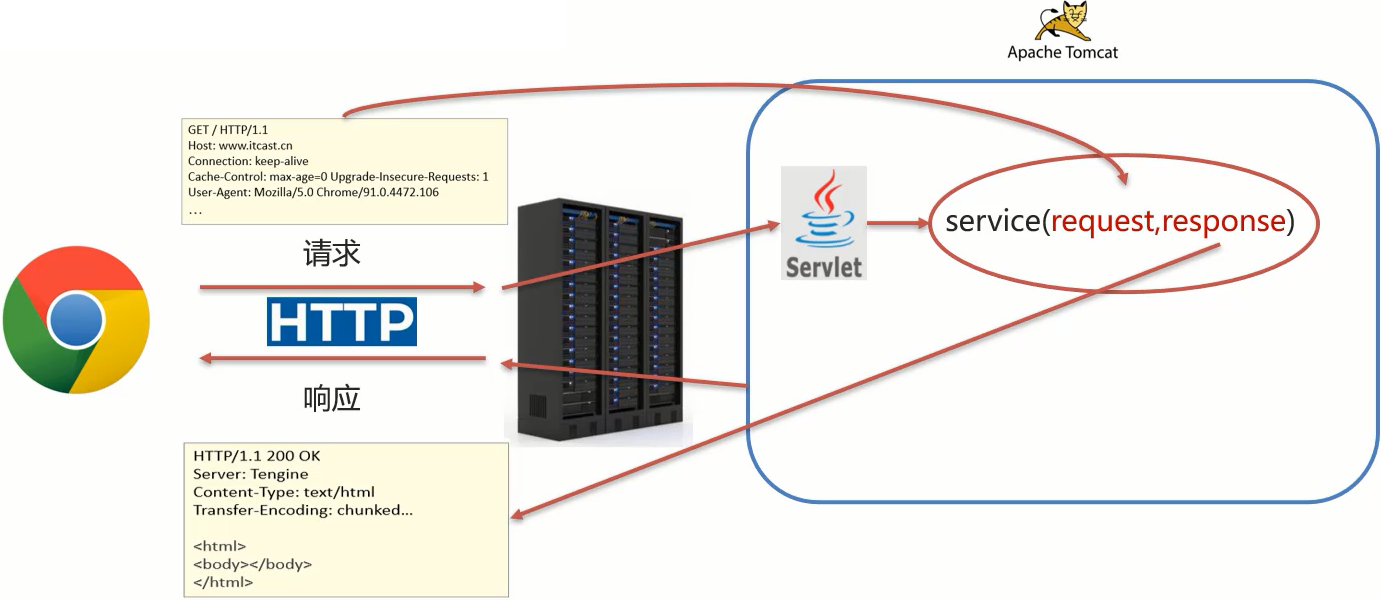
Request是请求对象,Response是响应对象。这两个对象在我们使用Servlet的时候有看到
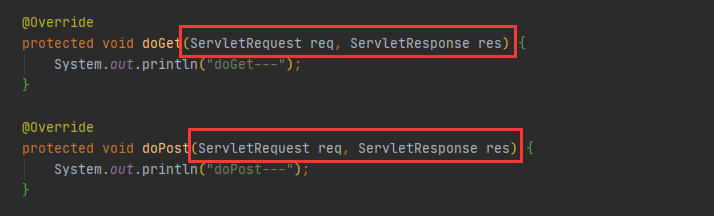
-
request:
获取请求数据:- 浏览器会发送HTTP请求到后台服务器[Tomcat]
- HTTP的请求中会包含很多请求数据[请求行+请求头+请求体]
- 后台服务器[Tomcat]会对HTTP请求中的数据进行解析并把解析结果存入到一个对象中
- 所存入的对象即为
request对象,所以我们可以从request对象中获取请求的相关参数 - 获取到数据后就可以继续后续的业务,比如获取用户名和密码就可以实现登录操作的相关业务
-
response:
设置响应数据:- 业务处理完后,后台就需要给前端返回业务处理的结果即响应数据
- 把响应数据封装到response对象中
- 后台服务器[Tomcat]会解析
response对象,按照[响应行+响应头+响应体]格式拼接结果 - 浏览器最终解析结果,把内容展示在浏览器给用户浏览
对于上述所讲的内容,我们通过一个案例来初步体验下request和response对象的使用。
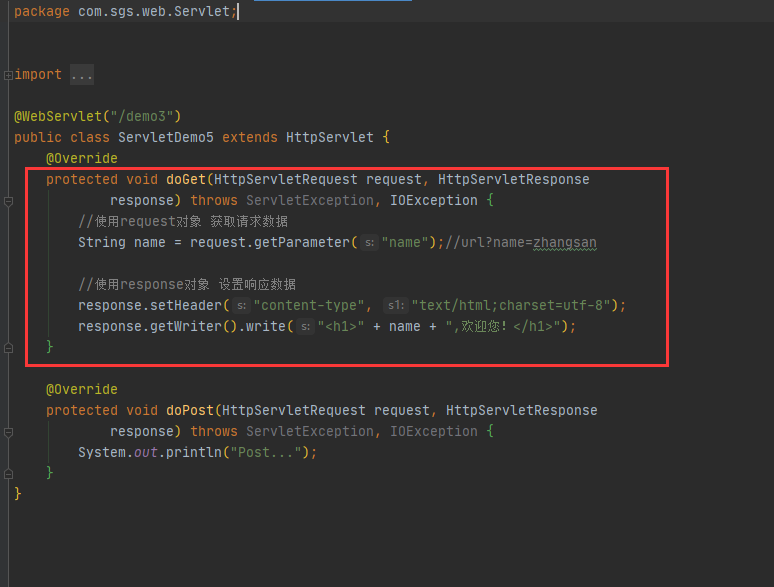
结果:

小结
在这节中,我们主要认识了下request对象和reponse对象:- request对象是用来封装请求数据的对象
- response对象是用来封装响应数据的对象
一. Request对象学习
1.1 request继承体系
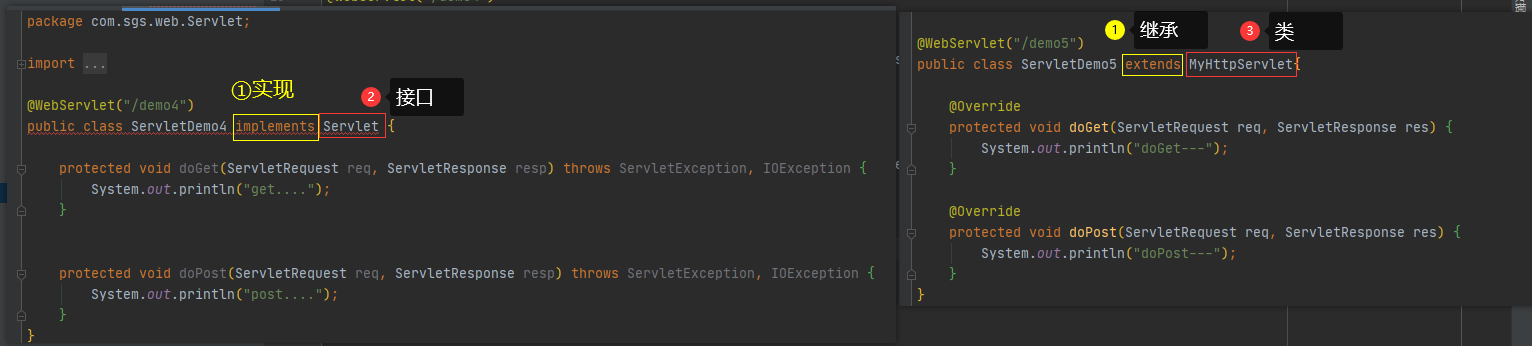
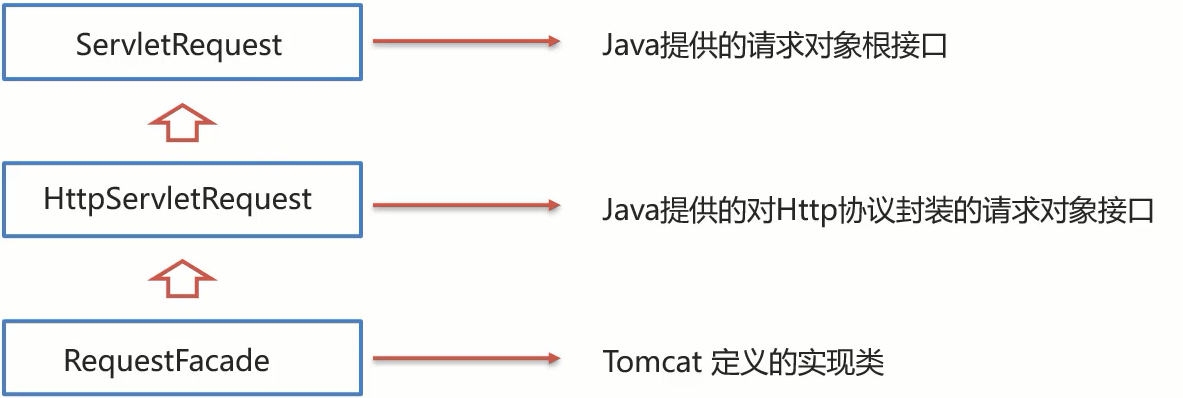
从上图中可以看出,ServletRequest和HttpServletRequest都是Java提供的,所以我们可以打开JavaEE提供的API文档

所以ServletRequest和HttpServletRequest是继承关系,并且两个都是接口,接口是无法创建对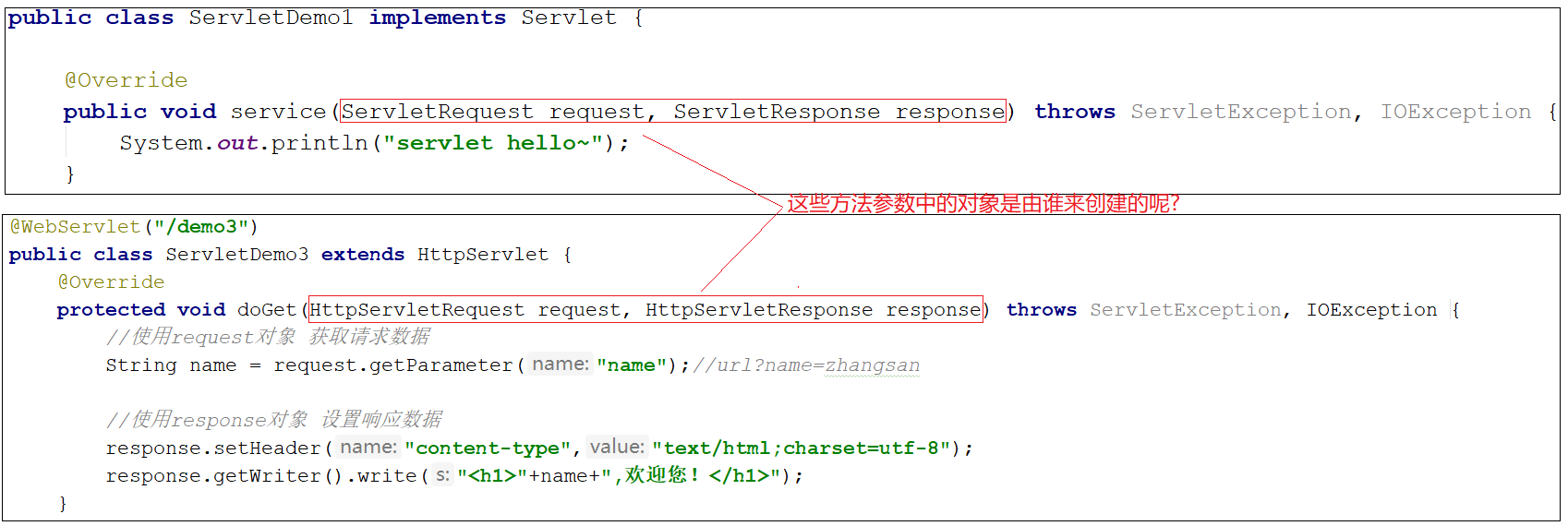
这个时候,我们就需要用到Request继承体系中的RequestFacade:该类实现了HttpServletRequest接口,也间接实现了ServletRequest接口。- Servlet类中的service方法、doGet方法或者是doPost方法最终都是由Web服务器[Tomcat]来调用的,所以Tomcat提供了方法参数接口的具体实现类,并完成了对象的创建
- 要想了解RequestFacade中都提供了哪些方法,我们可以直接查看JavaEE的API文档中关于
ServletRequest和HttpServletRequest的接口文档,因为RequestFacade实现了其接口就需要重写接口中的方法
对于上述结论,要想验证,可以编写一个Servlet,在方法中把request对象打印下,就能看到最终的对象是不是RequestFacade,代码如下:@WebServlet("/demo2")= public class ServletDemo2 extends HttpServlet { @Override protected void doGet(HttpServletRequest request, HttpServletResponse response) throws ServletException, IOException { System.out.println(request); } @Override protected void doPost(HttpServletRequest request, HttpServletResponse response) throws ServletException, IOException { } }- 1
- 2
- 3
- 4
- 5
- 6
- 7
- 8
- 9
- 10
- 启动服务器,运行访问http://localhost:8080/request-demo/demo2 ,得到运行结果:

- 小结
- Request的继承体系为ServletRequest–>HttpServletRequest–>RequestFacade
Tomcat需要解析请求数据,封装为request对象,并且创建request对象传递到service方法- 使用request对象,可以查阅JavaEE API文档的HttpServletRequest接口中方法说明
- 小结
1.2 request获取请求参数
HTTP请求数据总共分为三部分内容,分别是**
请求行、请求头、请求体**,对于这三部分内容的数据,分别该如何获取,首先我们先来学习请求行数据如何获取?- 请求行
- 包含三块内容,分别是请求方式、请求资源路径、HTTP协议及版本

- 对于这三部分内容,request对象都提供了对应的API方法来获取,具体如下:
- 获取请求方式: GET
String getMethod()- 1
- 获取虚拟目录(项目访问路径): /request-demo
String getContextPath()- 1
- 获取URL(统一资源定位符): http://localhost:8080/request-demo/req1
StringBuffer getRequestURL()- 1
- 获取URI(统一资源标识符): /request-demo/req1
String getRequestURI()- 1
- 获取请求参数(GET方式): username=zhangsan&password=123
String getQueryString()- 1
- 获取请求方式: GET
- 包含三块内容,分别是请求方式、请求资源路径、HTTP协议及版本
介绍完上述方法后,咱们通过代码把上述方法都使用下:
//String getMethod(): 获取请求方式:get String method = req.getMethod(); System.out.println( "method:" + method);//默认GET //Sting getContextPath();获取虚拟项目(访问路径) /request-demo String servletPath = req.getServletPath(); System.out.println("servletPath:"+servletPath);// 默认路径为 /req1 //StringBuffer getRequestURL() 获取统一资源定位符(URL): ?之前的所有 StringBuffer requestURL = req.getRequestURL(); System.out.println("requestURL:"+requestURL); //String getRequestURI():获取统一资源标识符 /Web-demo/..... String requestURI = req.getRequestURI(); System.out.println("requestURI:"+requestURI); System.out.println("------------------"); //获取请求头:user-agent 获取浏览器的版本信息 String agent = req.getHeader("user-agent"); System.out.println("agent:"+agent); //获取请求体 //Sting getQueryString();获取请求参数Get方式的参数 类似于这些 username=zhangsan String queryString = req.getQueryString(); System.out.println("queryString:"+queryString);- 1
- 2
- 3
- 4
- 5
- 6
- 7
- 8
- 9
- 10
- 11
- 12
- 13
- 14
- 15
- 16
- 17
- 18
- 19
- 20
- 21
- 22
- 23
- 24
- 25
- 26
- 27
- 28
启动服务器,访问http://localhost:8080/request-demo/req1?username=zhangsan&passwrod=123,获取的结果如下:

-
获取请求头数据
对于请求头的数据,格式为key: value如下:

所以根据请求头名称获取对应值的方法为:String getHeader(String name);- 1
接下来,在代码中如果
想要获取客户端浏览器的版本信息,则可以使用:
/** * request 获取请求数据 */ @WebServlet("/req1") public class RequestDemo1 extends HttpServlet { @Override protected void doGet(HttpServletRequest req, HttpServletResponse resp) throws ServletException, IOException { String agent = req.getHeader("user-agent");//获取请求头: user-agent: 浏览器的版本信息 System.out.println(agent); } @Override protected void doPost(HttpServletRequest req, HttpServletResponse resp) throws ServletException, IOException { } }- 1
- 2
- 3
- 4
- 5
- 6
- 7
- 8
- 9
- 10
- 11
- 12
- 13
- 14
- 15
重新启动服务器后,http://localhost:8080/request-demo/req1username=zhangsan&passwrod=123,获取的结果如下:

- 获取请求体数据
浏览器在发送GET请求的时候是没有请求体的,所以需要把**请求方式变更为POST**,请求体中的数据格
式如下:

对于请求体中的数据,
post方式的Request对象提供了如下两种方式来获取其中的数据,分别是:- 获取字节输入流,如果前端发送的是字节数据,比如传递的是文件数据,则使用该方法
ServletInputStream getInputStream();//该方法可以获取字节- 1
- 获取字符输入流,如果前端发送的是纯文本数据,则使用该方法
BufferedReader getReader();//该方法可以获取字符串- 1
接下来,要想获取到请求体的内容该如何实现?
- 具体实现的步骤如下:
- 准备一个页面,在页面中添加form表单,用来发送post请求
DOCTYPE html> <html lang="en"> <head> <meta charset="UTF-8"> <title>Titletitle> head> <body> <form action="/request-demo/req1" method="post"> <input type="text" name="username"> <input type="password" name="password"> <input type="submit"> form> body> html>- 1
- 2
- 3
- 4
- 5
- 6
- 7
- 8
- 9
- 10
- 11
- 12
- 13
- 14
- 15
- 16
- 17
- 18
- 在Servlet的doPost方法中获取请求体数据
@WebServlet(urlPatterns="/req1") public class RequestDemo1 extends HttpServlet { @Override protected void doGet(HttpServletRequest req, HttpServletResponse resp) throws ServletException, IOException { } @Override protected void doPost(HttpServletRequest req, HttpServletResponse resp) throws ServletException, IOException { } }- 1
- 2
- 3
- 4
- 5
- 6
- 7
- 8
- 9
- 10
- 11
- 12
- 13
- 14
- 在doPost方法中使用request的getReader()或者getInputStream()来获取
@Override protected void doPost(HttpServletRequest req, HttpServletResponse resp) throws ServletException, IOException { //获取post请求体:请求参数 //1. 获取字符输入流 BufferedReader br = req.getReader(); //所得参数是字符串则调用getReader(); //2. 读取数据 String line = br.readLine(); System.out.println(line); //在post方式中是不用关闭br.close()的, post方式随着项目停止而停止 /* 方法 2 ServletInputStream is = req.getInputStream(); int len=0; byte[] b = new byte[1024]; while ((len = is.read(b))!=-1){ System.out.println(new String(b,0,len)); }*/ }- 1
- 2
- 3
- 4
- 5
- 6
- 7
- 8
- 9
- 10
- 11
- 12
- 13
- 14
- 15
- 16
- 17
- 18
- 19
- 20
- 21
- 22
- 23
- 24
注意- BufferedReader流和ServletInputStream 流是通过request对象来获取的,当请求完成后request对象就会被销毁,
- request对象被销毁后,BufferedReader流就会自动关闭,所以此处就不需要手动关闭流了
- 访问测试
启动服务器,通过浏览器访问http://localhost:8080/request-demo/req.html

点击提交按钮后,就可以在控制台看到前端所发送的请求数据

小结:
HTTP请求数据中包含了请求行、请求头和请求体,针对这三部分内容,Request对象都提供了对应的
API方法来获取对应的值:- 请求行
- getMethod()获取请求方式
- getContextPath()获取项目访问路径
- getRequestURL()获取请求URL
- getRequestURI()获取请求URI
- getQueryString()获取GET请求方式的请求参数
- 请求头
- getHeader(String name)根据请求头名称获取其对应的值
- 请求体
- 注意: 浏览器发送的POST请求才有请求体
- 如果是纯文本数据:getReader()
- 如果是字节数据如文件数据:getInputStream()
- 注意: 浏览器发送的POST请求才有请求体
1.3 request获取请求参数
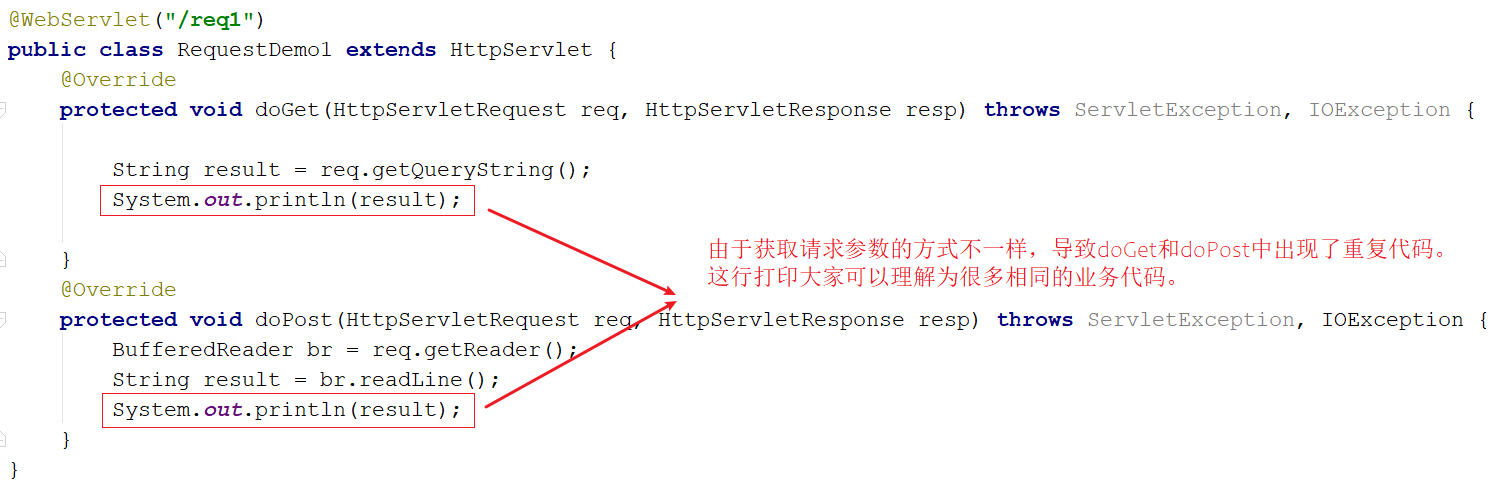
- 如何解决上述重复代码的问题呢?

当然,也可以在doGet中调用doPost,在doPost中完成参数的获取和打印,另外需要注意的是,doGet和doPost方法都必须存在,不能删除任意一个。
GET请求和POST请求获取请求参数的方式不一样,在获取请求参数这块该如何实现呢?- GET请求方式和POST请求方式区别主要在于获取请求参数的方式不一样,是否可以提供一种统一获取请求参数的方式,从而统一doGet和doPost方法内的代码?
-
解决方案一:
使用request的getMethod()来获取请求方式,根据请求方式的不同分别获取请求参数值,这样就可
以解决上述问题,但是以后每个Servlet都需要这样写代码,实现起来比较麻烦,这种方案我们不采
用
-
@WebServlet("/req1") public class RequestDemo1 extends HttpServlet { @Override protected void doGet(HttpServletRequest req, HttpServletResponse resp) throws ServletException, IOException { //获取请求方式 String method = req.getMethod(); //获取请求参数 String params = ""; if("GET".equals(method)){ params = req.getQueryString(); }else if("POST".equals(method)){ BufferedReader reader = req.getReader(); params = reader.readLine(); } //将请求参数进行打印控制台 System.out.println(params); } @Override protected void doPost(HttpServletRequest req, HttpServletResponse resp) throws ServletException, IOException { this.doGet(req,resp); } }- 1
- 2
- 3
- 4
- 5
- 6
- 7
- 8
- 9
- 10
- 11
- 12
- 13
- 14
- 15
- 16
- 17
- 18
- 19
- 20
- 21
- 22
-
解决方案二:
request对象已经将上述获取请求参数的方法进行了封装,并且request提供的方法实现的功能更强
大,以后只需要调用request提供的方法即可,在request的方法中都实现了哪些操作?-
根据不同的请求方式获取请求参数,获取的内容如下:

-
把获取到的内容进行分割,内容如下:
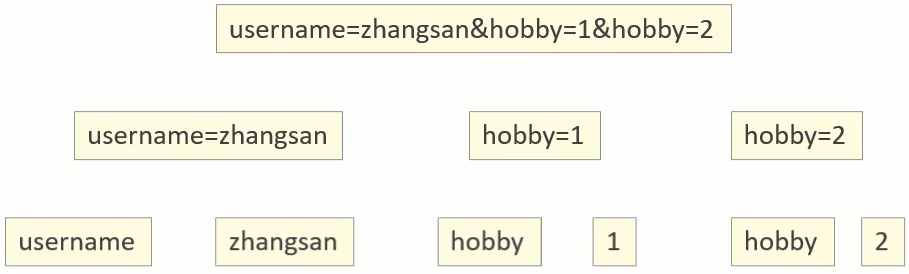
-
把分割后端数据,存入到一个Map集合中:
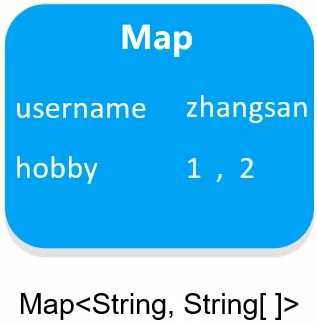
-
注意:因为参数的值可能是一个,也可能有多个,所以Map的值的类型为String数组。基于上述理论,request对象为我们提供了如下方法:
-
获取所有参数Map集合
java Map -
根据名称获取参数值(数组)
java String[] getParameterValues(String name); -
根据名称获取参数值 (单个值)
java String getParameter(String name);
接下来,我们通过案例来把上述的三个方法进行实例演示:
- 修改req.html页面,添加爱好选项,爱好可以同时选多个
DOCTYPE html> <html lang="en"> <head> <meta charset="UTF-8"> <title>Titletitle> head> <body> <form action="/Web_demo_war/req1" method="get"> <lable for="username">账号:lable> <input type="text" name="username"> <lable for="password">密码:lable> <input type="password" name="password"> <br> <input type="checkBox" name="hobby" value="1">唱 <input type="checkBox" name="hobby" value="2">跳 <br/> <input type="submit" name="submit" value="提交"> form> body> html>- 1
- 2
- 3
- 4
- 5
- 6
- 7
- 8
- 9
- 10
- 11
- 12
- 13
- 14
- 15
- 16
- 17
- 18
- 19
- 20
- 21
- 22
- 23

- 在Servlet代码中获取页面传递GET请求的参数值
package com.sgs.web.RequestDemo; import javax.servlet.ServletException; import javax.servlet.annotation.WebServlet; import javax.servlet.http.HttpServlet; import javax.servlet.http.HttpServletRequest; import javax.servlet.http.HttpServletResponse; import java.io.IOException; @WebServlet("/req1") public class RequestDemo2 extends HttpServlet { protected void doGet(HttpServletRequest request, HttpServletResponse response) throws ServletException, IOException { /* // 方式1 获取所有参数Map集合 Map- 1
- 2
- 3
- 4
- 5
- 6
- 7
- 8
- 9
- 10
- 11
- 12
- 13
- 14
- 15
- 16
- 17
- 18
- 19
- 20
- 21
- 22
- 23
- 24
- 25
- 26
- 27
- 28
- 29
- 30
- 31
- 32
- 33
- 34
- 35
- 36
- 37
- 38
- 39
- 40
- 41
- 42
- 43
- 44
- 45
- 46
- 47
- 48
- 49
- 50
- 51
- 52
- 53
- 54
- 55
- 56
- 57
- 58
- 59
- 60
- 61
- 62
结果图:

小结- req.getParameter()方法使用的频率会比较高
- 以后我们再写代码的时候,就只需要按照如下格式来编写:

1.4 IDEA快速创建Servlet
使用通用方式获取请求参数后,屏蔽了GET和POST的请求方式代码的不同,则代码可以定义如下格式

由于格式固定,所以我们可以使用IDEA提供的模板来制作一个Servlet的模板,这样我们后期在创建
Servlet的时候就会更高效,具体如何实现:- 按照自己的需求,修改Servlet创建的模板内容
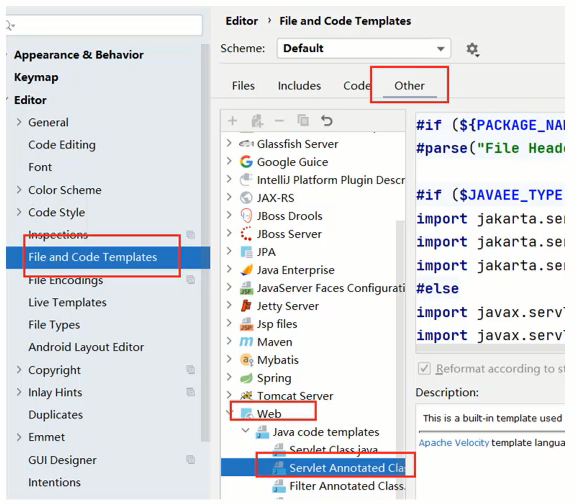
- 使用servlet模板创建Servlet类
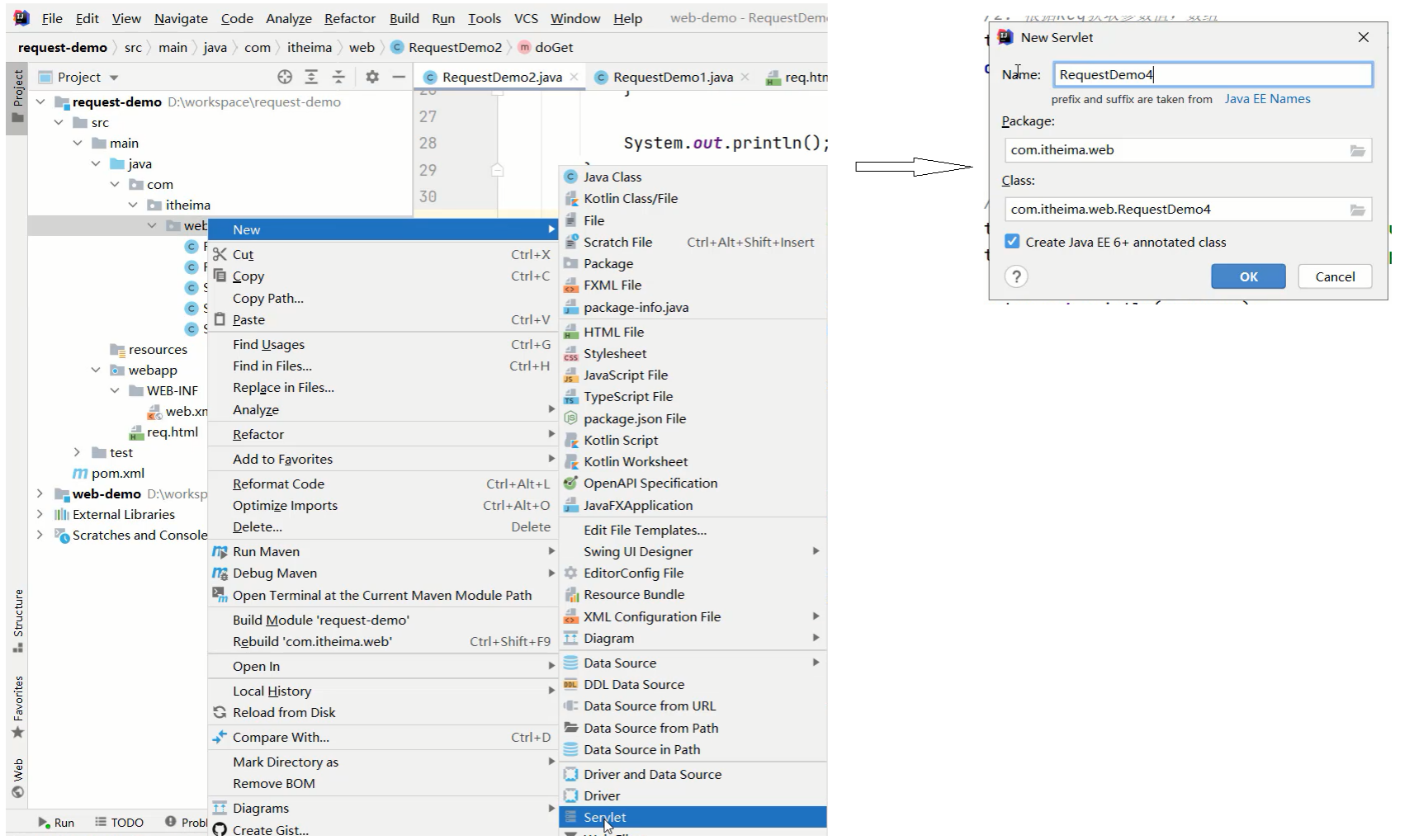
1.5 请求参数中文乱码问题
问题展示:
- 将req2.html页面的请求方式修改为get
<!DOCTYPE html> <html lang="en"> <head> <meta charset="UTF-8"> <title>Title</title> </head> <body> <form action="/Web_demo_war/req2" method="get"> <lable for="username">账号:</lable> <input type="text" name="username"> <lable for="password">密码:</lable> <input type="password" name="password"> <br> <input type="checkBox" name="hobby" value="1">游泳 <input type="checkBox" name="hobby" value="2">爬山 <br/> <input type="submit" name="submit" value="提交"> </form> </body> </html>- 1
- 2
- 3
- 4
- 5
- 6
- 7
- 8
- 9
- 10
- 11
- 12
- 13
- 14
- 15
- 16
- 17
- 18
- 19
- 20
- 21
- 22
- 23
- 在Servlet方法中获取参数,并打印
package com.sgs.web.RequestDemo; import javax.servlet.ServletException; import javax.servlet.annotation.WebServlet; import javax.servlet.http.HttpServlet; import javax.servlet.http.HttpServletRequest; import javax.servlet.http.HttpServletResponse; import java.io.IOException; @WebServlet("/req2") public class RequestDemo2 extends HttpServlet { protected void doGet(HttpServletRequest request, HttpServletResponse response) throws ServletException, IOException { /* // 方式1 获取所有参数Map集合 Map- 1
- 2
- 3
- 4
- 5
- 6
- 7
- 8
- 9
- 10
- 11
- 12
- 13
- 14
- 15
- 16
- 17
- 18
- 19
- 20
- 21
- 22
- 23
- 24
- 25
- 26
- 27
- 28
- 29
- 30
- 31
- 32
- 33
- 34
- 35
- 36
- 37
- 38
- 39
- 40
- 41
- 42
- 43
- 44
- 45
- 46
- 47
- 48
- 49
- 50
- 51
- 52
- 53
- 54
- 55
- 56
- 57
- 58
- 59
- 60
- 61
- 62
-
启动服务器,页面上输入中文参数
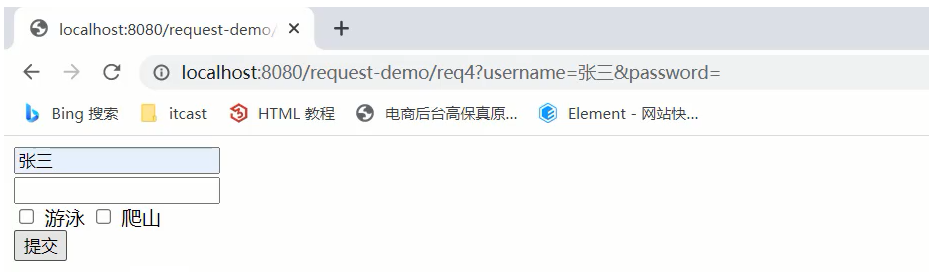
-
查看控制台打印内容

-
把req.html页面的请求方式改成post,再次发送请求和中文参数
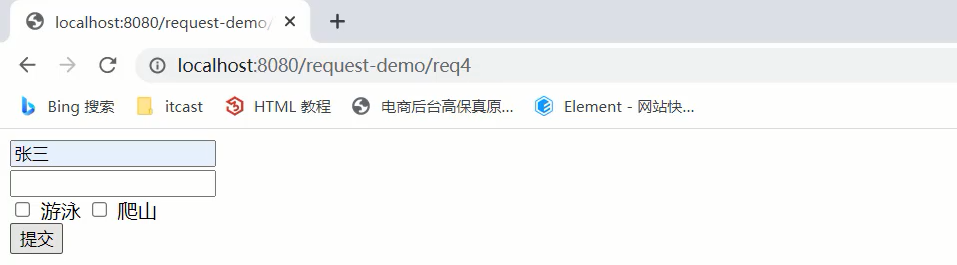
-
查看控制台打印内容,依然为乱码
通过上面的案例,会发现,不管是GET还是POST请求,在发送的请求参数中如果有中文,在后台接收 的时候,都会出现中文乱码的问题。具体该如何解决呢?1.5.1 POST请求解决方案
-
分析出现中文乱码的原因:
- POST的请求参数是通过
request的getReader()或者是getInputStream()来获取流中的数据 - Tomcat在获取流的时候采用的编码是ISO-8859-1
- ISO-8859-1编码是不支持中文的,所以会出现乱码
- POST的请求参数是通过
-
解决方案:
页面设置的编码格式为UTF-8把TOMCAT在获取流数据之前的编码设置为UTF-8- 通过request.
setCharacterEncoding("UTF-8")设置编码,UTF-8也可以写成小写
修改后的代码为:
package com.sgs.web.RequestDemo; import javax.servlet.ServletException; import javax.servlet.annotation.WebServlet; import javax.servlet.http.HttpServlet; import javax.servlet.http.HttpServletRequest; import javax.servlet.http.HttpServletResponse; import java.io.IOException; @WebServlet("/req2") public class RequestDemo2 extends HttpServlet { protected void doGet(HttpServletRequest request, HttpServletResponse response) throws ServletException, IOException { //这是post请求方式解决中文乱码问题 request.setCharacterEncoding("UTF-8"); /* // 方式1 获取所有参数Map集合 Map- 1
- 2
- 3
- 4
- 5
- 6
- 7
- 8
- 9
- 10
- 11
- 12
- 13
- 14
- 15
- 16
- 17
- 18
- 19
- 20
- 21
- 22
- 23
- 24
- 25
- 26
- 27
- 28
- 29
- 30
- 31
- 32
- 33
- 34
- 35
- 36
- 37
- 38
- 39
- 40
- 41
- 42
- 43
- 44
- 45
- 46
- 47
- 48
- 49
- 50
- 51
- 52
- 53
- 54
- 55
- 56
- 57
- 58
- 59
- 60
- 61
- 62
- 63
- 64
- 65
- 66
- 67
- 68
至此POST请求中文乱码的问题就已经解决,
但是这种方案不适用于GET请求,这个原因是什么呢,咱
们下面再分析。1.5.2 get请求解决方案
- POST请求的中文乱码解决方案为什么不适用GET请求?
- GET请求获取请求参数的方式是request.getQueryString()
- POST请求获取请求参数的方式是request.getReader()
- request.setCharacterEncoding(“utf-8”)是设置request处理流的编码
(Post请求) - getQueryString方法并没有通过流的方式获取数据
如图所示:首先我们需要先分析下
GET请求出现乱码的原因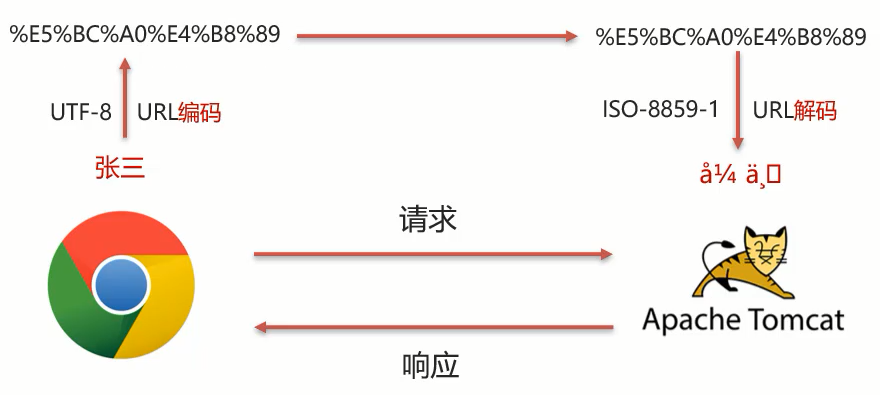
- 浏览器通过HTTP协议发送请求和数据给后台服务器(Tomcat)
- 浏览器在发送HTTP的过程中会对中文数据进行URL编码
在进行URL编码的时候会采用页面标签指定的UTF-8的方式进行编码,张三编码后的结果
为%E5%BC%A0%E4%B8%89(注意是6个字节)后台服务器(Tomcat)接收到%E5%BC%A0%E4%B8%89后会默认按照ISO-8859-1进行URL 解码- 由于前后编码与解码采用的格式不一样,就会导致后台获取到的数据为乱码。
-
思考: 如果把req.html页面的标签的charset属性改成ISO-8859-1 ,后台不做操作,能解
决中文乱码问题么?- 答案:
是否定的,因为ISO-8859-1本身是不支持中文展示的,所以改了标签的charset属性后,会导
致页面上的中文内容都无法正常展示。
- 答案:
-
分析完上面的问题后,我们会发现,其中有两个我们不熟悉的内容就是
URL编码和URL解码,什么是
URL编码,什么又是URL解码呢?- 这块知识我们只需要了解下即可,具体编码过程分两步,分别是:
- 将字符串按照编码方式转为二进制
- 每个字节转为2个16进制数并在前边加上%
- 这块知识我们只需要了解下即可,具体编码过程分两步,分别是:
张三按照UTF-8的方式转换成二进制的结果为:1 1110 0101 1011 1100 1010 0000 1110 0100 1011 1000 1000 1001
这个结果是如何计算的?
使用http://www.mytju.com/classcode/tools/encode_utf8.asp,输入张三

就可以获取张和三分别对应的10进制,然后在使用计算器,选择程序员模式,计算出对应的二进制数
据结果:

在计算的十六进制结果中,每两位前面加一个%,就可以获取到%E5%BC%A0%E4%B8%89。
当然你从上面所提供的网站中就已经能看到编码16进制的结果了:
方法一
但是对于上面的计算过程,如果没有工具,纯手工计算的话,相对来说还是比较复杂的,我们也不需
要进行手动计算在Java中已经为我们提供了编码和解码的API工具类(net包下的)可以让我们更快速的进行编码和解码:编码:
java.net.URLEncoder.encode("需要被编码的内容","字符集(UTF-8)")- 1
解码:
java.net.URLDecoder.decode("需要被解码的内容","字符集(UTF-8)")- 1
接下来咱们对张三来进行编码和解码:
public class URLDemo { public static void main(String[] args) throws UnsupportedEncodingException{ String username = "张三"; //1. URL编码 String encode = URLEncoder.encode(username, "utf-8"); System.out.println(encode); //打印:%E5%BC%A0%E4%B8%89 //2. URL解码 //String decode = URLDecoder.decode(encode, "utf-8");//打印:张三 String decode = URLDecoder.decode(encode, "ISO-8859-1");//打印:`å¼ ä¸ ` System.out.println(decode); } }- 1
- 2
- 3
- 4
- 5
- 6
- 7
- 8
- 9
- 10
- 11
- 12
- 13
- 14
到这,我们就可以分析出GET请求中文参数出现乱码的原因了
浏览器把中文参数按照UTF-8进行URL编码Tomcat对获取到的内容进行了ISO-8859-1的URL解码,在控制台就会出现类上å¼ ä口最后一位是个空格
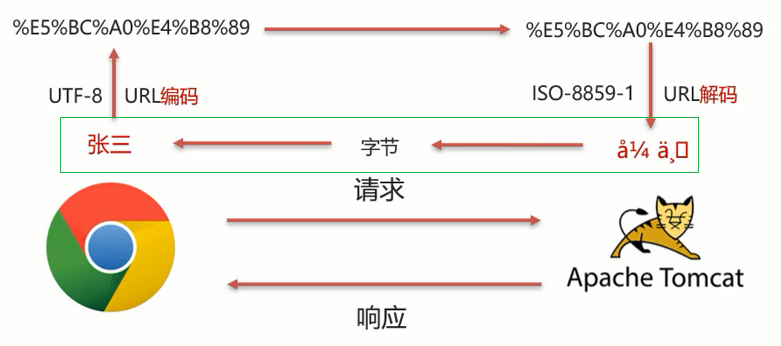
方法二
为所以我们可以考虑把å¼ ä¸口转换成字节,
在把字节转换成张三,在转换的过程中是它们的编码 一致,就可以解决中文乱码问题。具体的实现步骤为:
- 按照ISO-8859-1编码获取乱码å¼ ä¸ 对应的字节数组
- 按照UTF-8编码获取字节数组对应的字符串
public class URLDemo { public static void main(String[] args) throws UnsupportedEncodingException { String username = "张三"; //1. URL编码 String encode = URLEncoder.encode(username, "utf-8"); System.out.println(encode); //2. URL解码 String decode = URLDecoder.decode(encode, "ISO-8859-1"); //本来是"UTF-8,在这里讲解采用"ISO-8859-1"来说,出现乱码是故意的,为了让大家看下面String的解码过程也是可以的 System.out.println(decode); //此处打印的是对应的乱码数据 //3. 转换为字节数据,编码 byte[] bytes = decode.getBytes("ISO-8859-1"); for (byte b : bytes) { System.out.print(b + " "); } //此处打印的是:-27 -68 -96 -28 -72 -119 //4. 将字节数组转为字符串,解码 String s = new String(bytes, "utf-8"); System.out.println(s); //此处打印的是张三 } }- 1
- 2
- 3
- 4
- 5
- 6
- 7
- 8
- 9
- 10
- 11
- 12
- 13
- 14
- 15
- 16
- 17
- 18
- 19
- 20
- 21
- 22
说明:在第18行中打印的数据是-27 -68 -96 -28 -72 -119和张三转换成的二进制数据1110 0101
1011 1100 1010 0000 1110 0100 1011 1000 1000 1001为什么不一样呢?其实打印出来的是十进制数据,我们只需要使用计算机换算下就能得到他们的对应关系,如下图:
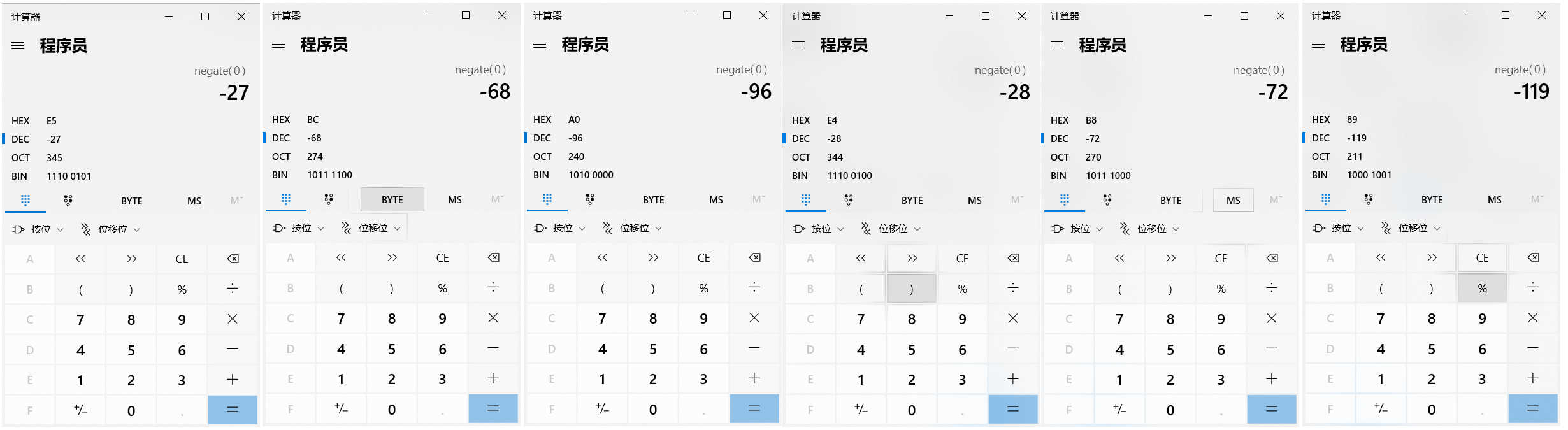
至此对于GET请求中文乱码的解决方案,我们就已经分析完了,最后在代码中去实现。小结-
中文乱码解决方案
- POST请求和GET请求的参数中如果有中文,后台接收数据就会出现中文乱码问题, GET请求在Tomcat8.0以后的版本就不会出现了
POST请求解决方案是:设置输入流的编码
request.setCharacterEncoding("UTF-8");//注意:设置的字符集要和页面保持一致- 1
通用方式(GET/POST):需要先解码,再编码
new String(username.getBytes("ISO-8859-1"),"UTF-8");- 1
-
URL编码实现方式:- 编码:
URLEncoder.encode(str,"UTF-8");// -----> 得到的对象是 s- 1
- 解码:
URLDecoder.decode(s,"UTF-8");//通过该对象 s 进行UTF-8的解码- 1
注意- 把request.setCharacterEncoding(“UTF-8”)代码注释掉后,会发现GET请求参数乱码解决方案
同时也可也把POST请求参数乱码的问题也解决了 - **只不过对于POST请求参数一般都会比较多,采用这种方式解决乱码起来比较麻烦,所以对于POST
请求还是建议使用设置编码的方式进行。
另外需要说明一点的是Tomcat8.0之后,已将GET请求乱码问题解决,设置默认的解码方式为UTF-8 -
-
相关阅读:
计算二进制中1的个数
Flink-窗口概念以及窗口API使用
C++: multiple and virtual inheritance under the hood
spark3.3.1 for CDH6.3.2 打包
献给阿尔吉侬的花束( 入门级bfs查找 + 模版解读 + 错误示范)
M2 MacBookAir售价是多少 M2 MacBookAir配置如何
进阶C语言-指针的进阶(中)
基于python的驾校管理系统的设计与实现
基于包围盒的机械臂防碰撞算法matlab仿真
cisco asa学习笔记
- 原文地址:https://blog.csdn.net/o676448/article/details/127698104

- 最新文章
-
沪漂五周年了:我越来越迷茫了
Agentic Skill Routing 实战:别再把所有 Skill 塞进 AI Agent 上下文
MySQL-Seconds_behind_master的精度误差
[MAF预定义ChatClient中间件-03]CachingChatClient——利用缓存省钱省时间
AI的至暗历史:从万众期待到被政府撤资,AI的两次死亡徘徊
Agent OS :五种驯服不确定性的范式
PortSwigger SQL注入LAB11
数据库即时编译JIT
[Begin]AI Learn Data Day 0
深度学习进阶(二十七)现代 LLM 的核心架构设计其二:SwiGLU