-
SpringBoot交友APP项目实战(详细介绍+案例源码) - 9.小视频(SpringCache缓存)
有人相爱,有人跳海

系列文章目录
1. 项目介绍及环境配置
2. 短信验证码登录
3. 用户信息
4. MongoDB
5. 推荐好友列表/MongoDB集群/动态发布与查看
6. 圈子动态/圈子互动
7. 即时通讯(基于第三方API)
8. 附近的人(百度地图APi)
9. 小视频
10.网关配置
11.后台管理
一、访客功能
1. 需求分析
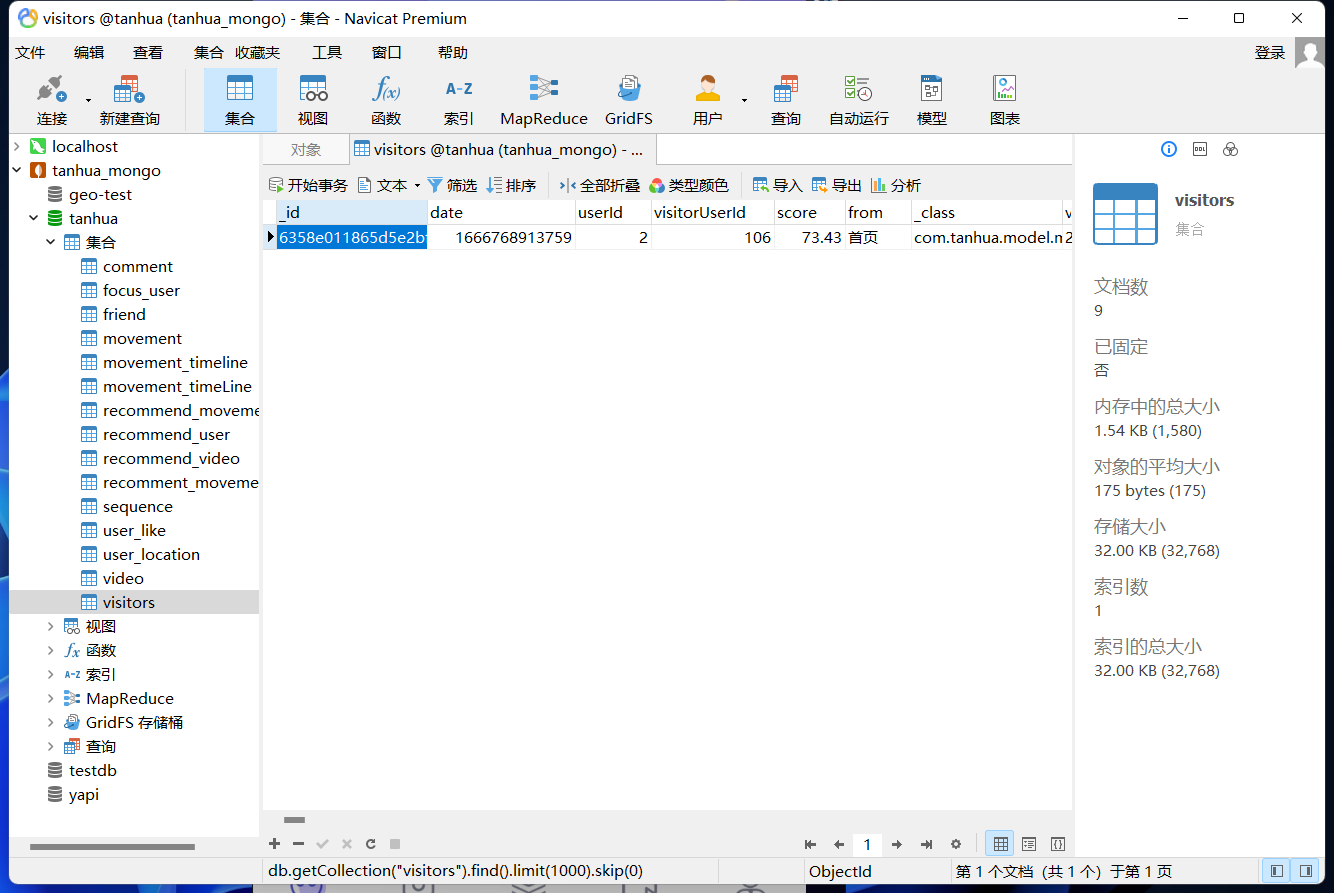
- 用户在浏览我的主页时,需要记录访客数据,访客在一天内每个用户只记录一次
- 首页展示最新5条访客记录
- 我的模块,分页展示所有的访客记录

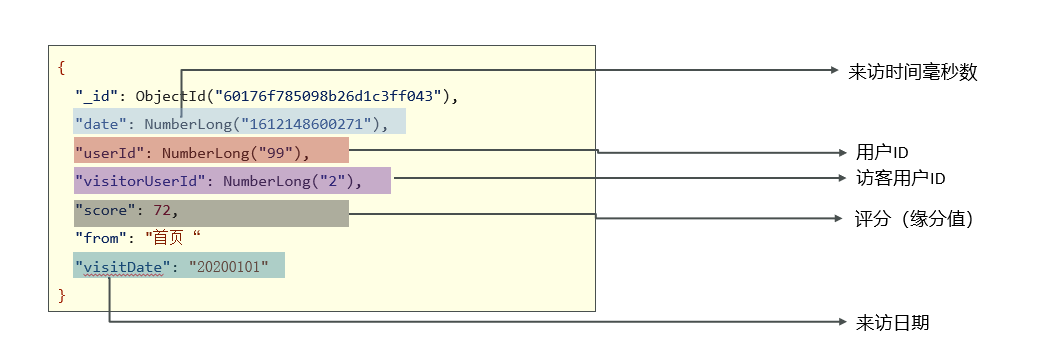
visirots(访客记录表):
2. 保存访客
⑴. 需求
- 用户在浏览我的主页时,需要记录访客数据
- 访客在一天内每个用户只记录一次
⑵. 编码实现
①. 实体对象
新建
tanhua-model/src/main/java/com/tanhua/model/mongo/Visitors.java文件:@Data @NoArgsConstructor @AllArgsConstructor @Document(collection = "visitors") public class Visitors implements java.io.Serializable{ private static final long serialVersionUID = 2811682148052386573L; private ObjectId id; private Long userId; //我的id private Long visitorUserId; //来访用户id private String from; //来源,如首页、圈子等 private Long date; //来访时间 private String visitDate;//来访日期 private Double score; //得分 }- 1
- 2
- 3
- 4
- 5
- 6
- 7
- 8
- 9
- 10
- 11
- 12
- 13
- 14
- 15
- 16
- 17
②. Service - 查看佳人详情
编辑
tanhua-app-server/src/main/java/com/tanhua/server/service/TanhuaService.java文件:... // 查看佳人详情 public TodayBest personalInfo(Long userId) { // 1. 根据用户id,查询用户详情 UserInfo userInfo = userInfoApi.findById(userId); // 2. 根据操作人id, 和查看的用户id,查询两者的推荐数据(缘分值) RecommendUser user = recommendUserApi.queryByUserId(userId, UserHolder.getUserId()); // 构造访客数据,调用API保存 Visitors visitors = new Visitors(); visitors.setUserId(userId); visitors.setVisitorUserId(UserHolder.getUserId()); visitors.setFrom("首页"); visitors.setDate(System.currentTimeMillis()); visitors.setVisitDate(new SimpleDateFormat("yyyyMMdd").format(new Date())); visitors.setScore(user.getScore()); visitorsApi.save(visitors); // 3. 构造返回值 return TodayBest.init(userInfo, user); } ...- 1
- 2
- 3
- 4
- 5
- 6
- 7
- 8
- 9
- 10
- 11
- 12
- 13
- 14
- 15
- 16
- 17
- 18
- 19
- 20
- 21
- 22
- 23
- 24
③. Api
Ⅰ. Api
新建
tanhua-dubbo/tanhua-dubbo-interface/src/main/java/com/tanhua/dubbo/api/VisitorsApi.java文件:public interface VisitorsApi { // 保存访客数据 void save(Visitors visitors); }- 1
- 2
- 3
- 4
- 5
Ⅱ. 实现类
新建
tanhua-dubbo/tanhua-dubbo-mongo/src/main/java/com/tanhua/dubbo/api/VisitorsApiImpl.java文件:@DubboService public class VisitorsApiImpl implements VisitorsApi{ @Autowired private MongoTemplate mongoTemplate; /** * 保存访客数据 * 对于同一个访客,一天只能保存一次数据 */ @Override public void save(Visitors visitors) { // 1. 查询访客数据 Query query = Query.query(Criteria.where("userId").is(visitors.getUserId()) .and("visitorUserId").is(visitors.getVisitorUserId()) .and("visitDate").is(visitors.getVisitDate())); // 2. 不存在,保存 if(!mongoTemplate.exists(query, Visitors.class)) { mongoTemplate.save(visitors); } } }- 1
- 2
- 3
- 4
- 5
- 6
- 7
- 8
- 9
- 10
- 11
- 12
- 13
- 14
- 15
- 16
- 17
- 18
- 19
- 20
- 21
- 22
⑶. 功能测试

3. 谁看过我
⑴. 需求
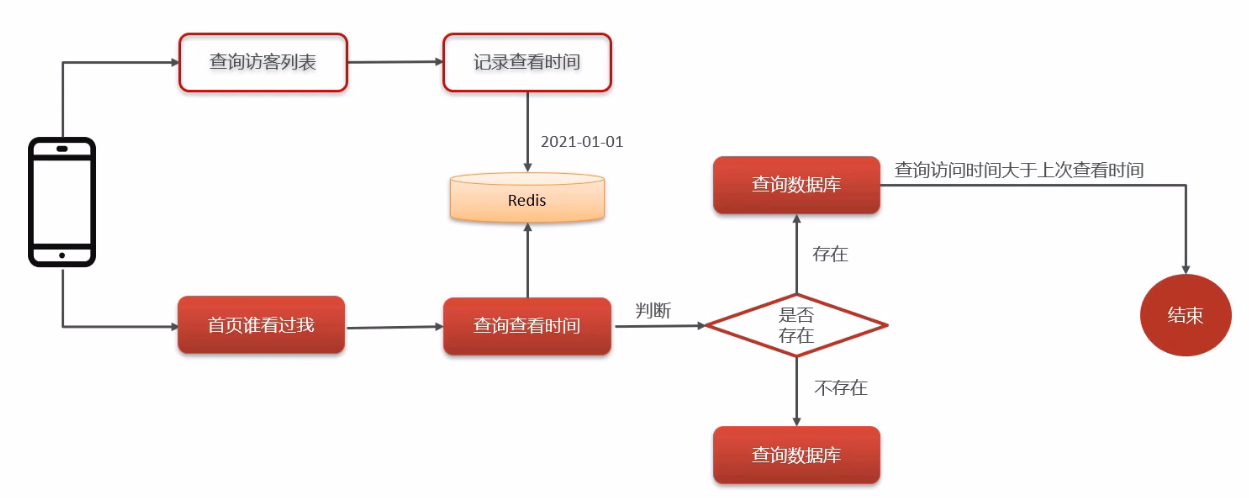
首页查询最新访客列表,查询数据时,如果用户查询过列表,就需要记录这次查询数据的时间,下次查询时查询大于等于该时间的数据。如果,用户没有记录查询时间,就查询最近的5个来访用户。
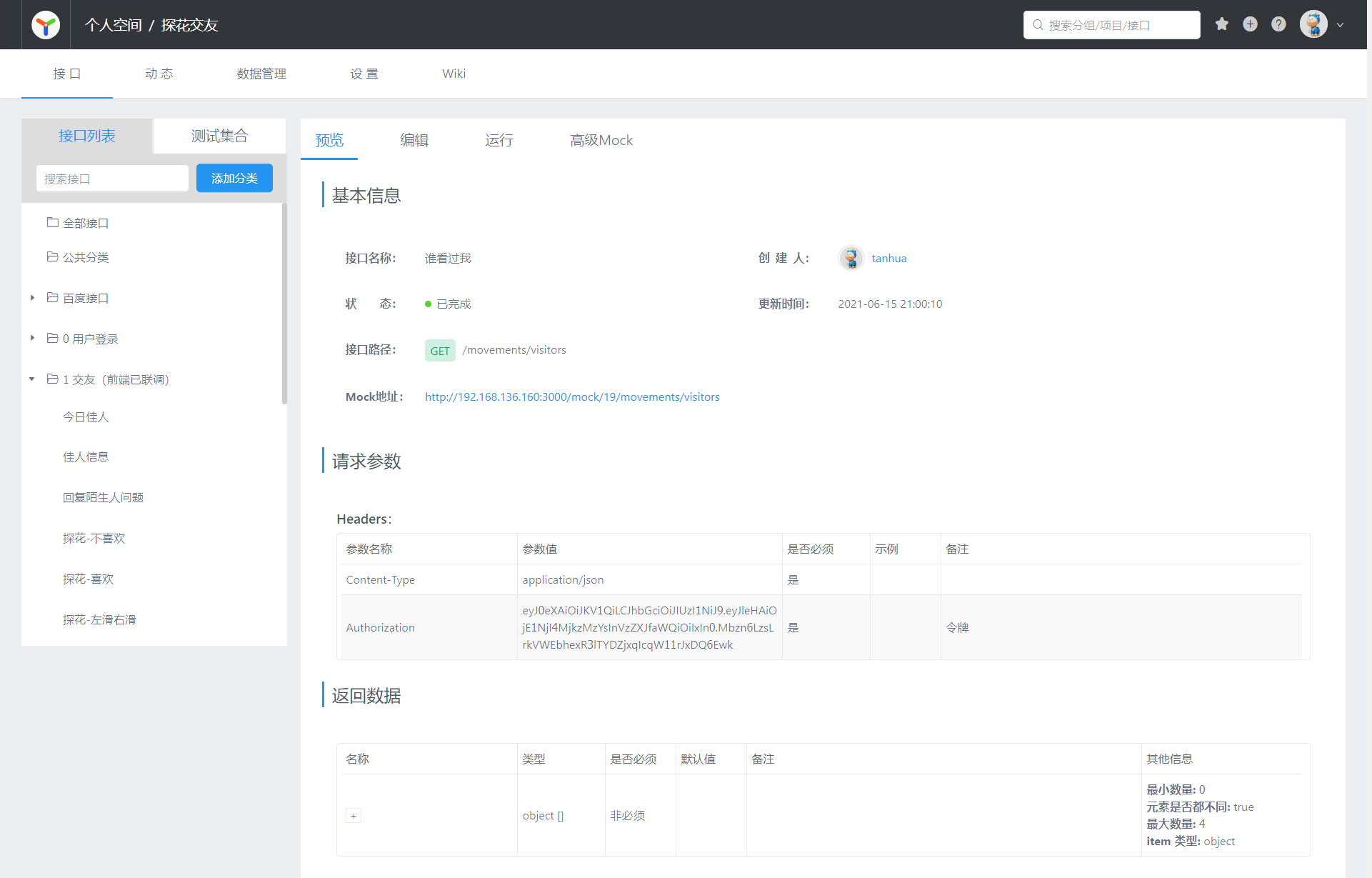
⑵. 接口文档
⑶. 编码实现
①. vo对象
新建
tanhua-model/src/main/java/com/tanhua/model/vo/VisitorsVo.java文件:@Data @NoArgsConstructor @AllArgsConstructor public class VisitorsVo { private Long id; //用户id private String avatar; private String nickname; private String gender; //性别 man woman private Integer age; private String[] tags; private Long fateValue; //缘分值 /** * 在vo对象中,补充一个工具方法,封装转化过程 */ public static VisitorsVo init(UserInfo userInfo, Visitors visitors) { VisitorsVo vo = new VisitorsVo(); BeanUtils.copyProperties(userInfo,vo); if(userInfo.getTags() != null) { vo.setTags(userInfo.getTags().split(",")); } vo.setFateValue(visitors.getScore().longValue()); return vo; } }- 1
- 2
- 3
- 4
- 5
- 6
- 7
- 8
- 9
- 10
- 11
- 12
- 13
- 14
- 15
- 16
- 17
- 18
- 19
- 20
- 21
- 22
- 23
- 24
- 25
- 26
②. Controller
编辑
tanhua-app-server/src/main/java/com/tanhua/server/controller/MovementController.java文件:@RestController @RequestMapping("/movements") public class MovementController { @Autowired private MovementService movementService; @Autowired private CommentsService commentsService; /** * 发布动态 * @return */ @PostMapping public ResponseEntity movements(Movement movement, MultipartFile imageContent[]) throws IOException { movementService.publishMovement(movement, imageContent); return ResponseEntity.ok(null); } /** * 查询我的动态 */ @GetMapping("/all") public ResponseEntity findByUserId(Long userId, @RequestParam(defaultValue = "1") Integer page, @RequestParam(defaultValue = "10") Integer pagesize) { PageResult pr = movementService.findByUserId(userId, page, pagesize); return ResponseEntity.ok(pr); } /** * 查询好友动态 */ @GetMapping() public ResponseEntity movements( @RequestParam(defaultValue = "1") Integer page, @RequestParam(defaultValue = "10") Integer pagesize) { PageResult pr = movementService.findFriendMovements(page, pagesize); return ResponseEntity.ok(pr); } /** * 查询推荐动态 */ @GetMapping("/recommend") public ResponseEntity recommend( @RequestParam(defaultValue = "1") Integer page, @RequestParam(defaultValue = "10") Integer pagesize) { PageResult pr = movementService.findRecommendMovements(page, pagesize); return ResponseEntity.ok(pr); } /** * 查询单条动态 */ @GetMapping("/{id}") public ResponseEntity findById(@PathVariable("id") String movementId) { MovementsVo vo = movementService.findById(movementId); return ResponseEntity.ok(vo); } /** * 点赞 */ @GetMapping("/{id}/like") public ResponseEntity like(@PathVariable("id") String movementId) { Integer likeCount = commentsService.likeComment(movementId); return ResponseEntity.ok(likeCount); } /** * 取消点赞 */ @GetMapping("/{id}/dislike") public ResponseEntity dislike(@PathVariable("id") String movementId) { Integer likeCount = commentsService.dislikeComment(movementId); return ResponseEntity.ok(likeCount); } /** * 喜欢 */ @GetMapping("/{id}/love") public ResponseEntity love(@PathVariable("id") String movementId) { Integer likeCount = commentsService.loveComment(movementId); return ResponseEntity.ok(likeCount); } /** * 取消喜欢 */ @GetMapping("/{id}/unlove") public ResponseEntity unlove(@PathVariable("id") String movementId) { Integer likeCount = commentsService.disloveComment(movementId); return ResponseEntity.ok(likeCount); } /** * 谁看过我 */ @GetMapping("visitors") public ResponseEntity queryVisitorsList(){ List<VisitorsVo> list = movementService.queryVisitorsList(); return ResponseEntity.ok(list); } }- 1
- 2
- 3
- 4
- 5
- 6
- 7
- 8
- 9
- 10
- 11
- 12
- 13
- 14
- 15
- 16
- 17
- 18
- 19
- 20
- 21
- 22
- 23
- 24
- 25
- 26
- 27
- 28
- 29
- 30
- 31
- 32
- 33
- 34
- 35
- 36
- 37
- 38
- 39
- 40
- 41
- 42
- 43
- 44
- 45
- 46
- 47
- 48
- 49
- 50
- 51
- 52
- 53
- 54
- 55
- 56
- 57
- 58
- 59
- 60
- 61
- 62
- 63
- 64
- 65
- 66
- 67
- 68
- 69
- 70
- 71
- 72
- 73
- 74
- 75
- 76
- 77
- 78
- 79
- 80
- 81
- 82
- 83
- 84
- 85
- 86
- 87
- 88
- 89
- 90
- 91
- 92
- 93
- 94
- 95
- 96
- 97
- 98
- 99
- 100
- 101
- 102
- 103
- 104
- 105
③. Service
编辑
tanhua-app-server/src/main/java/com/tanhua/server/service/MovementService.java文件:@Service public class MovementService { @Autowired private OssTemplate ossTemplate; @DubboReference private MovementApi movementApi; @DubboReference private UserInfoApi userInfoApi; @Autowired private RedisTemplate<String, String> redisTemplate; @DubboReference private VisitorsApi visitorsApi; /** * 发布动态 */ public void publishMovement(Movement movement, MultipartFile[] imageContent) throws IOException { // 1. 判断发布动态的内容是否存在 if(StringUtils.isEmpty(movement.getTextContent())) { throw new BusinessException(ErrorResult.contentError()); } // 2. 获取当前登录的用户id Long userId = UserHolder.getUserId(); // 3. 将文件内容上传到阿里云OSS, 获取请求地址 List<String> medias = new ArrayList<>(); for (MultipartFile multipartFile : imageContent) { // String upload = ossTemplate.upload(multipartFile.getOriginalFilename(), multipartFile.getInputStream()); // !!! 阿里云OSS收费, 这里暂时跳过 String upload = "https://img0.baidu.com/it/u=1501084209,93021381&fm=253&fmt=auto&app=138&f=JPEG"; medias.add(upload); } // 4. 将数据封装到movement对象 movement.setUserId(userId); movement.setMedias(medias); //5. 调用API完成动态发布 movementApi.publish(movement); } // 查询我的动态 public PageResult findByUserId(Long userId, Integer page, Integer pagesize) { // 1. 根据用户id, 调用API查询个人动态内容(PageResult -- Movement) PageResult pr = movementApi.findByUserId(userId, page, pagesize); // 2. 获取PageResult中item列表对象 List<Movement> items = (List<Movement>) pr.getItems(); // 3. 非空判断 if(items == null) { return pr; } // 4. 循环数据列表 UserInfo userInfo = userInfoApi.findById(userId); List<MovementsVo> vos = new ArrayList<>(); for (Movement item : items) { // 5. 一个Movement构建一个VO对象 MovementsVo vo = MovementsVo.init(userInfo, item); vos.add(vo); } // 6. 构建返回值 pr.setItems(vos); return pr; } // 查询好友动态 public PageResult findFriendMovements(Integer page, Integer pagesize) { // 1. 获取当前用户id Long userId = UserHolder.getUserId(); // 2. 调用API查询当前用户好友发布的动态列表 List<Movement> list = movementApi.findFriendMovements(page, pagesize, userId); return getPageResult(page, pagesize, list); } // 公共方法 private PageResult getPageResult(Integer page, Integer pagesize, List<Movement> list) { // 3. 判断列表是否为空 // if(list == null || list.isEmpty()) { if(CollUtil.isEmpty(list)) { return new PageResult(); } // 4. 提取动态发布人的id列表 List<Long> userIds = CollUtil.getFieldValues(list, "userId", Long.class); // 5. 根据用户id列表获取用户详情 Map<Long, UserInfo> map = userInfoApi.findByIds(userIds, null); // 6. 一个Movement构造一个vo对象 List<MovementsVo> vos = new ArrayList<>(); for (Movement movement : list) { UserInfo userInfo = map.get(movement.getUserId()); if(userInfo != null) { MovementsVo vo = MovementsVo.init(userInfo, movement); // 添加点赞状态,判断hashKey是否存在 String key = Constants.MOVEMENTS_INTERACT_KEY + movement.getId().toHexString(); String hashKey = Constants.MOVEMENT_LIKE_HASHKEY + UserHolder.getUserId(); if(redisTemplate.opsForHash().hasKey(key, hashKey)) { vo.setHasLiked(1); } // 添加喜欢状态,判断hashKey是否存在 String loveHashKey = Constants.MOVEMENT_LOVE_HASHKEY + UserHolder.getUserId(); if(redisTemplate.opsForHash().hasKey(key, loveHashKey)) { vo.setHasLoved(1); } vos.add(vo); } } // 7. 构造PageResult并返回 return new PageResult(page, pagesize, 0l, vos); } // 查询推荐动态 public PageResult findRecommendMovements(Integer page, Integer pagesize) { // 1. 从redis从获取推荐数据 String redisKey = Constants.MOVEMENTS_RECOMMEND + UserHolder.getUserId(); String redisValue = redisTemplate.opsForValue().get(redisKey); // 2. 判断推荐数据是否存在 List<Movement> list = Collections.EMPTY_LIST; if(StringUtils.isEmpty(redisValue)) { // 3. 如果不存在, 调用API随机构造10条动态数据 list = movementApi.randomMovements(pagesize); } else { // 4. 如果存在, 处理pid数据 "16,17,18,19,20,21,10015,10020,10040,10064,10092,10093,10099,10067" String[] values = redisValue.split(","); // 4.1 判断当前页的起始条数是否小于数组的总数 if((page - 1) * pagesize < values.length) { List<Long> pids = Arrays.stream(values).skip((page - 1) * pagesize).limit(pagesize) .map(e -> Long.valueOf(e)) .collect(Collectors.toList()); // 5. 调用API根据PID数组查询动态数据 list = movementApi.findMovementByPids(pids); } } // 6. 调用公共方法构造返回值 return getPageResult(page, pagesize, list); } // 查询单条动态 public MovementsVo findById(String movementId) { // 1. 调用API查询动态详情 Movement movement = movementApi.findById(movementId); // 2. 转换vo对象 if(movement != null) { UserInfo userInfo = userInfoApi.findById(movement.getUserId()); return MovementsVo.init(userInfo, movement); } else { return null; } } // 首页 - 访客列表 public List<VisitorsVo> queryVisitorsList() { // 1. 查询访问时间 String key = Constants.VISITORS_USER; String hashKey = String.valueOf(UserHolder.getUserId()); String value = (String) redisTemplate.opsForHash().get(key, hashKey); Long date = StringUtils.isEmpty(value) ? null : Long.valueOf(value); // 2. 调用API查询数据列表 ListList<Visitors> list = visitorsApi.queryVisitorsList(date, UserHolder.getUserId()); if(CollUtil.isEmpty(list)) { return new ArrayList<>(); } // 3. 提取用户id List<Long> visitorUserIds = CollUtil.getFieldValues(list, "visitorUserId", Long.class); // 4. 查看用户详情 Map<Long, UserInfo> map = userInfoApi.findByIds(visitorUserIds, null); // 5. 构造返回 List<VisitorsVo> vos = new ArrayList<>(); for (Visitors visitors : list) { UserInfo userInfo = map.get(visitors.getVisitorUserId()); if(userInfo != null) { VisitorsVo vo = VisitorsVo.init(userInfo, visitors); vos.add(vo); } } return vos; } } - 1
- 2
- 3
- 4
- 5
- 6
- 7
- 8
- 9
- 10
- 11
- 12
- 13
- 14
- 15
- 16
- 17
- 18
- 19
- 20
- 21
- 22
- 23
- 24
- 25
- 26
- 27
- 28
- 29
- 30
- 31
- 32
- 33
- 34
- 35
- 36
- 37
- 38
- 39
- 40
- 41
- 42
- 43
- 44
- 45
- 46
- 47
- 48
- 49
- 50
- 51
- 52
- 53
- 54
- 55
- 56
- 57
- 58
- 59
- 60
- 61
- 62
- 63
- 64
- 65
- 66
- 67
- 68
- 69
- 70
- 71
- 72
- 73
- 74
- 75
- 76
- 77
- 78
- 79
- 80
- 81
- 82
- 83
- 84
- 85
- 86
- 87
- 88
- 89
- 90
- 91
- 92
- 93
- 94
- 95
- 96
- 97
- 98
- 99
- 100
- 101
- 102
- 103
- 104
- 105
- 106
- 107
- 108
- 109
- 110
- 111
- 112
- 113
- 114
- 115
- 116
- 117
- 118
- 119
- 120
- 121
- 122
- 123
- 124
- 125
- 126
- 127
- 128
- 129
- 130
- 131
- 132
- 133
- 134
- 135
- 136
- 137
- 138
- 139
- 140
- 141
- 142
- 143
- 144
- 145
- 146
- 147
- 148
- 149
- 150
- 151
- 152
- 153
- 154
- 155
- 156
- 157
- 158
- 159
- 160
- 161
- 162
- 163
- 164
- 165
- 166
- 167
- 168
- 169
- 170
- 171
- 172
- 173
- 174
- 175
- 176
- 177
- 178
- 179
- 180
- 181
- 182
- 183
- 184
- 185
- 186
- 187
- 188
- 189
- 190
- 191
- 192
- 193
- 194
- 195
- 196
- 197
- 198
- 199
- 200
④. Api
编辑
tanhua-dubbo/tanhua-dubbo-interface/src/main/java/com/tanhua/dubbo/api/VisitorsApi.java文件:public interface VisitorsApi { // 保存访客数据 void save(Visitors visitors); // 首页 - 查询访客列表 List<Visitors> queryVisitorsList(Long date, Long userId); }- 1
- 2
- 3
- 4
- 5
- 6
- 7
- 8
⑤. Api实现类
编辑
tanhua-dubbo/tanhua-dubbo-mongo/src/main/java/com/tanhua/dubbo/api/VisitorsApiImpl.java文件:@DubboService public class VisitorsApiImpl implements VisitorsApi{ @Autowired private MongoTemplate mongoTemplate; /** * 保存访客数据 * 对于同一个访客,一天只能保存一次数据 */ @Override public void save(Visitors visitors) { // 1. 查询访客数据 Query query = Query.query(Criteria.where("userId").is(visitors.getUserId()) .and("visitorUserId").is(visitors.getVisitorUserId()) .and("visitDate").is(visitors.getVisitDate())); // 2. 不存在,保存 if(!mongoTemplate.exists(query, Visitors.class)) { mongoTemplate.save(visitors); } } // 首页 - 查询访客列表 public List<Visitors> queryVisitorsList(Long date, Long userId) { Criteria criteria = Criteria.where("userId").is(userId); if(date != null) { criteria.and("date").gt(date); } Query query = Query.query(criteria).limit(5).with(Sort.by(Sort.Order.desc("date"))); return mongoTemplate.find(query, Visitors.class); } }- 1
- 2
- 3
- 4
- 5
- 6
- 7
- 8
- 9
- 10
- 11
- 12
- 13
- 14
- 15
- 16
- 17
- 18
- 19
- 20
- 21
- 22
- 23
- 24
- 25
- 26
- 27
- 28
- 29
- 30
- 31
- 32
⑷. 页面效果

二、分布式存储FastDFS
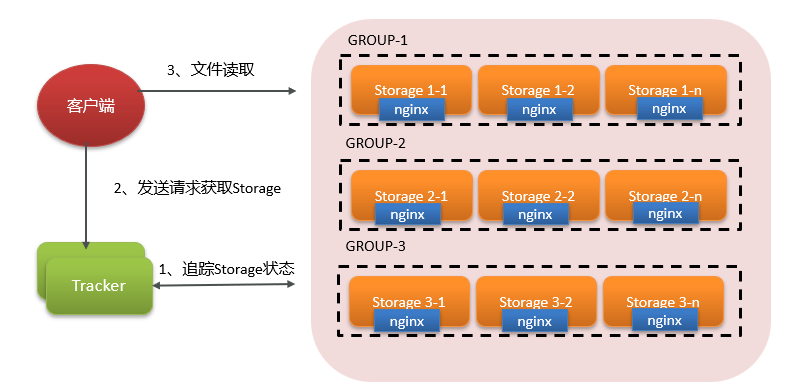
FastDFS是分布式文件系统。使用 FastDFS很容易搭建一套高性能的文件服务器集群提供文件上传、下载等服务
1. 内部结构
- Tracker server:
- 配置集群
- Tracker server监控各个Storage server,调度存储服务
- Storage server:
- Storage server(存储服务器),文件最终存放的位置
- 通过Group(组),拓展文件存储容量
- 各个Group(组)中,通过集群解决单点故障
2. 工作原理
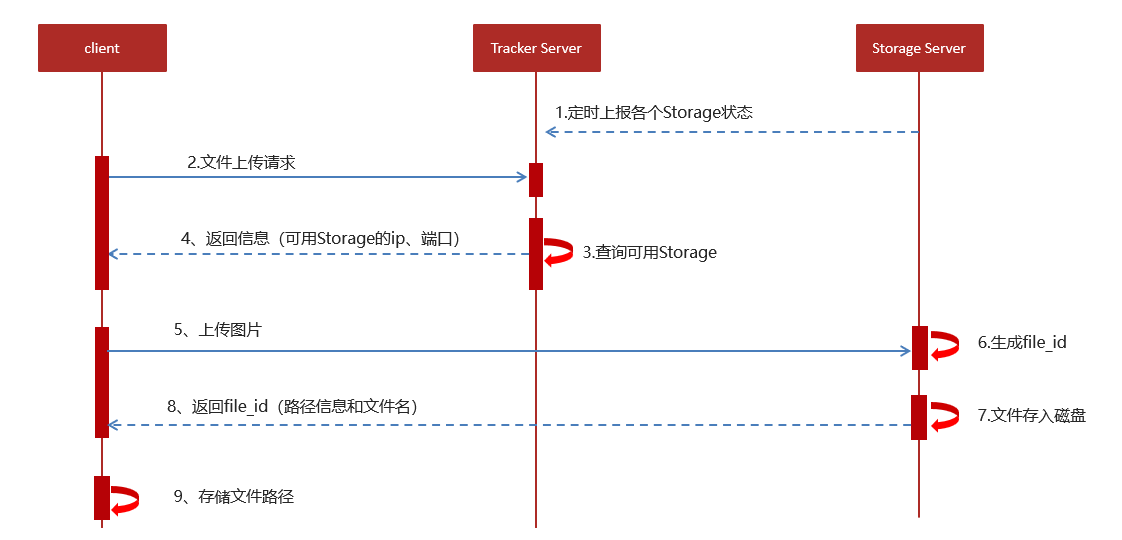
上传:
- Storage Server 向Tracker Server, 汇报当前存储节点的状态信息(包括磁盘剩余空间、文件同步状况等统计信息)
- 客户端程序连接Tracker Server发给上传请求
- Tracker Server计算可用的Storage Server 节点,返回
- 客户端将文件上传到Storage Server,并获取返回的file_id(包括路径信息和文件名称)
- 客户端保存请求地址
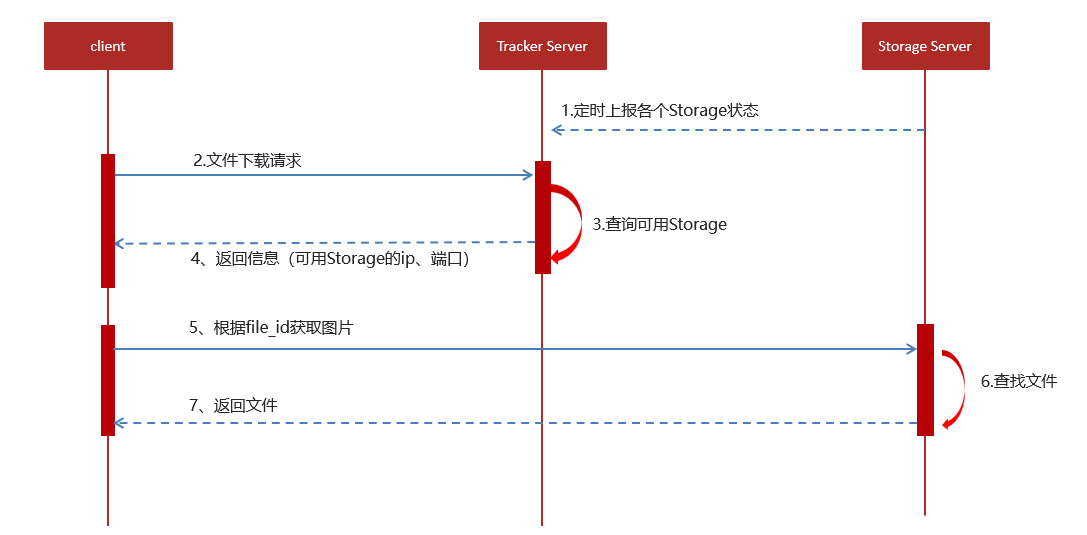
下载:
- 和文件上传类似
- 文件下载使用频率并不高,由于客户端记录的访问地址,直接拼接地址访问即可
3. 服务搭建
探花交友所需的第三方服务组件,已经以Docker-Compose准备好了。仅仅需要进入相关目录,以命令形式启动运行即可
#进入目录 cd /root/docker-file/fastdfs/ #创建容器并启动 docker-compose up –d #查看容器 docker ps -a- 1
- 2
- 3
- 4
- 5
- 6

4. 测试案例
⑴. 添加配置信息
编辑
tanhua-app-server/src/main/resources/application.yml文件:... # =================================================================== # 分布式文件系统FDFS配置 # =================================================================== fdfs: so-timeout: 1500 connect-timeout: 600 #缩略图生成参数 thumb-image: width: 150 height: 150 #TrackerList参数,支持多个 tracker-list: 192.168.136.160:22122 web-server-url: http://192.168.136.160:8888/- 1
- 2
- 3
- 4
- 5
- 6
- 7
- 8
- 9
- 10
- 11
- 12
- 13
- 14
- 15
⑵. 测试类
新建
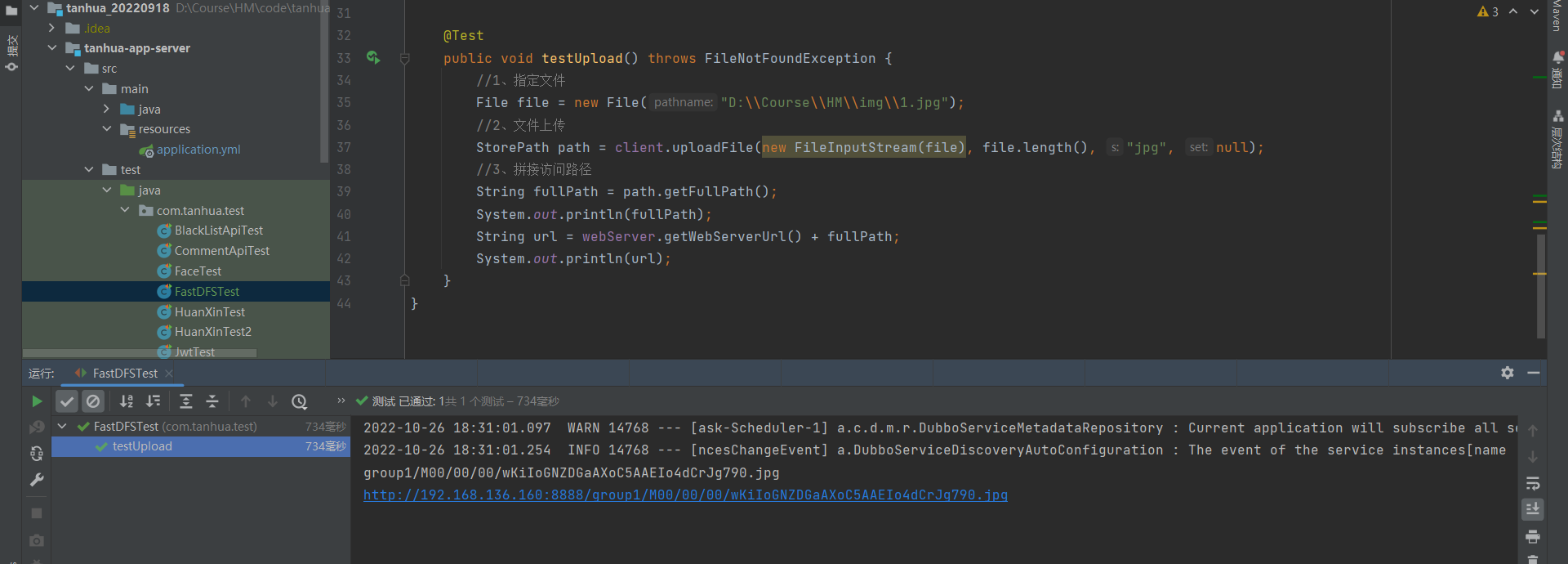
tanhua-app-server/src/test/java/com/tanhua/test/FastDFSTest.java文件:@RunWith(SpringRunner.class) @SpringBootTest(classes = AppServerApplication.class) public class FastDFSTest { /** * 测试FastDFS的文件上传 */ // 用于文件上传或下载 @Autowired private FastFileStorageClient client; @Autowired private FdfsWebServer webServer;// 获取存储服务器的请求URL @Test public void testUpload() throws FileNotFoundException { //1、指定文件 File file = new File("D:\\Course\\HM\\img\\1.jpg"); //2、文件上传 StorePath path = client.uploadFile(new FileInputStream(file), file.length(), "jpg", null); //3、拼接访问路径 String fullPath = path.getFullPath(); System.out.println(fullPath); String url = webServer.getWebServerUrl() + fullPath; System.out.println(url); } }- 1
- 2
- 3
- 4
- 5
- 6
- 7
- 8
- 9
- 10
- 11
- 12
- 13
- 14
- 15
- 16
- 17
- 18
- 19
- 20
- 21
- 22
- 23
- 24
- 25
- 26
- 27
- 28
5. 测试结果
三、视频功能
1. 需求分析
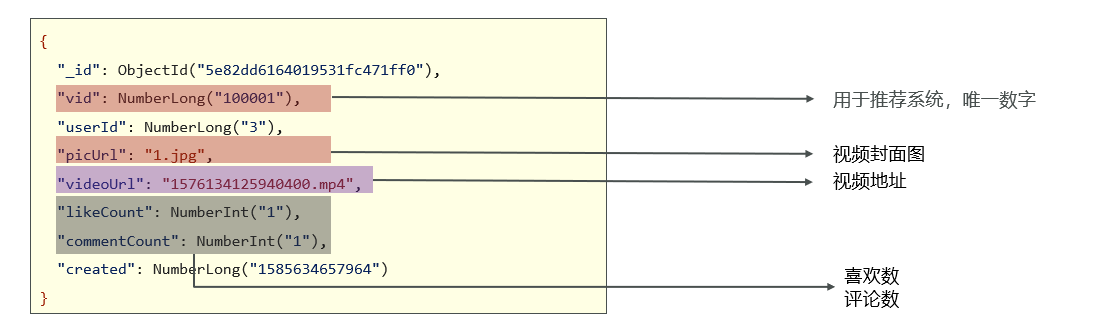
小视频功能类似于抖音、快手小视频的应用,用户可以上传小视频进行分享,也可以浏览查看别人分享的视频,并且可以对视频评论和点赞操作。
video(视频记录表):
2. 发布视频
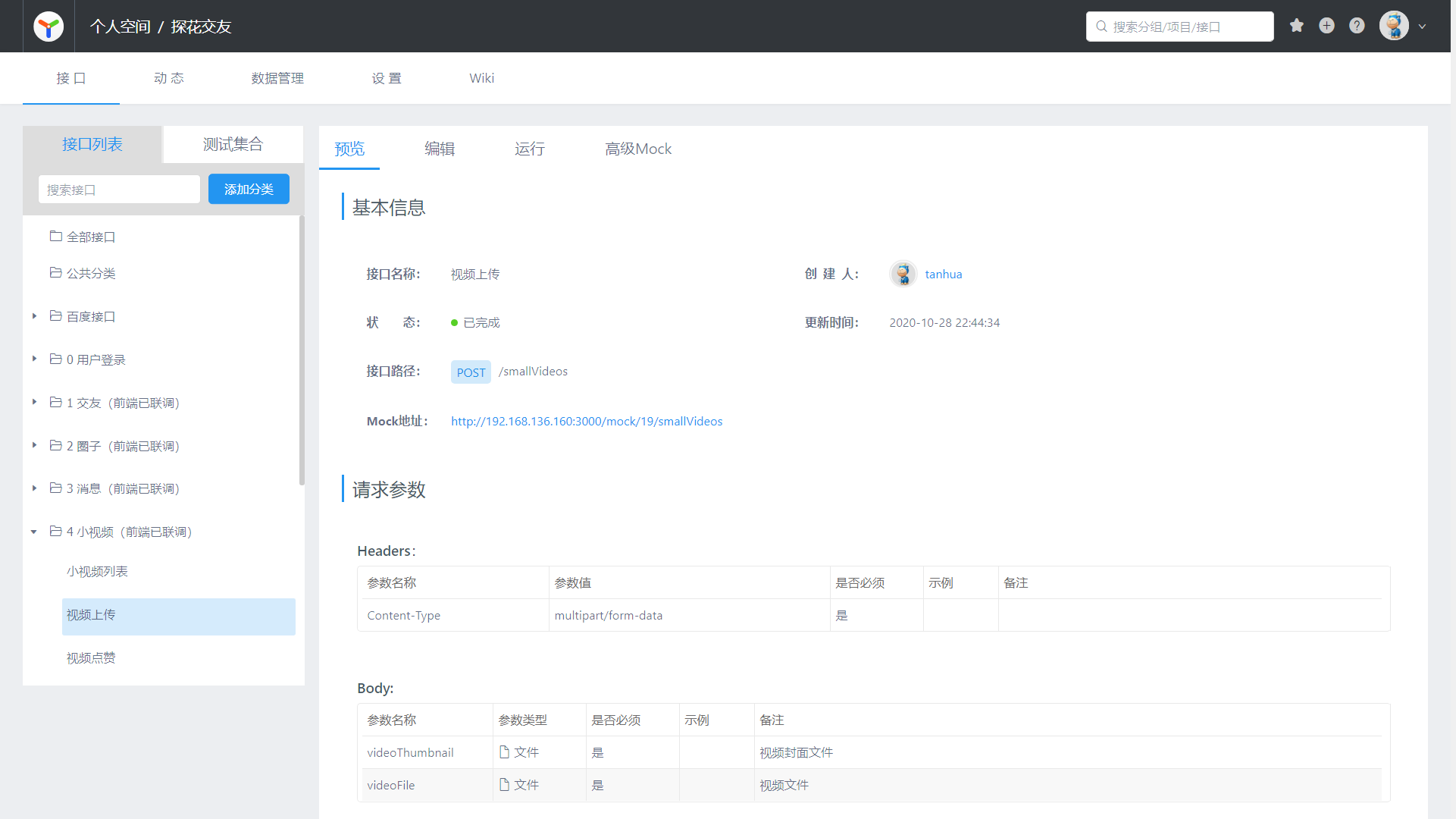
⑴. 接口文档
⑵. 发布流程
- 客户端上传视频时,自动生成封面图片一并发送请求
- 封面图片:上传到阿里云OSS
- 视频:上传到FastDFS
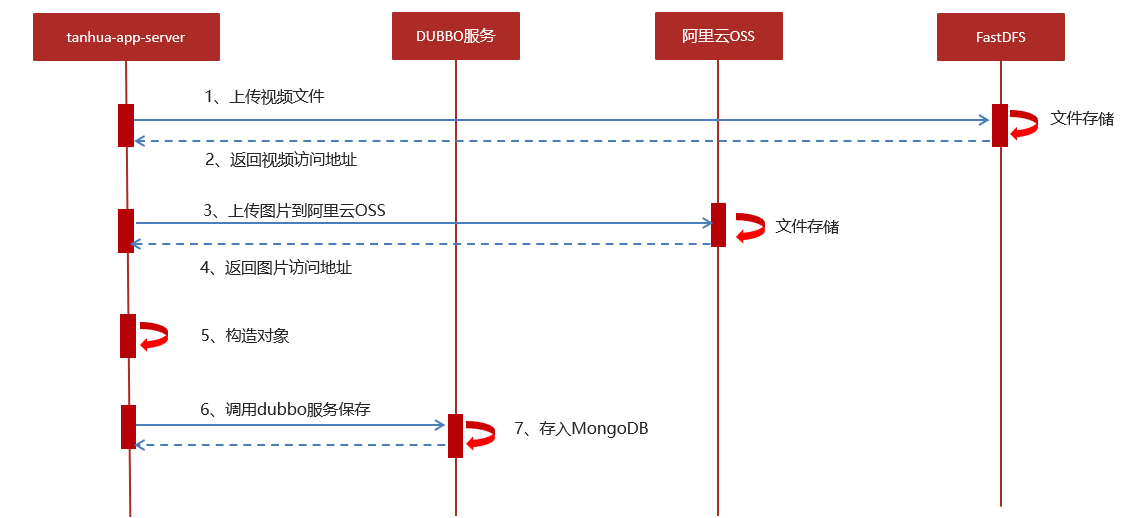
- 用户发通过客户端APP上传视频到server服务
- server服务上传视频到FastDFS文件系统,上传成功后返回视频的url地址
- server服务上传封面图片到阿里云OSS
- server通过rpc的调用dubbo服务进行保存小视频数据
⑶. 编码实现
①. yml配置文件
编辑
tanhua-app-server/src/main/resources/application.yml文件:... Spring: servlet: multipart: max-file-size: 30MB max-request-size: 30MB- 1
- 2
- 3
- 4
- 5
- 6
②. 实体类
新建
tanhua-model/src/main/java/com/tanhua/model/mongo/Video.java文件:@Data @NoArgsConstructor @AllArgsConstructor @Document(collection = "video") public class Video implements java.io.Serializable { private static final long serialVersionUID = -3136732836884933873L; private ObjectId id; //主键id private Long vid; //自动增长 private Long created; //创建时间 private Long userId; private String text; //文字 private String picUrl; //视频封面文件,URL private String videoUrl; //视频文件,URL private Integer likeCount=0; //点赞数 private Integer commentCount=0; //评论数 private Integer loveCount=0; //喜欢数 }- 1
- 2
- 3
- 4
- 5
- 6
- 7
- 8
- 9
- 10
- 11
- 12
- 13
- 14
- 15
- 16
- 17
- 18
- 19
- 20
- 21
- 22
- 23
③. Controller
新建
tanhua-app-server/src/main/java/com/tanhua/server/controller/SmallVideoController.java文件:@RestController @RequestMapping("/smallVideos") public class SmallVideoController { @Autowired private SmallVideosService videosService; /** * 发布视频 * 接口路径:POST * 请求参数: * videoThumbnail:封面图 * videoFile:视频文件 */ @PostMapping public ResponseEntity saveVideos(MultipartFile videoThumbnail, MultipartFile videoFile) throws IOException { videosService.saveVideos(videoThumbnail,videoFile); return ResponseEntity.ok(null); } }- 1
- 2
- 3
- 4
- 5
- 6
- 7
- 8
- 9
- 10
- 11
- 12
- 13
- 14
- 15
- 16
- 17
- 18
- 19
- 20
④. Service
编辑
tanhua-app-server/src/main/java/com/tanhua/server/service/SmallVideosService.java文件:@Service public class SmallVideosService { @Autowired private FastFileStorageClient client; @Autowired private FdfsWebServer webServer; @Autowired private OssTemplate ossTemplate; @DubboReference private VideoApi videoApi; /** * 上传视频 * @param videoThumbnail 视频封面图片 * @param videoFile 视频文件 */ public void saveVideos(MultipartFile videoThumbnail, MultipartFile videoFile) throws IOException { if(videoThumbnail.isEmpty() || videoFile.isEmpty()) { throw new BusinessException(ErrorResult.error()); } // 1. 将视频上传到FastDFS,获取访问url String filename = videoFile.getOriginalFilename(); filename = filename.substring(filename.lastIndexOf(".") + 1); StorePath storePath = client.uploadFile(videoFile.getInputStream(), videoFile.getSize(), filename, null); String videoUrl = webServer.getWebServerUrl() + storePath.getFullPath(); // 2. 将封面图片上传到阿里云OSS,获取访问的url // String upload = ossTemplate.upload(videoThumbnail.getOriginalFilename(), videoThumbnail.getInputStream()); // // !!! 阿里云OSS收费, 这里暂时跳过 String upload = "https://img0.baidu.com/it/u=8672387,2873147723&fm=253&fmt=auto&app=138&f=JPEG"; // 3. 构建Videos对象 Video video = new Video(); video.setUserId(UserHolder.getUserId()); video.setVideoUrl(videoUrl); video.setPicUrl(upload); video.setText("我就是我, 是颜色不一样的烟火"); // 4. 调用API保存数据 String videoId = videoApi.save(video); if(StringUtils.isEmpty(videoId)) { throw new BusinessException(ErrorResult.error()); } } }- 1
- 2
- 3
- 4
- 5
- 6
- 7
- 8
- 9
- 10
- 11
- 12
- 13
- 14
- 15
- 16
- 17
- 18
- 19
- 20
- 21
- 22
- 23
- 24
- 25
- 26
- 27
- 28
- 29
- 30
- 31
- 32
- 33
- 34
- 35
- 36
- 37
- 38
- 39
- 40
- 41
- 42
- 43
- 44
- 45
- 46
- 47
- 48
- 49
⑤. Api
新建
tanhua-dubbo/tanhua-dubbo-interface/src/main/java/com/tanhua/dubbo/api/VideoApi.java文件:public interface VideoApi { // 保存视频 String save(Video video); }- 1
- 2
- 3
- 4
- 5
⑥. Api实现类
新建
tanhua-dubbo/tanhua-dubbo-mongo/src/main/java/com/tanhua/dubbo/api/VideoApiImpl.java文件:@DubboService public class VideoApiImpl implements VideoApi{ @Autowired private MongoTemplate mongoTemplate; @Autowired private IdWorker idWorker; // 保存视频 @Override public String save(Video video) { // 1. 设置属性 video.setVid(idWorker.getNextId("video")); video.setCreated(System.currentTimeMillis()); // 2. 调用方法保存对象 mongoTemplate.save(video); // 3. 返回对象id return video.getId().toHexString(); } }- 1
- 2
- 3
- 4
- 5
- 6
- 7
- 8
- 9
- 10
- 11
- 12
- 13
- 14
- 15
- 16
- 17
- 18
- 19
- 20
- 21
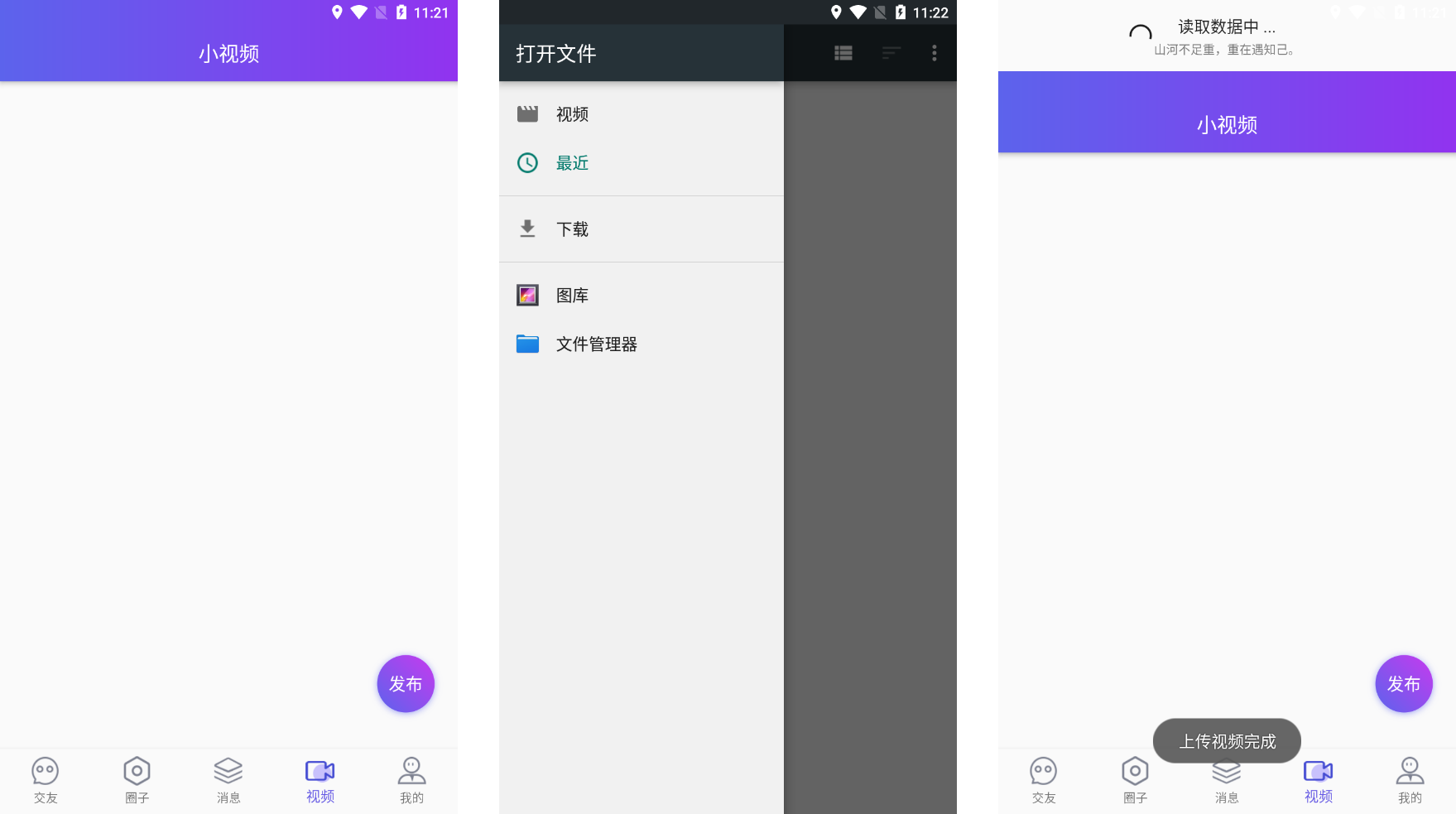
⑷. 页面效果
3. 视频列表查询
⑴. 接口文档
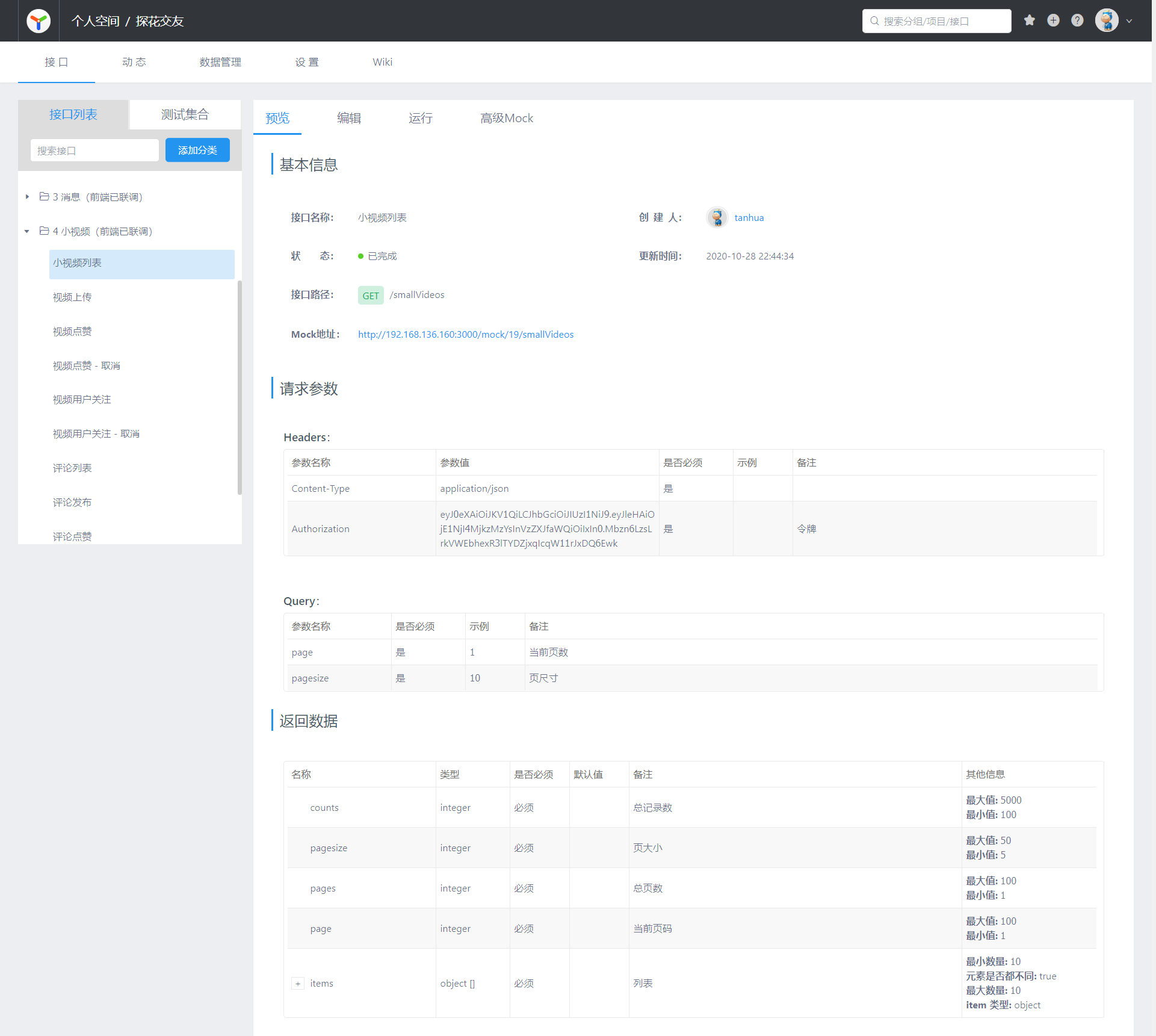
⑵. 编码实现
①. vo对象
新建
tanhua-model/src/main/java/com/tanhua/model/vo/VideoVo.java文件:@Data @NoArgsConstructor @AllArgsConstructor public class VideoVo implements Serializable { private Long userId; private String avatar; //头像 private String nickname; //昵称 private String id; private String cover; //封面 private String videoUrl; //视频URL private String signature; //发布视频时,传入的文字内容 private Integer likeCount; //点赞数量 private Integer hasLiked; //是否已赞(1是,0否) private Integer hasFocus; //是否关注 (1是,0否) private Integer commentCount; //评论数量 public static VideoVo init(UserInfo userInfo, Video item) { VideoVo vo = new VideoVo(); //copy用户属性 BeanUtils.copyProperties(userInfo,vo); //source,target //copy视频属性 BeanUtils.copyProperties(item,vo); vo.setCover(item.getPicUrl()); vo.setId(item.getId().toHexString()); vo.setSignature(item.getText()); vo.setHasFocus(0); vo.setHasLiked(0); return vo; } }- 1
- 2
- 3
- 4
- 5
- 6
- 7
- 8
- 9
- 10
- 11
- 12
- 13
- 14
- 15
- 16
- 17
- 18
- 19
- 20
- 21
- 22
- 23
- 24
- 25
- 26
- 27
- 28
- 29
- 30
- 31
- 32
- 33
- 34
- 35
②. Controller
编辑
tanhua-app-server/src/main/java/com/tanhua/server/controller/SmallVideoController.java文件:@RestController @RequestMapping("/smallVideos") public class SmallVideoController { @Autowired private SmallVideosService videosService; /** * 发布视频 * 接口路径:POST * 请求参数: * videoThumbnail:封面图 * videoFile:视频文件 */ @PostMapping public ResponseEntity saveVideos(MultipartFile videoThumbnail, MultipartFile videoFile) throws IOException { videosService.saveVideos(videoThumbnail,videoFile); return ResponseEntity.ok(null); } /** * 视频列表 */ @GetMapping public ResponseEntity queryVideoList(@RequestParam(defaultValue = "1") Integer page, @RequestParam(defaultValue = "10") Integer pagesize) { PageResult result = videosService.queryVideoList(page, pagesize); return ResponseEntity.ok(result); } }- 1
- 2
- 3
- 4
- 5
- 6
- 7
- 8
- 9
- 10
- 11
- 12
- 13
- 14
- 15
- 16
- 17
- 18
- 19
- 20
- 21
- 22
- 23
- 24
- 25
- 26
- 27
- 28
- 29
- 30
③. Service
编辑
tanhua-app-server/src/main/java/com/tanhua/server/service/SmallVideosService.java文件:@Service public class SmallVideosService { @Autowired private FastFileStorageClient client; @Autowired private FdfsWebServer webServer; @Autowired private OssTemplate ossTemplate; @DubboReference private VideoApi videoApi; @Autowired private RedisTemplate<String, String> redisTemplate; @DubboReference private UserInfoApi userInfoApi; /** * 上传视频 * @param videoThumbnail 视频封面图片 * @param videoFile 视频文件 */ public void saveVideos(MultipartFile videoThumbnail, MultipartFile videoFile) throws IOException { if(videoThumbnail.isEmpty() || videoFile.isEmpty()) { throw new BusinessException(ErrorResult.error()); } // 1. 将视频上传到FastDFS,获取访问url String filename = videoFile.getOriginalFilename(); filename = filename.substring(filename.lastIndexOf(".") + 1); StorePath storePath = client.uploadFile(videoFile.getInputStream(), videoFile.getSize(), filename, null); String videoUrl = webServer.getWebServerUrl() + storePath.getFullPath(); // 2. 将封面图片上传到阿里云OSS,获取访问的url // String upload = ossTemplate.upload(videoThumbnail.getOriginalFilename(), videoThumbnail.getInputStream()); // // !!! 阿里云OSS收费, 这里暂时跳过 String upload = "https://img0.baidu.com/it/u=8672387,2873147723&fm=253&fmt=auto&app=138&f=JPEG"; // 3. 构建Videos对象 Video video = new Video(); video.setUserId(UserHolder.getUserId()); video.setVideoUrl(videoUrl); video.setPicUrl(upload); video.setText("我就是我, 是颜色不一样的烟火"); // 4. 调用API保存数据 String videoId = videoApi.save(video); if(StringUtils.isEmpty(videoId)) { throw new BusinessException(ErrorResult.error()); } } // 查询视频列表 public PageResult queryVideoList(Integer page, Integer pagesize) { // 1. 查询redis数据 String redisKey = Constants.VIDEOS_RECOMMEND + UserHolder.getUserId(); String redisValue = redisTemplate.opsForValue().get(redisKey); // 2. 判断redis数据是否存在 List<Video> list = new ArrayList<>(); int redisPages = 0; if(!StringUtils.isEmpty(redisValue)) { // 3. 如果redis数据存在,根据VID查询数据 String[] values = redisValue.split(","); // 4. 判断redis中数据是否满足本次分页条数 if((page - 1) * pagesize < values.length) { List<Long> vids = Arrays.stream(values).skip((page - 1) * pagesize).limit(pagesize) .map(e -> Long.valueOf(e)) .collect(Collectors.toList()); list = videoApi.findMovementsByPids(vids); } redisPages = PageUtil.totalPage(values.length, pagesize); } // 5. 如果redis数据不存在, 分页查询视频数据 if(list.isEmpty()) { // page的计算规则, 传入的页码, --redis查询的总页数 list = videoApi.queryVideoList(page - redisPages, pagesize); } // 6. 提取视频列表中所有的用户id List<Long> userIds = CollUtil.getFieldValues(list, "userId", Long.class); // 7. 查询用户信息 Map<Long, UserInfo> map = userInfoApi.findByIds(userIds, null); // 8. 构建返回值 List<VideoVo> vos = new ArrayList<>(); for (Video video : list) { UserInfo info = map.get(video.getUserId()); if(info != null) { VideoVo vo = VideoVo.init(info, video); vos.add(vo); } } return new PageResult(page, pagesize, 0l, vos); } }- 1
- 2
- 3
- 4
- 5
- 6
- 7
- 8
- 9
- 10
- 11
- 12
- 13
- 14
- 15
- 16
- 17
- 18
- 19
- 20
- 21
- 22
- 23
- 24
- 25
- 26
- 27
- 28
- 29
- 30
- 31
- 32
- 33
- 34
- 35
- 36
- 37
- 38
- 39
- 40
- 41
- 42
- 43
- 44
- 45
- 46
- 47
- 48
- 49
- 50
- 51
- 52
- 53
- 54
- 55
- 56
- 57
- 58
- 59
- 60
- 61
- 62
- 63
- 64
- 65
- 66
- 67
- 68
- 69
- 70
- 71
- 72
- 73
- 74
- 75
- 76
- 77
- 78
- 79
- 80
- 81
- 82
- 83
- 84
- 85
- 86
- 87
- 88
- 89
- 90
- 91
- 92
- 93
- 94
- 95
- 96
- 97
- 98
- 99
- 100
- 101
④. Api
编辑
tanhua-dubbo/tanhua-dubbo-interface/src/main/java/com/tanhua/dubbo/api/VideoApi.java文件:public interface VideoApi { // 保存视频 String save(Video video); // 根据vid查询数据列表 List<Video> findMovementsByPids(List<Long> vids); // 分页查询数据列表 List<Video> queryVideoList(int page, Integer pagesize); }- 1
- 2
- 3
- 4
- 5
- 6
- 7
- 8
- 9
- 10
- 11
⑤. ApiImpl
编辑
tanhua-dubbo/tanhua-dubbo-mongo/src/main/java/com/tanhua/dubbo/api/VideoApiImpl.java文件:@DubboService public class VideoApiImpl implements VideoApi{ @Autowired private MongoTemplate mongoTemplate; @Autowired private IdWorker idWorker; // 保存视频 @Override public String save(Video video) { // 1. 设置属性 video.setVid(idWorker.getNextId("video")); video.setCreated(System.currentTimeMillis()); // 2. 调用方法保存对象 mongoTemplate.save(video); // 3. 返回对象id return video.getId().toHexString(); } // 根据vid查询数据列表 @Override public List<Video> findMovementsByPids(List<Long> vids) { Query query = Query.query(Criteria.where("vid").in(vids)); return mongoTemplate.find(query, Video.class); } // 分页查询数据列表 @Override public List<Video> queryVideoList(int page, Integer pagesize) { Query query = new Query().skip((page - 1) * pagesize).limit(pagesize) .with(Sort.by(Sort.Order.desc("created"))); return mongoTemplate.find(query, Video.class); } }- 1
- 2
- 3
- 4
- 5
- 6
- 7
- 8
- 9
- 10
- 11
- 12
- 13
- 14
- 15
- 16
- 17
- 18
- 19
- 20
- 21
- 22
- 23
- 24
- 25
- 26
- 27
- 28
- 29
- 30
- 31
- 32
- 33
- 34
- 35
- 36
⑶. Postman
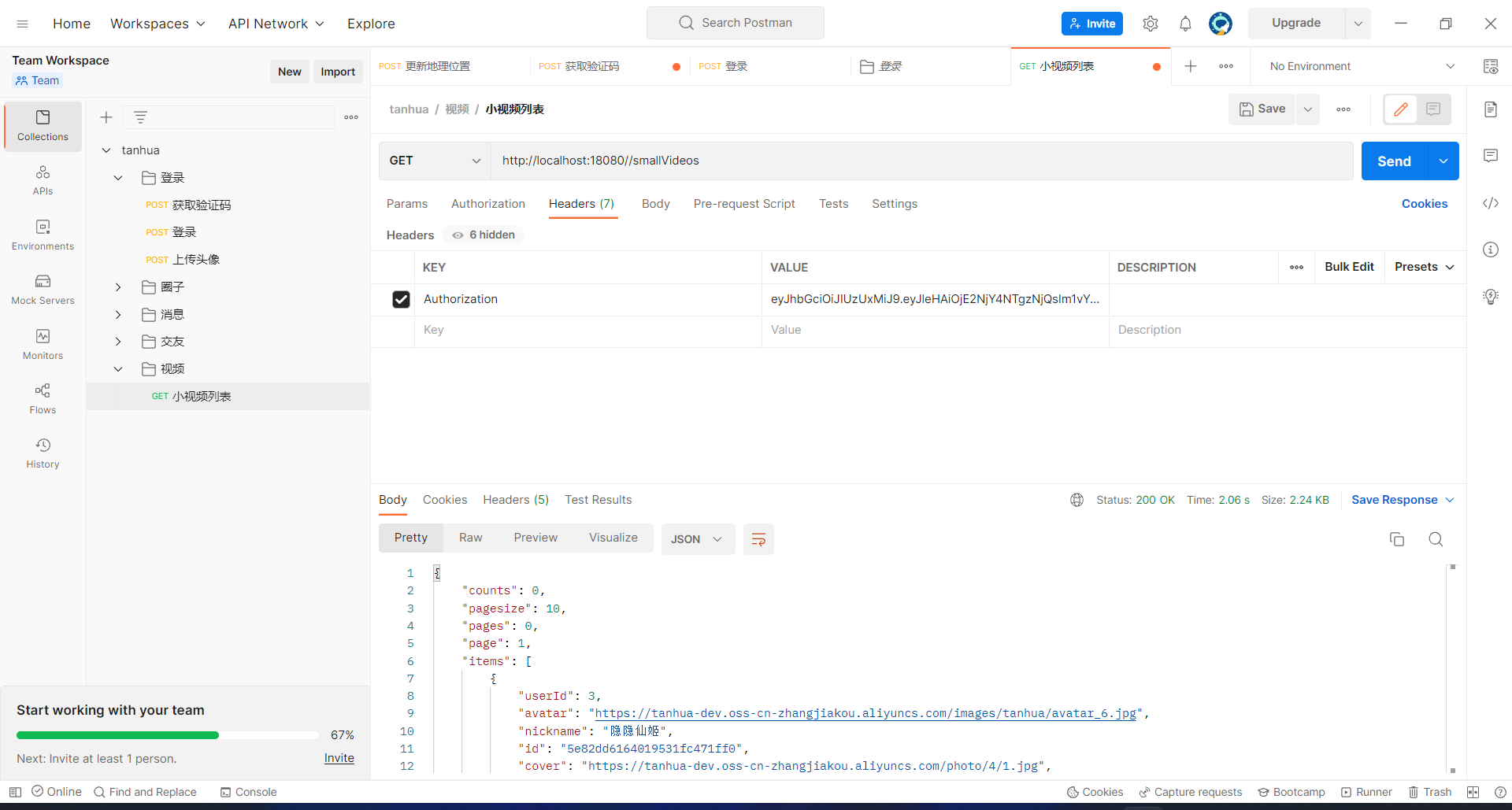
⑷. 页面效果

四、通用缓存SpringCache
1. 存在的问题
⑴. 问题
在项目中,我们通常会把高频的查询进行缓存。如资讯网站首页的文章列表、电商网站首页的商品列表、微博等社交媒体热搜的文章等等,当大量的用户发起查询时,借助缓存提高查询效率,同时减轻数据库压力。目前的缓存框架有很多:比如Redis、Memcached、Guava、Caffeine等等
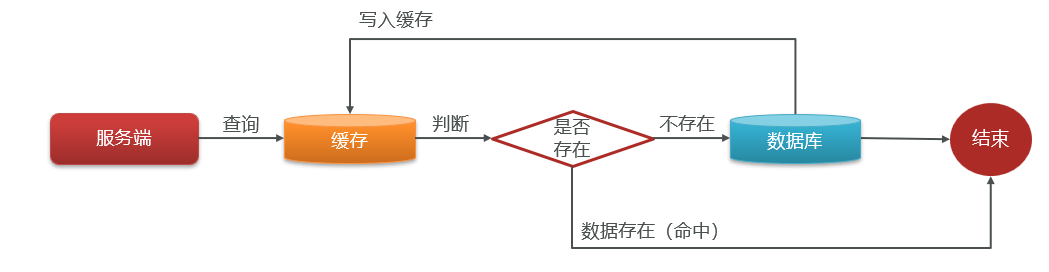
以redis为例:
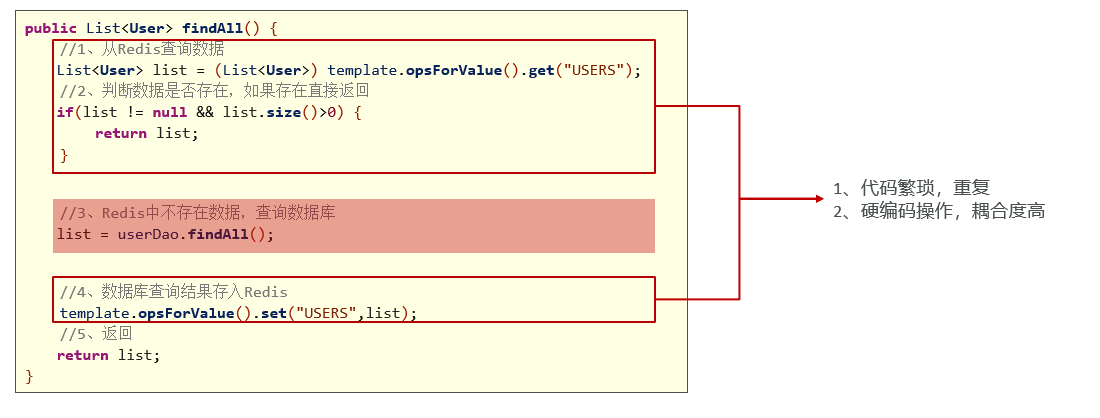
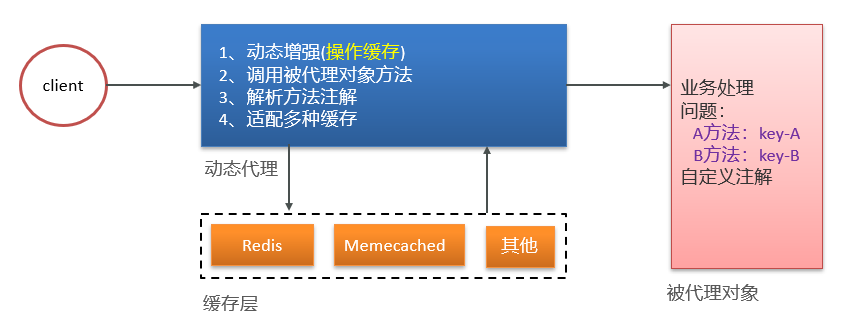
⑵. 问题分析
- 使用SpringAOP动态增强
- 自定义注解,进行缓存配置
- 适配多种缓存
2. SpringCache入门案例
⑴. 概述
Spring Cache是Spring提供的通用缓存框架。它利用了AOP,实现了基于注解的缓存功能,使开发者不用关心底层使用了什么缓存框架,只需要简单地加一个注解,就能实现缓存功能了。用户使用Spring Cache,可以快速开发一个很不错的缓存功能。
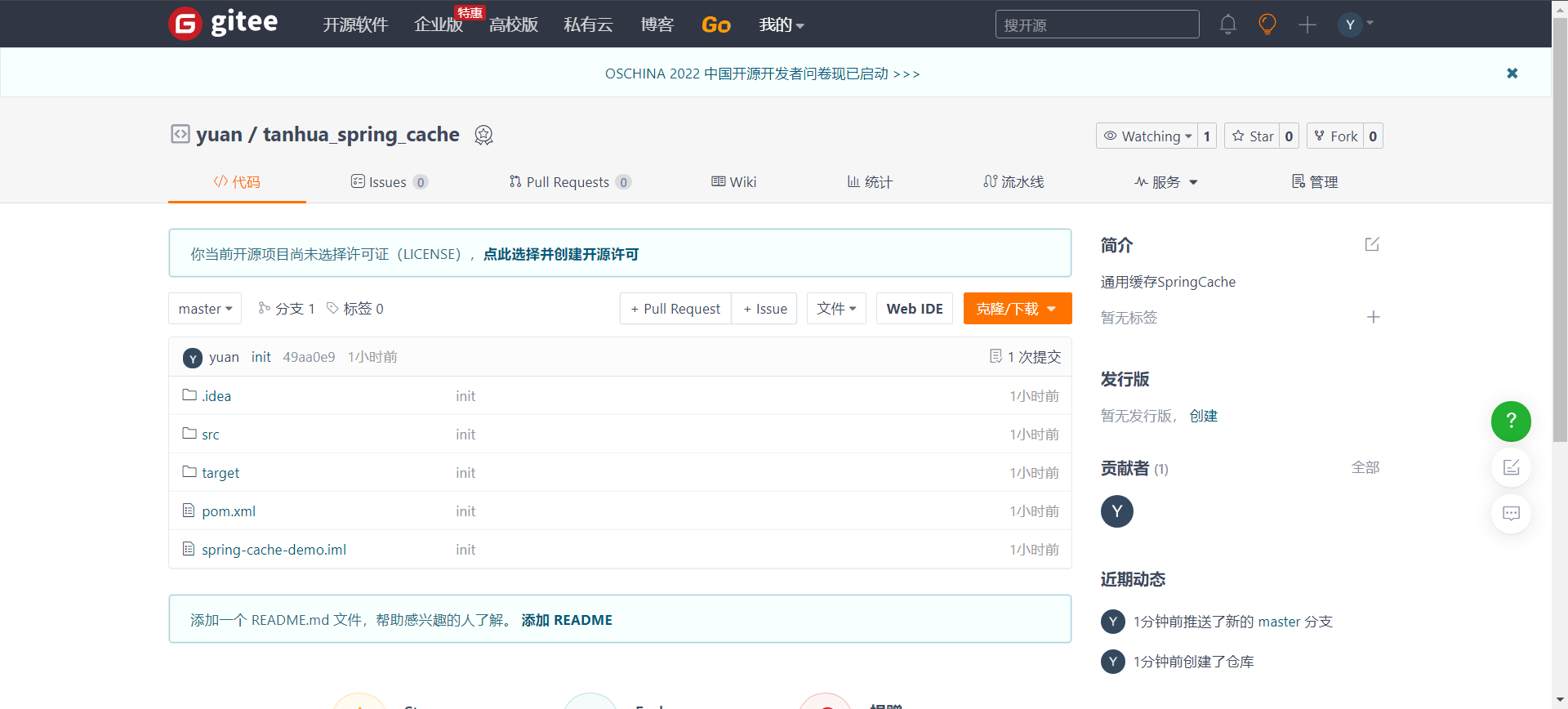
Gitee仓库: https://gitee.com/yuan0_0/tanhua_spring_cache.git
⑵. 入门案例
①. 引入依赖
编辑
pom.xml文件:<dependency> <groupId>org.springframework.bootgroupId> <artifactId>spring-boot-starter-cacheartifactId> dependency>- 1
- 2
- 3
- 4
- 5
②. 开启缓存
编辑
src/main/java/com/itheima/cache/CachingApplication.java文件:@SpringBootApplication @EnableCaching // 开启缓存 public class CachingApplication { public static void main(String[] args) { SpringApplication.run(CachingApplication.class, args); } }- 1
- 2
- 3
- 4
- 5
- 6
- 7
- 8
- 9
③. 配置注解
编辑
src/main/java/com/itheima/cache/service/UserService.java文件:@CachePut(value="user"") public User findById(Long id) { return userDao.findById(id); }- 1
- 2
- 3
- 4
④. 测试类
编辑
src/test/java/com/itheima/cache/test/UserServiceTest.java文件:/** * 根据id查询用户 */ @Test public void testFindById() { for (int i = 0; i < 5; i++) { User user = userService.findById(1l); System.out.println(user); } }- 1
- 2
- 3
- 4
- 5
- 6
- 7
- 8
- 9
- 10
⑶. redis缓存
①. 引入依赖
编辑
pom.xml文件:<dependency> <groupId>org.springframework.bootgroupId> <artifactId>spring-boot-starter-data-redisartifactId> dependency>- 1
- 2
- 3
- 4
- 5
②. 加入redis配置
编辑
src/main/resources/application.yml文件:spring: redis: port: 6379 host: 192.168.136.160- 1
- 2
- 3
- 4
③. 配置注解
编辑
src/main/java/com/itheima/cache/service/UserService.java文件:@Service public class UserService { @Autowired private UserDao userDao; // @CachePut(value="user"") /** * value:名称空间(分组) * key: 支持springel * redis-key的命名规则: * value + "::" + key */ @CachePut(value="user" , key = "'test' + #id") public User findById(Long id) { return userDao.findById(id); } //@CacheEvict(value="user" , key = "'test' + #id") @Caching( evict = { @CacheEvict(value="user" , key = "'test' + #id"), @CacheEvict(value="user" , key = "#id") } ) public void update(Long id) { userDao.update(id); } }- 1
- 2
- 3
- 4
- 5
- 6
- 7
- 8
- 9
- 10
- 11
- 12
- 13
- 14
- 15
- 16
- 17
- 18
- 19
- 20
- 21
- 22
- 23
- 24
- 25
- 26
- 27
- 28
- 29
④. 测试类
编辑
src/test/java/com/itheima/cache/test/UserServiceTest.java文件:@RunWith(SpringRunner.class) @SpringBootTest public class UserServiceTest { @Autowired private UserService userService; /** * 根据id查询用户 */ @Test public void testFindById() { for (int i = 0; i < 5; i++) { User user = userService.findById(1l); System.out.println(user); } } @Test public void testFindById2() { User user = userService.findById(2l); System.out.println(user); } //更新:更新数据库,删除redis中的缓存数据 @Test public void testUpdate() { userService.update(2l); } }- 1
- 2
- 3
- 4
- 5
- 6
- 7
- 8
- 9
- 10
- 11
- 12
- 13
- 14
- 15
- 16
- 17
- 18
- 19
- 20
- 21
- 22
- 23
- 24
- 25
- 26
- 27
- 28
- 29
- 30
- 31
3. 常用注解
- @Cacheable:
- 注解表示这个方法有了缓存的功能,方法的返回值会被缓存下来,下一次调用该方法前,会去检查是否缓存中已经有值,如果有就直接返回,不调用方法。如果没有,就调用方法,然后把结果缓存起来。
- @CachePut:
- 加了@CachePut注解的方法,会把方法的返回值put到缓存里面缓存起来,供其它地方使用。
- @CacheEvit:
- 使用了CacheEvict注解的方法,会清空指定缓存。
- @Caching:
- Java代码中,同个方法,一个相同的注解只能配置一次。如若操作多个缓存,可以使用@Caching
4. 使用SpringCache优化视频列表
①. 开启缓存
编辑
tanhua-app-server/src/main/java/com/tanhua/server/AppServerApplication.java文件://启动类 // @SpringBootApplication @SpringBootApplication(exclude = { MongoAutoConfiguration.class, MongoDataAutoConfiguration.class }) //排除mongo的自动配置 @EnableCaching //开启缓存 public class AppServerApplication { public static void main(String[] args) { SpringApplication.run(AppServerApplication.class,args); } }- 1
- 2
- 3
- 4
- 5
- 6
- 7
- 8
- 9
- 10
- 11
- 12
②. 配置注解
编辑
tanhua-app-server/src/main/java/com/tanhua/server/service/SmallVideosService.java文件:@Service public class SmallVideosService { @Autowired private FastFileStorageClient client; @Autowired private FdfsWebServer webServer; @Autowired private OssTemplate ossTemplate; @DubboReference private VideoApi videoApi; @Autowired private RedisTemplate<String, String> redisTemplate; @DubboReference private UserInfoApi userInfoApi; /** * 上传视频 * @param videoThumbnail 视频封面图片 * @param videoFile 视频文件 */ @CacheEvict(value="videoList",allEntries = true) // 清空缓存 public void saveVideos(MultipartFile videoThumbnail, MultipartFile videoFile) throws IOException { if(videoThumbnail.isEmpty() || videoFile.isEmpty()) { throw new BusinessException(ErrorResult.error()); } // 1. 将视频上传到FastDFS,获取访问url String filename = videoFile.getOriginalFilename(); filename = filename.substring(filename.lastIndexOf(".") + 1); StorePath storePath = client.uploadFile(videoFile.getInputStream(), videoFile.getSize(), filename, null); String videoUrl = webServer.getWebServerUrl() + storePath.getFullPath(); // 2. 将封面图片上传到阿里云OSS,获取访问的url // String upload = ossTemplate.upload(videoThumbnail.getOriginalFilename(), videoThumbnail.getInputStream()); // // !!! 阿里云OSS收费, 这里暂时跳过 String upload = "https://img0.baidu.com/it/u=8672387,2873147723&fm=253&fmt=auto&app=138&f=JPEG"; // 3. 构建Videos对象 Video video = new Video(); video.setUserId(UserHolder.getUserId()); video.setVideoUrl(videoUrl); video.setPicUrl(upload); video.setText("我就是我, 是颜色不一样的烟火"); // 4. 调用API保存数据 String videoId = videoApi.save(video); if(StringUtils.isEmpty(videoId)) { throw new BusinessException(ErrorResult.error()); } } // 查询视频列表 @Cacheable( value="videos", key = "T(com.tanhua.server.interceptor.UserHolder).getUserId()+'_'+#page+'_'+#pagesize") //userid _ page_pagesize public PageResult queryVideoList(Integer page, Integer pagesize) { // 1. 查询redis数据 String redisKey = Constants.VIDEOS_RECOMMEND + UserHolder.getUserId(); String redisValue = redisTemplate.opsForValue().get(redisKey); // 2. 判断redis数据是否存在 List<Video> list = new ArrayList<>(); int redisPages = 0; if(!StringUtils.isEmpty(redisValue)) { // 3. 如果redis数据存在,根据VID查询数据 String[] values = redisValue.split(","); // 4. 判断redis中数据是否满足本次分页条数 if((page - 1) * pagesize < values.length) { List<Long> vids = Arrays.stream(values).skip((page - 1) * pagesize).limit(pagesize) .map(e -> Long.valueOf(e)) .collect(Collectors.toList()); list = videoApi.findMovementsByPids(vids); } redisPages = PageUtil.totalPage(values.length, pagesize); } // 5. 如果redis数据不存在, 分页查询视频数据 if(list.isEmpty()) { // page的计算规则, 传入的页码, --redis查询的总页数 list = videoApi.queryVideoList(page - redisPages, pagesize); } // 6. 提取视频列表中所有的用户id List<Long> userIds = CollUtil.getFieldValues(list, "userId", Long.class); // 7. 查询用户信息 Map<Long, UserInfo> map = userInfoApi.findByIds(userIds, null); // 8. 构建返回值 List<VideoVo> vos = new ArrayList<>(); for (Video video : list) { UserInfo info = map.get(video.getUserId()); if(info != null) { VideoVo vo = VideoVo.init(info, video); vos.add(vo); } } return new PageResult(page, pagesize, 0l, vos); } }- 1
- 2
- 3
- 4
- 5
- 6
- 7
- 8
- 9
- 10
- 11
- 12
- 13
- 14
- 15
- 16
- 17
- 18
- 19
- 20
- 21
- 22
- 23
- 24
- 25
- 26
- 27
- 28
- 29
- 30
- 31
- 32
- 33
- 34
- 35
- 36
- 37
- 38
- 39
- 40
- 41
- 42
- 43
- 44
- 45
- 46
- 47
- 48
- 49
- 50
- 51
- 52
- 53
- 54
- 55
- 56
- 57
- 58
- 59
- 60
- 61
- 62
- 63
- 64
- 65
- 66
- 67
- 68
- 69
- 70
- 71
- 72
- 73
- 74
- 75
- 76
- 77
- 78
- 79
- 80
- 81
- 82
- 83
- 84
- 85
- 86
- 87
- 88
- 89
- 90
- 91
- 92
- 93
- 94
- 95
- 96
- 97
- 98
- 99
- 100
- 101
- 102
- 103
- 104
- 105
③. 设置失效时间
编辑
tanhua-app-server/src/main/java/com/tanhua/server/config/RedisCacheConfig.java文件:@Configuration public class RedisCacheConfig { //设置失效时间 private static final Map<String, Duration> cacheMap; static { cacheMap = ImmutableMap.<String, Duration>builder().put("videos", Duration.ofSeconds(30L)).build(); } //配置RedisCacheManagerBuilderCustomizer对象 @Bean public RedisCacheManagerBuilderCustomizer redisCacheManagerBuilderCustomizer() { return (builder) -> { //根据不同的cachename设置不同的失效时间 for (Map.Entry<String, Duration> entry : cacheMap.entrySet()) { builder.withCacheConfiguration(entry.getKey(), RedisCacheConfiguration.defaultCacheConfig().entryTtl(entry.getValue())); } }; } }- 1
- 2
- 3
- 4
- 5
- 6
- 7
- 8
- 9
- 10
- 11
- 12
- 13
- 14
- 15
- 16
- 17
- 18
- 19
- 20
- 21
- 22
-
相关阅读:
react如何阻止父容器滚动
基于改进海洋捕食者算法求解单目标优化问题附matlab代码(NMPA)
【ElasticSearch系列-05】SpringBoot整合elasticSearch
Linux性能优化实战CPU篇(二)
【Java UI】HarmonyOS 如何集成SlidingDrawer组件
妙啊!纯 CSS 实现拼图游戏
基于JARM指纹的C2识别
FPGA片内RAM读写测试实验+逻辑分析仪ila
小白excel初步使用2022.06.02
【工程光学】光度学&色度学
- 原文地址:https://blog.csdn.net/weixin_45137565/article/details/127529338
- 最新文章
-
【FHE】我们如何实现同态加密推理(八):SiLU 的密文化——两条路径,和一个 8 字节的开关
SQLcl 中 c/old/new 替换变量为何失效?先定位再替换
不让模型写作文,直接从它脑子里读答案:Jev 决策在 .NET 的两条路线
Halo插件:支持GitHub的图床附件策略
电视投屏界的“一股清流”!SimpleTVCast 6.0.0-beta 抢先体验:无需TV端App,界面大换血!✨
华三VXLAN集中式网关实战指南:Spine多活网关 + 双活接入(M-LAG)
软件更好写之后口碑会更重要
大 O、大 Omega、大 Theta 的区别,O(n) 复杂度是什么意思
Java标签跳转:一个鲜为人知但却很实用的小技巧
多智能体系统论文速读