-
[Unity2D独立/合作开发] 实现以网格为单位的物品丢弃范围以及设置物品可操作范围
学习目标:
大家好啊我是说的道理,今天来点大家想看的东西。
如果你也在做RPG类游戏的开发,有个问题是绕不过去的,就是当我们丢弃物品的时候,不能满地图都要丢掉,而是要考虑物品的可丢弃范围以及这个物品能不能丢在场景的某个位置,今天我能就用脚本来实现这些功能。
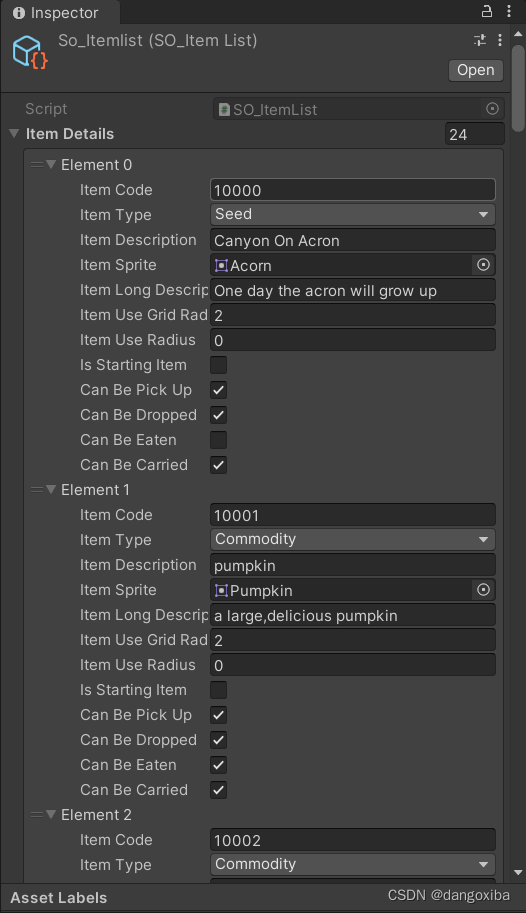
首先检测一下你们的so_Itemlist,是否把物品设置可丢弃CanBeDropped以及丢弃范围ItemUseGridRadius
然后就是代码部分
explicit operator,C#中的自定义类型的运算转化符,将之后的脚本中我们将使用这四个静态函数
- using UnityEngine;
- [System.Serializable]
- public class GridCoordinate
- {
- public int x;
- public int y;
- public GridCoordinate(int x, int y)
- {
- this.x = x;
- this.y = y;
- }
- public static explicit operator Vector2(GridCoordinate gridCoordinate)
- {
- return new Vector2((float)gridCoordinate.x, (float)gridCoordinate.y);
- }
- public static explicit operator Vector2Int(GridCoordinate gridCoordinate)
- {
- return new Vector2Int(gridCoordinate.x, gridCoordinate.y);
- }
- public static explicit operator Vector3(GridCoordinate gridCoordinate)
- {
- return new Vector3(gridCoordinate.x, gridCoordinate.y,0f);
- }
- public static explicit operator Vector3Int(GridCoordinate gridCoordinate)
- {
- return new Vector3Int(gridCoordinate.x, gridCoordinate.y,0);
- }
- }
回到我们的Enums脚本创建一个新的枚举,这些分别对应了我们的so_itemList上每个item的bool值
- public enum GridBoolProperty
- {
- diggable,
- canDropItem,
- canPlaneFurniture,
- isPath,
- isNPCObstacle,
- }
于是我们创建一个GridProeprty
- [System.Serializable]
- public class GridPropetry
- {
- public GridCoordinate gridCoordinate;
- public GridBoolProperty gridBoolProperty;
- public bool gridBoolValue = false;
- public GridPropetry(GridCoordinate gridCoordinate,GridBoolProperty gridBoolProperty,bool gridBoolValue)
- {
- this.gridCoordinate = gridCoordinate;
- this.gridBoolProperty = gridBoolProperty;
- this.gridBoolValue = gridBoolValue;
- }
- }
每个场景都需要一个记录gridpeoperty的数据结构支持
- using System.Collections;
- using System.Collections.Generic;
- using UnityEngine;
- [CreateAssetMenu(fileName = "so_GridProperties", menuName = "Scriptable Objects/Grid Properties")]
- public class SO_GridProperties : ScriptableObject
- {
- public SceneName sceneName;
- public int gridWidth;
- public int gridHeight;
- public int originX;
- public int originY;
- [SerializeField] public List
gridPropertyList; - }
以及一个Details细节脚本
- [System.Serializable]
- public class GridPropertyDetails
- {
- public int gridX;
- public int gridY;
- public bool isDiggable = false;
- public bool canDropItem = false;
- public bool canPlackFurntiure = false;
- public bool isPath = false;
- public bool isNPCObstacle = false;
- public int daysSinceDug = -1;
- public int daysSinceWatered = -1;
- public int seedItemCode = -1;
- public int growthDays = -1;
- public int daysSinceLastHarvest = -1;
- public GridPropertyDetails()
- {
- }
- }
新建一个游戏对象叫gridpropertyManager再给他一个同名脚本
- using System.Collections;
- using System.Collections.Generic;
- using UnityEngine;
- using UnityEngine.Tilemaps;
- [RequireComponent(typeof(GenerateGUID))]
- public class GridPropertiesManager : Singleton<GridPropertiesManager>, ISaveable//继承ISaveable并实现方法
- {
- public Grid grid;
- private Dictionary<string, GridPropertyDetails> gridPropertyDictionary; //GridPropertyDetails的字典
- [SerializeField] private SO_GridProperties[] so_GridPropertiesArray = null; //创建的每个场景中合起来的数组
- private string iSaveableUniqueID; //GUID
- public string ISaveableUniqueID { get => iSaveableUniqueID; set => iSaveableUniqueID = value; }
- private GameObjectSave gameObjectSave; //scneneData
- public GameObjectSave GameObjectSave { get => gameObjectSave; set => gameObjectSave = value; }
- protected override void Awake()
- {
- base.Awake();
- ISaveableUniqueID = GetComponent
().GUID; - GameObjectSave = new GameObjectSave();
- }
- private void Start()
- {
- IntializeGridProperty();
- }
- private void OnEnable()
- {
- EventHandler.AfterSceneLoadEvent += AfterSceneLoaded;
- ISaveableRegister();
- }
- private void OnDisable()
- {
- EventHandler.AfterSceneLoadEvent -= AfterSceneLoaded;
- ISaveableDeregister();
- }
- private void AfterSceneLoaded()
- {
- grid = GameObject.FindObjectOfType
(); - }
- public void ISaveableDeregister()
- {
- SaveStoreManager.Instance.iSaveableObjectLists.Remove(this);
- }
- public void ISaveableRegister()
- {
- SaveStoreManager.Instance.iSaveableObjectLists.Add(this);
- }
- public void ISaveableRestoreScene(string sceneName)
- {
- if(GameObjectSave.sceneData.TryGetValue(sceneName,out SceneSave sceneSave))
- {
- if(sceneSave.gridPropetyDeatilsDictionary != null)
- {
- gridPropertyDictionary = sceneSave.gridPropetyDeatilsDictionary;
- }
- }
- }
- public void ISaveableStoreScene(string sceneName)
- {
- GameObjectSave.sceneData.Remove(sceneName);
- SceneSave sceneSave = new SceneSave();
- sceneSave.gridPropetyDeatilsDictionary = gridPropertyDictionary;
- GameObjectSave.sceneData.Add(sceneName, sceneSave);
- }
- ///
- /// 初始化场景的中的GridProperty
- ///
- private void IntializeGridProperty()
- {
- foreach (SO_GridProperties so_GridProperties in so_GridPropertiesArray) //先遍历场景数据结构的数组
- {
- Dictionary<string, GridPropertyDetails> gridPropertyDictionary = new Dictionary<string, GridPropertyDetails>(); //对于每个场景创建一个字典,string即GUID
- foreach (GridPropetry gridPropetry in so_GridProperties.gridPropertyList) //遍历场景数据结构中的链表元素
- {
- GridPropertyDetails gridPropertyDetails;
- gridPropertyDetails = GetGridPropetyDetails(gridPropetry.gridCoordinate.x, gridPropetry.gridCoordinate.y,gridPropertyDictionary);//用坐标来初始化gridPropertyDetails
- if (gridPropertyDetails == null) //如果找不到就创建一个新的
- {
- gridPropertyDetails = new GridPropertyDetails();
- }
- //用switch来判断gridPropetry的gridBoolProperty枚举
- //以此来给gridPropertyDetails上的对应bool来赋值
- switch (gridPropetry.gridBoolProperty)
- {
- case GridBoolProperty.diggable:
- gridPropertyDetails.isDiggable = gridPropetry.gridBoolValue;
- break;
- case GridBoolProperty.canDropItem:
- gridPropertyDetails.canDropItem = gridPropetry.gridBoolValue;
- break;
- case GridBoolProperty.canPlaneFurniture:
- gridPropertyDetails.canPlackFurntiure = gridPropetry.gridBoolValue;
- break;
- case GridBoolProperty.isPath:
- gridPropertyDetails.isPath = gridPropetry.gridBoolValue;
- break;
- case GridBoolProperty.isNPCObstacle:
- gridPropertyDetails.isNPCObstacle = gridPropetry.gridBoolValue;
- break;
- default:
- break;
- }
- SetGridPropertyDetails(gridPropetry.gridCoordinate.x,gridPropetry.gridCoordinate.y,gridPropertyDetails,gridPropertyDictionary);
- }
- SceneSave sceneSave = new SceneSave();
- sceneSave.gridPropetyDeatilsDictionary = gridPropertyDictionary;//吧我们新建的gridPropertyDictionary复制给sceneSave的字典
- if (so_GridProperties.sceneName .ToString() == SceneControllerManager.Instance.startingSceneName.ToString())
- {
- this.gridPropertyDictionary = gridPropertyDictionary;
- }
- GameObjectSave.sceneData.Add(so_GridProperties.sceneName.ToString(), sceneSave);
- }
- }
- ///
- /// 重载函数,用默认的gridPropertyDictionary来储值
- ///
- ///
- ///
- ///
- public void SetGridPropertyDetails(int gridX,int gridY, GridPropertyDetails gridPropertyDetails)
- {
- SetGridPropertyDetails(gridX, gridY, gridPropertyDetails, gridPropertyDictionary);
- }
- private void SetGridPropertyDetails(int gridX, int gridY, GridPropertyDetails gridPropertyDetails, Dictionary<string, GridPropertyDetails> gridPropertyDictionary)
- {
- string key = "x" + gridX + "y" + gridY;
- gridPropertyDetails.gridX = gridX;
- gridPropertyDetails.gridY = gridY;
- gridPropertyDictionary[key] = gridPropertyDetails;
- }
- public GridPropertyDetails GetGridPropetyDetails(int gridX, int gridY,Dictionary<string , GridPropertyDetails> gridPropertyDictionary)
- {
- string key = "x" + gridX + "y" + gridY;
- GridPropertyDetails gridPropertyDetails;
- if(!gridPropertyDictionary.TryGetValue(key, out gridPropertyDetails))
- {
- return null;
- }
- else
- {
- return gridPropertyDetails;
- }
- }
- ///
- /// 重载函数,也是用默认的gridPropertyDictionary来取值
- ///
- ///
- ///
- ///
- public GridPropertyDetails GetGridPropetyDetails(int gridX, int gridY)
- {
- return GetGridPropetyDetails(gridX, gridY, gridPropertyDictionary);
- }
- }
我们还需要给每个这种判断bool的tilemap创建脚本
- using System.Collections;
- using System.Collections.Generic;
- using UnityEngine;
- using UnityEditor;
- using UnityEngine.Tilemaps;
- [ExecuteAlways]
- public class TilemapGridProperties : MonoBehaviour
- {
- private Tilemap tilemap;
- [SerializeField] private SO_GridProperties gridProperties = null;
- [SerializeField] private GridBoolProperty gridBoolProperty = GridBoolProperty.diggable;
- private void OnEnable()
- {
- if (!Application.IsPlaying(gameObject))
- {
- tilemap = GetComponent
(); - if(gridProperties != null)
- {
- gridProperties.gridPropertyList.Clear();
- }
- }
- }
- private void OnDisable()
- {
- if (!Application.IsPlaying(gameObject))
- {
- UseGridProperties();
- if (gridProperties != null)
- {
- Debug.Log("触发Editor");
- EditorUtility.SetDirty(gridProperties);
- }
- }
- }
- private void Update()
- {
- if (!Application.IsPlaying(gameObject))
- {
- }
- }
- private void UseGridProperties()
- {
- tilemap.CompressBounds();
- if (!Application.IsPlaying(gameObject))
- {
- if(gridProperties != null)
- {
- Vector3Int startCell = tilemap.cellBounds.min;
- Vector3Int endCell = tilemap.cellBounds.max;
- for (int x = startCell.x; x < endCell.x; x++)
- {
- for (int y = startCell.y; y < endCell.y; y++)
- {
- TileBase tile = tilemap.GetTile(new Vector3Int(x, y, 0));
- if(tile != null)
- {
- gridProperties.gridPropertyList.Add(new GridPropetry(new GridCoordinate(x, y), gridBoolProperty, true));
- }
- }
- }
- }
- }
- }
- }
注意我们上上篇讲的特性【ExcuteAlways】
然后回到Unity激活好我们创建的Grid Properties,

这五个Bool都有Tilemap组件,以canDropItem为例。

这里我们添加好后,就创建一个数据结构so_GridProperties_Scene1_Farm
当我们关闭这个gridProperties之后

打开我们创建的数据结构
,可见List多达上千条,添加成功
 可以给其它两个场景也添加上去。
自此主要功能已经实现了。
添加UI:
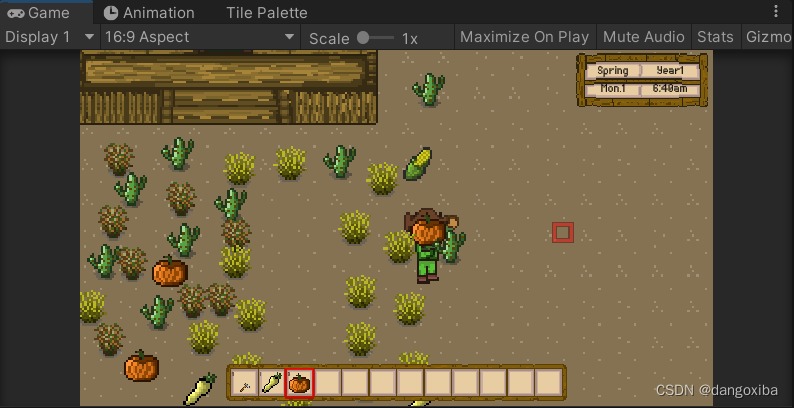
我们还需奥UI知道当放物体的时候是在哪一个grid网格上。
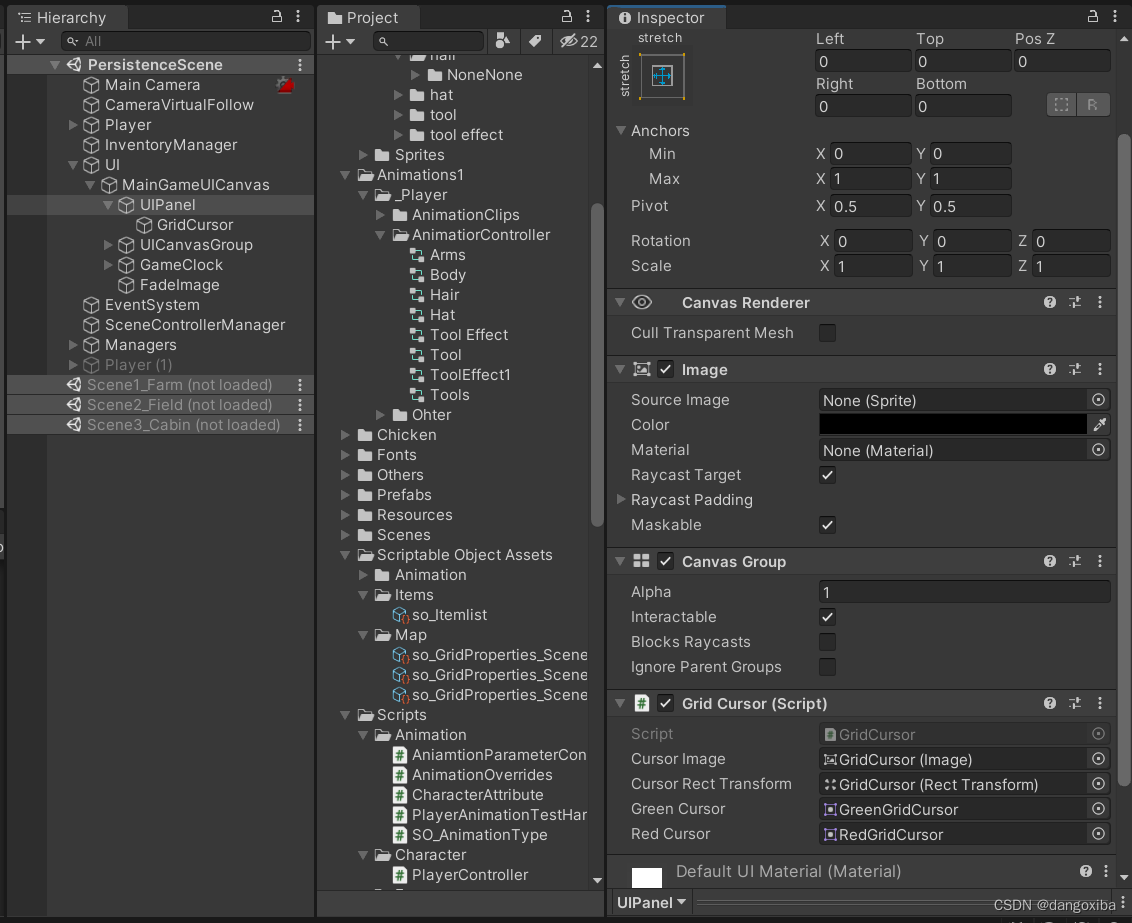

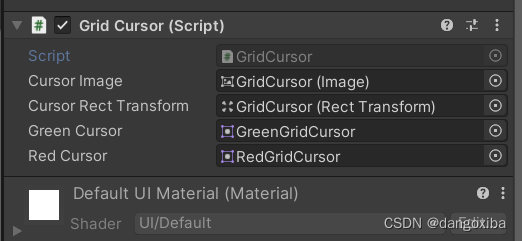
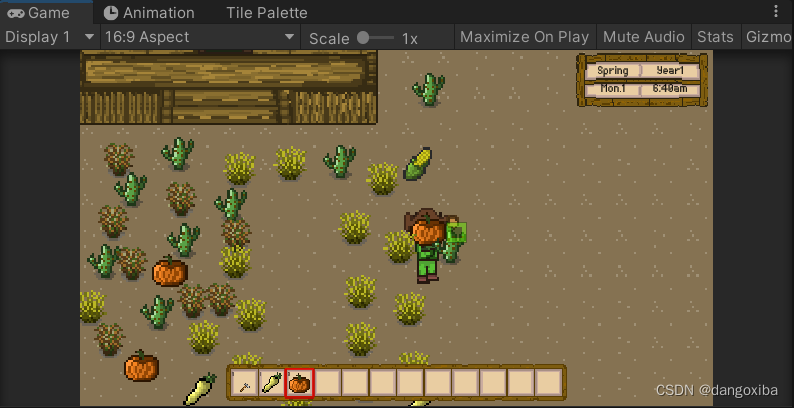
我有绿红两个指针,绿色表示可以放,红色表示不能放,然后创建脚本GridCursor
- using System.Collections;
- using System.Collections.Generic;
- using UnityEngine;
- using UnityEngine.UI;
- public class GridCursor : MonoBehaviour
- {
- private Canvas canvas;
- private Grid grid;
- private Camera mainCamera;
- [SerializeField] private Image cursorImage = null;
- [SerializeField] private RectTransform cursorRectTransform = null;
- [SerializeField] private Sprite greenCursor = null;
- [SerializeField] private Sprite redCursor = null;
- private bool _cursorPositionIsValid = false;
- public bool CursorPositionIsValid
- {
- get => _cursorPositionIsValid;
- set => _cursorPositionIsValid = value;
- }
- private int _itemUseGridRadius = 0;
- public int ItemUseGridRaudius
- {
- get => _itemUseGridRadius;
- set => _itemUseGridRadius = value;
- }
- private ItemType _selectedItemType;
- public ItemType SelectedItemType
- {
- get => _selectedItemType;
- set => _selectedItemType = value;
- }
- private bool _cursorIsEnabled = false;
- public bool CursorIsEnabled
- {
- get => _cursorIsEnabled;
- set => _cursorIsEnabled = value;
- }
- private void Start()
- {
- mainCamera = Camera.main;
- canvas = GetComponentInParent
- }
- private void OnEnable()
- {
- EventHandler.AfterSceneLoadEvent += AfterSceneLoaded;
- }
- private void OnDisable()
- {
- EventHandler.AfterSceneLoadEvent -= AfterSceneLoaded;
- }
- private void Update()
- {
- if (CursorIsEnabled)
- DisplayCursor();
- }
- private Vector3Int DisplayCursor()
- {
- if(grid != null)
- {
- Vector3Int gridPosition = GetGridPositionForCurosr();
- Vector3Int playerPosition = GetGridPositionForPlayer();
- SetCursorValidity(gridPosition ,playerPosition);
- cursorRectTransform.position = GetRectTransformForCursor(gridPosition);
- return gridPosition;
- }
- else
- {
- return Vector3Int.zero;
- }
- }
- private Vector3 GetRectTransformForCursor(Vector3Int gridPosition)
- {
- Vector3 gridWorldPostion = grid.CellToWorld(gridPosition);
- Vector2 gridScreenPosition = mainCamera.WorldToScreenPoint(gridWorldPostion);
- return RectTransformUtility.PixelAdjustPoint(gridScreenPosition, cursorRectTransform, canvas);
- }
- private void SetCursorValidity(Vector3Int cursorGridPosition, Vector3Int playerGridPosition)
- {
- SetCursorToValid();
- if(Mathf.Abs(cursorGridPosition.x - playerGridPosition.x) > ItemUseGridRaudius ||
- Mathf.Abs(cursorGridPosition.y - playerGridPosition.y) > ItemUseGridRaudius)
- {
- SetCursorToInValid();
- return;
- }
- ItemDetails itemDetails = InventoryManager.Instance.GetSelectedInventoryItemDetails(InventoryLocation.player);
- if(itemDetails == null)
- {
- SetCursorToInValid();
- return;
- }
- GridPropertyDetails gridPropertyDetails = GridPropertiesManager.Instance.GetGridPropetyDetails(cursorGridPosition.x, cursorGridPosition.y);
- if(gridPropertyDetails != null)
- {
- switch (itemDetails.itemType)
- {
- case ItemType.Seed:
- if (!IsCursorValidToSeed(gridPropertyDetails))
- {
- SetCursorToInValid();
- return;
- }
- break;
- case ItemType.Commodity:
- if (!IsCursorValidToCommidity(gridPropertyDetails))
- {
- SetCursorToInValid();
- return;
- }
- break;
- case ItemType.Hoeing_tool:
- if (!IsCursorValidToHoe(gridPropertyDetails,itemDetails))
- {
- SetCursorToInValid();
- return;
- }
- break;
- case ItemType.None:
- break;
- case ItemType.Count:
- break;
- default:
- break;
- }
- }
- else
- {
- SetCursorToInValid();
- return;
- }
- }
- private bool IsCursorValidToHoe(GridPropertyDetails gridPropertyDetails,ItemDetails itemDetails)
- {
- switch (itemDetails.itemType)
- {
- case ItemType.Hoeing_tool:
- if(gridPropertyDetails.isDiggable && gridPropertyDetails.daysSinceDug == -1)
- {
- Vector3 cursorWorldPostiin = new Vector3(GetCursorWorldPosition().x + 0.5f, GetCursorWorldPosition().y + 0.5f, 0f);
- List
- itemList = new List
- ();
- itemList = new List
- HelperMethod.GetComponenetsAtBoxLocation
- (out itemList,cursorWorldPostiin,Settings.cursorSize,0f);
- bool foundRepable = false;
- foreach (Item item in itemList)
- {
- if(InventoryManager.Instance.GetItemDetails(item.ItemCode).itemType == ItemType.Reapable_scenery)
- {
- foundRepable = true;
- break;
- }
- }
- if(foundRepable)
- {
- return false;
- }
- else
- {
- return true;
- }
- }
- else
- {
- return false;
- }
- default:
- return false;
- }
- }
- private Vector3 GetCursorWorldPosition()
- {
- return grid.CellToWorld(GetGridPositionForCurosr());
- }
- private bool IsCursorValidToCommidity(GridPropertyDetails gridPropertyDetails)
- {
- return gridPropertyDetails.canDropItem;
- }
- private bool IsCursorValidToSeed(GridPropertyDetails gridPropertyDetails)
- {
- return gridPropertyDetails.canDropItem;
- }
- private void SetCursorToValid()
- {
- cursorImage.sprite = greenCursor;
- CursorPositionIsValid = true;
- }
- private void SetCursorToInValid()
- {
- cursorImage.sprite = redCursor;
- CursorPositionIsValid = false;
- }
- public Vector3Int GetGridPositionForPlayer()
- {
- return grid.WorldToCell(PlayerController.Instance.transform.position);
- }
- public Vector3Int GetGridPositionForCurosr()
- {
- Vector3 worldPosition = mainCamera.ScreenToWorldPoint(new Vector3(Input.mousePosition.x, Input.mousePosition.y, -mainCamera.transform.position.z));
- return grid.WorldToCell(worldPosition);
- }
- private void AfterSceneLoaded()
- {
- grid = GameObject.FindObjectOfType
(); - }
- public void EnableCursor()
- {
- cursorImage.color = new Color(1f, 1f, 1f, 1f);
- CursorIsEnabled = true;
- }
- public void DisableCursor()
- {
- cursorImage.color = Color.clear;
- CursorIsEnabled = false;
- }
- }
在PlayerController脚本上,当点击的时候就去出
- private void PlayerClickInput()
- {
- if (!playerToolDisabled)
- {
- if (Input.GetMouseButtonDown(0))
- {
- if (gridCursor.CursorIsEnabled)
- {
- ProcessPlayerClickInput(cursorGridPosition,playerGridPosition);
- }
- }
- }
- }
- private void ProcessPlayerClickInput(Vector3Int cursorGridPosition,Vector3Int playerGridPosition)
- {
- ResetMovement();
- Vector3Int playerDirection = GetPlayerClickPosition(cursorGridPosition, playerGridPosition);
- GridPropertyDetails gridPropertyDetails = GridPropertiesManager.Instance.GetGridPropetyDetails(cursorGridPosition.x, cursorGridPosition.y);
- ItemDetails itemDetails = InventoryManager.Instance.GetSelectedInventoryItemDetails(InventoryLocation.player);
- if(itemDetails != null)
- {
- switch (itemDetails.itemType)
- {
- case ItemType.Seed:
- if (Input.GetMouseButtonDown(0))
- {
- ProcessPlayerClickInputSeed(itemDetails);
- }
- break;
- case ItemType.Commodity:
- if (Input.GetMouseButtonDown(0))
- {
- ProcessPlayerClickInputCommodity(itemDetails);
- }
- break;
- case ItemType.None:
- break;
- case ItemType.Count:
- break;
- default:
- break;
- }
- }
- }
- private Vector3Int GetPlayerClickPosition(Vector3Int cursorGridPosition, Vector3Int playerGridPosition)
- {
- if(cursorGridPosition.x > playerGridPosition.x)
- {
- return Vector3Int.right;
- }
- else if(cursorGridPosition.x < playerGridPosition.x)
- {
- return Vector3Int.left;
- }
- else if(cursorGridPosition.y > playerGridPosition.y)
- {
- return Vector3Int.up;
- }
- else
- {
- return Vector3Int.down;
- }
- }
- private void ProcessPlayerClickInputSeed(ItemDetails itemDetails)
- {
- if(itemDetails.canBeDropped && gridCursor.CursorPositionIsValid)
- {
- EventHandler.CallDropItemSelectedEvent();
- }
- }
- private void ProcessPlayerClickInputCommodity(ItemDetails itemDetails)
- {
- if (itemDetails.canBeDropped && gridCursor.CursorPositionIsValid)
- {
- EventHandler.CallDropItemSelectedEvent();
- }
- }
别忘了添加上去
学习产出:
-
相关阅读:
机器学习——逻辑回归
机器学习之聚类学习
IgH详解十二、IgH实现使用ENI文件配置从站(一)
CiscoCUCM安装初始化
c: dat file
16 Docker容器存储架构:docker存储持久化-volume
面向万物智联的语义通信网络
时间戳权限
C++ 信息学奥赛 2048:【例5.18】串排序
Java反射机制(一)
- 原文地址:https://blog.csdn.net/dangoxiba/article/details/126906093
