-
如何从github导入一个Java商城项目(How to clone a java poroject from github)
首先进入github查找想要的项目,比如说下面那个
https://github.com/MeetNiceMe/newbee-mall- 1
在你想要的文件夹打开GitHub

输入命令git clone https://github.com/MeetNiceMe/newbee-mall.git- 1
指定分支
git clone -b zhaoshuai_change https://github.com/MeetNiceMe/newbee-mall.git- 1
如果不会git,可以下载压缩包解压到指定文件夹
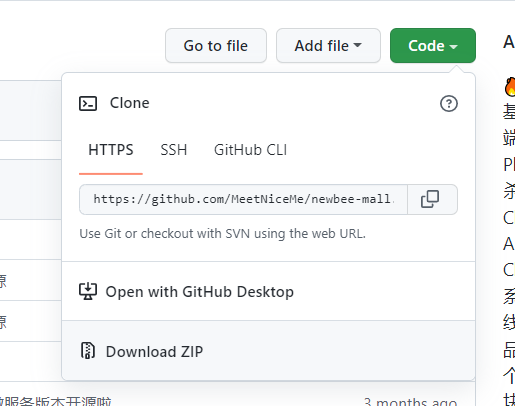
然后从idea打开这个项目

然后选择 Trust project
如果maven没有加载,那么点击add maven

然后配置upload资源路径
upload在
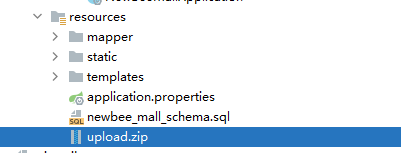
把文件解压到想要的路径后再设置相应的路径就行

然后配置环境

配置MySQL数据库地址和端口号

然后执行sql命令,注意MySQL不能是5.5版本

执行sql脚本


执行
然后点击运行
然后打开首页
端口号是你自定义的端口http://localhost:28089/index.html- 1

这是管理员登录http://localhost:28089/admin/login- 1
密码都是123456
-
相关阅读:
电力系统潮流分析(Matlab代码实现)
逐字稿 | 2 MoCo 论文逐段精读【论文精读】
opencv c++ 图像梯度、边缘、锐化
win10 任务栏预览设置为列表效果
新一代CMDB构建方法,能给企业带来哪些收益?
el -table 多层级嵌套
【多服务场景化解决方案】智能家居(UrbanHome)
【数据结构-栈 二】【单调栈】每日温度、接雨水
荣耀MagicBook X 14 Pro锐龙版 2023 集显(FRI-H76)笔记本电脑原装出厂Windows11系统工厂模式安装包下载,带F10智能还原
[附源码]Python计算机毕业设计Django驾校预约管理系统
- 原文地址:https://blog.csdn.net/The_Handsome_Sir/article/details/126715046