-
opencv c++ 图像梯度、边缘、锐化
图像梯度的目的:
获取图像上沿着某一方向或多个方向上,像素值的突变图像。
即:
对满足
 之间相互独立的函数,
求
 ,
,1、预备知识
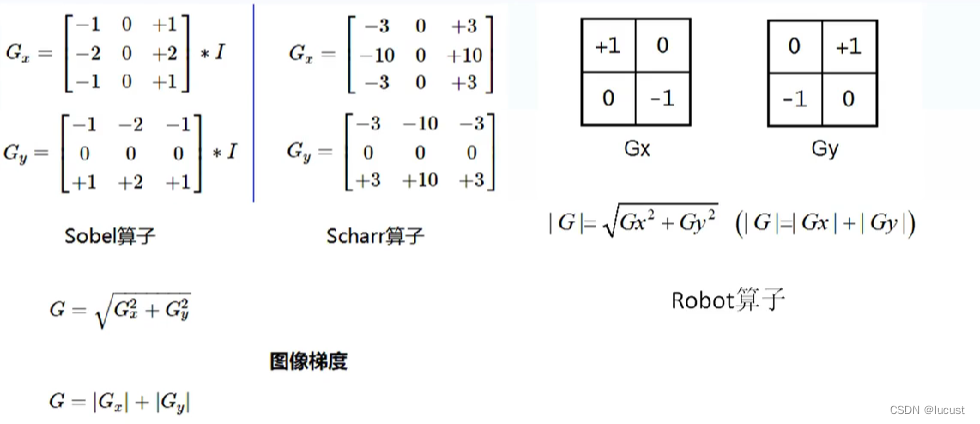
1.1、常见的梯度计算算子


1.2、梯度计算方法
L2法:
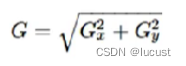
L1法:

1.3如何获取梯度图像
分别使用x、y方向的算子,在原始图像上卷积来获取Gx,Gy,然后选用梯度计算方法来获取对应像素点的梯度值。
2、代码示例
2.1robot算子
- void self_conv(Mat& image)
- {
- //robot 梯度计算
- Mat robot_x = (Mat_<int>(2, 2) << 1, 0, 0, -1);//自定义Mat核
- Mat robot_y = (Mat_<int>(2, 2) << 0, 1, -1, 0);
- Mat grad_x,grad_y;
- filter2D(image, grad_x, CV_32F, robot_x, Point(-1, -1), 0, BORDER_DEFAULT);
- filter2D(image, grad_y, CV_32F, robot_y, Point(-1, -1), 0, BORDER_DEFAULT);
- convertScaleAbs(grad_x, grad_x);//该API将图像格式转为CV_8U格式,并将所有像素值置为正。
- convertScaleAbs(grad_y, grad_y);
- Mat result;
- add(grad_x, grad_y, result);
- namedWindow("robot img", WINDOW_FREERATIO);
- imshow("robot img", result);
- }
2.2sobel算子
注:也可仿照robot算子示例输入3×3的卷积核,并赋予对应的sobel值进行梯度图像获取 。
opencvAPI调用示例:
- void self_conv(Mat& image)
- {
- Mat grad_x,grad_y;
- Sobel(image, grad_x, CV_32F, 1, 0);
- Sobel(image, grad_y, CV_32F, 0, 1);
- convertScaleAbs(grad_x, grad_x);//该API将图像格式转为CV_8U格式,并将所有像素值置为正。
- convertScaleAbs(grad_y, grad_y);
- Mat result2;
- //add(grad_x, grad_y, result2);
- addWeighted(grad_x, 0.5, grad_y, 0.5, 0, result2);
- namedWindow("sobel img", WINDOW_FREERATIO);
- imshow("sobel img", result2);
- }
2.3Scharr算子
- void self_conv(Mat& image)
- {
- Mat grad_x,grad_y;
- Scharr(image, grad_x, CV_32F, 1, 0);
- Scharr(image, grad_y, CV_32F, 0, 1);
- convertScaleAbs(grad_x, grad_x);//该API将图像格式转为CV_8U格式,并将所有像素值置为正。
- convertScaleAbs(grad_y, grad_y);
- Mat result3;
- //add(grad_x, grad_y, result2);
- addWeighted(grad_x, 0.5, grad_y, 0.5, 0, result3);
- namedWindow("Scharr img", WINDOW_FREERATIO);
- imshow("Scharr img", result3);
- }
结果:

3、拉普拉斯算子进行边缘获取、锐化
即二阶导数的图像应用。
3.1、拉普拉斯算子与锐化算子
拉普拉斯算子:

分别为: 四邻域算子、八邻域算子、变种算子。
拉普拉斯算子缺点:当图像细节较多时,难以去除这些细节的影响,需要与图像阈值化进行搭配使用。
锐化算子:原图加上拉普拉斯算子的结果,本质为图像增强。

3.2、代码示例
拉普拉斯:
- void Laplacian_demo(Mat& image)
- {
- Mat dst;
- Laplacian(image, dst, -1, 3, 1.0, 0, BORDER_DEFAULT);
- namedWindow("Laplacian", WINDOW_FREERATIO);
- imshow("Laplacian", dst);
- }

锐化:
由于没有现有的API,下列代码由filter2D加上自定义Mat方法实现。
- void QuickDemo::image_descent(Mat& image)
- {
- //定义锐化算子
- Mat sharp = (Mat_<int>(3, 3) << 0, -1, 0,
- -1, 5, -1,
- 0, -1, 0);
- Mat result;
- filter2D(image, result, -1, sharp, Point(-1, -1), 0, BORDER_DEFAULT);
- convertScaleAbs(result, result);
- namedWindow("sharp img", WINDOW_FREERATIO);
- imshow("sharp img", result);
- }

4、USM(unsharp mask)锐化
权重化减法锐化公式:
sharp_img = α×blur - β×laplacian
优点:忽视细小细节着重对有用部分边缘进行锐化。
- void usm_sharp(Mat& image)
- {
- Mat blur_img, lap_img;
- GaussianBlur(image, blur_img, Size(3, 3), 0, 0, BORDER_DEFAULT);
- Laplacian(image, lap_img, -1, 1, 1.0, 0, BORDER_DEFAULT);
- Mat usm_img;
- addWeighted(blur_img, 1, lap_img, -0.7, 0, usm_img, -1);
- namedWindow("usm_sharp img", WINDOW_FREERATIO);
- imshow("usm_sharp img", usm_img);
- }

-
相关阅读:
Elasticsearch核心概念
etoken是什么意思,有什么作用?
cmd安装jupyter出错
R语言复现:中国Charls数据库一篇现况调查论文的缺失数据填补方法
UI设计 ,我只推荐这6个网站,真的太好用了。
头条百科怎么创建才容易通过,上头条百科的技巧
使用 NumPy 来模拟随机游走(Random Walk)
【牛客 - 剑指offer】JZ4 二维数组中的查找 Java实现
手撕《现代信号处理》——通俗易懂的现代信号处理章节详解集合
flink教程(2)-source- sink
- 原文地址:https://blog.csdn.net/lucust/article/details/128114843