-
Vue学习之--------深入理解Vuex之模块化编码(2022/9/4)
在以下文章的基础上
1、深入理解Vuex、原理详解、实战应用:https://blog.csdn.net/weixin_43304253/article/details/126651368
2、深入理解Vuex之getters、mapState、mapGetters:https://blog.csdn.net/weixin_43304253/article/details/126679366
3、深入理解Vuex之多组件共享数据:https://blog.csdn.net/weixin_43304253/article/details/126685612组件化编码的好处、方便后期的维护、减少系统的耦合性
1、模块化+命名空间
-
目的:让代码更好维护,让多种数据分类更加明确。
-
修改
store.js
const countAbout = { namespaced:true,//开启命名空间 state:{x:1}, mutations: { ... }, actions: { ... }, getters: { bigSum(state){ return state.sum * 10 } } } const personAbout = { namespaced:true,//开启命名空间 state:{ ... }, mutations: { ... }, actions: { ... } } const store = new Vuex.Store({ modules: { countAbout, personAbout } })- 1
- 2
- 3
- 4
- 5
- 6
- 7
- 8
- 9
- 10
- 11
- 12
- 13
- 14
- 15
- 16
- 17
- 18
- 19
- 20
- 21
- 22
- 23
- 24
- 25
- 开启命名空间后,组件中读取state数据:
//方式一:自己直接读取 this.$store.state.personAbout.list //方式二:借助mapState读取: ...mapState('countAbout',['sum','school','subject']),- 1
- 2
- 3
- 4
- 开启命名空间后,组件中读取getters数据:
//方式一:自己直接读取 this.$store.getters['personAbout/firstPersonName'] //方式二:借助mapGetters读取: ...mapGetters('countAbout',['bigSum'])- 1
- 2
- 3
- 4
- 开启命名空间后,组件中调用dispatch
//方式一:自己直接dispatch this.$store.dispatch('personAbout/addPersonWang',person) //方式二:借助mapActions: ...mapActions('countAbout',{incrementOdd:'jiaOdd',incrementWait:'jiaWait'})- 1
- 2
- 3
- 4
- 开启命名空间后,组件中调用commit
//方式一:自己直接commit this.$store.commit('personAbout/ADD_PERSON',person) //方式二:借助mapMutations: ...mapMutations('countAbout',{increment:'JIA',decrement:'JIAN'}),- 1
- 2
- 3
- 4
2、项目中的实战应用
2.1 项目结构
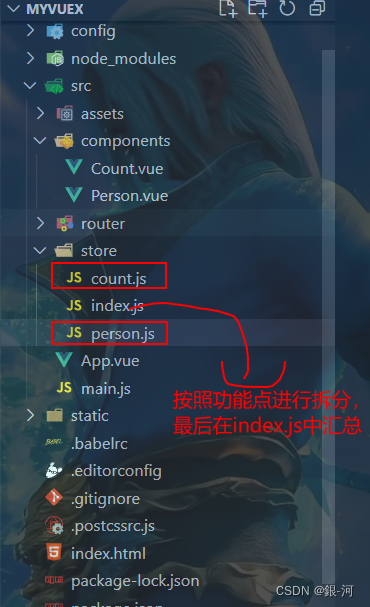
2.1 store下的文件配置
2.1.1 count.js(专门管理求和)
//求和相关配置 export default { namespaced: true, actions: { jia(context, value) { context.commit('JIA', value) }, jiaOdd(context, value) { if (context.state.sum % 2) { context.commit('JIA', value) } }, jiaWait(context, value) { setTimeout(() => { context.commit('JIA', value) }, 500); } }, mutations: { JIA(state, value) { state.sum += value }, JIAN(state, value) { state.sum -= value } }, state: { sum: 0,//当前的和, name: '张三', address: "广州" }, getters: { bigSum(state) { return state.sum * 10 } } }- 1
- 2
- 3
- 4
- 5
- 6
- 7
- 8
- 9
- 10
- 11
- 12
- 13
- 14
- 15
- 16
- 17
- 18
- 19
- 20
- 21
- 22
- 23
- 24
- 25
- 26
- 27
- 28
- 29
- 30
- 31
- 32
- 33
- 34
- 35
- 36
- 37
- 38
- 39
- 40
- 41
- 42
2.1.2 person.js(专门管理人员)
在action中进行业务处理时,使用axios调用接口。axios的安装使用:
npm i axios//人员管理相关配置 //引入axios import axios from 'axios' import { nanoid } from 'nanoid' export default { namespaced: true, actions: { addPersonZheng(context, value) { if (value.name.indexOf('郑') === 0) { console.log("123") context.commit('ADD_PERSON', value) } else { alert("添加的人必须性郑") } }, addPersonServer(context) { axios.get('https://api.uixsj.cn/hitokoto/get?type=social').then( response => { context.commit('ADD_PERSON', { id: nanoid(), name: response.data }) }, error => { alert(error.message) } ) } }, mutations: { ADD_PERSON(state, value) { state.personList.unshift(value) } }, state: { personList: [{ id: 'A001', name: '张三' }] }, getters: { firstPersonName(state) { return state.personList[0].name } } }- 1
- 2
- 3
- 4
- 5
- 6
- 7
- 8
- 9
- 10
- 11
- 12
- 13
- 14
- 15
- 16
- 17
- 18
- 19
- 20
- 21
- 22
- 23
- 24
- 25
- 26
- 27
- 28
- 29
- 30
- 31
- 32
- 33
- 34
- 35
- 36
- 37
- 38
- 39
- 40
- 41
- 42
- 43
- 44
- 45
- 46
- 47
- 48
- 49
2.1.3 index.j(进行汇总,统一对外暴露)
//该文件用于创建Vuex中最为核心的store //引入Vuex import Vuex from 'vuex' //引入Vue import Vue from 'vue' import countOptions from './count' import personOptions from './person' //使用插件 Vue.use(Vuex) //第一种形式 //创建并且暴露store export default new Vuex.Store({ modules: { countAbout: countOptions, personAbout: personOptions } }) //第二种形式 // //创建store // const store = new Vuex.Store({ // actions, // mutations, // state, // }) // //导出store // export default store- 1
- 2
- 3
- 4
- 5
- 6
- 7
- 8
- 9
- 10
- 11
- 12
- 13
- 14
- 15
- 16
- 17
- 18
- 19
- 20
- 21
- 22
- 23
- 24
- 25
- 26
- 27
- 28
- 29
- 30
- 31
- 32
- 33
- 34
- 35
- 36
- 37
- 38
- 39
- 40
2.2 components下的组件
2.2.1 Count.vue
<template> <div> <h1>当前求和为:{{ sum }}</h1> <h2>当前求和扩大十倍为:{{ bigSum }}</h2> <h3>你好,{{ name }}在{{ address }}工作</h3> <select v-model.number="n"> <option value="1">1</option> <option value="2">2</option> <option value="3">3</option> </select> <button @click="increment(n)">+</button> <button @click="decrement(n)">-</button> <button @click="incrementOdd(n)">当前求和为奇数再加</button> <button @click="incrementWait(n)">等一等再加</button> <hr> <h3 style="color:pink">当前用户数量:{{personList.length}}</h3> </div> </template> <script> import { mapState, mapGetters, mapActions, mapMutations } from "vuex"; export default { name: "Count", data() { return { n: 1, //用户选择的数字 }; }, methods: { //借助mapMutations生成对应的方法,方法中会调用commit去联系mutations(对象写法) ...mapMutations('countAbout',{ increment: "JIA", decrement: "JIAN" }), //借助mapActions生成对应的方法,方法中会调用dispatch去联系actions(对象写法) ...mapActions('countAbout',{ incrementOdd: "jiaOdd", incrementWait: "jiaWait" }), }, computed: { //数组写法 ...mapState('countAbout',["sum", "name", "address"]), ...mapState('personAbout',['personList']), //数组写法 ...mapGetters('countAbout',["bigSum"]), }, }; </script> <style lang="css"> button { margin-left: 5px; } </style>- 1
- 2
- 3
- 4
- 5
- 6
- 7
- 8
- 9
- 10
- 11
- 12
- 13
- 14
- 15
- 16
- 17
- 18
- 19
- 20
- 21
- 22
- 23
- 24
- 25
- 26
- 27
- 28
- 29
- 30
- 31
- 32
- 33
- 34
- 35
- 36
- 37
- 38
- 39
- 40
- 41
- 42
- 43
- 44
- 45
- 46
- 47
- 48
- 49
- 50
- 51
- 52
2.2.2 Person.vue
<template> <div> <h1>人员信息展示</h1> <h3 style="color: pink">Count组件的和为:{{ Count }}</h3> <h3>列表中第一个人的名字是:{{ firstPersonName }}</h3> <input type="text" placeholder="请输入姓名" v-model="name" /> <button @click="add">添加</button> <button @click="addZheng">添加一个姓郑的人</button> <button @click="addPersonServer">添加一个人,名字随机</button> <ul> <li v-for="p in personList" :key="p.id">{{ p.name }}</li> </ul> </div> </template> <script> import { nanoid } from "nanoid"; import { mapState, mapGetters, mapActions, mapMutations } from "vuex"; export default { name: "Person", data() { return { name: "", n: 1, }; }, methods: { add() { const personObj = { id: nanoid(), name: this.name }; this.$store.commit("personAbout/ADD_PERSON", personObj); this.name = ""; }, addZheng() { const personObj = { id: nanoid(), name: this.name }; this.$store.dispatch("personAbout/addPersonZheng", personObj); this.name = ""; }, addPersonServer() { const personObj = { id: nanoid(), name: this.name }; this.$store.dispatch("personAbout/addPersonServer", personObj); this.name = ""; }, }, computed: { personList() { return this.$store.state.personAbout.personList; }, Count() { return this.$store.state.countAbout.sum; }, firstPersonName() { return this.$store.getters["personAbout/firstPersonName"]; }, }, }; </script> <style lang="css"> </style>- 1
- 2
- 3
- 4
- 5
- 6
- 7
- 8
- 9
- 10
- 11
- 12
- 13
- 14
- 15
- 16
- 17
- 18
- 19
- 20
- 21
- 22
- 23
- 24
- 25
- 26
- 27
- 28
- 29
- 30
- 31
- 32
- 33
- 34
- 35
- 36
- 37
- 38
- 39
- 40
- 41
- 42
- 43
- 44
- 45
- 46
- 47
- 48
- 49
- 50
- 51
- 52
- 53
- 54
- 55
- 56
- 57
- 58
- 59
- 60
- 61
- 62
- 63
2.3 App.vue
<template> <div> <Count/> <hr> <Person/> </div> </template> <script> import Count from './components/Count' import Person from './components/Person.vue' export default { name:'App', components:{Count,Person}, } </script>- 1
- 2
- 3
- 4
- 5
- 6
- 7
- 8
- 9
- 10
- 11
- 12
- 13
- 14
- 15
- 16
- 17
2.4 main.js
// The Vue build version to load with the `import` command // (runtime-only or standalone) has been set in webpack.base.conf with an alias. import Vue from 'vue' import App from './App' import router from './router' //引入store import store from './store/index.js' Vue.config.productionTip = false /* eslint-disable no-new */ new Vue({ el: '#app', router, store, render: h => h(App), beforenCreate() { Vue.prototype.$bus = this } })- 1
- 2
- 3
- 4
- 5
- 6
- 7
- 8
- 9
- 10
- 11
- 12
- 13
- 14
- 15
- 16
- 17
- 18
- 19
- 20
- 21
- 22
- 23
3、测试效果
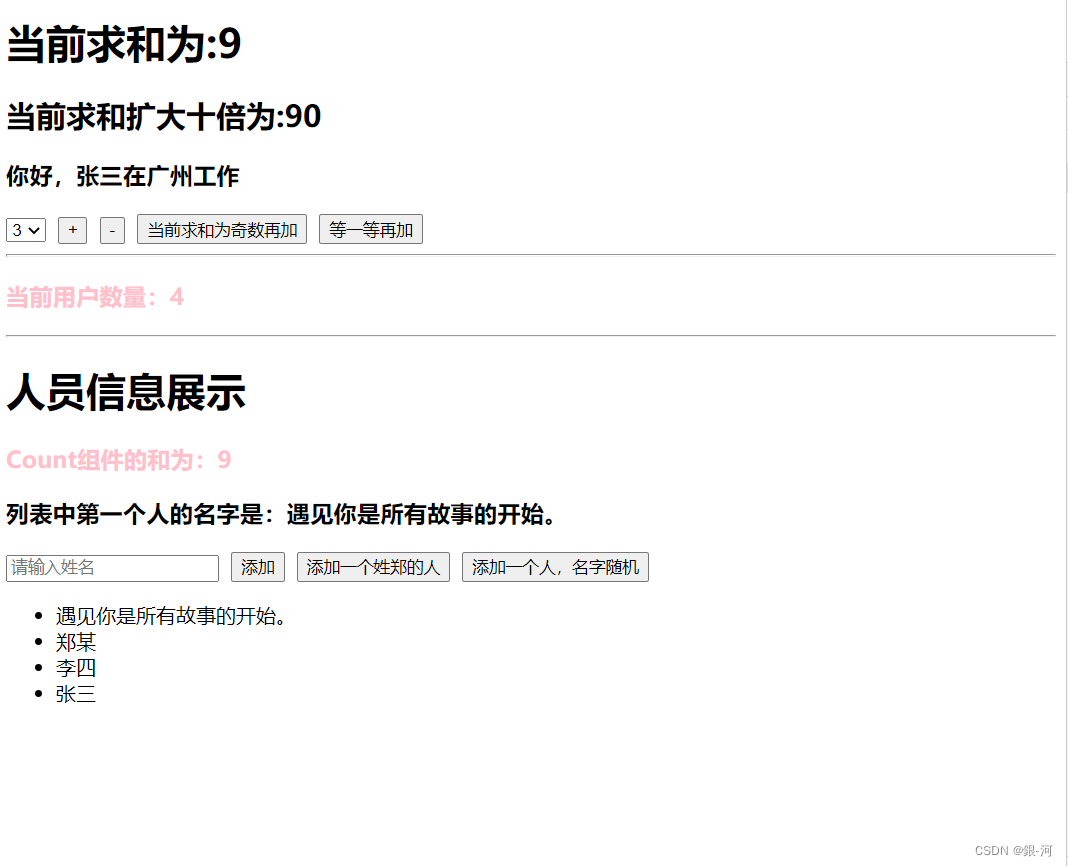
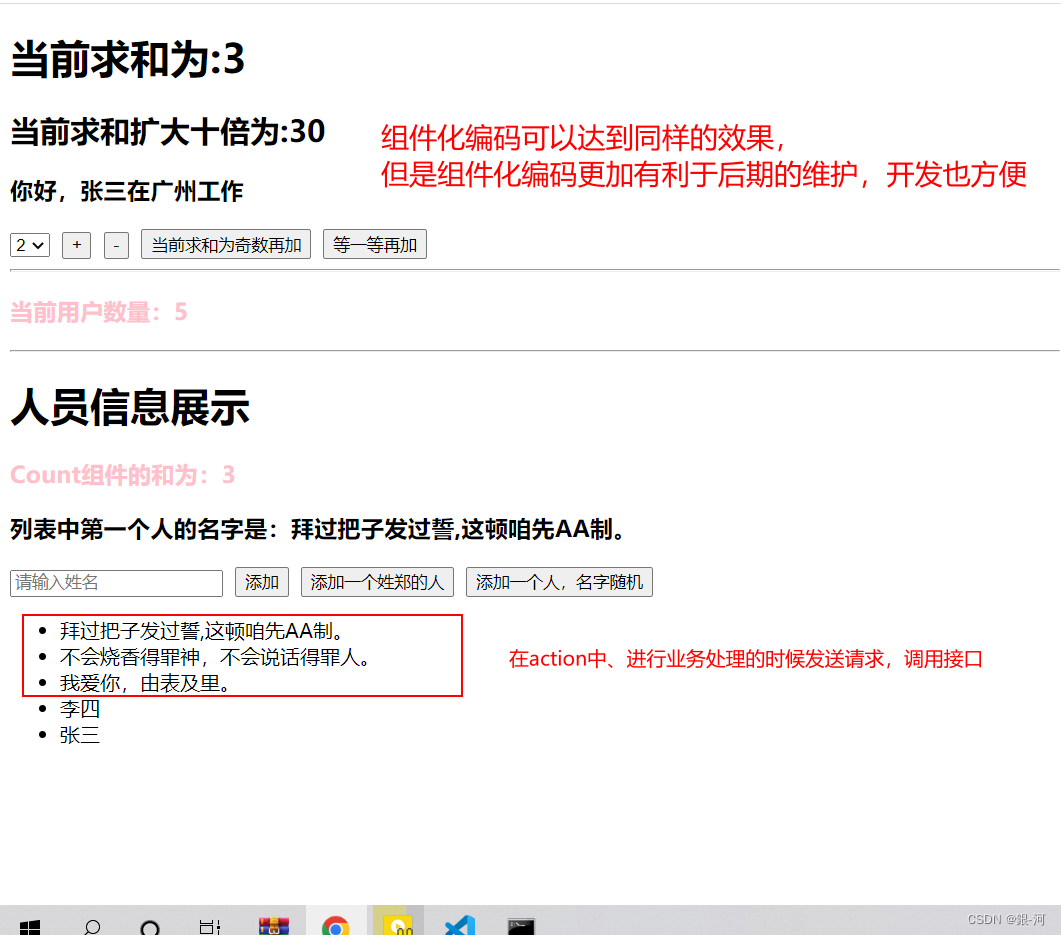
4、小范围的拆分store/index.js
//该文件用于创建Vuex中最为核心的store //引入Vuex import Vuex from 'vuex' //引入Vue import Vue from 'vue' //引入axios import axios from 'axios' import { nanoid } from 'nanoid' //使用插件 Vue.use(Vuex) const countOptions = { namespaced: true, //准备action-- 用于响应组件中的动作 actions: { jia(context, value) { context.commit('JIA', value) }, jiaOdd(context, value) { if (context.state.sum % 2) { context.commit('JIA', value) } }, jiaWait(context, value) { setTimeout(() => { context.commit('JIA', value) }, 500); } }, //准备mutations-- 用于操作数据(state) mutations: { JIA(state, value) { state.sum += value }, JIAN(state, value) { state.sum -= value } }, //准备state--用于存储数据 state: { sum: 0,//当前的和, name: '张三', address: "广州" }, //准备getters getters: { bigSum(state) { return state.sum * 10 } } } const personOptions = { namespaced: true, actions: { addPersonZheng(context, value) { if (value.name.indexOf('郑') === 0) { console.log("123") context.commit('ADD_PERSON', value) } else { alert("添加的人必须性郑") } }, addPersonServer(context) { axios.get('https://api.uixsj.cn/hitokoto/get?type=social').then( response => { context.commit('ADD_PERSON', { id: nanoid(), name: response.data }) }, error => { alert(error.message) } ) } }, mutations: { ADD_PERSON(state, value) { state.personList.unshift(value) } }, state: { personList: [{ id: 'A001', name: '张三' }] }, getters: { firstPersonName(state) { return state.personList[0].name } } } //第一种形式 //创建并且暴露store export default new Vuex.Store({ modules: { countAbout: countOptions, personAbout: personOptions } }) //第二种形式 // //创建store // const store = new Vuex.Store({ // actions, // mutations, // state, // }) // //导出store // export default store- 1
- 2
- 3
- 4
- 5
- 6
- 7
- 8
- 9
- 10
- 11
- 12
- 13
- 14
- 15
- 16
- 17
- 18
- 19
- 20
- 21
- 22
- 23
- 24
- 25
- 26
- 27
- 28
- 29
- 30
- 31
- 32
- 33
- 34
- 35
- 36
- 37
- 38
- 39
- 40
- 41
- 42
- 43
- 44
- 45
- 46
- 47
- 48
- 49
- 50
- 51
- 52
- 53
- 54
- 55
- 56
- 57
- 58
- 59
- 60
- 61
- 62
- 63
- 64
- 65
- 66
- 67
- 68
- 69
- 70
- 71
- 72
- 73
- 74
- 75
- 76
- 77
- 78
- 79
- 80
- 81
- 82
- 83
- 84
- 85
- 86
- 87
- 88
- 89
- 90
- 91
- 92
- 93
- 94
- 95
- 96
- 97
- 98
- 99
- 100
- 101
- 102
- 103
- 104
- 105
- 106
- 107
- 108
- 109
- 110
- 111
- 112
- 113
- 114
- 115
- 116
- 117
- 118
- 119
- 120
- 121
- 122
- 123
- 124
- 125
- 126
- 127
- 128
- 129
- 130
- 131
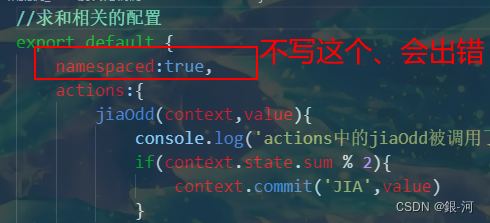
5、注意点
不会这个、找不到你的这个”组件化“
-
-
相关阅读:
餐饮大单品「真香」,却没有穿透周期的能力
解决tomcat的8080端口被占用
java实现钉钉机器人消息推送
xbox下载游戏速度一直为0b/s怎么办?
零零信安-D&D数据泄露报警日报【第28期】
统计内核代码运行时间
贪心算法—Problem Q
卷积神经网络(VGG-16)海贼王人物识别
zemax慧差与消慧差
[NOIP2004 提高组] 合并果子 / [USACO06NOV] Fence Repair G
- 原文地址:https://blog.csdn.net/weixin_43304253/article/details/126687269