-
实战Spring Boot集成quartz任务调度框架
本文目录
1、简介
本文主要围绕quartz框架展开介绍。quartz是一个开源的Java调度框架,功能十分丰富。quartz可以用来创建简单或复杂的调度,以执行数十个、数百个甚至数万个任务。
那么什么是任务调度?任务调度是指基于给定时间点,给定时间间隔或者给定执行次数自动执行任务。
如果老板给你一个需求,让你实现邮件推送的任务调度,你会考虑使用哪些技术实现呢?是JDK自带的Timer、JDK1.5推出的ScheduledExecutor,还是Spring框架提供的定时任务,亦或是本文介绍的quartz呢?
在做技术选型之前,先对这几种任务调度方案做一个对比。
1.1、任务调度方案对比
1.1.1、Timer
使用 Timer 实现任务调度的核心类是 Timer 和 TimerTask。
其中 Timer 负责设定 TimerTask 的起始与间隔执行时间,使用者只需要创建一个 TimerTask 的继承类,实现自己的 run 方法,然后将其丢给 Timer 去执行即可。
Timer 的设计核心是一个 TaskList 和一个 TaskThread。Timer 将接收到的任务丢到自己的 TaskList 中,TaskList 按照 Task 的最初执行时间进行排序。TimerThread 在创建 Timer 时会启动成为一个守护线程,这个线程会轮询所有任务,找到一个最近要执行的任务,然后休眠,当到达最近要执行任务的开始时间点,TimerThread 被唤醒并执行该任务,之后 TimerThread 更新最近一个要执行的任务,继续休眠。
使用Timer完成任务调度的代码样例如下所示。
import cn.hutool.core.date.DateUtil; import lombok.extern.slf4j.Slf4j; import java.util.Timer; import java.util.TimerTask; @Slf4j public class TimerDemo { public static void main(String[] args) { log.info("TimerDemo..."); Timer timer = new Timer(); TimerTask task1 = new TimerTask() { @Override public void run() { log.info("hello,task1!"); } }; TimerTask task2 = new TimerTask() { @Override public void run() { log.info("hello,task2!"); } }; // 在5秒后,每3秒执行一次 timer.schedule(task1,5000L,3000L); // 在固定时间执行 timer.schedule(task2,DateUtil.parseDateTime("2022-09-03 13:22:10")); } }- 1
- 2
- 3
- 4
- 5
- 6
- 7
- 8
- 9
- 10
- 11
- 12
- 13
- 14
- 15
- 16
- 17
- 18
- 19
- 20
- 21
- 22
- 23
- 24
- 25
- 26
- 27
运行结果如下图所示。

总结:
- 优点:简单易用
- 缺点:所有任务都是由同一个线程来调度,因此所有任务是串行执行的,同一时刻只能有一个任务在执行,前一个任务延迟或异常都会影响到之后的任务。如果想要并行执行多个任务,需要同时使用多个Timer类。
1.1.2、ScheduledExecutor
鉴于 Timer 的上述缺陷,JDK1.5 推出了基于线程池设计的 ScheduledExecutor。其设计思想是,每一个被调度的任务都会由线程池中一个线程去执行,因此任务是并发执行的,相互之间不会受到干扰。需要注意的是,只有当任务的执行时间到来时,ScheduedExecutor 才会真正启动一个线程,其余时间 ScheduledExecutor 都是在轮询任务的状态。
使用ScheduledExecutor完成任务调度的代码样例。
import lombok.extern.slf4j.Slf4j; import java.util.concurrent.Executors; import java.util.concurrent.ScheduledExecutorService; import java.util.concurrent.TimeUnit; @Slf4j public class ScheduledExecutorDemo { public static void main(String[] args) { log.info("ScheduledExecutorDemo..."); ScheduledExecutorService scheduledExecutorService = Executors.newScheduledThreadPool(10); // 在5秒后,每3秒执行一次 scheduledExecutorService.scheduleAtFixedRate(()->log.info("hello,scheduledExecutor!"),5L,3L, TimeUnit.SECONDS); } }- 1
- 2
- 3
- 4
- 5
- 6
- 7
- 8
- 9
- 10
- 11
- 12
- 13
运行结果如下图所示。

总结:- 优点:基于线程池的设计
- 缺点:Timer 和 ScheduledExecutor 都仅能提供基于开始时间与重复间隔的任务调度,不能胜任更加复杂的调度需求,而quartz可以做到这一点,关于quartz的调度器设计下面都会讲到
1.1.3、Spring Task
Spring Task可以看做是轻量级的quartz框架,使用Spring Task非常地方便,如果是基于注解的方式只需要一个@Scheduled注解便可实现任务调度,不需要编写任何代码。
Spring Task与前面的Timer和ScheduledExecutor不同的是,Spring Task支持cron表达式,cron表达式可以实现更复杂的调度需求。
使用Spring Task完成任务调度的代码样例。
import lombok.extern.slf4j.Slf4j; import org.springframework.scheduling.annotation.EnableScheduling; import org.springframework.scheduling.annotation.Scheduled; import org.springframework.stereotype.Component; @EnableScheduling @Component @Slf4j public class SpringTaskDemo { // 每10秒执行一次 @Scheduled(cron = "0/10 * * * * ?") public void schedule(){ log.info("hello,Spring Task!"); } }- 1
- 2
- 3
- 4
- 5
- 6
- 7
- 8
- 9
- 10
- 11
- 12
- 13
- 14
运行结果如下图所示。

总结:
- 优点:Spring框架自带,无缝集成,基于注解进行配置,使用起来非常方便
- 缺点:任务无法持久化,不能运行时动态修改调度时间和调度频率,不支持集群,而这三点quartz可以轻松做到
1.2、quartz的基本概念
经过上面对几种任务调度方案的介绍,相信你对任务调度的选型有一定的把握了,前面几种任务调度或多或少都有一些缺陷,无法满足现在企业中复杂的调度需求。
为什么本文要介绍quartz呢?quartz可以在运行时动态修改调度时间和调度频率,这一点是基于修改触发器实现的;quartz支持任务持久化,quartz可以将任务信息、触发器信息等存储在数据库中,如果应用重启,也不会丢失信息,然后继续执行之前提交过的任务;quartz支持集群模式,当集群中有多个节点时,quartz会通过争抢数据库锁来保证只有一个节点来执行某一个任务在某一时刻的一次触发,这样就不会担心重复执行。
既然quartz有这么多的优秀的特性,那还有什么理由不去选择它呢,quartz的更多特性请参阅官方文档:http://www.quartz-scheduler.org/documentation/
下面介绍quartz框架中几个核心概念:
名词 概念 Job 使用者只需要创建一个 org.quartz.Job 的继承类,实现 execute 方法,便定义了一个Job。每次Scheduler调度器执行到一个Job的时候,首先会拿到对应的Job的Class对象,然后创建该Job实例(也可以复用,复用可以降低内存消耗,这一点将在Job注入Spring容器中介绍),再去执行Job的execute()方法 JobDetail JobDetail 的作用是绑定 Job,负责封装 Job 以及 Job 的属性,是一个任务实例,它为 Job 添加了许多扩展参数,如JobName、JobGroup、JobClass、JobDataMap,Quartz 没有为 Job 设计带参数的构造函数,因此需要通过额外的 JobDataMap 来存储 Job 的数据,JobDataMap 可以存储任意数量的KV对 JobExecutionContext 当 Scheduler 执行一个 job时,就会将 JobExecutionContext 传递给 Job 的 execute() 方法,Job 能通过 JobExecutionContext 对象访问到 Quartz 运行时候的环境以及 Job 本身的明细数据 Trigger 触发器,用于设置调度的时间和调度的频率等,有SimpleTrigger和CronTrigger等,quartz复杂的调度就是通过多种不同种类的触发器来实现的 Scheduler 任务调度器,负责基于Trigger触发器,来执行Job任务,也可以删除Job、暂定Job等 说了这么多的概念,下面就来开始体验一下quartz的使用吧。
2、quartz使用入门
quartz是有一个核心的配置文件的,路径为classpath:quartz.properties。
在quartz.properties可以配置quartz的线程池,当同一时刻有多个任务触发时,利用线程池就可以并发地去执行这些任务,合理地配置线程池的线程个数是我们需要做的。
前面说到quartz的任务信息是可以持久存储在数据库中的,当集群中有多个节点时,节点通过争抢数据库锁来保证只有一个节点执行某一个任务在某一时刻的一次触发,不会出现重复执行的执行。但是quartz不是必须要将任务信息持久化的,也可以选择只存储在内存中。
当然,如果是第一次使用quartz,大可不必这么复杂,下面的配置示例将使用内存存储任务信息、非集群模式等。
org.quartz.scheduler.instanceName = MyScheduler # 实例名称 org.quartz.threadPool.class = org.quartz.simpl.SimpleThreadPool # 线程池的实现类 org.quartz.threadPool.threadCount = 10 # 线程数量,支持最多3个定时任务同时运行 org.quartz.jobStore.class = org.quartz.simpl.RAMJobStore # 将定时任务信息存储在内存中- 1
- 2
- 3
- 4
使用quartz,要引入quartz的依赖。
<dependency> <groupId>org.quartz-schedulergroupId> <artifactId>quartzartifactId> <version>2.3.2version> dependency>- 1
- 2
- 3
- 4
- 5
自定义Job。
import cn.hutool.core.date.DateUtil; import lombok.extern.slf4j.Slf4j; import org.quartz.Job; import org.quartz.JobExecutionContext; import org.quartz.JobExecutionException; @Slf4j public class HelloJob implements Job { @Override public void execute(JobExecutionContext context) throws JobExecutionException { log.info("jobName={},jobGroup={},triggerName={},triggerGroup={},\n触发时间={},dataName={}", context.getJobDetail().getKey().getName(), context.getJobDetail().getKey().getGroup(), context.getTrigger().getKey().getName(), context.getTrigger().getKey().getGroup(), DateUtil.formatDateTime(context.getFireTime()), context.getJobDetail().getJobDataMap().getString("dataName")); } }- 1
- 2
- 3
- 4
- 5
- 6
- 7
- 8
- 9
- 10
- 11
- 12
- 13
- 14
- 15
- 16
- 17
- 18
quartz任务调度的main方法(重要)。
import org.quartz.*; import org.quartz.impl.StdSchedulerFactory; public class QuartzDemo { public static void main(String[] args) throws SchedulerException { Scheduler scheduler = StdSchedulerFactory.getDefaultScheduler(); scheduler.start(); // 使用JobBuilder构造一个JobDetail JobDetail job = JobBuilder.newJob(HelloJob.class) .withIdentity("HelloJob") // JobName为HelloJob,JobGroup默认为DEFAULT .usingJobData("dataName","张三").build(); // 构造一个SimpleTrigger SimpleTrigger trigger = TriggerBuilder.newTrigger() .withIdentity("HelloTrigger") // TriggerName为HelloTrigger,TriggerGroup默认为DEFAULT .startNow() .withSchedule( // 每三秒执行一次,永远不停 SimpleScheduleBuilder.simpleSchedule().withIntervalInMilliseconds(3000L).repeatForever() ).build(); scheduler.scheduleJob(job,trigger); } }- 1
- 2
- 3
- 4
- 5
- 6
- 7
- 8
- 9
- 10
- 11
- 12
- 13
- 14
- 15
- 16
- 17
- 18
- 19
- 20
- 21
- 22
- 23
- 24
运行结果如下图所示。
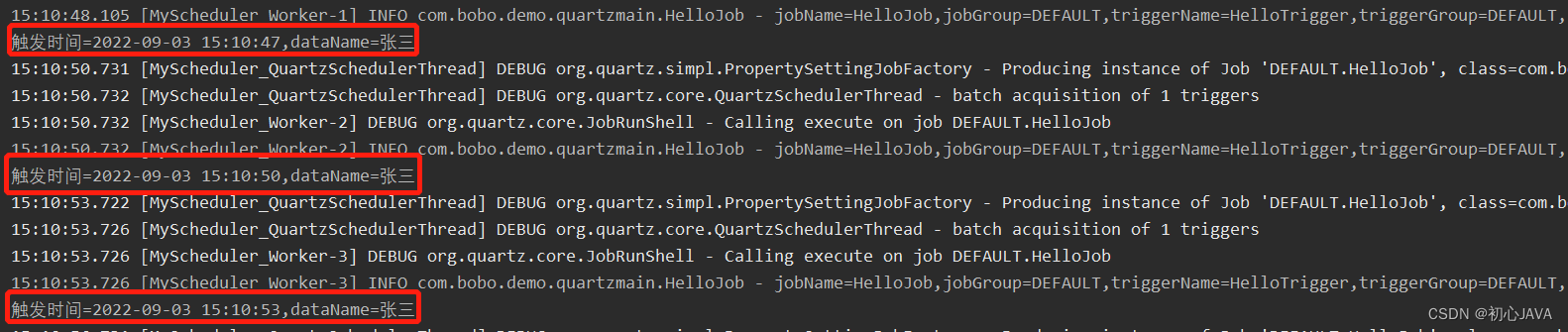
可以通过在main方法中,使用各种Job、Trigger以及Scheduler的API,来熟悉quartz的使用,这些都可以到quartz官网中找到。
当然,我们在做项目时,肯定会与Spring这样的框架进行集成,所以我们重点还是放到Spring Boot项目上,下面将介绍Spring Boot是如何集成quartz框架的,以及集群模式怎么用,Job如何配置注入Spring的IOC容易实现单例从而减少内存消耗,失败指令是什么,有哪些失败指令以及如何配置。
3、Spring Boot集成quartz
如何搭建一个标准的Spring Boot项目可以参考我的这篇文章:教科书级别 IDEA中用Maven手工搭建Spring Boot项目
3.1、添加相关依赖
我们引入spring-boot-starter-web依赖搭建一个web项目,使用swagger生成在线API文档,使用hutool和lombok作为工具类,任务信息持久化到mysql数据库,因此需要引入mysql驱动包,使用spring-boot-starter-data-jdbc作为持久层框架。当然,最重要的是quartz依赖。
最终的pom.xm文件如下所示。
<project xmlns="http://maven.apache.org/POM/4.0.0" xmlns:xsi="http://www.w3.org/2001/XMLSchema-instance" xsi:schemaLocation="http://maven.apache.org/POM/4.0.0 http://maven.apache.org/xsd/maven-4.0.0.xsd"> <modelVersion>4.0.0modelVersion> <groupId>com.bobogroupId> <artifactId>springboot-quartzartifactId> <version>1.0-SNAPSHOTversion> <parent> <groupId>org.springframework.bootgroupId> <artifactId>spring-boot-starter-parentartifactId> <version>2.2.6.RELEASEversion> <relativePath/> parent> <dependencies> <dependency> <groupId>org.springframework.bootgroupId> <artifactId>spring-boot-starter-webartifactId> dependency> <dependency> <groupId>org.springframework.bootgroupId> <artifactId>spring-boot-starter-testartifactId> <scope>testscope> dependency> <dependency> <groupId>org.springframework.bootgroupId> <artifactId>spring-boot-starter-data-jdbcartifactId> dependency> <dependency> <groupId>org.quartz-schedulergroupId> <artifactId>quartzartifactId> dependency> <dependency> <groupId>org.springframeworkgroupId> <artifactId>spring-context-supportartifactId> dependency> <dependency> <groupId>mysqlgroupId> <artifactId>mysql-connector-javaartifactId> dependency> <dependency> <groupId>cn.hutoolgroupId> <artifactId>hutool-allartifactId> <version>5.7.22version> dependency> <dependency> <groupId>org.projectlombokgroupId> <artifactId>lombokartifactId> dependency> <dependency> <groupId>io.springfoxgroupId> <artifactId>springfox-swagger2artifactId> <version>2.9.2version> dependency> <dependency> <groupId>io.springfoxgroupId> <artifactId>springfox-swagger-uiartifactId> <version>2.9.2version> dependency> dependencies> <build> <plugins> <plugin> <groupId>org.springframework.bootgroupId> <artifactId>spring-boot-maven-pluginartifactId> plugin> plugins> build> project>- 1
- 2
- 3
- 4
- 5
- 6
- 7
- 8
- 9
- 10
- 11
- 12
- 13
- 14
- 15
- 16
- 17
- 18
- 19
- 20
- 21
- 22
- 23
- 24
- 25
- 26
- 27
- 28
- 29
- 30
- 31
- 32
- 33
- 34
- 35
- 36
- 37
- 38
- 39
- 40
- 41
- 42
- 43
- 44
- 45
- 46
- 47
- 48
- 49
- 50
- 51
- 52
- 53
- 54
- 55
- 56
- 57
- 58
- 59
- 60
- 61
- 62
- 63
- 64
- 65
- 66
- 67
- 68
- 69
- 70
3.2、准备数据库,quartz表介绍
由于需要将quartz的任务信息持久化到mysql数据库,因此我们需要先创建一个mysql db,并手动执行quartz的数据库表脚本。
这里肯定就有疑问了,quartz的数据库表脚本在哪里呢?其实就在jar包里。
在org.quartz.impl.jdbcjobstore包下面,有各种类型的数据库的脚本,这里我们选择tables_mysql_innodb.sql。

在navicat工具中导入运行sql脚本后,可以看到quartz一共有11张表,如下图所示。

quartz表作用简单介绍:表名 作用 qrtz_blob_triggers 以Blob类型存储的触发器 qrtz_calendars 存放日历信息,quartz可配置一个日历来指定一个时间范围 qrtz_cron_triggers 存放cron类型的触发器 qrtz_fired_triggers 存放已触发的触发器 qrtz_job_details 存放jobDetail信息 qrtz_locks 存放锁信息 qrtz_paused_triggers_grps 存放已暂停的触发器组 qrtz_scheduler_state 存放调度器状态 qrtz_simple_triggers 存放简单类型的触发器 qrtz_simprop_triggers 存放CalendarIntervalTrigger和DailyTimeIntervalTrigger类型的触发器 qrtz_triggers 存放触发器基本信息 其实这些表以及表的字段含义,我们不用全都关注,相信我,qrtz_cron_triggers、qrtz_job_details、qrtz_simple_triggers、qrtz_simprop_triggers和qrtz_triggers这些才是最常用的表,当然qrtz_locks和qrtz_scheduler_state这两张表也不可以忽视。
3.3、配置quartz的数据源
这个比较简单,会Spring Boot基本都会配置数据源,如果想在一台机器开启多个实例,可通过配置不同的端口号实现。如下是我的配置(application.yml)。
spring: datasource: url: jdbc:mysql://localhost:3306/springboot_quartz?useUnicode=true&characterEncoding=utf-8&serverTimezone=Asia/Shanghai driver-class-name: com.mysql.cj.jdbc.Driver username: root password: ok server: port: 8081- 1
- 2
- 3
- 4
- 5
- 6
- 7
- 8
如果我想将Spring管理的数据源也作为quartz的数据源,那么有上述配置就够了,否则还需要在quartz核心配置文件中配置quartz的专属数据源。
3.4、quartz核心配置文件
# 主配置 org.quartz.scheduler.instanceName = springboot-quartz_cluster org.quartz.scheduler.instanceId = AUTO # 持久化配置 org.quartz.jobStore.class = org.quartz.impl.jdbcjobstore.JobStoreTX org.quartz.jobStore.driverDelegateClass = org.quartz.impl.jdbcjobstore.StdJDBCDelegate org.quartz.jobStore.isClustered = true # 线程池配置 org.quartz.threadPool.class = org.quartz.simpl.SimpleThreadPool org.quartz.threadPool.threadCount=10- 1
- 2
- 3
- 4
- 5
- 6
- 7
- 8
- 9
- 10
- 11
- 12
通过使org.quartz.jobStore.isClustered = true开启集群模式,属于同一集群的多个节点instanceName 必须相同,而instanceId 必须不同,这里为了方便,可以配置instanceId = AUTO从而为我们自动生成不重复的id。
通过配置org.quartz.jobStore.class = org.quartz.impl.jdbcjobstore.JobStoreTX可以实现持久化存储。jdbcjobstore其实有两种实现类可以用,分别是JobStoreTX和JobStoreCMT,那这两种有何不同呢?
- JobStoreTX通过在每个操作(比如添加作业)之后在数据库连接上调用commit()(或rollback())来管理所有事务,如果在独立的应用程序中使用quartz,或者应用程序不使用JTA事务,则适合使用JobStoreTX
- JobStoreCMT使用JTA全局事务
在quartz.properties中配置quartz的数据源:
org.quartz.jobStore.dataSource = NAME org.quartz.dataSource.NAME.driver = org.quartz.dataSource.NAME.URL = org.quartz.dataSource.NAME.user = org.quartz.dataSource.NAME.password =- 1
- 2
- 3
- 4
- 5
3.5、万事俱备,开始编码
3.5.1、自定义Job,注入Spring容器的那种
前面的quartz使用入门的代码案例中,自定义的Job是没有注入到Spring容器的,基本上是每触发一次调度就会new一个Job实例,非常消耗内存,在高并发的系统中容易触发GC。
下面自定义Job,并利用@Component注解将Job声明为Spring的bean,如下所示。
package com.bobo.quartz.job; import cn.hutool.core.date.DateUtil; import lombok.extern.slf4j.Slf4j; import org.quartz.Job; import org.quartz.JobExecutionContext; import org.quartz.JobExecutionException; import org.springframework.beans.factory.annotation.Autowired; import org.springframework.stereotype.Component; @Component @Slf4j public class HelloJob implements Job { @Override public void execute(JobExecutionContext context) throws JobExecutionException { log.info("hello,quartz!this={},jobName={},jobGroup={},triggerName={},triggerGroup={}", this.hashCode(),context.getJobDetail().getKey().getName(),context.getJobDetail().getKey().getGroup(), context.getTrigger().getKey().getName(),context.getTrigger().getKey().getGroup()); log.info("上次触发时间:{},本次触发时间:{},下次触发时间:{},调度时间:{}", DateUtil.formatDateTime(context.getPreviousFireTime()), DateUtil.formatDateTime(context.getFireTime()), DateUtil.formatDateTime(context.getNextFireTime()), DateUtil.formatDateTime(context.getScheduledFireTime())); } }- 1
- 2
- 3
- 4
- 5
- 6
- 7
- 8
- 9
- 10
- 11
- 12
- 13
- 14
- 15
- 16
- 17
- 18
- 19
- 20
- 21
- 22
- 23
- 24
3.5.2、自定义JobFactory,从Spring容器中拿单例Job
Job是注入到Spring容器了,但是调度器每次还是会new Job对象,并没有去拿Spring容器中的那个Job对象,因此我们还欠缺一个自定义的JobFactory,重写获取Job对象的逻辑。
package com.bobo.quartz.config; import org.quartz.Job; import org.quartz.spi.TriggerFiredBundle; import org.springframework.beans.BeansException; import org.springframework.context.ApplicationContext; import org.springframework.context.ApplicationContextAware; import org.springframework.scheduling.quartz.AdaptableJobFactory; import org.springframework.stereotype.Component; @Component public class MyJobFactory extends AdaptableJobFactory implements ApplicationContextAware { private ApplicationContext applicationContext; @Override public void setApplicationContext(ApplicationContext applicationContext) throws BeansException { this.applicationContext = applicationContext; } @Override protected Object createJobInstance(TriggerFiredBundle bundle) throws Exception { Job job = applicationContext.getBean(bundle.getJobDetail().getJobClass()); return job; } }- 1
- 2
- 3
- 4
- 5
- 6
- 7
- 8
- 9
- 10
- 11
- 12
- 13
- 14
- 15
- 16
- 17
- 18
- 19
- 20
- 21
- 22
- 23
可以看到,createJobInstance方法中通过applicationContext.getBean()方法从而每次拿到的都是Spring容器中的单例Job。
3.5.3、发动机来了,quartz核心Java配置类
由于是与Spring Boot整合,因此最好是要有一个Java配置类,来实现我们个性化的需求,相对而言也比较灵活一些。
package com.bobo.quartz.config; import org.quartz.spi.JobFactory; import org.springframework.beans.factory.annotation.Autowired; import org.springframework.context.annotation.Bean; import org.springframework.context.annotation.Configuration; import org.springframework.core.io.ClassPathResource; import org.springframework.scheduling.quartz.SchedulerFactoryBean; import javax.sql.DataSource; import java.io.IOException; import java.util.Properties; @Configuration public class QuartzConfig { @Autowired private JobFactory jobFactory; @Bean public SchedulerFactoryBean schedulerFactoryBean(DataSource dataSource) throws IOException { SchedulerFactoryBean factory = new SchedulerFactoryBean(); factory.setDataSource(dataSource); Properties prop = new Properties(); prop.load(new ClassPathResource("quartz.properties").getInputStream()); factory.setQuartzProperties(prop); factory.setJobFactory(jobFactory); // factory.setSchedulerName("springboot-quartz_scheduler"); return factory; } }- 1
- 2
- 3
- 4
- 5
- 6
- 7
- 8
- 9
- 10
- 11
- 12
- 13
- 14
- 15
- 16
- 17
- 18
- 19
- 20
- 21
- 22
- 23
- 24
- 25
- 26
- 27
- 28
- 29
在QuartzConfig 中,我们将Spring管理的DataSource、以及上面配置的JobFactory都设置进去了,所以我们叫它发动机没毛病吧。另外,SchedulerName可以不写,默认与instanceName同名。
3.6、表示层,学习quartz API就看这里
为了后面方便调用Controller的接口,也为了将接口参数注释写到API文档中一目了然,这里我们用到了swagger。
Spring Boot集成swagger是零配置,只需要在启动类打上@EnableSwagger2注解即可。swagger界面的URL为:http://localhost:8081/swagger-ui.html
3.6.1、Controller外貌以及一些常量
package com.bobo.quartz.controller; import cn.hutool.core.date.DateUtil; import com.bobo.quartz.job.HelloJob; import io.swagger.annotations.Api; import io.swagger.annotations.ApiImplicitParam; import io.swagger.annotations.ApiImplicitParams; import io.swagger.annotations.ApiOperation; import org.quartz.*; import org.springframework.beans.factory.annotation.Autowired; import org.springframework.web.bind.annotation.GetMapping; import org.springframework.web.bind.annotation.RestController; import java.util.Date; @RestController @Api(tags = "QuartzController") public class QuartzController { private static final String DATE_FORMAT = "yyyyMMddHHmmss"; private static final String DEFAULT_JOB_GROUP = "default_job_group"; private static final String DEFAULT_TRIGGER_GROUP = "default_trigger_group"; private static final String JOB_PRE = "J"; private static final String TRIGGER_PRE = "T"; @Autowired private Scheduler scheduler; }- 1
- 2
- 3
- 4
- 5
- 6
- 7
- 8
- 9
- 10
- 11
- 12
- 13
- 14
- 15
- 16
- 17
- 18
- 19
- 20
- 21
- 22
- 23
- 24
具体的接口方法下面会一一讲解。
3.6.2、添加Cron类型的JOB
cron类型的触发器也许是最常用的,代码写起来也是比较直观,唯一的成本就是需要会写cron表达式,这个我相信大家都会写吧,不会写的话网上有一些cron表达式教程和在线生成工具。
接口代码如下所示。
@GetMapping("/addCronJob") @ApiOperation(value = "添加Cron类型的JOB") @ApiImplicitParams({ @ApiImplicitParam(name = "cron",value = "合法的cron表达式",required = true,paramType = "query",dataType = "string"), @ApiImplicitParam(name = "start",value = "调度开始日期,yyyy-MM-dd格式",required = true,paramType = "query",dataType = "string"), @ApiImplicitParam(name = "end",value = "调度结束日期,yyyy-MM-dd格式",required = true,paramType = "query",dataType = "string"), @ApiImplicitParam(name = "misfireInstruction",value = "失败指令,-1:补偿多次;1:仅补偿一次;2:不会补偿;默认为1", required = false,paramType = "query",dataType = "int") }) public void addCronJob(String cron,String start,String end,Integer misfireInstruction) throws SchedulerException { String id = DateUtil.format(new Date(),DATE_FORMAT); JobDetail job = JobBuilder.newJob(HelloJob.class) .withIdentity(JobKey.jobKey(JOB_PRE+id,DEFAULT_JOB_GROUP)).build(); CronScheduleBuilder cronScheduleBuilder = CronScheduleBuilder.cronSchedule(cron); if(null != misfireInstruction){ if(-1 == misfireInstruction){ cronScheduleBuilder.withMisfireHandlingInstructionIgnoreMisfires(); }else if(1 == misfireInstruction){ cronScheduleBuilder.withMisfireHandlingInstructionFireAndProceed(); }else if(2 == misfireInstruction){ cronScheduleBuilder.withMisfireHandlingInstructionDoNothing(); } } Trigger trigger = TriggerBuilder.newTrigger() .withIdentity(TriggerKey.triggerKey(TRIGGER_PRE+id,DEFAULT_TRIGGER_GROUP)) .startAt(DateUtil.parseDate(start)) .endAt(DateUtil.parseDate(end)) .withSchedule(cronScheduleBuilder).build(); scheduler.scheduleJob(job,trigger); }- 1
- 2
- 3
- 4
- 5
- 6
- 7
- 8
- 9
- 10
- 11
- 12
- 13
- 14
- 15
- 16
- 17
- 18
- 19
- 20
- 21
- 22
- 23
- 24
- 25
- 26
- 27
- 28
- 29
- 30
- 31
- 32
3.6.3、添加一次性类型的JOB
一次性JOB就是在固定的时间执行一次之后就不再执行了,这类任务也是用的比较多的。一次性JOB通过quartz里面的SimpleTrigger来实现。
接口代码如下所示。
@GetMapping("/addOnceJob") @ApiOperation(value = "添加一次性类型的JOB") @ApiImplicitParams({ @ApiImplicitParam(name = "start",value = "一次性调度的时间,yyyy-MM-dd HH:mm:ss格式",required = true,paramType = "query",dataType = "string") }) public void addOnceJob(String start) throws SchedulerException { String id = DateUtil.format(new Date(),DATE_FORMAT); JobDetail job = JobBuilder.newJob(HelloJob.class) .withIdentity(JobKey.jobKey(JOB_PRE +id,DEFAULT_JOB_GROUP)).build(); Trigger trigger = TriggerBuilder.newTrigger() .withIdentity(TriggerKey.triggerKey(TRIGGER_PRE+id,DEFAULT_TRIGGER_GROUP)) .startAt(DateUtil.parseDateTime(start)) .withSchedule(SimpleScheduleBuilder.simpleSchedule().withRepeatCount(0)).build(); scheduler.scheduleJob(job,trigger); }- 1
- 2
- 3
- 4
- 5
- 6
- 7
- 8
- 9
- 10
- 11
- 12
- 13
- 14
- 15
- 16
- 17
3.6.4、添加Daily类型的JOB
现在有一种场景,我需要每天都执行一个任务,但是要设一个时间范围,比如上午12点到下午6点,非这个时间段内则不执行;另外,我还要设置在该时间段内周期性执行,比如按多少小时一次、多少分钟一次、多少秒一次等等。
CronTrigger和SimpleTrigger无法做到这一点,不信你可以试试。面对这种场景,我们需要用到更复杂的触发器-DailyTimeIntervalTrigger。
接口代码如下所示。
@GetMapping("/addDailyJob") @ApiOperation(value = "添加Daily类型的JOB") @ApiImplicitParams({ @ApiImplicitParam(name = "expression",value = "空格分隔的五个数字,如30 10 30 16 0,表示每天的10:30到每天的16:00,每隔30秒执行一次", required = true,paramType = "query",dataType = "string"), @ApiImplicitParam(name = "start",value = "调度开始日期,yyyy-MM-dd格式",required = true,paramType = "query",dataType = "string"), @ApiImplicitParam(name = "end",value = "调度结束日期,yyyy-MM-dd格式",required = true,paramType = "query",dataType = "string") }) public void addDailyJob(String expression,String start,String end) throws SchedulerException { String id = DateUtil.format(new Date(),DATE_FORMAT); JobDetail job = JobBuilder.newJob(HelloJob.class) .withIdentity(JobKey.jobKey(JOB_PRE+id,DEFAULT_JOB_GROUP)).build(); String[] arr = expression.split(" "); Trigger trigger = TriggerBuilder.newTrigger() .withIdentity(TriggerKey.triggerKey(TRIGGER_PRE+id,DEFAULT_TRIGGER_GROUP)) .startAt(DateUtil.parseDate(start)) .endAt(DateUtil.parseDate(end)) .withSchedule(DailyTimeIntervalScheduleBuilder.dailyTimeIntervalSchedule() .onEveryDay() .withIntervalInSeconds(Integer.valueOf(arr[0])) .startingDailyAt(TimeOfDay.hourAndMinuteOfDay(Integer.valueOf(arr[1]),Integer.valueOf(arr[2]))) .endingDailyAt(TimeOfDay.hourAndMinuteOfDay(Integer.valueOf(arr[3]),Integer.valueOf(arr[4])))).build(); scheduler.scheduleJob(job,trigger); }- 1
- 2
- 3
- 4
- 5
- 6
- 7
- 8
- 9
- 10
- 11
- 12
- 13
- 14
- 15
- 16
- 17
- 18
- 19
- 20
- 21
- 22
- 23
- 24
- 25
3.6.5、立即执行
比如一小时执行一次的调度,现在我不想等一个小时之后才看到它执行,我想立马执行它,如果做呢?其实就是将一个已存在的JobKey关联上一个触发时间为现在的一次性触发器就可以了。
接口代码如下所示。
@GetMapping("/trigger") @ApiOperation(value = "立即执行") @ApiImplicitParams({ @ApiImplicitParam(name = "jobName",value = "jobName",required = true,paramType = "query",dataType = "string"), @ApiImplicitParam(name = "jobGroup",value = "jobGroup",required = true,paramType = "query",dataType = "string") }) public void trigger(String jobName,String jobGroup) throws SchedulerException { String id = DateUtil.format(new Date(),DATE_FORMAT); Trigger trigger = TriggerBuilder.newTrigger() .withIdentity(TRIGGER_PRE+id, DEFAULT_TRIGGER_GROUP) .startNow() .forJob(JobKey.jobKey(jobName,jobGroup)) .build(); scheduler.scheduleJob(trigger); }- 1
- 2
- 3
- 4
- 5
- 6
- 7
- 8
- 9
- 10
- 11
- 12
- 13
- 14
- 15
3.6.6、更新触发器
假如我的任务设置的是一次性调度,现在我改变注意了,我想将它设置为CronTrigger类型的周期性调度,但是我又不想删除Job重新创建,如何实现呢?可以用调度器Scheduler的rescheduleJob() 方法。
接口代码如下所示。
@GetMapping("/updateToCronTrigger") @ApiOperation(value = "将一个已存在的Trigger更新为Cron类型的新Trigger") @ApiImplicitParams({ @ApiImplicitParam(name = "oldTriggerName",value = "旧triggerName",required = true,paramType = "query",dataType = "string"), @ApiImplicitParam(name = "oldTriggerGroup",value = "旧triggerGroup",required = true,paramType = "query",dataType = "string"), @ApiImplicitParam(name = "newTriggerCron",value = "新trigger cron表达式",required = true,paramType = "query",dataType = "string"), @ApiImplicitParam(name = "newTriggerStart",value = "新trigger开始日期,yyyy-MM-dd格式",required = true,paramType = "query",dataType = "string"), @ApiImplicitParam(name = "newTriggerEnd",value = "新trigger结束日期,yyyy-MM-dd格式",required = true,paramType = "query",dataType = "string") }) public void updateToCronTrigger(String oldTriggerName,String oldTriggerGroup,String newTriggerCron, String newTriggerStart,String newTriggerEnd) throws SchedulerException { String id = DateUtil.format(new Date(),DATE_FORMAT); Trigger newTrigger = TriggerBuilder.newTrigger() .withIdentity(TriggerKey.triggerKey(TRIGGER_PRE+id,DEFAULT_TRIGGER_GROUP)) .startAt(DateUtil.parseDate(newTriggerStart)) .endAt(DateUtil.parseDate(newTriggerEnd)) .withSchedule(CronScheduleBuilder.cronSchedule(newTriggerCron)).build(); scheduler.rescheduleJob(TriggerKey.triggerKey(oldTriggerName, oldTriggerGroup), newTrigger); }- 1
- 2
- 3
- 4
- 5
- 6
- 7
- 8
- 9
- 10
- 11
- 12
- 13
- 14
- 15
- 16
- 17
- 18
- 19
- 20
- 21
3.6.7、最后打个酱油,删除JOB
如标题所示,打个酱油,介绍一个比较简单的API-删除JOB。
接口代码如下所示。
@GetMapping("/deleteJob") @ApiOperation(value = "删除Job") @ApiImplicitParams({ @ApiImplicitParam(name = "jobName",value = "jobName",required = true,paramType = "query",dataType = "string"), @ApiImplicitParam(name = "jobGroup",value = "jobGroup",required = true,paramType = "query",dataType = "string") }) public void deleteJob(String jobName,String jobGroup) throws SchedulerException { scheduler.deleteJob(JobKey.jobKey(jobName,jobGroup)); }- 1
- 2
- 3
- 4
- 5
- 6
- 7
- 8
- 9
3.7、能运行才是真理,接口测试与quartz表数据观察
先来一个完整的项目结构图,可防止读者搭建有误。
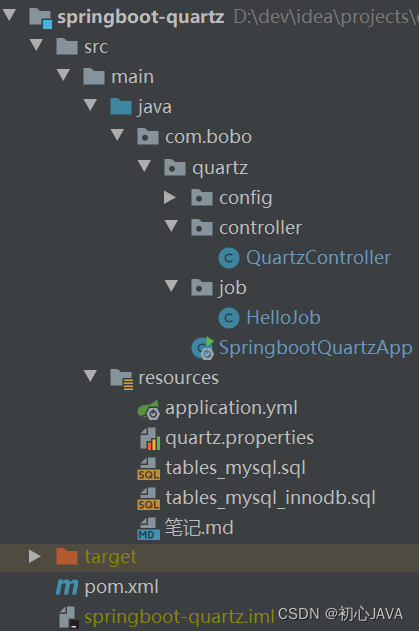
写的再好再优雅的代码,跑不起来都白搭。下面开始启动Spring Boot项目。
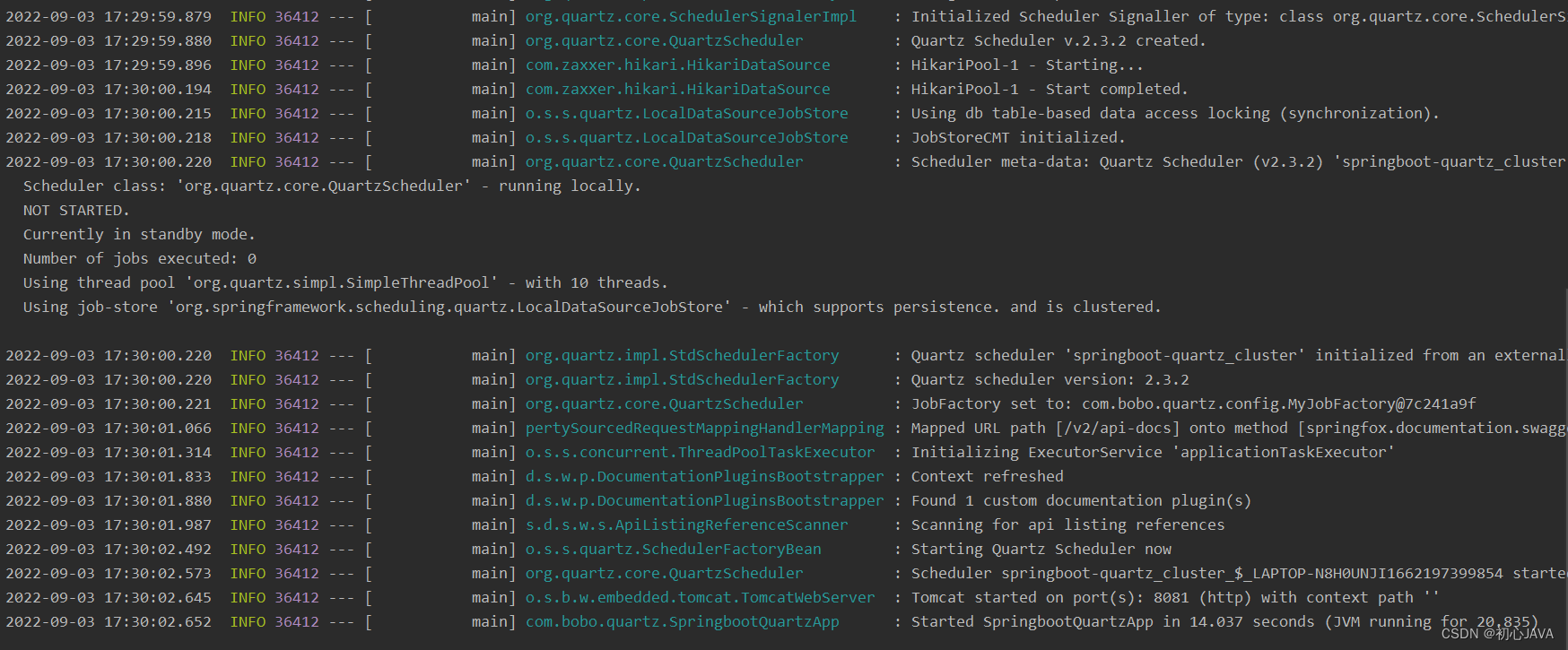
如果你的启动日志跟上面一样,那恭喜你,已经成功一半了,接下来就要测试接口功能的准确性了。这里我们通过修改端口号,启动两个实例。
观察qrtz_sheduler_state表和qrtz_locks表,发现有数据新增,如下图所示。

打开丝袜哥(Swagger)界面,测试第一个接口。

填写相应的参数,cron表达式的含义为每分钟执行一次。

发起请求,再来观察数据库的表,可以发现qrtz_cron_triggers表、qrtz_triggers表以及qrtz_job_details表新增数据,如下图所示。- qrtz_cron_triggers

- qrtz_triggers
可以重点关注下next_fire_time和prev_fire_time字段,分别表示上一次触发的时间和下一次触发的时间,这对调试很有帮助。

- qrtz_cron_triggers

请求是发送成功了,而且quartz的表也有了数据的变化,那任务到底有没有运行呢?是不是一分钟运行一次呢?集群中的两个实例是不是都参与了任务的运行呢?接下来看运行日志。
实例1的运行日志。

实例2的运行日志。

可以很容易地看到,实例1和实例2以负载均衡的方式,都参与了同一任务的调度,且的确是每分钟运行一次。由于文章篇幅原因,其它接口的测试由读者自行完成。
4、失败指令misfire Instruction
在上面做第一个接口的测试时,不知道大家有没有注意,有这么一个参数misfireInstruction,当时为了快速测试功能性就没有传这个参数,在不传的情况下默认采用smart policy。不知道什么是smart policy?别急,下面将详细介绍misfire Instruction的作用。
在任务调度的时候,不总是成功的,也有失败的情况,例如:
- 同一时刻要执行多个任务,线程池中的线程不够用
- 集群所有的实例都不在线
比如类似邮件推送调度(每天上午10点发送)的企业级需求,如果当天10点因线程池紧张而发送失败,难道就不管了吗?我们可以允许在稍后线程池资源够用的情况下进行一个补发,而不是要等到第二天才能发。另外,如果是因为集群所有实例挂机且挂了很多天导致的失败呢?当实例重启的那一刻,是补发前面失败的多次,还是只补发一次?这个就要看具体的需求了。
通过上面的举例可以看出,有三种比较通用的失败指令:
- 什么都不做,即不进行补偿
- 失败几次,就补偿几次
- 无论失败多少次,只补偿一次
然后在quartz框架中,不同类型的触发器具有不同的失败指令,也就是说,除了通用的失败指令外,还有触发器个性化的失败指令,这里我们只研究一下CronTrigger的失败指令吧。
前面的代码已经告诉了我们如何设置CronTrigger的失败指令,这里再粘贴一遍。
if(null != misfireInstruction){ if(-1 == misfireInstruction){ // 失败几次就补偿几次 cronScheduleBuilder.withMisfireHandlingInstructionIgnoreMisfires(); }else if(1 == misfireInstruction){ // 无论失败多少次,只补偿一次 cronScheduleBuilder.withMisfireHandlingInstructionFireAndProceed(); }else if(2 == misfireInstruction){ // 什么都不做,即不进行补偿 cronScheduleBuilder.withMisfireHandlingInstructionDoNothing(); } }- 1
- 2
- 3
- 4
- 5
- 6
- 7
- 8
- 9
- 10
- 11
- 12
所有类型的触发器的默认失败指令都是smart policy(值为0),这个智能的含义是:不同类型的触发器都会被翻译为该类型触发器支持的某一个失败指令。
比如CronTrigger,查看CronTriggerImpl的updateAfterMisfire方法源码,可以知道是被翻译为了MISFIRE_INSTRUCTION_FIRE_ONCE_NOW,如下所示。

关于失败指令的测试,由于篇幅原因就不在本文一一验证了,读者有兴趣的话可自行完成。5、每月一次这类调度怎么测,我不想坐等一个月啊
当然不用坐等一个月,可以修改系统时间啊,所以的任务调度框架都是基于系统时间的,反过来想,一旦系统时间出错,那带来的破坏也是极大的。
windows:
- date命令设置系统日期,time命令设置系统时间
Linux:
- 设置时间:date -s “2022-07-19 17:20:00”
- 查看时间:date “+%Y-%m-%d %H:%M:%S %A”
6、有没有比quartz更牛×的框架
说到底,quartz只是一个任务调度框架,并不是一个组件,一个平台,在使用上面还是有点不方便,需要调用Java API才能实现Job的新增、暂停等,没有管理界面,维护起来相当麻烦,如果要做成一个完善的产品还需要投入大量人力开发。
另外,quartz只支持集群模式,不支持分布式。要想成为分布式任务调度框架,必须要有支持分片的能力才行。像现在比较火的kafka消息中间件、elastic-search全文搜索引擎等,都是通过先分片后再生成多个副本,然后再打散落到各个机器上,不同的机器扮演不同分片的master角色,以此来实现高可用机制。
显然quartz是不支持这些的,那么市面上有没有比较成熟完善且受大众喜爱的分布式任务调度平台呢?有,它们就是xxl-job和elastic-job。
虽然quartz不算一个完成的调度平台,但对于一些中小型项目以及个人学习来说已经足够了,相反xxl-job和elastic-job在这种场景下就显得比较笨重了。
关于quartz本文就介绍到这里,感谢支持。

-
相关阅读:
GZ035 5G组网与运维赛题第4套
编译原理:语法分析(自下向上)
Java.lang.Class类 getConstructors()方法有什么功能呢?
【Linux】安装Hbase
git clone 遇到了 early EOF index-pack failed 问题
Springboot毕设项目基于Java的比亚迪汽车大数据评分系统c34pk(java+VUE+Mybatis+Maven+Mysql)
MNIST手写数字辨识-cnn网路 (机器学习中的hello world,加油)
Celery
【剑指Offer】10.斐波那契数列
什么是Monkey,以及Monkey异常
- 原文地址:https://blog.csdn.net/xl_1803/article/details/126671657
