Flask高级_WTF自定义验证器
一.自定义验证器步骤
-
定义一个方法,方法的名字规则是: validate_字段名(self,field) 。
-
在方法中,使用 field.data 可以获取到这个字段的具体的值(前端的)。
-
验证时,如果数据满足条件,那么可以什么都不做。如果验证失败,那么应该抛出一个 wtforms.validators.ValidationError 的异常,并且把验证失败 的信息传到这个异常类中。
二.实例
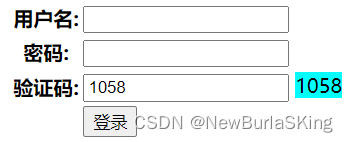
DOCTYPE html>
<html lang="en">
<head>
    <meta charset="UTF-8">
    <meta http-equiv="X-UA-Compatible" content="IE=edge">
    <meta name="viewport" content="width=device-width, initial-scale=1.0">
    <title>登录页面title>
head>
<body>
    <form action="/login/" method="post">
        <table>
            <tr>
                <th>用户名:th>
                <td><input type="text" name="uname">td>
            tr>
            <tr>
                <th>密码:th>
                <td><input type="text" name="pwd">td>
            tr>
            <tr>
                <th>验证码:th>
                <td><input type="text" name="code" maxlength="4"> <span style="background-color: aqua;">{{code}}span>td>
            tr>
            <tr>
                <th>th>
                <td><input type="submit" value="登录">td>
            tr>
        table>
    form>
body>
html>
- 1
- 2
- 3
- 4
- 5
- 6
- 7
- 8
- 9
- 10
- 11
- 12
- 13
- 14
- 15
- 16
- 17
- 18
- 19
- 20
- 21
- 22
- 23
- 24
- 25
- 26
- 27
- 28
- 29
- 30
- 31
loginForm.py:
from flask import session
from wtforms import Form,StringField
from wtforms.validators import Length,ValidationError

class loginForm(Form):
    code = StringField(validators=[Length(4,4)])

    def validate_code(self,field):
        font_code = field.data
        server_code = str(session.get('code'))
        if font_code != server_code:
            raise ValidationError('验证码不一致!!!请重新输入!')
main.py:
from flask import Flask,render_template,request,session
from random import randint
from loginForm import loginForm
app = Flask(__name__)
app.secret_key = 'adada'
@app.route('/')
def index():
return 'Hello~'
@app.route('/login/',methods=['GET','POST'])
def login():
if request.method == 'GET':
code = randint(1000,9999)
session['code'] = code
return render_template('login.html',code=code)
else:
form = loginForm(request.form)
if form.validate():
return '验证成功!'
return f'验证失败!失败信息:{form.errors}'
if __name__ == '__main__':
app.run(debug=True)
- 1
- 2
- 3
- 4
- 5
- 6
- 7
- 8
- 9
- 10
- 11
- 12
- 13
- 14
- 15
- 16
- 17
- 18
- 19
- 20
- 21
- 22
- 23
- 24
- 25
- 26
- 27
- 28

注:
如果觉得笔记有些问题,麻烦在百忙之中在评论中指正,或提出建议!另外,如果觉得这份笔记对你有所帮助,麻烦动动发财的小手手点一波赞!
