-
MySQL基础知识总结
基础命令
1、进入mysql:
mysql -u root -p(密码)- 1

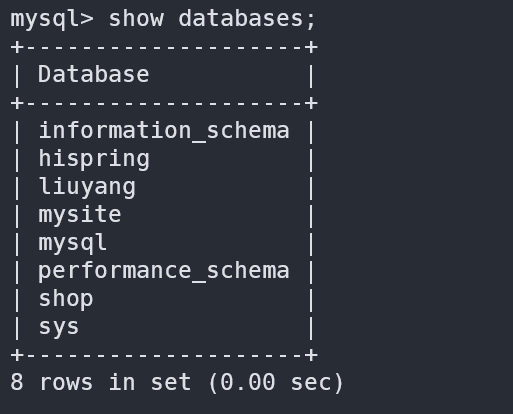
2、查看有哪些数据库:
show databases;- 1
此时会返回已存在的数据库名
3、选择使用数据库:
use 数据库名;- 1
此时会进入选定的数据库中

4、查看数据库中的表:
注:需要先用use选择具体的数据库
show tables;- 1
此时会返回数据库中所有表名

5、退出数据库:
exit;- 1
基础知识
1、元组:
数据表中,一行为一个元组。例如:学生信息表中,一个学生的所有信息即为一个元组,商品信息表中,一个商品的所有信息也是一个元组,如下图所示:

2、字段:
也称属性,表中,一列即为一个属性,用于描述所在列的语义。例如:学生的学号、姓名,商品的名称、价格数量等,如下图所示:

3、主键:
用于唯一标识一个元组。例如每名同学的学号都不同,可以将学号作为主键,通过学号即可索引到每位学生。因为主键是该元组的标识,因此必须唯一。
4、数据类型:
用于定义属性的数据类型。列出几个常用的:
关键词 INT REAL DOUBLE PRECISION FLOAT(n) NUMERIC(p,d) CHAR(n) VARCHAR(n) DATE TIME 含义 长整数 单精度浮点数 双精度浮点数 可设置精度的浮点数 定点数,p位数字,d位小数 长度为(n)的定长字符串 长度为n的变长字符串 日期 时间 例如,年龄是整数(通常使用
INT),生日是日期类型(通常使用DATE),姓名是字符串(通常使用CHAR(n))等。5、约束:
约束是对属性的一些限制,例如设置某个属性为主键,某个信息不能以空值填入数据表等等。
名称 句式 举例 备注 主键约束 primary keyID INT primary key 给ID属性设置主键约束 联合主键 primary key(属性1,属性2,...)primary key(ID,tel,name)为ID,tel,name三个属性设置联合主键约束(即不能同时相同,但可以部分相同) 非空约束 not nullname char(10) not null设置name属性不能为空值 唯一约束 uniquetel char(11) not null unique设置tel属性非空且不能重复(取值唯一) 外键约束 foreign key(本表属性名) references 被参照表名(属性名)foreign key(tel) references reader(tel)本表的tel属性取值为reader中的tel取值 检查约束 check(条件表达式)range int check(range between 0 and 100)range取值在0到100之间 还有其他约束,可以现用现查。
基本操作
1、创建数据库:
create database 数据库名;- 1
例如创建一个学生表:

2、创建一个数据表:
create table 数据表名 ( 字段1名 字段1类型 [字段1约束], 字段2名 字段2类型 [字段2约束], ... );- 1
- 2
- 3
例如:创建一个学生信息表,包含:学号(sid),姓名(sname),性别(ssex),生日(sbirthday),班级(class) 这5个属性,其中sid为主键:
create table student(sid varchar(20) primary key, sname varchar(20) not null, ssex varchar(10) not null, sbirthday datetime, class varchar(20));- 1
- 2
- 3
- 4
- 5
其中,primary key 意思是主键约束,即将sid设为主键。not null 是非空约束,即sname和ssex两个属性不能为空,sbirthday和class两个属性不设置约束。
3、插入数据
insert into 表名[属性列名1, 属性列名2, ...] values (属性1值, 属性2值, ...)- 1
注意:属性名可以不填,若不填,则插入所有属性的值。
例如,向学生表中插入:
insert into student values('10086','张三','男','200-01-01','1')- 1
4、修改数据
update 表名 set 属性列名1 = 表达式1, 属性列名2 = 表达式2 ... [ where 条件]- 1
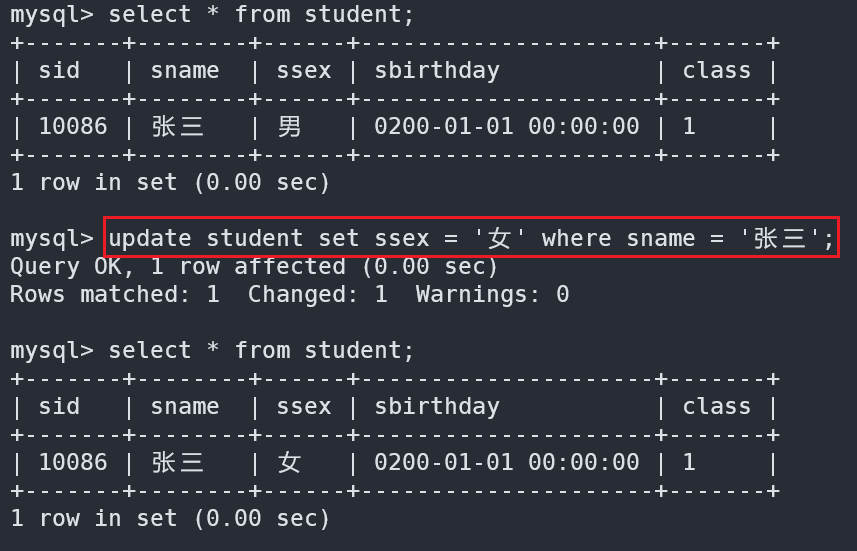
例如,将名字叫“张三”的性别改为女
update student set ssext = '女' where sname = '张三'- 1
改完表后,效果如下:
5、删除数据
delete from 表名 [where 条件]- 1
如果不使用where条件,则删除表中所有数据
例如,删除学号为10086的的数据
delete from student where sno = '10086';- 1

可以明显的看到,学号为10086的张三已经被删除。
6、查询数据
1、查询一张表
select * from 表名;- 1
2、查询指定字段
select 字段1,字段2,字段3...... from 表名;- 1
3、where条件查询
select 字段1,字段2,字段3 from 表名 where 条件表达式- 1
例:
select * from student where sid=10088;- 1

select * from student where class = 1;- 1

4、带in关键字查询
select 字段1,字段2 frome 表名 where 字段 [not]in(元素1,元素2,);- 1
例:
select * from student where age in (18,20);- 1

select * from student where age not in (18,20);- 1

5、带between and的范围查询
select 字段1,字段2 frome 表名 where 字段 [not]between 取值1 and 取值2;- 1
例:
select * from student where age between 21 and 29;- 1

select * from student where age not between 21 and 29;- 1

6、带like的模糊查询
select 字段1,字段2... frome 表名 where 字段 [not] like '字符串';- 1
- “%”代表任意字符;
- “_"代表单个字符;
例:
select * from student where sname like '二丫';- 1

select * frome t_student where stuName like '张三%'';- 1
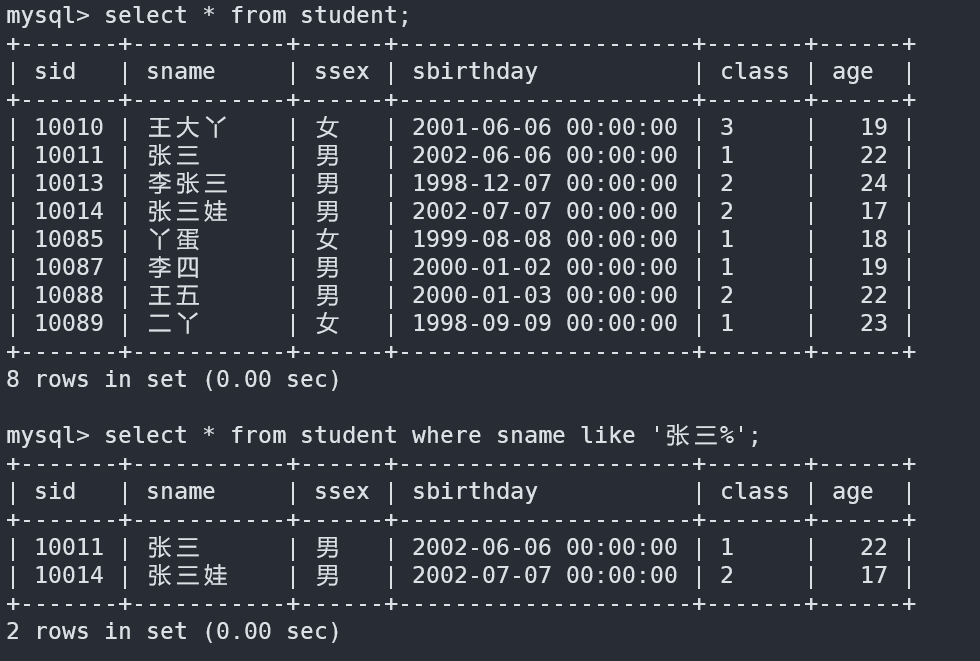
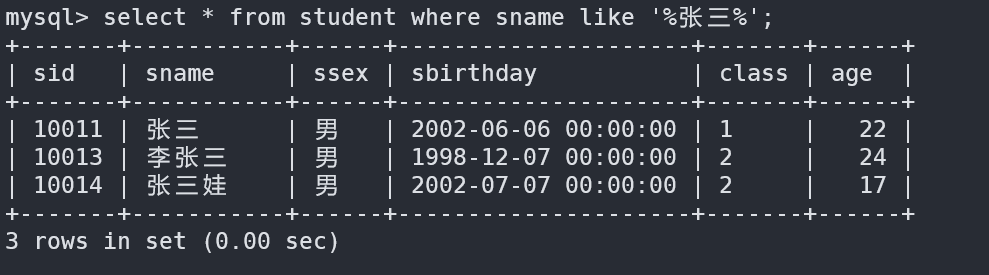
select * from student where sname like '%张三%'; //含有张三的任意字符- 1
select * from student where sname like '张三_';- 1

7、空值查询
select 字段1,字段2... frome 表名 where 字段 is[not] null;- 1

8、带and的多条件查询
select 字段1,字段2... from 表名 where 条件表达式1 and 条件表达式2 [and 条件表达式n];- 1
例:
select * from student where class=1 and age=22;- 1

9、带or的多条件查询
select 字段1,字段2... from 表名 where 条件表达式1 or 条件表达式2 [or 条件表达式n];- 1
例:
select * from student where class=2 or age = 23;- 1

10、distinct去重复查询
select distinct 字段名 from 表名;- 1
例:
select distinct class from student; //总共有三个班级- 1

11、对查询结果排序:
order byselect 字段1,字段2...from 表名 order by 属性名 [asc|desc];- 1
例:
select * from student order by age desc; //按照年龄降序排列,从大到小- 1

select * from student order by age asc; //升序,asc默认可以不写- 1

12、分组查询:
group bygroup by 属性名 [having 条件表达式][with rollup];- 1
- 单独使用:无意,不能单独使用。
- 与
group_concat()函数一起使用
例:
select class,group_concat(sname) from student group by class;- 1

- 与聚合函数一起使用
例:
select class,count(sname) from student group by class; //统计每个年级人数- 1
- 与
having一起使用(显示输出的结果)
例:
select class,group_concat(sname) from student group by class having count(sname)>3; //班级大于3个人- 1

- 与
whit rollup一起使用(最后加入一个总和行)
例:
select class,group_concat(sname) from student group by class with rollup;- 1

13.
limit分页查询select 字段1,字段2,...from 表名 limit 初始位置,记录数;- 1
例:
select * from student limit 0,5; //显示前五条记录- 1

7、多表连接查询
表一:

表二:

表三:

例:
select * from t_book,t_bookType;- 1
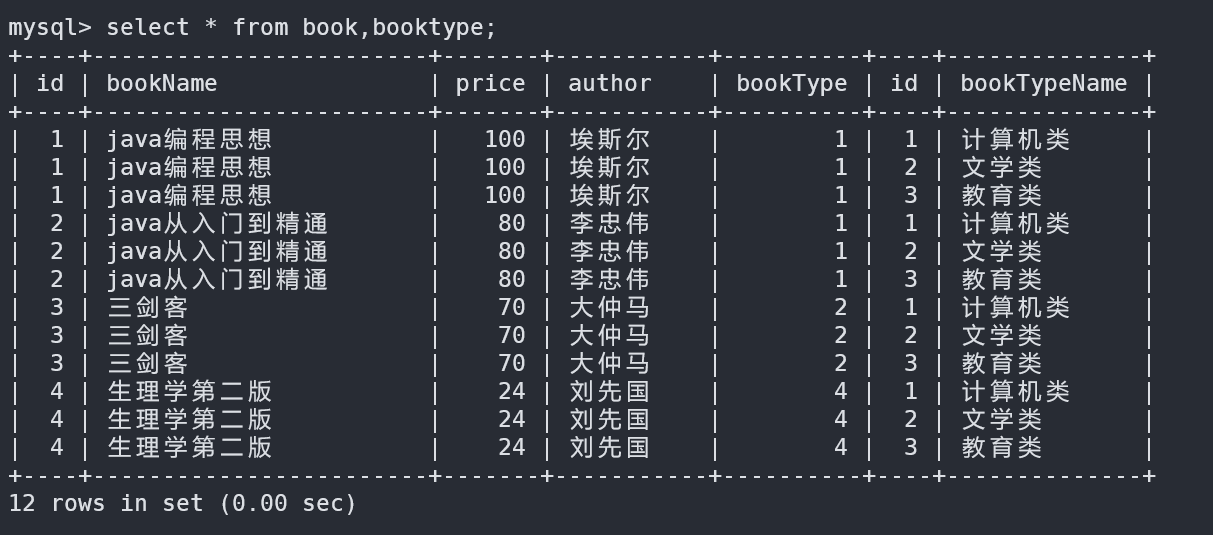
1、内连接查询(两张或以上的表连接起来查询需要的数据)
根据表一的booktype查询出所有的bookTypeName
select * from book,booktype where book.bookType=bookType.id;- 1

查询某几个字段:
select bookName,author from book,booktype where book.bookType=bookType.id;- 1

2、外连接查询(两张或以上的表连接起来 查询某张表的信息)
select * from book,booktype where book.id=1 or booktype.id=1;- 1

3、左连接查询
例:
select * from book left join booktype on book.bookType=booktype.id;- 1
如下图:表一(左边表)book的数据全部查出 表二没有的字段用null代替

4、右连接查询
select * from book right join booktype on book.bookType=booktype.id;- 1
如下图:表二(右边表)的所有信息,表一没有的用null代替

5、多条件连接查询
例:
select * from book,booktype where book.bookType=booktype.id and book.price>70;- 1

8、子查询
1、带in关键字的子查询
注:一个查询语句的条件可能落在另一个select语句的查询结果中
例:
select * from book where bookType in(select id from booktype);- 1

select * from book where bookType not in(select id from booktype);- 1
2、带比较运算符的子查询
注:子查询可以使用比较运算符
例:
select * from book where price>=(select price from pricelevel where priceLevel=1);- 1

3、带exists关键字的子查询
注:加入子查询查询到记录,则进行外层查询,否则,不执行外层查询
例:
select * from book where exists(select * from booktype);- 1

select * from book where not exists(select * from booktype);- 1

4、带any关键字的子查询
注:any关键字表示满足其中任一条件
例:
select * from book where price>=any(select price from pricelevel);- 1

5、带all关键字的子查询
注:all关键字表示满足所有条件
例:
select * from book where price>=all(select price from pricelevel);- 1
9、合并查询
1、
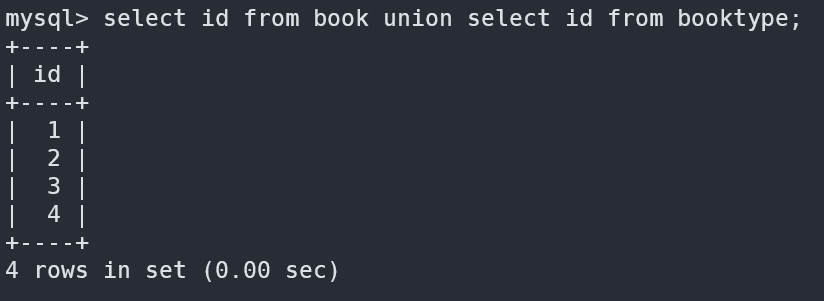
union使用union关键字时,数据库系统会将所有的查询结果合并到一起,然后去掉相同的记录;
例:
select id from book union select id from booktype;- 1
2、
union all使用
union all,不会去除掉重复的记录;例:
select id from book union all select id from booktype;- 1

-
相关阅读:
【组成原理 八 计算机的运算方法】
Java中等题-交错字符串(力扣)
openEuler生态大会 | 麒麟信安受邀参加欧拉伙伴入驻仪式,加速欧拉新发展
av_gettime() 与 av_gettime_relative() 是什么含义?
JMeter 常见函数讲解
dflow入门6——Subpath_slices
第2章 持久化初始数据到指定表
【BUG库】 记录自己学习工作中遇到的程序BUG
MATLAB实现函数拟合
【Hack The Box】windows练习-- Optimum
- 原文地址:https://blog.csdn.net/qq_43300880/article/details/126597587