-
dflow入门6——Subpath_slices
为了梳理学习dflow时遇到的知识点,我决定开这一个系列记录自己的学习过程。当然了,最好是去看 文档
本文,我们将讨论dflow的一个feature,Subpath_slices,并在最后写一个应用。
阅读原测试文件
test_subpath_slices.py 在源码example目录下
文件开始定义了两个OPclass Prepare(OP): def __init__(self): pass @classmethod def get_input_sign(cls): return OPIOSign({ }) @classmethod def get_output_sign(cls): return OPIOSign({ 'foo': Artifact(List[str], archive=None) }) @OP.exec_sign_check def execute( self, op_in: OPIO, ) -> OPIO: with open("foo1.txt", "w") as f: f.write("foo1") with open("foo2.txt", "w") as f: f.write("foo2") op_out = OPIO({ 'foo': ["foo1.txt", "foo2.txt"] }) return op_out class Hello(OP): def __init__(self): pass @classmethod def get_input_sign(cls): return OPIOSign({ 'foo': Artifact(str) }) @classmethod def get_output_sign(cls): return OPIOSign() @OP.exec_sign_check def execute( self, op_in: OPIO, ) -> OPIO: with open(op_in["foo"], "r") as f: print(f.read()) return OPIO()- 1
- 2
- 3
- 4
- 5
- 6
- 7
- 8
- 9
- 10
- 11
- 12
- 13
- 14
- 15
- 16
- 17
- 18
- 19
- 20
- 21
- 22
- 23
- 24
- 25
- 26
- 27
- 28
- 29
- 30
- 31
- 32
- 33
- 34
- 35
- 36
- 37
- 38
- 39
- 40
- 41
- 42
- 43
- 44
- 45
- 46
- 47
- 48
- 49
- 50
- 51
- 52
- 53
第一个OP没有输入,输出是一个list格式的artifact,值得注意的是,这里有一个label是
archive=None
点进注释可以看到,archive=None指不对文件进行压缩

第二个OP是读入单个文件,然后对该文件进行一些操作,没有输出
最后,我们来看套的壳wf = Workflow("subpath-slices") prepare = Step("prepare", PythonOPTemplate(Prepare, image="python:3.8")) wf.add(prepare) hello = Step("hello", PythonOPTemplate(Hello, image="python:3.8", slices=Slices(sub_path=True, input_artifact=["foo"] ) ), artifacts={"foo": prepare.outputs.artifacts["foo"]}) wf.add(hello) wf.submit() while wf.query_status() in ["Pending", "Running"]: time.sleep(1) assert(wf.query_status() == "Succeeded")- 1
- 2
- 3
- 4
- 5
- 6
- 7
- 8
- 9
- 10
- 11
- 12
- 13
- 14
- 15
- 16
- 17
- 18
- 19
首先是在wf里加入了prepare,然后把
prepare的输出传给了hello的输入,并在Slice里指定了要切割的对象,sub_path=True就可以了!!这相当于我以前代码里:
- 把这个文件夹传给第二步
- 在第二步里进入文件夹,然后
os.listdir('./')获取该文件夹下的每个工作目录,再进入该目录完成工作!!
使用sub_path之后就是:
- 把文件夹传给第二步
- 第二步使用slice之后,只关心工作目录里的业务操作即可。
应用案例
第一个OP实现工作目录的搭建
class BuildWithSub(OP): def __init__(self): pass @classmethod def get_input_sign(cls): return OPIOSign({ 'in_workbase': Artifact(Path), }) @classmethod def get_output_sign(cls): return OPIOSign({ 'out_workbase': Artifact(type=List[Path], archive=None), }) @OP.exec_sign_check def execute( self, op_in: OPIO, ) -> OPIO: name = 'cooking' cwd_ = os.getcwd() dst = os.path.abspath(name) os.makedirs(dst, exist_ok=True) if os.path.isdir(os.path.join(op_in['in_workbase'], 'raw')): raw = os.path.abspath(os.path.join(op_in['in_workbase'], 'raw')) else: raw = os.path.abspath(op_in['in_workbase']) outs = [] for a_file in os.listdir(raw): os.chdir(dst) a_file_name = os.path.splitext(a_file)[0] os.makedirs(a_file_name, exist_ok=True) shutil.copy(src=os.path.join(raw, a_file), dst=os.path.join(a_file_name, a_file)) outs.append(Path(os.path.join(name, a_file_name))) os.chdir(cwd_) op_out = OPIO({ "out_workbase": outs, }) return op_out- 1
- 2
- 3
- 4
- 5
- 6
- 7
- 8
- 9
- 10
- 11
- 12
- 13
- 14
- 15
- 16
- 17
- 18
- 19
- 20
- 21
- 22
- 23
- 24
- 25
- 26
- 27
- 28
- 29
- 30
- 31
- 32
- 33
- 34
- 35
- 36
- 37
- 38
- 39
- 40
- 41
- 42
第二个OP实现:进入工作目录,执行命令
class simpleExe(OP): def __init__(self): pass @classmethod def get_input_sign(cls): return OPIOSign({ 'workbase': Artifact(Path), 'cmd_list': List[str], 'out_list': List[str], 'in_fmt': str, 'log_file': str, }) @classmethod def get_output_sign(cls): return OPIOSign({ 'outs': Artifact(type=List[Path]), }) @OP.exec_sign_check def execute( self, op_in: OPIO, ) -> OPIO: cwd_ = os.getcwd() os.chdir(op_in['workbase']) cmd_list = op_in['cmd_list'] outs = [] if op_in['in_fmt'] == 'null': cmd_list.append(os.listdir('./')[0]) else: for a_file in os.listdir('./'): if a_file.endswith(op_in['in_fmt']): cmd_list.append(a_file) break log_file = op_in['log_file'] cmd_list.append(f'>>{log_file}') # time.sleep(60) os.system(' '.join(cmd_list)) for an_output in op_in['out_list']: if os.path.exists(an_output): outs.append(Path(os.path.join(op_in['workbase'], an_output))) os.chdir(cwd_) op_out = OPIO({ "outs": outs, }) return op_out- 1
- 2
- 3
- 4
- 5
- 6
- 7
- 8
- 9
- 10
- 11
- 12
- 13
- 14
- 15
- 16
- 17
- 18
- 19
- 20
- 21
- 22
- 23
- 24
- 25
- 26
- 27
- 28
- 29
- 30
- 31
- 32
- 33
- 34
- 35
- 36
- 37
- 38
- 39
- 40
- 41
- 42
- 43
- 44
- 45
- 46
- 47
- 48
- 49
- 50
- 51
- 52
外边的壳是:
a_build = Step(name='build', template=PythonOPTemplate(BuildWithSub, image="franklalalala/py_autorefiner"), artifacts={'in_workbase': src_dir} ) an_exe = Step(name='exe', template=PythonOPTemplate(simpleExe, image="franklalalala/py_autorefiner", slices=Slices(sub_path=True, input_artifact=["workbase"] ) ), artifacts={'workbase': a_build.outputs.artifacts['out_workbase']}, parameters={'cmd_list': ['xtb', '--opt tight'], 'out_list':['xtbopt.xyz', 'xtbopt.log'], 'in_fmt': None, 'log_file': None }, executor=dispatcher_executor, )- 1
- 2
- 3
- 4
- 5
- 6
- 7
- 8
- 9
- 10
- 11
- 12
- 13
- 14
- 15
- 16
- 17
- 18
- 19
- 20
需要注意的是:
- 第一个OP的输出是一个list的形式,且achive=None
- 第二个OP
download时,名字为exe的step有10个(batch_size个)
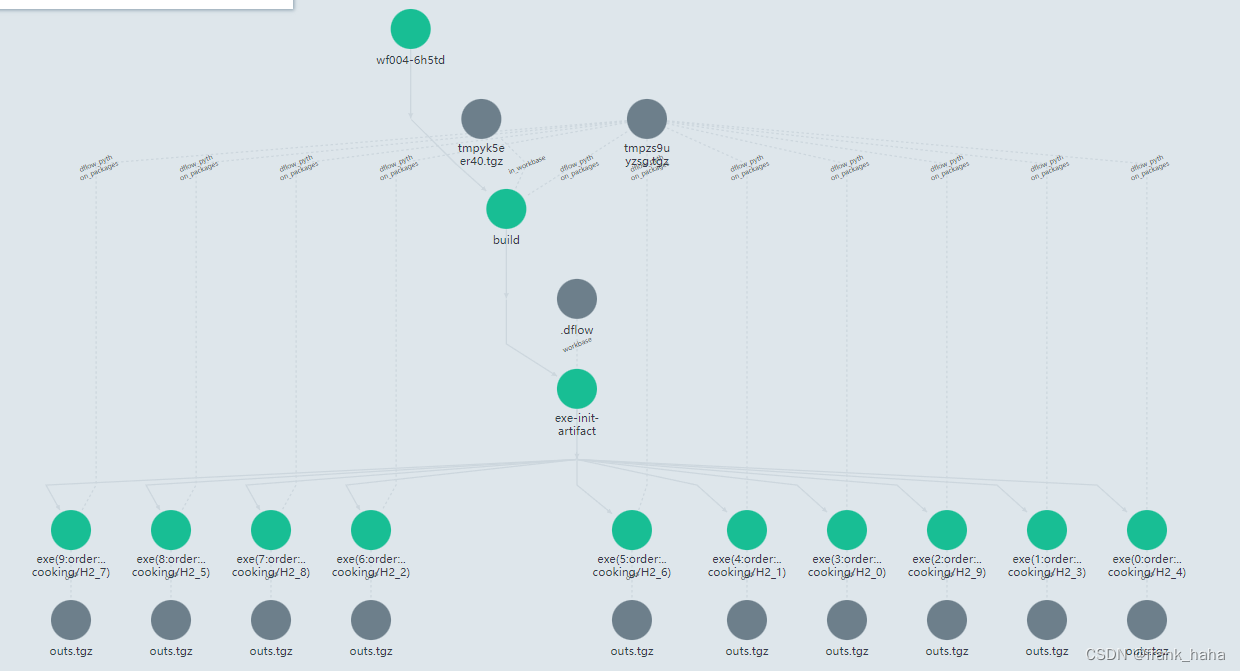
- 和普通的slice模式相比,每个工作目录只有一个输入文件,逻辑确实清晰很多,但每个工作目录都要搭配一个dflow的包(及其他所有要上传的包)。考虑到这一点,还是之前的实现更加轻便。1000以下的高通量计算可以接受类似的冗余。

上传一个16K的workbase需要搭配1.3M的package
du -h --max-depth=1查询当前文件夹目录下,各文件大小 -
相关阅读:
一道名题-(csp 儒略日)的心得与技巧
App自动化测试怎么做?实战分享App自动化测试全流程
axios在vue3.x中的基础入门使用
dubbo启动服务之容器(Container)
关于vector存放对象和对象指针的探索
Spring Security 集成 OIDC 项目编码 | 认证(三)
prompt 提示词如何写?
数字藏品交易系统前后端功能介绍
抛砖系列之前端性能分析工具
Elasticsearch实战(十九)---ES聚合算法易并行聚合算法及近似聚合算法及三角选择原则
- 原文地址:https://blog.csdn.net/frank_haha/article/details/126274316


