-
【SwiftUI模块】0015、SwiftUI自定义音频播放器
技术:SwiftUI、SwiftUI3.0、音频播放器、自定义音频播放器、AVAudioPlayer
运行环境:
SwiftUI3.0 + Xcode13.4.1 + MacOS12.5 + iPhone Simulator iPhone 13 Pro Max概述
使用SwiftUI自定义音频播放器
详细
一、运行效果

二、项目结构图

三、程序实现 - 过程
思路:
1.搭建歌曲图片、标题
2.搭建歌曲的操作按钮 比如 上一首、向前15秒、开始暂停、向后15秒、下一首
3.进度条的控制 - 和当前歌曲播放进度一样
4.检查开始和暂停的控制 - 是不是自动播放完成的操作、手动暂停的操作、控制是否正在播放的属性
5.监听手势拖拽进度条的时候 同步歌曲1.创建一个项目命名为
MusicPlayer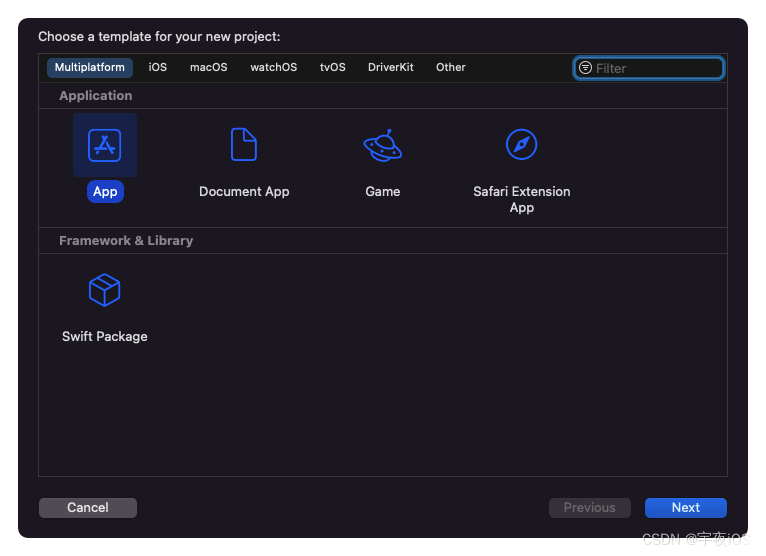

1.1.引入资源文件和颜色
图片logo1张
音频文件2个

Code
ContentView - 主窗口
主要是展示音频播放器UI 以及提供2个方法
- 获取歌曲的数据 比如标题、歌曲的图片
- 提供一个 切换歌曲的方法
- 监听 歌曲播放完成的方法
// // ContentView.swift // Shared // // Created by lyh on 2022/8/26. // import SwiftUI import AVKit struct ContentView: View { var body: some View { NavigationView{ MusicPlayer().navigationTitle("Music Player") } } } struct ContentView_Previews: PreviewProvider { static var previews: some View { ContentView() } } struct MusicPlayer : View{ @State var data : Data = .init(count: 0) @State var title = "" @State var player : AVAudioPlayer! @State var playing = false @State var width : CGFloat = 0 @State var songs = ["black","bad"] // 总音频列表 @State var current = 0 // 当前播放的第几首音频 @State var finish = false // 是否播放完成 @State var del = AVDelegate() // 播放器的代理 var body: some View{ VStack(spacing:20){ Image(uiImage:self.data.count == 0 ? UIImage(named: "itunes")! : UIImage(data: self.data)!) .resizable() .frame(width: self.data.count == 0 ? 250 : nil, height: 250) .cornerRadius(15) Text(self.title).font(.title).padding(.top) ZStack(alignment: .leading) { Capsule().fill(Color.black.opacity(0.08)).frame(height:8) // 红色进度等于播放进度 Capsule().fill(Color.red).frame(width:self.width,height:8) // 拖拽进度条处理 .gesture(DragGesture() .onChanged({ value in let x = value.location.x self.width = x }) .onEnded({ value in let x = value.location.x let screen = UIScreen.main.bounds.width - 30 // 百分比 let percent = x / screen self.player.currentTime = Double(percent) * self.player.duration }) ) } HStack(spacing:UIScreen.main.bounds.width / 5 - 30) { // 1.返回上一首 Button { // 检测歌曲的索引 if self.current > 0{ self.current -= 1 self.ChangeSongs() } } label: { Image(systemName: "backward.fill").font(.title) } // 2.返回前15秒 Button { self.player.currentTime -= 15 } label: { Image(systemName: "gobackward.15").font(.title) } // 3.播放暂停 Button { if self.player.isPlaying { self.player.pause() self.playing = false } else { if self.finish { self.player.currentTime = 0 self.width = 0 self.finish = false } self.player.play() self.playing = true } } label: { // 如果是播放完成 也要变回到播放按钮 Image(systemName:self.playing && !self.finish ? "pause.fill" : "play.fill").font(.title) } // 4.向后跳15秒 Button { let increase = self.player.currentTime + 15 if increase < self.player.duration { self.player.currentTime = increase } } label: { Image(systemName: "goforward.15").font(.title) } // 5.下一首 Button { // 检测歌曲的索引是否越界 if self.songs.count - 1 != self.current { self.current += 1 self.ChangeSongs() } } label: { Image(systemName: "forward.fill").font(.title) } } .padding(.top,25) .foregroundColor(Color.black) } .padding() .onAppear{ let url = Bundle.main.path(forResource: self.songs[self.current], ofType: "mp3") self.player = try! AVAudioPlayer(contentsOf: URL(fileURLWithPath: url!)) self.player.prepareToPlay() self.player.delegate = self.del // 获取音频数据 并且把音频数据得到的data存储起来 self.getData() // 启动定时器 播放时候 进度同步更新 Timer.scheduledTimer(withTimeInterval: 1, repeats: true) { (_) in if self.player.isPlaying { // 测试播放进度 //print(self.player.currentTime) let screen = UIScreen.main .bounds.width - 30 let value = self.player.currentTime / self.player.duration self.width = screen * CGFloat(value) } } // 使用通知监听歌曲是否播放完成 NotificationCenter.default.addObserver(forName: NSNotification.Name("Finish"), object: nil, queue: .main) { (_) in self.finish = true } } } func getData(){ let asset = AVAsset(url: self.player.url!) for i in asset.commonMetadata { if i.commonKey?.rawValue == "artwork" { let data = i.value as! Data self.data = data } if i.commonKey?.rawValue == "title"{ let title = i.value as! String self.title = title } } } func ChangeSongs(){ let url = Bundle.main.path(forResource: self.songs[self.current], ofType: "mp3") self.player = try! AVAudioPlayer(contentsOf: URL(fileURLWithPath: url!)) self.player.prepareToPlay() // 切换歌曲 重新初始化音频的数据 比如 data 歌曲的图片 title 歌曲的名称 self.data = .init(count: 0) self.title = "" self.getData() self.playing = true self.finish = false self.width = 0 // 切换之后 直接播放歌曲 self.player.play() } } // 通过代理监听歌曲是否播放完成 // 使用通知告诉视图 操作播放完成的操作 class AVDelegate : NSObject,AVAudioPlayerDelegate { func audioPlayerDidFinishPlaying(_ player: AVAudioPlayer, successfully flag: Bool) { NotificationCenter.default.post(name: NSNotification.Name("Finish"), object: nil) } }- 1
- 2
- 3
- 4
- 5
- 6
- 7
- 8
- 9
- 10
- 11
- 12
- 13
- 14
- 15
- 16
- 17
- 18
- 19
- 20
- 21
- 22
- 23
- 24
- 25
- 26
- 27
- 28
- 29
- 30
- 31
- 32
- 33
- 34
- 35
- 36
- 37
- 38
- 39
- 40
- 41
- 42
- 43
- 44
- 45
- 46
- 47
- 48
- 49
- 50
- 51
- 52
- 53
- 54
- 55
- 56
- 57
- 58
- 59
- 60
- 61
- 62
- 63
- 64
- 65
- 66
- 67
- 68
- 69
- 70
- 71
- 72
- 73
- 74
- 75
- 76
- 77
- 78
- 79
- 80
- 81
- 82
- 83
- 84
- 85
- 86
- 87
- 88
- 89
- 90
- 91
- 92
- 93
- 94
- 95
- 96
- 97
- 98
- 99
- 100
- 101
- 102
- 103
- 104
- 105
- 106
- 107
- 108
- 109
- 110
- 111
- 112
- 113
- 114
- 115
- 116
- 117
- 118
- 119
- 120
- 121
- 122
- 123
- 124
- 125
- 126
- 127
- 128
- 129
- 130
- 131
- 132
- 133
- 134
- 135
- 136
- 137
- 138
- 139
- 140
- 141
- 142
- 143
- 144
- 145
- 146
- 147
- 148
- 149
- 150
- 151
- 152
- 153
- 154
- 155
- 156
- 157
- 158
- 159
- 160
- 161
- 162
- 163
- 164
- 165
- 166
- 167
- 168
- 169
- 170
- 171
- 172
- 173
- 174
- 175
- 176
- 177
- 178
- 179
- 180
- 181
- 182
- 183
- 184
- 185
- 186
- 187
- 188
- 189
- 190
- 191
- 192
- 193
- 194
- 195
- 196
- 197
- 198
- 199
- 200
- 201
- 202
- 203
- 204
- 205
- 206
- 207
- 208
- 209
- 210
- 211
- 212
- 213
- 214
- 215
- 216
- 217
- 218
-
相关阅读:
线程常见面试题回答
数据仓库Hive(林子雨课程慕课)
【重识云原生】第六章容器6.3.4节——etcd组件
DBeaverUE Mac版:数据库管理新纪元,一键掌控所有数据
c# ManualResetEvent WaitHandle 实现同步
适合汽车应用的MAX49017ATA/VY、MAX40025AAWT、MAX40025CAWT、MAX40026ATA/VY(线性)微功耗比较器
Python动态建模(4)
【Tensorflow深度学习】实现手写字体识别、预测实战(附源码和数据集 超详细)
【Java】泛型的理解与使用,包装类
STM32MP157A驱动开发 | 03-usb host接口的使用(U盘 )
- 原文地址:https://blog.csdn.net/qq_42816425/article/details/126551327