-
vue 基础语法(二)
12-(掌握)插值操作-mustache语法
- <div id="app">
- <h3>{{msg}}h3>
- <h3>{{msg}},李银河h3>
- <h3>{{firstName+"·"+lastName}}h3>
- <h3>{{firstName}} {{lastName}}h3>
- <h4>{{counter*2}}h4>
- div>
- <script src = "./js/vue.js">script>
- <script>
- /**
- * 插值操作
- * 1、{{}} mustache 双大括号语法 数据是响应的
- */
- const app = new Vue({
- el:"#app",
- data:{
- msg:"你好呀",
- firstName:"乌拉那拉",
- lastName:"宜修",
- counter:100
- }
- })
- script>
13-(掌握)插值操作-其他指令使用
- <div id="app" v-cloak>
- <h3>{{msg}}h3>
- <h3 v-once>{{msg}}h3>
- <div v-html = "url">div>
- <h2 v-text = "msg">h2>
- <h2 v-pre >{{msg}}h2>
- div>
- <script src = "./js/vue.js">script>
- <script>
- /**
- * 插值操作 其他指令
- * 1、v-once
- * 2、v-html
- * 3、v-text 一般不适用,因为它不够灵活
- * 4、v-pre 原封不动的展示内容 用的也很少
- * 5、v-cloak cloak:斗篷 没啥意义,仅做了解
- *
- * 在vue解析之前,div有v-cloak 属性
- * 在vue解析之后,div中没有v-cloak 属性
- */
- const app = new Vue({
- el:"#app",
- data:{
- msg:"你好呀",
- url:"百度一下",
- }
- })
- script>
14-(掌握)v-bind的基本使用
- body>
- <div id="app" v-cloak>
- <h3>{{msg}}h3>
- <img v-bind:src="imgurl" alt="">
- <a v-bind:href="aHref">百度一下a>
- <a :href="aHref">百度一下a>
- div>
- <script src = "./js/vue.js">script>
- <script>
- /**
- * v-bind 动态绑定属性
- * 给哪个属性绑定值,就在那个属性前面加 v-bind:
- * 语法糖: v-bind:href => :href
- */
- const app = new Vue({
- el:"#app",
- data:{
- msg:"你好呀",
- imgurl:"https://v2.cn.vuejs.org/images/lifecycle.png",
- aHref:"http://www.baidu.com"
- }
- })
- script>
- body>
15-(掌握)v-bind动态绑定class(对象语法)【注意案例里面的简单写法】

- <div id="app" v-cloak>
- <div :class = "{active:isActive,line:isLine}">测试div>
- <div class = "title" :class = "{active:isActive,line:isLine}">测试div>
- <div class = "title" :class = "getClass()">测试div>
- <button :class = "{changeColor:isChangeColor}" @click = "clickFn">按钮button>
- div>
- <script src = "./js/vue.js">script>
- <script>
- /**
- * v-bind 动态绑定class (对象语法)
- * 1、 v-bind:class = "{'类名1':boolean,'类名2':boolean}"
- * 2、如果类名太长,可以写在computed里面或者methods里面
- */
- const app = new Vue({
- el:"#app",
- data:{
- msg:"hello world",
- active:"active",
- isActive:true,
- isLine:true,
- isChangeColor:false,
- counter:0
- },
- methods:{
- getClass(){
- return {active:this.isActive,line:this.isLine}
- },
- clickFn(){
- // 注意这里的一个简单写法
- // this.counter++;
- // if(this.counter%2==0){
- // this.isChangeColor = false
- // }else{
- // this.isChangeColor = true
- // }
- this.isChangeColor = !this.isChangeColor
- }
- }
- })
- script>
16-(了解)v-bind动态绑定class(数组语法) 【仅做了解,用的很少】
- <div id="app" v-cloak>
- <div class="title" :class = "['active','line']">{{msg}}div>
- <div class="title" :class = "[active,line]">{{msg}}div>
- <div class="title" :class = "getClasses()">{{msg}}div>
- div>
- <script src = "./js/vue.js">script>
- <script>
- /**
- * v-bind 动态绑定class (数组语法)
- * 1、多个类名可以写在computed或者methods里面
- */
- const app = new Vue({
- el:"#app",
- data:{
- msg:"hello world",
- active:"aaa",
- line:"bbb"
- },
- methods:{
- getClasses(){
- return [this.active,this.line]
- }
- }
- })
- script>
17-(完成)v-bind和v-for结合的作业布置
- <div id="app" v-cloak>
- <ul>
- <li v-for = "(item,index) of movies" :class = "{active:currentIndex == index}" @click = "clickFn(index)">{{item}}li>
- ul>
- div>
- <script src = "./js/vue.js">script>
- <script>
- /**
- * v-bind 和 v-for 小作业:
- * 实现列表,默认第一个高亮,然后点击哪个哪个高亮
- */
- const app = new Vue({
- el:"#app",
- data:{
- msg:"hello world",
- movies:["甄嬛传","芈月传","如懿传"],
- currentIndex:0
- },
- methods:{
- clickFn(index){
- this.currentIndex = index
- }
- }
- })
- script>
18-(掌握)v-bind动态绑定style(对象语法)
- <div id="app" v-cloak>
- <div :style = "{fontSize:fontSize}">{{msg}}div>
- <div :style = "{'font-size':fontSize}">{{msg}}div>
- <div :style = "{'font-size':finalSize+'px'}">{{msg}}div>
- <div :style = "{'font-size':fontSize,color:finalColor}">{{msg}}div>
- <div :style = "getStyles()">{{msg}}div>
- div>
- <script src = "./js/vue.js">script>
- <script>
- /**
- * v-bind 动态绑定style(对象语法)
- * 在组件化开发中用的多一些
- * 对象语法用的比较多
- * 属性太多可以抽离到methods或者computed里面
- * */
- const app = new Vue({
- el:"#app",
- data:{
- msg:"hello world",
- fontSize:"28px",
- finalSize:52,
- finalColor:"red"
- },
- methods:{
- getStyles(){
- return {'font-size':this.fontSize,color:this.finalColor}
- }
- }
- })
- script>
19-(了解)v-bind动态绑定style(数组语法)
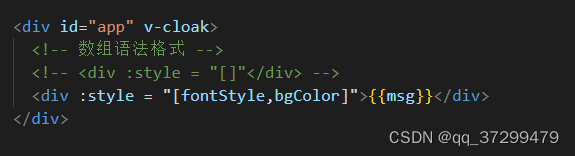

20-(掌握)计算属性的基本使用 【计算属性是当做属性使用的,使用的时候不需要加()】
- <div id="app">
- <div>{{firstname}} {{lastname}}div>
- <div>{{firstname+" "+lastname}}div>
- <div>{{getFullName()}}div>
- <div>{{fullName}}div>
- div>
- <script src = "./js/vue.js">script>
- <script>
- /**
- * 计算属性:当我们要对某种数据进行变化的时候再来进行显示的话,可以使用computed
- * 计算属性是当做属性使用的,使用的时候不需要加()
- * */
- const app = new Vue({
- el:"#app",
- data:{
- firstname:"hello",
- lastname:"world"
- },
- computed:{
- // 计算属性一般不加动词
- fullName(){
- return this.firstname+" "+this.lastname;
- }
- },
- methods:{
- getFullName(){
- return this.firstname+" "+this.lastname;
- }
- }
- })
- script>
21-(掌握)计算属性的复杂操作

- <div id="app">
- <div>{{firstname}} {{lastname}}div>
- <div>{{firstname+" "+lastname}}div>
- 总价格:{{totalPirce}}
- div>
- <script src = "./js/vue.js">script>
- <script>
- const app = new Vue({
- el:"#app",
- data:{
- firstname:"hello",
- lastname:"world",
- books:[
- {
- id:"001",
- name:"unix编程艺术",
- price:1
- },
- {
- id:"002",
- name:"代码大全",
- price:2
- },
- {
- id:"003",
- name:"深入理解计算机组成原理",
- price:3
- },
- {
- id:"004",
- name:"现代操作系统",
- price:4
- },
- ]
- },
- computed:{
- totalPirce(){
- let totalCount = 0
- // 第一种写法
- // this.books.map(item=>{
- // totalCount=Number(totalCount)+Number(item.price);
- // });
- // 第二种 原始写法
- // for(let i = 0;i
- // totalCount=Number(totalCount)+Number(this.books[i].price);
- // }
- // es6 for循环 in
- // for(let i in this.books){
- // totalCount=Number(totalCount)+Number(this.books[i].price);
- // }
- // es6 for循环 of
- for(let book of this.books){
- totalCount=Number(totalCount)+Number(book.price);
- }
- return totalCount
- }
- }
- })
- script>
- body>
22-(了解)课堂回顾
1、邂逅vue.js:
认识vue, vue的读音,为啥学vue, 什么是渐进式,vue特点,
2、安装vue(3中方式)
3、vue初体验:三个案例:
- mustache 语法, 体验vue响应式,
- vue列表展示,v-for
- vue计数器小案例 ,事件监听,@click
4、vue中的mvvm
5、创建vue option 可以放那些东西【el, data, methods, lifestyle】
6、插值语法(mustache,v-html,, v-text, v-once, v-pre, v-cloak)
7、v-bind 绑定基本属性
8、v-bind 动态绑定class【对象语法和数组语法】 列表小作业
9、v-bind 动态绑定style【对象语法和数组语法】
10、computed 讲解两个案例
-
相关阅读:
crm系统哪家好?
mac安装mysql,php,nginx,phpmyadmin,配置访问数据库
【51单片机实验笔记】前篇(三) 模块功能封装汇总(持续更新)
pdf文件大小超过限制怎么办?一招教你压缩pdf文件
【CQF Finance Class 1 现金时间价值】
一个混乱千万级软件项目
前端——Vue响应式适配
vite + vue3.0 + ts 项目搭建
好用到哭!没想到听书神器这么适合我~
go语言有哪些web框架
- 原文地址:https://blog.csdn.net/qq_37299479/article/details/126518183
