-
threejs绘制多个多边形
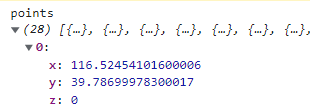
points格式:
drawPolygon(points, index) { const coordinates = points.map(item => { return [item.x, item.y]; }); const shape = new THREE.Shape(); coordinates.forEach(( v, j) => { // 左边转换工具 const coord = this.customCoords.lngLatToCoord(v); if( j === 0) { shape.moveTo(...coord); } else { shape.lineTo(...coord); } }); const geometry = new THREE.ShapeGeometry(shape); // 材质 this.roadMaterial = new THREE.MeshPhongMaterial( { color: 'rgba(0, 224, 150)', // 增加透明度 transparent: true, opacity: 0.5, polygonOffset: true, polygonOffsetFactor: -0.1, polygonOffsetUnits: -2.9 }); this[`mesh${index}`] = new THREE.Mesh(geometry, this.roadMaterial); this[`mesh${index}`].position.setZ(0.1); this[`mesh${index}`].matrixAutoUpdate = false; this.scene.add(this[`mesh${index}`]); // 绘制边框线 const lineGeom = new THREE.EdgesGeometry(geometry); const lineMaterial = new THREE.LineBasicMaterial({ color: 0x00fbff, linewidth: 1, linecap: 'round', linejoin: 'round' }); this[`line${index}`] = new THREE.LineSegments(lineGeom, lineMaterial); this[`line${index}`].scale.copy(this[`mesh${index}`].scale); this[`line${index}`].rotation.copy(this[`mesh${index}`].rotation); this[`line${index}`].position.copy(this[`mesh${index}`].position); this.scene.add(this[`line${index}`]); }- 1
- 2
- 3
- 4
- 5
- 6
- 7
- 8
- 9
- 10
- 11
- 12
- 13
- 14
- 15
- 16
- 17
- 18
- 19
- 20
- 21
- 22
- 23
- 24
- 25
- 26
- 27
- 28
- 29
- 30
- 31
- 32
- 33
- 34
- 35
- 36
- 37
- 38
- 39
- 40
- 41
- 42
- 43
- 44
-
相关阅读:
Golang 规则引擎原理及实战
【java数据结构】优先级队列
做数据产品半年后的体会总结
微服务和注册中心
unity(WebGL) 截图拼接并保存本地,下载PDF
JAVA每日面试题(一)
学习MyBatis框架及学习的过程中遇到的问题
JAVA 集合
XML 编辑器:功能、选择与使用技巧
AN基础工具——变形工具
- 原文地址:https://blog.csdn.net/bidepanm/article/details/126510330
