-
ESP8266制作的1.44寸TFT显示屏太空人天气时钟(st7735)(增加农历显示)(抄作业)
前言
之前学习律动灯条的时候买了一块esp8266开发板以及1.44寸的tft屏幕,一直闲置,所以学习制作网上爆火的天气时钟。同时为了便携,制作成可充电版本(typec充电)


软件和硬件都在:!!!!!点击这里!!!!!!
硬件制作

因为有现成的esp8266开发板,所以就在画pcb的时候就没有自己做esp8266的外围电路。

TFT的接线为:

这对应的esp8266开发板的D0那一列。

对应TFT引脚:
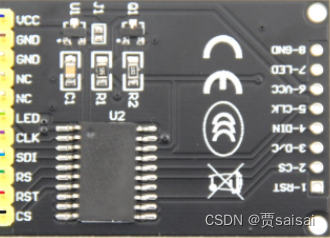
这里的按键检测电路有问题,原来我以为可以程序设计该引脚为上拉状态,但是参考资料少,所以没找到。

最好设计为下图
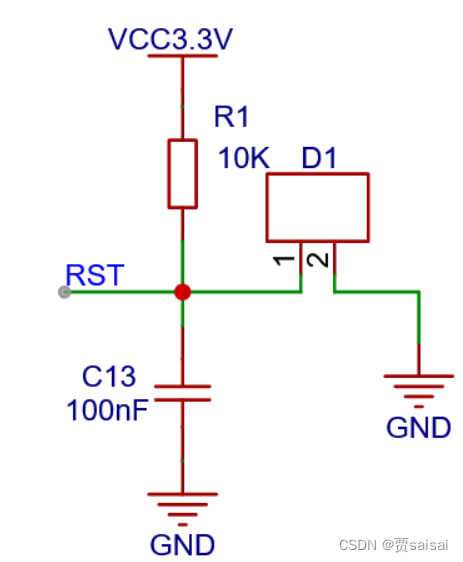

这里的原理图和pcb都是修改后的,我自己做的板子有点问题,只好飞线处理了。


洗板水在学校,所以板子看上去黄黄的,松香没洗。电源管理
这里尝试一节锂电池降压到3.3v后给板子供电,可能因为显示屏缘故,电压不够,所以用两节锂电池串联降压到5v后,从板子的VIN供电。
充电电路参考: 基于CS5090E的5V升压给两节锂电池8.4v充电电路
这里注意1117降压芯片降压后不能和充电电路的5v连在一起,这样电池降压后又给电池充电,形成了回路。1117受不了,我的冒烟了。所以后面用剪刀把板子的线路划断了,然后飞线走的。上面的原理图和pcb是修改后的。
软件抄作业
软件抄作业自这个大佬的:使用esp8266点亮福利屏型号st7735的1.44的TFT屏
软件比较复杂,涉及到物联网的知识,而且arduino编程序都是用的封装好的库,所以不容易理解。包括但不限与json解析,TFT显示,NTP服务器、网络配置等等,比较复杂,我也是抄的作业然后自己修改了一下。软件也放在上面的开源资料里了。
增加了按键控制亮度的问题,实际中发现这个东西是电老虎
if(digitalRead(D0)==LOW&&key_press==0) { lcd_light=lcd_light+20; analogWrite(LCD_BL_PIN,50); }- 1
- 2
- 3
- 4
- 5
可以控制TFT的LED引脚(背光控制引脚)节省电。
API解析
因为农历生日常常记不住,所以我加了一个农历日期显示,这里就需要自己找API接口,来解析。
char n_nongli[30] =""; char n_shengxiao[1] =""; String nongli_show; void nongli_get() { const char* hosts = "lunarapi.top"; // http://lunarapi.top/lunar/getbydate?date=2022-08-02 // Connect to API Serial.print("连接nongli服务器::::"); Serial.println(hosts); // Use WiFiClient class to create TCP connections WiFiClient nongclient; const int httpPort = 80; if (!nongclient.connect(hosts, httpPort)) { Serial.println("连接失败"); return; } // We now create a URI for the request //增加公历日期到url中 String date; date=String(year())+"-"; if(month()<10) { date+="0"+String(month())+"-"; } else { date+=String(month())+"-"; } if(day()<10) { date+="0"+String(day()); } else { date+=String(day()); } // Serial.println(date); String url = "/lunar/getbydate?date="+date; Serial.print("Requesting URL: "); Serial.println(url); // This will send the request to the server nongclient.print(String("GET ") + url + " HTTP/1.1\r\n" + "Host: " + hosts + "\r\n" + "Connection: close\r\n\r\n"); delay(1000); // Read all the lines of the reply from server and print them to Serial String nong_data; while (nongclient.available()) { String line = nongclient.readStringUntil('\r'); nong_data += line; } nongclient.stop(); Serial.println(); Serial.println("关闭连接"); // Convert to JSON String json_nong_data; int jsonIndex; for (int i = 0; i < nong_data.length(); i++) { if (nong_data[i] == '{') { jsonIndex = i; break; } } // Get JSON data json_nong_data = nong_data.substring(jsonIndex); Serial.println(); Serial.println(json_nong_data); // String input; StaticJsonDocument<512> doc; //char state = 0; deserializeJson(doc, json_nong_data); JsonObject data = doc["data"]; strcpy(n_nongli, data["lunarDateTime"]); //农历2021年3月2日 nongli_show=n_nongli; Serial.println("nongli: "); Serial.println(nongli_show); }- 1
- 2
- 3
- 4
- 5
- 6
- 7
- 8
- 9
- 10
- 11
- 12
- 13
- 14
- 15
- 16
- 17
- 18
- 19
- 20
- 21
- 22
- 23
- 24
- 25
- 26
- 27
- 28
- 29
- 30
- 31
- 32
- 33
- 34
- 35
- 36
- 37
- 38
- 39
- 40
- 41
- 42
- 43
- 44
- 45
- 46
- 47
- 48
- 49
- 50
- 51
- 52
- 53
- 54
- 55
- 56
- 57
- 58
- 59
- 60
- 61
- 62
- 63
- 64
- 65
- 66
- 67
- 68
- 69
- 70
- 71
- 72
- 73
- 74
- 75
- 76
- 77
- 78
- 79
- 80
- 81
- 82
- 83
- 84
- 85
- 86
- 87
网上都是利用的心知天气的API,但是访问几次就被限制了,或者还要花钱买,我找到另外一个不要钱的,但是访问时需要在url上加上公历的日期。例子如下
http://lunarapi.top/lunar/getbydate?date=2022-08-02TFT农历显示:
nongli_get(); clk.createSprite(120, 18); clk.fillSprite(0x0000); clk.loadFont(nonglifont_15); clk.setTextDatum(ML_DATUM); clk.setTextColor(0xFFFF, 0x0000); clk.drawString("农历:"+nongli_show,1,9); clk.pushSprite(5,108); clk.deleteSprite(); clk.unloadFont(); //释放加载字体资源- 1
- 2
- 3
- 4
- 5
- 6
- 7
- 8
- 9
- 10
这里又涉及到字库的问题了,需要下载一个软件,同时还要转码。

具体操作在:TFT_eSPI添加各种字库上图软件在放在开头的资源包里面了。
结尾
时间不够,没有时间去画一个3D的外壳了。
通过做这个,对与网络API接口应用有了一个新的理解,同时因为不学网页开发,所以对json解析也不是很清楚,模仿别人代码试着解析理解了一下。
有兴趣可以把esp8266开发板和TFT集合在一块PCB板子上,就会更加小巧了。
arduino还是比较强大的,有各种库,但是不是专攻的话,不容易理解,因为封装的太好了,而且查找源文件还要到本地的库里面找。
最重要的是,编程不通过,可能是库的版本不对,我把所有库(比较大100多M)也一起发到资源包里面。还是编程不方便。
纠正一下,可能软件上传错了版本:背光引脚程序中要改成D2

下面是软件:
主要的NTP时间获取:oid digitalClockDisplay() { clk.setColorDepth(8); /***中间时间区***/ //时分 clk.createSprite(75, 28); clk.fillSprite(bgColor); clk.loadFont(FxLED_32); clk.setTextDatum(ML_DATUM); clk.setTextColor(timehmfontColor, bgColor); clk.drawString(hourMinute(),1,14,7); //绘制时和分 clk.unloadFont(); clk.pushSprite(10,19); clk.deleteSprite(); //秒 clk.createSprite(40, 28); clk.fillSprite(bgColor); clk.loadFont(FxLED_32); clk.setTextDatum(ML_DATUM); clk.setTextColor(timesfontColor, bgColor); clk.drawString(":"+num2str(second()),1,14); clk.unloadFont(); clk.pushSprite(83,19); clk.deleteSprite(); /***中间时间区***/ /***底部***/ clk.loadFont(zkyyt12); clk.createSprite(30, 16); clk.fillSprite(bgColor); //星期 clk.setTextDatum(ML_DATUM); clk.setTextColor(weekfontColor, bgColor); clk.drawString(week(),1,8); clk.pushSprite(2,89); clk.deleteSprite(); //月日 clk.createSprite(49,16); clk.fillSprite(bgColor); clk.setTextDatum(ML_DATUM); clk.setTextColor(monthfontColor, bgColor); clk.drawString(monthDay(),1,8); clk.pushSprite(36,89); clk.deleteSprite(); clk.unloadFont(); /***底部***/ } //星期 String week(){ String wk[7] = {"日","一","二","三","四","五","六"}; String s = "周" + wk[weekday()-1]; return s; } //月日 String monthDay(){ String s = String(month()); s = s + "月" + day() + "日"; return s; } //时分 String hourMinute(){ String s = num2str(hour()); backLight_hour = s.toInt(); s = s + ":" + num2str(minute()); return s; } String num2str(int digits) { String s = ""; if (digits < 10) s = s + "0"; s = s + digits; return s; } void printDigits(int digits) { Serial.print(":"); if (digits < 10) Serial.print('0'); Serial.print(digits); } //------------------------------------------------------------------------------------ //NTP部分的代码,包含2个函数------------------------------------------------------------ /*-------- NTP code ----------*/ const int NTP_PACKET_SIZE = 48; // NTP时间在消息的前48字节中 byte packetBuffer[NTP_PACKET_SIZE]; //buffer to hold incoming & outgoing packets time_t getNtpTime() { IPAddress ntpServerIP; // NTP server's ip address while (Udp.parsePacket() > 0) ; // discard any previously received packets //Serial.println("Transmit NTP Request"); // get a random server from the pool WiFi.hostByName(ntpServerName, ntpServerIP); //Serial.print(ntpServerName); //Serial.print(": "); //Serial.println(ntpServerIP); sendNTPpacket(ntpServerIP); uint32_t beginWait = millis(); while (millis() - beginWait < 1500) { int size = Udp.parsePacket(); if (size >= NTP_PACKET_SIZE) { Serial.println("可以呀,小伙子,NTP同步成功啦!!!"); Udp.read(packetBuffer, NTP_PACKET_SIZE); // read packet into the buffer unsigned long secsSince1900; // convert four bytes starting at location 40 to a long integer secsSince1900 = (unsigned long)packetBuffer[40] << 24; secsSince1900 |= (unsigned long)packetBuffer[41] << 16; secsSince1900 |= (unsigned long)packetBuffer[42] << 8; secsSince1900 |= (unsigned long)packetBuffer[43]; //Serial.println(secsSince1900 - 2208988800UL + timeZone * SECS_PER_HOUR); return secsSince1900 - 2208988800UL + timeZone * SECS_PER_HOUR; } } //ESP.restart(); //时间获取失败直接重启 Serial.println("NTP同步失败,别气馁,下次会成功的..."); return 0; // 无法获取时间时返回0 } // 向NTP服务器发送请求 void sendNTPpacket(IPAddress &address) { // set all bytes in the buffer to 0 memset(packetBuffer, 0, NTP_PACKET_SIZE); // Initialize values needed to form NTP request // (see URL above for details on the packets) packetBuffer[0] = 0b11100011; // LI, Version, Mode packetBuffer[1] = 0; // Stratum, or type of clock packetBuffer[2] = 6; // Polling Interval packetBuffer[3] = 0xEC; // Peer Clock Precision // 8 bytes of zero for Root Delay & Root Dispersion packetBuffer[12] = 49; packetBuffer[13] = 0x4E; packetBuffer[14] = 49; packetBuffer[15] = 52; // all NTP fields have been given values, now // you can send a packet requesting a timestamp: Udp.beginPacket(address, 123); //NTP requests are to port 123 Udp.write(packetBuffer, NTP_PACKET_SIZE); Udp.endPacket(); }- 1
- 2
- 3
- 4
- 5
- 6
- 7
- 8
- 9
- 10
- 11
- 12
- 13
- 14
- 15
- 16
- 17
- 18
- 19
- 20
- 21
- 22
- 23
- 24
- 25
- 26
- 27
- 28
- 29
- 30
- 31
- 32
- 33
- 34
- 35
- 36
- 37
- 38
- 39
- 40
- 41
- 42
- 43
- 44
- 45
- 46
- 47
- 48
- 49
- 50
- 51
- 52
- 53
- 54
- 55
- 56
- 57
- 58
- 59
- 60
- 61
- 62
- 63
- 64
- 65
- 66
- 67
- 68
- 69
- 70
- 71
- 72
- 73
- 74
- 75
- 76
- 77
- 78
- 79
- 80
- 81
- 82
- 83
- 84
- 85
- 86
- 87
- 88
- 89
- 90
- 91
- 92
- 93
- 94
- 95
- 96
- 97
- 98
- 99
- 100
- 101
- 102
- 103
- 104
- 105
- 106
- 107
- 108
- 109
- 110
- 111
- 112
- 113
- 114
- 115
- 116
- 117
- 118
- 119
- 120
- 121
- 122
- 123
- 124
- 125
- 126
- 127
- 128
- 129
- 130
- 131
- 132
- 133
- 134
- 135
- 136
- 137
- 138
- 139
- 140
- 141
- 142
- 143
- 144
- 145
- 146
- 147
- 148
- 149
- 150
- 151
- 152
- 153
- 154
- 155
- 156
- 157
- 158
- 159
- 160
初始化和主循环:
void setup() { Serial.begin(115200); EEPROM.begin(1024); if(EEPROM.read(BL_addr)>0&&EEPROM.read(BL_addr)<100) LCD_BL_PWM = EEPROM.read(BL_addr); pinMode(LCD_BL_PIN, OUTPUT); analogWrite(LCD_BL_PIN, 150); pinMode(Button, INPUT); tft.begin(); /* TFT init */ tft.invertDisplay(1);//反转所有显示颜色:1反转,0正常 tft.fillScreen(0x0000); tft.setTextColor(TFT_WHITE, 0x0000); // 设置屏幕显示的旋转角度,参数为:0, 1, 2, 3 // 分别代表 0°、90°、180°、270° //根据实际需要旋转 tft.setRotation(4); TJpgDec.setJpgScale(1); TJpgDec.setSwapBytes(true); TJpgDec.setCallback(tft_output); targetTime = millis() + 1000; Serial.print("正在连接WIFI "); Serial.println(ssid); WiFi.begin(WiFi.SSID().c_str(),WiFi.psk().c_str()); TJpgDec.setJpgScale(1); TJpgDec.setSwapBytes(true); TJpgDec.setCallback(tft_output); tft.fillScreen(0x0000); while (WiFi.status() != WL_CONNECTED) { loading(70); if(loadNum>=94) { SmartConfig(); break; } } delay(10); while(loadNum < 94) //让动画走完 { loading(1); } Serial.print("本地IP: "); Serial.println(WiFi.localIP()); //Serial.println("启动UDP"); Udp.begin(localPort); //Serial.print("端口号: "); //Serial.println(Udp.localPort()); //Serial.println("等待同步..."); setSyncProvider(getNtpTime); setSyncInterval(setNTPSyncTime*60); //NTP网络同步频率,单位秒。 //绘制一个视口 tft.fillScreen(0x0000); tft.fillRoundRect(0,0,128,128,0,bgColor);//实心矩形 //绘制线框 tft.drawFastHLine(0,0,128,xkColor); tft.drawFastHLine(0,18,128,xkColor); tft.drawFastHLine(0,106,128,xkColor); tft.drawFastVLine(80,0,18,xkColor); tft.drawFastHLine(0,88,128,xkColor); tft.drawFastVLine(32,88,18,xkColor); tft.drawFastVLine(85,88,18,xkColor); int TCityCODE = 0; for(int cnum=5;cnum>0;cnum--) { TCityCODE = TCityCODE*100; TCityCODE += EEPROM.read(CC_addr+cnum-1); delay(5); } if(TCityCODE>=101000000 && TCityCODE<=102000000) cityCode = String(TCityCODE); else getCityCode(); //获取城市代码 getCityWeater(); // get_Bstation_follow(); // fanspush(); nonli_show(); pinMode(D0,INPUT); } unsigned long nongliTime = 0; unsigned long weaterTime = 0; void loop() { key_state(); if (now() != prevDisplay) { prevDisplay = now(); digitalClockDisplay(); } if(millis() - weaterTime > 300000){ //5分钟更新一次天气 millis()五十天后溢出 weaterTime = millis(); getCityWeater(); // nonli_show(); } if(millis() - nongliTime > 21600000){ //5分钟更新一次天气 nongliTime = millis(); nonli_show(); } scrollBanner(); weatherWarning(); imgAnim(); Serial_set(); }- 1
- 2
- 3
- 4
- 5
- 6
- 7
- 8
- 9
- 10
- 11
- 12
- 13
- 14
- 15
- 16
- 17
- 18
- 19
- 20
- 21
- 22
- 23
- 24
- 25
- 26
- 27
- 28
- 29
- 30
- 31
- 32
- 33
- 34
- 35
- 36
- 37
- 38
- 39
- 40
- 41
- 42
- 43
- 44
- 45
- 46
- 47
- 48
- 49
- 50
- 51
- 52
- 53
- 54
- 55
- 56
- 57
- 58
- 59
- 60
- 61
- 62
- 63
- 64
- 65
- 66
- 67
- 68
- 69
- 70
- 71
- 72
- 73
- 74
- 75
- 76
- 77
- 78
- 79
- 80
- 81
- 82
- 83
- 84
- 85
- 86
- 87
- 88
- 89
- 90
- 91
- 92
- 93
- 94
- 95
- 96
- 97
- 98
- 99
- 100
- 101
- 102
- 103
- 104
- 105
- 106
- 107
- 108
- 109
- 110
- 111
- 112
- 113
- 114
- 115
- 116
- 117
- 118
- 119
- 120
- 121
- 122
- 123
- 124
- 125
- 126
- 127
- 128
- 129
- 130
- 131
城市信息获取:
//CityCode文件夹内的js文件搜索可得 String cityCode = "101250101"; // 发送HTTP请求并且将服务器响应通过串口输出 void getCityCode(){ String URL = "http://wgeo.weather.com.cn/ip/?_="+String(now()); //创建 HTTPClient 对象 HTTPClient httpClient; httpClient.begin(wificlient,URL); //设置请求头中的User-Agent httpClient.setUserAgent("Mozilla/5.0 (iPhone; CPU iPhone OS 11_0 like Mac OS X) AppleWebKit/604.1.38 (KHTML, like Gecko) Version/11.0 Mobile/15A372 Safari/604.1"); httpClient.addHeader("Referer", "http://www.weather.com.cn/"); //启动连接并发送HTTP请求 int httpCode = httpClient.GET(); Serial.print("Send GET request to URL: "); Serial.println(URL); //如果服务器响应OK则从服务器获取响应体信息并通过串口输出 if (httpCode == HTTP_CODE_OK) { String str = httpClient.getString(); int aa = str.indexOf("id="); if(aa>-1) { //cityCode = str.substring(aa+4,aa+4+9).toInt(); cityCode = str.substring(aa+4,aa+4+9); Serial.println(cityCode); getCityWeater(); } else { Serial.println("获取城市代码失败"); } } else { Serial.println("请求城市代码错误:"); Serial.println(httpCode); } //关闭ESP8266与服务器连接 httpClient.end(); }- 1
- 2
- 3
- 4
- 5
- 6
- 7
- 8
- 9
- 10
- 11
- 12
- 13
- 14
- 15
- 16
- 17
- 18
- 19
- 20
- 21
- 22
- 23
- 24
- 25
- 26
- 27
- 28
- 29
- 30
- 31
- 32
- 33
- 34
- 35
- 36
- 37
- 38
- 39
- 40
- 41
- 42
- 43
- 44
- 45
- 46
- 47
- 48
其他相关代码在资源包里,整体挺多的,放不下了。
-
相关阅读:
CAS 和 OAuth 的区别是什么?
论文翻译:2018_Source localization using deep neural networks in a shallow water environment
java计算机毕业设计课程在线反馈系统源程序+mysql+系统+lw文档+远程调试
【活动总结】0730-COC深圳社区AI●CMeetup第4期——畅谈AI+智能制造与机器人的现状与未来
Opencv学习笔记-第0篇 安装
Java GUI实现贪吃蛇游戏
Linux-10-线程
电子元器件销售ERP管理系统哪个比较好?
Spring(ioc)
对接建行支付
- 原文地址:https://blog.csdn.net/zerokingwang/article/details/126415661
