-
4.Mybatis 环境搭建
Mybatis 环境搭建
-
学习Mybatis前的准备
- 需要环境 : JDK 1.8 + MySQL 5.7.34 + Maven 3.6.2 + IDEA 2021.3.3
- 掌握技术 : JDBC + MySQL基础 + Java基础 + Maven基础 + Junit
-
什么是 Mybatis ?
- MyBatis 是一款优秀的持久层框架,它支持自定义 SQL、存储过程以及高级映射
- MyBatis 免除了几乎所有的 JDBC 代码以及设置参数和获取结果集的工作
- MyBatis 可以通过简单的 XML 或注解来配置和映射原始类型、接口和 Java POJO(Plain Old Java Objects,普通老式 Java 对象)为数据库中的记录.
注意点1 : 持久层即将数据持久化(存到数据库里).而持久化就是将程序的数据在持久状态(数据库,io文件持久化)和瞬时状态(内存)转化的过程.其实就是我们买肉冻冰箱不吃时冷藏和要吃时解冻的过程
注意点2 : 为什么需要持久化?因为内存有着断电即失的特性,但是有些对象不能丢弃,而且内存太贵.
注意点3 : 持久化是一个动作,而持久层是一个概念
注意点4 : 持久层是完成持久化工作的模块
注意点5 : 为什么用mybatis?因为传统的JDBC代码太过复杂,而mybatis更加方便,它帮助程序员将数据存入到数据库中
-
获得Mybatis的途径
-
maven仓库 (推荐) :
<dependency> <groupId>org.mybatisgroupId> <artifactId>mybatisartifactId> <version>3.5.2version> dependency>- 1
- 2
- 3
- 4
- 5
- 6
注意点1 : 在我们的 IDEA 中新建maven项目后,经过配置会直接从maven仓库中给我们下好,所以最方便.
-
Mybatis中文网 : https://mybatis.net.cn/
-
-
Mybatis 框架主要配置
-
pom.xml <—> mybatis-config.xml, log4j.xml, jdbc.properties <—> 实体类User <—> *mapper接口UserMapper <—> *映射文件UserMapper.xml<—> 测试文件MybatisTest,SqlSessionUtils文件
-
文件名 作用 pom.xml maven仓库导入各种需要的工具 mybatis-config.xml , log4j.xml , jdbc.properties 配置核心文件连接到mysql数据库, 配置日志, 连接的数据库信息 实体类User 用的哪张表就创建一个对应的实体类 mapper接口UserMapper 写入想要通过SQL语句实现的功能 映射文件UserMapper.xml 写实现功能的SQL语句 测试文件MybatisTest, SqlSessionUtils文件 测试能否实现功能, 封装要用的SQLSession对象避免代码冗余
-
第一步 : 搭建数据库
-
思路描述 : 在QLyog中新建mybatis_sql库,并创建user(用户)表、device(设备)表、connection(连接)表、monitor(监控)表四张表并插入数据.
-
代码实现 :
-
1.创建mybatis_sql库并使用
create database if not exists `mybatis_sql`; use `mybatis_sql`;- 1
- 2
- 3
-
2.新建user表并插入数据
create table if not exists `user` ( `id` int(20) unsigned not null auto_increment comment '主键', `username` varchar(30) not null default '' comment '用户名', `password` varchar(300) not null default '' comment '登录密码', `create_time` timestamp not null default current_timestamp comment '记录创建时间', `update_time` timestamp not null default current_timestamp comment '记录更新时间', `status` tinyint(4) not null default '1' comment '1代表记录有效,0代表记录无效', primary key (`id`), key `update_time_password` (`update_time`,`password`) ) engine=innodb auto_increment=27 default charset=utf8 comment='用户信息表'- 1
- 2
- 3
- 4
- 5
- 6
- 7
- 8
- 9
- 10
insert into `user` (`username`,`password`) values ('张三','123456'), ('李四','123456'), ('王五','123456'), ('赵六','123456'), ('孙七','123456'), ('周八','123456'), ('吴九','123456'), ('郑十','123456');- 1
- 2
- 3
- 4
- 5
- 6
- 7
- 8
- 9
- 10
-
3.新建device表并插入数据
create table if not exists `device` ( `device_id` int(20) unsigned not null auto_increment comment '主键', `device_name` varchar(30) not null default '' comment '设备名称', `device_user` varchar(30) not null default '' comment '设备所有者', `device_type` enum('主机','交换机','控制器') not null default '主机' comment '类型', `device_state` tinyint(4) not null default '1' comment '1代表启动,0代表未启动', `device_create_time` timestamp not null default current_timestamp comment '记录创建时间', `device_update_time` timestamp not null default current_timestamp comment '记录更新时间', `device_status` tinyint(4) not null default '1' comment '1代表记录有效,0代表记录无效', primary key (`device_id`), key `dupdate_time_dname` (`device_update_time`,`device_name`), key `dupdate_time_dtype` (`device_update_time`,`device_type`), key `dupdate_time_dstate` (`device_update_time`,`device_state`), key `dupdate_time_dstatus` (`device_update_time`,`device_status`), key `dupdate_time_duser` (`device_update_time`,`device_user`) ) engine=innodb auto_increment=4 default charset=utf8 comment='设备表'- 1
- 2
- 3
- 4
- 5
- 6
- 7
- 8
- 9
- 10
- 11
- 12
- 13
- 14
- 15
- 16
insert into `device` (`device_name`,`device_user`,`device_type`) values ('device001','25','主机'), ('device002','25','交换机'), ('device003','25','控制器');- 1
- 2
- 3
- 4
- 5
-
4.新建connection表并插入数据
create table if not exists `connection` ( `link_id` int(20) unsigned not null auto_increment comment '主键', `device_id` varchar(30) not null default '' comment '连接的did', `device_link` varchar(1000) not null default '' comment '设备连接情况', `link_state` tinyint(4) not null default '1' comment '1代表连接,0代表未连接', `link_create_time` timestamp not null default current_timestamp comment '记录创建时间', `link_update_time` timestamp not null default current_timestamp comment '记录更新时间', `link_status` tinyint(4) not null default '1' comment '1代表记录有效,0代表记录无效', primary key (`link_id`), key `lupdate_time_dlink` (`link_update_time`,`device_link`), key `lupdate_time_lstate` (`link_update_time`,`link_state`), key `lupdate_time_lstatus` (`link_update_time`,`link_status`) ) engine=innodb auto_increment=2 default charset=utf8 comment='连接表'- 1
- 2
- 3
- 4
- 5
- 6
- 7
- 8
- 9
- 10
- 11
- 12
- 13
insert into `connection` (`device_id`,`device_link`) values ('4','49qu894uqfj3849f89q4ufq895uqy57f'), ('5','d239dh3487ofh742f98d982h9395hf93'), ('6','i48q3r03498f54jwg896gy89hq98hf9f');- 1
- 2
- 3
- 4
- 5
-
5.新建monitor表并插入数据
create table if not exists `monitor` ( `mid` int(20) unsigned not null auto_increment comment '主键', `doubtful_ip` varchar(30) not null default '' comment '可疑ip', `if_ban_doubtful_ip` varchar(30) not null default '1' comment '是否封禁,1代表封禁,0代表未封禁', `create_time` timestamp not null default current_timestamp comment '记录创建时间', `update_time` timestamp not null default current_timestamp comment '记录更新时间', `status` tinyint(4) not null default '1' comment '1代表记录有效,0代表记录无效', primary key (`mid`), key `update_time_if_ban_doubtful_ip` (`update_time`,`if_ban_doubtful_ip`) ) engine=innodb default charset=utf8 comment='监控信息表'- 1
- 2
- 3
- 4
- 5
- 6
- 7
- 8
- 9
- 10
insert into `monitor` (`doubtful_ip`) values ('192.168.1.1'), ('192.168.1.2'), ('192.168.1.3'), ('192.168.1.4');- 1
- 2
- 3
- 4
- 5
- 6
-
第二步 : 新建空项目

第三步 : 空项目下新建 Maven 项目

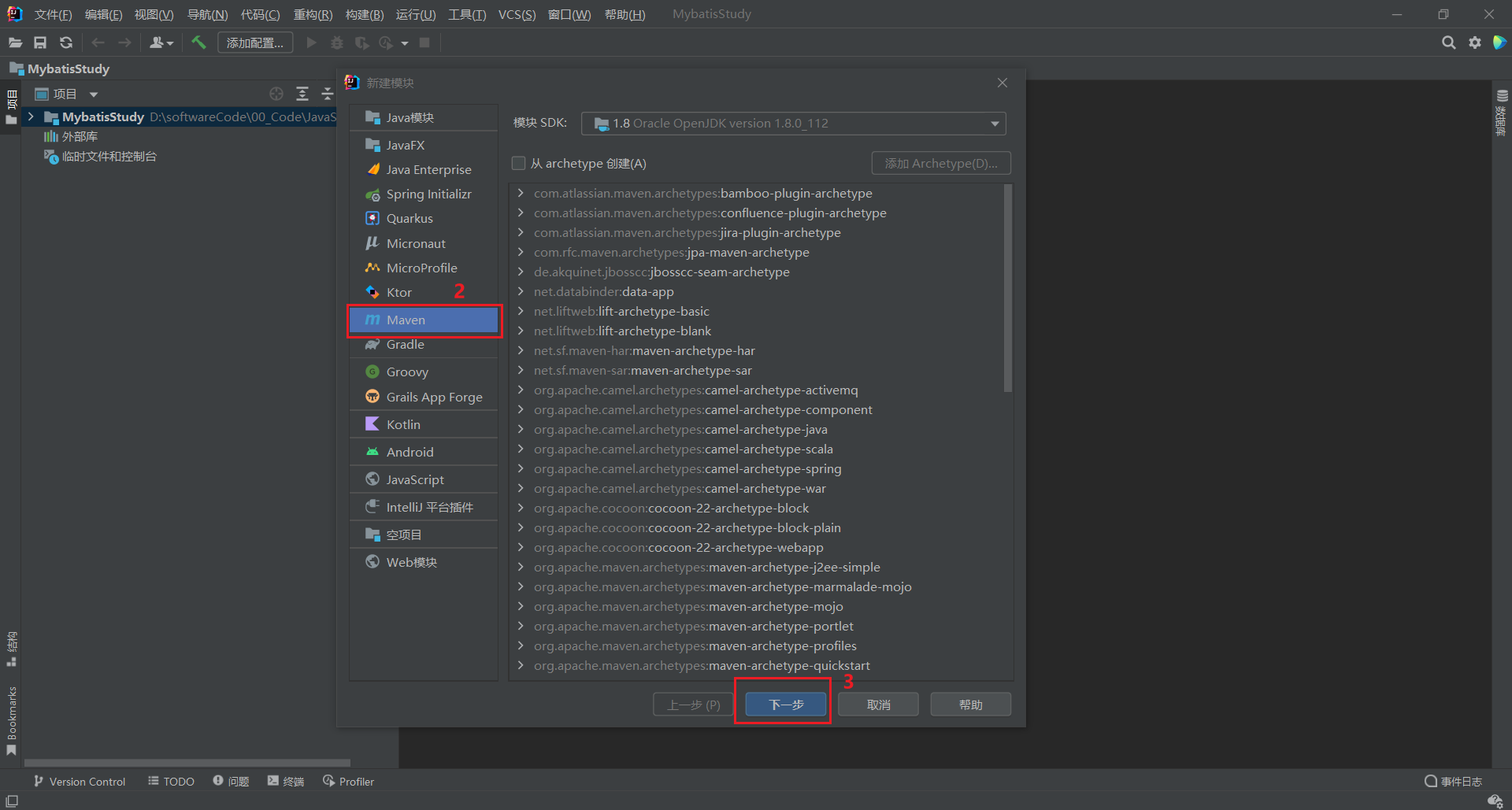

第四步 : 配置 Maven 项目结构

第五步 : 配置 Maven 构造工具

第六步 : 配置 Maven 项目 pom.xml 文件
<project xmlns="http://maven.apache.org/POM/4.0.0" xmlns:xsi="http://www.w3.org/2001/XMLSchema-instance" xsi:schemaLocation="http://maven.apache.org/POM/4.0.0 http://maven.apache.org/xsd/maven-4.0.0.xsd"> <modelVersion>4.0.0modelVersion> <groupId>com.atguigu.mybatisgroupId> <artifactId>mybatis_demoartifactId> <version>1.0-SNAPSHOTversion> ----------------------------------------------------插入以下内容即可 <packaging>jarpackaging> <dependencies> <dependency> <groupId>org.mybatisgroupId> <artifactId>mybatisartifactId> <version>3.5.7version> dependency> <dependency> <groupId>junitgroupId> <artifactId>junitartifactId> <version>4.12version> <scope>testscope> dependency> <dependency> <groupId>mysqlgroupId> <artifactId>mysql-connector-javaartifactId> <version>5.1.3version> dependency> <dependency> <groupId>log4jgroupId> <artifactId>log4jartifactId> <version>1.2.17version> dependency> dependencies> project>- 1
- 2
- 3
- 4
- 5
- 6
- 7
- 8
- 9
- 10
- 11
- 12
- 13
- 14
- 15
- 16
- 17
- 18
- 19
- 20
- 21
- 22
- 23
- 24
- 25
- 26
- 27
- 28
- 29
- 30
- 31
- 32
- 33
- 34
- 35
- 36
- 37
- 38
- 39
- 40
- 41
- 42
- 43
- 44
- 45
- 46
- 47
- 48
- 49
第七步 : 配置 Maven 项目 资源

-
1.配置 jdbc.properties 文件
jdbc.driver=com.mysql.jdbc.Driver jdbc.url=jdbc:mysql://127.0.0.1:3306/mybatis_sql jdbc.username=root jdbc.password=123456- 1
- 2
- 3
- 4
-
2.配置 log4j.xml 文件
DOCTYPE log4j:configuration SYSTEM "log4j.dtd"> <log4j:configuration xmlns:log4j="http://jakarta.apache.org/log4j/"> <appender name="STDOUT" class="org.apache.log4j.ConsoleAppender"> <param name="Encoding" value="UTF-8" /> <layout class="org.apache.log4j.PatternLayout"> <param name="ConversionPattern" value="%-5p %d{MM-dd HH:mm:ss,SSS} %m (%F:%L) \n" /> layout> appender> <logger name="java.sql"> <level value="debug" /> logger> <logger name="org.apache.ibatis"> <level value="info" /> logger> <root> <level value="debug" /> <appender-ref ref="STDOUT" /> root> log4j:configuration>- 1
- 2
- 3
- 4
- 5
- 6
- 7
- 8
- 9
- 10
- 11
- 12
- 13
- 14
- 15
- 16
- 17
- 18
- 19
- 20
- 21
- 22
- 23
- 24
- 25
-
3.配置 mybatis-config.xml 文件
DOCTYPE configuration PUBLIC "-//mybatis.org//DTD Config 3.0//EN" "http://mybatis.org/dtd/mybatis-3-config.dtd"> <configuration> <properties resource="jdbc.properties" /> <settings> <setting name="mapUnderscoreToCamelCase" value="true"/> <setting name="lazyLoadingEnabled" value="true"/> settings> <typeAliases> <package name="com.atguigu.mybatis.pojo"/> typeAliases> <environments default="development"> <environment id="development"> <transactionManager type="JDBC"/> <dataSource type="POOLED"> <property name="driver" value="${jdbc.driver}"/> <property name="url" value="${jdbc.url}"/> <property name="username" value="${jdbc.username}"/> <property name="password" value="${jdbc.password}"/> dataSource> environment> environments> <mappers> <package name="com.atguigu.mybatis.mapper"/> mappers> configuration>- 1
- 2
- 3
- 4
- 5
- 6
- 7
- 8
- 9
- 10
- 11
- 12
- 13
- 14
- 15
- 16
- 17
- 18
- 19
- 20
- 21
- 22
- 23
- 24
- 25
- 26
- 27
- 28
- 29
- 30
- 31
- 32
- 33
- 34
- 35
- 36
- 37
- 38
- 39
- 40
- 41
- 42
- 43
- 44
- 45
- 46
- 47
- 48
- 49
- 50
- 51
第八步 : 配置 Maven 项目 实体类

-
1.实体类 User.java 文件
package com.atguigu.mybatis.pojo; import java.sql.Timestamp; public class User { private Integer id; private String username; private String password; private Timestamp createTime; private Timestamp updateTime; private int status; public User() { } public User(String username, String password) { this.username = username; this.password = password; } public int getId() { return id; } public void setId(int id) { this.id = id; } public String getUsername() { return username; } public void setUsername(String username) { this.username = username; } public String getPassword() { return password; } public void setPassword(String password) { this.password = password; } public Timestamp getCreateTime() { return createTime; } public void setCreateTime(Timestamp create_time) { this.createTime = create_time; } public Timestamp getUpdateTime() { return updateTime; } public void setUpdateTime(Timestamp update_time) { this.updateTime = update_time; } public int getStatus() { return status; } public void setStatus(int status) { this.status = status; } @Override public String toString() { return "User{" + "id=" + id + ", username='" + username + '\'' + ", password='" + password + '\'' + ", create_time=" + createTime + ", update_time=" + updateTime + ", status=" + status + '}'; } }- 1
- 2
- 3
- 4
- 5
- 6
- 7
- 8
- 9
- 10
- 11
- 12
- 13
- 14
- 15
- 16
- 17
- 18
- 19
- 20
- 21
- 22
- 23
- 24
- 25
- 26
- 27
- 28
- 29
- 30
- 31
- 32
- 33
- 34
- 35
- 36
- 37
- 38
- 39
- 40
- 41
- 42
- 43
- 44
- 45
- 46
- 47
- 48
- 49
- 50
- 51
- 52
- 53
- 54
- 55
- 56
- 57
- 58
- 59
- 60
- 61
- 62
- 63
- 64
- 65
- 66
- 67
- 68
- 69
- 70
- 71
- 72
- 73
- 74
- 75
- 76
- 77
- 78
- 79
- 80
- 81
-
2.实体类 Device.java 文件
package com.atguigu.mybatis.pojo; import java.sql.Timestamp; public class Device { private Integer deviceId; private String deviceName; private String deviceUser; private String deviceType; private Integer deviceState; private Timestamp deviceCreateTime; private Timestamp deviceUpdateTime; public Device() { } public Device(String deviceName, String deviceUser, String deviceType) { this.deviceName = deviceName; this.deviceUser = deviceUser; this.deviceType = deviceType; } public Integer getDeviceId() { return deviceId; } public void setDeviceId(Integer deviceId) { this.deviceId = deviceId; } public String getDeviceName() { return deviceName; } public void setDeviceName(String deviceName) { this.deviceName = deviceName; } public String getDeviceUser() { return deviceUser; } public void setDeviceUser(String deviceUser) { this.deviceUser = deviceUser; } public String getDeviceType() { return deviceType; } public void setDeviceType(String deviceType) { this.deviceType = deviceType; } public Integer getDeviceState() { return deviceState; } public void setDeviceState(Integer deviceState) { this.deviceState = deviceState; } public Timestamp getDeviceCreateTime() { return deviceCreateTime; } public void setDeviceCreateTime(Timestamp deviceCreateTime) { this.deviceCreateTime = deviceCreateTime; } public Timestamp getDeviceUpdateTime() { return deviceUpdateTime; } public void setDeviceUpdateTime(Timestamp deviceUpdateTime) { this.deviceUpdateTime = deviceUpdateTime; } @Override public String toString() { return "Device{" + "deviceId=" + deviceId + ", deviceName='" + deviceName + '\'' + ", deviceUser='" + deviceUser + '\'' + ", deviceType='" + deviceType + '\'' + ", deviceState=" + deviceState + ", deviceCreateTime=" + deviceCreateTime + ", deviceUpdateTime=" + deviceUpdateTime + '}'; } }- 1
- 2
- 3
- 4
- 5
- 6
- 7
- 8
- 9
- 10
- 11
- 12
- 13
- 14
- 15
- 16
- 17
- 18
- 19
- 20
- 21
- 22
- 23
- 24
- 25
- 26
- 27
- 28
- 29
- 30
- 31
- 32
- 33
- 34
- 35
- 36
- 37
- 38
- 39
- 40
- 41
- 42
- 43
- 44
- 45
- 46
- 47
- 48
- 49
- 50
- 51
- 52
- 53
- 54
- 55
- 56
- 57
- 58
- 59
- 60
- 61
- 62
- 63
- 64
- 65
- 66
- 67
- 68
- 69
- 70
- 71
- 72
- 73
- 74
- 75
- 76
- 77
- 78
- 79
- 80
- 81
- 82
- 83
- 84
- 85
- 86
- 87
- 88
- 89
- 90
- 91
-
3.实体类 Connection.java 文件
package com.atguigu.mybatis.pojo; import java.io.Serializable; import java.sql.Timestamp; public class Connection implements Serializable { private Integer linkId; private Integer deviceId; private String deviceLink; private int linkState; private Timestamp linkCreateTime; private Timestamp linkUpdateTime; private Device device; public Connection() { } public Connection(Integer linkId, Integer deviceId, String deviceLink, int linkState, Timestamp linkCreateTime, Timestamp linkUpdateTime) { this.linkId = linkId; this.deviceId = deviceId; this.deviceLink = deviceLink; this.linkState = linkState; this.linkCreateTime = linkCreateTime; this.linkUpdateTime = linkUpdateTime; } public Integer getLinkId() { return linkId; } public void setLinkId(Integer linkId) { this.linkId = linkId; } public Integer getDeviceId() { return deviceId; } public void setDeviceId(Integer deviceId) { this.deviceId = deviceId; } public String getDeviceLink() { return deviceLink; } public void setDeviceLink(String deviceLink) { this.deviceLink = deviceLink; } public int getLinkState() { return linkState; } public void setLinkState(int linkState) { this.linkState = linkState; } public Timestamp getLinkCreateTime() { return linkCreateTime; } public void setLinkCreateTime(Timestamp linkCreateTime) { this.linkCreateTime = linkCreateTime; } public Timestamp getLinkUpdateTime() { return linkUpdateTime; } public void setLinkUpdateTime(Timestamp linkUpdateTime) { this.linkUpdateTime = linkUpdateTime; } public Device getDevice() { return device; } public void setDevice(Device device) { this.device = device; } @Override public String toString() { return "Connection{" + "linkId=" + linkId + ", deviceId=" + deviceId + ", deviceLink='" + deviceLink + '\'' + ", linkState=" + linkState + ", linkCreateTime=" + linkCreateTime + ", linkUpdateTime=" + linkUpdateTime + ", device=" + device + '}'; } }- 1
- 2
- 3
- 4
- 5
- 6
- 7
- 8
- 9
- 10
- 11
- 12
- 13
- 14
- 15
- 16
- 17
- 18
- 19
- 20
- 21
- 22
- 23
- 24
- 25
- 26
- 27
- 28
- 29
- 30
- 31
- 32
- 33
- 34
- 35
- 36
- 37
- 38
- 39
- 40
- 41
- 42
- 43
- 44
- 45
- 46
- 47
- 48
- 49
- 50
- 51
- 52
- 53
- 54
- 55
- 56
- 57
- 58
- 59
- 60
- 61
- 62
- 63
- 64
- 65
- 66
- 67
- 68
- 69
- 70
- 71
- 72
- 73
- 74
- 75
- 76
- 77
- 78
- 79
- 80
- 81
- 82
- 83
- 84
- 85
- 86
- 87
- 88
- 89
- 90
- 91
- 92
- 93
- 94
- 95
第九步 : 配置 Maven 项目 mapper接口

-
1.mapper接口 UserMapper.java 文件
package com.atguigu.mybatis.mapper; import com.atguigu.mybatis.pojo.User; import org.apache.ibatis.annotations.Param; import java.util.List; public interface UserMapper { /** 功能1: 根据用户名查询用户信息 **/ User getUserByUsername(@Param("username") String username); /**功能2:根据用户名修改用户密码**/ int updateUserByUsername(@Param("username") String username,@Param("password") String password); /**功能3:根据用户名伪删除用户**/ int fkdeleteUserByUsername(@Param("username") String username); /**功能4:查询所有的用户信息**/ List<User> getAllUser(); /**功能5:添加用户信息**/ int insertUser(User user); /**功能6:根据用户名找回伪删除用户**/ int removeFkdeleteUserByUsername(@Param("username") String username); }- 1
- 2
- 3
- 4
- 5
- 6
- 7
- 8
- 9
- 10
- 11
- 12
- 13
- 14
- 15
- 16
- 17
- 18
- 19
- 20
- 21
- 22
- 23
- 24
- 25
- 26
- 27
- 28
- 29
- 30
- 31
- 32
- 33
-
2.mapper接口 DeviceMapper.java 文件
package com.atguigu.mybatis.mapper; import com.atguigu.mybatis.pojo.Device; import org.apache.ibatis.annotations.Param; import java.util.List; public interface DeviceMapper { /**功能1: 根据设备号和所有者查询对应设备的所有信息**/ Device getDeviceByDidAndDuser(@Param("deviceId") Integer deviceId, @Param("deviceUser") String deviceUser); /**功能2: 根据设备所有者查询该用户的所有设备**/ List<Device> getAllDeviceByDuser(@Param("deviceUser") String deviceUser); /**功能3: 查询注册的全部设备,返回所有设备的信息**/ List<Device> getAllDevice(); /**功能4: 根据传入的设备所有者注册设备(其他所有数据可为空)**/ int insertDevice(Device device); /**功能5: 根据设备号和设备所有者,将对应设备直接删除(非伪删除)**/ int deleteDevice(@Param("deviceId") Integer deviceId, @Param("deviceUser") String deviceUser); /**功能6: 根据所有者直接清空此用户下属的所有设备(非伪删除)**/ int deleteAllDevice(@Param("deviceUser") String deviceUser); /**功能7: 根据设备号和所有者修改设备信息**/ int updateDevice( @Param("deviceId") Integer deviceId, @Param("deviceUser") String deviceUser, @Param("deviceName") String deviceName, @Param("deviceType") String deviceType, @Param("deviceState") Integer deviceState ); }- 1
- 2
- 3
- 4
- 5
- 6
- 7
- 8
- 9
- 10
- 11
- 12
- 13
- 14
- 15
- 16
- 17
- 18
- 19
- 20
- 21
- 22
- 23
- 24
- 25
- 26
- 27
- 28
- 29
- 30
- 31
- 32
- 33
- 34
- 35
- 36
- 37
- 38
- 39
- 40
- 41
- 42
- 43
- 44
-
3.mapper接口 ConnectionMapper.java 文件
package com.atguigu.mybatis.mapper; import com.atguigu.mybatis.pojo.Connection; import org.apache.ibatis.annotations.Param; import java.util.List; public interface ConnectionMapper { /**功能1: 根据设备号显示这个设备号所有连接的信息**/ Connection getConnection(@Param("deviceId") Integer deviceId); /**功能2: 直接显示所有信息(包括设备表里的设备所有者字段)**/ List<Connection> getAllConnection(); /**功能3: 传入设备号增加一条信息(除设备号外的其他字段都可以为空)**/ int insertConnection(@Param("deviceId") Integer deviceId); /**功能4: 传入设备号和连接的设备删除单个连接信息(非伪删除) **/ int deleteConnection(@Param("linkId") Integer linkId,@Param("deviceId") Integer deviceId); /**功能5: 传入设备号删除这个设备号的所有连接信息**/ int deleteAllConnection(@Param("deviceId") Integer deviceId); /**功能6: 传入所有者删除其名下所属设备的所有连接信息**/ int deleteConnectionByDuser(@Param("deviceUser") String deviceUser); }- 1
- 2
- 3
- 4
- 5
- 6
- 7
- 8
- 9
- 10
- 11
- 12
- 13
- 14
- 15
- 16
- 17
- 18
- 19
- 20
- 21
- 22
- 23
- 24
- 25
- 26
- 27
- 28
- 29
- 30
- 31
- 32
第十步 : 配置 Maven 项目 映射文件

注意点1 : 创建这种嵌套目录要一个一个的去创建, 不要图省事直接com.atguigu.mybatis.mapper 这样创建目录, 这样可能导致测试代码时报错
org.apache.ibatis.binding.BindingException: Invalid bound statement (not found)-
1.映射文件 UserMapper.xml 文件
DOCTYPE mapper PUBLIC "-//mybatis.org//DTD Mapper 3.0//EN" "http://mybatis.org/dtd/mybatis-3-mapper.dtd"> <mapper namespace="com.atguigu.mybatis.mapper.UserMapper"> <select id="getUserByUsername" resultType="User"> select * from user where username = #{username}; select> <update id="updateUserByUsername"> update user set password = md5(#{password}) where username = #{username}; update> <update id="fkdeleteUserByUsername"> update user set status = 0 where username = #{username}; update> <select id="getAllUser" resultType="User"> select id, username, create_time, update_time, status from user select> <insert id="insertUser"> insert into user (username,password) values (#{username},md5(#{password})); insert> <update id="removeFkdeleteUserByUsername"> update user set status = 1 where username = #{username}; update> mapper>- 1
- 2
- 3
- 4
- 5
- 6
- 7
- 8
- 9
- 10
- 11
- 12
- 13
- 14
- 15
- 16
- 17
- 18
- 19
- 20
- 21
- 22
- 23
- 24
- 25
- 26
- 27
- 28
- 29
- 30
- 31
- 32
- 33
- 34
- 35
- 36
- 37
- 38
- 39
- 40
- 41
- 42
- 43
-
2.映射文件 DeviceMapper.xml 文件
DOCTYPE mapper PUBLIC "-//mybatis.org//DTD Mapper 3.0//EN" "http://mybatis.org/dtd/mybatis-3-mapper.dtd"> <mapper namespace="com.atguigu.mybatis.mapper.DeviceMapper"> <select id="getDeviceByDidAndDuser" resultType="Device"> select * from device where device_id = #{deviceId} and device_user = #{deviceUser}; select> <select id="getAllDeviceByDuser" resultType="Device"> select * from device where device_user = #{deviceUser}; select> <select id="getAllDevice" resultType="Device"> select * from device select> <insert id="insertDevice"> insert into device (device_name,device_user,device_type) values (#{deviceName},#{deviceUser},#{deviceType}) insert> <delete id="deleteDevice"> delete from device where device_id = #{deviceId} and device_user = #{deviceUser} delete> <delete id="deleteAllDevice"> delete from device where device_user = #{deviceUser} delete> <update id="updateDevice"> update device set device_name=#{deviceName},device_type=#{deviceType},device_state=#{deviceState} where device_id = #{deviceId} and device_user = #{deviceUser} update> mapper>- 1
- 2
- 3
- 4
- 5
- 6
- 7
- 8
- 9
- 10
- 11
- 12
- 13
- 14
- 15
- 16
- 17
- 18
- 19
- 20
- 21
- 22
- 23
- 24
- 25
- 26
- 27
- 28
- 29
- 30
- 31
- 32
- 33
- 34
- 35
- 36
- 37
- 38
- 39
- 40
- 41
- 42
- 43
- 44
-
3.映射文件 ConnectionMapper.xml 文件
DOCTYPE mapper PUBLIC "-//mybatis.org//DTD Mapper 3.0//EN" "http://mybatis.org/dtd/mybatis-3-mapper.dtd"> <mapper namespace="com.atguigu.mybatis.mapper.ConnectionMapper"> <select id="getConnection" resultType="Connection"> select * from connection where device_id = #{deviceId} select> <resultMap id="getAllConnectionResultMap" type="Connection"> <id property="linkId" column="link_id">id> <result property="deviceId" column="device_id">result> <result property="deviceLink" column="device_link">result> <result property="linkState" column="link_state">result> <result property="linkCreateTime" column="link_create_time">result> <result property="linkUpdateTime" column="link_update_time">result> <result property="device.deviceId" column="device_id">result> <result property="device.deviceUser" column="device_user">result> resultMap> <select id="getAllConnection" resultMap="getAllConnectionResultMap"> select c.link_id, d.device_user, c.device_id, c.device_link, c.link_state, c.link_create_time, c.link_update_time from connection c left join device d on c.device_id = d.device_id select> <insert id="insertConnection"> insert into connection (device_id) value (#{deviceId}) insert> <delete id="deleteConnection"> delete from connection where link_id=#{linkId} and device_id=#{deviceId} delete> <delete id="deleteAllConnection"> delete from connection where device_id=#{deviceId} delete> <delete id="deleteConnectionByDuser"> delete c from connection c left join device d on c.device_id = d.device_id where d.device_user=#{deviceUser} delete> mapper>- 1
- 2
- 3
- 4
- 5
- 6
- 7
- 8
- 9
- 10
- 11
- 12
- 13
- 14
- 15
- 16
- 17
- 18
- 19
- 20
- 21
- 22
- 23
- 24
- 25
- 26
- 27
- 28
- 29
- 30
- 31
- 32
- 33
- 34
- 35
- 36
- 37
- 38
- 39
- 40
- 41
- 42
- 43
- 44
- 45
- 46
- 47
第十一步 : 配置 Maven 项目 SqlSessionUtils文件

-
SqlSessionUtils 文件
package com.atguigu.mybatis.utils; import org.apache.ibatis.io.Resources; import org.apache.ibatis.session.SqlSession; import org.apache.ibatis.session.SqlSessionFactory; import org.apache.ibatis.session.SqlSessionFactoryBuilder; import java.io.IOException; import java.io.InputStream; public class SqlSessionUtils { public static SqlSession getSqlSession(){ SqlSession sqlSession = null; try { InputStream is = Resources.getResourceAsStream("mybatis-config.xml"); SqlSessionFactory sqlSessionFactory = new SqlSessionFactoryBuilder().build(is); sqlSession = sqlSessionFactory.openSession(true); } catch (IOException e) { e.printStackTrace(); } return sqlSession; } }- 1
- 2
- 3
- 4
- 5
- 6
- 7
- 8
- 9
- 10
- 11
- 12
- 13
- 14
- 15
- 16
- 17
- 18
- 19
- 20
- 21
- 22
- 23
第十二步 : 配置 Maven 项目 测试文件
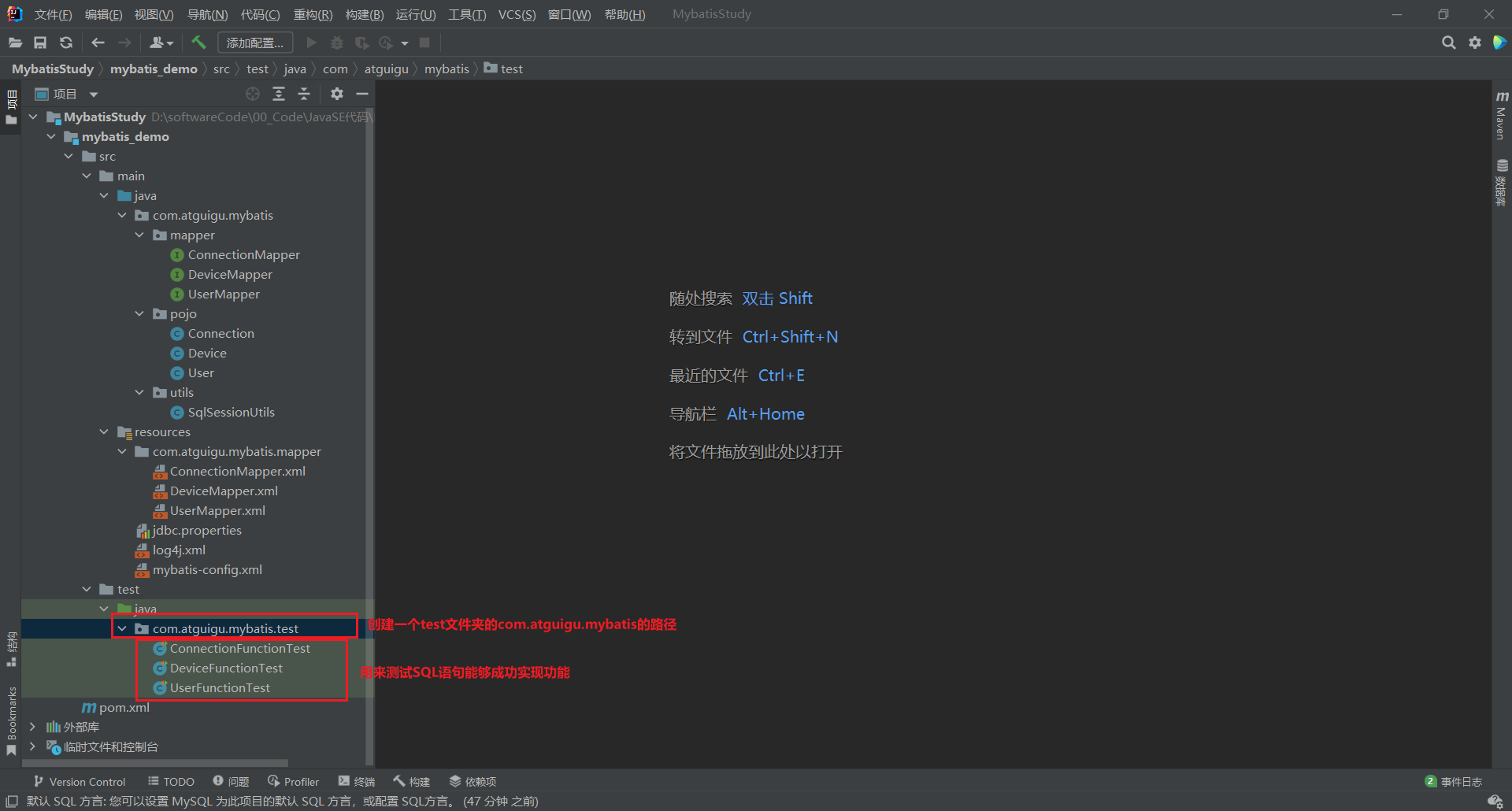
-
1.测试文件 UserFunctionTest.java 文件
package com.atguigu.mybatis.test; import com.atguigu.mybatis.mapper.UserMapper; import com.atguigu.mybatis.pojo.User; import com.atguigu.mybatis.utils.SqlSessionUtils; import org.apache.ibatis.session.SqlSession; import org.junit.Test; import java.util.List; public class UserFunctionTest { // 功能1: 根据用户名查询用户信息 @Test public void testgetUserByUsername(){ SqlSession sqlSession = SqlSessionUtils.getSqlSession(); UserMapper mapper = sqlSession.getMapper(UserMapper.class); User user = mapper.getUserByUsername("张三"); System.out.println(user); } // 功能2: 根据用户名修改用户密码 @Test public void testupdateUserByUsername(){ SqlSession sqlSession = SqlSessionUtils.getSqlSession(); UserMapper mapper = sqlSession.getMapper(UserMapper.class); int user = mapper.updateUserByUsername("张三","654321"); System.out.println(user); } // 功能3:根据用户名伪删除用户 @Test public void testfkdeleteUserByUsername(){ SqlSession sqlSession = SqlSessionUtils.getSqlSession(); UserMapper mapper = sqlSession.getMapper(UserMapper.class); int user = mapper.fkdeleteUserByUsername("张三"); System.out.println(user); } // 功能4: 查询所有的用户信息 @Test public void testGetAllUser(){ SqlSession sqlSession = SqlSessionUtils.getSqlSession(); UserMapper mapper = sqlSession.getMapper(UserMapper.class); List<User> list = mapper.getAllUser(); for(User user:list){ System.out.println(user); } } // 功能5: 添加用户信息 @Test public void testinsertUser(){ SqlSession sqlSession = SqlSessionUtils.getSqlSession(); UserMapper mapper = sqlSession.getMapper(UserMapper.class); User user = new User("欧阳","336677"); mapper.insertUser(user); System.out.println(user); } // 功能6:根据用户名找回伪删除用户 @Test public void testremoveFkdeleteUserByUsername(){ SqlSession sqlSession = SqlSessionUtils.getSqlSession(); UserMapper mapper = sqlSession.getMapper(UserMapper.class); int user = mapper.removeFkdeleteUserByUsername("张三"); System.out.println(user); } }- 1
- 2
- 3
- 4
- 5
- 6
- 7
- 8
- 9
- 10
- 11
- 12
- 13
- 14
- 15
- 16
- 17
- 18
- 19
- 20
- 21
- 22
- 23
- 24
- 25
- 26
- 27
- 28
- 29
- 30
- 31
- 32
- 33
- 34
- 35
- 36
- 37
- 38
- 39
- 40
- 41
- 42
- 43
- 44
- 45
- 46
- 47
- 48
- 49
- 50
- 51
- 52
- 53
- 54
- 55
- 56
- 57
- 58
- 59
- 60
- 61
- 62
- 63
- 64
- 65
- 66
- 67
- 68
- 69
- 70
-
2.测试文件 DeviceFunctionTest.java 文件
package com.atguigu.mybatis.test; import com.atguigu.mybatis.mapper.DeviceMapper; import com.atguigu.mybatis.pojo.Device; import com.atguigu.mybatis.utils.SqlSessionUtils; import org.apache.ibatis.session.SqlSession; import org.junit.Test; import java.util.List; public class DeviceFunctionTest { // 功能1: 根据设备号和所有者查询对应设备的所有信息 @Test public void testgetDeviceByDidAndDuser(){ SqlSession sqlSession = SqlSessionUtils.getSqlSession(); DeviceMapper mapper = sqlSession.getMapper(DeviceMapper.class); Device device = mapper.getDeviceByDidAndDuser(1,"张三"); System.out.println(device); } // 功能2: 根据设备所有者查询该用户的所有设备 @Test public void testgetAllDeviceByDuser(){ SqlSession sqlSession = SqlSessionUtils.getSqlSession(); DeviceMapper mapper = sqlSession.getMapper(DeviceMapper.class); List<Device> list = mapper.getAllDeviceByDuser("张三"); for(Device device:list){ System.out.println(device); } } // 功能3: 查询注册的全部设备,返回所有设备的信息 @Test public void testgetAllDevice(){ SqlSession sqlSession = SqlSessionUtils.getSqlSession(); DeviceMapper mapper = sqlSession.getMapper(DeviceMapper.class); List<Device> list = mapper.getAllDevice(); for(Device device:list){ System.out.println(device); } } // 功能4: 根据传入的设备所有者注册设备(其他所有数据可为空) @Test public void testinsertDevice(){ SqlSession sqlSession = SqlSessionUtils.getSqlSession(); DeviceMapper mapper = sqlSession.getMapper(DeviceMapper.class); Device device = new Device(null,"李四",null); mapper.insertDevice(device); System.out.println(device); } // 功能5: 根据设备号和设备所有者,将对应设备直接删除(非伪删除) @Test public void testdeleteDevice(){ SqlSession sqlSession = SqlSessionUtils.getSqlSession(); DeviceMapper mapper = sqlSession.getMapper(DeviceMapper.class); int device = mapper.deleteDevice(5,"李四"); System.out.println(device); } // 功能6: 根据所有者直接清空此用户下属的所有设备(非伪删除) @Test public void testdeleteAllDevice(){ SqlSession sqlSession = SqlSessionUtils.getSqlSession(); DeviceMapper mapper = sqlSession.getMapper(DeviceMapper.class); int device = mapper.deleteAllDevice("张三"); System.out.println(device); } // 功能7: 根据设备号和所有者修改设备信息 @Test public void testupdateDevice(){ SqlSession sqlSession = SqlSessionUtils.getSqlSession(); DeviceMapper mapper = sqlSession.getMapper(DeviceMapper.class); int device = mapper.updateDevice(1,"张三","device001","主机",0); System.out.println(device); } }- 1
- 2
- 3
- 4
- 5
- 6
- 7
- 8
- 9
- 10
- 11
- 12
- 13
- 14
- 15
- 16
- 17
- 18
- 19
- 20
- 21
- 22
- 23
- 24
- 25
- 26
- 27
- 28
- 29
- 30
- 31
- 32
- 33
- 34
- 35
- 36
- 37
- 38
- 39
- 40
- 41
- 42
- 43
- 44
- 45
- 46
- 47
- 48
- 49
- 50
- 51
- 52
- 53
- 54
- 55
- 56
- 57
- 58
- 59
- 60
- 61
- 62
- 63
- 64
- 65
- 66
- 67
- 68
- 69
- 70
- 71
- 72
- 73
- 74
- 75
- 76
- 77
- 78
- 79
- 80
- 81
-
3.测试文件 ConnectionFunctionTest 文件
package com.atguigu.mybatis.test; import com.atguigu.mybatis.mapper.ConnectionMapper; import com.atguigu.mybatis.pojo.Connection; import com.atguigu.mybatis.utils.SqlSessionUtils; import org.apache.ibatis.session.SqlSession; import org.junit.Test; import java.util.List; public class ConnectionFunctionTest { //功能1: 根据设备号显示这个设备号所有连接的信息 @Test public void testgetConnection(){ SqlSession sqlSession = SqlSessionUtils.getSqlSession(); ConnectionMapper mapper = sqlSession.getMapper(ConnectionMapper.class); Connection connection = mapper.getConnection(1); System.out.println(connection); } //功能2: 直接显示所有信息(包括设备表里的设备所有者字段) @Test public void testgetAllConnection(){ SqlSession sqlSession = SqlSessionUtils.getSqlSession(); ConnectionMapper mapper = sqlSession.getMapper(ConnectionMapper.class); List<Connection> list = mapper.getAllConnection(); System.out.println(list); } //功能3: 传入设备号增加一条信息(除设备号外的其他字段都可以为空) @Test public void testinsertConnection(){ SqlSession sqlSession = SqlSessionUtils.getSqlSession(); ConnectionMapper mapper = sqlSession.getMapper(ConnectionMapper.class); int connection = mapper.insertConnection(2); System.out.println(connection); } //功能4: 传入设备号和连接的设备删除单个连接信息(非伪删除) @Test public void testdeleteConnection(){ SqlSession sqlSession = SqlSessionUtils.getSqlSession(); ConnectionMapper mapper = sqlSession.getMapper(ConnectionMapper.class); int connection = mapper.deleteConnection(3,2); System.out.println(connection); } //功能5: 传入设备号删除这个设备号的所有连接信息 @Test public void testdeleteAllConnection(){ SqlSession sqlSession = SqlSessionUtils.getSqlSession(); ConnectionMapper mapper = sqlSession.getMapper(ConnectionMapper.class); int connection = mapper.deleteAllConnection(2); System.out.println(connection); } //功能6: 传入所有者删除该用户所属设备的所有连接信息 @Test public void testdeleteConnectionByDuser(){ SqlSession sqlSession = SqlSessionUtils.getSqlSession(); ConnectionMapper mapper = sqlSession.getMapper(ConnectionMapper.class); int connection = mapper.deleteConnectionByDuser("张三"); System.out.println(connection); } }- 1
- 2
- 3
- 4
- 5
- 6
- 7
- 8
- 9
- 10
- 11
- 12
- 13
- 14
- 15
- 16
- 17
- 18
- 19
- 20
- 21
- 22
- 23
- 24
- 25
- 26
- 27
- 28
- 29
- 30
- 31
- 32
- 33
- 34
- 35
- 36
- 37
- 38
- 39
- 40
- 41
- 42
- 43
- 44
- 45
- 46
- 47
- 48
- 49
- 50
- 51
- 52
- 53
- 54
- 55
- 56
- 57
- 58
- 59
- 60
- 61
- 62
- 63
- 64
- 65
- 66
-
-
相关阅读:
设计模式---代理模式
学习Android的第十七天
IDEA问题解决:pom跟external librarie依赖版本不一致
斐波那契数列
goweb入门
6年技术迭代,阿里全球化出海&合规的挑战和探索
Boost ASIO:Platform-specific I/O Objects
【JVM基础】程序计数器
使用 tensorboard 可视化 kears训练结果
【数据结构】栈的顺序表实现
- 原文地址:https://blog.csdn.net/m0_56126722/article/details/126330232


