-
直播课堂系统11--腾讯云点播管理模块(三)
点播管理模块-课程统计
需求
编写mapper
课程统计为VideoVisitor,首先创建其mapper
@Mapper public interface VideoVisitorMapper extends BaseMapper<VideoVisitor> { //显示统计数据 List<VideoVisitorCountVo> findCount(Long courseId, String StartDate, String EndDate); }- 1
- 2
- 3
- 4
- 5
- 6
再编写其xml文件,里面的代码转化为sql为
SELECT DATE(join_time) As joinTime, COUNT(*) As userCount FROM video_visitor WHERE DATE(join_time) >= ${startDate} AND DATE(join_time) <= ${EndDate} AND course_id=${courseId} GROUP BY DATE(join_time) ORDER BY DATE (join_time)- 1
- 2
- 3
- 4
- 5
- 6
- 7
- 8
- 9
- 10
- 11
- 12
- 13
需要注意传来的数据中,start或end有可能是空的,所以需要做一个提前判断是否为空。
DOCTYPE mapper PUBLIC "-//mybatis.org//DTD Mapper 3.0//EN" "http://mybatis.org/dtd/mybatis-3-mapper.dtd"> <mapper namespace="vod.mapper.VideoVisitorMapper"> <select id="findCount" resultType="vo.vod.VideoVisitorCountVo"> SELECT DATE(join_time) AS joinTime, COUNT(*) AS userCount FROM video_visitor <where> <if test="startDate != null and startDate != ''"> AND DATE(join_time) >= #{startDate} if> <if test="endDate != null and endDate != ''"> AND DATE(join_time) <= #{endDate} if> and course_id=#{courseId} where> GROUP BY DATE(join_time) ORDER BY DATE (join_time) select> mapper>- 1
- 2
- 3
- 4
- 5
- 6
- 7
- 8
- 9
- 10
- 11
- 12
- 13
- 14
- 15
- 16
- 17
- 18
- 19
- 20
- 21
- 22
编写Service
首先在Service里面声明接口方法
public interface VideoVisitorService extends IService<VideoVisitor> { //声明课程显示统计数据 List<VideoVisitorCountVo> findCount(Long courseId,String startTimr,String endTime); }- 1
- 2
- 3
- 4
- 5
在impl里实现,使用流处理
@Service public class VideoVisitorImpl extends ServiceImpl<VideoVisitorMapper, VideoVisitor> implements VideoVisitorService { //声明mapper @Autowired private VideoVisitorMapper videoVisitorMapper; @Override public Map<String, Object> findCount(Long courseId, String startTime, String endTime) { //首先调用mapper的方法 获得list List<VideoVisitorCountVo> videoVisitorCountVos = videoVisitorMapper.findCount(courseId,startTime,endTime); //创建map集合 因为需要返回x和y 所以用HashMap返回 HashMap<String, Object> map = new HashMap<>(); //首先是x坐标,代表所有日期 对上面的list进行流处理 map指的是对里面的对象调用()里面指定的方法 //原本输出的会是stream流 又collect则将流转换为list形式 List<Date> dateList = videoVisitorCountVos.stream().map(VideoVisitorCountVo::getJoinTime).collect(Collectors.toList()); //每个日期一共有多少人 List<Integer> usercount = videoVisitorCountVos.stream().map(VideoVisitorCountVo::getUserCount).collect(Collectors.toList()); //将上述两个list放到map里 map.put("xData",dateList); map.put("yData",usercount); return map; } }- 1
- 2
- 3
- 4
- 5
- 6
- 7
- 8
- 9
- 10
- 11
- 12
- 13
- 14
- 15
- 16
- 17
- 18
- 19
- 20
- 21
- 22
controller
@Api(value = "课程统计管理",tags = "课程统计管理") @RestController @RequestMapping(value = "/admin/vod/videoVisitor") @CrossOrigin public class VideoVisitorController { //注入service @Autowired private VideoVisitorService videoVisitorService; @ApiOperation("显示统计数据") @GetMapping("findCount/{courseId}/{startDate}/{endDate}") public Result showChart( @ApiParam("课程id") @PathVariable Long courseId, @ApiParam("开始时间") @PathVariable String startDate, @ApiParam("结束时间") @PathVariable String endDate){ Map<String, Object> map = videoVisitorService.findCount(courseId, startDate, endDate); return Result.ok(map); } }- 1
- 2
- 3
- 4
- 5
- 6
- 7
- 8
- 9
- 10
- 11
- 12
- 13
- 14
- 15
- 16
- 17
- 18
- 19
Echarts组建
ECharts是百度的一个项目,后来百度把Echart捐给apache,用于图表展示,提供了常规的折线图、柱状图、散点图、饼图、K线图,用于统计的盒形图,用于地理数据可视化的地图、热力图、线图,用于关系数据可视化的关系图、treemap、旭日图,多维数据可视化的平行坐标,还有用于 BI 的漏斗图,仪表盘,并且支持图与图之间的混搭。
此时安装echartnpm install --save echarts@4.1.0- 1
前端
首先在route/index.js里面添加数据统计
{ path: 'course/chart/:id', name: 'CourseChart', component: () => import('@/views/vod/course/chart'), meta: { title: '课程统计' }, hidden: true }- 1
- 2
- 3
- 4
- 5
- 6
- 7
创建videoVisitor.js,定义域后端进行交互的接口
import request from '@/utils/request' const api_name = '/admin/vod/videoVisitor' export default { findCount(courseId, startDate, endDate) { return request({ url: `${api_name}/findCount/${courseId}/${startDate}/${endDate}`, method: 'get' }) } }- 1
- 2
- 3
- 4
- 5
- 6
- 7
- 8
- 9
- 10
- 11
- 12
然后编写chart.vue

<template> <div class="app-container"> <!--表单--> <el-form :inline="true" class="demo-form-inline"> <el-form-item> <el-date-picker v-model="startDate" type="date" placeholder="选择开始日期" value-format="yyyy-MM-dd" /> </el-form-item> <el-form-item> <el-date-picker v-model="endDate" type="date" placeholder="选择截止日期" value-format="yyyy-MM-dd" /> </el-form-item> <el-button :disabled="btnDisabled" type="primary" icon="el-icon-search" @click="showChart()">查询</el-button> </el-form> <div id="chart" class="chart" style="height:500px;" /> </div> </template> <script> import echarts from 'echarts' import api from '@/api/vod/videoVisitor' export default { data() { return { courseId: '', startDate: '', endDate: '', btnDisabled: false } }, created() { this.courseId = this.$route.params.id // 初始化最近十天数据 let currentDate = new Date(); this.startDate = this.dateFormat(new Date(currentDate.getTime()-7*24*3600*1000)) this.endDate = this.dateFormat(currentDate) this.showChart() }, methods: { showChart() { api.findCount(this.courseId, this.startDate, this.endDate).then(response => { this.setChartData(response.data) }) }, setChartData(data) { // 基于准备好的dom,初始化echarts实例 var myChart = echarts.init(document.getElementById('chart')) // 指定图表的配置项和数据 var option = { title: { text: '观看课程人数统计' }, xAxis: { data: data.xData }, yAxis: { minInterval: 1 }, series: [{ type: 'line', data: data.yData }] } // 使用刚指定的配置项和数据显示图表。 myChart.setOption(option) }, dateFormat(date) { let fmt = 'YYYY-mm-dd' let ret; const opt = { "Y+": date.getFullYear().toString(), // 年 "m+": (date.getMonth() + 1).toString(), // 月 "d+": date.getDate().toString(), // 日 "H+": date.getHours().toString(), // 时 "M+": date.getMinutes().toString(), // 分 "S+": date.getSeconds().toString() // 秒 // 有其他格式化字符需求可以继续添加,必须转化成字符串 }; for (let k in opt) { ret = new RegExp("(" + k + ")").exec(fmt); if (ret) { fmt = fmt.replace(ret[1], (ret[1].length == 1) ? (opt[k]) : (opt[k].padStart(ret[1].length, "0"))) }; }; return fmt; } } } </script>- 1
- 2
- 3
- 4
- 5
- 6
- 7
- 8
- 9
- 10
- 11
- 12
- 13
- 14
- 15
- 16
- 17
- 18
- 19
- 20
- 21
- 22
- 23
- 24
- 25
- 26
- 27
- 28
- 29
- 30
- 31
- 32
- 33
- 34
- 35
- 36
- 37
- 38
- 39
- 40
- 41
- 42
- 43
- 44
- 45
- 46
- 47
- 48
- 49
- 50
- 51
- 52
- 53
- 54
- 55
- 56
- 57
- 58
- 59
- 60
- 61
- 62
- 63
- 64
- 65
- 66
- 67
- 68
- 69
- 70
- 71
- 72
- 73
- 74
- 75
- 76
- 77
- 78
- 79
- 80
- 81
- 82
- 83
- 84
- 85
- 86
- 87
- 88
- 89
- 90
- 91
- 92
- 93
- 94
- 95
- 96
- 97
- 98
- 99
展示效果时出了问题,首先是路由跳转不对,故将vod/course/list.vue里面改成
<router-link :to="'/course/info/'+scope.row.id"> <el-button type="text" icon="el-icon-edit" >修改</el-button> </router-link> <router-link :to="'/course/chapter/'+scope.row.id"> <el-button type="text" icon="el-icon-edit" >编辑大纲</el-button> </router-link> <router-link :to="'/course/chart/'+scope.row.id"> <el-button type="text" icon="el-icon-edit">课程统计</el-button> </router-link>- 1
- 2
- 3
- 4
- 5
- 6
- 7
- 8
- 9
在index.js里面的course/course改成只有一个course,纯粹是自己看不惯。
//课程管理 { path: '/course', component: Layout, redirect: '/course/list', name: '课程管理', meta: {title: '课程管理',icon: 'el-icon-bank-card'}, alwaysShow: true, children: [ { path: 'list', name: '课程管理', component: () => import('@/views/vod/course/list'), meta: { title: '课程列表' } }, { path: 'info', name: 'CourseInfo', component: () => import('@/views/vod/course/form'), meta: { title: '发布课程' }, hidden: true }, { path: 'info/:id', name: 'CourseInfoEdit', component: () => import('@/views/vod/course/form'), meta: { title: '编辑课程' }, hidden: true }, { path: 'chapter/:id', name: 'CourseChapterEdit', component: () => import('@/views/vod/course/form'), meta: { title: '编辑大纲' }, hidden: true }, { path: 'chart/:id', name: 'CourseChart', component: () => import('@/views/vod/course/chart'), meta: { title: '课程统计' }, hidden: true } ] },- 1
- 2
- 3
- 4
- 5
- 6
- 7
- 8
- 9
- 10
- 11
- 12
- 13
- 14
- 15
- 16
- 17
- 18
- 19
- 20
- 21
- 22
- 23
- 24
- 25
- 26
- 27
- 28
- 29
- 30
- 31
- 32
- 33
- 34
- 35
- 36
- 37
- 38
- 39
- 40
- 41
- 42
- 43
- 44
- 45
此时页面总算可以跳转,但是出现500问题

很明显前后端连接出问题了,继续排查。
原因是xml里面写的属性要和声明保持一致,故将xml改为<select id="findCount" resultType="vo.vod.VideoVisitorCountVo"> SELECT DATE(join_time) AS joinTime, COUNT(*) AS userCount FROM video_visitor <where> <if test="StartDate != null and StartDate != ''"> AND DATE(join_time) >= #{StartDate} if> <if test="EndDate != null and EndDate != ''"> AND DATE(join_time) <= #{EndDate} if> and course_id=#{courseId} where> GROUP BY DATE(join_time) ORDER BY DATE (join_time) select>- 1
- 2
- 3
- 4
- 5
- 6
- 7
- 8
- 9
- 10
- 11
- 12
- 13
- 14
- 15
- 16
- 17
- 18
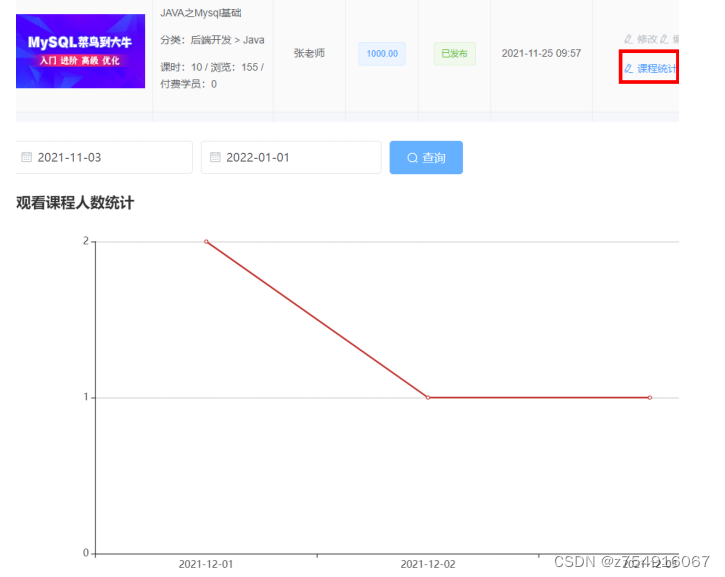
效果展示

整合腾讯云点播
需求:在发布课程时候,需要添加课时并且上传课程视频,这个时候需要使用到腾讯云点播服务进行上传视频管理

在删除小节的时候,还需要删除视频
在删除课程的时候,需要删除课程,章节,小节和视频
但是感觉对我没什么用,不需要了解这部分,直接过了。 -
相关阅读:
如果模块请求http改为了https,测试方案应该如何制定和修改?
【Vue】模板语法
神经网络预测指标是什么,神经网络怎么预测数据
C# BackgroundWorker用法详解(源码可直接使用)
【Java】数据类型转换入门
数据结构OJ题
实验六:Android的网络编程基础
深入理解Java线程
事务的原理、MVCC的原理
计算机体系结构的概念和学习目的
- 原文地址:https://blog.csdn.net/z754916067/article/details/126321870
