-
实验六:Android的网络编程基础
实验六:Android 的网络编程基础
6.1 实验目的
本次实验的目的是让大家熟悉 Android 开发中的如何获取天气预报,包括了
解和熟悉 WebView、WebService 使用、网络编程事件处理等内容。
6.2 实验要求
-
熟悉和掌握 WebView 使用
-
了解 Android 的网络编程
-
熟悉和掌握 WebService 使用
6.3 实验内容
【练习 6.1】基于 Webview 的获取天气预报
1. 项目结构
项目名:WebViewWeather
项目结构:
res/layout/activity_main.xml:主布局文件res/values/strings.xml:字符串资源文件src/com/example/webview/MainActivity.java:主Activity文件AndroidManifest.xml:Android清单文件
2. 主布局文件 (
activity_main.xml)<LinearLayout xmlns:android="http://schemas.android.com/apk/res/android" android:orientation="vertical" android:gravity="center_horizontal" android:layout_width="fill_parent" android:layout_height="fill_parent"> <LinearLayout android:orientation="horizontal" android:layout_width="wrap_content" android:layout_height="wrap_content"> <Button android:id="@+id/bj" android:layout_width="wrap_content" android:layout_height="wrap_content" android:text="@string/bj" android:textSize="30dp" /> <Button android:id="@+id/sh" android:layout_width="wrap_content" android:layout_height="wrap_content" android:text="@string/sh" android:textSize="30dp" /> <Button android:id="@+id/heb" android:layout_width="wrap_content" android:layout_height="wrap_content" android:text="@string/heb" android:textSize="30dp" /> LinearLayout> <LinearLayout android:orientation="horizontal" android:layout_width="wrap_content" android:layout_height="wrap_content"> <Button android:id="@+id/gz" android:layout_width="wrap_content" android:layout_height="wrap_content" android:text="@string/gz" android:textSize="30dp" /> <Button android:id="@+id/cc" android:layout_width="wrap_content" android:layout_height="wrap_content" android:text="@string/cc" android:textSize="30dp" /> <Button android:id="@+id/sy" android:layout_width="wrap_content" android:layout_height="wrap_content" android:text="@string/sy" android:textSize="30dp" android:layout_gravity="right" /> LinearLayout> <WebView android:id="@+id/webView1" android:layout_width="match_parent" android:layout_height="0dip" android:focusable="false" android:layout_weight="1"/> LinearLayout>- 1
- 2
- 3
- 4
- 5
- 6
- 7
- 8
- 9
- 10
- 11
- 12
- 13
- 14
- 15
- 16
- 17
- 18
- 19
- 20
- 21
- 22
- 23
- 24
- 25
- 26
- 27
- 28
- 29
- 30
- 31
- 32
- 33
- 34
- 35
- 36
- 37
- 38
- 39
- 40
- 41
- 42
- 43
- 44
- 45
- 46
- 47
- 48
- 49
- 50
- 51
- 52
- 53
- 54
- 55
- 56
- 57
- 58
- 59
- 60
- 61
- 62
- 63
- 64
- 65
- 66
- 67
- 68
- 69
- 70
- 71
3. 字符串资源文件 (
strings.xml)<resources> <string name="app_name">WebViewWeatherstring> <string name="go">GOstring> <string name="bj">北京string> <string name="sh">上海string> <string name="gz">广州string> <string name="heb">哈尔滨string> <string name="cc">长春string> <string name="sy">沈阳string> resources>- 1
- 2
- 3
- 4
- 5
- 6
- 7
- 8
- 9
- 10
4. 主Activity文件 (
MainActivity.java)package com.example.webviewweather; import android.app.Activity; import android.os.Bundle; import android.view.View; import android.view.View.OnClickListener; import android.webkit.WebChromeClient; import android.webkit.WebView; import android.webkit.WebViewClient; import android.widget.Button; public class MainActivity extends Activity implements OnClickListener { private WebView webView; @Override protected void onCreate(Bundle savedInstanceState) { super.onCreate(savedInstanceState); setContentView(R.layout.activity_main); webView = (WebView) findViewById(R.id.webView1); webView.getSettings().setJavaScriptEnabled(true); webView.setWebChromeClient(new WebChromeClient()); webView.setWebViewClient(new WebViewClient()); webView.loadUrl("http://m.weather.com.cn/mweather/"); webView.setInitialScale(57 4); Button bj = (Button) findViewById(R.id.bj); bj.setOnClickListener(this); Button sh = (Button) findViewById(R.id.sh); sh.setOnClickListener(this); Button heb = (Button) findViewById(R.id.heb); heb.setOnClickListener(this); Button cc = (Button) findViewById(R.id.cc); cc.setOnClickListener(this); Button sy = (Button) findViewById(R.id.sy); sy.setOnClickListener(this); Button gz = (Button) findViewById(R.id.gz); gz.setOnClickListener(this); } @Override public void onClick(View view) { switch (view.getId()) { case R.id.bj: openUrl("101010100"); break; case R.id.sh: openUrl("101020100"); break; case R.id.heb: openUrl("101050101"); break; case R.id.cc: openUrl("101060101"); break; case R.id.sy: openUrl("101070101"); break; case R.id.gz: openUrl("101280101"); break; } } private void openUrl(String id) { webView.loadUrl("http://m.weather.com.cn/mweather/" + id + ".shtml"); } }- 1
- 2
- 3
- 4
- 5
- 6
- 7
- 8
- 9
- 10
- 11
- 12
- 13
- 14
- 15
- 16
- 17
- 18
- 19
- 20
- 21
- 22
- 23
- 24
- 25
- 26
- 27
- 28
- 29
- 30
- 31
- 32
- 33
- 34
- 35
- 36
- 37
- 38
- 39
- 40
- 41
- 42
- 43
- 44
- 45
- 46
- 47
- 48
- 49
- 50
- 51
- 52
- 53
- 54
- 55
- 56
- 57
- 58
- 59
- 60
- 61
- 62
- 63
- 64
- 65
- 66
- 67
- 68
- 69
- 70
- 71
- 72
- 73
- 74
5. Android清单文件 (
AndroidManifest.xml)<manifest xmlns:android="http://schemas.android.com/apk/res/android" package="com.example.webview" > <uses-permission android:name="android.permission.INTERNET"/> <application android:allowBackup="true" android:icon="@mipmap/ic_launcher" android:label="@string/app_name" android:supportsRtl="true" android:theme="@style/AppTheme" > <activity android:name=".MainActivity" > <intent-filter> <action android:name="android.intent.action.MAIN" /> <category android:name="android.intent.category.LAUNCHER" /> intent-filter> activity> application> manifest>- 1
- 2
- 3
- 4
- 5
- 6
- 7
- 8
- 9
- 10
- 11
- 12
- 13
- 14
- 15
- 16
- 17
- 18
- 19
- 20
- 21
6.运行效果

【练习 6.2】基于 WebService 的手机归属地查询
1. 添加 ksoap2-android 库
-
在 ksoap2-android 的项目下载网站 下载
ksoap2-android-assembly-2.4-jar-with-dependencies.jar。- 如果难以下载,可以在随书光盘中找到该 JAR 包。
-
将下载的
ksoap2-androidJAR 包添加到工程的lib目录下。 -
右键点击 JAR 包,选择 “Add as library”,将 ksoap2-android 集成到 Android 项目中。
2. WebService 配置
-
点击 “getMobileCodeInfo” 进入说明页,获取以下关键信息:
- 作用域 TargetNameSpace =
http://WebXml.com.cn/ - 查询的方法名为 “getMobileCodeInfo”,需要带上 “mobileCode” 与 “userID” 两个参数。
- 返回的结果存在 “getMobileCodeInfoResult” 中。
- 作用域 TargetNameSpace =
-
在 http://ws.webxml.com.cn/WebServices/MobileCodeWS.asmx?wsdl 可以访问其 WSDL 说明。
3. 资源文件布局
- 创建
activity_web_client.xml文件,定义界面布局。
<LinearLayout xmlns:android="http://schemas.android.com/apk/res/android" xmlns:tools="http://schemas.android.com/tools" android:layout_width="match_parent" android:layout_height="match_parent" android:paddingBottom="@dimen/activity_vertical_margin" android:paddingLeft="@dimen/activity_horizontal_margin" android:paddingRight="@dimen/activity_horizontal_margin" android:paddingTop="@dimen/activity_vertical_margin" android:orientation="vertical" tools:context="com.example.webservicephonelocationlookup.WebClient"> <LinearLayout android:layout_width="match_parent" android:layout_height="wrap_content" android:orientation="horizontal"> <TextView android:layout_width="wrap_content" android:layout_height="wrap_content" android:text="输入手机号:" /> <EditText android:layout_width="150dp" android:layout_height="wrap_content" android:id="@+id/etphone" /> <Button android:layout_width="wrap_content" android:layout_height="wrap_content" android:text="搜索" android:id="@+id/btnsearch" /> LinearLayout> <TextView android:layout_width="wrap_content" android:layout_height="wrap_content" android:text="查询结果:" /> <TextView android:id="@+id/tvinfo" android:layout_width="wrap_content" android:layout_height="wrap_content"/> LinearLayout>- 1
- 2
- 3
- 4
- 5
- 6
- 7
- 8
- 9
- 10
- 11
- 12
- 13
- 14
- 15
- 16
- 17
- 18
- 19
- 20
- 21
- 22
- 23
- 24
- 25
- 26
- 27
- 28
- 29
- 30
- 31
- 32
- 33
- 34
- 35
- 36
- 37
- 38
- 39
- 40
- 41
- 42
- 43
- 44
4. Java 代码
- 创建
WebClient.java文件,实现 WebService 调用逻辑。
package com.example.webservicephonelocationlookup; import android.os.AsyncTask; import androidx.appcompat.app.AppCompatActivity; import android.os.Bundle; import android.view.View; import android.widget.Button; import android.widget.EditText; import android.widget.TextView; import org.ksoap2.SoapEnvelope; import org.ksoap2.SoapFault; import org.ksoap2.serialization.SoapObject; import org.ksoap2.serialization.SoapSerializationEnvelope; import org.ksoap2.transport.HttpTransportSE; import org.xmlpull.v1.XmlPullParserException; import java.io.IOException; public class WebClient extends AppCompatActivity { private static final String SERVER_URL = "http://ws.webxml.com.cn/WebServices/MobileCodeWS.asmx?wsdl"; private static final String NAMESPACE = "http://WebXml.com.cn/"; private static final String METHOD_NAME = "getMobileCodeInfo"; private EditText etPhone; private Button btnSearch; private TextView tvInfo; @Override protected void onCreate(Bundle savedInstanceState) { super.onCreate(savedInstanceState); setContentView(R.layout.activity_web_client); etPhone = (EditText) findViewById(R.id.etphone); btnSearch = (Button) findViewById(R.id.btnsearch); tvInfo = (TextView) findViewById(R.id.tvinfo); btnSearch.setOnClickListener(new View.OnClickListener() { @Override public void onClick(View v) { String phoneNumber = etPhone.getText().toString(); if (phoneNumber.length() > 0) { getPhoneLocation(phoneNumber); } } }); } private void getPhoneLocation(String phoneNumber) { new AsyncTask<String, Void, String>() { @Override protected String doInBackground(String... params) { String location = ""; final HttpTransportSE httpSe = new HttpTransportSE(SERVER_URL); httpSe.debug = true; SoapObject soapObject = new SoapObject(NAMESPACE, METHOD_NAME); soapObject.addProperty("mobileCode", params[0]); soapObject.addProperty("userID", ""); final SoapSerializationEnvelope envelope = new SoapSerializationEnvelope(SoapEnvelope.VER10); envelope.setOutputSoapObject(soapObject); envelope.dotNet = true; // 获取返回信息 try { httpSe.call(NAMESPACE + METHOD_NAME, envelope); if (envelope.getResponse() != null) { SoapObject result = (SoapObject) envelope.bodyIn; location = result.getProperty("getMobileCodeInfoResult").toString(); } } catch (XmlPullParserException | SoapFault | IOException e) { e.printStackTrace(); } return location; } @Override protected void onPostExecute(String result) { tvInfo.setText(result); } }.execute(phoneNumber); } }- 1
- 2
- 3
- 4
- 5
- 6
- 7
- 8
- 9
- 10
- 11
- 12
- 13
- 14
- 15
- 16
- 17
- 18
- 19
- 20
- 21
- 22
- 23
- 24
- 25
- 26
- 27
- 28
- 29
- 30
- 31
- 32
- 33
- 34
- 35
- 36
- 37
- 38
- 39
- 40
- 41
- 42
- 43
- 44
- 45
- 46
- 47
- 48
- 49
- 50
- 51
- 52
- 53
- 54
- 55
- 56
- 57
- 58
- 59
- 60
- 61
- 62
- 63
- 64
- 65
- 66
- 67
- 68
- 69
- 70
- 71
- 72
- 73
- 74
- 75
- 76
- 77
- 78
- 79
- 80
- 81
- 82
- 83
- 84
- 85
- 86
- 87
- 88
5. AndroidManifest.xml 配置
- 在
AndroidManifest.xml中添加 INTERNET 权限。
<uses-permission android:name="android.permission.INTERNET"/>- 1
- 配置应用程序的入口 Activity。
<activity android:name="com.example.webservice.WebClient"> <intent-filter> <action android:name ="android.intent.action.MAIN" /> <category android:name="android.intent.category.LAUNCHER" /> intent-filter> activity>- 1
- 2
- 3
- 4
- 5
- 6
- 7
- 8
6. 运行效果
- 在模拟器或真机上运行应用程序,输入手机号码,点击搜索按钮,查看查询结果。
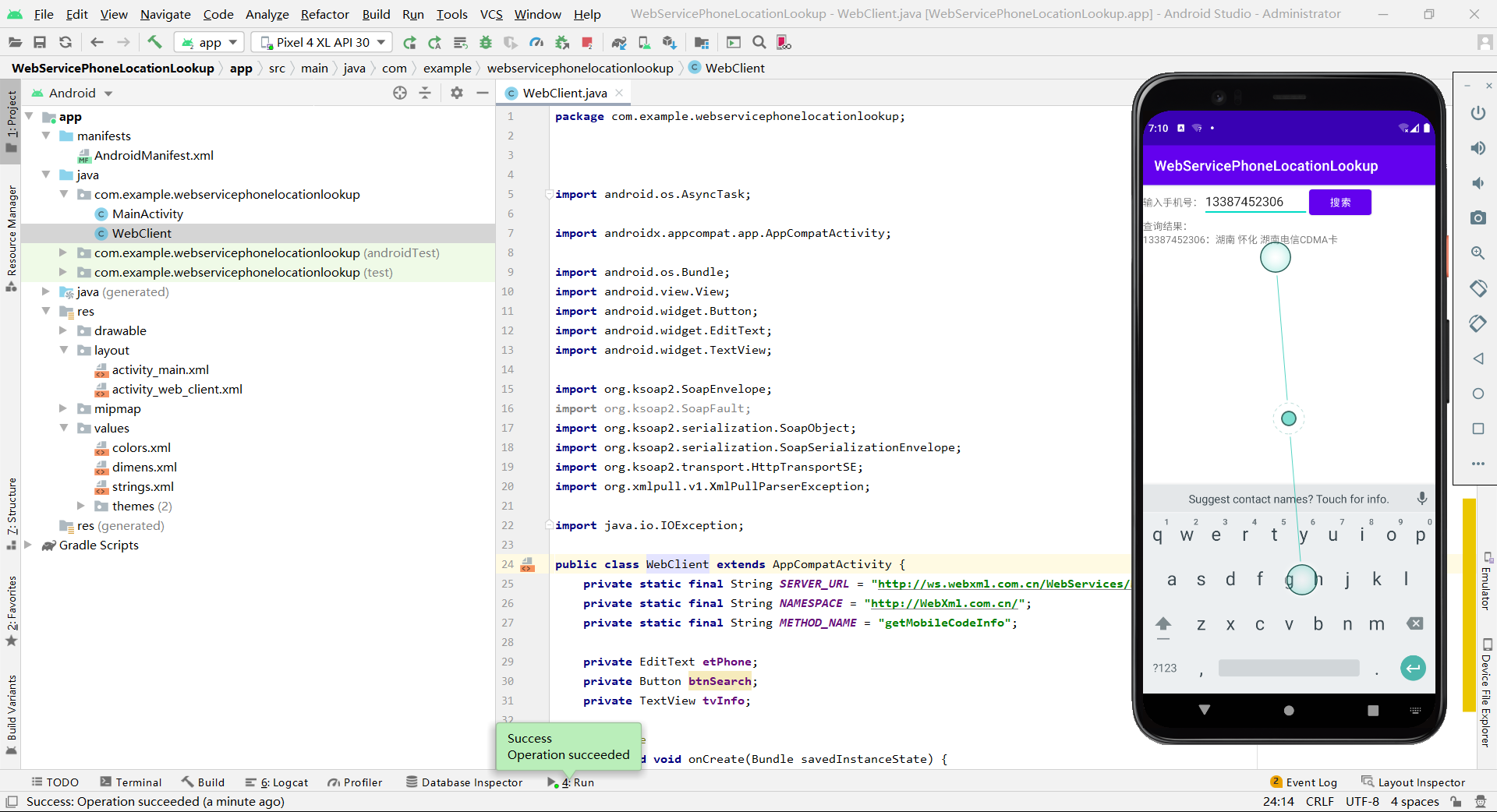
【拓展】编写 Android 程序,实现使用系统内置游览器打开指定网页。
步骤 1: 创建新项目
- 打开 Android Studio,选择 “Start a new Android Studio project”。
- 选择 “Empty Activity” 模板,点击 “Next”。
- 命名项目为 “WebBrowserDemo”,选择语言为 “Java”,点击 “Finish”。
步骤 2: 修改布局文件
- 打开
activity_main.xml文件,用以下代码替换其中的内容:
<LinearLayout xmlns:android="http://schemas.android.com/apk/res/android" android:layout_width="fill_parent" android:layout_height="fill_parent" android:gravity="center_horizontal" android:orientation="vertical"> <EditText android:id="@+id/ed" android:layout_width="match_parent" android:layout_height="200px"> EditText> <Button android:id="@+id/bu1" android:layout_width="286dp" android:layout_height="wrap_content" android:text="Go" /> <WebView android:id="@+id/webView1" android:layout_width="match_parent" android:layout_height="0dip" android:layout_weight="1" android:focusable="false" /> LinearLayout>- 1
- 2
- 3
- 4
- 5
- 6
- 7
- 8
- 9
- 10
- 11
- 12
- 13
- 14
- 15
- 16
- 17
- 18
- 19
- 20
- 21
- 22
- 23
- 24
- 25
- 26
- 27
步骤 3: 编写 Java 代码
- 打开
MainActivity.java文件,用以下代码替换其中的内容:
package com.example.webbrowserdemo; import android.app.Activity; import android.os.Bundle; import android.view.View; import android.view.View.OnClickListener; import android.webkit.WebChromeClient; import android.webkit.WebView; import android.webkit.WebViewClient; import android.widget.Button; import android.widget.EditText; import android.widget.Toast; public class MainActivity extends Activity{ private WebView webView; //声明 WebView 组件的对象 String url=""; @Override protected void onCreate(Bundle savedInstanceState) { super.onCreate(savedInstanceState); setContentView(R.layout.activity_main); webView=(WebView)findViewById(R.id.webView1); //获取WebView 组件 webView.getSettings().setJavaScriptEnabled(true); //设置 JavaScript可用 webView.setWebChromeClient(new WebChromeClient()); //处理JavaScript 对话框 webView.setWebViewClient(new WebViewClient()); //处理各种通知和请求事件,如果不使用该句代码,将使用内置浏览器访问网页 webView.setInitialScale(57*4); //放网页内容放大 4 倍 Button bu1=(Button)findViewById(R.id.bu1); EditText editText=findViewById(R.id.ed); bu1.setOnClickListener(new OnClickListener() { @Override public void onClick(View v) { url=editText.getText().toString(); openUrl(url); } }); } //打开网页的方法 private void openUrl(String id){ if (!url.equals("")){ webView.loadUrl("http://"+id+"/"); // }else { Toast.makeText(this,"网址不能为空",Toast.LENGTH_LONG).show(); } } }- 1
- 2
- 3
- 4
- 5
- 6
- 7
- 8
- 9
- 10
- 11
- 12
- 13
- 14
- 15
- 16
- 17
- 18
- 19
- 20
- 21
- 22
- 23
- 24
- 25
- 26
- 27
- 28
- 29
- 30
- 31
- 32
- 33
- 34
- 35
- 36
- 37
- 38
- 39
- 40
- 41
- 42
- 43
- 44
- 45
- 46
- 47
步骤 4: 运行应用
-
运行应用程序,点击 “打开网页” 按钮。
-
系统将使用内置浏览器打开指定网页。

【拓展】编写 Android 程序,实现从指定网站下载文件。
步骤 1: 创建新的 Android 项目
- 打开 Android Studio。
- 选择 “Start a new Android Studio project”。
- 选择 “Empty Activity” 模板,然后点击 “Finish”。
步骤 2: 修改布局文件
打开
res/layout/activity_main.xml文件,并使用以下 XML 代码替换默认的布局:<RelativeLayout xmlns:android="http://schemas.android.com/apk/res/android" xmlns:tools="http://schemas.android.com/tools" android:layout_width="match_parent" android:layout_height="match_parent" tools:context=".MainActivity"> <Button android:id="@+id/downloadButton" android:layout_width="wrap_content" android:layout_height="wrap_content" android:layout_centerInParent="true" android:text="下载文件" /> RelativeLayout>- 1
- 2
- 3
- 4
- 5
- 6
- 7
- 8
- 9
- 10
- 11
- 12
- 13
- 14
步骤 3: 在 MainActivity.java 中添加代码
打开
MainActivity.java文件,修改onCreate方法和添加新的方法:package com.example.filedownloader; import android.os.AsyncTask; import android.os.Bundle; import android.os.Environment; import android.view.View; import android.widget.Button; import android.widget.Toast; import androidx.appcompat.app.AppCompatActivity; import java.io.BufferedInputStream; import java.io.FileOutputStream; import java.io.IOException; import java.io.InputStream; import java.net.HttpURLConnection; import java.net.URL; public class MainActivity extends AppCompatActivity { private static final String DOWNLOAD_URL = "https://image.baidu.com/search/detail?ct=503316480&z=undefined&tn=baiduimagedetail&ipn=d&word=%E7%99%BE%E5%BA%A6%E5%9B%BE%E7%89%87&step_word=&lid=7733045057659531704&ie=utf-8&in=&cl=2&lm=-1&st=undefined&hd=undefined&latest=undefined©right=undefined&cs=505978886,3280506511&os=2821336839,1523677687&simid=3395585618,291075366&pn=0&rn=1&di=7264239678495129601&ln=1594&fr=&fmq=1700213057065_R&fm=&ic=undefined&s=undefined&se=&sme=&tab=0&width=undefined&height=undefined&face=undefined&is=0,0&istype=0&ist=&jit=&bdtype=0&spn=0&pi=0&gsm=1e&objurl=https%3A%2F%2Fp3.itc.cn%2Fq_70%2Fimages03%2F20211117%2F1270baf1c2f84fa19a99ef82c52d454c.png&rpstart=0&rpnum=0&adpicid=0&nojc=undefined&dyTabStr=MCwxLDIsMyw2LDQsNSw4LDcsOQ%3D%3D"; @Override protected void onCreate(Bundle savedInstanceState) { super.onCreate(savedInstanceState); setContentView(R.layout.activity_main); Button downloadButton = findViewById(R.id.downloadButton); downloadButton.setOnClickListener(new View.OnClickListener() { @Override public void onClick(View view) { new DownloadFileTask().execute(DOWNLOAD_URL); } }); } private class DownloadFileTask extends AsyncTask<String, Void, Boolean> { @Override protected Boolean doInBackground(String... urls) { String fileUrl = urls[0]; try { URL url = new URL(fileUrl); HttpURLConnection urlConnection = (HttpURLConnection) url.openConnection(); urlConnection.connect(); InputStream inputStream = urlConnection.getInputStream(); int totalSize = urlConnection.getContentLength(); int downloadedSize = 0; byte[] buffer = new byte[1024]; int bufferLength; String fileName = "示例图片.png"; // 文件保存的名称 FileOutputStream fileOutputStream = new FileOutputStream( Environment.getExternalStorageDirectory().getPath() + "/" + fileName); while ((bufferLength = inputStream.read(buffer)) > 0) { fileOutputStream.write(buffer, 0, bufferLength); downloadedSize += bufferLength; } fileOutputStream.close(); return true; } catch (IOException e) { e.printStackTrace(); return false; } } @Override protected void onPostExecute(Boolean result) { if (result) { Toast.makeText(MainActivity.this, "文件下载成功", Toast.LENGTH_SHORT).show(); } else { Toast.makeText(MainActivity.this, "文件下载失败", Toast.LENGTH_SHORT).show(); } } } }- 1
- 2
- 3
- 4
- 5
- 6
- 7
- 8
- 9
- 10
- 11
- 12
- 13
- 14
- 15
- 16
- 17
- 18
- 19
- 20
- 21
- 22
- 23
- 24
- 25
- 26
- 27
- 28
- 29
- 30
- 31
- 32
- 33
- 34
- 35
- 36
- 37
- 38
- 39
- 40
- 41
- 42
- 43
- 44
- 45
- 46
- 47
- 48
- 49
- 50
- 51
- 52
- 53
- 54
- 55
- 56
- 57
- 58
- 59
- 60
- 61
- 62
- 63
- 64
- 65
- 66
- 67
- 68
- 69
- 70
- 71
- 72
- 73
- 74
- 75
- 76
- 77
- 78
- 79
- 80
步骤 4: 添加 Internet 和存储权限
确保在
AndroidManifest.xml文件中添加了 Internet 和存储权限:<uses-permission android:name="android.permission.INTERNET" /> <uses-permission android:name="android.permission.WRITE_EXTERNAL_STORAGE" />- 1
- 2
步骤 5: 运行应用

-
-
相关阅读:
MATLAB算法实战应用案例精讲-【工具应用篇】matlab遗传算法工具箱使用方法
Vue----属性侦听器
SpringBoot的核心原理(扒笔记记录)
gitlab 16.x - ERR unknown command ‘HELLO‘
为什么服务器没必要当电脑用?
MySQL 如何避免 RC 隔离级别下的 INSERT 死锁?
如何从 Android 中恢复误删除的照片
C++ 五大链表排序(冒泡、插入、选择、归并、快排)
创建型-单例模式-实现和优缺点
淘宝客APP源码/社交电商自营商城源码/前端基于Uniapp开发
- 原文地址:https://blog.csdn.net/qq_45473330/article/details/134467711
