-
【aspose】 word/excel转pdf,实现在线预览文件功能
项目场景:
需求描述:上传附件后,可实现在线预览,这里就会存在一个问题,很多附件的类型是没法在线预览的,点击就会下载。除pdf/jpg/jpeg等,于是技术方案定,将word/excel等类型的文件转成pdf,并且使用nginx代理附件路径,实现预览效果。
技术实现
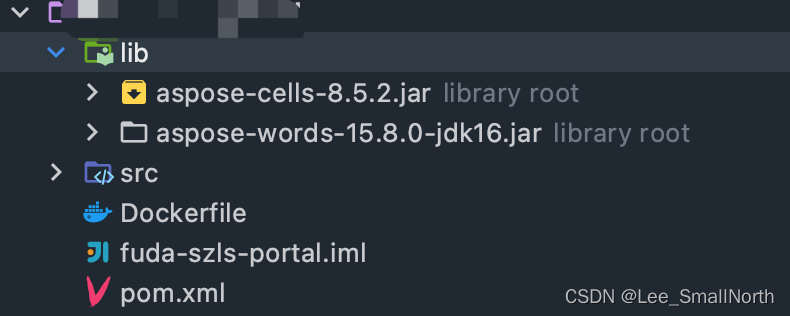
提示:要考虑到,一个附件肯定会被多人点击预览,从表结构设计的角度,要多加一个preview_path(预览文件地址)字段,第一次生成pdf后,将链接持久化到数据库,之后只有该值不为空,查询直接返回即可。aspose从maven仓库拉取不下来,需手动下载本地添加到项目中。
aspose-cells-8.5.2.jar
aspose-words-15.8.0-jdk16.jar链接:https://pan.baidu.com/s/1YBAfBJF2mzPDaJqxjQ6jkg 密码:srco- 1
pom.xml添加
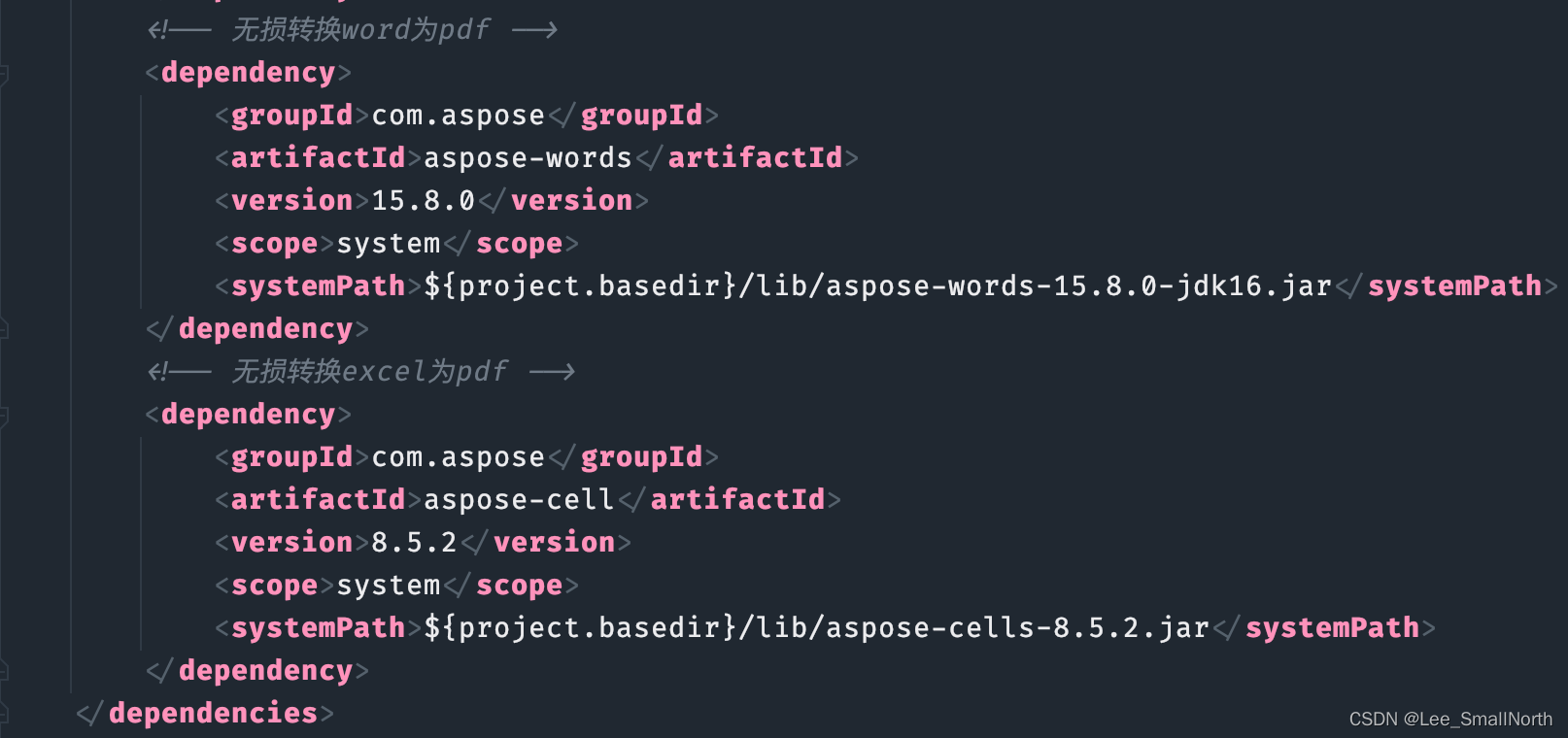
注意:maven打包的时候,要加上这句,不然打包有问题

ok,堆代码吧
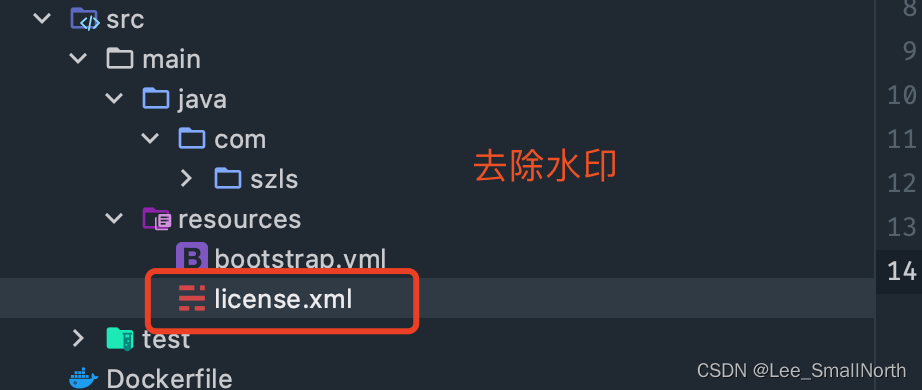
<License> <Data> <Products> <Product>Aspose.Total for JavaProduct> <Product>Aspose.Words for JavaProduct> Products> <EditionType>EnterpriseEditionType> <SubscriptionExpiry>20991231SubscriptionExpiry> <LicenseExpiry>20991231LicenseExpiry> <SerialNumber>8bfe198c-7f0c-4ef8-8ff0-acc3237bf0d7SerialNumber> Data> <Signature>sNLLKGMUdF0r8O1kKilWAGdgfs2BvJb/2Xp8p5iuDVfZXmhppo+d0Ran1P9TKdjV4ABwAgKXxJ3jcQTqE/2IRfqwnPf8itN8aFZlV3TJPYeD3yWE7IT55Gz6EijUpC7aKeoohTb4w2fpox58wWoF3SNp6sK6jDfiAUGEHYJ9pjU=Signature> License>- 1
- 2
- 3
- 4
- 5
- 6
- 7
- 8
- 9
- 10
- 11
- 12
- 13
- 14
枚举类,支持的附件类型,按自己需求增减
package com.szls.enums; import lombok.AllArgsConstructor; import lombok.Getter; /** * com.szls.enums * * @author smallNorth_Lee * @date 2022/8/11 */ @Getter @AllArgsConstructor public enum FileTypeEnum { PDF(".pdf"), XLSX(".xlsx"), DOCX(".docx"), DOC(".doc"); /** * 文件类型 */ private final String fileType; }- 1
- 2
- 3
- 4
- 5
- 6
- 7
- 8
- 9
- 10
- 11
- 12
- 13
- 14
- 15
- 16
- 17
- 18
- 19
- 20
- 21
- 22
- 23
- 24
- 25
package com.szls.utils; import com.aspose.words.*; import com.szls.enums.FileTypeEnum; import lombok.RequiredArgsConstructor; import lombok.SneakyThrows; import org.springframework.stereotype.Component; import java.io.File; import java.io.FileOutputStream; import java.io.IOException; import java.io.InputStream; /** * word转化成pdf,实现在线预览 * * @author smallNorth_Lee * @date 2022/8/10 */ @Component @RequiredArgsConstructor public class AsposeWordUtil { private final AsposeExcelUtil asposeExcelUtil; /** * 验证License 若不验证则转化出的pdf文档会有水印产生 */ @SneakyThrows private static void getLicense() { try (InputStream is = AsposeWordUtil.class.getClassLoader().getResourceAsStream("License.xml")) { License license = new License(); license.setLicense(is); } } /** * word转pdf * * @param filePath 原文件地址 * @param pdfFilePath pdf 文件地址 * @param fileType 文件类型 */ public void fileToPdf(String filePath, String pdfFilePath, String fileType) { if (FileTypeEnum.XLSX.getFileType().equals(fileType)) { asposeExcelUtil.excelToPdf(filePath, pdfFilePath); return; } getLicense(); File file = new File(pdfFilePath); if (!file.getParentFile().exists()) { file.getParentFile().mkdirs(); } FileOutputStream os = null; try { os = new FileOutputStream(file); Document doc = new Document(filePath); TableCollection tables = doc.getFirstSection().getBody().getTables(); for (Table table : tables) { RowCollection rows = table.getRows(); table.setAllowAutoFit(false); for (Row row : rows) { CellCollection cells = row.getCells(); for (Cell cell : cells) { CellFormat cellFormat = cell.getCellFormat(); cellFormat.setFitText(false); cellFormat.setWrapText(true); } } } if (FileTypeEnum.DOC.getFileType().equals(fileType) || FileTypeEnum.DOCX.getFileType().equals(fileType)) { doc.save(os, SaveFormat.PDF); } else { throw new RuntimeException("暂不支持该文件类型在线预览!"); } } catch (Exception e) { e.printStackTrace(); } finally { if (os != null) { try { os.close(); } catch (IOException e) { e.printStackTrace(); } } } } }- 1
- 2
- 3
- 4
- 5
- 6
- 7
- 8
- 9
- 10
- 11
- 12
- 13
- 14
- 15
- 16
- 17
- 18
- 19
- 20
- 21
- 22
- 23
- 24
- 25
- 26
- 27
- 28
- 29
- 30
- 31
- 32
- 33
- 34
- 35
- 36
- 37
- 38
- 39
- 40
- 41
- 42
- 43
- 44
- 45
- 46
- 47
- 48
- 49
- 50
- 51
- 52
- 53
- 54
- 55
- 56
- 57
- 58
- 59
- 60
- 61
- 62
- 63
- 64
- 65
- 66
- 67
- 68
- 69
- 70
- 71
- 72
- 73
- 74
- 75
- 76
- 77
- 78
- 79
- 80
- 81
- 82
- 83
- 84
- 85
- 86
- 87
- 88
- 89
package com.szls.utils; import com.aspose.cells.*; import lombok.SneakyThrows; import org.springframework.stereotype.Component; import java.io.File; import java.io.FileOutputStream; import java.io.IOException; import java.io.InputStream; /** * excel转化成pdf,实现在线预览 * * @author smallNorth_Lee * @date 2022/8/10 */ @Component public class AsposeExcelUtil { /** * 验证License 若不验证则转化出的pdf文档会有水印产生 */ @SneakyThrows private static void getLicense() { try (InputStream is = AsposeExcelUtil.class.getClassLoader().getResourceAsStream("License.xml")) { License license = new License(); license.setLicense(is); } } /** * excel转pdf * * @param filePath 原文件地址 * @param pdfFilePath pdf 文件地址 */ public void excelToPdf(String filePath, String pdfFilePath) { getLicense(); File file = new File(pdfFilePath); if (!file.getParentFile().exists()) { file.getParentFile().mkdirs(); } FileOutputStream os = null; try { Workbook workbook = new Workbook(filePath); WorksheetCollection worksheet = workbook.getWorksheets(); Worksheet sheet = worksheet.get(0); sheet.getPageSetup().setPrintGridlines(false); os = new FileOutputStream(file); workbook.save(os, SaveFormat.PDF); } catch (Exception e) { e.printStackTrace(); } finally { if (os != null) { try { os.close(); } catch (IOException e) { e.printStackTrace(); } } } } }- 1
- 2
- 3
- 4
- 5
- 6
- 7
- 8
- 9
- 10
- 11
- 12
- 13
- 14
- 15
- 16
- 17
- 18
- 19
- 20
- 21
- 22
- 23
- 24
- 25
- 26
- 27
- 28
- 29
- 30
- 31
- 32
- 33
- 34
- 35
- 36
- 37
- 38
- 39
- 40
- 41
- 42
- 43
- 44
- 45
- 46
- 47
- 48
- 49
- 50
- 51
- 52
- 53
- 54
- 55
- 56
- 57
- 58
- 59
- 60
- 61
- 62
- 63
- 64
- 65
注意⚠️:这里的每一个类,不要引错jar包,每个方法都是独立的类!!!!
存在问题及解决方案:
代码写完,开开心心部署到服务器,小手那么一点,文件转换没问题!!!,举国欢庆,关机跑路!!!!
突然前端同学:你这导出怎么乱码!!!!辣鸡
于是你开始沉默,堕落,自我拉扯…hold on bro,因为linux 缺少字体,windows直接去找c:\windows\fonts
把这些文件上传到服务器上,新建一个文件夹mkdir /usr/share/fonts/win sudo mkfontscale sudo mkfontdir sudo fc-cache -fv -v sudo chmod 755 /usr/share/fonts/win fc-list :lang=zh- 1
- 2
- 3
- 4
- 5
- 6
- 7
- 8
- 9
- 10
- 11
服务重启,重新执行方法,OK~~~~~~~
-
相关阅读:
Gitlab----Shell类型的gitlab-runer设置以root权限执行
Python每日一练(牛客新题库)——第23天:内置函数
【译】A unit of profiling makes the allocations go away
SpringCloud Stream详解
2019年1+X 证书 Web 前端开发中级理论考试题目原题+答案——第一套
家长的感统观念决定孩子的未来!
文件包含 [ZJCTF 2019]NiZhuanSiWei1
图像分割简述
Transformer ZOO
电力电子转战数字IC20220822day66——断言和序列
- 原文地址:https://blog.csdn.net/Lee_SmallNorth/article/details/126285882
