-
十、Spring Boot 安全管理(5)
本章概要
- Spring Boot 整合 Shiro
10.5.1 Shiro 简介
Apache Shiro 是一个开源的轻量级的 Java 安全框架,它提供身份验证、授权、密码管理以及会话管理等功能。相对于 Spring Security ,Shiro 框架更加直观、易用,同时也能提供健壮的安全性。
在传统的 SSM 框架中,手动整合 Shiro 的配置步骤还是比较多的,针对 Spring Boot ,Shiro 官方提供了 shiro-spring-boot-web-starter 用来简化 Shiro 在 Spring Boot 中的配置。10.5.2 整合 Shiro
1. 创建项目
首先创建一个普通的 Spring Boot Web 项目,添加 Shiro 依赖以及页面模板依赖
<dependency> <groupId>org.apache.shirogroupId> <artifactId>shiro-spring-boot-web-starterartifactId> <version>1.4.0version> dependency> <dependency> <groupId>org.springframework.bootgroupId> <artifactId>spring-boot-starter-thymeleafartifactId> dependency> <dependency> <groupId>com.github.theborakompanionigroupId> <artifactId>thymeleaf-extras-shiroartifactId> <version>2.0.0version> dependency>- 1
- 2
- 3
- 4
- 5
- 6
- 7
- 8
- 9
- 10
- 11
- 12
- 13
- 14
这里不需要添加 spring-boot-starter-web 依赖,shiro-spring-boot-web-starter 中已经依赖了 spring-boot-starter-web 。同时,此处使用 Thymeleaf 模板,为了在 Thymeleaf 使用 shiro 标签,加入了 thymeleaf-extras-shiro 依赖。
2. Shiro 基本配置
在 application.properties 中配置 Shiro 的基本信息
# 开启 Shiro 配置,默认为 true shiro.enabled=true # 开启 Shiro Web 配置,默认为 true shiro.web.enabled=true # 配置登录地址,默认为 /login.jsp shiro.loginUrl=/login # 配置登录成功的地址,默认为 / shiro.successUrl=/index # 未获授权默认跳转地址 shiro.unauthorizedUrl=/unauthorized # 是否允许通过 URL 参数实现会话跟踪,如果网站支持 Cookie,可以关闭此选项,默认为 true shiro.sessionManager.sessionIdUrlRewritingEnabled=true # 是否允许通过 Cookie 实现会话跟踪,默认为 true shiro.sessionManager.sessionIdCookieEnabled=true- 1
- 2
- 3
- 4
- 5
- 6
- 7
- 8
- 9
- 10
- 11
- 12
- 13
- 14
然后在 Java 代码中配置 Shiro ,提供两个最基本的 Bean 即可
@Configuration public class ShiroConfig { @Bean public Realm realm() { TextConfigurationRealm realm = new TextConfigurationRealm(); realm.setUserDefinitions("sang=123,user\n admin=123,admin"); realm.setRoleDefinitions("admin=read,write\n user=read"); return realm; } @Bean public ShiroFilterChainDefinition shiroFilterChainDefinition() { DefaultShiroFilterChainDefinition chainDefinition = new DefaultShiroFilterChainDefinition(); chainDefinition.addPathDefinition("/login", "anon"); chainDefinition.addPathDefinition("/doLogin", "anon"); chainDefinition.addPathDefinition("/logout", "logout"); chainDefinition.addPathDefinition("/**", "authc"); return chainDefinition; } @Bean public ShiroDialect shiroDialect() { return new ShiroDialect(); } }- 1
- 2
- 3
- 4
- 5
- 6
- 7
- 8
- 9
- 10
- 11
- 12
- 13
- 14
- 15
- 16
- 17
- 18
- 19
- 20
- 21
- 22
- 23
- 24
- 25
- 26
代码解释:
- 这里提供两个关键的 Bean ,一个是 Realm,另一个是 ShiroFilterChainDefinition 。至于 ShiroDialect 则是为了支持在 Thymeleaf 中使用 Shiro 标签,如果不在 Thymeleaf 中使用 Shiro 标签,那么可以不提供 ShiroDialect
- Realm 可以是自定义的 Realm,也可以是 Shiro 提供的 Realm,简单起见,此处没有配置数据库连接,直接配置了两个用户:sang/123 和 admin/123 ,分别对应角色 user 和 admin。
- ShiroFilterChainDefinition Bean 中配置了基本的过滤规则 ,“/login” 和 “/doLogin”,可以匿名访问,“/logout”是一个注销登录请求,其余请求则都需要认证后才能访问
然后配置登录接口以及页面访问接口
@Controller public class UserController { @PostMapping("/doLogin") public String doLogin(String username, String password, Model model) { UsernamePasswordToken token = new UsernamePasswordToken(username, password); Subject subject = SecurityUtils.getSubject(); try { subject.login(token); } catch (AuthenticationException e) { model.addAttribute("error", "用户名或密码输入错误!"); return "login"; } return "redirect:/index"; } @RequiresRoles("admin") @GetMapping("/admin") public String admin() { return "admin"; } @RequiresRoles(value = {"admin", "user"}, logical = Logical.OR) @GetMapping("/user") public String user() { return "user"; } }- 1
- 2
- 3
- 4
- 5
- 6
- 7
- 8
- 9
- 10
- 11
- 12
- 13
- 14
- 15
- 16
- 17
- 18
- 19
- 20
- 21
- 22
- 23
- 24
- 25
- 26
- 27
代码解释:
- 在 doLogin 方法中,首先构建一个 UsernamePasswordToken 实例,然后获取一个 Subject 对象并调用该对象中的 login 方法执行登录操作,在登录操作执行过程中,当有异常抛出时,说明登录失败,携带错误信息返回登录视图;当登录成功时,则重定向到“/index”
- 接下来暴露两个接口“/admin”和“/user”,对于“/admin”接口,需要具有 admin 角色才可以访问;对于“/user”接口,具备 admin 角色 和 user角色其中任意一个即可访问
对于其他不需要角色就能访问的接口,直接在 WebMvc 中配置即可
@Configuration public class WebMvcConfig implements WebMvcConfigurer{ @Override public void addViewControllers(ViewControllerRegistry registry) { registry.addViewController("/login").setViewName("login"); registry.addViewController("/index").setViewName("index"); registry.addViewController("/unauthorized").setViewName("unauthorized"); } }- 1
- 2
- 3
- 4
- 5
- 6
- 7
- 8
- 9
接下来创建全局异常处理器进行全局异常处理,此处主要是处理授权异常
@ControllerAdvice public class ExceptionController { @ExceptionHandler(AuthorizationException.class) public ModelAndView error(AuthorizationException e) { ModelAndView mv = new ModelAndView("unauthorized"); mv.addObject("error", e.getMessage()); return mv; } }- 1
- 2
- 3
- 4
- 5
- 6
- 7
- 8
- 9
当用户访问未授权的资源时,跳转到 unauthorized 视图中,并携带出错误信息。
配置完成后,最后在 resources/templates 目录下创建 5 个 HTML 页面进行测试。(1)index.html
DOCTYPE html> <html lang="en" xmlns:shiro="http://www.pollix.at/thymeleaf/shiro"> <head> <meta charset="UTF-8"> <title>Titletitle> head> <body> <h3>Hello, <shiro:principal/>h3> <h3><a href="/logout">注销登录a>h3> <h3><a shiro:hasRole="admin" href="/admin">管理员页面a>h3> <h3><a shiro:hasAnyRoles="admin,user" href="/user">普通用户页面a>h3> body> html>- 1
- 2
- 3
- 4
- 5
- 6
- 7
- 8
- 9
- 10
- 11
- 12
- 13
(2)login.html
DOCTYPE html> <html lang="en" xmlns:th="http://www.thymeleaf.org"> <head> <meta charset="UTF-8"> <title>Titletitle> head> <body> <div> <form action="/doLogin" method="post"> <input type="text" name="username"><br> <input type="password" name="password"><br> <div th:text="${error}">div> <input type="submit" value="登录"> form> div> body> html>- 1
- 2
- 3
- 4
- 5
- 6
- 7
- 8
- 9
- 10
- 11
- 12
- 13
- 14
- 15
- 16
- 17
(3)user.html
DOCTYPE html> <html lang="en"> <head> <meta charset="UTF-8"> <title>Titletitle> head> <body> <h1>普通用户页面h1> body> html>- 1
- 2
- 3
- 4
- 5
- 6
- 7
- 8
- 9
- 10
(4)admin.html
DOCTYPE html> <html lang="en"> <head> <meta charset="UTF-8"> <title>Titletitle> head> <body> <h1>管理员页面h1> body> html>- 1
- 2
- 3
- 4
- 5
- 6
- 7
- 8
- 9
- 10
(5)unauthorized.html
DOCTYPE html> <html lang="en" xmlns:th="http://www.thymeleaf.org"> <head> <meta charset="UTF-8"> <title>Titletitle> head> <body> <div> <h3>未获授权,非法访问h3> <h3 th:text="${error}">h3> div> body> html>- 1
- 2
- 3
- 4
- 5
- 6
- 7
- 8
- 9
- 10
- 11
- 12
- 13
3. 测试
启动项目,访问登录页面,使用 sang/123 登录

注意:由于 sang 用户不具备 admin 角色,因此登录成功后的页面没有前往管理员页面的超链接。
然后使用 admin/123 登录。
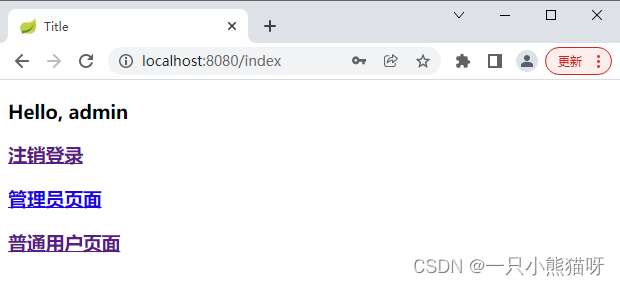
如果用户使用 sang 登录,然后去访问:http://localhost:8080/admin,会跳转到未授权页面
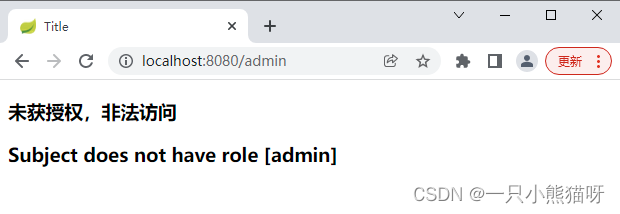
以上通过一个简单的案例展示了如何在 Spring Boot 中整合 Shiro 以及如何在 Thymeleaf 中使用 Shiro 标签,一旦整合成功,接下来 Shiro 的用法就和原来的一模一样。此处主要将 Spring Boot 整合 Shiro,对于 Shiro 的其它用法,可以参考 Shiro 官方文档。
-
相关阅读:
Java.lang.Class类 getInterfaces()方法有什么功能呢?
MySQL 安装报错的解决方法
工业物联网网关为边缘计算带来更多的价值
python系列教程216——何时用列表解析
【技术积累】Python中的Pandas库【二】
TypeScript学习日志-第二十六天(weakMap,weakSet,set,map)
C++ 结构体
STM32CubeMX:串口DMA
判断船进去倾倒区次数
Zebec&Solana基金会AMA圆满召开,Lily Liu盛赞Zebec
- 原文地址:https://blog.csdn.net/GXL_1012/article/details/126283966
