-
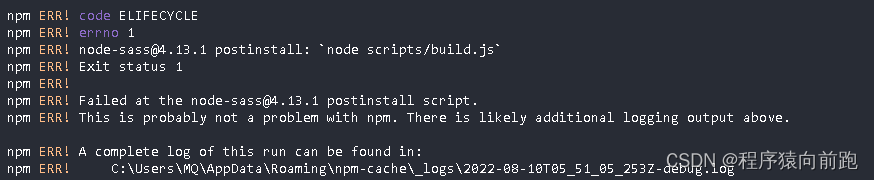
Failed at the node-sass@4.13.1 postinstall script.
gyp ERR! configure error
gyp ERR! stack Error: Command failed: D:\dev\envs\Python\Python37\python.EXE -c import sys; print “%s.%s.%s” % sys.version_info[:3];
gyp ERR! stack File “”, line 1
gyp ERR! stack import sys; print “%s.%s.%s” % sys.version_info[:3];
gyp ERR! stack ^
gyp ERR! stack SyntaxError: invalid syntax
gyp ERR! stack
gyp ERR! stack at ChildProcess.exithandler (child_process.js:390:12)
gyp ERR! stack at ChildProcess.emit (events.js:400:28)
gyp ERR! stack at maybeClose (internal/child_process.js:1055:16)
gyp ERR! stack at Process.ChildProcess._handle.onexit (internal/child_process.js:288:5)
gyp ERR! System Windows_NT 10.0.19044
gyp ERR! command “D:\dev\envs\nodejs\node.exe” “D:\BaiduNetdiskDownload\dnpicture\node_modules\node-gyp\bin\node-gyp.js” “rebuild” “–verbose” “–libsass_ext=” “–libsass_cflags=” “–libsass_ldflags=” “–libsass_library=”
gyp ERR! cwd D:\BaiduNetdiskDownload\dnpicture\node_modules\node-sass
gyp ERR! node -v v14.17.6
gyp ERR! node-gyp -v v3.8.0
Build failed with error code: 1
npm WARN optional SKIPPING OPTIONAL DEPENDENCY: fsevents@1.2.11 (node_modules\fsevents):
npm WARN notsup SKIPPING OPTIONAL DEPENDENCY: Unsupported platform for fsevents@1.2.11: wanted {“os”:“darwin”,“arch”:“any”} (current: {“os”:“win32”,“arch”:“x64”})npm ERR! code ELIFECYCLE
npm ERR! errno 1
npm ERR! node-sass@4.13.1 postinstall:node scripts/build.js
npm ERR! Exit status 1
npm ERR!
npm ERR! Failed at the node-sass@4.13.1 postinstall script.
npm ERR! This is probably not a problem with npm. There is likely additional logging output above.npm ERR! A complete log of this run can be found in:
npm ERR! C:\Users\MQ\AppData\Roaming\npm-cache_logs\2022-08-10T05_51_05_253Z-debug.log解决办法
1、先执行 npm uninstall node-sass 卸载之前可能遗留的node-sass。 2、再执行 npm i node-sass --sass_binary_site=https://npm.taobao.org/mirrors/node-sass/ 3、再执行npm install 安装成功- 1
- 2
- 3
-
相关阅读:
[JAVA]排序
Linux设置用户密码过期时间或永不过期
Routing路径系列数学建模(TSP+CVRP)
Mysql调优
WPFComBox的操作方式获取的方式
力扣 1422. 分割字符串的最大得分
ROS 第一节 运行小乌龟
Linux中常用的软件:Squid
学习Java语法糖这一篇就够了(详细版)
后端的前段基础
- 原文地址:https://blog.csdn.net/qq_46199553/article/details/126265140