-
01 SpringMVC 入门
目录
3.在web.xml中配置前端控制器DispatcherServlet
4.编写SpringMVC核心配置文件springmvc.xml,该配置文件和spring配置文件写法一样
6.使用tomcat插件启动项目,访问http:/localhost:8080/c1/hello1
一、SpringMVC简介
 MVC 模型MVC全称Model View Controller ,是一种设计创建 Web 应用程序的模式。这三个单词分别代表Web 应用程序的三个部分:Model (模型):指数据模型。用于存储数据以及处理用户请求的业务逻辑。在Web 应用中, JavaBean 对象,业务模型等都属于Model 。View (视图):用于展示模型中的数据的,一般为 jsp 或 html 文件。Controller (控制器):是应用程序中处理用户交互的部分。接受视图提出的请求,将数据交给模型处理,并将处理后的结果交 给视图显示。
 SpringMVCSpringMVC 是一个基于 MVC 模式的轻量级 Web 框架,是 Spring 框架的一个模块,和Spring 可以直接整合使用。 SpringMVC 代替了Servlet技术,它通过一套注解,让一个简单的 Java 类成为处理请求的控制器,而无须实 现任何接口。
二、SpringMVC入门案例

接下来我们编写一个SpringMVC的入门案例
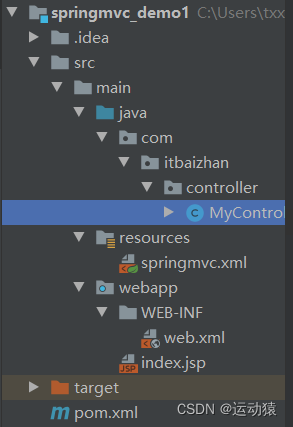
1.使用Maven创建一个web项目,补齐包结构。
2.引入相关依赖和tomcat插件
- <dependencies>
- <dependency>
- <groupId>org.springframeworkgroupId>
- <artifactId>spring-contextartifactId>
- <version>5.2.12.RELEASEversion>
- dependency>
- <dependency>
- <groupId>org.springframeworkgroupId>
- <artifactId>spring-webartifactId>
- <version>5.2.12.RELEASEversion>
- dependency>
- <dependency>
- <groupId>org.springframeworkgroupId>
- <artifactId>spring-webmvcartifactId>
- <version>5.2.12.RELEASEversion>
- dependency>
- <dependency>
- <groupId>javax.servletgroupId>
- <artifactId>servlet-apiartifactId>
- <version>2.5version>
- <scope>providedscope>
- dependency>
- <dependency>
- <groupId>javax.servlet.jspgroupId>
- <artifactId>jsp-apiartifactId>
- <version>2.0version>
- <scope>providedscope>
- dependency>
- <dependency>
- <groupId>com.fasterxml.jackson.coregroupId>
- <artifactId>jackson-coreartifactId>
- <version>2.9.0version>
- dependency>
- <dependency>
- <groupId>com.fasterxml.jackson.coregroupId>
- <artifactId>jackson-databindartifactId>
- <version>2.9.0version>
- dependency>
- <dependency>
- <groupId>com.fasterxml.jackson.coregroupId>
- <artifactId>jackson-annotationsartifactId>
- <version>2.9.0version>
- dependency>
- dependencies>
- <build>
- <plugins>
- <plugin>
- <groupId>org.apache.tomcat.mavengroupId>
- <artifactId>tomcat7-maven-pluginartifactId>
- <version>2.1version>
- <configuration>
- <port>8080port>
- <path>/path>
- <uriEncoding>UTF-8uriEncoding>
- <server>tomcat7server>
- <systemProperties>
- <java.util.logging.SimpleFormatter.format>%1$tH:%1$tM:%1$tS %2$s%n%4$s: %5$s%6$s%n java.util.logging.SimpleFormatter.format>
- systemProperties>
- configuration>
- plugin>
- plugins>
- build>
3.在web.xml中配置前端控制器DispatcherServlet
- <web-app>
- <display-name>Archetype Created Web Applicationdisplay-name>
- <servlet>
- <servlet-name>dispatcherServletservlet-name>
- <servlet-class>org.springframework.web.servlet.DispatcherServletservlet-class>
- <init-param>
- <param-name>contextConfigLocationparam-name>
- <param-value>classpath:springmvc.xmlparam-value>
- init-param>
- <load-on-startup>1load-on-startup>
- servlet>
- <servlet-mapping>
- <servlet-name>dispatcherServletservlet-name>
- <url-pattern>/url-pattern>
- servlet-mapping>
- web-app>
4.编写SpringMVC核心配置文件springmvc.xml,该配置文件和spring配置文件写法一样
- <beans xmlns="http://www.springframework.org/schema/beans"
- xmlns:mvc="http://www.springframework.org/schema/mvc"
- xmlns:context="http://www.springframework.org/schema/context"
- xmlns:xsi="http://www.w3.org/2001/XMLSchema-instance"
- xsi:schemaLocation=" http://www.springframework.org/schema/beans
- http://www.springframework.org/schema/beans/spring-beans.xsd
- http://www.springframework.org/schema/mvc
- http://www.springframework.org/schema/mvc/spring-mvc.xsd
- http://www.springframework.org/schema/context
- http://www.springframework.org/schema/context/spring-context.xsd">
- <context:component-scan base-package="com.itbaizhan">context:component-scan>
- <mvc:annotation-driven>mvc:annotation-driven>
- beans>
5.编写控制器
- @Controller
- public class MyController1 {
- // 该控制器的访问路径为/c1/hello1
- @RequestMapping("/c1/hello1")
- public void helloMVC(){
- System.out.println("hello,SpringMVC");
- }
- }
6.使用tomcat插件启动项目,访问http:/localhost:8080/c1/hello1
三、SpringMVC执行流程

1.SpringMVC的组件
DispatcherServlet:前端控制器,接受所有请求,调用其他组件,相当于转发器
HandlerMapping:处理器映射器,根据配置找到方法的执行链
HandlerAdapter:处理器适配器,根据方法类型找到对应的处理器
Handler:处理器,需要程序员开发
ViewResolver:视图解析器,找到指定试图
视图View:View是一个接口, 它的实现类支持不同的视图类型,如jsp,freemarker,pdf等等
2.SpringMVC的工作流程
(1)客户端将请求发送给前端控制器DispatcherServlet
(2)前端控制器收到请求后,将请求发送给处理器映射器HandlerMapping,处理器映射器根据路径找到方法的执行链Handler,返回给前端控制器DispatcherServlet
(3)前端控制器将方法的执行链Handler发送给处理器适配器HandlerAdapter,处理器适配器HandlerAdapter根据方法类型找到对应的处理器
(4)处理器执行方法,将结果返回给前端控制器
(5)前端控制器将结果发送给视图解析器ViewResolver,视图解析器找到视图文件位置并进行解析
(6)视图解析器ViewResolver解析完成后返回具体的视图View,然后前端控制器DispatcherServlet对View进行渲染视图
(7)最后前端控制器DispatcherServlet将结果显示到客户端
四、知识点整理
1.在MVC模型中,Controller指的是“应用程序中处理用户交互的部分”。
2.SpringMVC框架可以让一个简单JAVA类成为“控制器”、“视图”、“模型”。
3.使用SpringMVC必须要配置的是“前端控制器”
4.在SpringMVC中,通过“视图解析器”组件找到指定视图
5.在SpringMVC中,通过“前端控制器”组件接受所有请求,调用其他组件
-
相关阅读:
Netty 如何高效接收网络数据?一文聊透 ByteBuffer 动态自适应扩缩容机制
智慧物流之道:数据可视化引领全局监控
vue uniapp 实现点击获取坐标出现gif
vue多条件查询
OA项目(一)之用户管理[登录+分页查询]
对极几何与三角化求3D空间坐标
112. 路径总和
<<Java>> Thread 类的基本用法
在pandas中使用query替代loc进行高效简洁的条件筛选
django+django-haystack+Whoosh(后期切换引擎为Elasticsearch+ik)+Jieba+mysql
- 原文地址:https://blog.csdn.net/m0_51697147/article/details/126251219
