-
浏览器本地存储
概念
- 浏览器的本地存储是指浏览器端通过
window.sessionStorage和window.localStorage属性来进行浏览器的本地存储的。 - 一般能存5M左右的数据。
说白了就是 8 个API的使用
xxxStorage.setItem('key', 'value'):该方法接受一个键和值作为参数,会把键值对添加到存储中,如果键名存在,则更新其对应的值xxxStorage.getItem('key'):该方法接受一个键名作为参数,返回键名对应的值xxxStorage.removeItem('key'):该方法接受一个键名作为参数,并把该键名从存储中删除xxxStorage.clear():该方法会清空存储中的所有数据
其中
xxx=local或者session。
localStorage的使用
DOCTYPE html> <html lang="en"> <head> <meta charset="UTF-8"> <meta http-equiv="X-UA-Compatible" content="IE=edge"> <meta name="viewport" content="width=device-width, initial-scale=1.0"> <title>localStoragetitle> head> <body> <h2>localStorage的使用h2> <button onclick="saveDate()">点我保存数据button><br/> <button onclick="readDate()">点我读数据button><br/> <button onclick="deleteDate()">点我删除数据button><br/> <button onclick="deleteAllDate()">点我清空数据button><br/> <script> let person = {name:"划水艺术家", age:20} // 保存数据 function saveDate(){ localStorage.setItem('msg','localStorage') localStorage.setItem('person',JSON.stringify(person)) } // 读取数据 function readDate(){ console.log(localStorage.getItem('msg')) const person = localStorage.getItem('person') console.log(JSON.parse(person)) } // 删除数据 function deleteDate(){ localStorage.removeItem('msg') localStorage.removeItem('person') } // 清空数据 function deleteAllDate(){ localStorage.clear() } script> body> html>- 1
- 2
- 3
- 4
- 5
- 6
- 7
- 8
- 9
- 10
- 11
- 12
- 13
- 14
- 15
- 16
- 17
- 18
- 19
- 20
- 21
- 22
- 23
- 24
- 25
- 26
- 27
- 28
- 29
- 30
- 31
- 32
- 33
- 34
- 35
- 36
- 37
- 38
- 39
- 40
- 41
- 42
- 43
- 44
- 45
- 46
sessionStorage的使用
DOCTYPE html> <html lang="en"> <head> <meta charset="UTF-8"> <meta http-equiv="X-UA-Compatible" content="IE=edge"> <meta name="viewport" content="width=device-width, initial-scale=1.0"> <title>sessionStoragetitle> head> <body> <h2>sessionStorageh2> <button onclick="saveDate()">点我保存数据button><br/> <button onclick="readDate()">点我读数据button><br/> <button onclick="deleteDate()">点我删除数据button><br/> <button onclick="deleteAllDate()">点我清空数据button><br/> <script> let person = {name:"划水艺术家", age:20} // 保存数据 function saveDate(){ sessionStorage.setItem('msg','sessionStorage') sessionStorage.setItem('person',JSON.stringify(person)) } // 读取数据 function readDate(){ console.log(sessionStorage.getItem('msg')) const person = sessionStorage.getItem('person') console.log(JSON.parse(person)) } // 删除数据 function deleteDate(){ sessionStorage.removeItem('msg') sessionStorage.removeItem('person') } // 清空数据 function deleteAllDate(){ sessionStorage.clear() } script> body> html>- 1
- 2
- 3
- 4
- 5
- 6
- 7
- 8
- 9
- 10
- 11
- 12
- 13
- 14
- 15
- 16
- 17
- 18
- 19
- 20
- 21
- 22
- 23
- 24
- 25
- 26
- 27
- 28
- 29
- 30
- 31
- 32
- 33
- 34
- 35
- 36
- 37
- 38
- 39
- 40
- 41
- 42
- 43
- 44
浏览器的本地存储可以在开发者工具中看到
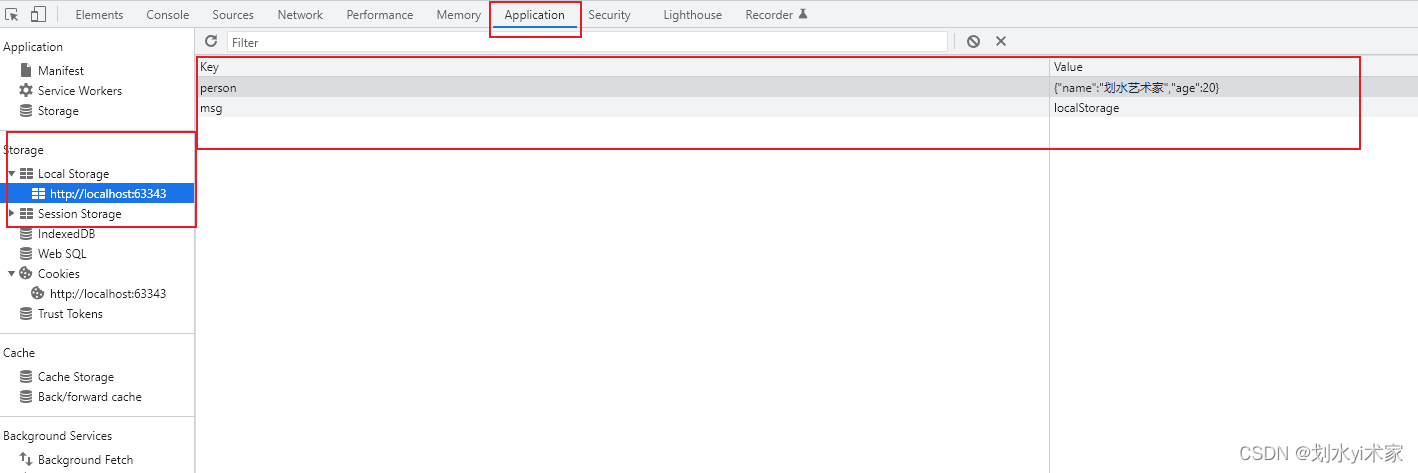
sessionStorage和localStorage的区别:- sessionStorage存储的内容会随着浏览器窗口关闭而消失
- localStorage存储的内容保存在磁盘,需要手动清除才会消失
- 浏览器的本地存储是指浏览器端通过
-
相关阅读:
net-java-php-python-宠物销售系统计算机毕业设计程序
.NET Emit 入门教程:第六部分:IL 指令:7:详解 ILGenerator 指令方法:分支条件指令
实人认证API的出现,让电子化身份验证更加可靠
以绝对优势立足:从CDN和云存储来聊聊云生态的崛起
Stream流详解
代码+视频基于R语言进行K折交叉验证
采用sFlow工具实现流量监控--实验
springboot校园师生出入登记系统java ssm
可能是入门高阶数学的好通道 —— 很直观易记,又很难判断的真假的数学命题们
flask bootstrap页面json格式化
- 原文地址:https://blog.csdn.net/qq_51938362/article/details/126247322
