-
C#【委托/事件篇】跨线程访问窗体控件的方法
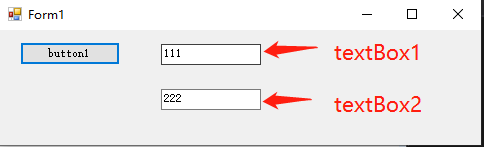
一、直接调用方法,方法中使用委托【textBox1.InvokeRequired】
using System; using System.Windows.Forms; using System.Threading; namespace WindowsFormsApp1 { public partial class Form1 : Form { public Form1() { InitializeComponent(); } public Thread th = null; private void button1_Click(object sender, EventArgs e) { th = new Thread(Start); th.IsBackground = true; th.Start(); } private void Start() { AddStr("111"); UpdateText4("222"); if (th != null) { th.Abort(); } } //方法一:TextBox1的委托 delegate void AddDg(string str); //声明一个委托 private void AddStr(string str) { if (textBox1.InvokeRequired) { AddDg dg = new AddDg(AddStr); textBox1.Invoke(dg, str); } else { textBox1.Text += str; } } //方法二:TextBox2的委托 private void UpdateText4(object str) { if (textBox2.InvokeRequired) { // 当一个控件的InvokeRequired属性值为真时,说明有一个创建它以外的线程想访问它 Action<string> actionDelegate = (x) => { this.textBox2.Text += x.ToString(); }; //Lambda表达式的应用 //ActionactionDelegate = delegate (string txt) { this.textBox3.Text += txt; }; // 或者 this.textBox2.Invoke(actionDelegate, str); } else { this.textBox2.Text += str.ToString(); } } } }- 1
- 2
- 3
- 4
- 5
- 6
- 7
- 8
- 9
- 10
- 11
- 12
- 13
- 14
- 15
- 16
- 17
- 18
- 19
- 20
- 21
- 22
- 23
- 24
- 25
- 26
- 27
- 28
- 29
- 30
- 31
- 32
- 33
- 34
- 35
- 36
- 37
- 38
- 39
- 40
- 41
- 42
- 43
- 44
- 45
- 46
- 47
- 48
- 49
- 50
- 51
- 52
- 53
- 54
- 55
- 56
- 57
- 58
- 59
- 60
- 61
- 62
- 63
- 64
- 65
二、调用委托,委托进一步关联方法
1.使用委托【最基础的调用方法:委托五步法】
委托五步法:创建委托、声明委托、创建委托方法、委托绑定、调用委托
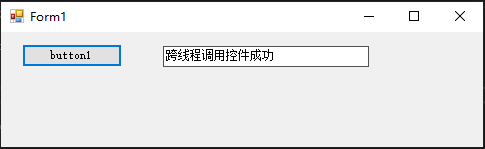
using System; using System.Windows.Forms; using System.Threading; namespace WindowsFormsApp1 { public partial class Form1 : Form { //【01】声明委托 public delegate void SetFormTextDelegate(); //【02】创建委托对象 private SetFormTextDelegate SetFormText; //【03】委托关联的方法 private void ExcuteMethod() { textBox1.Text = "跨线程调用控件成功"; } public Form1() { InitializeComponent(); //【04】委托绑定 this.SetFormText = ExcuteMethod; } public Thread th = null; private void button1_Click(object sender, EventArgs e) { th = new Thread(Start); th.IsBackground = true; th.Start(); } private void Start() { //错误调用委托【报错:System.InvalidOperationException:“线程间操作无效: 从不是创建控件“Form1”的线程访问它。”】 //因为想要在多线程里操作主线程的控件,你还得经过控件的同意【使用.Invoke()方法】 //SetFormText(); //【05】正确调用委托 this.Invoke(SetFormText); } } }- 1
- 2
- 3
- 4
- 5
- 6
- 7
- 8
- 9
- 10
- 11
- 12
- 13
- 14
- 15
- 16
- 17
- 18
- 19
- 20
- 21
- 22
- 23
- 24
- 25
- 26
- 27
- 28
- 29
- 30
- 31
- 32
- 33
- 34
- 35
- 36
- 37
- 38
- 39
- 40
- 41
- 42
- 43
- 44
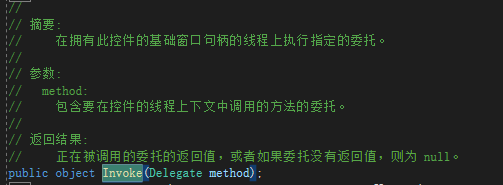
控件的父类Control提供了下边的方法:
2.使用Action作为委托来创建
微软从某个版本开始,出来了Action和Lamda表达式,Action是系统委托,也就是说,不需要我们手动创建委托了,它有个兄弟叫Func。
Action没有返回值,最多可以有16个参数。
Func必须要有返回值,最多可以有16个参数,最后一个参数表示返回值。1)第一步简化:用Action作为委托来创建
////// 多线程方法 /// private void Start() { //【01】创建委托、绑定委托 Action action = new Action(ExcuteMethod); //【02】调用委托 this.Invoke(action); } //委托关联的方法 private void ExcuteMethod() { textBox1.Text = "跨线程调用控件成功"; } - 1
- 2
- 3
- 4
- 5
- 6
- 7
- 8
- 9
- 10
- 11
- 12
- 13
- 14
- 15
- 16
2)第二步简化:委托对象只用一次,所以可以直接放到参数里
////// 多线程方法 /// private void Start() { //【01】创建委托、绑定委托、调用委托 this.Invoke(new Action(ExcuteMethod)); } //委托关联的方法 private void ExcuteMethod() { textBox1.Text = "跨线程调用控件成功"; } - 1
- 2
- 3
- 4
- 5
- 6
- 7
- 8
- 9
- 10
- 11
- 12
- 13
- 14
3)第三步简化:用Lamda表达式代替方法【推荐使用!!!】
////// 多线程方法 /// private void Start() { //【01】创建委托、绑定委托、调用委托 this.Invoke(new Action(()=> { textBox1.Text = "跨线程调用控件成功"; })); } - 1
- 2
- 3
- 4
- 5
- 6
- 7
- 8
- 9
- 10
- 11
-
相关阅读:
深入剖析Linux线程特定数据
细数实现全景图VR的几种方式(panorama/cubemap/eac)
常见的开源人脸检测模型有哪些
Rust机器学习之Plotters
▶《强化学习的数学原理》(2024春)_西湖大学赵世钰 Ch2 贝尔曼公式
RabbitMQ(十一)【高级 - 分布式事务】
threejs三维地图大屏项目分享
使用证书的方式登录linux 系统或者windows系统
Python实现WOA智能鲸鱼优化算法优化BP神经网络回归模型(BP神经网络回归算法)项目实战
网络——IPV4地址(二)
- 原文地址:https://blog.csdn.net/sinat_40003796/article/details/126246744
