-
【wpf】深度解析,Bingding是如何寻找数据源的 上篇
数据源存放位置
目前我用存放数据源的属性有:
- Resources
- ItemsSource
- DataContext
一般控件都有Resources和DataContext属性,列表控件会多一个ItemsSource。
Resources可以放多个资源,但是需要给每一个资源指定一个key。
- <Page.Resources>
- <local:TestMode2 x:Key="TM2"/>
- <local:TestMode x:Key="TM1"/>
- Page.Resources>
而 ItemsSource和DataContext只能放一个对象(不需要指定key)
- <Page.DataContext>
- <local:TestMode2/>
- Page.DataContext>
Bingding 表达式
Bingding 表达式 有一些常用的方法:
- Source
- RelativeSource
- Path
Path 相当于是一个过滤器,用来选择具体是哪一个属性。
Source 是指定资源的位置,Source 指定的资源是去Resources中找,寻找资源时直接指定key,就能一步到位。
<TextBlock Text="{Binding Source={StaticResource TM2 }, Path=TestDate }"/>但如果,我们在绑定表达式中,不写Source 指定资源时,绑定表达式就会自动到ItemsSource和DataContext 中去找。
<TextBlock Text="{Binding Path=Value}"/>而且,默认的寻找方式是一层层的往上找,如果在某一层找到ItemsSource或DataContext 被设置过,不管Path指定的属性是否存在,就会停止继续往上找。
那么是否改变这种默认的查找方式呢?答案是使用RelativeSource 。
你会发现 RelativeSource 和 Source 有着本质的区别, 它并不是指定源的位置,而是用于改变默认的寻找资料的方式。(因为此时 源的位置是不确定的,是需要按照一定的规则去寻找的)
- <TextBlock Text="{Binding Path=DataContext.DM1.Value,
- RelativeSource={RelativeSource Mode=FindAncestor, AncestorType=Page}}"/>
感悟
在使用数据绑定时,我们更喜欢,使用不指定Source 的方式,此时会自动去ItemsSource或DataContext 中寻找,这种方式更加的灵活。
RelativeSource
接下来,我将介绍 RelativeSource 是如何改变默认的寻找资源的方式。并显示实际的例子。
先看一下它的具体写法
- <TextBlock Background="Orange" Text="{Binding Path=DataContext.DM1.Value,
- RelativeSource={RelativeSource Mode=FindAncestor, AncestorType=Page}}"/>
最主要就是这个Mode,它定义了寻找源的几种规则:
- //
- // 摘要:
- // Describes the location of the binding source relative to the position of the
- // binding target.
- public enum RelativeSourceMode
- {
- //
- // 摘要:
- // Allows you to bind the previous data item (not that control that contains the
- // data item) in the list of data items being displayed.
- PreviousData = 0,
- //
- // 摘要:
- // Refers to the element to which the template (in which the data-bound element
- // exists) is applied. This is similar to setting a System.Windows.TemplateBindingExtension
- // and is only applicable if the System.Windows.Data.Binding is within a template.
- TemplatedParent = 1,
- //
- // 摘要:
- // Refers to the element on which you are setting the binding and allows you to
- // bind one property of that element to another property on the same element.
- Self = 2,
- //
- // 摘要:
- // Refers to the ancestor in the parent chain of the data-bound element. You can
- // use this to bind to an ancestor of a specific type or its subclasses. This is
- // the mode you use if you want to specify System.Windows.Data.RelativeSource.AncestorType
- // and/or System.Windows.Data.RelativeSource.AncestorLevel.
- FindAncestor = 3
- }
FindAncestor
表示找到最顶层,一般配合AncestorType使用,AncestorType指定一种类型,表示遇到这种类型就停止寻找。
Self
表示Bingding的属性就在自身寻找。
TemplatedParent
这个就是模板匹配中常用到的TemplatBinding
PreviousData
这个是表示绑定上一个子项,目前感觉只能在数据模板中才会生效。
以下是具体的代码部分:
- <Page x:Class="WpfTest.绑定源的寻找"
- xmlns="http://schemas.microsoft.com/winfx/2006/xaml/presentation"
- xmlns:x="http://schemas.microsoft.com/winfx/2006/xaml"
- xmlns:mc="http://schemas.openxmlformats.org/markup-compatibility/2006"
- xmlns:d="http://schemas.microsoft.com/expression/blend/2008"
- xmlns:local="clr-namespace:WpfTest"
- mc:Ignorable="d"
- d:DesignHeight="450" d:DesignWidth="800" Background="AliceBlue"
- Title="绑定源的寻找">
- <Page.Resources>
- <local:TestMode2 x:Key="TM2"/>
- <local:TestMode x:Key="TM1"/>
- Page.Resources>
- <Page.DataContext>
- <local:TestMode2/>
- Page.DataContext>
- <UniformGrid Rows="3">
- <ItemsControl ItemsSource="{Binding Path=ValueList}">
- <ItemsControl.ItemTemplate>
- <DataTemplate>
- <UniformGrid Columns="4" Rows="4">
- <TextBlock Text="{Binding Path=Value}"/>
- <TextBlock Background="Orange" Text="{Binding Path=DataContext.DM1.Value,
- RelativeSource={RelativeSource Mode=FindAncestor, AncestorType=Page}}"/>
- <TextBlock Background="Green" Text="{Binding Path=DataContext.TestDate,
- RelativeSource={RelativeSource Mode=FindAncestor, AncestorType=Page}}"/>
- <TextBlock Text="{Binding }"/>
- <TextBlock Text="{Binding Source={StaticResource TM2 }, Path=TestDate }"/>
- UniformGrid>
- DataTemplate>
- ItemsControl.ItemTemplate>
- ItemsControl>
- <StackPanel>
- <TextBlock Background="Orange" Text="{Binding Path=DataContext.DM1.Value,
- RelativeSource={RelativeSource Mode=FindAncestor, AncestorType=Page}}"/>
- <TextBlock Background="Green" Text="{Binding Path=ActualWidth,
- RelativeSource={RelativeSource Mode=Self}}"/>
- <ItemsControl ItemsSource="{Binding Path=ValueList}">
- <ItemsControl.ItemTemplate>
- <DataTemplate>
- <StackPanel Orientation="Horizontal">
- <TextBlock Text="{Binding Value}"/>
- <TextBlock Text="{Binding Path=Value,
- RelativeSource={RelativeSource Mode=PreviousData}}" Foreground="Red" Margin="10,0,0,0"/>
- StackPanel>
- DataTemplate>
- ItemsControl.ItemTemplate>
- ItemsControl>
- StackPanel>
- UniformGrid>
- Page>
- using System;
- using System.Collections.Generic;
- using System.ComponentModel;
- using System.Linq;
- using System.Text;
- using System.Threading.Tasks;
- using System.Windows;
- namespace WpfTest
- {
- public class TestMode2
- {
- public string TestDate { get; set; } = "test";
- public DataModel1 DM1 { get; set; } = new DataModel1();
- public DataModel2 DM2 { get; set; } = new DataModel2();
- public class DataModel1 : INotifyPropertyChanged
- {
- private int _value = 1;
- public int Value
- {
- get { return _value; }
- set
- {
- _value = value;
- PropertyChanged?.Invoke(this, new PropertyChangedEventArgs("Value"));
- }
- }
- public event PropertyChangedEventHandler PropertyChanged;
- }
- public class DataModel2 : INotifyPropertyChanged
- {
- private int _value = 2;
- public int Value
- {
- get { return _value; }
- set
- {
- _value = value;
- PropertyChanged?.Invoke(this, new PropertyChangedEventArgs("Value"));
- }
- }
- public event PropertyChangedEventHandler PropertyChanged;
- public int MyProperty { get; set; } = 3;
- }
- public List
ValueList { get; set; } = new List () - {
- new DataModel2{ Value=1},
- new DataModel2{ Value=2},
- new DataModel2{ Value=3},
- new DataModel2{ Value=4},
- };
- }
- }
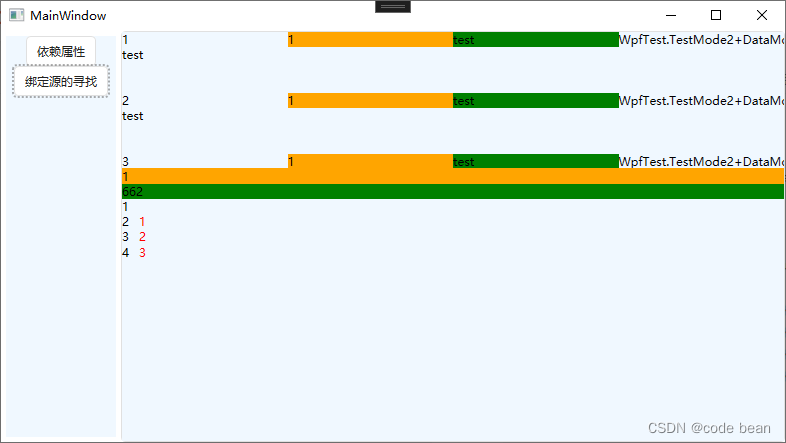
-
相关阅读:
MFC 中创建并显示二维码
C++:多态、多态的实现及优点、虚函数(纯虚函数)
Azure Blob MD5算法
mobx实战,几分钟入门
〔003〕虚幻 UE5 基础教程和蓝图入门
LeetCode Cookbook 树(2)
热烈祝贺埃文科技代码特工队斩获2023黄河鲲鹏开发者大赛河南赛区创新赛道二等奖
java计算机毕业设计Vue和mysql智能图书管理系统MyBatis+系统+LW文档+源码+调试部署
STM32智能物流机器人系统教程
踩坑ffmpeg录制的mp4无法在浏览器上播放
- 原文地址:https://blog.csdn.net/songhuangong123/article/details/126195727
