-
【OpenCV + Qt】 制作视频播放器
目录
1.2 点击暂停播放 视频停在某一帧画面 同时按钮文本改变为继续播放 以便用户继续播放视频 提高用户使用体验感
1.3 点击结束播放 就不再播放视频 同时结束播放按钮不可以再次点击
1.5 点击开始录制,从当前帧画面开始录制,并将录制视频保存在自己配置的文件夹目录下
1.7 进度条拖拽 视频画面也跟随进度条拖拽进度进行更新播放
一:视频播放器成果测试
1.1 点击开始播放按钮,能够播放视频
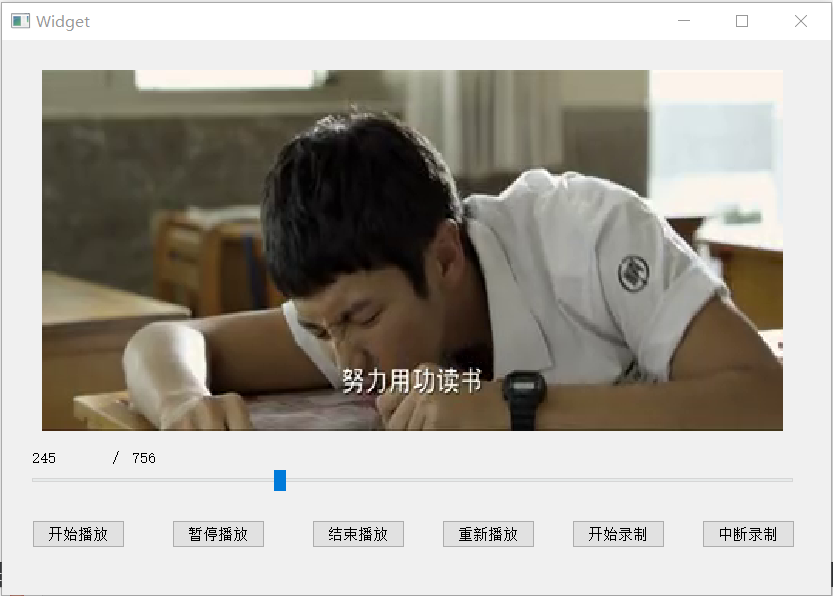
1.2 点击暂停播放 视频停在某一帧画面 同时按钮文本改变为继续播放 以便用户继续播放视频 提高用户使用体验感
点击暂停 停在某一帧画面

点击继续 继续播放视频

1.3 点击结束播放 就不再播放视频 同时结束播放按钮不可以再次点击

1.4 点击重新播放 可以播放新的一个视频

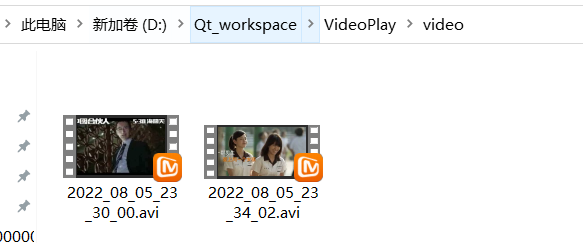
1.5 点击开始录制,从当前帧画面开始录制,并将录制视频保存在自己配置的文件夹目录下
点击录制,录制300ms

去自己配置文件夹下,可以查看到自己刚才录制下来的视频 并且双击打开能够正常播放

1.6 点击中断录制,可以随时停止录制视频
点击中断录制 只录制69ms

同样能够在自己配置的文件夹目录下 查看到 自己中断录制前所录制下来的视频
1.7 进度条拖拽 视频画面也跟随进度条拖拽进度进行更新播放

经过以上的测试,大致完成了本次的视频播放器的基本业务流程。
二:完整代码
UI界面可以Qt可视化绘制
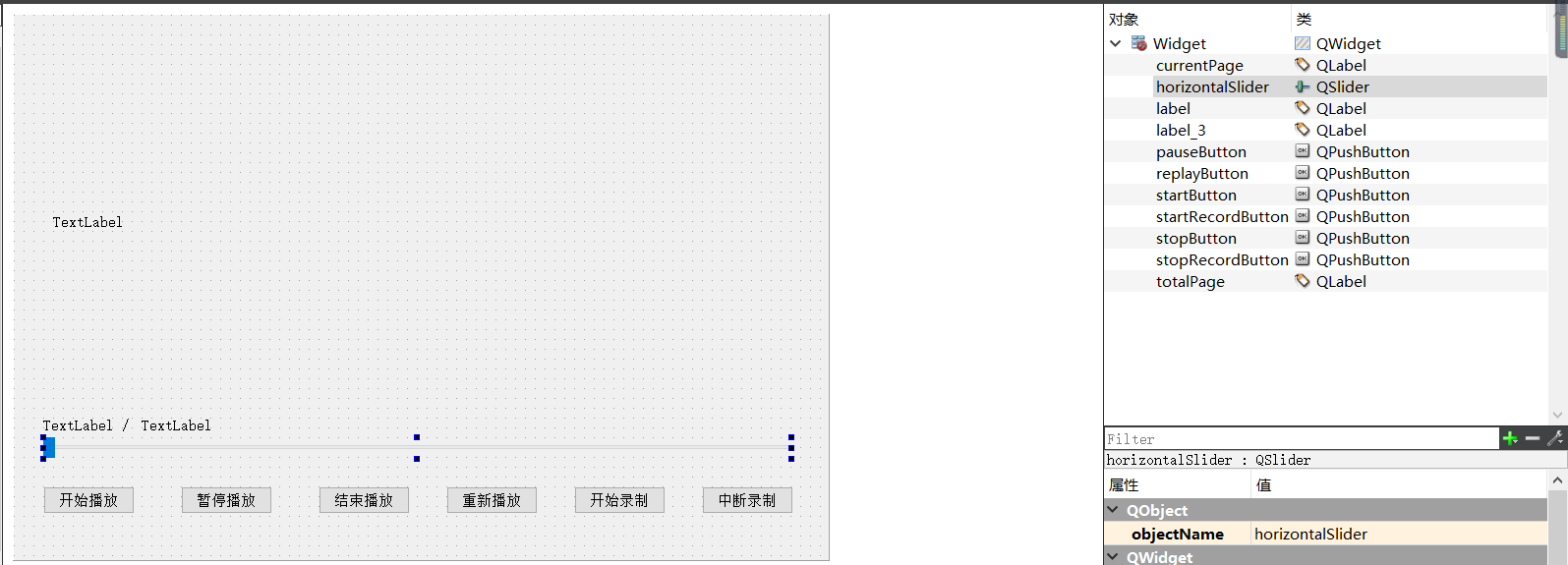
源码:

窗口类
- #ifndef WIDGET_H
- #define WIDGET_H
- #include
- #include
- #include
- #include
- #include"videothread.h"
- using namespace cv;
- using namespace std;
- namespace Ui {
- class Widget;
- }
- class Widget : public QWidget
- {
- Q_OBJECT
- public:
- explicit Widget(QWidget *parent = 0);
- ~Widget();
- void paintEvent(QPaintEvent *arg);
- void videoinit(char *path);
- private:
- Ui::Widget *ui;
- QImage img;
- VideoThread *thread;//线程对象
- public slots:
- void ChangeData(int current,Mat frame);
- private slots:
- void on_startButton_clicked();//开始播放
- void on_pauseButton_clicked();//结束
- void on_stopButton_clicked();//暂停
- void on_replayButton_clicked();//重新播放
- void on_startRecordButton_clicked();//开始录制
- void on_stopRecordButton_clicked();//中断录制
- void on_horizontalSlider_sliderPressed();//按下进度条
- void on_horizontalSlider_sliderReleased();//松开进度条
- };
- #endif // WIDGET_H
- #include "widget.h"
- #include "ui_widget.h"
- Widget::Widget(QWidget *parent) :
- QWidget(parent),
- ui(new Ui::Widget)
- {
- ui->setupUi(this);
- videoinit("D:/000000000000000ffmpeg/那些年,我们一起追的女孩.mp4");
- }
- Widget::~Widget()
- {
- delete ui;
- }
- void Widget::videoinit(char *path)
- {
- //线程播放视频
- this->thread = new VideoThread(path);
- //进度条的初始化
- ui->horizontalSlider->setMinimum(0);
- ui->horizontalSlider->setMaximum(this->thread->getTotalpage());
- //进度条拖动范围
- ui->horizontalSlider->setRange(0,this->thread->getTotalpage());
- //进度条步长
- ui->horizontalSlider->setSingleStep(1);
- ui->horizontalSlider->setValue(0);
- //label初始化
- ui->totalPage->setText(QString::number(this->thread->getTotalpage()));
- ui->currentPage->setText(QString::number(0));
- connect(this->thread,SIGNAL(send2UI(int,Mat)),this,SLOT(ChangeData(int,Mat)),Qt::BlockingQueuedConnection);
- }
- void Widget::paintEvent(QPaintEvent *arg)
- {
- //视频播放显示
- ui->label->setPixmap(QPixmap::fromImage(this->img));
- }
- void Widget::ChangeData(int current, Mat frame)
- {
- this->img = QImage(frame.data,frame.cols,frame.rows,QImage::Format_RGB888);
- this->img = this->img.scaled(ui->label->width(),ui->label->height());
- ui->currentPage->setText(QString::number(current));
- ui->horizontalSlider->setValue(current);
- this->update();
- }
- void Widget::on_startButton_clicked()
- {
- this->thread->start();
- this->thread->setIsRun(true);
- qDebug()<<"thread start";
- }
- void Widget::on_pauseButton_clicked()
- {
- //如果当前的线程没有在执行
- if(this->thread->getIsRun() == false)
- {
- //继续执行线程
- this->thread->resumeThread();
- ui->pauseButton->setText("暂停播放");
- }
- else
- {
- //点击暂停播放视频的按钮
- this->thread->pauseThread();
- //要设置可继续播放视频的按钮
- ui->pauseButton->setText("继续播放");
- }
- }
- //点击结束播放
- void Widget::on_stopButton_clicked()
- {
- this->thread->stopThread();
- if(this->thread->isRunning() == false && this->thread != NULL)
- {
- //解除信号槽的绑定
- disconnect(this->thread,SIGNAL(send2UI(int,Mat)),
- this,SLOT(ChangeData(int,Mat)));
- delete this->thread;
- this->thread = NULL;
- //设置不可以点击
- ui->stopButton->setEnabled(false);
- }
- }
- //重新播放
- void Widget::on_replayButton_clicked()
- {
- this->thread->stopThread();
- // QThread::sleep(1);
- if(this->thread->isRunning() == false)
- {
- //解除信号槽的绑定
- disconnect(this->thread,SIGNAL(send2UI(int,Mat)),
- this,SLOT(ChangeData(int,Mat)));
- delete this->thread;
- //播放新的一个视频
- videoinit("D:/000000000000000ffmpeg/中国合伙人.avi");
- this->thread->start();
- this->thread->setIsRun(true);
- }
- }
- //开始录制
- void Widget::on_startRecordButton_clicked()
- {
- this->thread->setIsRecord(true);
- }
- //中断录制
- void Widget::on_stopRecordButton_clicked()
- {
- this->thread->setIsRecord(false);
- }
- //进度条按下
- void Widget::on_horizontalSlider_sliderPressed()
- {
- //暂停当前线程
- this->thread->pauseThread();
- }
- //进度条释放
- void Widget::on_horizontalSlider_sliderReleased()
- {
- //改变当前帧进度
- this->thread->setCurrentpage(ui->horizontalSlider->value());
- //继续线程
- this->thread->resumeThread();
- }
视频线程类
- #ifndef VIDEOTHREAD_H
- #define VIDEOTHREAD_H
- #include
- #include
- #include
- #include
- #include
- using namespace cv;
- using namespace std;
- class VideoThread : public QThread
- {
- Q_OBJECT
- public:
- VideoThread(char *path);
- //总帧数
- int getTotalpage() const;
- void setTotalpage(int value);
- //当前帧进度
- int getCurrentpage() const;
- void setCurrentpage(int value);
- //录制
- bool getIsRecord() const;
- void setIsRecord(bool value);
- void run();//运行
- void pauseThread();//暂停
- void resumeThread();//继续
- void stopThread();//停止
- bool getIsRun() const;
- void setIsRun(bool value);
- private:
- VideoCapture cap;//视频对象
- VideoWriter writer;//写视频对象
- Mat frame;//当前每一帧的画面 一帧画面
- int totalpage;//视频总帧数
- int currentpage;//视频正在播放的当前帧数
- int pagenum;//录制的帧数
- int frame_width;//帧宽
- int frame_height;//帧高
- //暂停方法:1.锁对象QMutex 2.条件变量 3.标志位bool 是线程暂停
- bool isRun;//控线线程暂停
- bool isStop;//控制结束
- bool isRecord;//控制线程什么时候开始/结束录制
- signals:
- void send2UI(int current,Mat frame);
- };
- #endif // VIDEOTHREAD_H
- #include "videothread.h"
- VideoThread::VideoThread(char *path):QThread()
- {
- if(this->cap.open(path))
- {
- qDebug()<<"Video is open";
- //cap对象创建成功 路径成功 就可获取到视频总帧数
- this->totalpage = cap.get(CV_CAP_PROP_FRAME_COUNT);
- qDebug()<<"Video totalpage ="<<this->totalpage;
- //帧宽 帧高 的获取
- this->frame_width = cap.get(CV_CAP_PROP_FRAME_WIDTH);
- this->frame_height = cap.get(CV_CAP_PROP_FRAME_HEIGHT);
- }
- //当前帧
- this->currentpage = 0;
- //录制视频帧
- this->pagenum = 0;
- //运行
- this->isRun = false;
- //结束
- this->isStop = false;
- //录制
- this->isRecord = false;
- }
- int VideoThread::getTotalpage() const
- {
- return totalpage;
- }
- void VideoThread::setTotalpage(int value)
- {
- totalpage = value;
- }
- int VideoThread::getCurrentpage() const
- {
- return currentpage;
- }
- void VideoThread::setCurrentpage(int value)
- {
- currentpage = value;
- //拖动进度条 改变画面
- this->cap.set(CV_CAP_PROP_POS_FRAMES,this->currentpage);
- }
- bool VideoThread::getIsRecord() const
- {
- return isRecord;
- }
- void VideoThread::setIsRecord(bool value)
- {
- isRecord = value;
- //开始录制
- if(this->isRecord == true)
- {
- QDateTime current_date_time = QDateTime::currentDateTime();
- QString filename = "./video/";
- filename += current_date_time.toString("yyyy_MM_dd_hh_mm_ss");
- filename += ".avi";
- qDebug()<<"filename = "<this->writer.open(filename.toStdString(),//视频文件名VideoWriter::fourcc('M','J','P','G'),//编码类型25,//帧率Size(this->frame_width,this->frame_height),//尺寸大小true);//彩色格式为true 灰度为false}}void VideoThread::run(){//控制线程停止while (this->isStop == false){//控线线程的暂停和继续if(this->isRun == true){//如果读到一帧if(cap.read(frame)){//当前帧数递增this->currentpage++;cvtColor(frame,frame,CV_BGR2RGB);emit send2UI(this->currentpage,frame);//开始录制if(this->isRecord == true){cvtColor(frame,frame,CV_BGR2RGB);//录制300msif(this->pagenum<300){this->writer.write(frame);this->pagenum++;qDebug()<<"Record pagenum = "<}else{//录制保存this->writer.release();//释放置零this->pagenum = 0;this->isRecord = false;}}else{//录制保存this->writer.release();this->pagenum = 0;}}//播放设置1ms 25帧msleep(40);}}cap.release();qDebug()<<"thread move away";}//暂停视频播放void VideoThread::pauseThread(){qDebug()<<"pauseThread ";//如果当前线程正在执行if(QThread::isRunning()&&this->isRun == true){this->isRun = false;}}//继续播放void VideoThread::resumeThread(){qDebug()<<"resumeThread ";//如果当前线程正在执行if(QThread::isRunning()&&this->isRun == false){this->isRun = true;}}//结束播放void VideoThread::stopThread(){qDebug()<<"stopThread";//如果当前线程正在执行if(QThread::isRunning()&&this->isStop == false){this->isStop = true;QThread::quit();QThread::wait();QThread::exit();// QThread::terminate();}}bool VideoThread::getIsRun() const{return isRun;}void VideoThread::setIsRun(bool value){isRun = value;}
主入口测试
- #include "widget.h"
- #include
- int main(int argc, char *argv[])
- {
- QApplication a(argc, argv);
- Widget w;
- w.show();
- return a.exec();
- }
以上就是本次视频播放器的全部制作流程啦!欢迎一起学习!

-
相关阅读:
Python Random模块详解
lsblk 硬盘属性查看
【Jmeter+Influxdb+Grafana性能监控平台安装与部署】
24. [Python GUI] PyQt5中拖放的基本原理
JZ6 从尾到头打印链表
【vscode下载安装】只需简单一步——使用镜像解决vscode下载慢、失败的问题
【giszz笔记】产品设计标准流程【8】
博客项目(前台功能实现)
【11】使用透视投影建立一个3D空间的测试
Python编程从入门到实践 第九章:类 练习答案记录
- 原文地址:https://blog.csdn.net/m0_56051805/article/details/126187379
