-
springMVC的学习【上】
前言
作为一个计算机专业的人,学习,记笔记,领悟是一个必经的过程!
没有鲜花、掌声,但是我还是要写下自己学习的东西
同样的知识,不一样精彩……0.0学习制胜终极秘诀
- 坚持+方法
- 在这里,介绍一下常用的调试方法:小黄鸭调试方
- 小黄鸭调试法(Rubber Duck Debuging),又称橡皮鸭调试法,它是软件工程中最常使用调试方法之一。


- 此概念据说来自《程序员修炼之道》书中的一个故事,传说程序大师随身携带一只小黄鸭,在调试代码的时候会在桌上放上这只小黄鸭,然后详细地向鸭子解释每行代码,然后很快就将问题定位修复了。
其实就是自己正向走一遍代码,来排除错误
一 复习一下MVC
1.1 MVC的主要内容理解
-
MVC是==模型(Model)、视图(View)、控制器(Controller)==的简写,是一种软件设计规范。
-
是将业务逻辑、数据、显示分离的方法来组织代码。
-
MVC主要作用是降低了视图与业务逻辑间的双向偶合。
-
MVC不是一种设计模式,MVC是一种架构模式。当然不同的MVC存在差异。
-
Model(模型):数据模型,提供要展示的数据,因此包含数据和行为,可以认为是JavaBean组件(包含数据和行为),不过现在一般都分离开来:Value Object(数据Dao) 和 服务层(行为Service)。也就是模型提供了模型数据查询和模型数据的状态更新等功能,包括数据和业务。
-
View(视图):负责进行模型的展示,一般就是我们见到的用户界面。
-
Controller(控制器):接收用户请求,委托给模型进行处理,处理完毕后把返回的模型数据返回给视图,由视图负责展示。
-
最典型的MVC就是JSP + servlet + javabean的模式

1.2 Model1和Model2
- Model1中,主要分为两层,视图层和模型层。

优点:架构简单,比较适合小型项目开发;
缺点:JSP职责不单一,职责过重,不便于维护; - Model2把一个项目分成三部分,包括视图、控制、模型。

1.3 总结
- Model2不仅提高的代码的复用率与项目的扩展性,且大大降低了项目的维护成本。
- Model 1模式的实现比较简单,适用于快速开发小规模项目,Model1中JSP页面身兼View和Controller两种角色,将控制逻辑和表现逻辑混杂在一起,从而导致代码的重用性非常低,增加了应用的扩展性和维护的难度。
- Model2消除了Model1的缺点。
1.4 职责分析:
- Controller:控制器
- 取得表单数据
- 调用业务逻辑
- 转向指定的页面
- Model:模型
- 业务逻辑
- 保存数据的状态
- View:视图
- 显示页面
1.5 MVC框架要做哪些事情
- 将url映射到java类或java类的方法 .
- 封装用户提交的数据 .
- 处理请求–调用相关的业务处理–封装响应数据 .
- 将响应的数据进行渲染 . jsp / html 等表示层数据 .
二 SpringMVC
2.1 概述

- Spring MVC是Spring Framework的一部分,是基于Java实现MVC的轻量级Web框架。
- 官方文档
- spring MVC - 百度百科
- Spring MVC的特点:
- 轻量级,简单易学
- 高效 , 基于请求响应的MVC框架
- 与Spring兼容性好,无缝结合
- 约定优于配置
- 功能强大:RESTful、数据验证、格式化、本地化、主题等
- 简洁灵活
- pring的web框架围绕==DispatcherServlet [ 调度Servlet ] ==设计。
- DispatcherServlet的作用是将请求分发到不同的处理器。从Spring 2.5开始,使用Java 5或者以上版本的用户可以采用基于注解形式进行开发,十分简洁;
2.2 中心控制器
- Spring的web框架围绕DispatcherServlet设计。 DispatcherServlet的作用是将请求分发到不同的处理器。
- DispatcherServlet是一个实际的Servlet (它继承自HttpServlet 基类)。
- SpringMVC的原理如下图所示:
- 当发起请求时被前置的控制器拦截到请求,根据请求参数生成代理请求。然后找到请求对应的实际控制器。
- 控制器处理请求,创建数据模型,访问数据库,将模型响应给前端控制器。
- 控制器使用模型与视图渲染视图结果,将结果返回给前端控制器,再将结果返回给请求者。


三 创建项目【使用注解】
因为带有webapp支持的maven项目有web.xml版本是默认配置不一致,所以采用以下方法
- 首先,创建一个空的maven项目,删除src文件夹
- 在pom.xml文件引入相关的依赖:主要有Spring框架核心库、Spring MVC、servlet , JSTL等
<dependencies> <dependency> <groupId>junitgroupId> <artifactId>junitartifactId> <version>4.13.2version> <scope>testscope> dependency> <dependency> <groupId>org.springframeworkgroupId> <artifactId>spring-webmvcartifactId> <version>5.3.18version> dependency> <dependency> <groupId>javax.servletgroupId> <artifactId>servlet-apiartifactId> <version>2.5version> dependency> <dependency> <groupId>javax.servlet.jspgroupId> <artifactId>jsp-apiartifactId> <version>2.2version> dependency> <dependency> <groupId>javax.servletgroupId> <artifactId>jstlartifactId> <version>1.2version> dependency> <dependency> <groupId>org.projectlombokgroupId> <artifactId>lombokartifactId> <version>1.18.24version> dependency> dependencies>- 1
- 2
- 3
- 4
- 5
- 6
- 7
- 8
- 9
- 10
- 11
- 12
- 13
- 14
- 15
- 16
- 17
- 18
- 19
- 20
- 21
- 22
- 23
- 24
- 25
- 26
- 27
- 28
- 29
- 30
- 31
- 32
- 33
- 34
- 由于Maven可能存在资源过滤的问题,我们将配置完善
<build> <resources> <resource> <directory>src/main/resourcesdirectory> <includes> <include>**/*.propertiesinclude> <include>**/*.xmlinclude> includes> <filtering>truefiltering> resource> <resource> <directory>src/main/javadirectory> <includes> <include>**/*.propertiesinclude> <include>**/*.xmlinclude> includes> <filtering>truefiltering> resource> resources> build>- 1
- 2
- 3
- 4
- 5
- 6
- 7
- 8
- 9
- 10
- 11
- 12
- 13
- 14
- 15
- 16
- 17
- 18
- 19
- 20
- 21
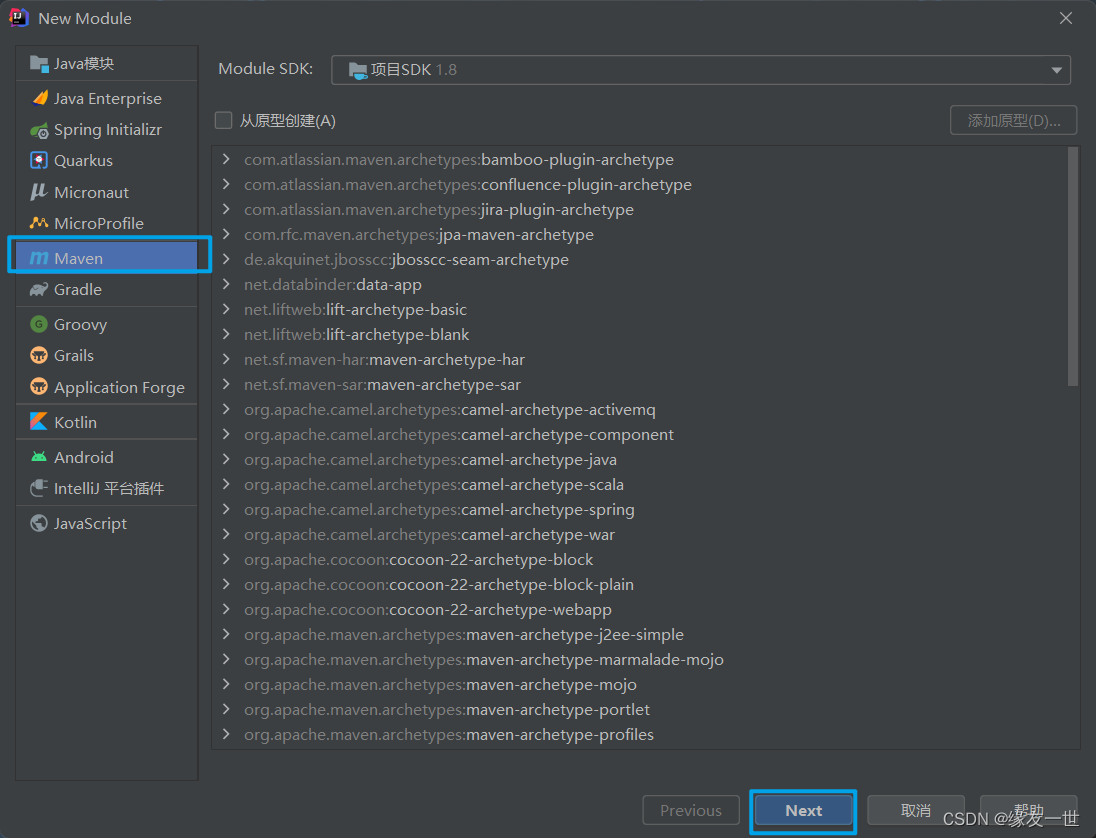
- 创建子模块项目,然后添加添加框架支持

- 配置web.xml,注册DispatcherServlet
- 注意点:
- 注册DispatcherServlet,启动级别为1
- 关联SpringMVC的配置文件
- 映射路径为 / 【不要用/*,会404】
/ 和 /* 的区别:
- < url-pattern > / 不会匹配到.jsp, 只针对我们编写的请求;即:.jsp 不会进入spring的 DispatcherServlet类 。
- < url-pattern > /* 会匹配 *.jsp,
会出现返回 jsp视图 时再次进入spring的DispatcherServlet 类,导致找不到对应的controller所以报404错。
<web-app xmlns="http://xmlns.jcp.org/xml/ns/javaee" xmlns:xsi="http://www.w3.org/2001/XMLSchema-instance" xsi:schemaLocation="http://xmlns.jcp.org/xml/ns/javaee http://xmlns.jcp.org/xml/ns/javaee/web-app_4_0.xsd" version="4.0"> <servlet> <servlet-name>springmvcservlet-name> <servlet-class>org.springframework.web.servlet.DispatcherServletservlet-class> <init-param> <param-name>contextConfigLocationparam-name> <param-value>classpath:springmvc-servlet.xmlparam-value> init-param> <load-on-startup>1load-on-startup> servlet> <servlet-mapping> <servlet-name>springmvcservlet-name> <url-pattern>/url-pattern> servlet-mapping> web-app>- 1
- 2
- 3
- 4
- 5
- 6
- 7
- 8
- 9
- 10
- 11
- 12
- 13
- 14
- 15
- 16
- 17
- 18
- 19
- 20
- 21
- 22
- 23
- 24
- 25
- 26
- 27
- 28
- 29
- 编写SpringMVC 的 配置文件!名称:springmvc-servlet.xml
- 让IOC的注解生效
- 静态资源过滤 :HTML . JS . CSS . 图片 , 视频 …
- MVC的注解驱动
- 配置视图解析器
- 在resource目录下添加springmvc-servlet.xml配置文件,配置的形式与Spring容器配置基本类似,为了支持基于注解的IOC,设置了自动扫描包的功能。
- 在视图解析器中我们把所有的视图都存放在/WEB-INF/目录下,这样可以保证视图安全,因为这个目录下的文件,客户端不能直接访问。
<beans xmlns="http://www.springframework.org/schema/beans" xmlns:xsi="http://www.w3.org/2001/XMLSchema-instance" xmlns:context="http://www.springframework.org/schema/context" xmlns:mvc="http://www.springframework.org/schema/mvc" xsi:schemaLocation="http://www.springframework.org/schema/beans http://www.springframework.org/schema/beans/spring-beans.xsd http://www.springframework.org/schema/context https://www.springframework.org/schema/context/spring-context.xsd http://www.springframework.org/schema/mvc https://www.springframework.org/schema/mvc/spring-mvc.xsd"> <context:component-scan base-package="com.yang.controller"/> <mvc:default-servlet-handler /> <mvc:annotation-driven /> <bean class="org.springframework.web.servlet.view.InternalResourceViewResolver" id="internalResourceViewResolver"> <property name="prefix" value="/WEB-INF/jsp/" /> <property name="suffix" value=".jsp" /> bean> beans>- 1
- 2
- 3
- 4
- 5
- 6
- 7
- 8
- 9
- 10
- 11
- 12
- 13
- 14
- 15
- 16
- 17
- 18
- 19
- 20
- 21
- 22
- 23
- 24
- 25
- 26
- 27
- 28
- 29
- 30
- 31
- 32
- 33
- 34
- 35
- 36
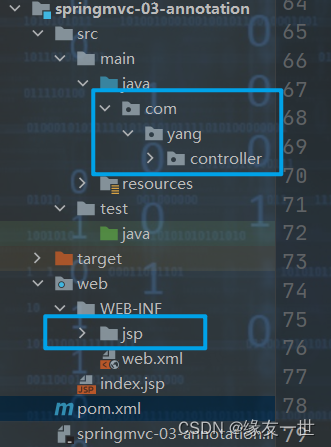
- 建立相关包
- 创建Controller
- 编写一个Java控制类: comyang.controller.HelloController , 注意编码规范
package com.yang.controller; import org.springframework.stereotype.Controller; import org.springframework.ui.Model; import org.springframework.web.bind.annotation.RequestMapping; /** * @author 缘友一世 * @date 2022/7/30-15:02 */ @Controller @RequestMapping("/hello") public class HelloController { //真实的访问地址:项目名/hello/sayHello @RequestMapping("/sayHello") public String sayHello(Model model) { /*封装数据 向模型中添加属性msg与其对应的值,可以在jsp页面中取出并渲染 */ model.addAttribute("msg","hello,Controller"); /* 返回给视图解析器 进行拼接web-info/jsp/hello.jsp */ return "hello"; } }- 1
- 2
- 3
- 4
- 5
- 6
- 7
- 8
- 9
- 10
- 11
- 12
- 13
- 14
- 15
- 16
- 17
- 18
- 19
- 20
- 21
- 22
- 23
- 24
- 25
- 26
- 27
- 28
- @Controller是为了让Spring IOC容器初始化时自动扫描到;
- @RequestMapping是为了映射请求路径,这里因为类与方法上都有映射所以访问时应该
是/hello/sayHello; - 方法中声明Model类型的参数是为了把Action中的数据带到视图中;
- 方法返回的结果是视图的名称hello,加上配置文件中的前后缀变成WEB-INF/jsp/hello.jsp。
- 创建视图层
- 在WEB-INF/ jsp目录中创建hello.jsp , 视图可以直接取出并展示从Controller带回的信息;可以通过EL表示取出Model中存放的值,或者对象;
<%-- Created by IntelliJ IDEA. User: HP Date: 2022/7/30 Time: 15:13 To change this template use File | Settings | File Templates. --%> <%@ page contentType="text/html;charset=UTF-8" language="java" %> <html> <head> <title>Title</title> </head> <body> ${msg} </body> </html>- 1
- 2
- 3
- 4
- 5
- 6
- 7
- 8
- 9
- 10
- 11
- 12
- 13
- 14
- 15
- 16
- 17
- 配置Tomcat运行
- 配置Tomcat , 开启服务器 , 访问 对应的请求路径!


可能的问题:404
- 查看控制台输出,看一下是不是缺少了什么jar包。
- 如果jar包存在,显示无法输出,就在IDEA的项目发布中,添加lib依赖!

3.1 小结
- 实现步骤其实非常的简单:
- 新建一个web项目
- 导入相关jar包
- 编写web.xml , 注册DispatcherServlet
- 编写springmvc配置文件
- 接下来就是去创建对应的控制类 , controller
- 最后完善前端视图和controller之间的对应
- 测试运行调试.
- 使用springMVC必须配置的三大件:处理器映射器、处理器适配器、视图解析器
- 通常,我们只需要手动配置视图解析器,而处理器映射器和处理器适配器只需要开启注解驱动即可,而省去了大段的xml配置
4 Controller 及 RestFul
4.1 控制器Controller【注解定义方式】
-
控制器复杂提供访问应用程序的行为,通常通过接口定义或注解定义两种方法实现。
-
控制器负责解析用户的请求并将其转换为一个模型。
-
在Spring MVC中一个控制器类可以包含多个方法
-
@Controller注解类型用于声明Spring类的实例是一个控制器(在讲IOC时还提到了另外3个注解);
-
Spring可以使用扫描机制来找到应用程序中所有基于注解的控制器类,为了保证Spring能找到你的控制器,需要在spring配置文件中声明组件扫描。
<context:component-scan base-package="com.yang.controller"/>- 1
- 2
- 增加一个Controller类,使用注解实现;
package com.yang.controller; import org.springframework.stereotype.Controller; import org.springframework.ui.Model; import org.springframework.web.bind.annotation.RequestMapping; /** * @author 缘友一世 * @date 2022/7/30-16:02 */ @Controller//代表这个类会被Spring接管 //被这个注解的类中的所有方法,如果返回值是string,并且有具体页面可以跳转,那么就会被视图解析器解析; public class controllerTest2 { @RequestMapping("/t2") public String index(Model model){ //Spring MVC会自动实例化一个Model对象用于向视图中传值 model.addAttribute("msg", "ControllerTest2"); //返回视图位置 return "test"; } }- 1
- 2
- 3
- 4
- 5
- 6
- 7
- 8
- 9
- 10
- 11
- 12
- 13
- 14
- 15
- 16
- 17
- 18
- 19
- 20
- 21
- 22
- 23
- 创建视图层
<%@ page contentType="text/html;charset=UTF-8" language="java" %> <html> <head> <title>Title</title> </head> <body> ${msg} </body> </html>- 1
- 2
- 3
- 4
- 5
- 6
- 7
- 8
- 9
- 可以发现,两个请求都可以指向一个视图,但是页面结果的结果是不一样的,从这里可以看出视图是被复用的,而且控制器与视图之间是弱偶合关系。
4.2 RequestMapping
- @RequestMapping注解用于映射url到控制器类或一个特定的处理程序方法。可用于类或方法上。
- 用于类上,表示类中的所有响应请求的方法都是以该地址作为父路径。
- 只注解在方法上面
@Controller public class TestController { @RequestMapping("/h1") public String test(){ return "test"; } }- 1
- 2
- 3
- 4
- 5
- 6
- 7
访问路径:http://localhost:8080 / 项目名 / h1
- 同时注解类与方法
@Controller @RequestMapping("/admin") public class TestController { @RequestMapping("/h1") public String test(){ return "test"; } }- 1
- 2
- 3
- 4
- 5
- 6
- 7
- 8
访问路径:http://localhost:8080 / 项目名/ admin /h1 , 需要先指定类的路径再指定方法的路径;
4.3 RestFul 风格
概念
- Restful就是一个资源定位及资源操作的风格。不是标准也不是协议,只是一种风格。基于这个风格设计的软件可以更简洁,更有层次,更易于实现缓存等机制。- 1
- 功能
- 资源:互联网所有的事物都可以被抽象为资源
- 资源操作:使用POST、DELETE、PUT、GET,使用不同方法对资源进行操作。
- 分别对应 添加、 删除、修改、查询。
- 使用RESTful操作资源 : 可以通过不同的请求方式来实现不同的效果!如下:请求地址一样,但是功能可以不同!
- http://127.0.0.1/item/1 查询,GET
- http://127.0.0.1/item 新增,POST
- http://127.0.0.1/item 更新,PUT
- http://127.0.0.1/item/1 删除,DELETE
栗子
- 新建一个类 RestFulController
知识补充:
在Spring MVC中可以使用 @PathVariable 注解,让方法参数的值对应绑定到一个URI模板变量上。package com.yang.controller; import org.springframework.stereotype.Controller; import org.springframework.ui.Model; import org.springframework.web.bind.annotation.*; /** * @author 缘友一世 * @date 2022/7/30-18:01 */ @Controller public class RestFulController { //原来:http://localhost:8080/add?a=125&b=125 //现在:http://localhost:8080/add/a/b //@RequestMapping(value = "/add/{a}/{b}",method = RequestMethod.GET ) @GetMapping("/add/{a}/{b}") public String test1(@PathVariable int a,@PathVariable int b, Model model) { int res=a+b; model.addAttribute("msg","test1结果为"+res); return "test"; } @PostMapping("/add/{a}/{b}") public String test2(@PathVariable int a,@PathVariable int b, Model model) { int res=a+b; model.addAttribute("msg","test2结果为"+res); return "test"; } }- 1
- 2
- 3
- 4
- 5
- 6
- 7
- 8
- 9
- 10
- 11
- 12
- 13
- 14
- 15
- 16
- 17
- 18
- 19
- 20
- 21
- 22
- 23
- 24
- 25
- 26
- 27
- 28
- 29
总结
-
使用路径变量的好处
- 使路径变得更加简洁;
- 获得参数更加方便,框架会自动进行类型转换。
- 通过路径变量的类型可以约束访问参数,如果类型不一样,则访问不到对应的请求方法。
-
使用method属性指定请求类型
- 用于约束请求的类型,可以收窄请求范围。指定请求谓词的类型如GET, POST, HEAD, OPTIONS, PUT,PATCH, DELETE, TRACE等
@RequestMapping(value = "/add/{a}/{b}",method = {RequestMethod.GET} )- 1
所有的地址栏请求默认都会是 HTTP GET 类型的。
方法级别的注解变体有如下几个: 组合注解@GetMapping @PostMapping @PutMapping @DeleteMapping @PatchMapping- 1
- 2
- 3
- 4
- 5
-
相关阅读:
CarSim-车辆模型
【每日一题】2300. 咒语和药水的成功对数
数组结构与算法
一切都在变
初级软件测试工程师如何涨薪?
前端---CSS的样式汇总
【Linux】swap有什么用?如何建立swap分区?
C++11新特性nullptr
04 Spring MVC 源码总结 - 启动流程
C#使用 AutoUpdater.NET 实现程序自动更新
- 原文地址:https://blog.csdn.net/yang2330648064/article/details/126142433
