-
SpringBoot 21 Swagger 2.9.2
21.1 为什么会有 Swagger
前后端分离的主流:Vue + SpringBoot
- 后端:数据访问层、服务层、控制层【后端团队】
- 前端:控制层、视图层【前端团队】
前后端如何进行交互: API 接口(url 请求)这个东西是后端写好的,我们前端直接 发送请求,然后拿到 Json 数据即可。
前后端分离目前的问题:集成联调的时候,前后端人员无法做到及时的协商。最好是 后续成本可能大的需求今早解决。以免最后导致问题集中爆发。
解决方案:
- 首先 指定 Schema(计划),实时更新 最新的 API 接口。前后端可以第一时间看到。降低集成的风险。
- 早些年的时候,指定 Word 计划 文档。前端测试后端接口 可以用
postman、后端提供接口,必须保持实时更新最新。
Swagger:号称最流行的 API 框架,它是 RestFul 风格的 API。并且 文档还 支持在线自动的生成。API 文档 与 API 定义 能同步更新。可以直接 运行,甚至可以在线测试 API 接口,还支持多种的编程语言。
21.2 SpringBoot 集成 Swagger
- 导入 相关 依赖
<dependency> <groupId>io.springfoxgroupId> <artifactId>springfox-swagger2artifactId> <version>2.9.2version> dependency> <dependency> <groupId>io.springfoxgroupId> <artifactId>springfox-swagger-uiartifactId> <version>2.9.2version> dependency>- 1
- 2
- 3
- 4
- 5
- 6
- 7
- 8
- 9
- 10
- 11
- 12
- 13
- 写 swagger 的 config 配置类,先默认 不写任何的配置代码
package top.muquanyu.config; import org.springframework.context.annotation.Configuration; import springfox.documentation.swagger2.annotations.EnableSwagger2; @Configuration @EnableSwagger2 public class SwaggerConfig { // 很多的 配置 如果 你不配,那么用的全是 默认值 }- 1
- 2
- 3
- 4
- 5
- 6
- 7
- 8
- 9
- 10
- 11
- 12
如果 运行 报错。则需要 去 application 配置中,配置一下。

spring: mvc: pathmatch: matching-strategy: ant_path_matcher- 1
- 2
- 3
- 4
问题出现的原因是:Spring Boot 2.6.X使用
PathPatternMatcher匹配路径,而 Swagger 使用的路径匹配是基于AntPathMatcher 的。上述的那个方法 只能 治标,但不治本。把下面的 这个 方法 写到 配置类里面,即可 治本。只不过 这个 治本的方法 是 适用在 swagger 3.0.0 版本上的。
@Bean public static BeanPostProcessor springfoxHandlerProviderBeanPostProcessor() { return new BeanPostProcessor() { @Override public Object postProcessAfterInitialization(Object bean, String beanName) throws BeansException { if (bean instanceof WebMvcRequestHandlerProvider || bean instanceof WebFluxRequestHandlerProvider) { customizeSpringfoxHandlerMappings(getHandlerMappings(bean)); } return bean; } private <T extends RequestMappingInfoHandlerMapping> void customizeSpringfoxHandlerMappings(List<T> mappings) { List<T> copy = mappings.stream() .filter(mapping -> mapping.getPatternParser() == null) .collect(Collectors.toList()); mappings.clear(); mappings.addAll(copy); } @SuppressWarnings("unchecked") private List<RequestMappingInfoHandlerMapping> getHandlerMappings(Object bean) { try { Field field = ReflectionUtils.findField(bean.getClass(), "handlerMappings"); field.setAccessible(true); return (List<RequestMappingInfoHandlerMapping>) field.get(bean); } catch (IllegalArgumentException | IllegalAccessException e) { throw new IllegalStateException(e); } } }; }- 1
- 2
- 3
- 4
- 5
- 6
- 7
- 8
- 9
- 10
- 11
- 12
- 13
- 14
- 15
- 16
- 17
- 18
- 19
- 20
- 21
- 22
- 23
- 24
- 25
- 26
- 27
- 28
- 29
- 30
- 31
- 32
如果 没报错,那就啥也别 弄,啥也别改。这么地 就行了。
- 直接访问
http://localhost:8080/swagger-ui.html

4. 简单的配置 SwaggerDocket是 Swagger 的 核心 实例。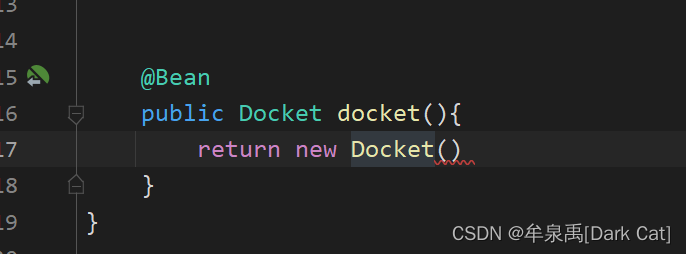
我们去 读一下 他的 源码。

我们 还发现 它 有 很多 待设置的 属性。

AppInfo


也就是说 它 需要 一个 实体的对象。AppInfo
你会发现 AppInfo 也有很多 需要设置的属性。package top.muquanyu.config; import org.springframework.context.annotation.Bean; import org.springframework.context.annotation.Configuration; import springfox.documentation.service.ApiInfo; import springfox.documentation.service.Contact; import springfox.documentation.spi.DocumentationType; import springfox.documentation.spring.web.plugins.Docket; import springfox.documentation.swagger2.annotations.EnableSwagger2; import java.util.ArrayList; @Configuration @EnableSwagger2 public class SwaggerConfig { // 很多的 配置 如果 你不配,那么用的全是 默认值 @Bean public Docket docket(){ return new Docket(DocumentationType.SWAGGER_2) .apiInfo(apiInfo()); } private ApiInfo apiInfo(){ Contact contact = new Contact("作者的名字","作者的网址","作者的email");// 作者信息 return new ApiInfo("API文档的名字", "API文档的描述", "版本号", "组织的网站/网址", contact, "许可证", "许可证的网址", new ArrayList<>()); } }- 1
- 2
- 3
- 4
- 5
- 6
- 7
- 8
- 9
- 10
- 11
- 12
- 13
- 14
- 15
- 16
- 17
- 18
- 19
- 20
- 21
- 22
- 23
- 24
- 25
- 26
- 27
- 28
- 29
- 30
- 31
- 32
- 33
- 34
- 35
- 36

-
相关阅读:
RabbitMQ初步到精通-第五章-RabbitMQ之消息防丢失
Sprinig Boot优雅实现接口幂等性
服务器感染了.360、.halo勒索病毒,如何确保数据文件完整恢复?
WGS84坐标系-地心地固坐标系-东北天坐标系
【架构师】的修炼之道都需要学习哪些?看看这些就够了
ESP32-C3入门教程 基础篇⑪——Non-Volatile Storage (NVS) 非易失性存储参数的读写
stm32-定时器输入捕获
深度学习(十一)---zed 调用yolov5 进行识别目标并实时测距
php实战案例记录(7)可变变量$$str
ArkTS编程语法基础,让你成为HarmonyOS开发高手
- 原文地址:https://blog.csdn.net/qq_52606908/article/details/126141280