-
Kubernetes 单节点安装Clickhouse
ClickHouse 简介
ClickHouse是一个面向列的数据库管理系统 (DBMS),用于查询的在线分析处理 (OLAP)。
Clickhouse 特点
-
真正的面向列的数据库管理系统
在真正的面向列的 DBMS 中,没有额外的数据与值一起存储。除此之外,这意味着必须支持常量长度值,以避免将它们的长度“数字”存储在值旁边。例如,十亿个 UInt8 类型的值应该消耗大约 1 GB 未压缩,否则这会严重影响 CPU 使用。即使在未压缩的情况下,也必须紧凑地存储数据(没有任何“垃圾”),因为解压缩的速度(CPU 使用率)主要取决于未压缩的数据量。
ClickHouse 是一个数据库管理系统,而不是单个数据库。ClickHouse 允许在运行时创建表和数据库、加载数据和运行查询,而无需重新配置和重新启动服务器。 -
数据压缩
在磁盘空间和 CPU 消耗之间具有不同权衡的高效通用压缩编解码器之外,ClickHouse 还为特定类型的数据提供专门的编解码器,这使 ClickHouse 能够与更多的小众数据库竞争并胜过更多的小众数据库,如时间序列数据库。 -
数据的磁盘存储
保持数据按主键物理排序可以以低延迟(不到几十毫秒)提取特定值或值范围的数据。一些面向列的 DBMS(例如 SAP HANA 和 Google PowerDrill)只能在 RAM 中工作。这种方法鼓励分配比实时分析所需的更大的硬件预算。
ClickHouse 设计用于普通硬盘驱动器,这意味着每 GB 数据存储的成本很低,但如果可用,也可以充分利用 SSD 和额外的 RAM。 -
多核并行处理
大型查询自然并行化,占用当前服务器上可用的所有必要资源。 -
多台服务器上的分布式处理
在 ClickHouse 中,数据可以驻留在不同的分片上。每个分片可以是一组用于容错的副本。所有分片都用于并行运行查询,对用户透明。 -
SQL 支持
ClickHouse 支持基于 SQL的声明式查询语言,该语言在许多情况下与 ANSI SQL 标准相同。
支持的查询包括GROUP BY、ORDER BY、FROM 中的子查询、JOIN子句、IN运算符、窗口函数和标量子查询。 -
矢量计算引擎
数据不仅按列存储,还通过向量(列的一部分)进行处理,从而实现高 CPU 效率。 -
实时数据更新
ClickHouse 支持带有主键的表。为了快速对主键的范围执行查询,使用合并树对数据进行增量排序。因此,数据可以不断添加到表中。摄取新数据时不会锁定。 -
一级索引
通过主键对数据进行物理排序可以以低延迟(不到几十毫秒)为其特定值或值范围提取数据。 -
二级索引
与其他数据库管理系统不同,ClickHouse 中的二级索引不指向特定的行或行范围。相反,它们让数据库提前知道某些数据部分中的所有行都不会匹配查询过滤条件并且根本不读取它们,因此它们被称为数据跳过索引。 -
适合在线查询
大多数 OLAP 数据库管理系统并不针对具有亚秒级延迟的在线查询。在替代系统中,几十秒甚至几分钟的报告构建时间通常被认为是可以接受的。有时甚至需要更多的力量来离线准备报告
在 ClickHouse 中,低延迟意味着可以在加载用户界面页面的同时毫不延迟地处理查询,而无需尝试提前准备答案。换句话说,在线。 -
支持近似计算
ClickHouse 提供了多种方式来交换性能的准确性:
用于近似计算不同值、中位数和分位数的聚合函数。
基于部分(样本)数据运行查询并获得近似结果。在这种情况下,从磁盘中检索的数据按比例减少。
为有限数量的随机密钥而不是所有密钥运行聚合。在数据中密钥分布的特定条件下,这提供了相当准确的结果,同时使用了更少的资源。 -
自适应连接算法
ClickHouse自适应选择如何JOIN多个表,通过宁愿散列连接算法,并回落至合并连接算法,如果有一个以上的大表。 -
数据复制和数据完整性支持
ClickHouse 使用异步多主复制。在写入任何可用的副本后,所有剩余的副本都会在后台检索它们的副本。系统在不同的副本上维护相同的数据。大多数故障后的恢复是自动执行的,或者在复杂情况下半自动执行。 -
基于角色的访问控制
ClickHouse 使用 SQL 查询实现用户帐户管理,并允许基于角色的访问控制配置,类似于 ANSI SQL 标准和流行的关系数据库管理系统中的配置。
更多功能参考官方文档:https://clickhouse.com/docs/en/introduction/performance/#
Clickhouse 持久化配置
这里数据持久化使用NFS进行持久化数据
安装NFS
- #这里我使用单独服务器进行演示,实际上顺便使用一台服务器安装nfs都可以 (建议和kubernetes集群分开,找单独一台机器)
- [root@nfs ~]# yum install nfs-utils -y rpcbind
- #接下来设置nfs存储目录
- [root@nfs ~]# mkdir /data/k8s-volume
- [root@nfs ~]# chmod 755 /data/k8s-volume/
- #编辑nfs配置文件
- [root@nfs ~]# cat /etc/exports
- /data/k8s-volume *(rw,no_root_squash,sync)
- #存储目录,*允许所有人连接,rw读写权限,sync文件同时写入硬盘及内存,no_root_squash 使用者root用户自动修改为普通用户
- 接下来启动rpcbind
- [root@nfs ~]# systemctl start rpcbind
- [root@nfs ~]# systemctl enable rpcbind
- [root@nfs ~]# systemctl status rpcbind
- ● rpcbind.service - RPC bind service
- Loaded: loaded (/usr/lib/systemd/system/rpcbind.service; enabled; vendor preset: enabled)
- Active: active (running) since 四 2019-12-19 18:44:29 CST; 11min ago
- Main PID: 3126 (rpcbind)
- CGroup: /system.slice/rpcbind.service
- └─3126 /sbin/rpcbind -w
- #由于nfs需要向rpcbind进行注册,所以我们需要优先启动rpcbind
- #启动NFS
- [root@nfs ~]# systemctl restart nfs
- [root@nfs ~]# systemctl enable nfs
- [root@nfs ~]# systemctl status nfs
- ● nfs-server.service - NFS server and services
- Loaded: loaded (/usr/lib/systemd/system/nfs-server.service; enabled; vendor preset: disabled)
- Drop-In: /run/systemd/generator/nfs-server.service.d
- └─order-with-mounts.conf
- Active: active (exited) since 四 2019-12-19 18:44:30 CST; 13min ago
- Main PID: 3199 (code=exited, status=0/SUCCESS)
- CGroup: /system.slice/nfs-server.service
- #检查rpcbind及nfs是否正常
- [root@nfs ~]# rpcinfo |grep nfs
- 100003 3 tcp 0.0.0.0.8.1 nfs superuser
- 100003 4 tcp 0.0.0.0.8.1 nfs superuser
- 100227 3 tcp 0.0.0.0.8.1 nfs_acl superuser
- 100003 3 udp 0.0.0.0.8.1 nfs superuser
- 100003 4 udp 0.0.0.0.8.1 nfs superuser
- 100227 3 udp 0.0.0.0.8.1 nfs_acl superuser
- 100003 3 tcp6 ::.8.1 nfs superuser
- 100003 4 tcp6 ::.8.1 nfs superuser
- 100227 3 tcp6 ::.8.1 nfs_acl superuser
- 100003 3 udp6 ::.8.1 nfs superuser
- 100003 4 udp6 ::.8.1 nfs superuser
- 100227 3 udp6 ::.8.1 nfs_acl superuser
- #查看nfs目录挂载权限
- [root@nfs ~]# cat /var/lib/nfs/etab
- /data/k8s-volume *(rw,sync,wdelay,hide,nocrossmnt,secure,no_root_squash,no_all_squash,no_subtree_check,secure_locks,acl,no_pnfs,anonuid=65534,anongid=65534,sec=sys,rw,secure,no_root_squash,no_all_squash)
- #检查挂载是否正常
- [root@nfs ~]# showmount -e 127.0.0.1
- Export list for 127.0.0.1:
- /data/k8s-volume *
创建nfs client
本次nfs服务器地址192.168.31.101
数据存储目录 /data/k8s-volume- kind: Deployment
- apiVersion: apps/v1
- metadata:
- name: nfs-client-provisioner
- spec:
- replicas: 1
- selector:
- matchLabels:
- app: nfs-client-provisioner
- strategy:
- type: Recreate
- template:
- metadata:
- labels:
- app: nfs-client-provisioner
- spec:
- serviceAccountName: nfs-client-provisioner
- containers:
- - name: nfs-client-provisioner
- image: quay.io/external_storage/nfs-client-provisioner:latest
- volumeMounts:
- - name: nfs-client-root
- mountPath: /persistentvolumes
- env:
- - name: PROVISIONER_NAME
- value: fuseim.pri/ifs
- - name: NFS_SERVER
- value: 192.168.31.101 #nfs server 地址
- - name: NFS_PATH
- value: /data/k8s-volume #nfs共享目录
- volumes:
- - name: nfs-client-root
- nfs:
- server: 192.168.31.101
- path: /data/k8s-volume
- 接下来我们还需要创建一个serveraccount,用于将nfs-client-provisioner中的ServiceAccount绑定到一个nfs-client-provisioner-runner的ClusterRole。而该ClusterRole声明了一些权限,其中就包括了对persistentvolumes的增删改查,所以我们就可以利用ServiceAccount来自动创建PV
- apiVersion: v1
- kind: ServiceAccount
- metadata:
- name: nfs-client-provisioner
- ---
- kind: ClusterRole
- apiVersion: rbac.authorization.k8s.io/v1
- metadata:
- name: nfs-client-provisioner-runner
- rules:
- - apiGroups: [""]
- resources: ["persistentvolumes"]
- verbs: ["get", "list", "watch", "create", "delete"]
- - apiGroups: [""]
- resources: ["persistentvolumeclaims"]
- verbs: ["get", "list", "watch", "update"]
- - apiGroups: ["storage.k8s.io"]
- resources: ["storageclasses"]
- verbs: ["get", "list", "watch"]
- - apiGroups: [""]
- resources: ["events"]
- verbs: ["list", "watch", "create", "update", "patch"]
- - apiGroups: [""]
- resources: ["endpoints"]
- verbs: ["create", "delete", "get", "list", "watch", "patch", "update"]
- ---
- kind: ClusterRoleBinding
- apiVersion: rbac.authorization.k8s.io/v1
- metadata:
- name: run-nfs-client-provisioner
- subjects:
- - kind: ServiceAccount
- name: nfs-client-provisioner
- namespace: default
- roleRef:
- kind: ClusterRole
- name: nfs-client-provisioner-runner
- apiGroup: rbac.authorization.k8s.io
- #检查pod是否ok
- [root@k8s-01 nfs]# kubectl get pod
- NAME READY STATUS RESTARTS AGE
- nfs-client-provisioner-7995946c89-n7bsc 1/1 Running 0 13m
创建storageclass
这里我们声明了一个名为managed-nfs-storage的Storageclass对象- apiVersion: storage.k8s.io/v1
- kind: StorageClass
- metadata:
- name: managed-nfs-storage
- provisioner: fuseim.pri/ifs # or choose another name, must match deployment's env PROVISIONER_NAME'
- #检查
- [root@k8s-01 nfs]# kubectl get storageclasses.storage.k8s.io
- NAME PROVISIONER RECLAIMPOLICY VOLUMEBINDINGMODE ALLOWVOLUMEEXPANSION AGE
- managed-nfs-storage fuseim.pri/ifs Delete Immediate false 104d
为clickhouse创建pvc
- 首先需要创建一个namespace,放ck相关
- kubectl create ns test
- # pvc yaml文件如下
- apiVersion: v1
- kind: PersistentVolumeClaim
- metadata:
- name: clickhouse-pvc
- namespace: test
- spec:
- resources:
- requests:
- storage: 10Gi #数据大小
- accessModes:
- - ReadWriteMany # pvc数据访问类型
- storageClassName: "managed-nfs-storage" #storageclass 名称
- # 检查状态
- [root@k8s-01 clickhouse]# kubectl get pvc -n test
- NAME STATUS VOLUME CAPACITY ACCESS MODES STORAGECLASS AGE
- clickhouse-pvc Bound pvc-ee8a47fc-a196-459f-aca4-143a8af58bf3 10Gi RWX managed-nfs-storage 25s
Clickhouse 安装
由于我们这里需要对
users.xml配置进行修改,做一下配置参数跳转,我这里将users.xml下载下来修改后使用configmap进行挂载- #这里可以直接下载配置,或者是启动ck在复制users.xml拷贝下来修改
- wget https://d.frps.cn/file/kubernetes/clickhouse/users.xml
- [root@k8s-01 clickhouse]# kubectl create cm -n test clickhouse-users --from-file=users.xml #不做配置持久化可以跳过
- configmap/clickhouse-users created
- [root@k8s-01 clickhouse]# kubectl get cm -n test
- NAME DATA AGE
- clickhouse-users 1 5s
clickhouse yaml文件如下
- apiVersion: apps/v1
- kind: Deployment
- metadata:
- labels:
- app: clickhouse
- name: clickhouse
- namespace: test
- spec:
- replicas: 1
- revisionHistoryLimit: 10
- selector:
- matchLabels:
- app: clickhouse
- template:
- metadata:
- labels:
- app: clickhouse
- spec:
- containers:
- - image: clickhouse/clickhouse-server
- imagePullPolicy: IfNotPresent
- name: clickhouse
- ports:
- - containerPort: 8123
- protocol: TCP
- resources:
- limits:
- cpu: 1048m
- memory: 2Gi
- requests:
- cpu: 1048m
- memory: 2Gi
- volumeMounts:
- - mountPath: /var/lib/clickhouse
- name: clickhouse-volume
- - mountPath: /etc/clickhouse-server/users.xml
- subPath: users.xml
- name: clickhouse-users
- volumes:
- - name: clickhouse-users
- configMap:
- name: clickhouse-users
- defaultMode: 511
- - name: clickhouse-volume
- persistentVolumeClaim:
- claimName: clickhouse-pvc
- restartPolicy: Always
- terminationGracePeriodSeconds: 30
- ---
- apiVersion: v1
- kind: Service
- metadata:
- name: clickhouse
- namespace: test
- spec:
- ports:
- - port: 8123
- protocol: TCP
- targetPort: 8123
- selector:
- app: clickhouse
- type: ClusterIP
检查服务是否正常
- Events:
- Type Reason Age From Message
- ---- ------ ---- ---- -------
- Normal Scheduled <unknown> default-scheduler Successfully assigned test/clickhouse-bd6cb4f4b-8b6lx to k8s-02
- Normal Pulling 6m17s kubelet, k8s-02 Pulling image "clickhouse/clickhouse-server"
- Normal Pulled 4m25s kubelet, k8s-02 Successfully pulled image "clickhouse/clickhouse-server"
- Normal Created 4m20s kubelet, k8s-02 Created container clickhouse
- Normal Started 4m17s kubelet, k8s-02 Started container clickhouse
检查pod svc状态
- [root@k8s-01 clickhouse]# kubectl get pod -n test
- NAME READY STATUS RESTARTS AGE
- clickhouse-bd6cb4f4b-8b6lx 1/1 Running 0 7m4s
- [root@k8s-01 clickhouse]# kubectl get svc -n test
- NAME TYPE CLUSTER-IP EXTERNAL-IP PORT(S) AGE
- clickhouse ClusterIP 10.100.88.207 <none> 8123/TCP 7m23s
pod内部调用测试
- [root@k8s-01 clickhouse]# kubectl exec -it -n test clickhouse-bd6cb4f4b-8b6lx bash #进入到容器
- kubectl exec [POD] [COMMAND] is DEPRECATED and will be removed in a future version. Use kubectl kubectl exec [POD] -- [COMMAND] instead.
- root@clickhouse-bd6cb4f4b-8b6lx:/# clickhouse-client #连接客户端
- ClickHouse client version 21.12.3.32 (official build).
- Connecting to localhost:9000 as user default.
- Connected to ClickHouse server version 21.12.3 revision 54452.
- clickhouse-bd6cb4f4b-8b6lx :) show databases; #查看数据库
- SHOW DATABASES
- Query id: d89a782e-2fb5-47e8-a4e0-1ab3aa038bdf
- ┌─name───────────────┐
- │ INFORMATION_SCHEMA │
- │ default │
- │ information_schema │
- │ system │
- └────────────────────┘
- 4 rows in set. Elapsed: 0.003 sec.
- clickhouse-bd6cb4f4b-8b6lx :) create database abcdocker #创建测试库
- CREATE DATABASE abcdocker
- Query id: 3a7aa992-9fe1-49fe-bc54-f537e0f4a104
- Ok.
- 0 rows in set. Elapsed: 3.353 sec.
- clickhouse-bd6cb4f4b-8b6lx :) show databases;
- SHOW DATABASES
- Query id: c53996ba-19de-4ffa-aa7f-2f3c305d5af5
- ┌─name───────────────┐
- │ INFORMATION_SCHEMA │
- │ abcdocker │
- │ default │
- │ information_schema │
- │ system │
- └────────────────────┘
- 5 rows in set. Elapsed: 0.006 sec.
- clickhouse-bd6cb4f4b-8b6lx :) use abcdocker;
- USE abcdocker
- Query id: e8302401-e922-4677-9ce3-28c263d162b1
- Ok.
- 0 rows in set. Elapsed: 0.002 sec.
- clickhouse-bd6cb4f4b-8b6lx :) show tables
- SHOW TABLES
- Query id: 29b3ec6d-6486-41f5-a526-28e80ea17107
- Ok.
- 0 rows in set. Elapsed: 0.003 sec.
- clickhouse-bd6cb4f4b-8b6lx :)
接下来我们创建一个Telnet容器,测试直接使用svc name访问容器是否正常
- kubectl run -n test --generator=run-pod/v1 -i --tty busybox --image=busybox --restart=Never -- sh
- / # telnet clickhouse 8123
- Connected to clickhouse
- #如果不在同一个命名空间就需要使用clickhouse.test.svc.cluster.local
外部访问Clickhouse
k8s内部调用我们采用的是svc name,外部可以通过nodeport实现
- #svc 外部yaml如下
- apiVersion: v1
- kind: Service
- metadata:
- name: clickhouse-node
- namespace: test
- spec:
- ports:
- - port: 8123
- protocol: TCP
- targetPort: 8123
- selector:
- app: clickhouse
- type: NodePort
- [root@k8s-01 clickhouse]# kubectl get svc -n test
- NAME TYPE CLUSTER-IP EXTERNAL-IP PORT(S) AGE
- clickhouse ClusterIP 10.100.88.207
8123/TCP 33m - clickhouse-node NodePort 10.99.147.187
8123:32445/TCP 8s - #如果用的阿里云托管可以直接使用阿里云LoadBalancer
- apiVersion: v1
- kind: Service
- metadata:
- annotations:
- service.beta.kubernetes.io/alibaba-cloud-loadbalancer-id: "xxxx"
- service.beta.kubernetes.io/alibaba-cloud-loadbalancer-force-override-listeners: "true"
- name: clickhouse-ck
- namespace: test
- spec:
- ports:
- - port: 8123
- protocol: TCP
- targetPort: 8123
- selector:
- app: clickhouse
- type: LoadBalancer
首先需要下载Windows工具
https://d.frps.cn/file/kubernetes/clickhouse/dbeaver-ce-7.1.4-x86_64-setup.exe
接下来连接ck,查看我们创建的库是否存在 (安装下载的软件包)

添加clickhouse连接


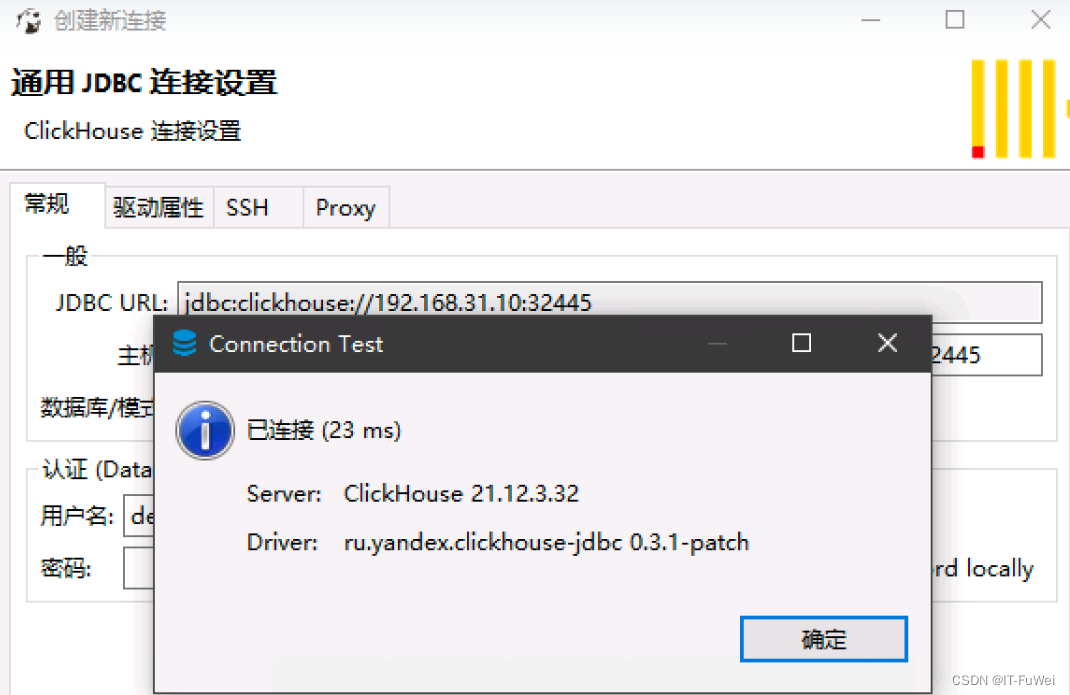
这里已经可以看到我们创建的库,里面只是一个空库

如果我们需要给ck设置密码,需要修改我们挂载的configmap即可
- root@clickhouse-bd6cb4f4b-8b6lx:/etc/clickhouse-server# cat users.xml |grep pass
- <!-- See also the files in users.d directory where the password can be overridden.
- If you want to specify password in plaintext (not recommended), place it in 'password' element.
- Example: <password>qwerty</password>.
- If you want to specify SHA256, place it in 'password_sha256_hex' element.
- Example: <password_sha256_hex>65e84be33532fb784c48129675f9eff3a682b27168c0ea744b2cf58ee02337c5</password_sha256_hex>
- If you want to specify double SHA1, place it in 'password_double_sha1_hex' element.
- Example: <password_double_sha1_hex>e395796d6546b1b65db9d665cd43f0e858dd4303</password_double_sha1_hex>
- place 'kerberos' element instead of 'password' (and similar) elements.
- How to generate decent password:
- In first line will be password and in second - corresponding SHA256.
- In first line will be password and in second - corresponding double SHA1.
- <password></password> #设置免密参数
-
-
相关阅读:
001 Python开发环境搭建
洛谷P1242 新汉诺塔
SPA项目之动态树&数据表格&分页
3D建模师为了让甲方爸爸过稿,还可以这么做,就是在赚血汗钱啊
04_BFC
MySQL驱动包下载
SpringBoot系列之动态定时程序改进版
C/C++教程 从入门到精通《第十六章》—— 网络编程详解
docker启动容器报错
Function 洛谷P1464
- 原文地址:https://blog.csdn.net/zfw_666666/article/details/126121436
