-
springBoot整合redis使用介绍(详细案例)
文章预览:
一、创建springboot项目(采用骨架方式)


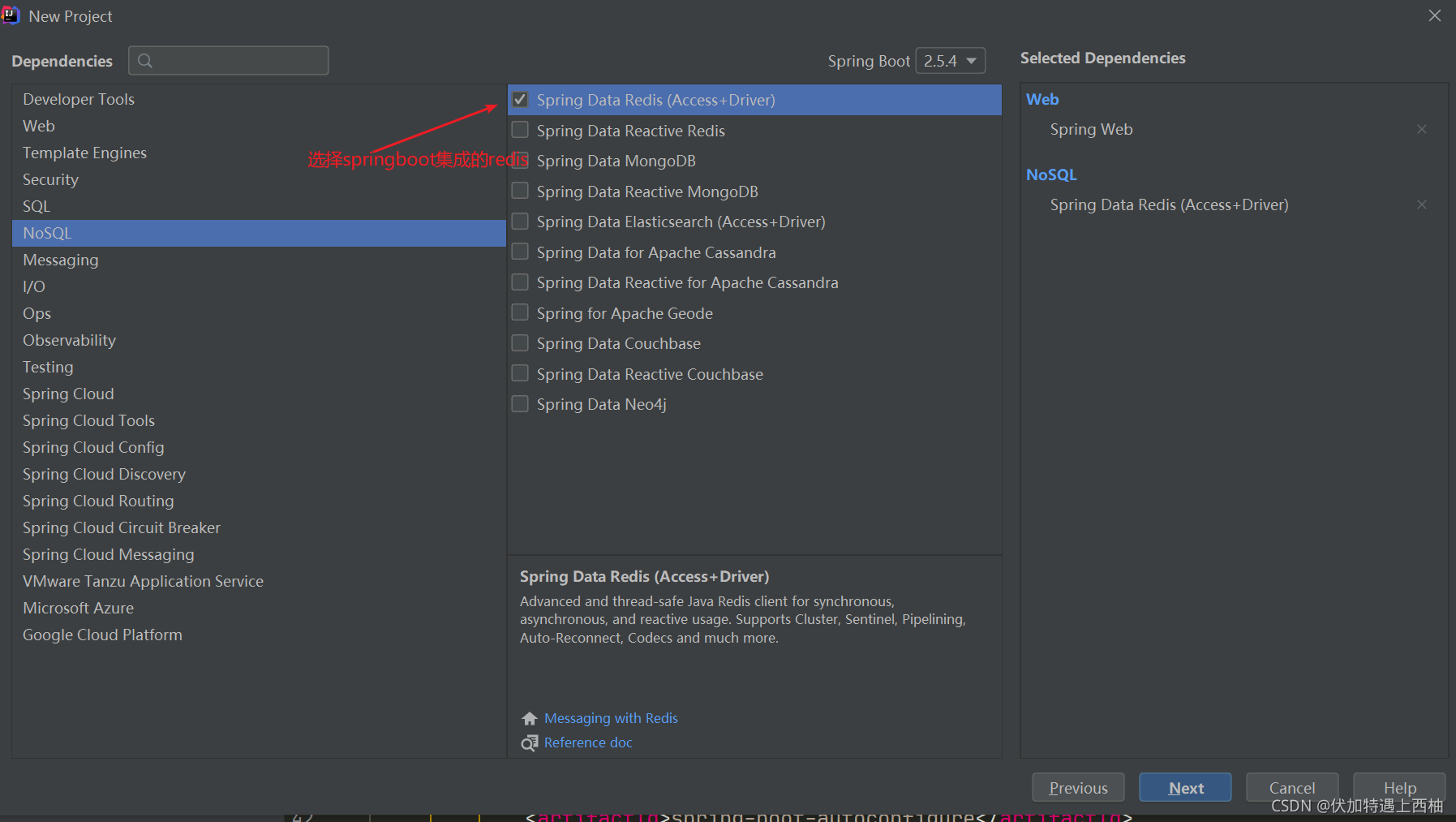


创建完成;
我们分析下pom文件中内容:
所使用到的关键依赖:org.springframework.boot spring-boot-starter-data-redis 2.5.4 org.springframework.boot spring-boot-starter-web 2.5.4 org.projectlombok lombok 1.18.20 true org.springframework.boot spring-boot-starter-test 2.5.4 test org.springframework.boot spring-boot-autoconfigure 2.5.4 com.alibaba fastjson 1.2.75 - 1
- 2
- 3
- 4
- 5
- 6
- 7
- 8
- 9
- 10
- 11
- 12
- 13
- 14
- 15
- 16
- 17
- 18
- 19
- 20
- 21
- 22
- 23
- 24
- 25
- 26
- 27
- 28
- 29
- 30
- 31
- 32
- 33
- 34
二、配置文件
server.port=8088 spring.redis.host=127.0.0.1 #Redis服务器连接端口 spring.redis.port=6379 #Redis服务器连接密码(默认为空) spring.redis.password=123456 #连接池最大连接数(使用负值表示没有限制) spring.redis.pool.max-active=8 #连接池最大阻塞等待时间(使用负值表示没有限制) spring.redis.pool.max-wait=-1 #连接池中的最大空闲连接 spring.redis.pool.max-idle=8 #连接池中的最小空闲连接 spring.redis.pool.min-idle=0 #连接超时时间(毫秒) spring.redis.timeout=30000- 1
- 2
- 3
- 4
- 5
- 6
- 7
- 8
- 9
- 10
- 11
- 12
- 13
- 14
- 15
- 16
三、使用redis
package com.example.redis.cache; import com.alibaba.fastjson.JSON; import com.alibaba.fastjson.JSONArray; import com.alibaba.fastjson.JSONObject; import lombok.extern.slf4j.Slf4j; import org.springframework.beans.factory.annotation.Autowired; import org.springframework.data.redis.core.StringRedisTemplate; import org.springframework.stereotype.Component; import org.springframework.util.StringUtils; import java.util.Collection; import java.util.Collections; import java.util.Date; import java.util.List; import java.util.concurrent.TimeUnit; /** * @author wxl * @date 2021-08-15 18:44 */ @Slf4j @Component public class CacheService { @Autowired private StringRedisTemplate redisTemplate; private final String DEFAULT_KEY_PREFIX = ""; private final int EXPIRE_TIME = 1; private final TimeUnit EXPIRE_TIME_TYPE = TimeUnit.DAYS; /** * 数据缓存至redis * * @param key * @param value * @return */ publicclazz) { String value = this.get(key); V result = null; if (!StringUtils.isEmpty(value)) { result = JSONObject.parseObject(value, clazz); } return result; } /** * 从redis中获取缓存数据,转成list * * @param key must not be {@literal null}. * @param clazz 对象类型 * @return */ public getList(K key, Class clazz) { String value = this.get(key); List result = Collections.emptyList(); if (!StringUtils.isEmpty(value)) { result = JSONArray.parseArray(value, clazz); } return result; } /** * 功能描述:Get the value of {@code key}. * * @param key must not be {@literal null}. * @return java.lang.String * @date 2021/9/19 **/ public String get(K key) { String value; try { value = redisTemplate.opsForValue().get(DEFAULT_KEY_PREFIX + key); } catch (Exception e) { log.error(e.getMessage(), e); throw new RuntimeException("从redis缓存中获取缓存数据失败"); } return value; } /** * 删除key */ public void delete(String key) { redisTemplate.delete(key); } /** * 批量删除key */ public void delete(Collection keys) { redisTemplate.delete(keys); } /** * 序列化key */ public byte[] dump(String key) { return redisTemplate.dump(key); } /** * 是否存在key */ public Boolean hasKey(String key) { return redisTemplate.hasKey(key); } /** * 设置过期时间 */ public Boolean expire(String key, long timeout, TimeUnit unit) { return redisTemplate.expire(key, timeout, unit); } /** * 设置过期时间 */ public Boolean expireAt(String key, Date date) { return redisTemplate.expireAt(key, date); } /** * 移除 key 的过期时间,key 将持久保持 */ public Boolean persist(String key) { return redisTemplate.persist(key); } /** * 返回 key 的剩余的过期时间 */ public Long getExpire(String key, TimeUnit unit) { return redisTemplate.getExpire(key, unit); } /** * 返回 key 的剩余的过期时间 */ public Long getExpire(String key) { return redisTemplate.getExpire(key); } } - 1
- 2
- 3
- 4
- 5
- 6
- 7
- 8
- 9
- 10
- 11
- 12
- 13
- 14
- 15
- 16
- 17
- 18
- 19
- 20
- 21
- 22
- 23
- 24
- 25
- 26
- 27
- 28
- 29
- 30
- 31
- 32
- 33
- 34
- 35
- 36
- 37
- 38
- 39
- 40
- 41
- 42
- 43
- 44
- 45
- 46
- 47
- 48
- 49
- 50
- 51
- 52
- 53
- 54
- 55
- 56
- 57
- 58
- 59
- 60
- 61
- 62
- 63
- 64
- 65
- 66
- 67
- 68
- 69
- 70
- 71
- 72
- 73
- 74
- 75
- 76
- 77
- 78
- 79
- 80
- 81
- 82
- 83
- 84
- 85
- 86
- 87
- 88
- 89
- 90
- 91
- 92
- 93
- 94
- 95
- 96
- 97
- 98
- 99
- 100
- 101
- 102
- 103
- 104
- 105
- 106
- 107
- 108
- 109
- 110
- 111
- 112
- 113
- 114
- 115
- 116
- 117
- 118
- 119
- 120
- 121
- 122
- 123
- 124
- 125
- 126
- 127
- 128
- 129
- 130
- 131
- 132
- 133
- 134
- 135
- 136
- 137
- 138
- 139
- 140
- 141
- 142
- 143
- 144
- 145
- 146
- 147
- 148
- 149
- 150
- 151
- 152
- 153
- 154
- 155
- 156
- 157
- 158
- 159
- 160
- 161
- 162
- 163
- 164
- 165
- 166
- 167
- 168
- 169
- 170
- 171
- 172
- 173
- 174
- 175
- 176
- 177
- 178
- 179
- 180
- 181
- 182
- 183
- 184
- 185
- 186
- 187
- 188
- 189
- 190
- 191
- 192
- 193
- 194
- 195
- 196
- 197
- 198
- 199
- 200
- 201
- 202
- 203
- 204
- 205
- 206
- 207
- 208
- 209
- 210
- 211
- 212
- 213
- 214
- 215
- 216
- 217
- 218
- 219
- 220
1、添加字符串到redis
/** * 功能描述:添加字符串到redis */ @Test void add() { cacheService.add("test", 1234); }- 1
- 2
- 3
- 4
- 5
- 6
- 7
结果:

2、将对象转换成jsonString并存入redis
/** * 功能描述:添加对象至redis */ @Test void addObject() { User user = User.builder() .id(ID) .name("小萌") .age(AGE) .build(); cacheService.add(user.getId(), user); }- 1
- 2
- 3
- 4
- 5
- 6
- 7
- 8
- 9
- 10
- 11
- 12
结果:

3、将对象集合转换成jsonString,并设置过期时间存入至redis
/** * 功能描述:添加对象集合至redis */ @Test void addObjects() { ArrayListusers = new ArrayList<>(); User user = User.builder() .id(ID) .name("小萌") .age(AGE) .build(); users.add(user); cacheService.add("key", users, 1, TimeUnit.HOURS); } - 1
- 2
- 3
- 4
- 5
- 6
- 7
- 8
- 9
- 10
- 11
- 12
- 13
- 14
结果:

4、获取对象
/** * 功能描述:获取对象 */ @Test void getObject() { User object = cacheService.getObject(ID, User.class); System.out.println("object = " + object); }- 1
- 2
- 3
- 4
- 5
- 6
- 7
- 8
结果:
object = User(id=123, name=小萌, age=12)- 1
5、获取对象集合
/** * 功能描述:获取对象集合 */ @Test void getObjects() { Listusers = cacheService.getList("key", User.class); System.out.println("users = " + users); } - 1
- 2
- 3
- 4
- 5
- 6
- 7
- 8
结果:
users = [User(id=123, name=小萌, age=12)]- 1
6、添加 hash-set
/** * 功能描述:添加 hash-set */ @Test void addHashCache() { cacheService.addHashCache("hashKey", "key", "value"); }- 1
- 2
- 3
- 4
- 5
- 6
- 7
结果:

7、获取 hash-setvalue
/** * 获取 hash-setvalue * * @param key must not be {@literal null}. * @param subKey must not be {@literal null}. */ public- 1
- 2
- 3
- 4
- 5
- 6
- 7
- 8
- 9
结果:
hashCache = value- 1
先自我介绍一下,小编13年上师交大毕业,曾经在小公司待过,去过华为OPPO等大厂,18年进入阿里,直到现在。深知大多数初中级java工程师,想要升技能,往往是需要自己摸索成长或是报班学习,但对于培训机构动则近万元的学费,着实压力不小。自己不成体系的自学效率很低又漫长,而且容易碰到天花板技术停止不前。因此我收集了一份《java开发全套学习资料》送给大家,初衷也很简单,就是希望帮助到想自学又不知道该从何学起的朋友,同时减轻大家的负担。添加下方名片,即可获取全套学习资料哦
-
相关阅读:
工作中最常见的6种OOM问题
[CISCN2019 华北赛区 Day1 Web2]ikun
Oracle/PLSQL: CharToRowid Function
CTF-Linux的学习笔记
服从正态分布的正弦函数、余弦函数期望
【学习笔记】ABC265/AGC012
催交费通知单套打单纸设置说明
OpenFOAM:并行区域划分理解(Domain Decomposition)
打卡go学习第一天
Llama2-Chinese项目:2.1-Atom-7B预训练
- 原文地址:https://blog.csdn.net/m0_67402774/article/details/126114941
