-
BGP联邦实验
一、要求如下
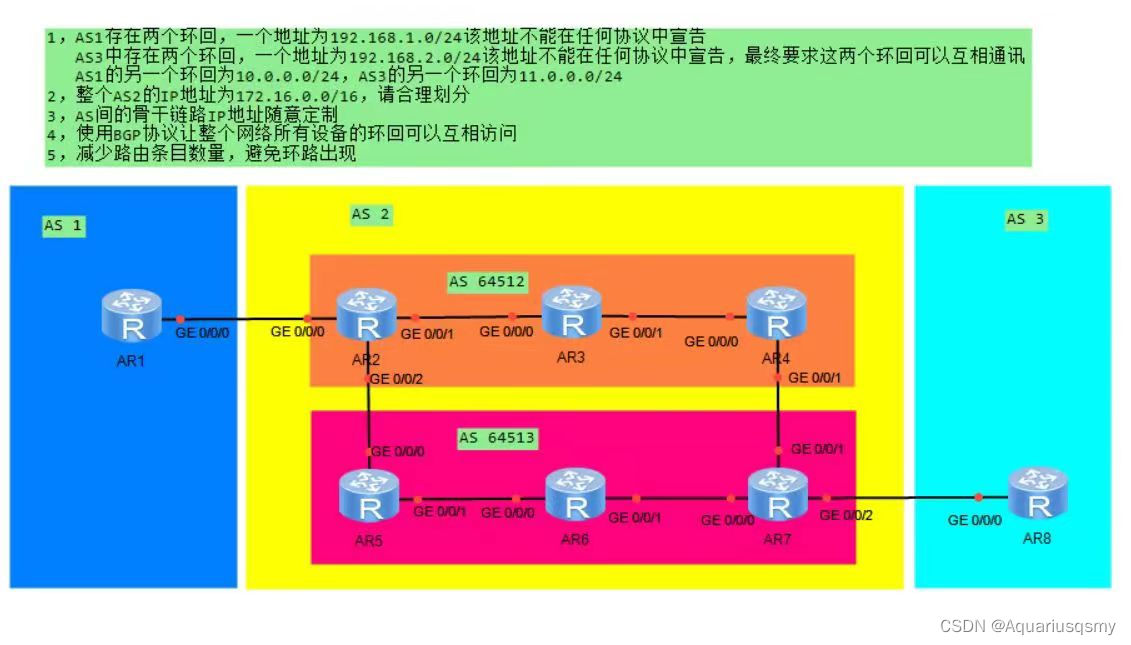
IP配置
sys
Enter system view, return user view with Ctrl+Z.
[Huawei]sys r1
[r1]int lo0
[r1-LoopBack0]ip ad 192.168.1.1 24
[r1-LoopBack0]int lo1
[r1-LoopBack1]ip ad 10.0.0.1 24
[r1-LoopBack1]int g 0/0/0
[r1-GigabitEthernet0/0/0]ip ad 12.0.0.1 24
Jul 26 2022 10:43:23-08:00 r1 %%01IFNET/4/LINK_STATE(l)[0]:The line protocol IP
on the interface GigabitEthernet0/0/0 has entered the UP state.
[r1-GigabitEthernet0/0/0]
[r2]int g 0/0/0
[r2-GigabitEthernet0/0/0]ip ad 12.0.0.2 24
Jul 26 2022 10:47:52-08:00 r2 %%01IFNET/4/LINK_STATE(l)[2]:The line protocol IP
on the interface GigabitEthernet0/0/0 has entered the UP state.
[r2-GigabitEthernet0/0/0]int lo0
[r2-LoopBack0]ip ad 172.16.2.1 24
[r2-LoopBack0]int g 0/0/1
[r2-GigabitEthernet0/0/1]ip ad 172.16.1.1 29
[r2-GigabitEthernet0/0/1]
Jul 26 2022 10:48:54-08:00 r2 %%01IFNET/4/LINK_STATE(l)[3]:The line protocol IP
on the interface GigabitEthernet0/0/1 has entered the UP state.
[r2-GigabitEthernet0/0/1]int g 0/0/2
[r2-GigabitEthernet0/0/2]ip ad 172.16.1.9 29
[r2-GigabitEthernet0/0/2]
Jul 26 2022 10:49:28-08:00 r2 %%01IFNET/4/LINK_STATE(l)[4]:The line protocol IP
on the interface GigabitEthernet0/0/2 has entered the UP state.
[r2-GigabitEthernet0/0/2][Huawei]sys r3
[r3]int lo0
[r3-LoopBack0]ip ad 172.16.3.1 24
[r3-LoopBack0]int g 0/0/0
[r3-GigabitEthernet0/0/0]ip ad 172.16.1.2 29
Jul 26 2022 10:50:51-08:00 r3 %%01IFNET/4/LINK_STATE(l)[0]:The line protocol IP
on the interface GigabitEthernet0/0/0 has entered the UP state.
[r3-GigabitEthernet0/0/0]int g 0/0/1
[r3-GigabitEthernet0/0/1]ip ad 172.16.1.17 29
[r3-GigabitEthernet0/0/1]
Jul 26 2022 10:51:08-08:00 r3 %%01IFNET/4/LINK_STATE(l)[1]:The line protocol IP
on the interface GigabitEthernet0/0/1 has entered the UP state.
[r3-GigabitEthernet0/0/1]
[Huawei]sys r4
[r4]int lo0
[r4-LoopBack0]ip ad 172.16.4.1 24
[r4-LoopBack0]int g 0/0/0
[r4-GigabitEthernet0/0/0]ip ad 172.16.1.18 29
Jul 26 2022 10:52:12-08:00 r4 %%01IFNET/4/LINK_STATE(l)[0]:The line protocol IP
on the interface GigabitEthernet0/0/0 has entered the UP state.
[r4-GigabitEthernet0/0/0]int g 0/0/1
[r4-GigabitEthernet0/0/1]ip ad 172.16.1.25 29
Jul 26 2022 10:52:36-08:00 r4 %%01IFNET/4/LINK_STATE(l)[1]:The line protocol IP
on the interface GigabitEthernet0/0/1 has entered the UP state.
[r4-GigabitEthernet0/0/1]
[Huawei]sys r5
[r5]int lo0
[r5-LoopBack0]ip ad 172.16.5.1 24
[r5-LoopBack0]int g 0/0/0
[r5-GigabitEthernet0/0/0]ip ad 172.16.1.10 29
Jul 26 2022 10:53:30-08:00 r5 %%01IFNET/4/LINK_STATE(l)[0]:The line protocol IP
on the interface GigabitEthernet0/0/0 has entered the UP state.
[r5-GigabitEthernet0/0/0]int g 0/0/1
[r5-GigabitEthernet0/0/1]ip ad 172.16.1.33 29
[r5-GigabitEthernet0/0/1]
Jul 26 2022 10:54:00-08:00 r5 %%01IFNET/4/LINK_STATE(l)[1]:The line protocol IP
on the interface GigabitEthernet0/0/1 has entered the UP state.
[r5-GigabitEthernet0/0/1]
[Huawei]sys r6
[r6]int lo0
[r6-LoopBack0]ip ad 172.16.6.1 24
[r6-LoopBack0]int g 0/0/0
[r6-GigabitEthernet0/0/0]ip ad 172.16.1.34 29
Jul 26 2022 10:55:19-08:00 r6 %%01IFNET/4/LINK_STATE(l)[0]:The line protocol IP
on the interface GigabitEthernet0/0/0 has entered the UP state.
[r6-GigabitEthernet0/0/0]int g 0/0/1
[r6-GigabitEthernet0/0/1]ip ad 172.16.1.41 29
Jul 26 2022 10:55:33-08:00 r6 %%01IFNET/4/LINK_STATE(l)[1]:The line protocol IP
on the interface GigabitEthernet0/0/1 has entered the UP state.
[r6-GigabitEthernet0/0/1]
[Huawei]sys r7
[r7]int lo0
[r7-LoopBack0]ip ad 172.16.7.1 24
[r7-LoopBack0]int g 0/0/0
[r7-GigabitEthernet0/0/0]ip ad 172.16.1.42 29
Jul 26 2022 10:56:51-08:00 r7 %%01IFNET/4/LINK_STATE(l)[0]:The line protocol IP
on the interface GigabitEthernet0/0/0 has entered the UP state.
[r7-GigabitEthernet0/0/0]int g 0/0/1
[r7-GigabitEthernet0/0/1]ip ad 172.16.1.26 29
Jul 26 2022 10:57:19-08:00 r7 %%01IFNET/4/LINK_STATE(l)[1]:The line protocol IP
on the interface GigabitEthernet0/0/1 has entered the UP state.
[r7-GigabitEthernet0/0/1]int g 0/0/2
[r7-GigabitEthernet0/0/2]ip ad 78.0.0.1 24
[r7-GigabitEthernet0/0/2]
Jul 26 2022 10:57:34-08:00 r7 %%01IFNET/4/LINK_STATE(l)[2]:The line protocol IP
on the interface GigabitEthernet0/0/2 has entered the UP state.
[r7-GigabitEthernet0/0/2][Huawei]sys r8
[r8]int lo0
[r8-LoopBack0]ip ad 192.168.2.1 24
[r8-LoopBack0]int lo1
[r8-LoopBack1]ip ad 11.0.0.1 24
[r8-LoopBack1]int g 0/0/0
[r8-GigabitEthernet0/0/0]ip ad 78.0.0.2 24
Jul 26 2022 10:59:03-08:00 r8 %%01IFNET/4/LINK_STATE(l)[0]:The line protocol IP
on the interface GigabitEthernet0/0/0 has entered the UP state.
[r8-GigabitEthernet0/0/0]
OSPF配置
在AS2中启用OSPF协议
[r2]ospf 1 rou
[r2]ospf 1 router-id 2.2.2.2
[r2-ospf-1]a 0
[r2-ospf-1-area-0.0.0.0]network 172.16.0.0 0.0.255.255
[r2-ospf-1-area-0.0.0.0]
[r3]ospf 1 rou
[r3]ospf 1 router-id 3.3.3.3
[r3-ospf-1]a 0
[r3-ospf-1-area-0.0.0.0]network 172.16.0.0 0.0.255.255
[r3-ospf-1-area-0.0.0.0]
[r4]ospf 1 rou
[r4]ospf 1 router-id 4.4.4.4
[r4-ospf-1]a 0
[r4-ospf-1-area-0.0.0.0]network 172.16.0.0 0.0.255.255
[r5]ospf 1 rou
[r5]ospf 1 router-id 5.5.5.5
[r5-ospf-1]a 0
[r5-ospf-1-area-0.0.0.0]network 172.16.0.0 0.0.255.255
[r6]ospf 1 rou
[r6]ospf 1 router-id 6.6.6.6
[r6-ospf-1]a 0
[r6-ospf-1-area-0.0.0.0]network 172.16.0.0 0.0.255.255
[r6-ospf-1-area-0.0.0.0]
[r7]ospf 1 rou
[r7]ospf 1 router-id 7.7.7.7
[r7-ospf-1]a 0
[r7-ospf-1-area-0.0.0.0]net
[r7-ospf-1-area-0.0.0.0]network 172.16.0.0 0.0.255.255
BGP
对所有设备启用BGP协议,并进行对等体建立[r1]bgp 1
[r1-bgp]rout
[r1-bgp]router-
[r1-bgp]router-id 1.1.1.1
[r1-bgp]peer 12.0.0.2 as
[r1-bgp]peer 12.0.0.2 as-number 2
[r2]bgp 64512
[r2-bgp]
[r2-bgp]rou
[r2-bgp]router
[r2-bgp]router-id 2.2.2.2
告诉AS64512位于AS2中[r2-bgp]confederation id 2
建立联邦,需要知道对端的AS号[r2-bgp]confederation peer-as 64513
[r2-bgp]peer 12.0.0.1 as-
[r2-bgp]peer 12.0.0.1 as-number
使用还回接口建邻[r2-bgp]peer 172.16.3.1 as-number 64512
[r2-bgp]peer 172.16.3.1 connect-interface lo0
建立联邦的EBGP对等体关系[r2-bgp]peer 172.16.5.1 as-number 64513
[r2-bgp]peer 172.16.5.1 connect-interface lo0
[r2-bgp]
将TTL值改大才能正常建邻[r2-bgp]peer 172.16.5.1 ebgp-max-hop //修改到255
[r3]bgp 64512
[r3-bgp]router
[r3-bgp]router-id 3.3.3.3
[r3-bgp]conf
[r3-bgp]confederation id 2
[r3-bgp]peer 172.16.2.1 as-num
[r3-bgp]peer 172.16.2.1 as-number 64512
[r3-bgp]peer 172.16.2.1 conn
[r3-bgp]peer 172.16.2.1 connect-interface lo0
[r3-bgp]peer 172.16.4.1 as-number 64512
[r3-bgp]peer 172.16.4.1 conn
[r3-bgp]peer 172.16.4.1 connect-interface lo0
[r3-bgp]
[r4]bgp 64512
[r4-bgp]rou
[r4-bgp]router
[r4-bgp]router-id 4.4.4.4
[r4-bgp]conf
[r4-bgp]confederation id 2
[r4-bgp]con
[r4-bgp]confederation peer-as 64513
[r4-bgp]peer 172.16.3.1 as-number 64512
[r4-bgp]peer 172.16.3.1 connect-
[r4-bgp]peer 172.16.3.1 connect-interface lo0
[r4-bgp]peer 172.16.7.1 as-number 64513
Jul 26 2022 11:31:13-08:00 r4 %%01BGP/3/STATE_CHG_UPDOWN(l)[0]:The status of the
peer 172.16.3.1 changed from OPENCONFIRM to ESTABLISHED. (InstanceName=Public,
StateChangeReason=Up)
[r4-bgp]peer 172.16.7.1 con
[r4-bgp]peer 172.16.7.1 connect-interface lo0
[r4-bgp]peer 172.16.7.1 ebgp-max-hop
[r4-bgp]
[r5]bgp 64513
[r5-bgp]router
[r5-bgp]router-id 5.5.5.5
[r5-bgp]confe
[r5-bgp]confederation id 2
[r5-bgp]con
[r5-bgp]confederation peer-as 64512
[r5-bgp]peer 172.16.2.1 as-number 64512
[r5-bgp]peer 172.16.2.1 connect-interface lo0
[r5-bgp]peer 172.16.2.1 ebgp-max-hop
[r5-bgp]peer 172.16.6.1 as-number 64513
[r5-bgp]
[r5-bgp]peer 172.16.6.1 con
[r5-bgp]peer 172.16.6.1 connect-interface lo0
[r5-bgp]
Jul 26 2022 11:36:22-08:00 r5 %%01BGP/3/STATE_CHG_UPDOWN(l)[0]:The status of the
peer 172.16.2.1 changed from OPENCONFIRM to ESTABLISHED. (InstanceName=Public,
StateChangeReason=Up)
[r5-bgp]
[r6]bgp 64513
[r6-bgp]
[r6-bgp]router
[r6-bgp]router-id 6.6.6.6
[r6-bgp]conf
[r6-bgp]confederation id 2
[r6-bgp]peer 172.16.5.1 as-
[r6-bgp]peer 172.16.5.1 as-number 64513
[r6-bgp]peer 172.16.5.1 con
[r6-bgp]peer 172.16.5.1 connect-interface lo0
[r6-bgp]peer 172.16.7.1 as 64513
[r6-bgp]
Jul 26 2022 11:38:57-08:00 r6 %%01BGP/3/STATE_CHG_UPDOWN(l)[0]:The status of the
peer 172.16.5.1 changed from OPENCONFIRM to ESTABLISHED. (InstanceName=Public,
StateChangeReason=Up)
[r6-bgp]peer 172.16.7.1 con
[r6-bgp]peer 172.16.7.1 connect-interface lo0
[r6-bgp]
[r7]bgp 64513
[r7-bgp]router
[r7-bgp]router-id 7.7.7.7
[r7-bgp]conf
[r7-bgp]confederation id 2
[r7-bgp]conf
[r7-bgp]confederation peer-as 64512
[r7-bgp]peer 172.16.6.1 as 64513
[r7-bgp]peer 172.16.6.1 con
[r7-bgp]peer 172.16.6.1 connect-interface lo0
[r7-bgp]peer 172.16.4.1 as 64512
[r7-bgp]peer 172.16.4.1 con
[r7-bgp]peer 172.16.4.1 connect-interface lo0
[r7-bgp]peer
Jul 26 2022 11:42:20-08:00 r7 %%01BGP/3/STATE_CHG_UPDOWN(l)[0]:The status of the
peer 172.16.6.1 changed from OPENCONFIRM to ESTABLISHED. (InstanceName=Public,
StateChangeReason=Up)
[r7-bgp]peer 172.16.4.1 con
[r7-bgp]peer 172.16.4.1 ebgp-max-hop
[r7-bgp]peer 78.0.0.2 as 3
[r7-bgp]
[r8]bgp 3
[r8-bgp]router
[r8-bgp]router-id 8.8.8.8
[r8-bgp]peer 78.0.0.1 as 2
[r8-bgp]发布路由
[r1]bgp 1
[r1-bgp]network 10.0.0.0 24
收到信息不可用,是由于AS_BY_AS规则导致,R2发出的下一跳未变,需将下一跳改为local[r2]bgp 64512
[r2-bgp]peer 172.16.3.1 next
[r2-bgp]peer 172.16.3.1 next-hop-local
[r2-bgp]peer 172.16.5.1 next-hop-local
由于 水平分割,R4和R、收不到,因此需要指定R2为R3的客户,配置路由反射器[r3]bgp 64512
[r3-bgp]peer 172.16.2.1 re
[r3-bgp]peer 172.16.2.1 reflect-client
指定R7为R6的客户[r6] bgp 64513
[r6-bgp]peer 172.16.7.1 re
[r6-bgp]peer 172.16.7.1 reflect-client
[r7] bgp 64513
[r7-bgp]peer 172.16.6.1 next-hop-local
[r7-bgp]peer 172.16.4.1 next-hop-local
[r7-bgp]
[r8] bgp 3
[r8-bgp]network 11.0.0.0 24
还回互通
[r2]ip route-static 172.16.0.0 21 NULL 0
[r2]bgp 64512
[r2-bgp]net
[r2-bgp]network 172.16.0.0 21
避免往黑洞发送的数据表在AS2内部传递浪费资源[r7]ip route-s
[r7]ip route-static 172.16.0.0 21 NULL 0
[r7]bgp 64513
[r7-bgp]network 172.16.0.0 21
[r7-bgp]
R1和R8还回可通,做GRE隧道[r1] int t 0/0/0
[r1-Tunnel0/0/0]ip ad 99.0.0.1 24
[r1-Tunnel0/0/0]tunn
[r1-Tunnel0/0/0]tunnel-protocol gre
[r1-Tunnel0/0/0]source 10.0.0.1
[r1-Tunnel0/0/0]des
[r1-Tunnel0/0/0]description 11.0.0.1
[r1-Tunnel0/0/0]
[r8]int t 0/0/0
[r8-Tunnel0/0/0]ip ad 99.0.0.2 24
[r8-Tunnel0/0/0]tun
[r8-Tunnel0/0/0]tunnel-protocol gre
[r8-Tunnel0/0/0]source 11.0.0.1
[r8-Tunnel0/0/0]dest
[r8-Tunnel0/0/0]destination 10.0.0.1告诉怎么互相去对方网段,加路由
[r1]ip route-static 192.168.2.0 24 99.0.0.2
[r8]ip route-static 192.168.1.0 24 99.0.0.1
-
相关阅读:
【Linux守护进程】一、进程组与会话
最全面的蓝桥杯常考知识点总结(Python)|冲国赛
目前的一些关于机器学习的感悟
[项目管理-16]: 大型复杂组织内的产品管理流程、项目管理流程、软件开发流程以及不同角色在项目开发中的位置
MySQL8新特性窗口函数详解
selenium与chrome容器化部署实战
ZigBee案例笔记 -- RFID卡片读写(模拟饭卡)
扩展欧几里得
Python 桌面程序教程之 02 一次性窗口,自动关闭模式(教程含源码)
【MySQL】多表查询的分类2:自连接和非自连接
- 原文地址:https://blog.csdn.net/Aquariusqsmy/article/details/126085693