-
03大数据技术之Hadoop(HDFS)
03大数据技术之Hadoop(HDFS)(老师:尚硅谷)
文章目录
- 03大数据技术之Hadoop(HDFS)(老师:尚硅谷)
- 第1章 HDFS概述
- 1.1 HDFS产出背景及定义
- 1.2 HDFS优缺点
- 1.3 HDFS组成架构
- 1.4. HDFS文件块大小
- 第2章 HDFS的shell操作
- 2.1 基本语法
- 2.2 命令大全
- 2.3 常用命令实操
- 第3章 HDFS的API操作
- 3.1 客户端环境准备
- 3.2 HDFS的API案例实操
- 第4章 HDFS的读写流程
- 4.1 HDFS写数据流程
- 4.2 HDFS读数据流程
- 第5章 NameNode和SecondaryNameNode
- 5.1 NN和2NN工作机制
- 5.2 Fsimage和Edits解析
- 5.3 CheckPoint时间设置
- 第6章 DataNode
- 6.1 DN工作机制
- 6.2 数据完整性
- 6.3 掉线时限参数设置
第1章 HDFS概述
1.1 HDFS产出背景及定义
-
产生背景
需要一种系统来管理多台机器上的文件 → 分布式文件管理系统。
HDFS : 一种分布式文件管理系统
-
HDFS定义
HDFS(Hadoop Distributed File System),一个文件系统,用于存储文件,通过目录树来定位文件;分布式,由很多服务器联合起来实现其功能,集群中的服务器有各自的角色。
-
使用场景:适合一次写入、多次读出的场景
1.2 HDFS优缺点
- 优点:
- 高容错性:
- 数据自动保存多个副本。它通过增加副本的形式,提高容错性。
- 某一个副本丢失以后,可以自动恢复。
- 适合处理大数据
- 数据规模:能够处理数据规模达到GB、TB、甚至PB级别的数据;
- 文件规模:能够处理百万规模以上的文件数量,数量相当之大。
- 可构建在廉价机器上,通过多副本机制,提高可靠性
- 高容错性:
- 缺点:
- 不适合低延时数据访问
- 无法高效的对小量小文件进行存储
- 不支持并发写入、文件随机修改
1.3 HDFS组成架构
-
NameNode(nn):Master,主管、管理者
- 管理HDFS的名称空间
- 配置副本策略
- 管理数据块(Block)映射信息
- 处理客户端读写请求
-
DataNode:Slava。NameNode下达命令,DataNode执行实际的操作
- 存储实际的数据块
- 执行数据块的读/写操作
-
Client:客户端
- 文件切分。
- 与NN交互,获得文件的位置信息
- 与DN交互,读取或者写入数据
- Client提供一些命令来管理HDFS
- Client可以通过一些命令来访问HDFS
-
Secondary NameNode:并非NameNode的热备,当NN挂掉,它并不能马上替换NN并提供服务。
- 辅助NN,分担其工作量
- 在紧急情况下,可辅助恢复NN
1.4. HDFS文件块大小
HDFS中的文件在物理上是分块(Block)存储,块的大小可以通过配置参数(dfs.blocksize)来规定。
默认大小:Hadoop1.x版本中64M,2.x和3.x版本中是128M
- 寻址时间约为10ms,即查找到目标block的时间为10ms
- 寻址时间为传输时间的1%时,为最佳状态,此时传输时间 = 10ms/0.0.1 = 1s
- 目前磁盘的传输速率普遍为100MB/s
【HDFS块的大小设置主要取决于磁盘传输速率】
→ 太小:增加寻址时间。
→ 太大:从磁盘传输数据的时间会明显大于定位这个块开始位置所需的时间。
第2章 HDFS的shell操作
2.1 基本语法
hadoop fs 具体命令 OR hdfs dfs 具体命令【完全相同】
2.2 命令大全
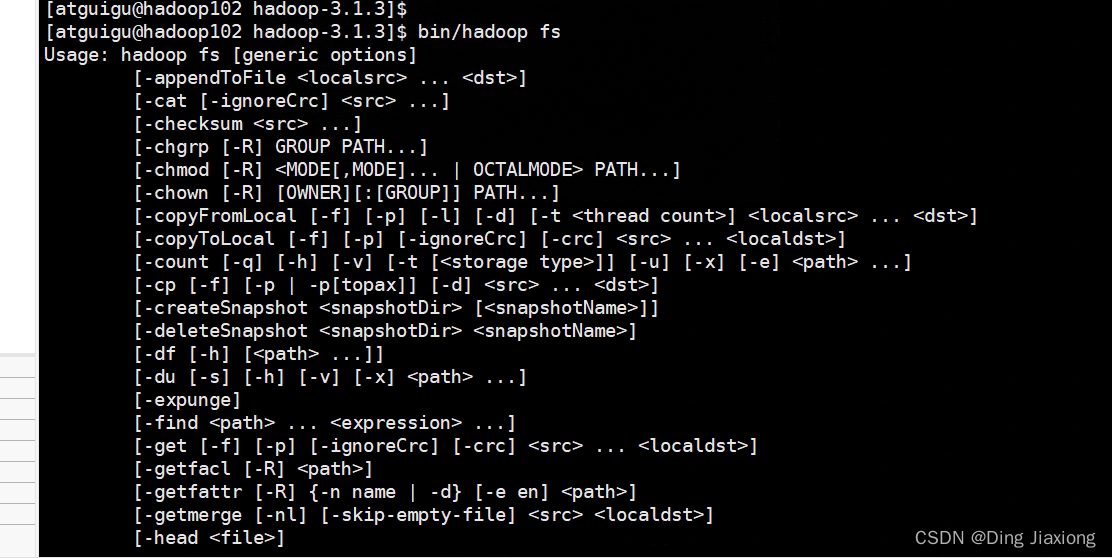
2.3 常用命令实操
2.3.1 准备工作
-
启动Hadoop集群

-
-help
查看创建命令
-
创建/sanguo文件夹

2.3.2 上传
- -moveFromLocal:从本地剪切粘贴到 HDFS【本地就没有了】

-
-copyFromLocal:从本地文件系统中拷贝文件到 HDFS 路径去

-
-put:等同于 copyFromLocal,生产环境更习惯用 put
-
-appendToFile:追加一个文件到已经存在的文件末尾

2.3.3 下载
- -copyToLocal:从 HDFS 拷贝到本地
- -get:等同于 copyToLocal,生产环境更习惯用 get
2.3.4 HDFS直接操作
-
-ls: 显示目录信息
[atguigu@hadoop102 hadoop-3.1.3]$ hadoop fs -ls /sanguo- 1
-
-cat:显示文件内容
[atguigu@hadoop102 hadoop-3.1.3]$ hadoop fs -cat /sanguo/shuguo.txt- 1
-
-chgrp、-chmod、-chown:Linux 文件系统中的用法一样,修改文件所属权限
[atguigu@hadoop102 hadoop-3.1.3]$ hadoop fs -chmod 666 /sanguo/shuguo.txt [atguigu@hadoop102 hadoop-3.1.3]$ hadoop fs -chown atguigu:atguigu /sanguo/shuguo.txt- 1
- 2
- 3
-
-mkdir:创建路径
[atguigu@hadoop102 hadoop-3.1.3]$ hadoop fs -mkdir /jinguo- 1
-
-cp:从 HDFS 的一个路径拷贝到 HDFS 的另一个路径
[atguigu@hadoop102 hadoop-3.1.3]$ hadoop fs -cp /sanguo/shuguo.txt /jinguo- 1
- 2
-
-mv:在 HDFS 目录中移动文件
[atguigu@hadoop102 hadoop-3.1.3]$ hadoop fs -mv /sanguo/wuguo.txt /jinguo [atguigu@hadoop102 hadoop-3.1.3]$ hadoop fs -mv /sanguo/weiguo.txt /jinguo- 1
- 2
- 3
-
-tail:显示一个文件的末尾 1kb 的数据
[atguigu@hadoop102 hadoop-3.1.3]$ hadoop fs -tail /jinguo/shuguo.txt- 1
-
-rm:删除文件或文件夹
[atguigu@hadoop102 hadoop-3.1.3]$ hadoop fs -rm /sanguo/shuguo.txt- 1
-
-rm -r:递归删除目录及目录里面内容
[atguigu@hadoop102 hadoop-3.1.3]$ hadoop fs -rm -r /sanguo- 1
-
-du 统计文件夹的大小信息
27 表示文件大小;81 表示 27*3 个副本;/jinguo 表示查看的目录
[atguigu@hadoop102 hadoop-3.1.3]$ hadoop fs -du -s -h /jinguo 27 81 /jinguo [atguigu@hadoop102 hadoop-3.1.3]$ hadoop fs -du -h /jinguo 14 42 /jinguo/shuguo.txt 7 21 /jinguo/weiguo.txt 6 18 /jinguo/wuguo.tx- 1
- 2
- 3
- 4
- 5
- 6
-
-setrep:设置 HDFS 中文件的副本数量
[atguigu@hadoop102 hadoop-3.1.3]$ hadoop fs -setrep 10 /jinguo/shuguo.txt- 1
这里设置的副本数只是记录在 NameNode 的元数据中,是否真的会有这么多副本,还得看 DataNode 的数量。因为目前只有 3 台设备,最多也就 3 个副本,只有节点数的增加到 10台时,副本数才能达到 10。
第3章 HDFS的API操作
3.1 客户端环境准备
-
配置HADOOP_HOME环境变量
-
配置Path环境变量
-
在 IDEA 中创建一个 Maven 工程 HdfsClientDemo,并导入相应的依赖坐标+日志添加
org.apache.hadoop hadoop-client 3.1.3 junit junit 4.12 org.slf4j slf4j-log4j12 1.7.30 - 1
- 2
- 3
- 4
- 5
- 6
- 7
- 8
- 9
- 10
- 11
- 12
- 13
- 14
- 15
- 16
- 17
-
代码
public class HdfsClient { @Test public void testMkdirs() throws IOException,URISyntaxException,InterruptedException{ // 1. 获取文件系统 Configuration configuration = new Configuration(); FileSystem fs = FileSystem.get(new URI("hdfs://hadoop102:8020"),configuration,"atguigu"); //2. 创建目录 fs.mkdirs(new Path("/xiyou/huaguoshan/")); // 3. 关闭资源 fs.close(); } }- 1
- 2
- 3
- 4
- 5
- 6
- 7
- 8
- 9
- 10
- 11
- 12
-
执行程序

创建成功
3.2 HDFS的API案例实操
3.2.1 HDFS文件上传
@Test public void testCopyFromLocalFile() throws IOException,InterruptedException,URISyntaxException{ //1. 获取文件系统 Configuration configuration = new Configuration(); configuration.set("dfs.replication","2"); FileSystem fs = FileSystem.get(new URI("hdfs://hadoop102:8020"),configuration,"atguigu"); //2.上传文件 fs.copyFromLocalFile(new Path("d:/sunwukong.txt"),new Path("/xiyou/huaguoshan")); //3.关闭资源 fs.close(); }- 1
- 2
- 3
- 4
- 5
- 6
- 7
- 8
- 9
- 10
- 11
- 12

【参数优先级】
客户端代码中设置的值 > ClassPath下用户自定义配置文件 > 服务器的自定义配置(xxx-site.xml) > 服务器的默认配置(xxx-default.xml)
3.2.2 HDFS文件下载
@Test public void testCopyToLocalFile() throws IOException, InterruptedException, URISyntaxException{ // 1 获取文件系统 Configuration configuration = new Configuration(); FileSystem fs = FileSystem.get(new URI("hdfs://hadoop102:8020"), configuration, "atguigu"); // 2 执行下载操作 // boolean delSrc 指是否将原文件删除 // Path src 指要下载的文件路径 // Path dst 指将文件下载到的路径 // boolean useRawLocalFileSystem 是否开启文件校验 fs.copyToLocalFile(false, new Path("/xiyou/huaguoshan/sunwukong.txt"), new Path("d:/sunwukong2.txt"), true); // 3 关闭资源 fs.close(); }- 1
- 2
- 3
- 4
- 5
- 6
- 7
- 8
- 9
- 10
- 11
- 12
- 13
- 14
- 15
- 16
- 17
- 18
- 19
- 20

3.2.3 HDFS文件更名和移动
@Test public void testRename() throws IOException, InterruptedException, URISyntaxException{ // 1 获取文件系统 Configuration configuration = new Configuration(); FileSystem fs = FileSystem.get(new URI("hdfs://hadoop102:8020"), configuration, "atguigu"); // 2 修改文件名称 fs.rename(new Path("/xiyou/huaguoshan/sunwukong.txt"), new Path("/xiyou/huaguoshan/meihouwang.txt")); // 3 关闭资源 fs.close(); }- 1
- 2
- 3
- 4
- 5
- 6
- 7
- 8
- 9
- 10
- 11
- 12
- 13
3.2.4 HDFS删除文件和目录
@Test public void testDelete() throws IOException, InterruptedException, URISyntaxException{ // 1 获取文件系统 Configuration configuration = new Configuration(); FileSystem fs = FileSystem.get(new URI("hdfs://hadoop102:8020"), configuration, "atguigu"); // 2 执行删除 fs.delete(new Path("/xiyou"), true); // 3 关闭资源 fs.close(); }- 1
- 2
- 3
- 4
- 5
- 6
- 7
- 8
- 9
- 10
- 11
- 12
3.2.5 HDFS文件详情查看
@Test public void testListFiles() throws IOException, InterruptedException, URISyntaxException { // 1 获取文件系统 Configuration configuration = new Configuration(); FileSystem fs = FileSystem.get(new URI("hdfs://hadoop102:8020"), configuration, "atguigu"); // 2 获取文件详情 RemoteIterator<LocatedFileStatus> listFiles = fs.listFiles(new Path("/"), true); while (listFiles.hasNext()) { LocatedFileStatus fileStatus = listFiles.next(); System.out.println("========" + fileStatus.getPath() + "========="); System.out.println(fileStatus.getPermission()); System.out.println(fileStatus.getOwner()); System.out.println(fileStatus.getGroup()); System.out.println(fileStatus.getLen()); System.out.println(fileStatus.getModificationTime()); System.out.println(fileStatus.getReplication()); System.out.println(fileStatus.getBlockSize()); System.out.println(fileStatus.getPath().getName()); // 获取块信息 BlockLocation[] blockLocations = fileStatus.getBlockLocations(); System.out.println(Arrays.toString(blockLocations)); } // 3 关闭资源 fs.close(); }- 1
- 2
- 3
- 4
- 5
- 6
- 7
- 8
- 9
- 10
- 11
- 12
- 13
- 14
- 15
- 16
- 17
- 18
- 19
- 20
- 21
- 22
- 23
- 24
- 25
- 26
- 27
- 28
3.2.6 HDFS文件和文件夹判断
@Test public void testListStatus() throws IOException, InterruptedException, URISyntaxException{ // 1 获取文件配置信息 Configuration configuration = new Configuration(); FileSystem fs = FileSystem.get(new URI("hdfs://hadoop102:8020"), configuration, "atguigu"); // 2 判断是文件还是文件夹 FileStatus[] listStatus = fs.listStatus(new Path("/")); for (FileStatus fileStatus : listStatus) { // 如果是文件 if (fileStatus.isFile()) { System.out.println("f:"+fileStatus.getPath().getName()); }else { System.out.println("d:"+fileStatus.getPath().getName()); } } // 3 关闭资源 fs.close(); }- 1
- 2
- 3
- 4
- 5
- 6
- 7
- 8
- 9
- 10
- 11
- 12
- 13
- 14
- 15
- 16
- 17
- 18
- 19
- 20
第4章 HDFS的读写流程
4.1 HDFS写数据流程
4.1.1 剖析文件写入
- 客户端通过Distributed FileSystem模块向NameNode请求上传文件,NameNode检查目标文件是否已存在,父目录是否存在。
- NameNode返回是否可以上传。
- 客户端请求第一个 Block上传到哪几个DataNode服务器上。
- NameNode返回3个DataNode节点,分别为dn1、dn2、dn3。
- 客户端通过FSDataOutputStream模块请求dn1上传数据,dn1收到请求会继续调用dn2,然后dn2调用dn3,将这个通信管道建立完成。
- dn1、dn2、dn3逐级应答客户端。
- 客户端开始往dn1上传第一个Block(先从磁盘读取数据放到一个本地内存缓存),以Packet为单位,dn1收到一个Packet就会传给dn2,dn2传给dn3;dn1每传一个packet会放入一个应答队列等待应答。
- 当一个Block传输完成之后,客户端再次请求NameNode上传第二个Block的服务器。(重复执行3-7步)。
4.1.2 网络拓扑-节点距离计算
在 HDFS 写数据的过程中,NameNode 会选择距离待上传数据最近距离的 DataNode 接收数据。
节点距离:两个节点到达最近的共同祖先的距离总和。

4.1.3 机架感知
- 机架感知说明
- Hadoop3.1.3 副本节点选择
- 第一个副本在Client所处的节点上。如果客户端在集群外,随机选一个。
- 第二个副本在另一个机架的随机一个节点
- 第三个副本在第二个副本所在机架的随机节点
4.2 HDFS读数据流程
- 客户端通过DistributedFileSystem向NameNode请求下载文件,NameNode通过查询元数据,找到文件块所在的DataNode地址。
- 挑选一台DataNode(就近原则,然后随机)服务器,请求读取数据。
- DataNode开始传输数据给客户端(从磁盘里面读取数据输入流,以Packet为单位来做校验)。
- 客户端以Packet为单位接收,先在本地缓存,然后写入目标文件。
第5章 NameNode和SecondaryNameNode
5.1 NN和2NN工作机制
FsImage:在磁盘中备份元数据。
Edits文件(只进行追加操作,效率高):每当有元数据更新或者添加元数据时,修改内存中的元数据并追加到Edits中。【当NN节点断电,F + E → 元数据】
SecondaryNamenode:专门用于FsImage和Edits的合并。
【NN工作机制】
- 第一阶段:NN启动
- 第一次启动NameNode格式化后,创建Fsimage和Edits文件。如果不是第一次启动,直接加载编辑日志和镜像文件到内存。
- 客户端对元数据进行增删改的请求。
- NameNode记录操作日志,更新滚动日志。
- NameNode在内存中对元数据进行增删改。
- 第二阶段:SNN工作
- Secondary NameNode询问NameNode是否需要CheckPoint。直接带回NameNode是否检查结果。
- Secondary NameNode请求执行CheckPoint。
- NameNode滚动正在写的Edits日志。
- 将滚动前的编辑日志和镜像文件拷贝到Secondary NameNode。
- Secondary NameNode加载编辑日志和镜像文件到内存,并合并。
- 生成新的镜像文件fsimage.chkpoint。
- 拷贝fsimage.chkpoint到NameNode。
- NameNode将fsimage.chkpoint重新命名成fsimage。
5.2 Fsimage和Edits解析
NN被格式化后,将在/opt/module/hadoop-3.1.3/data/tmp/dfs/name/current目录中产生如下文件

- Fsimage文件:HDFS文件系统元数据的一个永久性的检查点,其中包含HDFS文件系统的所有目
录和文件inode的序列化信息。 - Edits文件:存放HDFS文件系统的所有更新操作的路径,文件系统客户端执行的所有写操作首先
会被记录到Edits文件中。 - seen_txid文件保存的是一个数字,就是最后一个edits_的数字
- 每 次NameNode启动的时候都会将Fsimage文件读入内存,加载Edits里面的更新操作,保证内存
中的元数据信息是最新的、同步的,可以看成NameNode启动的时候就将Fsimage和Edits文件进行了合并。
-
oiv查看Fsimage文件
hdfs oiv -p 文件类型 -i 镜像文件 -o 转换后文件输出路径- 1
-
oev 查看 Edits 文件
hdfs oev -p 文件类型 -i 编辑日志 -o 转换后文件输出路径- 1
5.3 CheckPoint时间设置
-
通常情况下,SecondaryNameNode 每隔一小时执行一次。
[hdfs-default.xml]dfs.namenode.checkpoint.period 3600s
- 1
- 2
- 3
- 4
- 5
一分钟检查一次操作次数,当操作次数达到 1 百万时,SecondaryNameNode 执行一次。
dfs.namenode.checkpoint.txns 1000000 操作动作次数 dfs.namenode.checkpoint.check.period 60s 1分钟检查一次操作次数 - 1
- 2
- 3
- 4
- 5
- 6
- 7
- 8
- 9
- 10
- 11
第6章 DataNode
6.1 DN工作机制
- 一个数据块在DataNode上以文件形式存储在磁盘上,包括两个文件,一个是数据本身,一个是元数据包括数据块的长度,块数据的校验和,以及时间戳。
- DataNode启动后向NameNode注册,通过后,周期性(6小时)的向NameNode上报所有的块信息。
- 心跳是每3秒一次,心跳返回结果带有NameNode给该DataNode的命令如复制块数据到另一台机器,或删除某个数据块。如果超过10分钟没有收到某个DataNode的心跳,则认为该节点不可用。
- 集群运行中可以安全加入和退出一些机器。
6.2 数据完整性
DN节点保证数据完整性的方法:
- 当DataNode读取Block的时候,它会计算CheckSum。
- 如果计算后的CheckSum,与Block创建时值不一样,说明Block已经损坏。
- Client读取其他DataNode上的Block。
- 常见的校验算法crc(32),md5(128),sha1(160)
- DataNode在其文件创建后周期验证CheckSum。
6.3 掉线时限参数设置
-
DataNode进程死亡或者网络故障造成DataNode无法与NameNode通信
-
NameNode不会立即把该节点判定为死亡,要经过一段时间,这段时间暂称作超时时长。
-
HDFS默认的超时时长为10分钟+30秒。
-
如果定义超时时间为TimeOut,则超时时长的计算公式为:
TimeOut = 2 * dfs.namenode.heartbeat.recheck-interval + 10 * dfs.heartbeat.interval。
而默认的dfs.namenode.heartbeat.recheck-interval 大小为5分钟,dfs.heartbeat.interval默认为3秒。
保证数据完整性的方法:
- 当DataNode读取Block的时候,它会计算CheckSum。
- 如果计算后的CheckSum,与Block创建时值不一样,说明Block已经损坏。
- Client读取其他DataNode上的Block。
- 常见的校验算法crc(32),md5(128),sha1(160)
- DataNode在其文件创建后周期验证CheckSum。
【注意】hdfs-site.xml 配置文件中的 heartbeat.recheck.interval 的单位为毫秒,dfs.heartbeat.interval 的单位为秒。

铅掺杂PEG钝化石墨烯量子点荧光探针/磷脂包覆银石墨烯量子点多功能纳米粒表征
【方向盘】启动命令和IDEA如何传递:VM参数、命令行参数、系统参数、环境变量参数、main方法参数
vue-lazyload图片懒加载
DevOps整合Jenkins+k8s+CICD
【C++】C++ 类中的 this 指针用法 ② ( 常量成员函数 | const 修饰成员函数分析 )
鹰潭病理实验室建设、筹建考虑因素
rsa,randon.seed+费马定理
深入解析Spring Boot的常用注解和组件(上)
Linux---(二)基本认识与安装