-
QGraphicsView图形视图框架使用(六)图元动画
之前的图形框架应用中用到的图元都是静态的,在实际开发过程中纯静态的图元肯定是不够用的,特别是在一些2D游戏类的应用中,很多图元都是动态的。这里就介绍一下在图形视图框架应用中如何实现图元动画,图元动画主要的实现方法有三种,分别如下:
1.使用定时器
2.使用动画框架
3.调用Scene的advance()方法下面以一个例子分别说明一下三种方法如何实现。在实现图元动画之前我们先创建一个自定义背景和一个用来执行动画的图元。
创建基本元素
用来演示的图元以一条自定义的鱼为例,对应的实现如下:
//fish.h #ifndef Fish_H #define Fish_H #include//继承自图片图元的自定义图元 class Fish : public QGraphicsPixmapItem { public: explicit Fish(QGraphicsItem *parent = 0); //设置图元在水平和垂直方向上的移动方向 void setXDirection(int direction); void setYDirection(int direction); int xDirection(); int yDirection(); private: int m_Xdirection; //X方向 int m_Ydirection; //Y方向 }; #endif // Fish_H - 1
- 2
- 3
- 4
- 5
- 6
- 7
- 8
- 9
- 10
- 11
- 12
- 13
- 14
- 15
- 16
- 17
- 18
- 19
- 20
- 21
- 22
- 23
- 24
//fish.cpp #include "fish.h" #include#include Fish::Fish(QGraphicsItem *parent) : QGraphicsPixmapItem(parent) , m_Xdirection(0) , m_Ydirection(0) { //添加对应的图片 QPixmap pixmap(":/image/bomb.png"); setPixmap(pixmap); //将图片中心和坐标系中心对齐 setOffset(-pixmap.width() / 2, -pixmap.height() / 2); } void Fish::setYDirection(int direction) { m_Ydirection = direction; } int Fish::xDirection() { return m_Xdirection; } int Fish::yDirection() { return m_Ydirection; } void Fish::setXDirection(int direction) { m_Xdirection = direction; if (m_Xdirection != 0) { QTransform transform; //X正方向和负方向的时候镜像翻转 if (m_Xdirection > 0) { transform.scale(-1, 1); } setTransform(transform); } } - 1
- 2
- 3
- 4
- 5
- 6
- 7
- 8
- 9
- 10
- 11
- 12
- 13
- 14
- 15
- 16
- 17
- 18
- 19
- 20
- 21
- 22
- 23
- 24
- 25
- 26
- 27
- 28
- 29
- 30
- 31
- 32
- 33
- 34
- 35
- 36
- 37
- 38
- 39
- 40
- 41
- 42
- 43
- 44
- 45
- 46
背景图元是一个显示范围比较大的图片图元,对应的实现如下:
//backgrounditem.h #ifndef BACKGROUNDITEM_H #define BACKGROUNDITEM_H #includeclass BackgroundItem : public QGraphicsPixmapItem { public: //外部传进来图片信息 explicit BackgroundItem(const QPixmap &pixmap, QGraphicsItem *parent = 0); public: virtual QPainterPath shape() const; }; #endif // BACKGROUNDITEM_H - 1
- 2
- 3
- 4
- 5
- 6
- 7
- 8
- 9
- 10
- 11
- 12
- 13
- 14
- 15
- 16
//backgrounditem.cpp #include "backgrounditem.h" BackgroundItem::BackgroundItem(const QPixmap &pixmap, QGraphicsItem * parent) : QGraphicsPixmapItem(pixmap, parent) { } QPainterPath BackgroundItem::shape() const { //碰撞检测的时候是通过shape()来判断的 //通过返回一个空路径,防止检测的时候检测到背景图片 //背景不会和任何图元发生碰撞 return QPainterPath(); }- 1
- 2
- 3
- 4
- 5
- 6
- 7
- 8
- 9
- 10
- 11
- 12
- 13
- 14
- 15
将背景图元和动画图元添加到场景中,对应的实现如下:
//myscene.h #ifndef MYSCENE_H #define MYSCENE_H #include#include class QGraphicsPixmapItem; class BackgroundItem; class Fish; class MyScene : public QGraphicsScene { Q_OBJECT public: explicit MyScene(QObject *parent = 0); private: //初始化背景图片 void initBackgournd(); //场景的范围 int m_fieldHeight; int m_fieldWidth; //海洋中的鱼 Fish* m_fish; BackgroundItem *m_sea; //背景 }; #endif // MYSCENE_H - 1
- 2
- 3
- 4
- 5
- 6
- 7
- 8
- 9
- 10
- 11
- 12
- 13
- 14
- 15
- 16
- 17
- 18
- 19
- 20
- 21
- 22
- 23
- 24
- 25
- 26
- 27
- 28
- 29
- 30
//myscene.cpp #include "myscene.h" #include#include #include #include #include "fish.h" #include "backgrounditem.h" #include #include #include MyScene::MyScene(QObject *parent) : QGraphicsScene(parent) , m_fieldHeight(600) , m_fieldWidth(320) , m_fish(0) , m_sea(0) { //初始化背景图像 initBackgournd(); } void MyScene::initBackgournd() { setSceneRect(0, 0, 320, 600); //添加背景的大海 m_sea = new BackgroundItem(QPixmap(":/image/background.png")); addItem(m_sea); m_fish = new Fish(); //计算游动的X的范围 int minX = m_fish->boundingRect().width() * 0.5; int maxX = m_fieldWidth - m_fish->boundingRect().width() * 0.5; //计算游动的Y的范围 int minY = m_fish->boundingRect().height()*0.5; int maxY = m_fieldHeight - m_fish->boundingRect().height()*0.5; //设置默认位置 int currentX = (minX + maxX)*0.5; int currentY = (minY + maxY)*0.5; addItem(m_fish); m_fish->setPos(currentX, currentY); m_fish->setZValue(1); } - 1
- 2
- 3
- 4
- 5
- 6
- 7
- 8
- 9
- 10
- 11
- 12
- 13
- 14
- 15
- 16
- 17
- 18
- 19
- 20
- 21
- 22
- 23
- 24
- 25
- 26
- 27
- 28
- 29
- 30
- 31
- 32
- 33
- 34
- 35
- 36
- 37
- 38
- 39
- 40
- 41
- 42
- 43
- 44
- 45
- 46
- 47
- 48
显示效果如下所示:

使用定时器
为了能让图元动起来,我们添加定时器定时对图元的位置进行调整,默认定时器是关闭的。当按下对应的方向键之后启动定时器,当松开对应的方向键之后暂停定时器。对应的实现如下:
//myscene.h #ifndef MYSCENE_H #define MYSCENE_H #include#include class QGraphicsPixmapItem; class BackgroundItem; class Fish; class MyScene : public QGraphicsScene { Q_OBJECT public: explicit MyScene(QObject *parent = 0); public slots: //对鱼进行移动 void moveFish(); protected: //按键按下和抬起事件 void keyPressEvent(QKeyEvent *event); void keyReleaseEvent(QKeyEvent *event); private: //修改水平位置 void addHorizontalInput(int input); //修改垂直位置 void addVerticalInput(int input); private: //初始化背景图片 void initBackgournd(); //检查定时器 void checkTimer(); //场景的范围 int m_fieldHeight; int m_fieldWidth; //海洋中的鱼 Fish* m_fish; BackgroundItem *m_sea; //背景 //移动速度 int m_velocity; //X方向上的范围 qreal m_minX; qreal m_maxX; //Y方向上的范围 qreal m_minY; qreal m_maxY; //定时器 QTimer m_timer; //当前位置 qreal m_currentX; qreal m_currentY; //X方向和Y方向上的输入 int m_horizontalInput; int m_verticalInput; }; #endif // MYSCENE_H - 1
- 2
- 3
- 4
- 5
- 6
- 7
- 8
- 9
- 10
- 11
- 12
- 13
- 14
- 15
- 16
- 17
- 18
- 19
- 20
- 21
- 22
- 23
- 24
- 25
- 26
- 27
- 28
- 29
- 30
- 31
- 32
- 33
- 34
- 35
- 36
- 37
- 38
- 39
- 40
- 41
- 42
- 43
- 44
- 45
- 46
- 47
- 48
- 49
- 50
- 51
- 52
- 53
- 54
- 55
- 56
- 57
- 58
- 59
- 60
- 61
- 62
- 63
- 64
- 65
- 66
- 67
- 68
- 69
- 70
//myscene.cpp #include "myscene.h" #include#include #include #include #include "fish.h" #include "backgrounditem.h" #include #include #include MyScene::MyScene(QObject *parent) : QGraphicsScene(parent) , m_velocity(4) , m_minX(0) , m_maxX(0) , m_minY(0) , m_maxY(0) , m_fieldHeight(600) , m_fieldWidth(320) , m_fish(0) , m_sea(0) , m_horizontalInput(0) , m_verticalInput(0) { //初始化背景图像 initBackgournd(); //定时器对图元进行移动 m_timer.setInterval(30); connect(&m_timer, &QTimer::timeout, this, &MyScene::moveFish); } void MyScene::moveFish() { //如果两个方向上都没有变化不操作对象 if ((m_fish->xDirection() == 0)&& (m_fish->yDirection() == 0)) { return; } //根据速度向对应的方向上进行移动 int xDirection = m_fish->xDirection(); int yDirection = m_fish->yDirection(); //qBound确保位置在视图范围内 //X方向变化 const int dx = xDirection * m_velocity; qreal newX = qBound(m_minX, m_currentX + dx, m_maxX); m_currentX = newX; //Y方向变化 const int dy = yDirection * m_velocity; qreal newY = qBound(m_minY, m_currentY + dy, m_maxY); m_currentY = newY; m_fish->setPos(m_currentX,m_currentY); } void MyScene::checkTimer() { //对定时器进行检查 if ((m_fish->xDirection() == 0)&& (m_fish->yDirection() == 0)) { m_timer.stop(); } else if (!m_timer.isActive()) { m_timer.start(); } } void MyScene::initBackgournd() { setSceneRect(0, 0, 320, 600); //添加背景的大海 m_sea = new BackgroundItem(QPixmap(":/image/background.png")); addItem(m_sea); m_fish = new Fish(); //计算游动的X的范围 m_minX = m_fish->boundingRect().width() * 0.5; m_maxX = m_fieldWidth - m_fish->boundingRect().width() * 0.5; //计算游动的Y的范围 m_minY = m_fish->boundingRect().height()*0.5; m_maxY = m_fieldHeight - m_fish->boundingRect().height()*0.5; //设置默认位置 m_currentX = (m_maxX + m_minX)*0.5; m_currentY = (m_maxY + m_minY)*0.5; addItem(m_fish); m_fish->setPos(m_currentX, m_currentY); m_fish->setZValue(1); } void MyScene::keyPressEvent(QKeyEvent *event) { if (event->isAutoRepeat()) { return; } switch (event->key()) { case Qt::Key_Right: addHorizontalInput(1); break; case Qt::Key_Left: addHorizontalInput(-1); break; case Qt::Key_Up: addVerticalInput(-1); break; case Qt::Key_Down: addVerticalInput(1); break; default: break; } } void MyScene::keyReleaseEvent(QKeyEvent *event) { if (event->isAutoRepeat()) { return; } switch (event->key()) { case Qt::Key_Right: addHorizontalInput(-1); break; case Qt::Key_Left: addHorizontalInput(1); break; case Qt::Key_Up: addVerticalInput(1); break; case Qt::Key_Down: addVerticalInput(-1); break; default: break; } } //修改水平移动方向 void MyScene::addHorizontalInput(int input) { m_horizontalInput += input; m_fish->setXDirection(qBound(-1, m_horizontalInput, 1)); checkTimer(); } //修改垂直移动方向 void MyScene::addVerticalInput(int input) { m_verticalInput += input; m_fish->setYDirection(qBound(-1, m_verticalInput, 1)); checkTimer(); } - 1
- 2
- 3
- 4
- 5
- 6
- 7
- 8
- 9
- 10
- 11
- 12
- 13
- 14
- 15
- 16
- 17
- 18
- 19
- 20
- 21
- 22
- 23
- 24
- 25
- 26
- 27
- 28
- 29
- 30
- 31
- 32
- 33
- 34
- 35
- 36
- 37
- 38
- 39
- 40
- 41
- 42
- 43
- 44
- 45
- 46
- 47
- 48
- 49
- 50
- 51
- 52
- 53
- 54
- 55
- 56
- 57
- 58
- 59
- 60
- 61
- 62
- 63
- 64
- 65
- 66
- 67
- 68
- 69
- 70
- 71
- 72
- 73
- 74
- 75
- 76
- 77
- 78
- 79
- 80
- 81
- 82
- 83
- 84
- 85
- 86
- 87
- 88
- 89
- 90
- 91
- 92
- 93
- 94
- 95
- 96
- 97
- 98
- 99
- 100
- 101
- 102
- 103
- 104
- 105
- 106
- 107
- 108
- 109
- 110
- 111
- 112
- 113
- 114
- 115
- 116
- 117
- 118
- 119
- 120
- 121
- 122
- 123
- 124
- 125
- 126
- 127
- 128
- 129
- 130
- 131
- 132
- 133
- 134
- 135
- 136
- 137
- 138
- 139
- 140
- 141
- 142
- 143
- 144
- 145
- 146
- 147
- 148
- 149
- 150
- 151
- 152
- 153
- 154
- 155
- 156
- 157
添加了定时器之后,我们就可以通过方向键来控制图元的运动了,对应的显示效果如下:
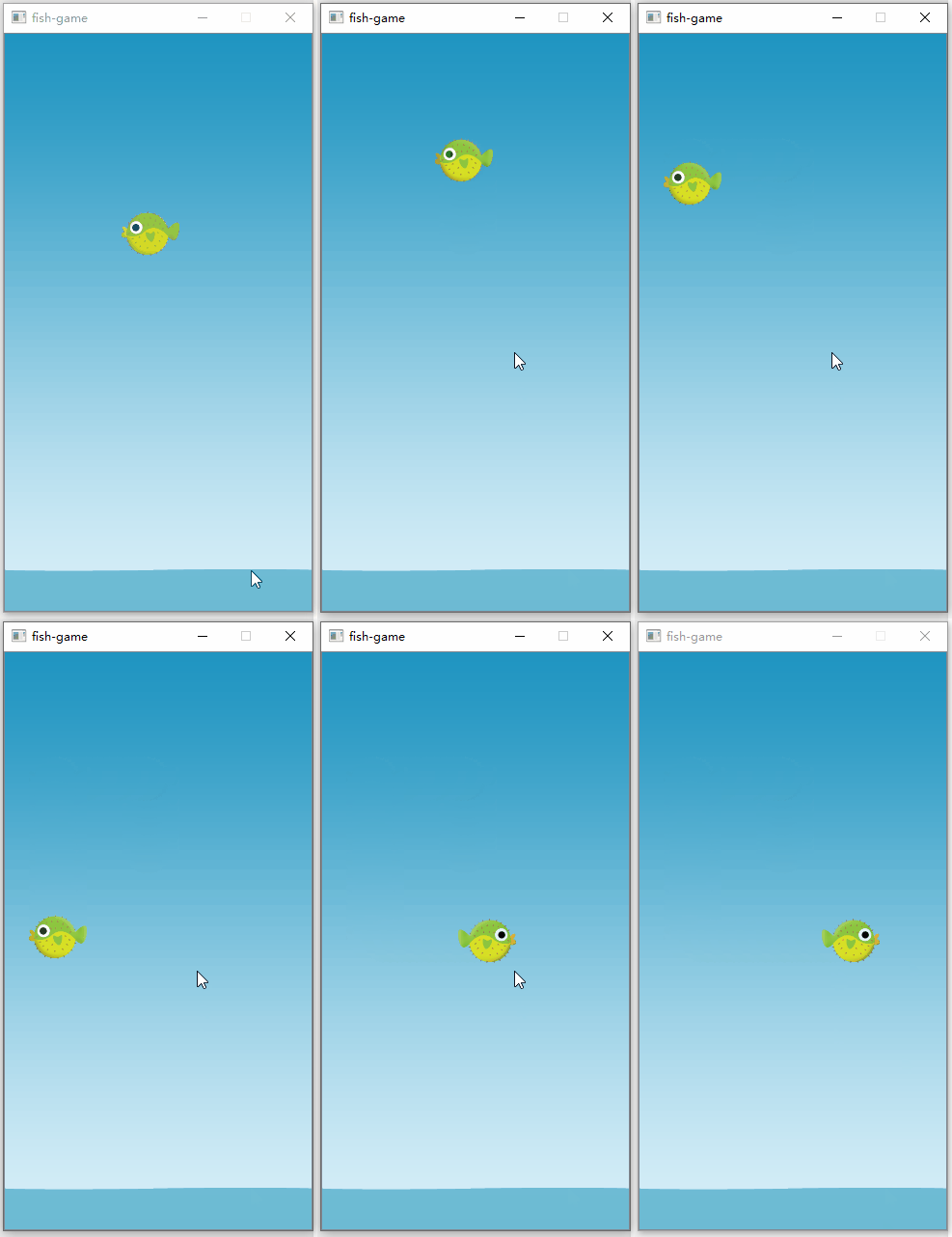
使用动画框架
使用定时器动态修改图元的属性,这种动态操作比较单一。如果想实现更加复杂的动画效果,可以采用QT的动画框架。QT的动画类是基于QObject的,不仅可以用于QWidget控件还可以用于图形视图框架中的图元。使用动画类,我们不仅可以操作图元的位置还可以操作图元的颜色、透明度等一系列的属性。同时我们还可以将多个动画组合到一起使用。
动画类的使用流程如下:
1.创建一个动画类(比如 QPropertyAnimation)
2.设置动画对象(setTargetObject)
3.设置需要动态操作的属性(setPropertyName)
4.设置动画的变化规则(起始值、结束值及差值曲线)
5.启动动画默认的Scene成员变量动画类是识别不了的,我们必须把对应的成员值声明成QT能识别的属性(Property)。只有继承自QObject的类才能声明属性。我们一般在Q_OBJECT宏之后,在private作用域下通过Q_PROPERTY宏来声明属性。在之前的QML和C++交互的文章中也介绍过如何声明属性,格式如下:
Q_PROPERTY(变量类型 访问名称 READ 读方法 WRITE 写方法 NOTIFY 发生变化的通知信号)- 1
动画框架支持的属性类型包括int、unsinged int、double、float、QLine、QLineF、QSize、QSizeF、QRect、QRectF、QColor。其它的类型不支持,因为QT无法支持其它类型的差值操作。当然我们也可以为自定义类型添加支持。
这里我们在MyScene中添加一个属性rushDistance用来定义Fish快速移动的距离,对应的实现如下所示:
#ifndef MYSCENE_H #define MYSCENE_H #include#include class QGraphicsPixmapItem; class QPropertyAnimation; class BackgroundItem; class Fish; class MyScene : public QGraphicsScene { Q_OBJECT //添加一个属性值 Q_PROPERTY(qreal rushDistance READ rushDistance //读方法 WRITE setRushDistance //写方法 NOTIFY rushDistanceChanged) //信号 public: explicit MyScene(QObject *parent = 0); //属性值的读方法 qreal rushDistance() const; //属性值的写方法 void setRushDistance(const qreal &rushDistance); private slots: //鱼快速游动 void rush(); signals: //属性值变化的信号 void rushDistanceChanged(qreal); ··· ··· //对应的动画类 QPropertyAnimation *m_rush_Animation; //对应的属性值 qreal mRushDistance; }; #endif // MYSCENE_H - 1
- 2
- 3
- 4
- 5
- 6
- 7
- 8
- 9
- 10
- 11
- 12
- 13
- 14
- 15
- 16
- 17
- 18
- 19
- 20
- 21
- 22
- 23
- 24
- 25
- 26
- 27
- 28
- 29
- 30
- 31
- 32
- 33
- 34
- 35
- 36
- 37
- 38
- 39
定义完成属性之后,我们添加一个动画,动态的操作这个属性,从而实现Fish的快速移动,对应的实现如下:
MyScene::MyScene(QObject *parent) : QGraphicsScene(parent) , m_velocity(4) , m_minX(0) , m_maxX(0) , m_minY(0) , m_maxY(0) , m_fieldHeight(600) , m_fieldWidth(320) , m_fish(0) , m_sea(0) , m_horizontalInput(0) , m_verticalInput(0) , m_rush_Animation(new QPropertyAnimation(this)) , m_last_input(-1) { //初始化背景图像 initBackgournd(); ··· ··· //定义动画按照固定的速度曲线对属性值进行调整 m_rush_Animation->setTargetObject(this); m_rush_Animation->setPropertyName("rushDistance"); m_rush_Animation->setStartValue(0); m_rush_Animation->setKeyValueAt(0.5, 0.5); m_rush_Animation->setEndValue(1.5); m_rush_Animation->setDuration(400); m_rush_Animation->setEasingCurve(QEasingCurve::InCubic); } //启动动画,让鱼快速移动 void MyScene::rush() { if (QAbstractAnimation::Stopped == m_rush_Animation->state()) { m_rush_Animation->start(); } } //获取快速移动的值 qreal MyScene::rushDistance() const { return mRushDistance; } void MyScene::setRushDistance(const qreal &rushDistance) { if (mRushDistance == rushDistance) { return; } //动画执行的过程中动态刷新鱼的位置 mRushDistance = rushDistance; emit rushDistanceChanged(mRushDistance); int prev_pos = m_currentX; prev_pos += m_last_input * 80 *m_rush_Animation->currentValue().toReal(); m_fish->setX(prev_pos); //动画结束的时候更新鱼的当前位置 if (1.5 == m_rush_Animation->currentValue()) { m_currentX = prev_pos; } } //按空格键启动动画 void MyScene::keyPressEvent(QKeyEvent *event) { if (event->isAutoRepeat()) { return; } switch (event->key()) { case Qt::Key_Space: rush(); default: break; } }- 1
- 2
- 3
- 4
- 5
- 6
- 7
- 8
- 9
- 10
- 11
- 12
- 13
- 14
- 15
- 16
- 17
- 18
- 19
- 20
- 21
- 22
- 23
- 24
- 25
- 26
- 27
- 28
- 29
- 30
- 31
- 32
- 33
- 34
- 35
- 36
- 37
- 38
- 39
- 40
- 41
- 42
- 43
- 44
- 45
- 46
- 47
- 48
- 49
- 50
- 51
- 52
- 53
- 54
- 55
- 56
- 57
- 58
- 59
- 60
- 61
- 62
- 63
- 64
- 65
- 66
- 67
- 68
- 69
- 70
- 71
- 72
- 73
- 74
- 75
- 76
动画图元的动画效果如下所示:

为了让背景显示不那么单调,我们添加几个动态闪烁的星星用来点缀一下,对应的星星图元的实现如下。这里需要注意一点,默认的图元并不是继承自QObject类的,无法注册属性,我们实现自定义图元的时候需要同时继承实现QObject类和QGraphicsPixmapItem类。当然我们也可以直接继承QGraphicsObject类,但是我们就需要自己在paint()函数中实现图片的绘制操作了。//stars.h #ifndef STAR_H #define STAR_H #include#include #include class Star : public QObject, public QGraphicsPixmapItem { Q_OBJECT //声明透明度属性 Q_PROPERTY(qreal opacity READ opacity WRITE setOpacity) //声明尺寸变化属性 Q_PROPERTY(qreal sacleFactor READ scaleFactor WRITE setScaleFactor) public: explicit Star(QGraphicsItem *parent = 0); enum { Type = UserType + 1 }; int type() const; //闪烁 void explode(); //属性修改 qreal scaleFactor() const; void setScaleFactor(const qreal &scaleFactor); private: qreal mScaleFactor; //尺寸缩放系数 QPropertyAnimation *mscaleAnimation; //尺寸缩放动画 }; #endif - 1
- 2
- 3
- 4
- 5
- 6
- 7
- 8
- 9
- 10
- 11
- 12
- 13
- 14
- 15
- 16
- 17
- 18
- 19
- 20
- 21
- 22
- 23
- 24
- 25
- 26
- 27
- 28
- 29
- 30
- 31
- 32
- 33
- 34
- 35
//stars.cpp #include "stars.h" #include#include #include #include Star::Star(QGraphicsItem *parent) : QGraphicsPixmapItem(parent), mScaleFactor(1) { QPixmap pixmap(":/image/currency.png"); setPixmap(pixmap); setOffset(-pixmap.width() / 2, -pixmap.height() / 2); explode(); } int Star::type() const { return Type; } void Star::explode() { //并行动画,两个动画同时执行 QParallelAnimationGroup *group = new QParallelAnimationGroup(this); //尺寸变化动画 mscaleAnimation = new QPropertyAnimation(this, "sacleFactor"); mscaleAnimation->setDuration(2700); mscaleAnimation->setStartValue(0.8); mscaleAnimation->setEndValue(1.5); mscaleAnimation->setEasingCurve(QEasingCurve::OutQuad); group->addAnimation(mscaleAnimation); //透明度变化的动画 QPropertyAnimation *fadeAnimation = new QPropertyAnimation(this, "opacity"); fadeAnimation->setDuration(2700); fadeAnimation->setStartValue(1); fadeAnimation->setEndValue(0.2); fadeAnimation->setEasingCurve(QEasingCurve::OutQuad); group->addAnimation(fadeAnimation); //动画无限的循环播放 group->setLoopCount(-1); group->start(); } qreal Star::scaleFactor() const { return mScaleFactor; } void Star::setScaleFactor(const qreal &scaleFactor) { mScaleFactor = scaleFactor; double scale_factor = mscaleAnimation->currentValue().toReal(); QTransform transform; transform.scale(scale_factor,scale_factor); this->setTransform(transform); } - 1
- 2
- 3
- 4
- 5
- 6
- 7
- 8
- 9
- 10
- 11
- 12
- 13
- 14
- 15
- 16
- 17
- 18
- 19
- 20
- 21
- 22
- 23
- 24
- 25
- 26
- 27
- 28
- 29
- 30
- 31
- 32
- 33
- 34
- 35
- 36
- 37
- 38
- 39
- 40
- 41
- 42
- 43
- 44
- 45
- 46
- 47
- 48
- 49
- 50
- 51
- 52
- 53
- 54
- 55
- 56
- 57
- 58
- 59
- 60
- 61
- 62
- 63
在背景创建的时候,动态的将小星星添加进去,添加代码如下:
void MyScene::initBackgournd() { ··· ··· for (int i = 0; i < 25; ++i) { Star *c = new Star(); c->setPos(qrand() % (int)m_maxX, qrand() % (int)m_maxY); c->setZValue(0); addItem(c); } }- 1
- 2
- 3
- 4
- 5
- 6
- 7
- 8
- 9
- 10
- 11
添加了星星背景之后,视图场景显示效果如下所示:

通过引入动画框架我们就可以实现各种各样的复杂的动画效果了。这在一些2D游戏开发过程中用的还挺多的。调用advance()方法
除了定时器和动画框架外,我们还可以通过调用scene的advance()方法来让图元动起来。如果调用Scene的advance()方法,该方法会进一步调用所有图元的advance方法。我们可以在对应图元的advance()方法中实现图元的运动。
Scene的advance()方法调用分为两步调用,首先使用数值0调用一次,通知图元准备移动,然后使用数值1调用一次,通知图元移动。advance()方法通常和QTimeLine搭配到一起使用,对应的调用流程如下所示:
MyScene::MyScene(QObject *parent) : QGraphicsScene(parent) { ··· ··· //2秒一次,调用十次 QTimeLine* timeLine = new QTimeLine(2000,this); timeLine->setFrameRange(0,10); connect(timeLine,SIGNAL(frameChanged(int)),this,SLOT(advance())); }- 1
- 2
- 3
- 4
- 5
- 6
- 7
- 8
- 9
- 10
由于所有的图元都会调用advance方法,所以所有图元都会移动,如果我们只想移动一部分图元的话,使用advance()方法可能并不是最好的动画方案。
-
相关阅读:
【Java】关于ZooKeeper的原理以及一致性问题,协议和算法和ZooKeeper的理论知识和应用 场景
LM2903VQPWRQ1比较器 LM73C0QDDCRQ1传感器的中文资料
【网络层】IP组播(多播)、硬件组播、IGMP、组播路由选择协议、移动IP、路由器详解、路由表和路由转发
深度系统v15.4正式发布,惊艳眼球
Android 使用 GeckoView 并实现 js 交互、权限交互
论文阅读笔记(二)——Mask R-CNN
傅里叶级数与傅里叶变换_Part3_周期为2L的函数展开为傅里叶级数
arcgis--二维点、线转三维
英特尔参与 CentOS Stream 项目
Leetcode刷题详解——字母大小写全排列
- 原文地址:https://blog.csdn.net/yang1fei2/article/details/125900175
