-
3D数学之三角公式
三角有两种表达方式,一种是人类喜欢的角度 Degree,一种是数学喜欢的弧度 Redian。
它们之间的转换为
r e d = d e g ∗ ( π / 180 ) = d e g ∗ 0.01745329 d e g = r e d ∗ ( 180 / π ) = r e d ∗ 57.29578 red = deg * (\pi / 180) = deg * 0.01745329\\ deg = red * (180 / \pi) = red * 57.29578\\ red=deg∗(π/180)=deg∗0.01745329deg=red∗(180/π)=red∗57.29578
我们无需手写,一般数学库中包含了角度与弧度的相互转换Mathf.Red2Deg: 0.01745329Mathf.Deg2Red:57.29578正弦
sin和 余弦cos,还有一些其他形式三角函数
sec θ = 1 cos θ csc θ = 1 sin θ tan θ = sin θ cos θ cot θ = 1 tan θ = cos θ sin θ \sec\theta = \frac{1}{\cos\theta}\qquad \csc\theta = \frac{1}{\sin\theta}\\ \tan\theta = \frac{\sin\theta}{\cos\theta}\qquad \cot\theta = \frac{1}{\tan\theta} = \frac{\cos\theta}{\sin\theta} secθ=cosθ1cscθ=sinθ1tanθ=cosθsinθcotθ=tanθ1=sinθcosθ
三角恒等式
sin 2 θ + cos 2 θ = 1 \sin^2\theta + \cos^2\theta = 1 sin2θ+cos2θ=1一般的数学库还提供反三角函数,如
Asin,Acos,Atan,它们可以将其转换为角度三角函数在单位圆形位置表示
x = cos θ y = sin θ sin θ 2 + cos θ 2 = 1 x = \cos\theta\\ y = \sin\theta\\ \sin\theta^2+\cos\theta^2 = 1 x=cosθy=sinθsinθ2+cosθ2=1在三角形的其他公式,如正弦定理,余弦定理
正弦定理
sin A a = sin B b = sin C c \frac{\sin A}{a} = \frac{\sin B}{b} = \frac{\sin C}{c} asinA=bsinB=csinC
余弦定理
a 2 = b 2 + c 2 − 2 b c cos A b 2 = a 2 + c 2 − 2 a c cos B c 2 = a 2 + b 2 − 2 a b cos C a^2 = b^2 + c^2 - 2bc\cos A\\ b^2 = a^2 + c^2 - 2ac\cos B\\ c^2 = a^2 + b^2 - 2ab\cos C\\ a2=b2+c2−2bccosAb2=a2+c2−2accosBc2=a2+b2−2abcosC这里演示一个物体的随机旋转,确定一个围绕旋转的物体,然后生成多个物体围绕它旋转。
旋转中心
public class TriangleText : MonoBehaviour { [SerializeField] private int _count = 5; [SerializeField] private float _radius = 2f; [SerializeField] private GameObject _prefab; void Start() { //获得弧度 float red = 2 * Mathf.PI / _count; for (int i = 0; i < _count; i++) { //获得位置 Vector3 position = new Vector3( Mathf.Cos(red * i) * _radius, transform.position.y, Mathf.Sin(red * i) * _radius); //获得方向 Quaternion quaternion = Quaternion.FromToRotation(Vector3.up, (transform.position - position).normalized); //创建 Instantiate(_prefab, position + transform.position, quaternion); } } }- 1
- 2
- 3
- 4
- 5
- 6
- 7
- 8
- 9
- 10
- 11
- 12
- 13
- 14
- 15
- 16
- 17
- 18
- 19
- 20
- 21
一个中心点
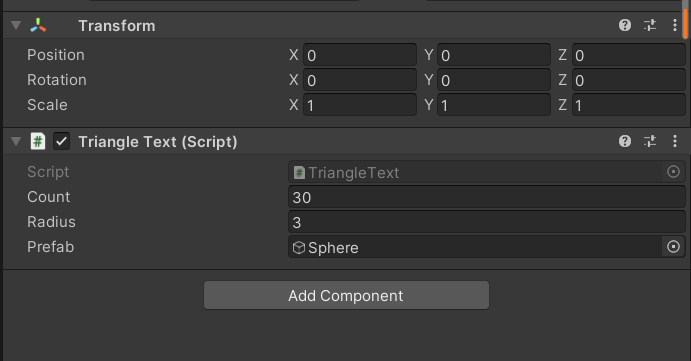
旋转物体
[SerializeField] private float _rotationSpeed = 30f; [SerializeField] private Transform _point; private float _distance; private float _currentRed; private Quaternion _rondomRoation; private void Start() { _rondomRoation = Quaternion.AngleAxis(Random.Range(0f, 180f), Random.onUnitSphere); _rondomRoation = _rondomRoation.normalized; Debug.Log(_rondomRoation); _distance = (_point.position - transform.position).magnitude; _currentRed = Vector3.Angle(Vector3.right, transform.position) * Mathf.Deg2Rad; if (Vector3.Cross(Vector3.right, transform.position).y < 0) _currentRed += Mathf.PI; StartCoroutine(Rotation()); } private IEnumerator Rotation() { while (true) { _currentRed = (_currentRed + _rotationSpeed * Mathf.Deg2Rad * Time.deltaTime) % 360f; float x1 = Mathf.Cos(_currentRed) * _distance; float y1 = Mathf.Sin(_currentRed) * _distance; Vector3 position = new Vector3(x1, 0, y1); position = _rondomRoation * position + _point.position; Quaternion quaternion = Quaternion.FromToRotation(Vector3.up, (_point.position - transform.position).normalized); transform.SetPositionAndRotation(position, quaternion); yield return null; } // ReSharper disable once IteratorNeverReturns }- 1
- 2
- 3
- 4
- 5
- 6
- 7
- 8
- 9
- 10
- 11
- 12
- 13
- 14
- 15
- 16
- 17
- 18
- 19
- 20
- 21
- 22
- 23
- 24
- 25
- 26
- 27
- 28
- 29
- 30
- 31
- 32
- 33
- 34
- 35
- 36
- 37
- 38
- 39
- 40
物体

效果图
20220720_155057
-
相关阅读:
传奇版本添加npc修改增加npc方法以及配置参数教程
LeetCode高频题42. 接雨水
数组的基本概念和存储结构
NFC调试,自会制线圈
web前端课程设计 HTML+CSS+JavaScript旅游风景云南城市网页设计与实现 web前端课程设计代码 web课程设计 HTML网页制作代码
蚂蚁集团最新业绩出炉:净利润同比下降63%,连续三个季度下滑
学习Bootstrap 5的第十四天
springboot+vue+nodejs+java卤菜品销售商城系统
c语言练习61:malloc和free
设计文档的Excel转换为对象结构POJO-简式尺规工具箱
- 原文地址:https://blog.csdn.net/m0_52361859/article/details/125894382
