-
JAVA_JDBC
一、数据库驱动
程序通过数据库驱动与数据库交换数据
二、JDBC
SUN公司为了简化开发人员的(对数据库的统一)操作,提供了一个(Java操作数据库)规范,俗称:JDBC
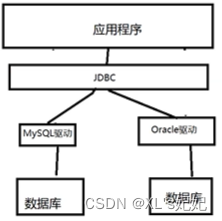
java.sql
javax.sql
还需导入数据库驱动包:mysql-connector-java-8.0.28.jar三、第一个JDBC程序
package com.JJL.lesson01; import java.nio.file.attribute.UserPrincipalLookupService; import java.sql.*; // 我的第一个JDBC程序 public class JdbcFirstDemo { public static void main(String[] args) throws ClassNotFoundException, SQLException { //1.加载驱动 Class.forName("com.mysql.cj.jdbc.Driver");//固定写法 //2.用户信息和url String url ="jdbc:mysql://localhost:3306/jdbcstudy?useUnicode=true&charaterEncoding=ut8&useSSL=true"; String username="root"; String password="1234qwer"; //3.连接成功,数据库对象 Connection 代表数据库 Connection connection= DriverManager.getConnection(url,username,password); //4.执行sql的对象 Statement执行sql的对象 Statement statement=connection.createStatement(); //5.执行SQL的对象 去执行SQL,可能存在结果,查看返回值 String sql="select * from users;"; ResultSet resultSet = statement.executeQuery(sql);//返回的结果 while (resultSet.next()){ System.out.println("id="+resultSet.getObject("id")); System.out.println("name="+resultSet.getObject("NAME")); System.out.println("pwd="+resultSet.getObject("PASSWORD")); System.out.println("email="+resultSet.getObject("email")); System.out.println("birth="+resultSet.getObject("birthday")); } //6.释放连接 resultSet.close(); statement.close(); connection.close(); } }- 1
- 2
- 3
- 4
- 5
- 6
- 7
- 8
- 9
- 10
- 11
- 12
- 13
- 14
- 15
- 16
- 17
- 18
- 19
- 20
- 21
- 22
- 23
- 24
- 25
- 26
- 27
- 28
- 29
- 30
- 31
- 32
- 33
- 34
- 35
- 36
- 37
- 38
- 39
- 40
步骤总结:
1、加载驱动
2、连接数据库
3、获得执行sql的对象
4、获得返回的结果集
5、释放连接DriverManager
//DriverManager.registerDriver(new com.mysql.cj.jdbc.Driver()); Class.forName("com.mysql.cj.jdbc.Driver");//固定写法 Connection connection= DriverManager.getConnection(url,username,password); Connection 代表数据库 数据库设置自动提交 connection.setAutoCommit(); 事物提交 connection.commit(); 事物回滚 connection.rollback();- 1
- 2
- 3
- 4
- 5
- 6
- 7
- 8
URL
String url =“jdbc:mysql://localhost:3306/jdbcstudy?useUnicode=true&charaterEncoding=ut8&useSSL=true”;
mysql—3306
协议://主机地址:端口/数据库名?参数1&参数2&参数3Oracle
jdbc:oracle:thin:@localhost:1521:sidStatement执行sql的对象
statement.executeQuery();//查询操作返回一个结果
statement.execute();//执行任何sql
statement.executeUpdate();//更新、插入、删除,都是用这个,返回一个受影响的行数Resltset 返回的结果集,结果集中封装了我们全部的查询结果
resultSet.getObject();//在不知道列类型的情况下使用
//如果知道列的类型就用指定的类型
resultSet.getString();
resultSet.getInt();
resultSet.getFloat();
resultSet.getDate();遍历,指针
resultSet.next();四、statement对象
jdbc中的statement对象用于向数据库发送sql语句。
statement.executeQuery();//查询操作返回一个结果
statement.execute();//执行任何sql
statement.executeUpdate();//更新、插入、删除,都是用这个,返回一个受影响的行数1、在src目录下创建jdbc配置文件db.properties
driver=com.mysql.cj.jdbc.Driver url =jdbc:mysql://localhost:3306/jdbcstudy?useUnicode=true&charaterEncoding=ut8&useSSL=true username=root password=1234qwer- 1
- 2
- 3
- 4
2、创建工具类
package com.JJL.lesson02.utls; import java.io.InputStream; import java.sql.*; import java.util.Properties; public class JdbcUtils { private static String driver=null; private static String url=null; private static String username=null; private static String password=null; static { try{ InputStream in=JdbcUtils.class.getClassLoader().getResourceAsStream("db.properties"); Properties properties = new Properties(); properties.load(in); driver = properties.getProperty("driver"); url = properties.getProperty("url"); username = properties.getProperty("username"); password = properties.getProperty("password"); //1.驱动只用加载一次 Class.forName(driver); } catch (Exception e) { throw new RuntimeException(e); } } //获取连接 public static Connection getConneciton() throws SQLException { return DriverManager.getConnection(url, username, password); } //释放连接资源 public static void release(Connection conn, Statement st, ResultSet rs) throws SQLException { if (rs!=null){rs.close();} if (rs!=null){st.close();} if (rs!=null){conn.close();} } }- 1
- 2
- 3
- 4
- 5
- 6
- 7
- 8
- 9
- 10
- 11
- 12
- 13
- 14
- 15
- 16
- 17
- 18
- 19
- 20
- 21
- 22
- 23
- 24
- 25
- 26
- 27
- 28
- 29
- 30
- 31
- 32
- 33
- 34
- 35
- 36
- 37
- 38
- 39
- 40
3、插入数据
package com.JJL.lesson02; import com.JJL.lesson02.utls.JdbcUtils; import java.sql.Connection; import java.sql.ResultSet; import java.sql.SQLException; import java.sql.Statement; public class TestInsert { public static void main(String[] args) throws SQLException { Connection conn=null; Statement st = null; ResultSet rs =null; try { conn = JdbcUtils.getConneciton();//获取数据库连接 st=conn.createStatement();//获取sql的执行对象 String sql = "INSERT into users(id,`NAME`,`PASSWORD`,`email`,`birthday`)" + "VALUES(5,'xl','1234','12314@qq.com','2022-03-26')"; int i = st.executeUpdate(sql); if(i>0){ System.out.println("insert 成功"); } }catch (SQLException e){ System.out.println("11111111111111"); e.printStackTrace(); }finally { JdbcUtils.release(conn,st,rs); } } }- 1
- 2
- 3
- 4
- 5
- 6
- 7
- 8
- 9
- 10
- 11
- 12
- 13
- 14
- 15
- 16
- 17
- 18
- 19
- 20
- 21
- 22
- 23
- 24
- 25
- 26
- 27
- 28
- 29
- 30
- 31
4、删除数据
package com.JJL.lesson02; import com.JJL.lesson02.utls.JdbcUtils; import java.sql.Connection; import java.sql.ResultSet; import java.sql.SQLException; import java.sql.Statement; public class TestDelete { public static void main(String[] args) throws SQLException { Connection conn=null; Statement st = null; ResultSet rs =null; try { conn = JdbcUtils.getConneciton();//获取数据库连接 st=conn.createStatement();//获取sql的执行对象 String sql = "DELETE FROM users WHERE id=2;"; int i = st.executeUpdate(sql); if(i>0){ System.out.println("delete 成功"); } }catch (SQLException e){ System.out.println("11111111111111"); e.printStackTrace(); }finally { JdbcUtils.release(conn,st,rs); } } }- 1
- 2
- 3
- 4
- 5
- 6
- 7
- 8
- 9
- 10
- 11
- 12
- 13
- 14
- 15
- 16
- 17
- 18
- 19
- 20
- 21
- 22
- 23
- 24
- 25
- 26
- 27
- 28
- 29
5、修改数据
package com.JJL.lesson02; import com.JJL.lesson02.utls.JdbcUtils; import java.sql.Connection; import java.sql.ResultSet; import java.sql.SQLException; import java.sql.Statement; public class TestUpdate { public static void main(String[] args) throws SQLException { Connection conn=null; Statement st = null; ResultSet rs =null; try { conn = JdbcUtils.getConneciton();//获取数据库连接 st=conn.createStatement();//获取sql的执行对象 String sql = "UPDATE users set `NAME`='linlin' WHERE id=3;"; int i = st.executeUpdate(sql); if(i>0){ System.out.println("update 成功"); } }catch (SQLException e){ System.out.println("11111111111111"); e.printStackTrace(); }finally { JdbcUtils.release(conn,st,rs); } } }- 1
- 2
- 3
- 4
- 5
- 6
- 7
- 8
- 9
- 10
- 11
- 12
- 13
- 14
- 15
- 16
- 17
- 18
- 19
- 20
- 21
- 22
- 23
- 24
- 25
- 26
- 27
- 28
- 29
6、查询数据
package com.JJL.lesson02; import com.JJL.lesson02.utls.JdbcUtils; import java.sql.Connection; import java.sql.ResultSet; import java.sql.SQLException; import java.sql.Statement; public class Testselect { public static void main(String[] args) throws SQLException { Connection conn=null; Statement st=null; ResultSet rs=null; try { conn= JdbcUtils.getConneciton();//创建连接 st = conn.createStatement();//创建执行对象 //sql String sql="select * from users"; rs = st.executeQuery(sql);//查询完毕会返回结果集 while (rs.next()){ System.out.println(rs.getString("NAME")); } }catch (SQLException e){ e.printStackTrace(); }finally { JdbcUtils.release(conn,st,rs); } } }- 1
- 2
- 3
- 4
- 5
- 6
- 7
- 8
- 9
- 10
- 11
- 12
- 13
- 14
- 15
- 16
- 17
- 18
- 19
- 20
- 21
- 22
- 23
- 24
- 25
- 26
- 27
- 28
- 29
五、SQL注入问题
sql存在漏洞,会被攻击,导致数据泄露
package com.JJL.lesson02.utls; import java.sql.Connection; import java.sql.ResultSet; import java.sql.SQLException; import java.sql.Statement; public class SQL注入 { public static void main(String[] args) throws SQLException { //输入正常的用户名密码 //login("linlin","1234"); //利用拼接字符串的方式,实现sql注入,查询出数据库所有的用户密码 login(" ' or '1=1"," ' or '1=1"); } public static void login(String username,String password) throws SQLException { Connection conn=null; Statement st=null; ResultSet rs=null; try { conn= JdbcUtils.getConneciton();//创建连接 st = conn.createStatement();//创建执行对象 //sql String sql="select * from users where NAME ='"+username+"'and password='"+password+"'"; rs = st.executeQuery(sql);//查询完毕会返回结果集 while (rs.next()){ System.out.println(rs.getString("NAME")); System.out.println(rs.getString("password")); } }catch (SQLException e){ e.printStackTrace(); }finally { JdbcUtils.release(conn,st,rs); } } }- 1
- 2
- 3
- 4
- 5
- 6
- 7
- 8
- 9
- 10
- 11
- 12
- 13
- 14
- 15
- 16
- 17
- 18
- 19
- 20
- 21
- 22
- 23
- 24
- 25
- 26
- 27
- 28
- 29
- 30
- 31
- 32
- 33
- 34
- 35
六、PreparedStatement对象——防止sql注入
PreparedStatement可以防止sql注入
PreparedStatement会把传入的参数当作字符
如果字符里含有转义字符会直接忽略,比如单引号1、插入记录
package com.JJL.lesson03; import com.JJL.lesson02.utls.JdbcUtils; import java.util.Date; import java.sql.*; public class TestInsert { public static void main(String[] args) throws SQLException { Connection conn=null; PreparedStatement st =null; ResultSet rs = null; try{ conn= JdbcUtils.getConneciton(); //使用? 占位符代替参数 String sql = "INSERT into users(id,`NAME`,`PASSWORD`,`email`,`birthday`)VALUES(?,?,?,?,?)"; st=conn.prepareStatement(sql);//预编译sql,先写sql,然后不执行 //手动给参数赋值 st.setInt(1,2); st.setString(2,"dier"); st.setString(3,"1234qwer"); st.setString(4,"wsdf@.com"); //注意点:sql.Date是数据库的 // util.Date Java new Date().getTime() 获得时间戳 st.setDate(5,new java.sql.Date(new Date().getTime())); //执行sql int i = st.executeUpdate(); if(i>0){ System.out.println("成功插入:"+i+"行"); } }catch (SQLException e){ e.printStackTrace(); }finally { JdbcUtils.release(conn,st,rs); } } }- 1
- 2
- 3
- 4
- 5
- 6
- 7
- 8
- 9
- 10
- 11
- 12
- 13
- 14
- 15
- 16
- 17
- 18
- 19
- 20
- 21
- 22
- 23
- 24
- 25
- 26
- 27
- 28
- 29
- 30
- 31
- 32
- 33
- 34
- 35
- 36
- 37
- 38
- 39
2、删除记录
package com.JJL.lesson03; import com.JJL.lesson02.utls.JdbcUtils; import java.sql.Connection; import java.sql.PreparedStatement; import java.sql.ResultSet; import java.sql.SQLException; public class TestDelete { public static void main(String[] args) throws SQLException { Connection conn=null; PreparedStatement st =null; ResultSet rs = null; try{ conn= JdbcUtils.getConneciton(); //使用? 占位符代替参数 String sql = "delete from users where id=?"; st=conn.prepareStatement(sql);//预编译sql,先写sql,然后不执行 //手动给参数赋值 st.setInt(1,4); //执行sql int i = st.executeUpdate(); if(i>0){ System.out.println("成功删除:"+i+"行"); } }catch (SQLException e){ e.printStackTrace(); }finally { JdbcUtils.release(conn,st,rs); } } }- 1
- 2
- 3
- 4
- 5
- 6
- 7
- 8
- 9
- 10
- 11
- 12
- 13
- 14
- 15
- 16
- 17
- 18
- 19
- 20
- 21
- 22
- 23
- 24
- 25
- 26
- 27
- 28
- 29
- 30
- 31
- 32
- 33
3、更新记录
package com.JJL.lesson03; import com.JJL.lesson02.utls.JdbcUtils; import java.sql.Connection; import java.sql.PreparedStatement; import java.sql.ResultSet; import java.sql.SQLException; public class TestUpdate { public static void main(String[] args) throws SQLException { Connection conn=null; PreparedStatement st =null; ResultSet rs = null; try{ conn= JdbcUtils.getConneciton(); //使用? 占位符代替参数 String sql = "update users set `NAME`=? WHERE id=?"; st=conn.prepareStatement(sql);//预编译sql,先写sql,然后不执行 //手动给参数赋值 st.setString(1,"第一"); st.setInt(2,1); //执行sql int i = st.executeUpdate(); if(i>0){ System.out.println("成功更新:"+i+"行"); } }catch (SQLException e){ e.printStackTrace(); }finally { JdbcUtils.release(conn,st,rs); } } }- 1
- 2
- 3
- 4
- 5
- 6
- 7
- 8
- 9
- 10
- 11
- 12
- 13
- 14
- 15
- 16
- 17
- 18
- 19
- 20
- 21
- 22
- 23
- 24
- 25
- 26
- 27
- 28
- 29
- 30
- 31
- 32
- 33
- 34
- 35
4、查询记录
package com.JJL.lesson03; import com.JJL.lesson02.utls.JdbcUtils; import java.sql.Connection; import java.sql.PreparedStatement; import java.sql.ResultSet; import java.sql.SQLException; public class TestSelect { public static void main(String[] args) throws SQLException { Connection conn=null; PreparedStatement st =null; ResultSet rs = null; try{ conn= JdbcUtils.getConneciton(); //使用? 占位符代替参数 String sql = "select * from users where id=?"; st=conn.prepareStatement(sql);//预编译sql,先写sql,然后不执行 //手动给参数赋值 st.setInt(1,5); //执行sql rs=st.executeQuery(); if(rs.next()){ System.out.println(rs.getString("NAME")); } }catch (SQLException e){ e.printStackTrace(); }finally { JdbcUtils.release(conn,st,rs); } } }- 1
- 2
- 3
- 4
- 5
- 6
- 7
- 8
- 9
- 10
- 11
- 12
- 13
- 14
- 15
- 16
- 17
- 18
- 19
- 20
- 21
- 22
- 23
- 24
- 25
- 26
- 27
- 28
- 29
- 30
- 31
- 32
- 33
七、使用IDEA连接数据库

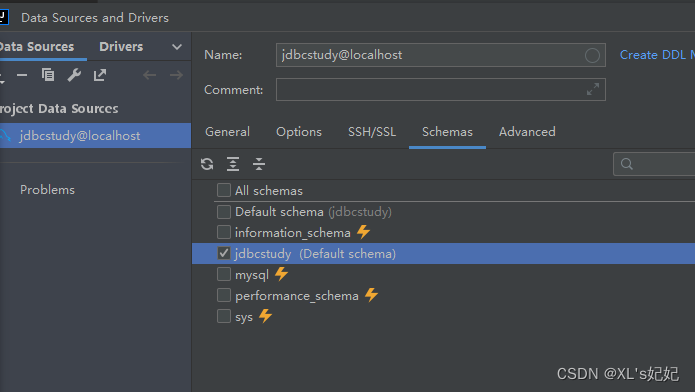
连接成功

选择数据库
查看表数据
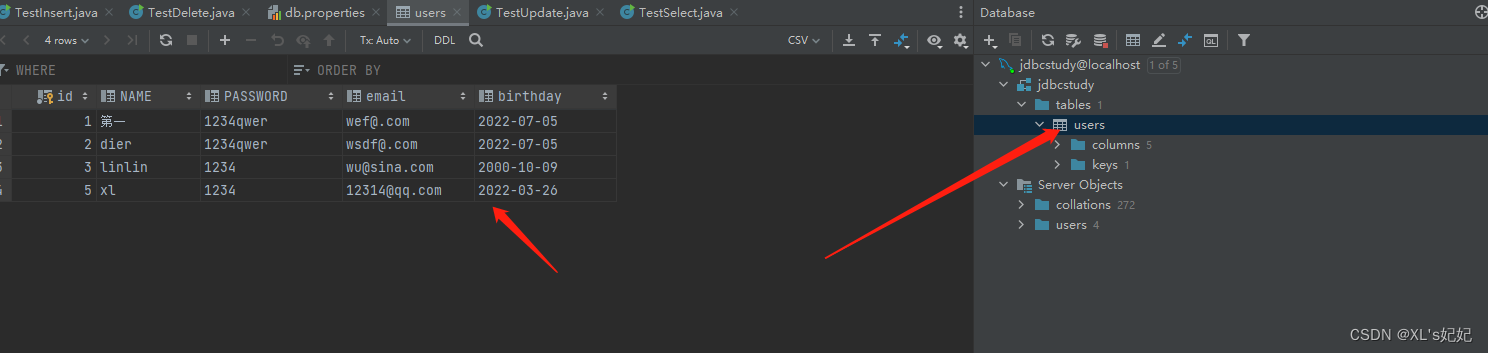
修改表数据

sql查询窗口

八、jdbc操作事务
要么都成功,要么都失败
ACID原则
原子性:要么全部完成,要么都不完成
一致性:总数不变
隔离性:多个进程互不干扰
持久性:一旦提交不可逆,持久化到数据库了隔离性的问题:
脏读:一个事务读取了另一个美哟提交的事务
不可重复读:在同一个事物内,重复读取表中的数据,表数据发生了改变
虚读(幻读):在一个事物内,读取到了别人插入的数据,导致前后读取不一致package com.JJL.lesson04; import com.JJL.lesson02.utls.JdbcUtils; import java.sql.Connection; import java.sql.PreparedStatement; import java.sql.ResultSet; import java.sql.SQLException; public class TestTransactions2 { public static void main(String[] args) throws SQLException { Connection conn = null; PreparedStatement st = null; ResultSet rs=null; try { conn = JdbcUtils.getConneciton(); //关闭数据库的自动提交功能,自动会开启事物 conn.setAutoCommit(false);//开启事物 String sql1 = "update account set money=money-100 where name='a'"; String sql2 = "update account set money=money+100 where name='b'"; st=conn.prepareStatement(sql1); st.executeUpdate(); int x=1/0;//模拟sql执行失败后,会不会整体回滚 st=conn.prepareStatement(sql2); st.executeUpdate(); //提交事物 conn.commit(); System.out.println("执行成功"); } catch (SQLException e) { try{ conn.rollback();//如果失败回滚事物,其实这个地方不写也会回滚,默认回滚 } catch (SQLException ex) { throw new RuntimeException(ex); } throw new RuntimeException(e); }finally { JdbcUtils.release(conn,st,rs); } } }- 1
- 2
- 3
- 4
- 5
- 6
- 7
- 8
- 9
- 10
- 11
- 12
- 13
- 14
- 15
- 16
- 17
- 18
- 19
- 20
- 21
- 22
- 23
- 24
- 25
- 26
- 27
- 28
- 29
- 30
- 31
- 32
- 33
- 34
- 35
- 36
- 37
- 38
- 39
- 40
- 41
- 42
1、开启事务conn.setAutoCommit(false)
2、一组业务执行完毕,提交事务
3、可以在catch语句中显示定义回滚语句,但默认失败就会回滚九、数据库连接池
数据库连接–执行完毕–释放
连接–释放十分浪费系统资源
池化技术:准备一些预先的资源,过来就链接预先准备好的最小连接数:
最大连接数:
等待超时间:开源数据源实现
DBCP
C3P0
DRUID:阿里巴巴的使用了这些数据库连接池之后,我们在项目开发中就不需要编写连接数据库代码了
DBCP
commons-dbcp-1.4.jar
commons-pool-1.6.jar1、dbcp配置文件
#连接设置 这里的名字,是DBCP数据源定义好的 driverClassName=com.mysql.cj.jdbc.Driver url =jdbc:mysql://localhost:3306/jdbcstudy?useUnicode=true&charaterEncoding=ut8&useSSL=true username=root password=1234qwer #初试连接数 initialSize=10 #最大连接数 maxActive=30 #最大空闲连接数 maxIdle=10 #最小空闲连接数 minIdle=5 #最长等待时间(毫秒) maxWait=60000 #程序中的连接不使用后是否被连接池回收 #removeAbandoned=true removeAbandonedOnMaintenance=true removeAbandonedOnBorrow=true #连接在所指定的秒数内未使用才会被删除(秒)(为配合测试程序才配置为1秒) removeAbandonedTimeout=1- 1
- 2
- 3
- 4
- 5
- 6
- 7
- 8
- 9
- 10
- 11
- 12
- 13
- 14
- 15
- 16
- 17
- 18
- 19
- 20
- 21
2、工具类
package com.JJL.lesson05.utls; import com.JJL.lesson02.utls.JdbcUtils; import org.apache.commons.dbcp.BasicDataSource; import org.apache.commons.dbcp.BasicDataSourceFactory; import javax.sql.DataSource; import java.io.InputStream; import java.sql.*; import java.util.Properties; public class JdbcUtils_DBCP { private static DataSource dataSource=null; static { try{ InputStream in= JdbcUtils_DBCP.class.getClassLoader().getResourceAsStream("dbcpconfig.properties"); Properties properties = new Properties(); properties.load(in); //创建数据源 dataSource = BasicDataSourceFactory.createDataSource(properties); } catch (Exception e) { throw new RuntimeException(e); } } //获取连接 public static Connection getConneciton() throws SQLException { return dataSource.getConnection();//从数据源中获取连接 } //释放连接资源 public static void release(Connection conn, Statement st, ResultSet rs) throws SQLException { if (rs!=null){rs.close();} if (rs!=null){st.close();} if (rs!=null){conn.close();} } }- 1
- 2
- 3
- 4
- 5
- 6
- 7
- 8
- 9
- 10
- 11
- 12
- 13
- 14
- 15
- 16
- 17
- 18
- 19
- 20
- 21
- 22
- 23
- 24
- 25
- 26
- 27
- 28
- 29
- 30
- 31
- 32
- 33
- 34
- 35
- 36
- 37
3、实现插入数据,与jdbc没啥区别
package com.JJL.lesson05; import com.JJL.lesson05.utls.JdbcUtils_DBCP; import java.sql.Connection; import java.sql.PreparedStatement; import java.sql.ResultSet; import java.sql.SQLException; import java.util.Date; public class TestDBCP { public static void main(String[] args) throws SQLException { Connection conn=null; PreparedStatement st =null; ResultSet rs = null; try{ conn= JdbcUtils_DBCP.getConneciton(); //使用? 占位符代替参数 String sql = "INSERT into users(id,`NAME`,`PASSWORD`,`email`,`birthday`)VALUES(?,?,?,?,?)"; st=conn.prepareStatement(sql);//预编译sql,先写sql,然后不执行 //手动给参数赋值 st.setInt(1,6); st.setString(2,"di六"); st.setString(3,"1234qwer"); st.setString(4,"wsdf@.com"); //注意点:sql.Date是数据库的 // util.Date Java new Date().getTime() 获得时间戳 st.setDate(5,new java.sql.Date(new Date().getTime())); //执行sql int i = st.executeUpdate(); if(i>0){ System.out.println("成功插入:"+i+"行"); } }catch (SQLException e){ e.printStackTrace(); }finally { JdbcUtils_DBCP.release(conn,st,rs); } } }- 1
- 2
- 3
- 4
- 5
- 6
- 7
- 8
- 9
- 10
- 11
- 12
- 13
- 14
- 15
- 16
- 17
- 18
- 19
- 20
- 21
- 22
- 23
- 24
- 25
- 26
- 27
- 28
- 29
- 30
- 31
- 32
- 33
- 34
- 35
- 36
- 37
- 38
- 39
- 40
- 41
- 42
C3P0
c3p0-0.9.5.5.jar
mchange-commons-java-0.2.19.jar1、配置文件
<?xml version="1.0" encoding="UTF-8"?> <c3p0-config> <!-- 使用默认的配置读取连接池对象 --> <default-config> <!-- 连接参数 --> <!-- 驱动名称 --> <property name="driverClass">com.mysql.jdbc.Driver</property> <!-- 数据库URL --> <property name="jdbcUrl">jdbc:mysql://localhost:3306/jdbcstudy?useUnicode=true&characterEncoding=UTF-8&zeroDateTimeBehavior=convertToNull&useSSL=false&serverTimezone=UTC</property> <!-- 用户名 --> <property name="user">root</property> <!-- 密码 --> <property name="password">1234qwer</property> <!-- 连接池参数 --> <property name="acquireIncrement">5</property> <!-- 初始连接数量 --> <property name="initialPoolSize">5</property> <!-- 最大连接数 --> <property name="maxPoolSize">10</property> <property name="minPoolSize">5</property> <!-- 超时时间 --> <property name="checkoutTimeout">3000</property> </default-config> <named-config name="MySQL"> <!-- 连接参数 --> <!-- 驱动名称 --> <property name="driverClass">com.mysql.jdbc.Driver</property> <!-- 数据库URL --> <property name="jdbcUrl">jdbc:mysql://localhost:3306/jdbcstudy?useUnicode=true&characterEncoding=UTF-8&zeroDateTimeBehavior=convertToNull&useSSL=false&serverTimezone=UTC</property> <!-- 用户名 --> <property name="user">root</property> <!-- 密码 --> <property name="password">1234qwer</property> <!-- 连接池参数 --> <property name="acquireIncrement">5</property> <!-- 初始连接数量 --> <property name="initialPoolSize">5</property> <!-- 最大连接数 --> <property name="maxPoolSize">10</property> <property name="minPoolSize">5</property> <!-- 超时时间 --> <property name="checkoutTimeout">3000</property> </named-config> </c3p0-config>- 1
- 2
- 3
- 4
- 5
- 6
- 7
- 8
- 9
- 10
- 11
- 12
- 13
- 14
- 15
- 16
- 17
- 18
- 19
- 20
- 21
- 22
- 23
- 24
- 25
- 26
- 27
- 28
- 29
- 30
- 31
- 32
- 33
- 34
- 35
- 36
- 37
- 38
- 39
- 40
- 41
- 42
- 43
- 44
- 45
2、工具类
package com.JJL.lesson05.utls; import com.mchange.v2.c3p0.ComboPooledDataSource; import java.sql.Connection; import java.sql.ResultSet; import java.sql.SQLException; import java.sql.Statement; public class JdbcUtils_C3P0 { private static ComboPooledDataSource dataSource=null; static { try { dataSource = new ComboPooledDataSource(); }catch (Exception e){ e.printStackTrace(); } } //获取连接 public static Connection getConneciton() throws SQLException { return dataSource.getConnection();//从数据源中获取连接 } //释放连接资源 public static void release(Connection conn, Statement st, ResultSet rs) throws SQLException { if (rs!=null){rs.close();} if (rs!=null){st.close();} if (rs!=null){conn.close();} } }- 1
- 2
- 3
- 4
- 5
- 6
- 7
- 8
- 9
- 10
- 11
- 12
- 13
- 14
- 15
- 16
- 17
- 18
- 19
- 20
- 21
- 22
- 23
- 24
- 25
- 26
- 27
- 28
- 29
- 30
- 31
- 32
3、实现类
package com.JJL.lesson05; import com.JJL.lesson05.utls.JdbcUtils_C3P0; import com.JJL.lesson05.utls.JdbcUtils_DBCP; import java.sql.Connection; import java.sql.PreparedStatement; import java.sql.ResultSet; import java.sql.SQLException; import java.util.Date; public class TestC3p0 { public static void main(String[] args) throws SQLException { Connection conn=null; PreparedStatement st =null; ResultSet rs = null; try{ conn = JdbcUtils_C3P0.getConneciton(); //使用? 占位符代替参数 String sql = "INSERT into users(id,`NAME`,`PASSWORD`,`email`,`birthday`)VALUES(?,?,?,?,?)"; st=conn.prepareStatement(sql);//预编译sql,先写sql,然后不执行 //手动给参数赋值 st.setInt(1,7); st.setString(2,"di七"); st.setString(3,"1234qwer"); st.setString(4,"wsdf@.com"); //注意点:sql.Date是数据库的 // util.Date Java new Date().getTime() 获得时间戳 st.setDate(5,new java.sql.Date(new Date().getTime())); //执行sql int i = st.executeUpdate(); if(i>0){ System.out.println("成功插入:"+i+"行"); } }catch (SQLException e){ e.printStackTrace(); }finally { JdbcUtils_DBCP.release(conn,st,rs); } } }- 1
- 2
- 3
- 4
- 5
- 6
- 7
- 8
- 9
- 10
- 11
- 12
- 13
- 14
- 15
- 16
- 17
- 18
- 19
- 20
- 21
- 22
- 23
- 24
- 25
- 26
- 27
- 28
- 29
- 30
- 31
- 32
- 33
- 34
- 35
- 36
- 37
- 38
- 39
- 40
- 41
- 42
- 43
- 44
- 45
-
相关阅读:
Pytorch实战教程(十一)-卷积神经网络
【RAZ】kids 电脑版本
linux系统编程(六) linux文件系统的操作
Mybatis搞两下(sqlsession,动态代理)
「SDOI2016」征途 题解
Redis04:Redis事务操作以及后续高级部分
在 Spring Boot 中使用 Jdbi3 简介
(附源码)ssm教师工作量核算统计系统 毕业设计 162307
CMS getshell
CentOS7和CentOS8 Asterisk 20.0.0 简单图形化界面7--对接讯时FXO网关落地
- 原文地址:https://blog.csdn.net/qq_43427354/article/details/125387204