-
JSP图书销售管理系统
作者主页:夜未央5788
简介:Java领域优质创作者、Java项目、学习资料、技术互助
文末获取源码
项目介绍
该系统分为前后台,普通用户与管理员两种角色,前台普通用户登录,后台管理员登录;
用户角色包含以下功能:
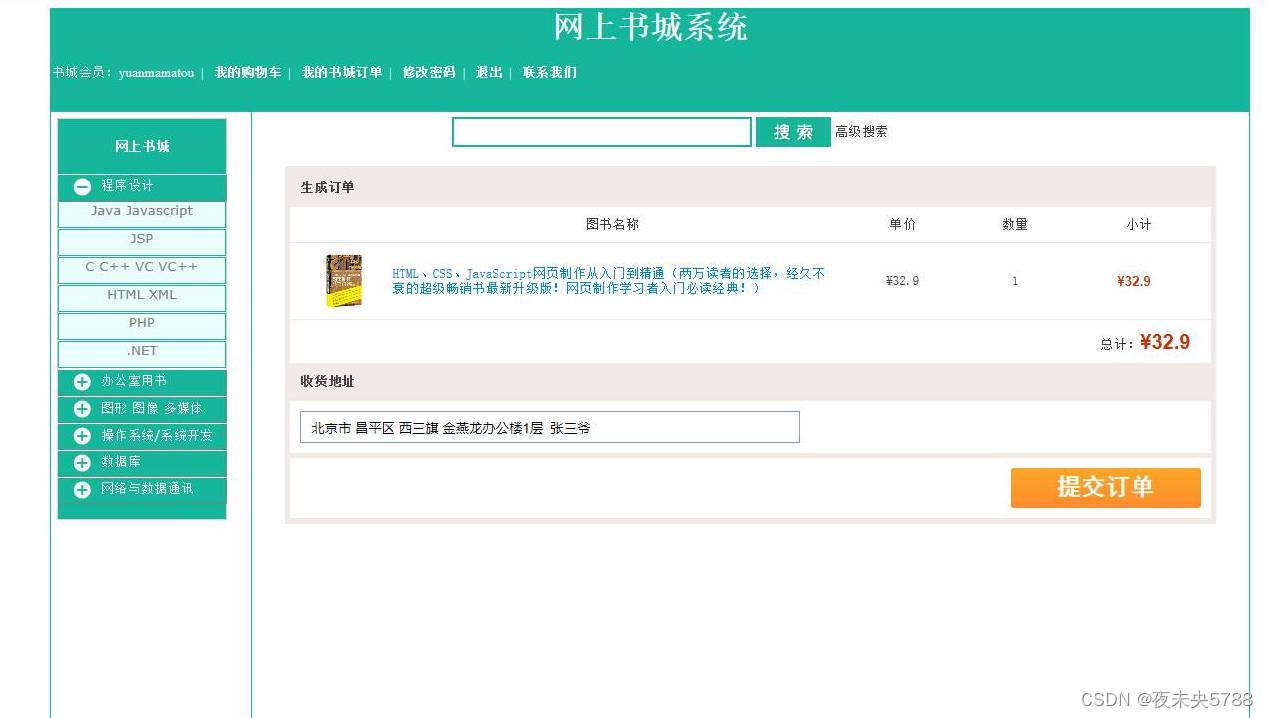
提交订单,查看图书列表,查看图书详情,查看订单,查看购物车,用户登录等功能。
管理员角色包含以下功能:
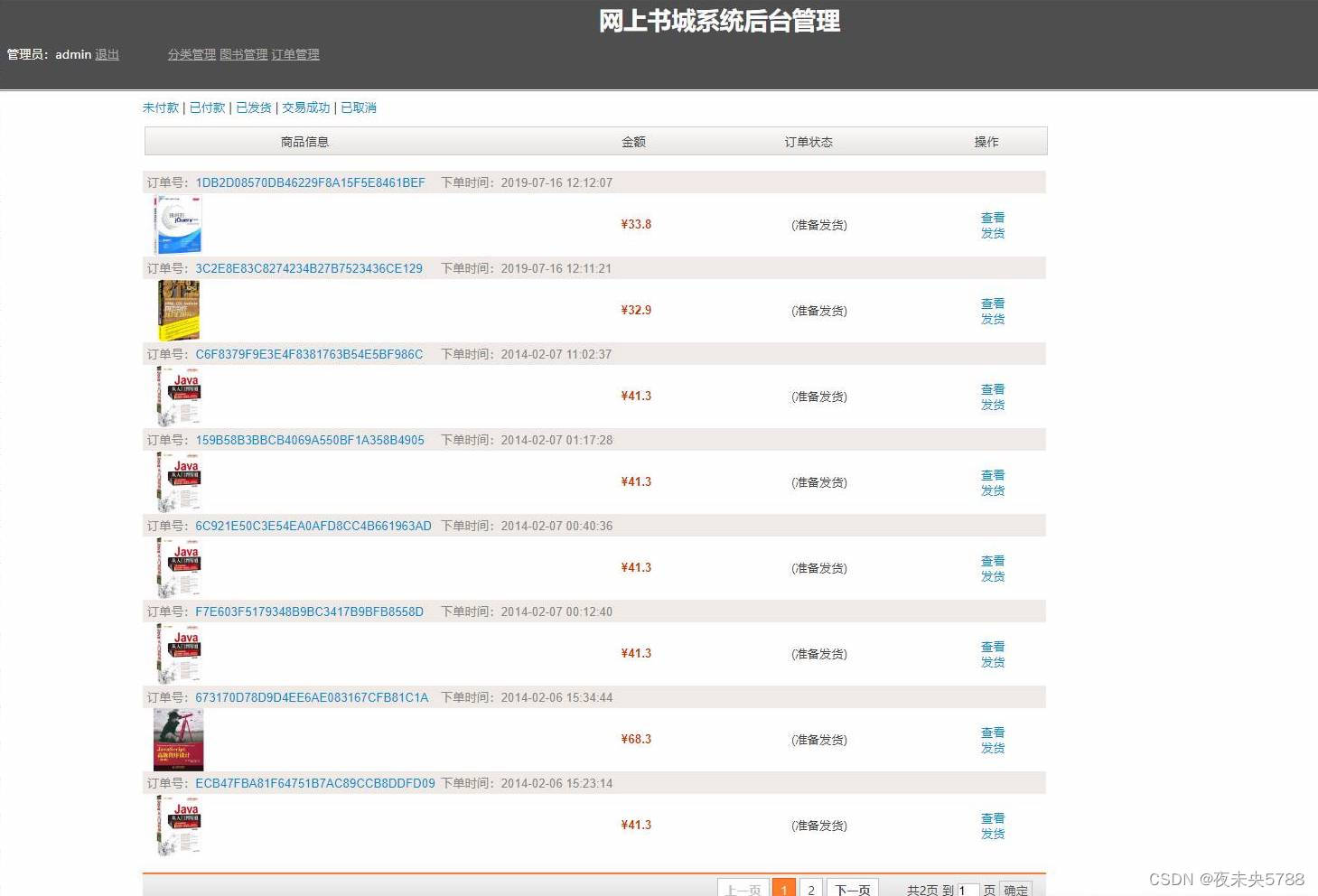
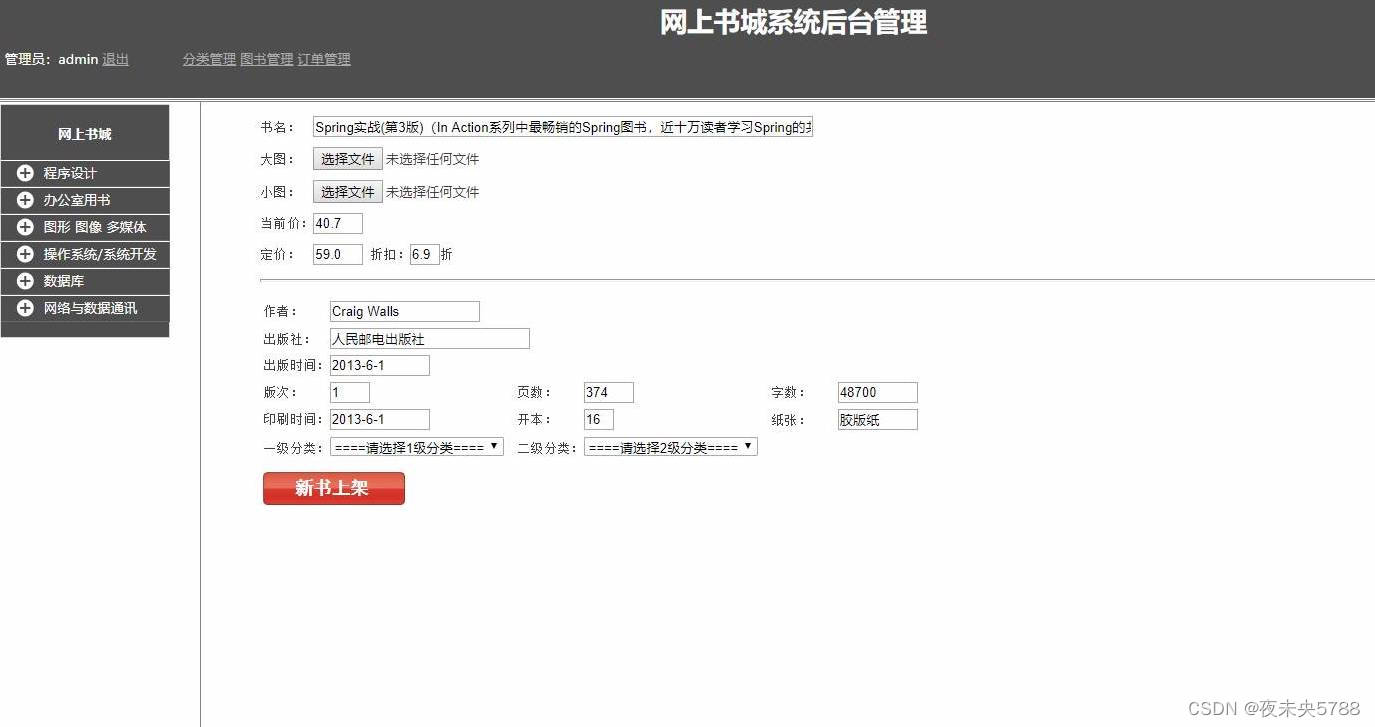
一级分类管理,分类管理,发货,图书信息管理,添加图书,订单管理等功能。环境需要
1.运行环境:最好是java jdk 1.8,我们在这个平台上运行的。其他版本理论上也可以。
2.IDE环境:IDEA,Eclipse,Myeclipse都可以。推荐IDEA;
3.tomcat环境:Tomcat 7.x,8.x,9.x版本均可
4.硬件环境:windows 7/8/10 1G内存以上;或者 Mac OS;5.数据库:MySql 5.7版本;
6.是否Maven项目:否;
技术栈
1.后端:servlet
2.前端:JSP+CSS+JavaScript+jQuery
使用说明
1. 使用Navicat或者其它工具,在mysql中创建对应名称的数据库,并导入项目的sql文件;
2. 使用IDEA/Eclipse/MyEclipse导入项目,Eclipse/MyEclipse导入时,若为maven项目请选择maven;
若为maven项目,导入成功后请执行maven clean;maven install命令,然后运行;
3. 将项目中c3p0-config.xml配置文件中的数据库配置改为自己的配置;
4. 运行项目,在浏览器中输入http://localhost:8080/goods/ 登录
注:Tomcat中配置项目路径必须为goods,否则会导致
管理员账号/密码:guanyu/123
用户账号/密码: zhangsan/123456
运行截图
前台界面


后台管理员界面



相关代码
图书servlet
- public class BookServlet extends BaseServlet {
- private BookService bookService = new BookService();
- /**
- * 获取当前页码
- * @param req
- * @return
- */
- private int getPc(HttpServletRequest req) {
- int pc = 1;
- String param = req.getParameter("pc");
- if(param != null && !param.trim().isEmpty()) {
- try {
- pc = Integer.parseInt(param);
- } catch(RuntimeException e) {}
- }
- return pc;
- }
- /**
- * 截取url,页面中的分页导航中需要使用它做为超链接的目标!
- * @param req
- * @return
- */
- /*
- * http://localhost:8080/goods/BookServlet?methed=findByCategory&cid=xxx&pc=3
- * /goods/BookServlet + methed=findByCategory&cid=xxx&pc=3
- */
- private String getUrl(HttpServletRequest req) {
- String url = req.getRequestURI() + "?" + req.getQueryString();
- /*
- * 如果url中存在pc参数,截取掉,如果不存在那就不用截取。
- */
- int index = url.lastIndexOf("&pc=");
- if(index != -1) {
- url = url.substring(0, index);
- }
- return url;
- }
- /**
- * 按bid查询
- * @param req
- * @param resp
- * @return
- * @throws ServletException
- * @throws IOException
- */
- public String load(HttpServletRequest req, HttpServletResponse resp)
- throws ServletException, IOException {
- String bid = req.getParameter("bid");//获取链接的参数bid
- Book book = bookService.load(bid);//通过bid得到book对象
- req.setAttribute("book", book);//保存到req中
- return "f:/jsps/book/desc.jsp";//转发到desc.jsp
- }
- /**
- * 按分类查
- * @param req
- * @param resp
- * @return
- * @throws ServletException
- * @throws IOException
- */
- public String findByCategory(HttpServletRequest req, HttpServletResponse resp)
- throws ServletException, IOException {
- /*
- * 1. 得到pc:如果页面传递,使用页面的,如果没传,pc=1
- */
- int pc = getPc(req);
- /*
- * 2. 得到url:...
- */
- String url = getUrl(req);
- /*
- * 3. 获取查询条件,本方法就是cid,即分类的id
- */
- String cid = req.getParameter("cid");
- /*
- * 4. 使用pc和cid调用service#findByCategory得到PageBean
- */
- PageBean<Book> pb = bookService.findByCategory(cid, pc);
- /*
- * 5. 给PageBean设置url,保存PageBean,转发到/jsps/book/list.jsp
- */
- pb.setUrl(url);
- req.setAttribute("pb", pb);
- return "f:/jsps/book/list.jsp";
- }
- /**
- * 按作者查
- * @param req
- * @param resp
- * @return
- * @throws ServletException
- * @throws IOException
- */
- public String findByAuthor(HttpServletRequest req, HttpServletResponse resp)
- throws ServletException, IOException {
- /*
- * 1. 得到pc:如果页面传递,使用页面的,如果没传,pc=1
- */
- int pc = getPc(req);
- /*
- * 2. 得到url:...
- */
- String url = getUrl(req);
- /*
- * 3. 获取查询条件,本方法就是cid,即分类的id
- */
- String author = req.getParameter("author");
- /*
- * 4. 使用pc和cid调用service#findByCategory得到PageBean
- */
- PageBean<Book> pb = bookService.findByAuthor(author, pc);
- /*
- * 5. 给PageBean设置url,保存PageBean,转发到/jsps/book/list.jsp
- */
- pb.setUrl(url);
- req.setAttribute("pb", pb);
- return "f:/jsps/book/list.jsp";
- }
购物车servlet
- public class CartItemServlet extends BaseServlet {
- private CartItemService cartItemService = new CartItemService();
- /**
- * 加载多个CartItem
- * @param req
- * @param resp
- * @return
- * @throws ServletException
- * @throws IOException
- */
- public String loadCartItems(HttpServletRequest req, HttpServletResponse resp)
- throws ServletException, IOException {
- /*
- * 1. 获取cartItemIds参数
- */
- String cartItemIds = req.getParameter("cartItemIds");
- double total = Double.parseDouble(req.getParameter("total"));
- /*
- * 2. 通过service得到List<CartItem>
- */
- List<CartItem> cartItemList = cartItemService.loadCartItems(cartItemIds);
- /*
- * 3. 保存,然后转发到/cart/showitem.jsp
- */
- req.setAttribute("cartItemList", cartItemList);
- req.setAttribute("total", total);
- req.setAttribute("cartItemIds", cartItemIds);
- return "f:/jsps/cart/showitem.jsp";
- }
- public String updateQuantity(HttpServletRequest req, HttpServletResponse resp)
- throws ServletException, IOException {
- String cartItemId = req.getParameter("cartItemId");
- int quantity = Integer.parseInt(req.getParameter("quantity"));
- CartItem cartItem = cartItemService.updateQuantity(cartItemId, quantity);
- // 给客户端返回一个json对象
- StringBuilder sb = new StringBuilder("{");
- sb.append("\"quantity\"").append(":").append(cartItem.getQuantity());
- sb.append(",");
- sb.append("\"subtotal\"").append(":").append(cartItem.getSubtotal());
- sb.append("}");
- resp.getWriter().print(sb);
- return null;
- }
- /**
- * 批量删除功能
- * @param req
- * @param resp
- * @return
- * @throws ServletException
- * @throws IOException
- */
- public String batchDelete(HttpServletRequest req, HttpServletResponse resp)
- throws ServletException, IOException {
- /*
- * 1. 获取cartItemIds参数
- * 2. 调用service方法完成工作
- * 3. 返回到list.jsp
- */
- String cartItemIds = req.getParameter("cartItemIds");
- cartItemService.batchDelete(cartItemIds);
- return myCart(req, resp);
- }
- /**
- * 添加购物车条目
- * @param req
- * @param resp
- * @return
- * @throws ServletException
- * @throws IOException
- */
- public String add(HttpServletRequest req, HttpServletResponse resp)
- throws ServletException, IOException {
- /*
- * 1. 封装表单数据到CartItem(bid, quantity)
- */
- Map map = req.getParameterMap();
- CartItem cartItem = CommonUtils.toBean(map, CartItem.class);
- Book book = CommonUtils.toBean(map, Book.class);
- User user = (User)req.getSession().getAttribute("sessionUser");
- cartItem.setBook(book);
- cartItem.setUser(user);
- /*
- * 2. 调用service完成添加
- */
- cartItemService.add(cartItem);
- /*
- * 3. 查询出当前用户的所有条目,转发到list.jsp显示
- */
- return myCart(req, resp);
- }
如果也想学习本系统,下面领取。回复:017JSP
-
相关阅读:
定了!百度WAVE SUMMIT 2024正式定档6月28日
MySQL MVVC多版本并发控制
leetcode经典例题——单词拆分
腾讯云安全2022年度产品发布会:“3+1”一体化防护体系 助力企业实现云上安全“最优解”
汽车发电机
ios CI/CD 持续集成 组件化专题一 iOS 将图片打包成bundle
各种存储性能瓶颈分析与优化方案
傻瓜式制作产品图册,一秒就能学会
微信公众号获取openid流程
Java剑指Offer青蛙跳台阶问题
- 原文地址:https://blog.csdn.net/hanyunlong1989/article/details/125597713
