-
React:五、React脚手架应用
React:五、React脚手架应用
1 前言
react脚手架搭建react应用:
1.全局安装(任意地方可使用create-react-app) npm install -g create-react-app 或 npm i -g create-react-app (i代表install) 2.切换到想创建项目的目录,使用如下命令 create-react-app appName:如 hello-my-react- 1
- 2
- 3
- 4
- 5
- 6
执行第二步前,可以打开cmd,做如下配置,再次执行第二步会快些:
npm config set registry https://registry.npm.taobao.org -- 配置后可通过下面方式来验证是否成功 npm config get registry -- 或npm info express- 1
- 2
- 3
- 4
出现如下即创建成功

然后通过vscode打开项目文件夹,ctrl+`,执行npm start:

2 使用
2.1 项目结构介绍
public一般存放静态资源:
.ico:网站的图标

index.html:%PUBLIC_URL%可改为.(当前路径):

public的index.html(react应用仅1个index.html,即SPA,single page web application 单页应用程序):<!DOCTYPE html> <html lang="en"> <head> <meta charset="utf-8" /> <link rel="icon" href="%PUBLIC_URL%/favicon.ico" /> <meta name="viewport" content="width=device-width, initial-scale=1" /> <meta name="theme-color" content="#000000" /> <meta name="description" content="Web site created using create-react-app" /> <link rel="apple-touch-icon" href="%PUBLIC_URL%/logo192.png" /> <!-- manifest.json provides metadata used when your web app is installed on a user's mobile device or desktop. See https://developers.google.com/web/fundamentals/web-app-manifest/ --> <link rel="manifest" href="%PUBLIC_URL%/manifest.json" /> <!-- Notice the use of %PUBLIC_URL% in the tags above. It will be replaced with the URL of the `public` folder during the build. Only files inside the `public` folder can be referenced from the HTML. Unlike "/favicon.ico" or "favicon.ico", "%PUBLIC_URL%/favicon.ico" will work correctly both with client-side routing and a non-root public URL. Learn how to configure a non-root public URL by running `npm run build`. --> <title>React App</title> </head> <body> <!-- 浏览器不支持js时展示这个 --> <noscript>You need to enable JavaScript to run this app.</noscript> <!-- 以后组件都放在这里面 --> <div id="root"></div> </body> </html>- 1
- 2
- 3
- 4
- 5
- 6
- 7
- 8
- 9
- 10
- 11
- 12
- 13
- 14
- 15
- 16
- 17
- 18
- 19
- 20
- 21
- 22
- 23
- 24
- 25
- 26
- 27
- 28
- 29
- 30
- 31
- 32
- 33
- 34
- 35

src文件夹:
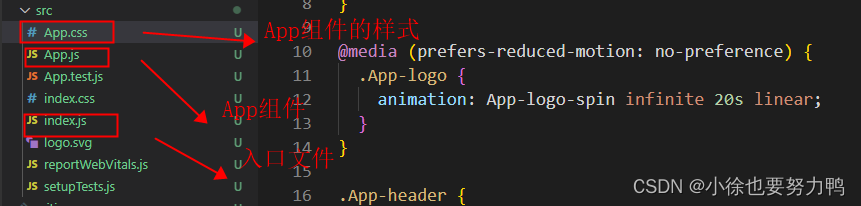

降低项目的react版本:
打开vscode的terminal终端,输入如下命令:npm i react@17 react-dom@17- 1
如下即成功:

package.json更新了react和react-dom的版本:

降低react版本后,需要修改src下的index.js(注意修改:import ReactDOM from ‘react-dom’;):import React from 'react'; import ReactDOM from 'react-dom'; import './index.css'; import App from './App'; import reportWebVitals from './reportWebVitals'; ReactDOM.render( <React.StrictMode> <App /> </React.StrictMode>, document.getElementById("root")) reportWebVitals();- 1
- 2
- 3
- 4
- 5
- 6
- 7
- 8
- 9
- 10
- 11
- 12
- 13
修改App.js:
import React, { Component } from 'react' // Component 在react.js中是分别暴露的,即 export Component,即可使用import React, { Component } from 'react' // 如果是默认暴露:export default App,在导入时,可以使用import 别名 class App extends Component{ render(){ return ( <div> hello,react </div> ) } } export default App;- 1
- 2
- 3
- 4
- 5
- 6
- 7
- 8
- 9
- 10
- 11
- 12
- 13
- 14
- 15
2.2 组件化编程

hello.css:.hel{ width: 200px; height: 40px; background-color: blueviolet; }- 1
- 2
- 3
- 4
- 5
hello.js:
import React,{Component} from 'react' import './hello.css' class Hello extends Component{ render(){ return ( <div className='hel'> 我是hello组件 </div> ) } } export default Hello- 1
- 2
- 3
- 4
- 5
- 6
- 7
- 8
- 9
- 10
- 11
- 12
- 13
- 14
welcome.css:
.wel{ width: 400px; height: 40px; background-color: yellowgreen; }- 1
- 2
- 3
- 4
- 5
welcome.js:
import React,{Component} from 'react' import './welcome.css' class Welcome extends Component{ render(){ return ( <div className = 'wel'> 我是welcome组件 </div> ) } } export default Welcome- 1
- 2
- 3
- 4
- 5
- 6
- 7
- 8
- 9
- 10
- 11
- 12
- 13
- 14
App.js:
import React,{Component} from "react"; import Hello from "./Components/hello/hello"; import Welcome from "./Components/welcome/welcome"; class App extends Component{ render(){ return ( <div> <Hello/> <Welcome/> </div> ) } } export default App;- 1
- 2
- 3
- 4
- 5
- 6
- 7
- 8
- 9
- 10
- 11
- 12
- 13
- 14
- 15
- 16
2.3 ToDo组件
2.3.1 父子组件通信
安装快捷语法插件,rcc可快速输入react的jsx语法:

//在某个组件下的index.jsx中输入rcc,快捷提示输出如下: import React, { Component } from 'react' export default class index extends Component { render() { return ( <div>index</div> ) } }- 1
- 2
- 3
- 4
- 5
- 6
- 7
- 8
- 9
- 10
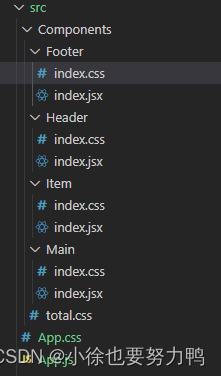
Footer:
index.css:/* footer */ .todo-footer label{ display: inline-block; margin-right: 16px; } .todo-footer label input{ position: relative; top: -1px; vertical-align: middle; margin-right: 5px; cursor: pointer; } .todo-footer button{ float: right; margin-bottom: 1px; } .todo-footer span{ font-size: 16px; }- 1
- 2
- 3
- 4
- 5
- 6
- 7
- 8
- 9
- 10
- 11
- 12
- 13
- 14
- 15
- 16
- 17
- 18
- 19
- 20
- 21
- 22
index.jsx:
import React, { Component } from 'react' import './index.css' export default class Footer extends Component { render() { return ( <div className='todo-footer'> <label htmlFor=""> <input type="checkbox" /> </label> <span> <span>已完成0</span> <span>/ 全部2</span> </span> <button className='btn btn-danger'>清除已完成任务</button> </div> ) } }- 1
- 2
- 3
- 4
- 5
- 6
- 7
- 8
- 9
- 10
- 11
- 12
- 13
- 14
- 15
- 16
- 17
- 18
Header:
index.css:.todo-header span{ display: inline-block; width: 70px; font-size: 16px; text-shadow: 1px 1px rgb(214, 211, 211); } /* heaer */ .todo-header input{ width:620px; padding: 4px; height:28px; border:1px solid #ccc; border-radius: 5px; } .todo-header input::placeholder{ font-size: 14px; padding-left: 10px; text-align: center; color: rgb(139, 134, 134); } .todo-header input:focus{ outline: none; border-color: red; box-shadow: 1px 1px rgb(238, 103, 103); }- 1
- 2
- 3
- 4
- 5
- 6
- 7
- 8
- 9
- 10
- 11
- 12
- 13
- 14
- 15
- 16
- 17
- 18
- 19
- 20
- 21
- 22
- 23
- 24
- 25
- 26
- 27
index.jsx:
import React, { Component } from 'react' import './index.css' export default class Header extends Component { // 一般最好判断输入成功是键盘按下键并弹起的时候,即keyUp事件, // 不易使用keyDown事件 handlekeyUp = (event)=>{ let val = event.target.value; let keyCode = event.keyCode; if(keyCode=='13'){ // console.log("新的",val) // console.log(event.keyCode) // console.log(parseInt("00012")) let max_str_id = this.getMaxId(this.props.originData) let obj = {id:max_str_id,name:val,done:false} this.props.onShow(obj) } } getMaxId(...objs){ // console.log(objs) let arr = objs[0] if(arr.length<=0){ throw new Error("app父组件的数组长度需大于0") } let max = arr[0].id; arr.forEach((o,inedx)=>{ // console.log(o,inedx) if(o.id>max){ max = o.id } }) // 子组件Header构造对象obj的id是当前最大id+1,补00凑成3位返回给父组件 // slice(-3):取数组倒数第三个到最后一个元素(包含最后一个) // Array(3).join(0):构造2个0的字符串(因为3个元素间隔只有2个),拼接最大id let maxAdd = parseInt(max)+1 let newId = (Array(3).join(0)+parseInt(maxAdd)).slice(-3) return newId } removeSpace = (event)=>{ event.target.value = event.target.value.replace(/\s+/g,"") } // 禁止输入空格,keyUp和keyDown效果均不佳,监听input较优 inputRemoveSpace = (event)=>{ event.target.value = event.target.value.replace(/\s+/g,"") } render() { return ( <div className='todo-header'> <span>请输入:</span> <input onKeyUp = {this.handlekeyUp} onKeyDown = {this.removeSpace} onInput = {this.inputRemoveSpace} type="text" placeholder='请输入任务名称,按回车确定'/> </div> ) } }- 1
- 2
- 3
- 4
- 5
- 6
- 7
- 8
- 9
- 10
- 11
- 12
- 13
- 14
- 15
- 16
- 17
- 18
- 19
- 20
- 21
- 22
- 23
- 24
- 25
- 26
- 27
- 28
- 29
- 30
- 31
- 32
- 33
- 34
- 35
- 36
- 37
- 38
- 39
- 40
- 41
- 42
- 43
- 44
- 45
- 46
- 47
- 48
- 49
- 50
- 51
- 52
- 53
- 54
- 55
- 56
- 57
- 58
- 59
- 60
- 61
- 62
- 63
Item:
index.css:li{ list-style: none; box-sizing: border-box; height:36px; width:630px; line-height: 36px; padding: 0 5px; border: 1px solid #ddd; border-radius: 5px; margin:5px 0; } li span{ display: inline-block; vertical-align: middle; height:40px; font-size: 14px; font-family: Arial, Helvetica, sans-serif; letter-spacing: 1px; padding-left: 5px; } li input,li,li span{ cursor: pointer; } li input{ width: 16px; height: 16px; } li:hover{ background-color: rgb(203, 241, 229); }- 1
- 2
- 3
- 4
- 5
- 6
- 7
- 8
- 9
- 10
- 11
- 12
- 13
- 14
- 15
- 16
- 17
- 18
- 19
- 20
- 21
- 22
- 23
- 24
- 25
- 26
- 27
- 28
- 29
- 30
- 31
- 32
- 33
- 34
index.jsx:
import React, { Component } from 'react' import './index.css' export default class Item extends Component { render() { // const {content} = this.props const {id,name,done} = this.props return ( <li> <label htmlFor=""> <input type="checkbox" defaultChecked={done}/> <span>{name}</span> {/* <span>{content.name}</span> */} </label> <button className='btn btn-danger' style={{display:"none"}}>删除</button> </li> ) } }- 1
- 2
- 3
- 4
- 5
- 6
- 7
- 8
- 9
- 10
- 11
- 12
- 13
- 14
- 15
- 16
- 17
- 18
- 19
- 20
Main:
index.css:.todo-main{ padding-left: 70px; }- 1
- 2
- 3
index.jsx:
import React, { Component } from 'react' import Item from '../Item' import "./index.css" export default class Main extends Component { render() { const {myTodos} = this.props return ( <ul className='todo-main'> { myTodos.map((per)=>{ // return <Item key={per.id} content = {per}/> return <Item key={per.id} {...per}/> }) } </ul> ) } }- 1
- 2
- 3
- 4
- 5
- 6
- 7
- 8
- 9
- 10
- 11
- 12
- 13
- 14
- 15
- 16
- 17
- 18
- 19
App.css:
body{ background: #fff; } .todo-container{ width: 760px; border: 1px solid rgb(123, 121, 121); border-radius: 5px; margin: 10px auto; } .todo-container .wrap{ margin: 10px 5px; } .btn{ display: inline-block; background-color: aquamarine; border: 1px solid #ddd; padding: 5px 10px; border-radius: 5px; color: rgb(223, 19, 19); font-family:Verdana, Geneva, Tahoma, sans-serif; font-weight: 600; } .btn:hover{ cursor: pointer; opacity: 0.8; } .btn:focus{ background-color: yellowgreen; opacity: 0.8; }- 1
- 2
- 3
- 4
- 5
- 6
- 7
- 8
- 9
- 10
- 11
- 12
- 13
- 14
- 15
- 16
- 17
- 18
- 19
- 20
- 21
- 22
- 23
- 24
- 25
- 26
- 27
- 28
- 29
- 30
- 31
- 32
- 33
- 34
- 35
App.js:
import React, { Component } from 'react' // 如果是导入js文件,那么文件名可以省略.js,如果是 // 导入css文件,文件名不可省略.css /* 如果是组件文件夹(文件夹命名是类名命名形式,即大写字母开头), 那么下面可以直接写index.css、index.jsx,直接引入大写类名即可 */ import Header from './Components/Header' import Main from './Components/Main' import Footer from './Components/Footer' import './App.css' window.a = "da" // Component 在react.js中是分别暴露的,即 export Component,即可使用import React, { Component } from 'react' // 如果是默认暴露:export default App,在导入时,可以使用import 别名 class App extends Component{ state = {todo:[ {id:"001",name:"学习python",done:true}, {id:"002",name:"学java",done:true}, {id:"003",name:"学react",done:true}, ]} // 组件中,子组件要传数据给父组件,即组件通信中的的子传父,需要 // 父组件将函数用过props传给子组件,子组件需要传数据给父组件时,调用 // 父组件的这个方法即可 sonToFather = (obj)=>{ const {todo} = this.state this.setState({todo:[...todo,obj]}) console.log(this.state) } render(){ console.log(window.a) const {todo} = this.state return ( <div className='todo-container'> <div className='wrap'> <Header onShow = {this.sonToFather} originData = {todo}/> <Main myTodos = {this.state.todo}/> <Footer/> </div> </div> ) } } export default App;- 1
- 2
- 3
- 4
- 5
- 6
- 7
- 8
- 9
- 10
- 11
- 12
- 13
- 14
- 15
- 16
- 17
- 18
- 19
- 20
- 21
- 22
- 23
- 24
- 25
- 26
- 27
- 28
- 29
- 30
- 31
- 32
- 33
- 34
- 35
- 36
- 37
- 38
- 39
- 40
- 41
- 42
- 43
- 44
- 45
- 46
- 47
效果如下:

通信方式:父组件传数据给子组件,依赖props传值;子组件传数据给父组件,父组件将父组件定义的更新state的方法,通过props传递给子组件,子组件传值时,调用父组件传来的props方法即可。2.3.2 爷孙组件通信
state状态在哪里,操作的方法就在哪里
Header:
index.css:
.todo-header span{ display: inline-block; width: 70px; font-size: 16px; text-shadow: 1px 1px rgb(214, 211, 211); } /* heaer */ .todo-header input{ width:620px; padding: 4px; height:28px; border:1px solid #ccc; border-radius: 5px; } .todo-header input::placeholder{ font-size: 14px; padding-left: 10px; text-align: center; color: rgb(139, 134, 134); } .todo-header input:focus{ outline: none; border-color: red; box-shadow: 1px 1px rgb(238, 103, 103); }- 1
- 2
- 3
- 4
- 5
- 6
- 7
- 8
- 9
- 10
- 11
- 12
- 13
- 14
- 15
- 16
- 17
- 18
- 19
- 20
- 21
- 22
- 23
- 24
- 25
- 26
- 27
index.jsx:
import React, { Component } from 'react' import './index.css' export default class Header extends Component { // 一般最好判断输入成功是键盘按下键并弹起的时候,即keyUp事件, // 不易使用keyDown事件 handlekeyUp = (event)=>{ let val = event.target.value; let keyCode = event.keyCode; if(keyCode=='13'){ // console.log("新的",val) // console.log(event.keyCode) // console.log(parseInt("00012")) if(val.trim()<=0) return let max_str_id = this.getMaxId(this.props.originData) let obj = {id:max_str_id,name:val,done:false} this.props.onShow(obj) } } getMaxId(...objs){ // console.log(objs) let arr = objs[0] if(arr.length<=0){ throw new Error("app父组件的数组长度需大于0") } let max = arr[0].id; arr.forEach((o,inedx)=>{ // console.log(o,inedx) if(o.id>max){ max = o.id } }) // 子组件Header构造对象obj的id是当前最大id+1,补00凑成3位返回给父组件 // slice(-3):取数组倒数第三个到最后一个元素(包含最后一个) // Array(3).join(0):构造2个0的字符串(因为3个元素间隔只有2个),拼接最大id let maxAdd = parseInt(max)+1 let newId = (Array(3).join(0)+parseInt(maxAdd)).slice(-3) return newId } removeSpace = (event)=>{ event.target.value = event.target.value.replace(/\s+/g,"") } // 禁止输入空格,keyUp和keyDown效果均不佳,监听input较优 inputRemoveSpace = (event)=>{ event.target.value = event.target.value.replace(/\s+/g,"") } render() { return ( <div className='todo-header'> <span>请输入:</span> <input onKeyUp = {this.handlekeyUp} onKeyDown = {this.removeSpace} onInput = {this.inputRemoveSpace} type="text" placeholder='请输入任务名称,按回车确定'/> </div> ) } }- 1
- 2
- 3
- 4
- 5
- 6
- 7
- 8
- 9
- 10
- 11
- 12
- 13
- 14
- 15
- 16
- 17
- 18
- 19
- 20
- 21
- 22
- 23
- 24
- 25
- 26
- 27
- 28
- 29
- 30
- 31
- 32
- 33
- 34
- 35
- 36
- 37
- 38
- 39
- 40
- 41
- 42
- 43
- 44
- 45
- 46
- 47
- 48
- 49
- 50
- 51
- 52
- 53
- 54
- 55
- 56
- 57
- 58
- 59
- 60
- 61
- 62
- 63
- 64
Main:
index.css:.todo-main{ padding-left: 70px; }- 1
- 2
- 3
index.jsx:
import React, { Component } from 'react' import Item from '../Item' import "./index.css" export default class Main extends Component { render() { const {myTodos,checkChange} = this.props return ( <ul className='todo-main'> { myTodos.map((per)=>{ return <Item key={per.id} {...per} checkChange = {checkChange}/> }) } </ul> ) } }- 1
- 2
- 3
- 4
- 5
- 6
- 7
- 8
- 9
- 10
- 11
- 12
- 13
- 14
- 15
- 16
- 17
- 18
Footer:
index.css:/* footer */ .todo-footer label{ display: inline-block; margin-right: 16px; } .todo-footer label input{ position: relative; top: -1px; vertical-align: middle; margin-right: 5px; cursor: pointer; } .todo-footer button{ float: right; margin-bottom: 1px; } .todo-footer span{ font-size: 16px; }- 1
- 2
- 3
- 4
- 5
- 6
- 7
- 8
- 9
- 10
- 11
- 12
- 13
- 14
- 15
- 16
- 17
- 18
- 19
- 20
- 21
- 22
index.jsx:
import React, { Component } from 'react' import './index.css' export default class Footer extends Component { render() { return ( <div className='todo-footer'> <label htmlFor=""> <input type="checkbox" /> </label> <span> <span>已完成0</span> <span>/ 全部2</span> </span> <button className='btn btn-danger'>清除已完成任务</button> </div> ) } }- 1
- 2
- 3
- 4
- 5
- 6
- 7
- 8
- 9
- 10
- 11
- 12
- 13
- 14
- 15
- 16
- 17
- 18
Item:
index.css:li{ list-style: none; box-sizing: border-box; height:36px; width:630px; line-height: 36px; padding: 0 5px; border: 1px solid #ddd; border-radius: 5px; margin:5px 0; position: relative; } li span{ display: inline-block; vertical-align: middle; height:40px; font-size: 14px; font-family: Arial, Helvetica, sans-serif; letter-spacing: 1px; padding-left: 5px; } li input,li,li span{ cursor: pointer; } li input{ width: 16px; height: 16px; } li:hover{ background-color: rgb(203, 241, 229); } li .btn{ position: absolute; top:2px; right:15px; height:30px; float:left; border: 1px solid rgb(157, 230, 11); vertical-align: middle; }- 1
- 2
- 3
- 4
- 5
- 6
- 7
- 8
- 9
- 10
- 11
- 12
- 13
- 14
- 15
- 16
- 17
- 18
- 19
- 20
- 21
- 22
- 23
- 24
- 25
- 26
- 27
- 28
- 29
- 30
- 31
- 32
- 33
- 34
- 35
- 36
- 37
- 38
- 39
- 40
- 41
- 42
- 43
- 44
- 45
index.jsx:
import React, { Component } from 'react' import './index.css' export default class Item extends Component { state = {isHover:false} move = (flag)=>{ return ()=>{ this.setState({isHover:flag}) } } changeCheck = (id)=>{ const {checkChange} = this.props return (event)=>{ checkChange(id,event.target.checked) } } render() { // const {content} = this.props const {id,name,done} = this.props return ( <li style = {{border:this.state.isHover?"1px solid red":"1px solid #ddd"}} onMouseLeave={this.move(false)} onMouseEnter={this.move(true)}> <label htmlFor=""> <input type="checkbox" defaultChecked={done} onChange= {this.changeCheck(id)}/> <span>{name}</span> {/* <span>{content.name}</span> */} </label> <button className='btn btn-danger' style={{display:this.state.isHover?"block":"none"}}>删除</button> </li> ) } }- 1
- 2
- 3
- 4
- 5
- 6
- 7
- 8
- 9
- 10
- 11
- 12
- 13
- 14
- 15
- 16
- 17
- 18
- 19
- 20
- 21
- 22
- 23
- 24
- 25
- 26
- 27
- 28
- 29
- 30
- 31
- 32
- 33
- 34
- 35
- 36
- 37
- 38
- 39
- 40
- 41
- 42
App.css:
body{ background: #fff; } .todo-container{ width: 760px; border: 1px solid rgb(123, 121, 121); border-radius: 5px; margin: 10px auto; } .todo-container .wrap{ margin: 10px 5px; } .btn{ display: inline-block; background-color: aquamarine; border: 1px solid #ddd; padding: 5px 10px; border-radius: 5px; color: rgb(223, 19, 19); font-family:Verdana, Geneva, Tahoma, sans-serif; font-weight: 600; font-size: 14px; } .btn:hover{ cursor: pointer; opacity: 0.8; } .btn:focus{ background-color: yellowgreen; opacity: 0.8; }- 1
- 2
- 3
- 4
- 5
- 6
- 7
- 8
- 9
- 10
- 11
- 12
- 13
- 14
- 15
- 16
- 17
- 18
- 19
- 20
- 21
- 22
- 23
- 24
- 25
- 26
- 27
- 28
- 29
- 30
- 31
- 32
- 33
- 34
- 35
- 36
App.js:
import React, { Component } from 'react' // 如果是导入js文件,那么文件名可以省略.js,如果是 // 导入css文件,文件名不可省略.css /* 如果是组件文件夹(文件夹命名是类名命名形式,即大写字母开头), 那么下面可以直接写index.css、index.jsx,直接引入大写类名即可 */ import Header from './Components/Header' import Main from './Components/Main' import Footer from './Components/Footer' import './App.css' window.a = "da" // Component 在react.js中是分别暴露的,即 export Component,即可使用import React, { Component } from 'react' // 如果是默认暴露:export default App,在导入时,可以使用import 别名 class App extends Component{ // 状态在哪里,操作的方法就在哪里 state = {todo:[ {id:"001",name:"学习python",done:true}, {id:"002",name:"学java",done:true}, {id:"003",name:"学react",done:true}, ]} // 组件中,子组件要传数据给父组件,即组件通信中的的子传父,需要 // 父组件将函数用过props传给子组件,子组件需要传数据给父组件时,调用 // 父组件的这个方法即可 sonToFather = (obj)=>{ const {todo} = this.state this.setState({todo:[...todo,obj]}) console.log(this.state) } // 子组件更改是否勾选 todoCheckChange = (id,done)=>{ const {todo} = this.state console.log(id,done) const newObj = todo.map((obj)=>{ if(obj.id===id)return {...obj,done:done} else return obj }) this.setState({todo:newObj}) } render(){ console.log(window.a) const {todo} = this.state return ( <div className='todo-container'> <div className='wrap'> <Header onShow = {this.sonToFather} originData = {todo}/> <Main myTodos = {this.state.todo} checkChange = {this.todoCheckChange}/> <Footer/> </div> </div> ) } } export default App;- 1
- 2
- 3
- 4
- 5
- 6
- 7
- 8
- 9
- 10
- 11
- 12
- 13
- 14
- 15
- 16
- 17
- 18
- 19
- 20
- 21
- 22
- 23
- 24
- 25
- 26
- 27
- 28
- 29
- 30
- 31
- 32
- 33
- 34
- 35
- 36
- 37
- 38
- 39
- 40
- 41
- 42
- 43
- 44
- 45
- 46
- 47
- 48
- 49
- 50
- 51
- 52
- 53
- 54
- 55
- 56
- 57
- 58
- 59
- 60
- 61
- 62
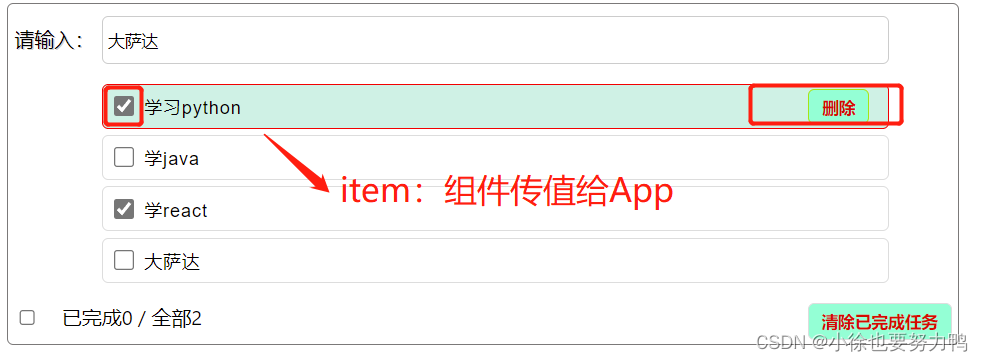
效果如下:
input的checkbox传值给App:
2.3.3 必要性限制react脚手架没有安装prop-types,需要自己安装:
npm i prop-types- 1
App.js中对子组件有props传值,需要限制Header和Main组件:
Header:import React, { Component } from 'react' import './index.css' import PropTypes from 'prop-types' export default class Header extends Component { static propTypes={ onShow:PropTypes.func.isRequired } // 一般最好判断输入成功是键盘按下键并弹起的时候,即keyUp事件, // 不易使用keyDown事件 handlekeyUp = (event)=>{ let val = event.target.value; let keyCode = event.keyCode; if(keyCode=='13'){ // console.log("新的",val) // console.log(event.keyCode) // console.log(parseInt("00012")) if(val.trim()<=0) return let max_str_id = this.getMaxId(this.props.originData) let obj = {id:max_str_id,name:val,done:false} this.props.onShow(obj) } } getMaxId(...objs){ // console.log(objs) let arr = objs[0] if(arr.length<=0){ throw new Error("app父组件的数组长度需大于0") } let max = arr[0].id; arr.forEach((o,inedx)=>{ // console.log(o,inedx) if(o.id>max){ max = o.id } }) // 子组件Header构造对象obj的id是当前最大id+1,补00凑成3位返回给父组件 // slice(-3):取数组倒数第三个到最后一个元素(包含最后一个) // Array(3).join(0):构造2个0的字符串(因为3个元素间隔只有2个),拼接最大id let maxAdd = parseInt(max)+1 let newId = (Array(3).join(0)+parseInt(maxAdd)).slice(-3) return newId } removeSpace = (event)=>{ event.target.value = event.target.value.replace(/\s+/g,"") } // 禁止输入空格,keyUp和keyDown效果均不佳,监听input较优 inputRemoveSpace = (event)=>{ event.target.value = event.target.value.replace(/\s+/g,"") } render() { return ( <div className='todo-header'> <span>请输入:</span> <input onKeyUp = {this.handlekeyUp} onKeyDown = {this.removeSpace} onInput = {this.inputRemoveSpace} type="text" placeholder='请输入任务名称,按回车确定'/> </div> ) } }- 1
- 2
- 3
- 4
- 5
- 6
- 7
- 8
- 9
- 10
- 11
- 12
- 13
- 14
- 15
- 16
- 17
- 18
- 19
- 20
- 21
- 22
- 23
- 24
- 25
- 26
- 27
- 28
- 29
- 30
- 31
- 32
- 33
- 34
- 35
- 36
- 37
- 38
- 39
- 40
- 41
- 42
- 43
- 44
- 45
- 46
- 47
- 48
- 49
- 50
- 51
- 52
- 53
- 54
- 55
- 56
- 57
- 58
- 59
- 60
- 61
- 62
- 63
- 64
- 65
- 66
- 67
- 68
- 69
Main:
import React, { Component } from 'react' import Item from '../Item' import "./index.css" import PropTypes from 'prop-types' export default class Main extends Component { static propTypes={ myTodos:PropTypes.array.isRequired, checkChange:PropTypes.func.isRequired } render() { const {myTodos,checkChange} = this.props return ( <ul className='todo-main'> { myTodos.map((per)=>{ return <Item key={per.id} {...per} checkChange = {checkChange}/> }) } </ul> ) } }- 1
- 2
- 3
- 4
- 5
- 6
- 7
- 8
- 9
- 10
- 11
- 12
- 13
- 14
- 15
- 16
- 17
- 18
- 19
- 20
- 21
- 22
- 23
- 24
- 25
2.3.4 删除item,清除已完成,全选按钮功能补充
Header:
index.css:
.todo-header span{ display: inline-block; width: 70px; font-size: 16px; text-shadow: 1px 1px rgb(214, 211, 211); } /* heaer */ .todo-header input{ width:620px; padding: 4px; height:28px; border:1px solid #ccc; border-radius: 5px; } .todo-header input::placeholder{ font-size: 14px; padding-left: 10px; text-align: center; color: rgb(139, 134, 134); } .todo-header input:focus{ outline: none; border-color: red; box-shadow: 1px 1px rgb(238, 103, 103); }- 1
- 2
- 3
- 4
- 5
- 6
- 7
- 8
- 9
- 10
- 11
- 12
- 13
- 14
- 15
- 16
- 17
- 18
- 19
- 20
- 21
- 22
- 23
- 24
- 25
- 26
- 27
index.jsx:
import React, { Component } from 'react' import './index.css' export default class Header extends Component { // 一般最好判断输入成功是键盘按下键并弹起的时候,即keyUp事件, // 不易使用keyDown事件 handlekeyUp = (event)=>{ let val = event.target.value; let keyCode = event.keyCode; if(keyCode=='13'){ // console.log("新的",val) // console.log(event.keyCode) // console.log(parseInt("00012")) if(val.trim()<=0) return let max_str_id = this.getMaxId(this.props.originData) let obj = {id:max_str_id,name:val,done:false} this.props.onShow(obj) } } getMaxId(...objs){ // console.log(objs) let arr = objs[0] if(arr.length<0){ throw new Error("app父组件的数组长度需大于等于0") } if(arr.length==0){ return "001"; } let max = arr[0].id; arr.forEach((o,inedx)=>{ // console.log(o,inedx) if(o.id>max){ max = o.id } }) // 子组件Header构造对象obj的id是当前最大id+1,补00凑成3位返回给父组件 // slice(-3):取数组倒数第三个到最后一个元素(包含最后一个) // Array(3).join(0):构造2个0的字符串(因为3个元素间隔只有2个),拼接最大id let maxAdd = parseInt(max)+1 let newId = (Array(3).join(0)+parseInt(maxAdd)).slice(-3) return newId } removeSpace = (event)=>{ event.target.value = event.target.value.replace(/\s+/g,"") } // 禁止输入空格,keyUp和keyDown效果均不佳,监听input较优 inputRemoveSpace = (event)=>{ event.target.value = event.target.value.replace(/\s+/g,"") } render() { return ( <div className='todo-header'> <span>请输入:</span> <input onKeyUp = {this.handlekeyUp} onKeyDown = {this.removeSpace} onInput = {this.inputRemoveSpace} type="text" placeholder='请输入任务名称,按回车确定'/> </div> ) } }- 1
- 2
- 3
- 4
- 5
- 6
- 7
- 8
- 9
- 10
- 11
- 12
- 13
- 14
- 15
- 16
- 17
- 18
- 19
- 20
- 21
- 22
- 23
- 24
- 25
- 26
- 27
- 28
- 29
- 30
- 31
- 32
- 33
- 34
- 35
- 36
- 37
- 38
- 39
- 40
- 41
- 42
- 43
- 44
- 45
- 46
- 47
- 48
- 49
- 50
- 51
- 52
- 53
- 54
- 55
- 56
- 57
- 58
- 59
- 60
- 61
- 62
- 63
- 64
- 65
- 66
- 67
Main:
index.css:.todo-main{ padding-left: 70px; }- 1
- 2
- 3
index.jsx:
import React, { Component } from 'react' import Item from '../Item' import "./index.css" export default class Main extends Component { render() { const {myTodos,checkChange,deleteItem} = this.props return ( <ul className='todo-main'> { myTodos.map((per)=>{ return <Item key={per.id} {...per} checkChange = {checkChange} deleteItem = {deleteItem} /> }) } </ul> ) } }- 1
- 2
- 3
- 4
- 5
- 6
- 7
- 8
- 9
- 10
- 11
- 12
- 13
- 14
- 15
- 16
- 17
- 18
- 19
- 20
Item:
index.css:li{ list-style: none; box-sizing: border-box; height:36px; width:630px; line-height: 36px; padding: 0 5px; border: 1px solid #ddd; border-radius: 5px; margin:5px 0; position: relative; } li span{ display: inline-block; vertical-align: middle; height:40px; font-size: 14px; font-family: Arial, Helvetica, sans-serif; letter-spacing: 1px; padding-left: 5px; } li input,li,li span{ cursor: pointer; } li input{ width: 16px; height: 16px; } li:hover{ background-color: rgb(203, 241, 229); } li .btn{ position: absolute; top:3px; right:15px; height:28px; float:left; border: 1px solid rgb(157, 230, 11); }- 1
- 2
- 3
- 4
- 5
- 6
- 7
- 8
- 9
- 10
- 11
- 12
- 13
- 14
- 15
- 16
- 17
- 18
- 19
- 20
- 21
- 22
- 23
- 24
- 25
- 26
- 27
- 28
- 29
- 30
- 31
- 32
- 33
- 34
- 35
- 36
- 37
- 38
- 39
- 40
- 41
- 42
- 43
- 44
index.jsx:
import React, { Component } from 'react' import './index.css' export default class Item extends Component { state = {isHover:false} move = (flag)=>{ return ()=>{ this.setState({isHover:flag}) } } changeCheck = (id)=>{ const {checkChange} = this.props return (event)=>{ checkChange(id,event.target.checked) } } // 删除todo回调 handleDelete = (id)=>{ const {deleteItem} = this.props return ()=>{ if(window.confirm('你确定删除这个东西?')){ deleteItem(id) } } } render() { // const {content} = this.props const {id,name,done} = this.props return ( <li style = {{border:this.state.isHover?"1px solid red":"1px solid #ddd"}} onMouseLeave={this.move(false)} onMouseEnter={this.move(true)}> <label htmlFor=""> <input type="checkbox" checked={done} onChange= {this.changeCheck(id)}/> <span>{name}</span> {/* <span>{content.name}</span> */} </label> <button onClick = {this.handleDelete(id)} className='btn btn-danger' style={{display:this.state.isHover?"block":"none"}}>删除</button> </li> ) } }- 1
- 2
- 3
- 4
- 5
- 6
- 7
- 8
- 9
- 10
- 11
- 12
- 13
- 14
- 15
- 16
- 17
- 18
- 19
- 20
- 21
- 22
- 23
- 24
- 25
- 26
- 27
- 28
- 29
- 30
- 31
- 32
- 33
- 34
- 35
- 36
- 37
- 38
- 39
- 40
- 41
- 42
- 43
- 44
- 45
- 46
- 47
- 48
- 49
- 50
- 51
- 52
- 53
- 54
Footer:
index.css:/* footer */ .todo-footer label{ display: inline-block; margin-right: 16px; } .todo-footer label input{ position: relative; top: -1px; vertical-align: middle; margin-right: 5px; cursor: pointer; } .todo-footer button{ float: right; margin-bottom: 1px; } .todo-footer span{ font-size: 16px; }- 1
- 2
- 3
- 4
- 5
- 6
- 7
- 8
- 9
- 10
- 11
- 12
- 13
- 14
- 15
- 16
- 17
- 18
- 19
- 20
- 21
- 22
index.jsx:
import React, { Component } from 'react' import './index.css' export default class Footer extends Component { finished = ()=>{ const {myTodos} = this.props return myTodos.filter((item)=>{ return item.done==true; }).length } confirmCheckAll = (event)=>{ console.log(event.target.checked) this.props.checkAll(event.target.checked) } clearFinished = ()=>{ const {clearAllFinished} = this.props if(window.confirm('是否清除全部已完成的事情呢?')){ clearAllFinished() } } render() { const {myTodos} = this.props return ( <div className='todo-footer'> <label htmlFor=""> <input type="checkbox" // onClick = {this.confirmCheckAll} onChange = {this.confirmCheckAll} checked = {this.finished()==myTodos.length&&myTodos.length!=0?true:false}/> </label> <span> <span>已完成{this.finished()}</span> <span>/ 全部{myTodos.length}</span> </span> <button className='btn btn-danger' onClick = {this.clearFinished}>清除已完成任务</button> </div> ) } }- 1
- 2
- 3
- 4
- 5
- 6
- 7
- 8
- 9
- 10
- 11
- 12
- 13
- 14
- 15
- 16
- 17
- 18
- 19
- 20
- 21
- 22
- 23
- 24
- 25
- 26
- 27
- 28
- 29
- 30
- 31
- 32
- 33
- 34
- 35
- 36
- 37
- 38
- 39
- 40
- 41
- 42
- 43
- 44
- 45
App.css:
body{ background: #fff; } .todo-container{ width: 760px; border: 1px solid rgb(123, 121, 121); border-radius: 5px; margin: 10px auto; } .todo-container .wrap{ margin: 10px 5px; } .btn{ display: inline-block; background-color: aquamarine; border: 1px solid #ddd; padding: 5px 10px; border-radius: 5px; color: rgb(223, 19, 19); font-family:Verdana, Geneva, Tahoma, sans-serif; font-weight: 600; } .btn:hover{ cursor: pointer; opacity: 0.8; } .btn:focus{ background-color: yellowgreen; opacity: 0.8; }- 1
- 2
- 3
- 4
- 5
- 6
- 7
- 8
- 9
- 10
- 11
- 12
- 13
- 14
- 15
- 16
- 17
- 18
- 19
- 20
- 21
- 22
- 23
- 24
- 25
- 26
- 27
- 28
- 29
- 30
- 31
- 32
- 33
- 34
- 35
App.js:
import React, { Component } from 'react' // 如果是导入js文件,那么文件名可以省略.js,如果是 // 导入css文件,文件名不可省略.css /* 如果是组件文件夹(文件夹命名是类名命名形式,即大写字母开头), 那么下面可以直接写index.css、index.jsx,直接引入大写类名即可 */ import Header from './Components/Header' import Main from './Components/Main' import Footer from './Components/Footer' import './App.css' window.a = "da" // Component 在react.js中是分别暴露的,即 export Component,即可使用import React, { Component } from 'react' // 如果是默认暴露:export default App,在导入时,可以使用import 别名 class App extends Component{ // 状态在哪里,操作的方法就在哪里 state = {todo:[ {id:"001",name:"学习python",done:true}, {id:"002",name:"学java",done:true}, {id:"003",name:"学react",done:true}, ]} // 组件中,子组件要传数据给父组件,即组件通信中的的子传父,需要 // 父组件将函数用过props传给子组件,子组件需要传数据给父组件时,调用 // 父组件的这个方法即可 sonToFather = (obj)=>{ const {todo} = this.state this.setState({todo:[...todo,obj]}) console.log(this.state) } // 子组件更改是否勾选 todoCheckChange = (id,done)=>{ const {todo} = this.state console.log(id,done) const newObj = todo.map((obj)=>{ if(obj.id===id)return {...obj,done:done} else return obj }) this.setState({todo:newObj}) } // 删除item deleteItem = (id)=>{ const {todo} = this.state // const newTodo = todo.filter((item,index)=>{ // if(item.id!==id)return item; // else return; // }) const newTodo = todo.filter((item,index)=>{ return item.id!==id; }) // console.log("现在的id是",id) // console.log("新的对象",newTodo) this.setState({todo:newTodo}) } /* Footer勾选全部数据 */ checkAll = (isCheck)=>{ const newTodo = this.state.todo.map(item=>{ return {...item,done:isCheck}; }) this.setState({todo:newTodo}) } /* Footer 清除所有已完成的todo */ clearAllFinished = ()=>{ const newTodo = this.state.todo.filter(item=>{ return item.done===false; }) this.setState({todo:newTodo}) } render(){ console.log(window.a) const {todo} = this.state return ( <div className='todo-container'> <div className='wrap'> <Header onShow = {this.sonToFather} originData = {todo}/> <Main myTodos = {this.state.todo} checkChange = {this.todoCheckChange} deleteItem = {this.deleteItem} /> <Footer myTodos = {this.state.todo} checkAll = {this.checkAll} clearAllFinished = {this.clearAllFinished}/> </div> </div> ) } } export default App;- 1
- 2
- 3
- 4
- 5
- 6
- 7
- 8
- 9
- 10
- 11
- 12
- 13
- 14
- 15
- 16
- 17
- 18
- 19
- 20
- 21
- 22
- 23
- 24
- 25
- 26
- 27
- 28
- 29
- 30
- 31
- 32
- 33
- 34
- 35
- 36
- 37
- 38
- 39
- 40
- 41
- 42
- 43
- 44
- 45
- 46
- 47
- 48
- 49
- 50
- 51
- 52
- 53
- 54
- 55
- 56
- 57
- 58
- 59
- 60
- 61
- 62
- 63
- 64
- 65
- 66
- 67
- 68
- 69
- 70
- 71
- 72
- 73
- 74
- 75
- 76
- 77
- 78
- 79
- 80
- 81
- 82
- 83
- 84
- 85
- 86
- 87
- 88
- 89
- 90
- 91
- 92
- 93
- 94
- 95
- 96
- 97
- 98


2.3.5 小结1 拆分组件、实现静态组件,注意:className、style的写法;
2 数据位于哪个组件的state?
2.1 某个组件使用,放在自身的state中;
2.2 某些组件使用,放在它们共同的父组件的state中;3 父子组件通信:
3.1 父组件给子组件传递数据:通过props传递
3.2 子组件给父组件传递数据:通过props传递,要求父提前给子传递一个函数4 注意defaultChecked和checked的区别,类似还有defaultValue和value
4.1 defaultChecked只会更新一次结果,后续即便传值更新也不会更改;checked会更新传值更新,故而上述勾选框使用属性为checked,非defaultChecked,且checked属性应当为变量,不是常量true或false,否则点击勾选一直不会更改
5 状态(state)在哪里,操作状态的方法就在哪里,如上述App.js父组件
-
相关阅读:
Python中的上下文管理器(contextlib)模块
WPFComBox的操作方式获取的方式
普中51单片机学习(EEPROM)
有一种密码学专用语言叫做ASN.1
用对外贸分析工具,让你对竞争对手情况“了如指掌”!
测试驱动开发 002:VSCode + CMake + Unity 环境搭建
STM32智能仓储管理系统教程
大疆2022秋招笔试 —— 最小时间差、数组的最小偏移量
shell通配符与glob
LeetCode 108. 将有序数组转换为二叉搜索树
- 原文地址:https://blog.csdn.net/a232884c/article/details/125305437
