-
linux 安装R 环境(最新)
最近工作中遇到一些根据数据项进行回归分析和权重计算的需要,经过调研发现R语言有现成的一些函数很方便的计算回归和权重,准备在线上部署实践,发现linux服务器部署遇到一些坑,记录下来:
1,安装
在查阅资料发现使用yum install R 安装的R版本比较老旧,问题比较多,想要安装最新安装包,在RStudio的官方文档中找到文档
- >sudo yum install https://dl.fedoraproject.org/pub/epel/epel-release-latest-7.noarch.rpm
- # 我安装的版本
- >export R_VERSION=4.2.0
- >curl -O https://cdn.rstudio.com/r/centos-7/pkgs/R-${R_VERSION}-1-1.x86_64.rpm
- >sudo yum install R-${R_VERSION}-1-1.x86_64.rpm
- # 修改R环境加入 PATH
- >sudo ln -s /opt/R/${R_VERSION}/bin/R /usr/bin/R
- >sudo ln -s /opt/R/${R_VERSION}/bin/Rscript /usr/bin/Rscript
2,安装R的三方包
- >R
- Copyright (C) 2022 The R Foundation for Statistical Computing
- Platform: x86_64-pc-linux-gnu (64-bit)
- R是自由软件,不带任何担保。
- 在某些条件下你可以将其自由散布。
- 用'license()'或'licence()'来看散布的详细条件。
- R是个合作计划,有许多人为之做出了贡献.
- 用'contributors()'来看合作者的详细情况
- 用'citation()'会告诉你如何在出版物中正确地引用R或R程序包。
- 用'demo()'来看一些示范程序,用'help()'来阅读在线帮助文件,或
- 用'help.start()'通过HTML浏览器来看帮助文件。
- 用'q()'退出R.
- > install.packages("RMySQL")
- 1: 0-Cloud [https]
- 2: Australia (Canberra) [https]
- 3: Australia (Melbourne 1) [https]
- 4: Australia (Melbourne 2) [https]
- 5: Australia (Perth) [https]
- 6: Austria [https]
- 7: Belgium (Brussels) [https]
- 8: Brazil (PR) [https]
- 9: Brazil (RJ) [https]
- 10: Brazil (SP 1) [https]
- 11: Brazil (SP 2) [https]
- 12: Bulgaria [https]
- 13: Canada (MB) [https]
- 14: Canada (ON 3) [https]
- 15: Chile (Santiago) [https]
- 16: China (Beijing 2) [https]
- 17: China (Beijing 3) [https]
- 18: China (Hefei) [https]
- 19: China (Hong Kong) [https]
- 20: China (Guangzhou) [https]
- 21: China (Lanzhou) [https]
- 22: China (Nanjing) [https]
- 23: China (Shanghai 2) [https]
- 24: China (Shenzhen) [https]
- ......
- Selection: 22
在安装 install.packages("RMySQL") RMySQL的包时报如下错误
Configure could not find suitable mysql/mariadb client library. Try installing:
* deb: libmariadbclient-dev | libmariadb-client-lgpl-dev (Debian, Ubuntu)
* rpm: mariadb-connector-c-devel | mariadb-devel | mysql-devel (Fedora, CentOS, RHEL)
* csw: mysql56_dev (Solaris)
* brew: mariadb-connector-c (OSX)
If you already have a mysql client library installed, verify that either
mariadb_config or mysql_config is on your PATH. If these are unavailable
you can also set INCLUDE_DIR and LIB_DIR manually via:
R CMD INSTALL --configure-vars='INCLUDE_DIR=... LIB_DIR=...'
--------------------------[ ERROR MESSAGE ]----------------------------
<stdin>:1:19: 致命错误:mysql.h:没有那个文件或目录发现时缺少 mysql.h 文件,因为我Linux中已经安装过mysql,按照提示缺少mysql-devel 但是通过yum install mysql-devel 安装出现依赖冲突问题,然后在MySQL 下载地址:
MySQL :: Download MySQL Community Server (Archived Versions)
 https://downloads.mysql.com/archives/community/找到我安装的mysql版本对应的 mysql-devel
mysql-community-devel-5.7.16-1.el7.x86_64.rpm
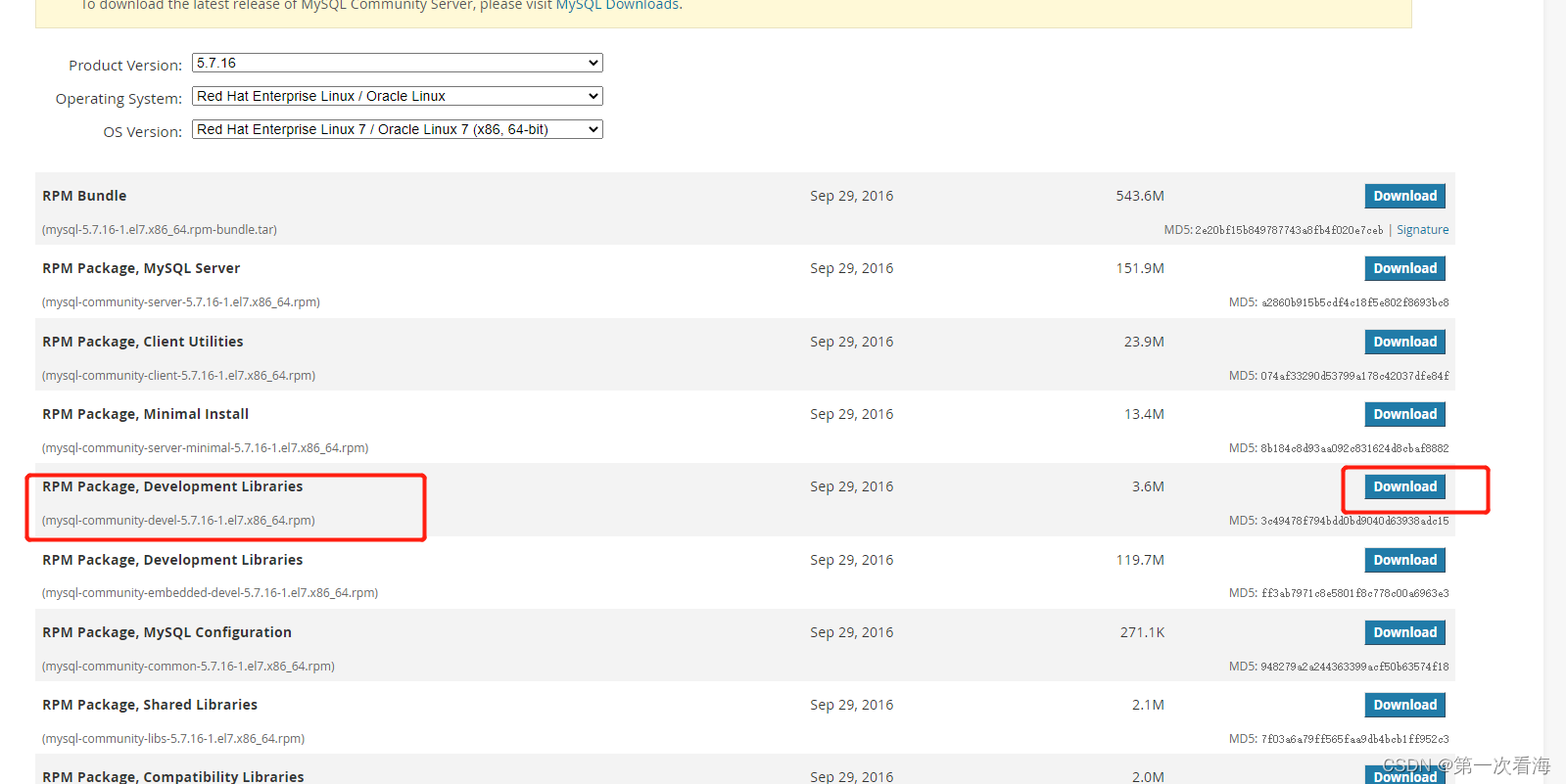
下载下来上传服务器
> sudo rpm -ivh mysql-community-devel-5.7.16-1.el7.x86_64.rpm安装成功在R 中执行安装 install.packages("RMySQL") 便可以安装成功,
-
相关阅读:
学生HTML个人网页作业作品 HTML+CSS+JavaScript环保页面设计与实现制作
聚观早报 | 东方甄选推出独立 App;腾讯《冒险岛 2》即将停服
App测试时常用的adb命令你都掌握了哪些呢?
给大家看下刚薅的阿里云99元服务器CPU性能如何?
使用极狐GitLab的VS Code插件 GitLab Workflow 来进行项目的DevOps管理,助力研发效能
肉苁蓉苷F与牛血清白蛋白偶联物 Cistanoside F-BSA
【Java实现图书管理系统】
vue:js中合并对象的方法
java开放式实验室预约系统计算机毕业设计MyBatis+系统+LW文档+源码+调试部署
为何面试官总是将你简历上的技术问题问到回答不出来为止?
- 原文地址:https://blog.csdn.net/dengxt/article/details/125555015