-
Vue组件自定义事件
绑定自定义事件
引例:子组件给父组件传值
-首先我们可以通过props来传递, 它的实现原理是父亲给儿子一个函数,儿子通过调用这个函数进行数据传递。
ex:
子组件<template> <div> <button @click="sendName">子组件的点击按钮,点击将数据传递给父组件</button> </div> </template> <script> export default { data() { return { name: "son", sex: "nan", }; }, mounted() {}, props: ["getName"], methods: { sendName() { this.getName(this.name); }, }, }; </script> <style lang='less' scoped> </style>- 1
- 2
- 3
- 4
- 5
- 6
- 7
- 8
- 9
- 10
- 11
- 12
- 13
- 14
- 15
- 16
- 17
- 18
- 19
- 20
- 21
- 22
- 23
- 24
父组件
<template> <div> <div id="test"> <p>我是一个父组件</p> 我收到的儿子的名字是:{{ sonName }} </div> <Son :getName="getName"></Son> </div> </template> <script> import Son from "@/components/custom/Son.vue"; export default { data() { return { sonName: "", }; }, components: { Son }, methods: { getName(name) { this.sonName = name; }, }, }; </script> <style lang='less' scoped> #test { width: 200px; height: 200px; background: red; } </style>- 1
- 2
- 3
- 4
- 5
- 6
- 7
- 8
- 9
- 10
- 11
- 12
- 13
- 14
- 15
- 16
- 17
- 18
- 19
- 20
- 21
- 22
- 23
- 24
- 25
- 26
- 27
- 28
- 29
- 30
- 31
- 32
- 33
点击传值按钮:
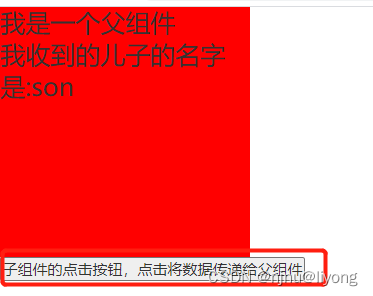
-自定义事件实现
它的原理是给组件实例对象绑定一个事件,让后在组件里面取触发,这样就可以给绑定的事件函数传递子组件的数据。
父组件<template> <div> <div id="test"> <p>我是一个父组件</p> 我收到的儿子的名字是:{{ sonName }} </div> <Son @getName="getName"></Son> </div> </template> <script> import Son from "@/components/custom/Son.vue"; export default { data() { return { sonName: "", }; }, components: { Son }, methods: { getName(name) { this.sonName = name; }, }, }; </script> <style lang='less' scoped> #test { width: 200px; height: 200px; background: red; font-size: 20px; } </style>- 1
- 2
- 3
- 4
- 5
- 6
- 7
- 8
- 9
- 10
- 11
- 12
- 13
- 14
- 15
- 16
- 17
- 18
- 19
- 20
- 21
- 22
- 23
- 24
- 25
- 26
- 27
- 28
- 29
- 30
- 31
- 32
- 33
- 34
子组件
<template> <div> <button @click="sendName">子组件的点击按钮,点击将数据传递给父组件</button> </div> </template> <script> export default { data() { return { name: "son", sex: "nan", }; }, mounted() {}, methods: { sendName() { this.$emit("getName", this.name); }, }, }; </script> <style lang='less' scoped> </style>- 1
- 2
- 3
- 4
- 5
- 6
- 7
- 8
- 9
- 10
- 11
- 12
- 13
- 14
- 15
- 16
- 17
- 18
- 19
- 20
- 21
- 22
- 23
运行的结果和上面通过props传递参数是同样的结果。
然后
<Son @getName="getName"></Son>- 1
对于绑定事件我们还有一种更加灵活的写法:
<Son ref="son"></Son> mounted() { this.$refs.son.$on("getName", this.getName); },- 1
- 2
- 3
- 4
当然这里我们可以直接写回调函数
mounted() { this.$refs.son.$on("getName", function() {} ); }, // 但是需要特别注意的是这里的this指向的是儿子,因为是儿子调用了getName函数 // 所以要让这个this指向父组件,那么需要将写为箭头函数() => {}- 1
- 2
- 3
- 4
- 5
- 6
这样我们可以在绑定自定义事件的时候添加一些其它的逻辑,比如定时操作,执行其它函数等。
如果我们只需要执行一次<Son @getName.once="getName"></Son> this.$refs.son.$on.$once("getName", this.getName);- 1
- 2
如果我们需要传递多个参数:
getName(obj) { // 首先我们可以传递一个对象,接收也是一个对象 }, // 其次我们可以使用es6语法 getName(name, ...parms) { // 第一个参数为name,其余的参数都在parms数组里面 },- 1
- 2
- 3
- 4
- 5
- 6
- 7
解绑事件
this.$off("getName"); // 如果解绑多个事件 this.$off(["event1", "event2"]); // 解绑所有 this.$off(); ``` ### 特别注意 组件在绑定原生事件的时候需要@click.native修饰,否则它会被当做自定义事件。- 1
- 2
- 3
- 4
- 5
- 6
- 7
- 8
-
相关阅读:
Docker 的数据管理
【洛谷算法题】P5713-洛谷团队系统【入门2分支结构】
PHP接口自动化测试框架实现
spark学习笔记(十二)——sparkStreaming-RDD队列/自定义数据源/kafka数据源/DStream转换/DStream输出/优雅关闭
数字三角形加强版题解(组合计数+快速幂+逆元)
698. 划分为k个相等的子集
【单链表】实现链表逆置
防静电门禁闸机管理系统的优点有哪些
十六)Stable Diffusion教程:出图流程化
tenacity发生异常/失败/错误时重试retry机制,Python
- 原文地址:https://blog.csdn.net/qq_43259860/article/details/125491624
