-
2.深入理解多线程底层执行的原理
多线程相关知识
1.CPU调度算法原理(先来先服务、最短作业法、优先级调度算法)??
2.站在字节码角度+cpu上下文切换角度分析线程安全问题?
3.手写Callable与FutureTask模式?两种方式??
4.并发编程实战案例之手写并发队列日志框架多线程的基本概念
什么是cpu
CPU的中文名称是中央处理器,是进行逻辑运算用的,主要由运算器、控制器、寄存器三部分组成,从字面意思看就是运算就是起着运算的作用,控制器就是负责发出cpu每条指令所需要的信息,寄存器就是保存运算或者指令的一些临时文件,这样可以保证更高的速度。
也就是我们的线程运行在cpu之上。
CPU
什么是线程/进程
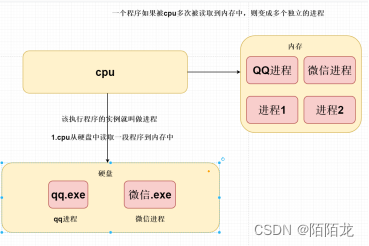
进程是资源分配最小单位,线程是程序执行的最小单位。 计算机在执行程序时,会为程序创建相应的进程,进行资源分配时,是以进程为单位进行相应的分配。每个进程都有相应的线程,在执行程序时,实际上是执行相应的一系列线程。
总结:进程是资源分配最小单位,线程是程序执行的最小单位****
什么是进程:
1. cpu从硬盘中读取一段程序到内存中,该执行程序的实例就叫做进程****
2. 一个程序如果被cpu多次被读取到内存中,则变成多个独立的进程****
什么是线程:
线程是程序执行的最小单位*****,在一个进程中可以有多个不同的线程*
同时执行。
为什么在进程中还需要线程呢?
同一个应用程序中(进程),更好并行处理
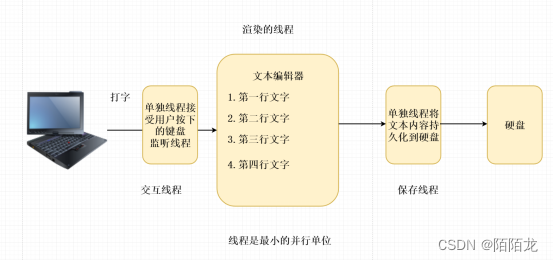
为什么需要使用到多线程
采用多线程的形式执行代码,目的就是为了提高程序的效率。
目的就是为了提高程序开发的效率
比如:现在一个项目只有一个程序员开发,需要开发功能模块会员模块、支付模块、订单模块。
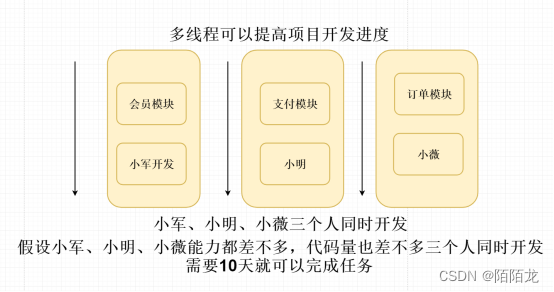
并行/串行区别
串行也就是单线程执行 代码执行效率非常低,代码从上向下执行;
并行就是多个线程并行一起执行,效率比较高。使用多线程一定提高效率吗?
多线程 执行 需要同时执行
不一定,需要了解cpu调度的算法
就是先把前一个任务的 CPU 上下文(也就是 CPU 寄存器和程序计数器)保存起来,然后加载新任务的上下文到这些寄存器和程序计数器,最后再跳转到程序计数器所指的新位置,运行新任务
如果生产环境中开启几百个或者上千个线程,而我们的服务器核数8核
16核 32核,这么多线程都会在我们这些cpu上做上下文切换
上下文切换:
从该线程执行切换到另外的线程 该线程—运行切换为就绪状态。
线程池:和服务器cpu核数 8核 16核
同步与异步的区别
同步概念:就是代码从上向下执行。
异步的概念:单独分支执行 相互之间没有任何影响。CPU调度时间片
-
单核的cpu上每次只能够执行一次线程,如果在单核的cpu上开启了多线程,则会发生对每个线程轮流执行
-
Cpu每次单个计算的时间成为一个cpu时间片,实际只有几十毫秒人为感觉好像是
在多线程
-
对于线程来说,存在等待cpu调度的时候 该线程的状态是为就绪状态,如果被cpu调度则该线程的状态为运行状态
-
当cpu转让执行其他的线程时,则该线程有变为就绪状态
如果在单核的cpu之上开启了多线程,底层执行并不是真正意义上的多线程。
利用多核多线程性能Cpu密集型/IO密集型
Cpu密集型:长时间占用cpu;例如: 视频剪辑
IO密集型 :cpu计算时间短 访问外接设备时间长
Input/outputCPU调度算法原理
1.先来先服务 缺点如果最先来执行的线程 是CPU密集型 这样话可能会一直
无法继续执行其他的线程。
2.最短作业法 谁的计算时间短,谁先来执行。
3.优先级调度算法 根据重要性将进程分成4个优先级
优先级4 进程D负责画面----
优先级3 进程B和进程C接受用户的指令 重要
优先级2 后台处理器 次要
优先级1程序计数器
程序计数器是用于存放下一条指令所在单元的地址的地方
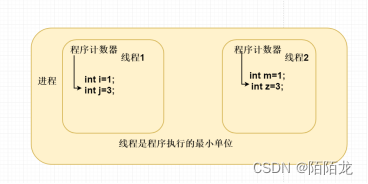
Cpu上下文切换多线程的应用场景
多线程的快速入门-
客户端(移动App端/)开发;
-
异步发送短信/发送邮件
-
将执行比较耗时的代码改用多线程异步执行; 可以提高接口的响应速度
-
异步写入日志 日志框架底层
-
多线程下载
多线程的创建方式
1)继承Thread类创建线程
2)实现Runnable接口创建线程
3)使用匿名内部类的形式创建线程
4)使用lambda表达式创建线程
5)使用Callable和Future创建线程
6)使用线程池例如用Executor框架
7)spring @Async异步注解 结合线程池.继承Thread类创建线程
public class ThreadDemo01 extends Thread { @Override public void run() { System.out.println(Thread.currentThread().getName() + "<run>"); } public static void main(String[] args) { // 创建一个线程 ThreadDemo01 threadDemo01 = new ThreadDemo01(); // 启动线程是start方法而不是run方法 threadDemo01.start(); } }- 1
- 2
- 3
- 4
- 5
- 6
- 7
- 8
- 9
- 10
- 11
- 12
- 13
- 14
实现Runnable接口创建线程
public class ThreadDemo02 implements Runnable { public void run() { System.out.println(Thread.currentThread().getName() + ",我是子线程"); } public static void main(String[] args) { new Thread(new ThreadDemo02()).start(); } }- 1
- 2
- 3
- 4
- 5
- 6
- 7
- 8
- 9
- 10
使用匿名内部类的形式创建线程
// 1.使用匿名内部类创建线程 new Thread(new Runnable() { public void run() { System.out.println(Thread.currentThread().getName() + ",>我是子线程<"); } }).start();- 1
- 2
- 3
- 4
- 5
- 6
使用jdk8的新特性lambda 创建线程
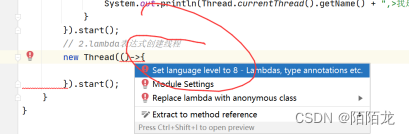
// 2.lambda表达式创建线程 new Thread(()->{ System.out.println(Thread.currentThread().getName() + ",>我是子线程<"); }).start();- 1
- 2
- 3
- 4
使用Callable和Future创建线程
Callable和Future 线程可以获取到返回结果 底层基于LockSupport
线程 异步执行 比较耗时间-
从Java 5开始,Java提供了Callable接口,该接口是Runnable接口的增强版,Callable接口提供了一个call()方法,可以看作是线程的执行体,但call()方法比run()方法更强大。
call()方法可以有返回值。
call()方法可以声明抛出异常。public class ThreadCallable implements Callable<Integer> { public static void main(String[] args) throws ExecutionException, InterruptedException { ThreadCallable threadCallable = new ThreadCallable(); FutureTask<Integer> integerFutureTask = new FutureTask<>(threadCallable); new Thread(integerFutureTask).start(); Integer result = integerFutureTask.get(); System.out.println(result); } @Override public Integer call() throws Exception { // 默认代码执行非常耗时!! System.out.println(Thread.currentThread().getName() + ",执行计算操作"); Thread.sleep(3000); return 1; } }- 1
- 2
- 3
- 4
- 5
- 6
- 7
- 8
- 9
- 10
- 11
- 12
- 13
- 14
- 15
- 16
- 17
- 18
使用线程池例如用Executors框架
复用机制ExecutorService executorService = Executors.newCachedThreadPool(); executorService.execute(new Runnable() { @Override public void run() { System.out.println(Thread.currentThread().getName() + ">我是子线程<"); } });- 1
- 2
- 3
- 4
- 5
- 6
- 7
- 8
spring @Async异步注解
@Async 底层基于aop+自定义注解实现@Component @Slf4j public class OrderManage { @Async public void asyncLog() { try { Thread.sleep(3000); log.info("<2>"); } catch (Exception e) { } } }- 1
- 2
- 3
- 4
- 5
- 6
- 7
- 8
- 9
- 10
- 11
- 12
- 13
/** * http://127.0.0.1:8080/addOrder * * @return */ @RequestMapping("/addOrder") public String addOrder() { log.info("<1>"); orderManage.asyncLog(); log.info("<3>"); return "3"; }- 1
- 2
- 3
- 4
- 5
- 6
- 7
- 8
- 9
- 10
- 11
- 12
- 13
手写 @Async异步注解
1.aop 拦截只要在我们的方法上有使用到@MayiktAsync 就单独的开启一个异步线程
执行我们的目标方法。Aop
http请求
环绕通知开始
目标方法
环绕通知结束@Aspect @Component public class ExtMayiktThreadAop { @Around(value = "@annotation(com.mayikt.service.annotation.MayiktAsync)") public void around(ProceedingJoinPoint joinPoint) { try { // 正常需要结合到线程池 new Thread(() -> { try { joinPoint.proceed(); } catch (Throwable throwable) { throwable.printStackTrace(); } }, "mayikt线程").start(); } catch (Throwable throwable) { } } } @Target(ElementType.METHOD) @Retention(RetentionPolicy.RUNTIME) public @interface MayiktAsync { } @Component @Slf4j public class OrderManage { @MayiktAsync public void asyncLog() { try { Thread.sleep(3000); log.info("<2>"); } catch (Exception e) { } } }- 1
- 2
- 3
- 4
- 5
- 6
- 7
- 8
- 9
- 10
- 11
- 12
- 13
- 14
- 15
- 16
- 17
- 18
- 19
- 20
- 21
- 22
- 23
- 24
- 25
- 26
- 27
- 28
- 29
- 30
- 31
- 32
- 33
- 34
- 35
- 36
- 37
手写一个异步日志框架
常用日志框架: Log4j,Log4j 2,Logback
日志框架:ALL < TRACE < DEBUG < INFO < WARN < ERROR < FATAL < OFF
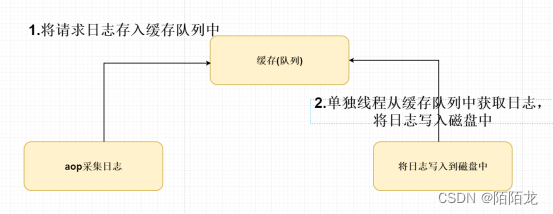
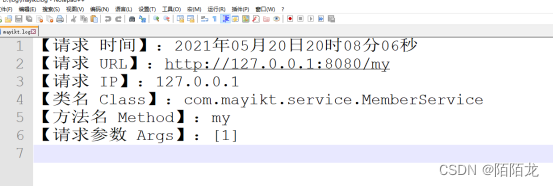
aop采集日志@Aspect @Component @Slf4j public class AopLog { private static final String START_TIME = "request-start"; private SimpleDateFormat sdf4 = new SimpleDateFormat("yyyy年MM月dd日HH时mm分ss秒"); /** * 切入点 */ @Pointcut("execution(public * com.mayikt.service.*Service.*(..))") public void log() { } /** * 前置操作 * * @param point 切入点 */ @Before("log()") public void beforeLog(JoinPoint point) { ServletRequestAttributes attributes = (ServletRequestAttributes) RequestContextHolder.getRequestAttributes(); HttpServletRequest request = Objects.requireNonNull(attributes).getRequest(); LogManage.addLog("【请求 时间】:" + sdf4.format(new Date())); LogManage.addLog("【请求 URL】:" + request.getRequestURL()); LogManage.addLog("【请求 IP】:" + request.getRemoteAddr()); LogManage.addLog("【类名 Class】:" + point.getSignature().getDeclaringTypeName()); LogManage.addLog("【方法名 Method】:" + point.getSignature().getName()); LogManage.addLog("【请求参数 Args】:" + JSON.toJSONString(point.getArgs()) ); // log.info("【请求 时间】:{}", System.currentTimeMillis()); // log.info("【请求 URL】:{}", request.getRequestURL()); // log.info("【请求 IP】:{}", request.getRemoteAddr()); // log.info("【类名 Class】:{},【方法名 Method】:{}", point.getSignature().getDeclaringTypeName(), point.getSignature().getName()); // log.info("【请求参数 Args】:{},", point.getArgs()); } } @Component public class LogManage { private static BlockingDeque<String> blockingDeque = new LinkedBlockingDeque<>(); private static final String filePath = "d:/log/mayikt.log"; public LogManage() { new LogThread().start(); } public static void addLog(String msg) { blockingDeque.add(msg); } class LogThread extends Thread { @Override public void run() { while (true) { String log = blockingDeque.poll(); if (!StringUtils.isEmpty(log)) { // 将该log写入到磁盘中 FileUtils.writeText(filePath, log, true); } } } } } public class FileUtils { /*判断文件是否存在*/ public static boolean isExists(String filePath) { File file = new File(filePath); return file.exists(); } /*判断是否是文件夹*/ public static boolean isDir(String path) { File file = new File(path); if (file.exists()) { return file.isDirectory(); } else { return false; } } /** * 文件或者目录重命名 * * @param oldFilePath 旧文件路径 * @param newName 新的文件名,可以是单个文件名和绝对路径 * @return */ public static boolean renameTo(String oldFilePath, String newName) { try { File oldFile = new File(oldFilePath); //若文件存在 if (oldFile.exists()) { //判断是全路径还是文件名 if (newName.indexOf("/") < 0 && newName.indexOf("\\") < 0) { //单文件名,判断是windows还是Linux系统 String absolutePath = oldFile.getAbsolutePath(); if (newName.indexOf("/") > 0) { //Linux系统 newName = absolutePath.substring(0, absolutePath.lastIndexOf("/") + 1) + newName; } else { newName = absolutePath.substring(0, absolutePath.lastIndexOf("\\") + 1) + newName; } } File file = new File(newName); //判断重命名后的文件是否存在 if (file.exists()) { System.out.println("该文件已存在,不能重命名"); } else { //不存在,重命名 return oldFile.renameTo(file); } } else { System.out.println("原该文件不存在,不能重命名"); } } catch (Exception e) { e.printStackTrace(); } return false; } /*文件拷贝操作*/ public static void copy(String sourceFile, String targetFile) { File source = new File(sourceFile); File target = new File(targetFile); target.getParentFile().mkdirs(); FileInputStream fis = null; FileOutputStream fos = null; FileChannel in = null; FileChannel out = null; try { fis = new FileInputStream(source); fos = new FileOutputStream(target); in = fis.getChannel();//得到对应的文件通道 out = fos.getChannel();//得到对应的文件通道 in.transferTo(0, in.size(), out);//连接两个通道,并且从in通道读取,然后写入out通道 } catch (IOException e) { e.printStackTrace(); } finally { try { if (out != null) { out.close(); } if (in != null) { in.close(); } if (fos != null) { fos.close(); } if (fis != null) { fis.close(); } } catch (IOException e) { e.printStackTrace(); } } } /*读取Text文件操作*/ public static String readText(String filePath) { String lines = ""; try { FileReader fileReader = new FileReader(filePath); BufferedReader bufferedReader = new BufferedReader(fileReader); String line = null; while ((line = bufferedReader.readLine()) != null) { lines += line + "\n"; } } catch (Exception e) { e.printStackTrace(); } return lines; } /*写入Text文件操作*/ public static void writeText(String filePath, String content, boolean isAppend) { FileOutputStream outputStream = null; OutputStreamWriter outputStreamWriter = null; BufferedWriter bufferedWriter = null; try { outputStream = new FileOutputStream(filePath, isAppend); outputStreamWriter = new OutputStreamWriter(outputStream); bufferedWriter = new BufferedWriter(outputStreamWriter); bufferedWriter.write(content); bufferedWriter.newLine(); } catch (IOException e) { e.printStackTrace(); } finally { try { if (bufferedWriter != null) { bufferedWriter.close(); } if (outputStreamWriter != null) { outputStreamWriter.close(); } if (outputStream != null) { outputStream.close(); } } catch (Exception e) { e.printStackTrace(); } } } }- 1
- 2
- 3
- 4
- 5
- 6
- 7
- 8
- 9
- 10
- 11
- 12
- 13
- 14
- 15
- 16
- 17
- 18
- 19
- 20
- 21
- 22
- 23
- 24
- 25
- 26
- 27
- 28
- 29
- 30
- 31
- 32
- 33
- 34
- 35
- 36
- 37
- 38
- 39
- 40
- 41
- 42
- 43
- 44
- 45
- 46
- 47
- 48
- 49
- 50
- 51
- 52
- 53
- 54
- 55
- 56
- 57
- 58
- 59
- 60
- 61
- 62
- 63
- 64
- 65
- 66
- 67
- 68
- 69
- 70
- 71
- 72
- 73
- 74
- 75
- 76
- 77
- 78
- 79
- 80
- 81
- 82
- 83
- 84
- 85
- 86
- 87
- 88
- 89
- 90
- 91
- 92
- 93
- 94
- 95
- 96
- 97
- 98
- 99
- 100
- 101
- 102
- 103
- 104
- 105
- 106
- 107
- 108
- 109
- 110
- 111
- 112
- 113
- 114
- 115
- 116
- 117
- 118
- 119
- 120
- 121
- 122
- 123
- 124
- 125
- 126
- 127
- 128
- 129
- 130
- 131
- 132
- 133
- 134
- 135
- 136
- 137
- 138
- 139
- 140
- 141
- 142
- 143
- 144
- 145
- 146
- 147
- 148
- 149
- 150
- 151
- 152
- 153
- 154
- 155
- 156
- 157
- 158
- 159
- 160
- 161
- 162
- 163
- 164
- 165
- 166
- 167
- 168
- 169
- 170
- 171
- 172
- 173
- 174
- 175
- 176
- 177
- 178
- 179
- 180
- 181
- 182
- 183
- 184
- 185
- 186
- 187
- 188
- 189
- 190
- 191
- 192
- 193
- 194
- 195
- 196
- 197
- 198
- 199
- 200
- 201
- 202
- 203
- 204
- 205
- 206
- 207
- 208
- 209
- 210
- 211
- 212
- 213
- 214
- 215
多线程线程安全问题什么是线程安全问题
多线程同时对同一个全局变量做写的操作,可能会受到其他
线程的干扰,就会发生线程安全性问题。
全局变量----java内存结构
什么是写操作------修改当多个线程共享同一个全局变量,做写的操作时,可能会受到其他的线程干扰,发生线程
安全问题。public class ThreadCount implements Runnable { private static Integer count = 100; @Override public void run() { while (count > 1) { cal(); } } private void cal() { try { Thread.sleep(20); } catch (Exception e) { } count--; System.out.println(Thread.currentThread().getName() + "," + count); } public static void main(String[] args) { ThreadCount threadCount = new ThreadCount(); Thread thread1 = new Thread(threadCount); Thread thread2 = new Thread(threadCount); thread1.start(); thread2.start(); } }- 1
- 2
- 3
- 4
- 5
- 6
- 7
- 8
- 9
- 10
- 11
- 12
- 13
- 14
- 15
- 16
- 17
- 18
- 19
- 20
- 21
- 22
- 23
- 24
- 25
- 26
- 27
- 28
- 29
- 30
同时执行概念
1-3 多线程如何解决线程安全问题/ 多线程如何实现同步呢
如何解决线程安全的问题
核心思想:上锁 分布式锁在同一个jvm中,多个线程需要竞争锁的资源,最终只能够有一个线程
能够获取到锁,多个线程同时抢同一把锁,谁(线程)能够获取到锁,
谁就可以执行到该代码,如果没有获取锁成功 中间需要经历锁的升级过程
如果一致没有获取到锁则会一直阻塞等待。
如果线程A获取锁成功 但是线程A一直不释放锁
线程B一直获取不到锁,则会一直阻塞等待。代码从那一块需要上锁?-----可能会发生线程安全性问题的代码需要上锁。
Juc并发编程 锁 重入锁 悲观锁 乐观锁 公平锁 非公平锁线程0 线程1 同时获取 this锁,假设线程0 获取到this ,意味着线程1没有获取到锁
则会阻塞等待。等我们线程0 执行完count-- 释放锁之后 就会唤醒 线程1从新进入
到获取锁的资源。获取锁与释放锁 全部都是有底层虚拟机实现好了。
对一块代码加锁缺点:
可能会影响到程序的执行效率。如果是同一把锁 在多线程的情况下 最终只能够给一个线程使用。
如果有线程持有了该锁 意味着其他的线程 不能够在继续获取锁核心思想:当多个线程共享同一个全局变量时,将可能会发生线程安全的代码
上锁,保证只有拿到锁的线程才可以执行,没有拿到锁的线程不可以执行,需要阻塞等待。1.使用synchronized锁,JDK1.6开始 锁的升级过程 juc 18-25
2.使用Lock锁 ,需要自己实现锁的升级过程。底层是基于aqs实现
3.使用Threadlocal,需要注意内存泄漏的问题。
4.原子类 CAS 非阻塞式synchronized锁的基本用法
在多线程的情况下 需要是同一个对象锁
Synchronized(对象锁)
{
需要保证线程安全的代码
}1.修饰代码块,指定加锁对象,对给定对象加锁,进入同步代码快前要获得 给定对象 的锁。
2.修饰实例方法,作用于当前实例加锁,进入同步代码前要获得 当前实例 的锁
3.修饰静态方法,作用于当前类对象(当前类.class)加锁,进入同步代码前要获得 当前类对象 的锁
修饰代码块
修饰代码块,指定加锁对象,对给定对象加锁,进入同步代码库前要获得 给定对象 的锁。public class ThreadCount implements Runnable { private static Integer count = 100; private String lock = "lock"; @Override public void run() { while (count > 1) { cal(); } } private void cal() { synchronized (this) { try { Thread.sleep(10); } catch (Exception e) { } count--; System.out.println(Thread.currentThread().getName() + "," + count); } } public static void main(String[] args) { ThreadCount threadCount = new ThreadCount(); Thread thread1 = new Thread(threadCount); Thread thread2 = new Thread(threadCount); thread1.start(); thread2.start(); } }- 1
- 2
- 3
- 4
- 5
- 6
- 7
- 8
- 9
- 10
- 11
- 12
- 13
- 14
- 15
- 16
- 17
- 18
- 19
- 20
- 21
- 22
- 23
- 24
- 25
- 26
- 27
- 28
- 29
- 30
- 31
- 32
- 33
- 34
修饰实例方法
修饰实例方法,作用于当前实例加锁,进入同步代码前要获得 当前实例的锁
在实例方法上默认加上synchronized 默认使用this锁。public class ThreadCount implements Runnable { private static Integer count = 100; private String lock = "lock"; @Override public void run() { while (count > 1) { cal(); } } private synchronized void cal() { try { Thread.sleep(10); } catch (Exception e) { } count--; System.out.println(Thread.currentThread().getName() + "," + count); } public static void main(String[] args) { ThreadCount threadCount = new ThreadCount(); Thread thread1 = new Thread(threadCount); Thread thread2 = new Thread(threadCount); thread1.start(); thread2.start(); } }- 1
- 2
- 3
- 4
- 5
- 6
- 7
- 8
- 9
- 10
- 11
- 12
- 13
- 14
- 15
- 16
- 17
- 18
- 19
- 20
- 21
- 22
- 23
- 24
- 25
- 26
- 27
- 28
- 29
修饰静态方法
修饰静态方法,作用于当前类对象加锁,进入同步代码前要获得 当前类对象的锁
默认使用当前类的类名.class 锁public class ThreadCount implements Runnable { private static Integer count = 100; private static String lock = "lock"; @Override public void run() { while (count > 1) { cal(); } } private static void cal() { synchronized (ThreadCount.class) { try { Thread.sleep(10); } catch (Exception e) { } count--; System.out.println(Thread.currentThread().getName() + "," + count); } } public static void main(String[] args) { ThreadCount threadCount1 = new ThreadCount(); ThreadCount threadCount2 = new ThreadCount(); Thread thread1 = new Thread(threadCount1); Thread thread2 = new Thread(threadCount2); thread1.start(); thread2.start(); } }- 1
- 2
- 3
- 4
- 5
- 6
- 7
- 8
- 9
- 10
- 11
- 12
- 13
- 14
- 15
- 16
- 17
- 18
- 19
- 20
- 21
- 22
- 23
- 24
- 25
- 26
- 27
- 28
- 29
- 30
- 31
- 32
- 33
- 34
- 35
synchronized死锁问题
我们如果在使用synchronized 需要注意 synchronized锁嵌套的问题 避免死锁的问题发生。
案例:public class DeadlockThread implements Runnable { private int count = 1; private String lock = "lock"; @Override public void run() { while (true) { count++; if (count % 2 == 0) { // 线程1需要获取 lock 在获取 a方法this锁 // 线程2需要获取this 锁在 获取B方法lock锁 synchronized (lock) { a(); } } else { synchronized (this) { b(); } } } } public synchronized void a() { System.out.println(Thread.currentThread().getName() + ",a方法..."); } public void b() { synchronized (lock) { System.out.println(Thread.currentThread().getName() + ",b方法..."); } } public static void main(String[] args) { DeadlockThread deadlockThread = new DeadlockThread(); Thread thread1 = new Thread(deadlockThread); Thread thread2 = new Thread(deadlockThread); thread1.start(); thread2.start(); } }- 1
- 2
- 3
- 4
- 5
- 6
- 7
- 8
- 9
- 10
- 11
- 12
- 13
- 14
- 15
- 16
- 17
- 18
- 19
- 20
- 21
- 22
- 23
- 24
- 25
- 26
- 27
- 28
- 29
- 30
- 31
- 32
- 33
- 34
- 35
- 36
- 37
- 38
- 39
- 40
- 41
synchronized 死锁诊断工具
D:\path\jdk\jdk8\bin\jconsole.exe线程1 先获取到自定义对象的lock锁,进入到a方法需要获取this锁
线程2 先获取this锁, ? ? ? ? ?进入到b方法需要自定义对象的lock锁线程1 线程2 是在同时执行
线程1 线程2
先获取到自定义对象的lock锁 先获取this锁
需要线程2已经持有的this锁 线程1已经持有自定义对象的lock锁springmvc 接口中使用
需要注意:
Spring MVC Controller默认是单例的 需要注意线程安全问题
单例的原因有二:
1、为了性能。
2、不需要多例。
@Scope(value = “prototype”) 设置为多例子。@RestController @Slf4j //@Scope(value = "prototype") public class CountService { private int count = 0; @RequestMapping("/count") public synchronized String count() { try { log.info(">count<" + count++); try { Thread.sleep(3000); } catch (Exception e) { } } catch (Exception e) { } return "count"; } }- 1
- 2
- 3
- 4
- 5
- 6
- 7
- 8
- 9
- 10
- 11
- 12
- 13
- 14
- 15
- 16
- 17
- 18
- 19
- 20
- 21
- 22
- 23
临界区
当多个线程读共享资源 读的过程中,没有任何问题,
在多个线程对共享资源读写操作时发生指令交错,就会发生线程安全问题
在多线程中如果存在对共享资源读写操作,该代码称作为临界区。public class Thread08 extends Thread { int count = 0; @Override public void run() { // 该代码就是为临界区 count++ ; } }- 1
- 2
- 3
- 4
- 5
- 6
- 7
- 8
- 9
- 10
竞争条件
多个线程在临界区内执行,由于代码的执行序列不同(指令)而导致结果无法预测,称之为发生了竞态条件
解决办法:
synchronized,Lock、原子类字节码角度分析线程安全问题
线程安全问题:
1.字节码
2.上下文切换
3.Jmm java内存模型
Java源代码 →编译成class文件线程安全代码
public class Thread02 extends Thread { private static int sum = 0; @Override public void run() { sum(); } public void sum() { for (int i = 0; i < 10000; i++) { sum++; } } public static void main(String[] args) throws InterruptedException { Thread02 t1 = new Thread02(); Thread02 t2 = new Thread02(); t1.start(); t2.start(); t1.join(); t2.join(); System.out.println(sum); } }- 1
- 2
- 3
- 4
- 5
- 6
- 7
- 8
- 9
- 10
- 11
- 12
- 13
- 14
- 15
- 16
- 17
- 18
- 19
- 20
- 21
- 22
- 23
- 24
- 25
字节码文件分析
javap -p -v Thread01.classsum++
Getstatic ### 获取静态变量值sum
iconst_1 ## 准备一个常量1
Iadd ### 自增
Putstatic ### 将修改后的值存入静态变量sumCpu上下文角度分析线程安全问题.
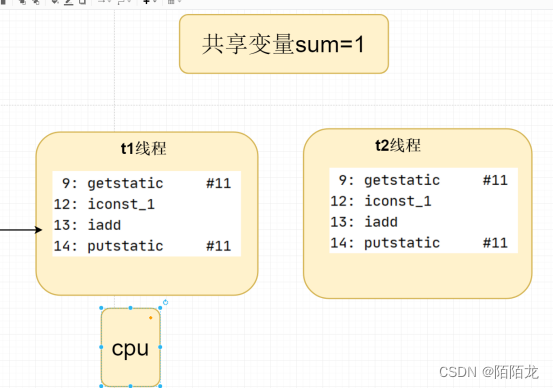
分析:
共享变量值 sum=0
假设现在cpu执行到t1线程,t1线程执行到13行 就切换到另外t2线程执行,
t2线程将静态变量sum=0改成=sum=1 有切换回来执行t1线程 t1线程 使用之前获取
Sum=0 +1 赋值给共享变量sum ,则最终结果:sum=1.
但是现在sum++ 执行 最终结果是算了一次。多线程线程之间通讯
等待/通知机制
等待/通知的相关方法是任意Java对象都具备的,因为这些方法被定义在所有对象的超类java.lang.Object上,方法如下:
1.notify() :通知一个在对象上等待的线程,使其从main()方法返回,而返回的前提是该线程获取到了对象的锁
2.notifyAll():通知所有等待在该对象的线程
3.wait():调用该方法的线程进入WAITING状态,只有等待其他线程的通知或者被中断,才会返回。需要注意调用wait()方法后,会释放对象的锁 。Exception in thread “Thread-0” java.lang.IllegalMonitorStateException
at java.lang.Object.wait(Native Method)
at java.lang.Object.wait(Object.java:502)
at com.mayikt.thread.days02.Thread03.run(Thread03.java:16)
注意:wait,notify和notifyAll要与synchronized一起使用wait/notify/notifyAll在Object类中
因为我们在使用synchronized锁 对象锁可以是任意对象,所以wait/notify/notifyAll需要放在Object类中。
wait/notify/简单的用法public class Thread03 extends Thread { @Override public void run() { try { synchronized (this) { System.out.println(Thread.currentThread().getName() + ">>当前线程阻塞,同时释放锁!<<"); this.wait(); } System.out.println(">>run()<<"); } catch (InterruptedException e) { } } public static void main(String[] args) { Thread03 thread = new Thread03(); thread.start(); try { Thread.sleep(3000); } catch (Exception e) { } synchronized (thread) { // 唤醒正在阻塞的线程 thread.notify(); } } }- 1
- 2
- 3
- 4
- 5
- 6
- 7
- 8
- 9
- 10
- 11
- 12
- 13
- 14
- 15
- 16
- 17
- 18
- 19
- 20
- 21
- 22
- 23
- 24
- 25
- 26
- 27
- 28
- 29
- 30
多线程通讯实现生产者与消费者
public class Thread04 { class Res { /** * 姓名 */ private String userName; /** * 性别 */ private char sex; /** * 标记 */ private boolean flag = false; } class InputThread extends Thread { private Res res; public InputThread(Res res) { this.res = res; } @Override public void run() { int count = 0; while (true) { synchronized (res) { //flag = false 写入输入 flag = true 则不能写入数据 只能读取数据 try { // 如果flag = true 则不能写入数据 只能读取数据 同时释放锁! if (res.flag) { res.wait(); } } catch (Exception e) { } if (count == 0) { this.res.userName = "余胜军"; this.res.sex = '男'; } else { this.res.userName = "小薇"; this.res.sex = '女'; } res.flag = true; res.notify(); } count = (count + 1) % 2; } } } class OutThread extends Thread { private Res res; public OutThread(Res res) { this.res = res; } @Override public void run() { while (true) { synchronized (res) { try { if (!res.flag) { res.wait(); } } catch (Exception e) { } System.out.println(res.userName + "," + res.sex); res.flag = false; res.notify(); } } } } public static void main(String[] args) { new Thread04().print(); } public void print() { Res res = new Res(); InputThread inputThread = new InputThread(res); OutThread outThread = new OutThread(res); inputThread.start(); outThread.start(); } }- 1
- 2
- 3
- 4
- 5
- 6
- 7
- 8
- 9
- 10
- 11
- 12
- 13
- 14
- 15
- 16
- 17
- 18
- 19
- 20
- 21
- 22
- 23
- 24
- 25
- 26
- 27
- 28
- 29
- 30
- 31
- 32
- 33
- 34
- 35
- 36
- 37
- 38
- 39
- 40
- 41
- 42
- 43
- 44
- 45
- 46
- 47
- 48
- 49
- 50
- 51
- 52
- 53
- 54
- 55
- 56
- 57
- 58
- 59
- 60
- 61
- 62
- 63
- 64
- 65
- 66
- 67
- 68
- 69
- 70
- 71
- 72
- 73
- 74
- 75
- 76
- 77
- 78
- 79
- 80
- 81
- 82
- 83
- 84
- 85
- 86
- 87
- 88
- 89
- 90
- 91
- 92
- 93
- 94
/**
- flag 默认值==false
- flag false 输入线程 输入值 输出线程 先拿到锁 释放锁
- flag true 输出线程 输出值
*/
public boolean flag = false;
Join/Wait与sleep之间的区别
sleep(long)方法在睡眠时不释放对象锁
join(long)方法先执行另外的一个线程,在等待的过程中释放对象锁 底层是基于wait封装的,
Wait(long)方法在等待的过程中释放对象锁
三个线程 T1,T2,T3,怎么确保它们按顺序执行?Thread t1 = new Thread(() -> System.out.println(Thread.currentThread().getName() + “,线程执行”), “t1”);
Thread t2 = new Thread(() -> System.out.println(Thread.currentThread().getName() + “,线程执行”), “t2”);
Thread t3 = new Thread(() -> System.out.println(Thread.currentThread().getName() + “,线程执行”), “t3”);
t1.start();
t2.start();
t3.start();
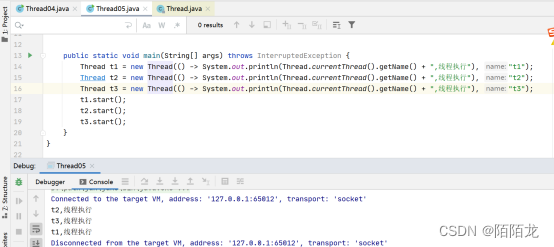
public class Thread05 { public static void main(String[] args) throws InterruptedException { Thread t1 = new Thread(() -> { try { Thread.sleep(3000); } catch (Exception e) { } System.out.println(Thread.currentThread().getName() + ",线程执行"); }, "t1"); Thread t2 = new Thread(() -> { try { t1.join(); } catch (InterruptedException e) { } System.out.println(Thread.currentThread().getName() + ",线程执行"); }, "t2"); Thread t3 = new Thread(() -> { try { t2.join(); } catch (InterruptedException e) { } System.out.println(Thread.currentThread().getName() + ",线程执行"); }, "t3"); t1.start(); t2.start(); t3.start(); } }- 1
- 2
- 3
- 4
- 5
- 6
- 7
- 8
- 9
- 10
- 11
- 12
- 13
- 14
- 15
- 16
- 17
- 18
- 19
- 20
- 21
- 22
- 23
- 24
- 25
- 26
- 27
- 28
- 29
- 30
- 31
- 32
- 33
- 34
Join的底层原理如何实现
public class Thread06 { private Object object = new Object(); public static void main(String[] args) throws InterruptedException { Thread06 thread06 = new Thread06(); Thread thread = thread06.print(); thread.start(); try { Thread.sleep(3000); thread.interrupt(); } catch (Exception e) { } } public Thread print() { Thread thread = new Thread(() -> { synchronized (object) { System.out.println("1"); try { object.wait(0); } catch (InterruptedException e) { e.printStackTrace(); } System.out.println("2"); } }); return thread; } }- 1
- 2
- 3
- 4
- 5
- 6
- 7
- 8
- 9
- 10
- 11
- 12
- 13
- 14
- 15
- 16
- 17
- 18
- 19
- 20
- 21
- 22
- 23
- 24
- 25
- 26
- 27
- 28
- 29
- 30
- 31
- 32
- 33
- 34
Join底层原理是基于wait封装的,唤醒的代码在jvm Hotspot 源码中 当
jvm在关闭线程之前会检测线阻塞在t1线程对象上的线程,然后执行notfyAll(),这样t2就被唤醒了。
多线程知识高级部分
多线程七种执行的状态初始化状态
就绪状态
运行状态
死亡状态
阻塞状态
超时等待
等待状态start():调用start()方法会使得该线程开始执行,正确启动线程的方式。
wait():调用wait()方法,进入等待状态,释放资源,让出CPU。需要在同步快中调用。
sleep():调用sleep()方法,进入超时等待,不释放资源,让出CPU
stop():调用sleep()方法,线程停止,线程不安全,不释放锁导致死锁,过时。
join():调用sleep()方法,线程是同步,它可以使得线程之间的并行执行变为串行执行。
yield():暂停当前正在执行的线程对象,并执行其他线程,让出CPU资源可能立刻获得资源执行。
yield()的目的是让相同优先级的线程之间能适当的轮转执行
notify():在锁池随机唤醒一个线程。需要在同步快中调用。
nnotifyAll():唤醒锁池里所有的线程。需要在同步快中调用。Sleep 主动释放cpu执行权 休眠一段时间
运行状态→限时等待状态
限时等待状态→就绪状态→运行状态Synchronized 没有获取到锁 当前线程变为阻塞状态
如果有线程释放了锁,唤醒正在阻塞没有获取到锁的线程
从新进入到获取锁的状态wait() 运行—等待状态
notify() 等待状态–阻塞状态(没有获取到锁的线程 队列)
—就绪状态→运行状态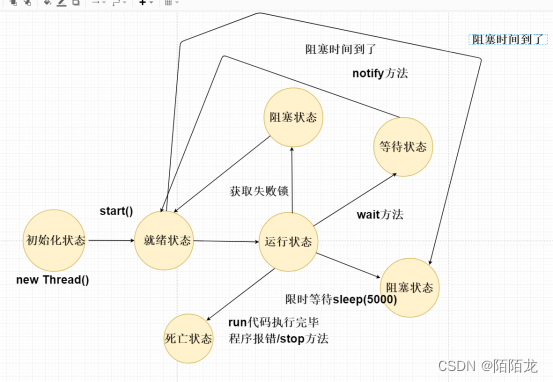
守护线程与用户线程
java中线程分为两种类型:用户线程和守护线程。通过Thread.setDaemon(false)设置为用户线程;通过Thread.setDaemon(true)设置为守护线程。如果不设置次属性,默认为用户线程。1.守护线程是依赖于用户线程,用户线程退出了,守护线程也就会退出,典型的守护线程如垃圾回收线程。
2.用户线程是独立存在的,不会因为其他用户线程退出而退出。public class Thread01 { public static void main(String[] args) { Thread thread = new Thread(() -> { while (true) { try { Thread.sleep(1000); System.out.println(Thread.currentThread().getName() + ",我是子线程"); } catch (Exception e) { } } }); /** * 1.setDaemon 设置为true 守护线程是依赖于用户线程,用户线程退出了,守护线程也就会退出,典型的守护线程如垃圾回收线程。 * 2.setDaemon 设置为false 用户线程是独立存在的,不会因为其他用户线程退出而退出。 */ thread.setDaemon(true); thread.start(); System.out.println("我是主线程,代码执行结束"); } }- 1
- 2
- 3
- 4
- 5
- 6
- 7
- 8
- 9
- 10
- 11
- 12
- 13
- 14
- 15
- 16
- 17
- 18
- 19
- 20
- 21
- 22
多线程yield
主动释放cpu执行权
1.多线程yield 会让线程从运行状态进入到就绪状态,让后调度执行其他线程。
2.具体的实现依赖于底层操作系统的任务调度器public Thread02(String name) { super(name); } @Override public void run() { for (int i = 0; i < 50; i++) { if (i == 30) { System.out.println(Thread.currentThread().getName() + ",释放cpu执行权"); this.yield(); } System.out.println(Thread.currentThread().getName() + "," + i); } } public static void main(String[] args) { new Thread02("mayikt01").start(); new Thread02("mayikt02").start(); }- 1
- 2
- 3
- 4
- 5
- 6
- 7
- 8
- 9
- 10
- 11
- 12
- 13
- 14
- 15
- 16
- 17
- 18
- 19
- 20
- 21
- 22
- 23
多线程优先级
1.在java语言中,每个线程都有一个优先级,当线程调控器有机会选择新的线程时,线程的优先级越高越有可能先被选择执行,线程的优先级可以设置1-10,数字越大代表优先级越高
注意:Oracle为Linux提供的java虚拟机中,线程的优先级将被忽略,即所有线程具有相同的优先级。
所以,不要过度依赖优先级。
2.线程的优先级用数字来表示,默认范围是1到10,即Thread.MIN_PRIORITY到Thread.MAX_PRIORTY.一个线程的默认优先级是5,即Thread.NORM_PRIORTY
3.如果cpu非常繁忙时,优先级越高的线程获得更多的时间片,但是cpu空闲时,设置优先级几乎没有任何作用。public class Thread03 { public static void main(String[] args) { Thread t1 = new Thread(() -> { int count = 0; for (; ; ) { System.out.println(Thread.currentThread().getName() + "," + count++); } }, "t1线程:"); Thread t2 = new Thread(() -> { int count = 0; for (; ; ) { System.out.println(Thread.currentThread().getName() + "," + count++); } }, "t2线程:"); t1.setPriority(Thread.MIN_PRIORITY); t1.setPriority(Thread.MAX_PRIORITY); t1.start(); t2.start(); } }- 1
- 2
- 3
- 4
- 5
- 6
- 7
- 8
- 9
- 10
- 11
- 12
- 13
- 14
- 15
- 16
- 17
- 18
- 19
- 20
- 21
sleep防止CPU占用100%
sleep(long millis) 线程睡眠 millis 毫秒
sleep(long millis, int nanos) 线程睡眠 millis 毫秒 + nanos 纳秒
使用sleep方法避免cpu空转 防止cpu占用100%public static void main(String[] args) { new Thread(() -> { while (true) { try { Thread.sleep(30); } catch (InterruptedException e) { e.printStackTrace(); } } }).start(); }- 1
- 2
- 3
- 4
- 5
- 6
- 7
- 8
- 9
- 10
- 11
- 12
如何安全的停止一个线程
调用stop方法
Stop:中止线程,并且清除监控器锁的信息,但是可能导致 线程安全问题,JDK不建议用。 Destroy: JDK未实现该方法。
Interrupt(线程中止)
Interrupt 打断正在运行或者正在阻塞的线程。
1.如果目标线程在调用Object class的wait()、wait(long)或wait(long, int)方法、join()、join(long, int)或sleep(long, int)方法时被阻塞,那么Interrupt会生效,该线程的中断状态将被清除,抛出InterruptedException异常。
2.如果目标线程是被I/O或者NIO中的Channel所阻塞,同样,I/O操作会被中断或者返回特殊异常值。达到终止线程的目的。
如果以上条件都不满足,则会设置此线程的中断状态。
打断正在阻塞的线程public static void main(String[] args) { Thread t1 = new Thread(() -> { try { Thread.sleep(5000); } catch (Exception e) { e.printStackTrace(); } }, "t1"); t1.start(); try { Thread.sleep(1000); } catch (Exception e) { } System.out.println("打断子线程"); //调用interrupt 打断正在阻塞的线程 t1.interrupt(); System.out.println("获取打断标记:" + t1.isInterrupted()); }- 1
- 2
- 3
- 4
- 5
- 6
- 7
- 8
- 9
- 10
- 11
- 12
- 13
- 14
- 15
- 16
- 17
- 18
- 19
- 20
打断正在运行的线程
public class Thread06 extends Thread { @Override public void run() { while (true) { // 如果终止了线程,则停止当前线程 if (this.isInterrupted()) { break; } } } public static void main(String[] args) { Thread06 thread06 = new Thread06(); thread06.start(); try { Thread.sleep(1000); } catch (Exception e) { } thread06.interrupt(); } }- 1
- 2
- 3
- 4
- 5
- 6
- 7
- 8
- 9
- 10
- 11
- 12
- 13
- 14
- 15
- 16
- 17
- 18
- 19
- 20
- 21
- 22
- 23
正确的线程中止-标志位
在上方代码逻辑中,增加一个判断,用来控制线程执行的中止。public class Thread07 extends Thread { private volatile boolean isFlag = true; @Override public void run() { while (isFlag) { } } public static void main(String[] args) { Thread07 thread07 = new Thread07(); thread07.start(); // thread07.isFlag = false; } }- 1
- 2
- 3
- 4
- 5
- 6
- 7
- 8
- 9
- 10
- 11
- 12
- 13
- 14
- 15
- 16
- 17
- 18
Lock锁的基本使用
在jdk1.5后新增的ReentrantLock类同样可达到此效果,且在使用上比synchronized更加灵活
相关API:
使用ReentrantLock实现同步
lock()方法:上锁
unlock()方法:释放锁
使用Condition实现等待/通知 类似于 wait()和notify()及notifyAll()
Lock锁底层基于AQS实现,需要自己封装实现自旋锁。Synchronized —属于JDK 关键字 底层属于 C++虚拟机底层实现
Lock锁底层基于AQS实现-- 变为重量级
Synchronized 底层原理—锁的升级过程
Lock 过程中 注意 获取锁 释放锁ReentrantLock用法
import java.util.concurrent.TimeUnit; import java.util.concurrent.locks.Lock; import java.util.concurrent.locks.ReentrantLock; /** * @author 余胜军 * @ClassName Thread09 * @qq 644064779 * @addres www.mayikt.com * 微信:yushengjun644 */ public class Thread09 implements Runnable { private int count = 100; private Lock lock = new ReentrantLock(); @Override public void run() { while (true) { try { Thread.sleep(30); } catch (Exception e) { } try { // 获取锁 lock.lock(); if (count > 1) { count--; System.out.println(Thread.currentThread().getName() + "," + count); } } catch (Exception e) { e.printStackTrace(); } finally { // 释放锁 lock.unlock(); } } } public static void main(String[] args) { Thread09 thread09 = new Thread09(); Thread t1 = new Thread(thread09); Thread t2 = new Thread(thread09); t1.start(); t2.start(); } }- 1
- 2
- 3
- 4
- 5
- 6
- 7
- 8
- 9
- 10
- 11
- 12
- 13
- 14
- 15
- 16
- 17
- 18
- 19
- 20
- 21
- 22
- 23
- 24
- 25
- 26
- 27
- 28
- 29
- 30
- 31
- 32
- 33
- 34
- 35
- 36
- 37
- 38
- 39
- 40
- 41
- 42
- 43
- 44
- 45
- 46
- 47
- 48
- 49
Condition用法
public class Thread10 { private ReentrantLock lock = new ReentrantLock(); private Condition condition = lock.newCondition(); public static void main(String[] args) { Thread10 thread10 = new Thread10(); try { thread10.print(); Thread.sleep(3000); thread10.signal(); } catch (Exception e) { } } public void print() { new Thread(() -> { try { // 释放锁 同时当前线程阻塞 lock.lock(); System.out.println(Thread.currentThread().getName() + ",1"); condition.await(); System.out.println(Thread.currentThread().getName() + ",2"); } catch (Exception e) { e.printStackTrace(); } finally { lock.unlock(); } }).start(); } public void signal() { try { lock.lock(); condition.signal(); } catch (Exception e) { e.printStackTrace(); } finally { lock.unlock(); } } }- 1
- 2
- 3
- 4
- 5
- 6
- 7
- 8
- 9
- 10
- 11
- 12
- 13
- 14
- 15
- 16
- 17
- 18
- 19
- 20
- 21
- 22
- 23
- 24
- 25
- 26
- 27
- 28
- 29
- 30
- 31
- 32
- 33
- 34
- 35
- 36
- 37
- 38
- 39
- 40
- 41
- 42
- 43
多线程综合小案例
手写Callable与FutureTask模式可以基于Callable+FutureTask可以实现异步线程执行 带返回结果。
LockSupport实现方式定义Callable+FutureTask
public interface MayiktCallable<V> { V call(); } public class MayiktFutureTask<V> implements Runnable { private MayiktCallable<V> mayiktCallable; private Thread cuThread; private V result; public MayiktFutureTask(MayiktCallable mayiktCallable) { this.mayiktCallable = mayiktCallable; } @Override public void run() { // 获取到mayiktCallable 执行返回结果 result = mayiktCallable.call(); // 如果 call方法执行完毕 则唤醒当前阻塞的线程 if (cuThread != null) LockSupport.unpark(cuThread); } /** * 调用get方法 当前线程就会阻塞。 */ public V get() { cuThread = Thread.currentThread(); // 阻塞当前线程 LockSupport.park(); return result; } }- 1
- 2
- 3
- 4
- 5
- 6
- 7
- 8
- 9
- 10
- 11
- 12
- 13
- 14
- 15
- 16
- 17
- 18
- 19
- 20
- 21
- 22
- 23
- 24
- 25
- 26
- 27
- 28
- 29
- 30
- 31
- 32
MayiktCallable mayiktCallable = new MayiktCallableImpl(); MayiktFutureTask<Integer> futureTask = new MayiktFutureTask<Integer>(mayiktCallable); new Thread(futureTask).start(); Integer result = futureTask.get(); System.out.println(Thread.currentThread().getName() + result);- 1
- 2
- 3
- 4
- 5
- 6
wait()与notify
public class MayiktFutureTask<V> implements Runnable { private MayiktCallable<V> mayiktCallable; private Thread cuThread; private V result; private Object lock = new Object(); public MayiktFutureTask(MayiktCallable mayiktCallable) { this.mayiktCallable = mayiktCallable; } @Override public void run() { // 获取到mayiktCallable 执行返回结果 result = mayiktCallable.call(); // 如果 call方法执行完毕 则唤醒当前阻塞的线程 if (cuThread != null) synchronized (lock) { lock.notify(); } } /** * 调用get方法 当前线程就会阻塞。 */ public V get() { cuThread = Thread.currentThread(); synchronized (lock) { try { // 当前线程释放锁 变为阻塞状态 lock.wait(); } catch (Exception e) { } } return result; } }- 1
- 2
- 3
- 4
- 5
- 6
- 7
- 8
- 9
- 10
- 11
- 12
- 13
- 14
- 15
- 16
- 17
- 18
- 19
- 20
- 21
- 22
- 23
- 24
- 25
- 26
- 27
- 28
- 29
- 30
- 31
- 32
- 33
- 34
- 35
- 36
- 37
-
-
相关阅读:
研发效能|DevOps 已死平台工程永存带来的焦虑
【图解设计模式】迭代器模式
string类
京东按关键字搜索商品 API 返回值说明
自定义修改Discuz X3 今日发帖数量 昨日发帖数量 帖子总数 会员总数
Leetcode49字母异位词分组
Vue考试题单选、多选、判断页面渲染和提交
【操作系统】esp栈指针
java毕业设计m和vue的酒店管理系统2021mybatis+源码+调试部署+系统+数据库+lw
hibernate源码(1)--- schema创建
- 原文地址:https://blog.csdn.net/u014001523/article/details/125453558