-
利用Qt制作美化登录界面框
/*** * ┌─┐ ┌─┐ + + * ┌──┘ ┴───────┘ ┴──┐++ * │ │ * │ ─── │++ + + + * ███████───███████ │+ * │ │+ * │ ─┴─ │ * │ │ * └───┐ ┌───┘ * │ │ * │ │ + + * │ │ * │ └──────────────┐ * │ │ * │ ├─┐ * │ ┌─┘ * │ │ * └─┐ ┐ ┌───────┬──┐ ┌──┘ + + + + * │ ─┤ ─┤ │ ─┤ ─┤ * └──┴──┘ └──┴──┘ + + + + * 神兽保佑 * 代码无BUG! */- 1
- 2
- 3
- 4
- 5
- 6
- 7
- 8
- 9
- 10
- 11
- 12
- 13
- 14
- 15
- 16
- 17
- 18
- 19
- 20
- 21
- 22
- 23
- 24
1、演示效果
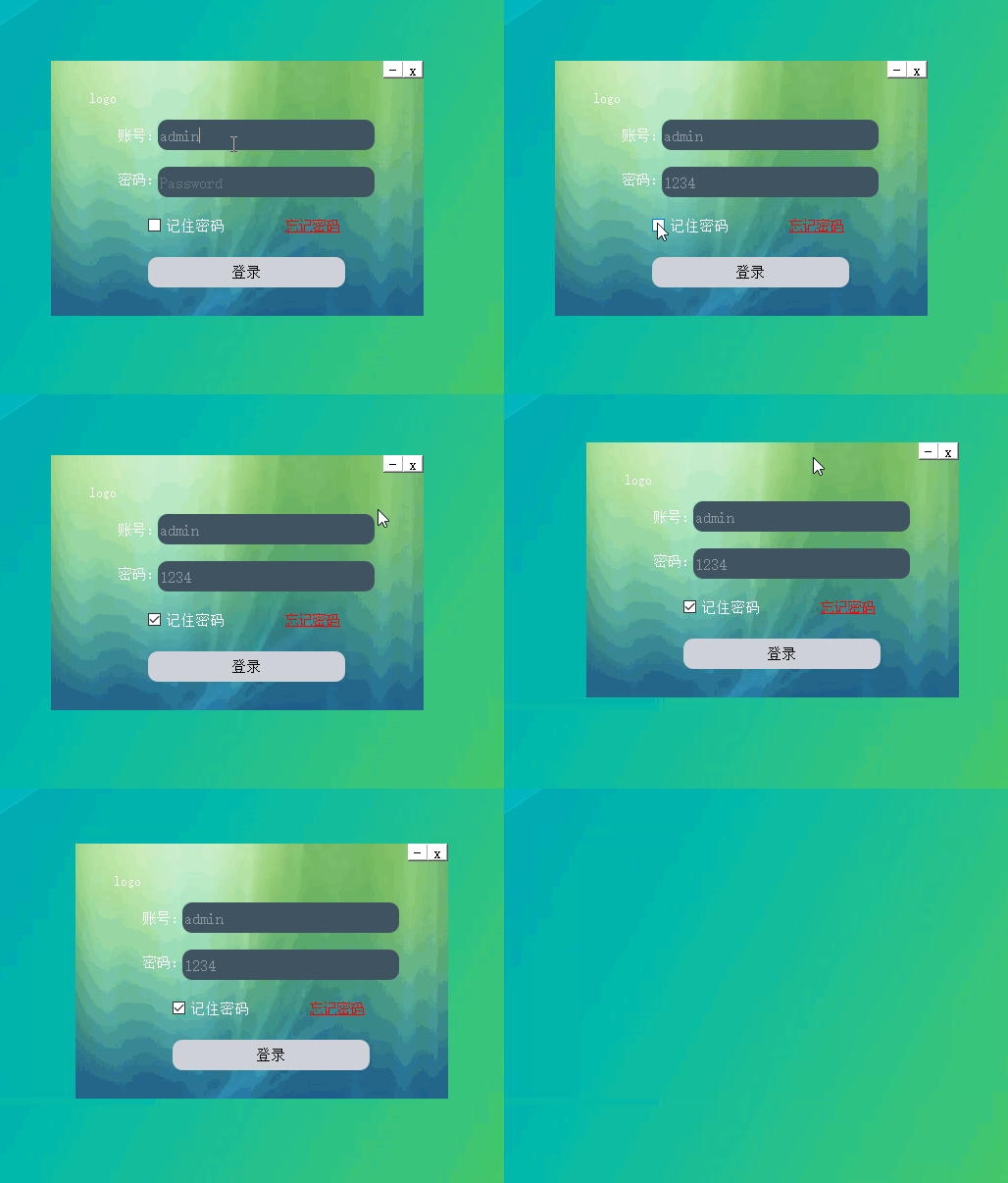
2、制作
2.1、新建一个Qwidget项目

2.2、添加界面组件

调整容器为合适大小,同时调整整个画布为合适大小。

2.3、添加按钮,标签,文字组件账号密码部分使用Input Widgets:Line Edit
Logo和忘记密码使用两个Display Widgets:TextLabel
是否记住选择一个Buttons:CheckBox
登录按钮使用Buttons:PushButton

修改Line Edit默认文本属性,分别点击两个LineEdit修改文本属性placeholdertext为Username和Password。
2.4、添加qss样式表*{ background:rgb(255, 255, 255); font-size:15px; font-style:MingLiU-ExtB; } QFrame{ border:sold 10px rgba(0,0,0); background-image:url(:/image/background.png); } QLineEdit{ color:#8d98a1; background-color:#405361; font-size:16px; border-style:outset; border-radius:10px; font-style:MingLiU-ExtB; } QPushButton{ background:#ced1d8; border-style:outset; border-radius:10px; font-style:MingLiU-ExtB; } QPushButton:pressed{ background-color:rgb(224,0,0); border-style:inset; font-style:MingLiU-ExtB; } QCheckBox{ background:rgba(85,170,255,0); color:white; font-style:MingLiU-ExtB; } QLabel{ background:rgba(85,170,255,0); color:white; font-style:MingLiU-ExtB; font-size:14px; } #label_forget{ color:red; text-decoration: underline }- 1
- 2
- 3
- 4
- 5
- 6
- 7
- 8
- 9
- 10
- 11
- 12
- 13
- 14
- 15
- 16
- 17
- 18
- 19
- 20
- 21
- 22
- 23
- 24
- 25
- 26
- 27
- 28
- 29
- 30
- 31
- 32
- 33
- 34
- 35
- 36
- 37
- 38
- 39
- 40
- 41
- 42
- 43

2.5、实现最小化窗口和关闭窗口功能
为最小化好关闭按钮添加槽函数:void Widget::on_minButton_clicked() { showMinimized(); } void Widget::on_closeButton_clicked() { close(); }- 1
- 2
- 3
- 4
- 5
- 6
- 7
- 8
- 9
2.6、隐藏widget窗口边框和背景
Widget::Widget(QWidget *parent) : QWidget(parent) , ui(new Ui::Widget) { ui->setupUi(this); //去窗口边框 setWindowFlags(Qt::FramelessWindowHint | windowFlags()); //把窗口背景设置为透明; setAttribute(Qt::WA_TranslucentBackground); }- 1
- 2
- 3
- 4
- 5
- 6
- 7
- 8
- 9
- 10
- 11
2.7、实现界面可移动
void mouseMoveEvent(QMouseEvent *e);//鼠标移动 void mousePressEvent(QMouseEvent *e);//鼠标按下移动 void Widget::mouseMoveEvent(QMouseEvent* event) { if(event->buttons() & Qt::LeftButton) { //移到左上角 move(event->globalPos() - point); } } void Widget::mousePressEvent(QMouseEvent* event) { if(event->button() == Qt::LeftButton) { //求坐标差值 //当前点击坐标-窗口左上角坐标 point = event->globalPos() - this->frameGeometry().topLeft(); } }- 1
- 2
- 3
- 4
- 5
- 6
- 7
- 8
- 9
- 10
- 11
- 12
- 13
- 14
- 15
- 16
- 17
- 18
- 19
- 20
-
相关阅读:
HFI-脉振法
Jmeter-实现图片的上传和下载
读懂MCU产品选型表
开源项目 - RuoYi-Cloud集成PostgreSQL数据库
UISwitch、UISegmentControl和UISlider
Linux配置腾讯云yum源(保姆级教学)
人大加拿大女王金融硕士项目——追逐梦想,无论何时起步都不迟
1087 有多少不同的值
Shel简介入门
四元数求导
- 原文地址:https://blog.csdn.net/m0_37251750/article/details/125413026